change time PONTIAC TORRENT 2007 User Guide
[x] Cancel search | Manufacturer: PONTIAC, Model Year: 2007, Model line: TORRENT, Model: PONTIAC TORRENT 2007Pages: 490, PDF Size: 2.71 MB
Page 197 of 490
AVG (Average) ECONOMY
Press the trip/fuel button until AVG ECONOMY
displays. This display shows the approximate
average miles per gallon (mpg) or liters per
100 kilometers (L/100 km). This number is
calculated based on the number of mpg (L/100 km)
recorded since the last time this menu item was
reset. To reset this display, press and hold the
set/reset button. The display will return to zero.
RANGE
Press the trip/fuel button until RANGE displays.
This display shows the approximate number
of remaining miles (mi) or kilometers (km) the
vehicle can be driven without refueling.The fuel range estimate is based on an average of
the vehicle’s fuel economy over recent driving
history and the amount of fuel remaining in the fuel
tank. This estimate will change if driving conditions
change. For example, if driving in traffic and making
frequent stops, this display may read one number,
but if the vehicle is driven on a freeway, the number
may change even though the same amount of fuel
is in the fuel tank. This is because different driving
conditions produce different fuel economies.
Generally, freeway driving produces better fuel
economy than city driving.
If your vehicle is low on fuel, the FUEL LEVEL
LOW message will be displayed. See “FUEL
LEVEL LOW” underDIC Warnings and Messages
on page 200for more information.
Blank Display
This display shows no information.
197
Page 198 of 490
Vehicle Information Menu Items
T
(Vehicle Information):Press this button to
scroll through the following displays:
OIL LIFE
Press the vehicle information button until OIL LIFE
REMAINING displays. This display shows an
estimate of the oil’s remaining useful life. If you
see 99% OIL LIFE REMAINING on the display,
that means 99% of the current oil life remains. The
engine oil life system will alert you to change
your oil on a schedule consistent with your driving
conditions.
When the remaining oil life is low, the CHANGE
ENGINE OIL SOON message will appear on
the display. See “CHANGE ENGINE OIL SOON”
underDIC Warnings and Messages on
page 200. You should change your oil as soon as
possible. SeeEngine Oil on page 349.In
addition to the engine oil life system monitoring
the oil life, additional maintenance is
recommended in the Maintenance Schedule in this
manual. SeeScheduled Maintenance on
page 440for more information.Remember, you must reset the OIL LIFE yourself
after each oil change. It will not reset itself.
Also, be careful not to reset the OIL LIFE
accidentally at any time other than when the oil
has just been changed. It cannot be reset
accurately until the next oil change. To reset the
engine oil life system, seeEngine Oil Life
System on page 352.
UNITS
Press the vehicle information button until UNITS
displays. This display allows you to select between
English or Metric units of measurement. Once in
this display, press the set/reset button to select
between ENGLISH or METRIC units.
FRONT TIRES or REAR TIRES
The pressure for each tire can be viewed in the
DIC. The tire pressure will be shown in either
pounds per square inch (psi) or kilopascals (kPa).
Press the vehicle information button until the
DIC shows FRONT TIRES PSI (kPa) LF ## (###)
RF ## (###). Press the vehicle information
button again until the DIC displays REAR TIRES
PSI (kPa) LR ## (###) RR ## (###).
198
Page 200 of 490
3. Press the set/reset button.
The message REMOTE KEY LEARNING
ACTIVE will display.
4. Press and hold the lock and unlock buttons
on the rst transmitter at the same time for
about 15 seconds.
A chime will sound indicating that the
transmitter is matched.
5. To match additional transmitters at this time,
repeat Step 3.
Each vehicle can have a maximum of four
transmitters matched to it.
6. To exit the programming mode, you must
cycle the key to LOCK.
Blank Display
This display shows no information.
PERSONALIZATION
This display allows you to personalize the feature
settings on your vehicle. SeeDIC Vehicle
Personalization on page 210for more information.
DIC Warnings and Messages
Messages are displayed on the DIC to notify the
driver that the status of the vehicle has changed
and that some action may be needed by the driver
to correct the condition. Multiple messages may
appear one after another.
Some messages may not require immediate
action, but you can press the set/reset button to
acknowledge that you received the messages and
to clear them from the display. Pressing any of
the DIC buttons also acknowledge and clear any
messages.
Some messages cannot be cleared from the DIC
display because they are more urgent. These
messages require action before they can be
cleared. You should take any messages that
appear on the display seriously and remember that
clearing the messages will only make the
messages disappear, not correct the problem.
The following are the possible messages that can
be displayed and some information about them.
200
Page 202 of 490
BUCKLE SEATBELT
This message reminds you to buckle the driver’s
safety belt.
This message displays and a chime sounds when
the ignition is on, the driver’s safety belt is
unbuckled, and the vehicle is in motion. You
should buckle your safety belt.
If the driver remains unbuckled when the ignition
is on and the vehicle is in motion, the reminder
will be repeated. If the driver’s safety belt is
already buckled, this message and chime will not
come on.
This message is an additional reminder to the
Safety Belt Reminder Light in the instrument panel
cluster. SeeSafety Belt Reminder Light on
page 175.
CHANGE ENGINE OIL SOON
This message displays when service is required
for the vehicle. See your dealer. SeeEngine Oil on
page 349andScheduled Maintenance on
page 440for more information.Acknowledging this message will not reset the OIL
LIFE REMAINING display. That must be done
at the OIL LIFE screen under the vehicle
information menu. See “OIL LIFE” underDIC
Operation and Displays on page 195andEngine
Oil Life System on page 352for more information.
CHECK TIRE PRESSURE
This message displays when the tire pressure in
one of the tires needs to be checked. This message
also displays LEFT FRONT, RIGHT FRONT, LEFT
REAR, or RIGHT REAR to indicate which tire needs
to be checked. You can receive more than one tire
pressure message at a time. To read the other
messages that may have been sent at the same
time, press the set/reset button. If a tire pressure
message appears on the DIC, stop as soon as you
can. Have the tire pressures checked and set to
those shown on the Tire Loading Information label.
SeeTires on page 386,Loading Your Vehicle on
page 321, andInation - Tire Pressure on
page 393. The DIC display also shows the tire
pressure values for the front and rear tires by
pressing the vehicle information button. SeeDIC
Operation and Displays on page 195. If the tire
pressure is low, the low tire pressure warning light
comes on. SeeTire Pressure Light on page 183.
202
Page 214 of 490
DELAY LOCK
This feature allows you to select whether or not
the locking of the vehicle’s doors will be delayed.
The locking of the vehicle’s doors is delayed
for up to 10 seconds after a power door lock switch
is pressed when a door is open, or after the
lock button on the RKE transmitter is pressed while
a door is open. The key must be out of the
ignition for this feature to work. SeeDelayed
Locking on page 105for more information.
Press the vehicle information button until DELAY
LOCK appears on the DIC display. Press the
set/reset button to access the settings for
this feature. Then press the vehicle information
button to scroll through the following settings:
OFF:There will be no delayed locking of
the vehicle’s doors.
ON (default):The locking of the vehicle’s doors
will be delayed by 10 seconds after a power
door lock switch is pressed when a door is open,
or the lock button on the RKE transmitter is
pressed while a door is open.NO CHANGE:No change will be made to this
feature. The current setting will remain.
Choose one of the available settings and press
the set/reset button while it is displayed on the DIC
to select it.
EXIT LIGHTING
If it is dark enough outside, this feature allows you
to select the amount of time you want the
exterior lamps to remain on. This happens after
the key is turned from RUN to LOCK.
Press the vehicle information button until EXIT
LIGHTING appears on the DIC display. Press the
set/reset button to access the settings for this
feature. Then press the vehicle information button
to scroll through the following settings:
OFF:The exterior lamps will not turn on.
30 SECONDS (default):The exterior lamps will
stay on for 30 seconds.
1 MINUTE:The exterior lamps will stay on for
one minute.
214
Page 220 of 490
Setting the Time
(Without Date Display)
If your vehicle has an AM/FM base radio with a
single CD player and preset buttons numbered one
through six, the radio will have a clock button
for setting the time. You can set the time by
following these steps:
1. Press the clock button until the hour numbers
begin ashing on the display. Press the clock
button a second time and the minute
numbers will begin ashing on the display.
2. While either the hour or the minute numbers
are ashing, turn the tune knob, located on
the upper right side of the radio, clockwise or
counterclockwise to increase or decrease
the time. Instead of using the tune knob, you
can also press the SEEK, FWD (forward),
or REV (reverse) buttons to adjust the time.
3. Press the clock button again until the clock
display stops ashing to set the currently
displayed time; otherwise, the ashing will stop
after ve seconds and the current time
displayed will be automatically set.To change the time default setting from 12 hour to
24 hour, press the clock button and then the
pushbutton located under the forward arrow label.
Once the time 12H and 24H are displayed,
press the pushbutton located under the desired
option to select the default. Press the clock button
again to apply the selected default, or let the
screen time out.
Setting the Time (With Date Display)
If your vehicle has a radio with a single CD
player or a CD with DVD player, the radio will
have a clock button for setting the time and date.
To set the time and date, follow these instructions:
1. Turn the radio on.
2. Press the clock button and the HR, MIN, MM,
DD, YYYY (hour, minute, month, day, and
year) will appear on the display.
220
Page 221 of 490
3. Press the pushbutton located under any one
of the labels that you want to change. Every
time the pushbutton is pressed again, the time
or the date if selected, will increase by one.
Another way to increase the time or date, is
to press the right SEEK arrow or FWD
(forward) button.
To decrease, press the left SEEK arrow or
REV (reverse) button. You can also turn
the tune knob, located on the upper
right side of the radio, to adjust the selected
setting.
The date will not automatically display. The only
way to see the date is by pressing the clock button
when the radio is on. The date with display will
time out after a few seconds and go back to
the normal radio and time display.
If your vehicle has a radio with a six-disc CD
player, the radio will have a MENU button instead
of the clock button to set the time and date.To set the time and date, follow these instructions:
1. Turn the radio on.
2. Press the MENU button. Once the clock
option is displayed.
3. Press the pushbutton located under that label.
The HR, MIN, MM, DD, YYYY will appear on
the display.
4. Press the pushbutton located under any one
of the labels that you want to change. Every
time the pushbutton is pressed again, the time
or the date if selected, will increase by one.
Another way to increase the time or date, is
to press the right SEEK arrow or FWD
(forward) button.
To decrease, press the left SEEK arrow or
REV (reverse) button. You can also turn the
tune knob, located on the upper right side of
the radio, to adjust the selected setting.
The date will not automatically display. The only
way to see the date is by pressing the MENU
button and then the clock button when the radio is
on. The date with display will time out after a
few seconds and go back to the normal radio and
time display.
221
Page 222 of 490
To change the time default setting from 12 hour to
24 hour or to change the date default setting
from month/day/year to day/month/year, follow
these instructions:
1. Press the clock button and then the
pushbutton located under the forward arrow
label. Once the time 12H and 24H, and
the date MM/DD/YYYY (month, day, and year)
and DD/MM/YYYY (day, month, and year)
are displayed.
2. Press the pushbutton located under the
desired option.
3. Press the clock or MENU button again to
apply the selected default, or let the screen
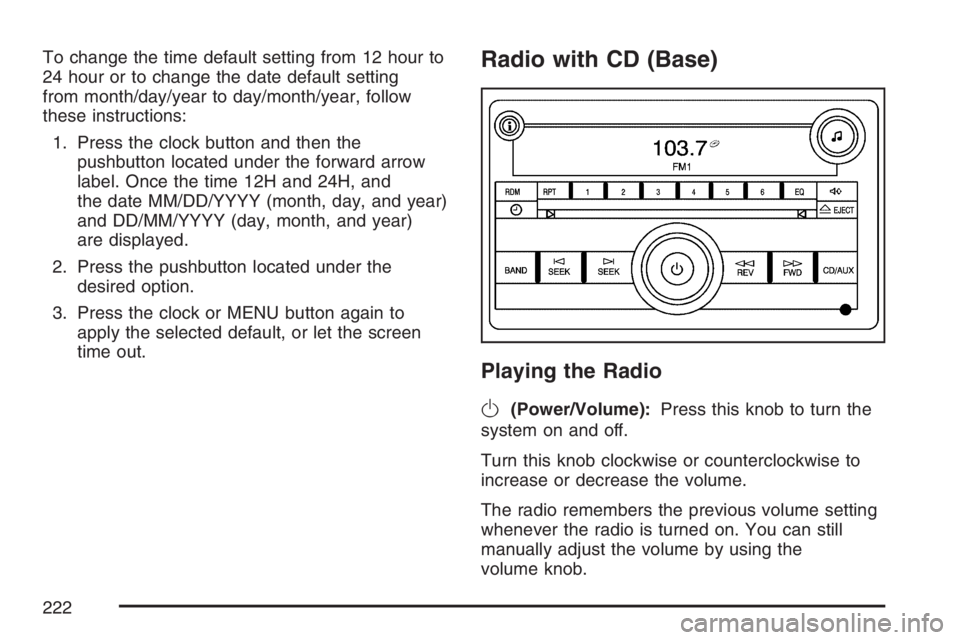
time out.Radio with CD (Base)
Playing the Radio
O
(Power/Volume):Press this knob to turn the
system on and off.
Turn this knob clockwise or counterclockwise to
increase or decrease the volume.
The radio remembers the previous volume setting
whenever the radio is turned on. You can still
manually adjust the volume by using the
volume knob.
222
Page 240 of 490
XM™ Satellite Radio Service
XM™ is a satellite radio service that is based in
the 48 contiguous United States and Canada.
XM™ offers a large variety of coast-to-coast
channels including music, news, sports, talk,
traffic/weather (U.S. subscribers), and children’s
programming. XM™ provides digital quality
audio and text information that includes song title
and artist name. A service fee is required in
order to receive the XM™ service. For more
information, contact XM™; In the U.S. at
www.xmradio.com or call 1-800-852-XMXM (9696)
or in Canada at www.xmradio.ca or call
1-877-GET-XMSR (438-9677).
Playing the Radio
O
(Power/Volume):Press this knob to turn the
system on and off.
Turn this knob clockwise to increase or
counterclockwise to decrease the volume.Speed Compensated Volume (SCV):The radio
has Speed Compensated Volume (SCV). While
SCV is on, the radio volume automatically adjusts
to compensate for road and wind noise as your
speed changes while driving. That way, the volume
level should sound about the same as you
drive. To activate SCV:
1. Set the radio volume to the desired level.
2. Press the MENU button to display the radio
setup menu.
3. Press the pushbutton under the AUTO
VOLUM (volume) label on the radio display.
4. Press the pushbutton under the desired SCV
setting (OFF, Low, Med (medium), or High) to
select the level of radio volume compensation.
The display times out after approximately
10 seconds. Each higher setting allows
for more radio volume compensation at faster
vehicle speeds.
240
Page 251 of 490
O(Power):Press this knob to turn the radio on.
Turn this knob clockwise or counterclockwise to
increase or decrease the volume. A single
press turns the radio off. Press and holding the
knob for more than two seconds turns off the entire
radio and rear seat entertainment system and
starts the parental control feature which prevents
the rear seat occupant from operating the Rear
Seat Audio (RSA) system or remote control.
A lock symbol appears next to the clock display.
The parental control feature remains on until
a subsequent press and hold of the power button
is performed (more than two seconds), or until
the driver turns the ignition off and exits the
vehicle.
f(Tune):Turn this knob to change tracks on a
CD or DVD, to manually tune a radio station, or to
change clock or date settings, while in the clock
or date setting mode. See the information
given earlier in this section specic to the radio,
CD, and the DVD. Also, seeSetting the Time
(Without Date Display) on page 220orSetting the
Time (With Date Display) on page 220, for
setting the clock and date.
©SEEK (Previous Track/Chapter):Press this
button to return to the start of the current track
or chapter. Press this button again to go to
the previous track or chapter. This button may not
work when the DVD is playing the copyright
information or the previews.
SEEK
¨(Next Track/Chapter):Press this
button to go to the next track or chapter. This
button may not work when the DVD is playing the
copyright information or the previews.
sREV (Reverse):Press this button to fast
reverse the CD or DVD, ve times the normal
speed. The radio displays the elapsed time while
in fast reverse. To stop fast reversing, press
this button again. This button may not work when
the DVD is playing the copyright information or
the previews.
\FWD (Fast Forward):Press this button to
fast forward the CD or DVD. The radio displays the
elapsed time and fast forwards ve times the
normal speed. To stop fast forwarding, press this
button again. This button may not work when
the DVD is playing the copyright information or the
previews.
251