turn signal PONTIAC TORRENT 2007 User Guide
[x] Cancel search | Manufacturer: PONTIAC, Model Year: 2007, Model line: TORRENT, Model: PONTIAC TORRENT 2007Pages: 490, PDF Size: 2.71 MB
Page 159 of 490
Ending Cruise Control
There are three ways to end cruise control:
Step lightly on the brake pedal.
Press the cancel button on the steering wheel.
Press the On/Off button on the steering
wheel.
Erasing Speed Memory
When the cruise control or the ignition is turned
off, the cruise control set speed memory is erased.
Headlamps
The exterior lamp control is located on the turn
signal/multifunction lever.
O(Exterior Lamp Control):Turn the control
with this symbol on it to operate the exterior lamps.The exterior lamp control has the following
positions:
AUTO (Off/Automatic Headlamps):Turn the
control to this position to put the headlamps
in automatic mode. Automatic mode will turn the
exterior lamps on and off depending upon
how much light is available outside of the vehicle.
;(Parking Lamps):Turn the control to this
position to turn on the parking lamps together with
the following:
Sidemarker Lamps
Taillamps
License Plate Lamps
Instrument Panel Lights
53(Headlamps):Turning the control to this
position turns on the headlamps, together with the
previously listed lamps and lights.
Headlamps on Reminder
If you open the driver’s door with the ignition off
and the lamps on, you will hear a warning chime.
159
Page 209 of 490
THEFT ATTEMPTED
This message displays if the content theft-deterrent
system has detected a break-in attempt while
you were away from your vehicle. SeeContent
Theft-Deterrent on page 111for more information.
TIRE LEARNING ACTIVE
This message displays when the Tire Pressure
Monitor (TPM) system is re-learning the tire
positions. SeeTire Pressure Monitor System on
page 395. The tire positions must be re-learned
after rotating the tires or after replacing a tire
or sensor. SeeTire Inspection and Rotation on
page 399andInation - Tire Pressure on page 393
for more information.
TRACTION CONTROL OFF
This message displays when the Traction Control
System (TCS) turns off. SeeTraction Control
System (TCS) on page 297for more information.
This message only displays while the ignition
is in RUN and disappears after 10 seconds, unless
it is acknowledged or an urgent warning appears.Any of the following conditions may cause the
TCS to turn off:
The TCS is turned off by pressing the
traction control button. SeeTraction Control
System (TCS) on page 297for more
information.
The battery is low.
There is a TCS failure. See your dealer for
service.
TRACTION CONTROL ON
This message displays when the Traction Control
System (TCS) turns on. SeeTraction Control
System (TCS) on page 297for more information.
TURN SIGNAL ON
This message displays as a reminder to turn off
the turn signal if you drive your vehicle for
more than about 0.75 mile (1.2 km) with a turn
signal on. SeeTurn Signal/Multifunction Lever on
page 151.
This message displays and a chime sounds only
when the ignition is in RUN. The message will
not disappear until the turn signal is manually
turned off, or a turn is completed.
209
Page 223 of 490
Finding a Station
BAND:Press this button to switch between FM1,
FM2 or AM. The display shows the selection.
f(Tune):Turn this knob to select radio stations.
©SEEK¨:Press the right or left SEEK
arrow to go to the next or to the previous station
and stay there.
To scan stations, press and hold either SEEK
arrow for a few seconds until you hear a beep. The
radio goes to a station, plays for a few seconds,
then goes to the next station. Press either
SEEK arrow again to stop scanning.
The radio only seeks and scans stations with a
strong signal that are in the selected band.
4(Information):Press this button to switch the
display between the radio station frequency
and the time. When the ignition is off, press this
button to display the time.
Setting Preset Stations
Up to 18 stations (six FM1, six FM2, and six AM),
can be programmed on the six numbered
pushbuttons, by performing the following steps:
1. Turn the radio on.
2. Press BAND to select FM1, FM2, or AM.
3. Tune in the desired station.
4. Press and hold one of the six numbered
pushbuttons for three seconds until you
hear a beep. Whenever that pushbutton is
pressed and released, the station that was set
returns.
5. Repeat the Steps 2-4 for each pushbutton.
Setting the Tone (Bass/Treble)
EQ (Equalization):To adjust the bass or treble,
press the tune knob or EQ button until the
desired tone control label appears on the display.
Turn the tune knob clockwise or counterclockwise
to increase or decrease the setting. The display
shows the current bass or treble level. If a station’s
frequency is weak, or if there is static, decrease
the treble.
223
Page 230 of 490
Finding a Station
BAND:Press this button to switch between AM,
FM, or XM™ (if equipped). The display shows
the selection.
f(Tune):Turn this knob to select radio stations.
©SEEK¨:Press the right or left SEEK
arrow to go to the next or to the previous station
and stay there.
To scan stations, press and hold either SEEK
arrow for a few seconds until you hear a beep. The
radio goes to a station, plays for a few seconds,
then goes to the next station. Press either
SEEK arrow again to stop scanning.
The radio only seeks and scans stations with a
strong signal that are in the selected band.
4(Information) (XM™ Satellite Radio Service,
MP3, and RDS Features):Press the information
button to display additional text information
related to the current FM-RDS or XM™ station, or
MP3 song. A choice of additional information
such as: Channel, Song, Artist, and CAT
(category) may appear. Continue pressing the
information button to highlight the desired label, or
press the pushbutton positioned under any one
of the labels and the information about that
label appears on the display.
When information is not available, No Info appears
on the display.
230
Page 241 of 490
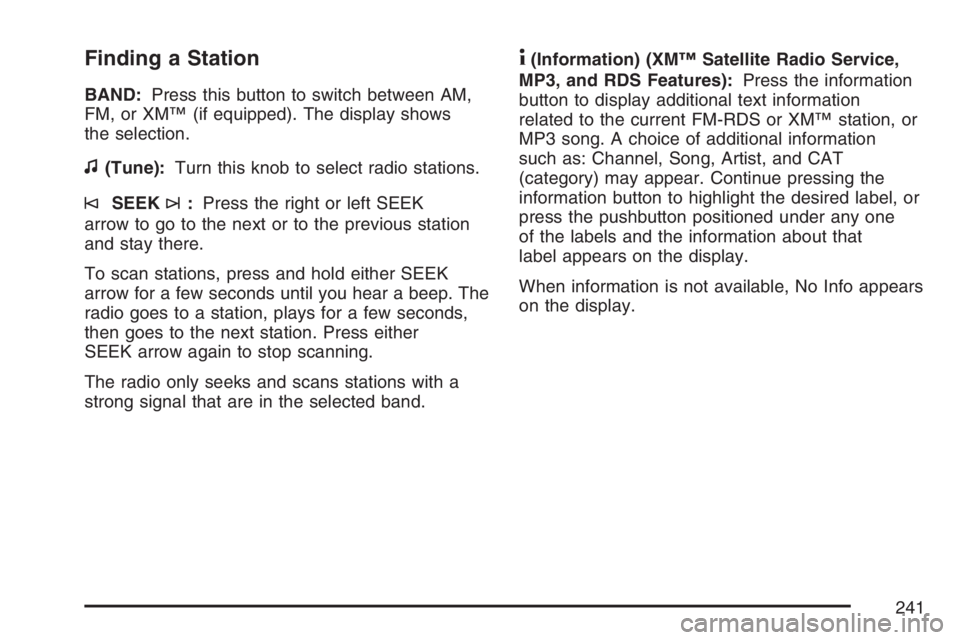
Finding a Station
BAND:Press this button to switch between AM,
FM, or XM™ (if equipped). The display shows
the selection.
f(Tune):Turn this knob to select radio stations.
©SEEK¨:Press the right or left SEEK
arrow to go to the next or to the previous station
and stay there.
To scan stations, press and hold either SEEK
arrow for a few seconds until you hear a beep. The
radio goes to a station, plays for a few seconds,
then goes to the next station. Press either
SEEK arrow again to stop scanning.
The radio only seeks and scans stations with a
strong signal that are in the selected band.
4(Information) (XM™ Satellite Radio Service,
MP3, and RDS Features):Press the information
button to display additional text information
related to the current FM-RDS or XM™ station, or
MP3 song. A choice of additional information
such as: Channel, Song, Artist, and CAT
(category) may appear. Continue pressing the
information button to highlight the desired label, or
press the pushbutton positioned under any one
of the labels and the information about that
label appears on the display.
When information is not available, No Info appears
on the display.
241
Page 272 of 490
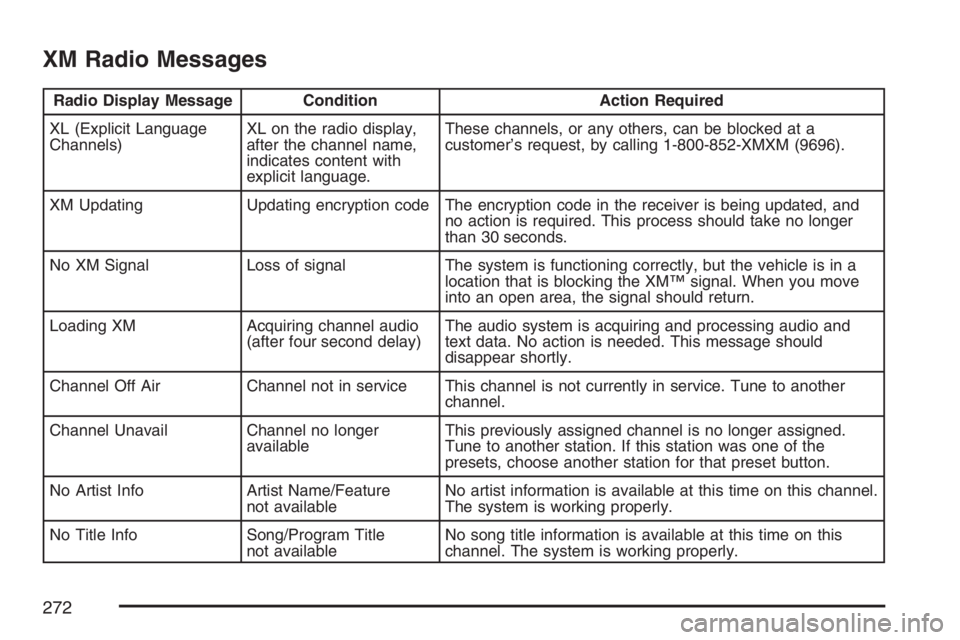
XM Radio Messages
Radio Display Message Condition Action Required
XL (Explicit Language
Channels)XL on the radio display,
after the channel name,
indicates content with
explicit language.These channels, or any others, can be blocked at a
customer’s request, by calling 1-800-852-XMXM (9696).
XM Updating Updating encryption code The encryption code in the receiver is being updated, and
no action is required. This process should take no longer
than 30 seconds.
No XM Signal Loss of signal The system is functioning correctly, but the vehicle is in a
location that is blocking the XM™ signal. When you move
into an open area, the signal should return.
Loading XM Acquiring channel audio
(after four second delay)The audio system is acquiring and processing audio and
text data. No action is needed. This message should
disappear shortly.
Channel Off Air Channel not in service This channel is not currently in service. Tune to another
channel.
Channel Unavail Channel no longer
availableThis previously assigned channel is no longer assigned.
Tune to another station. If this station was one of the
presets, choose another station for that preset button.
No Artist Info Artist Name/Feature
not availableNo artist information is available at this time on this channel.
The system is working properly.
No Title Info Song/Program Title
not availableNo song title information is available at this time on this
channel. The system is working properly.
272
Page 275 of 490
To enable Parental Control press and hold the
radio power button for more than 2 seconds. If on,
the radio and video screen will turn off. If a
DVD and/or CD is playing, it will be stopped.
A “padlock” icon or a text message may be
displayed on the radio display depending on which
radio you have, while Parental Control is on.
The radio can be turned back on with a single
press of the power button and used normally, but
the RSE system will remain in Parental Control.
To turn off Parental Control, press and hold
the radio power button for more than 2 seconds.
The video screen will return to the state they were
in before Parental Control was turned on. The
“padlock” icon will disappear from the radio
display.
Parental Control can also be turned off by inserting
or ejecting any disc, an ignition cycle, or pressing
the “play” icon on the radio DVD display menu.Headphones
The RSE includes two sets of wireless
headphones that are only dedicated to this
system. These headphones are used to listen to
the DVD radio or an auxiliary device connected to
the RCA jacks. The wireless headphones have
an ON/OFF switch and a volume control.
To use the headphones, turn the switch to ON.
An indicator light located on the headphones
will illuminate. If the light does not illuminate, the
batteries may need to be replaced. See “Battery
Replacement” later in this section for more
information. Switch the headphones to OFF when
not in use.
The infrared transmitters are located in the display
below the video screen. The headphones will
shut off automatically to save the battery power if
the RSE system and RSA are shut off or if the
headphones are out of range of the transmitters for
more than three minutes. If you move too far
forward or step out of the vehicle, the headphones
will lose the audio signal.
To adjust the volume on the headphones, use the
volume control located on the right side.
275
Page 277 of 490
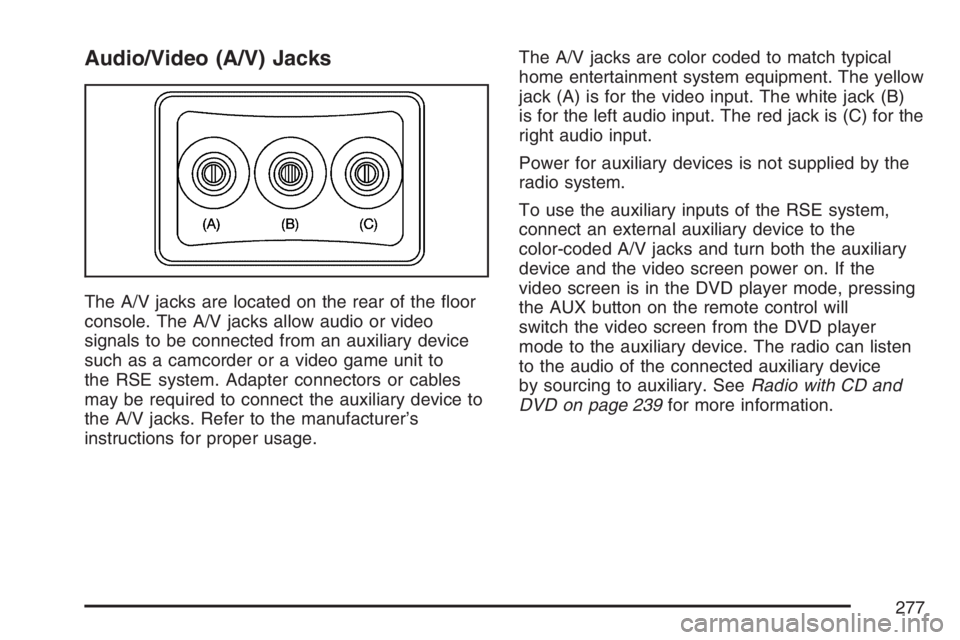
Audio/Video (A/V) Jacks
The A/V jacks are located on the rear of the oor
console. The A/V jacks allow audio or video
signals to be connected from an auxiliary device
such as a camcorder or a video game unit to
the RSE system. Adapter connectors or cables
may be required to connect the auxiliary device to
the A/V jacks. Refer to the manufacturer’s
instructions for proper usage.The A/V jacks are color coded to match typical
home entertainment system equipment. The yellow
jack (A) is for the video input. The white jack (B)
is for the left audio input. The red jack is (C) for the
right audio input.
Power for auxiliary devices is not supplied by the
radio system.
To use the auxiliary inputs of the RSE system,
connect an external auxiliary device to the
color-coded A/V jacks and turn both the auxiliary
device and the video screen power on. If the
video screen is in the DVD player mode, pressing
the AUX button on the remote control will
switch the video screen from the DVD player
mode to the auxiliary device. The radio can listen
to the audio of the connected auxiliary device
by sourcing to auxiliary. SeeRadio with CD and
DVD on page 239for more information.
277
Page 279 of 490
Video Screen
The video screen is located in the RSE overhead
console.
To use the video screen, do the following:
1. Push the release button located on the RSE
overhead console.
2. Turn the screen to the desired position.
When the video screen is not in use, push it up
into its locked position.
If a DVD is playing and the screen is raised to its
locked position, the screen will remain on, this
is normal, and the DVD will continue to play
through the previous audio source. Use the remote
control power button or eject the disc to turn off
the screen.
The RSE overhead console contains the IR
transmitters for the wireless headphones and the
IR receivers for the remote control. They are
located at the rear of the console.
Notice:Avoid directly touching the video
screen, as damage may occur. See “Cleaning
the Video Screen” later in this section for
more information.
Remote Control
To use the remote control, aim it at the transmitter
window at the rear of the RSE overhead console
and press the desired button. Direct sunlight
or very bright light may affect the ability of the RSE
transmitter to receive signals from the remote
control. If the remote control does not seem to be
working, the batteries may need to be replaced.
See “Battery Replacement” later in this section.
Objects blocking the line of sight may also affect
the function of the remote control.
If a CD or DVD is in the Radio DVD slot, the
remote control power button can be used to turn
on the video screen display and start the disc. The
radio can also turn on the video screen display.
SeeRadio with CD and DVD on page 239
for more information.
Notice:Storing the remote control in a hot
area or in direct sunlight may damage it,
and the repairs will not be covered by your
warranty. Keep the remote control stored in a
cool, dry place.
279
Page 304 of 490
Watch for traffic signs, pavement markings,
and lines. If you can see a sign up ahead
that might indicate a turn or an intersection,
delay your pass. A broken center line
usually indicates it is all right to pass, providing
the road ahead is clear. Never cross a solid
line on your side of the lane or a double solid
line, even if the road seems empty of
approaching traffic.
Do not get too close to the vehicle you want
to pass while you are awaiting an opportunity.
For one thing, following too closely reduces
your area of vision, especially if you are
following a larger vehicle. Also, you will not
have adequate space if the vehicle ahead
suddenly slows or stops. Keep back a
reasonable distance.
When it looks like a chance to pass is coming
up, start to accelerate but stay in the right
lane and do not get too close. Time your move
so you will be increasing speed as the time
comes to move into the other lane. If the way
is clear to pass, you will have a running
start that more than makes up for the distance
you would lose by dropping back. And ifsomething happens to cause you to cancel
your pass, you need only slow down and drop
back again and wait for another opportunity.
If other vehicles are lined up to pass a slow
vehicle, wait your turn. But take care that
someone is not trying to pass you as you pull
out to pass the slow vehicle. Remember to
glance over your shoulder and check the
blind spot.
Check your vehicle’s mirrors, glance over your
shoulder, and start your left lane change
signal before moving out of the right lane to
pass. When you are far enough ahead of
the passed vehicle to see its front in
your vehicle’s inside mirror, activate the right
lane change signal and move back into
the right lane. Remember that your vehicle’s
passenger side outside mirror is convex.
The vehicle you just passed may seem to be
farther away from you than it really is.
Try not to pass more than one vehicle at a
time on two-lane roads. Reconsider before
passing the next vehicle.
304