ignition PONTIAC TORRENT 2007 Repair Manual
[x] Cancel search | Manufacturer: PONTIAC, Model Year: 2007, Model line: TORRENT, Model: PONTIAC TORRENT 2007Pages: 490, PDF Size: 2.71 MB
Page 223 of 490
Finding a Station
BAND:Press this button to switch between FM1,
FM2 or AM. The display shows the selection.
f(Tune):Turn this knob to select radio stations.
©SEEK¨:Press the right or left SEEK
arrow to go to the next or to the previous station
and stay there.
To scan stations, press and hold either SEEK
arrow for a few seconds until you hear a beep. The
radio goes to a station, plays for a few seconds,
then goes to the next station. Press either
SEEK arrow again to stop scanning.
The radio only seeks and scans stations with a
strong signal that are in the selected band.
4(Information):Press this button to switch the
display between the radio station frequency
and the time. When the ignition is off, press this
button to display the time.
Setting Preset Stations
Up to 18 stations (six FM1, six FM2, and six AM),
can be programmed on the six numbered
pushbuttons, by performing the following steps:
1. Turn the radio on.
2. Press BAND to select FM1, FM2, or AM.
3. Tune in the desired station.
4. Press and hold one of the six numbered
pushbuttons for three seconds until you
hear a beep. Whenever that pushbutton is
pressed and released, the station that was set
returns.
5. Repeat the Steps 2-4 for each pushbutton.
Setting the Tone (Bass/Treble)
EQ (Equalization):To adjust the bass or treble,
press the tune knob or EQ button until the
desired tone control label appears on the display.
Turn the tune knob clockwise or counterclockwise
to increase or decrease the setting. The display
shows the current bass or treble level. If a station’s
frequency is weak, or if there is static, decrease
the treble.
223
Page 224 of 490
Adjusting the Speakers (Balance/Fade)
`
BAL/FADE (Balance/Fade):To adjust the
balance or fade, press this button or the tune knob
until the desired speaker control label appears
on the display. Turn the tune knob clockwise
or counterclockwise to adjust the setting.
Radio Messages
Calibration Error:The audio system has been
calibrated for your vehicle from the factory. If
Calibration Error appears on the display, it means
that the radio has not been congured properly
for your vehicle and it must be returned to
your dealer for service.
Loc (Locked):This message is displayed when
the THEFTLOCK
®system has locked up the radio.
Take the vehicle to your dealer for service.
If any error occurs repeatedly or if an error cannot
be corrected, contact your dealer.
Playing a CD (Single CD Player)
Insert a CD partway into the slot, label side up.
The player pulls it in and the CD should begin
playing.If the ignition or radio is turned off with a CD in the
player, it stays in the player. When the ignition or
radio is turned on, the CD starts playing where it
stopped, if it was the last selected audio source.
When a CD is inserted, the CD symbol appears on
the radio display. As each new track starts to
play, the track number appears on the display.
The CD player can play the smaller 3 inch (8 cm)
single CDs with an adapter ring. Full-size CDs and
the smaller CDs are loaded in the same manner.
If playing a CD-R, the sound quality may be
reduced due to CD-R quality, the method of
recording, the quality of the music that has been
recorded, and the way the CD-R has been
handled. There may be an increase in skipping,
difficulty in nding tracks, and/or difficulty in loading
and ejecting. If these problems occur, check the
bottom surface of the CD. If the surface of the CD
is damaged, such as cracked, broken, or
scratched, the CD will not play properly. If the
surface of the CD is soiled, seeCare of Your CDs
and DVDs on page 288for more information.
If there is no apparent damage, try a known
good CD.
224
Page 226 of 490
RDM (Random):With random, you can listen to
CD tracks in random, rather than sequential
order. To use random, do the following:
1. Press this button to play tracks from the CD
you are listening to in random order. The
random icon appears on the display.
2. Press this button again to turn off random
play. The random icon disappears from the
display.
RPT (Repeat):With repeat one track can be
repeated (played over and over).
To repeat the track you are listening to, press
and release the RPT button. An arrow symbol
appears on the display. Press RPT again
to turn off repeat play. When repeat is off, the
arrow symbol is no longer displayed.
4(Information):Press this button to switch the
display between the track number, elapsed time of
the track, and the time. When the ignition is off,
press this button to display the time.
BAND:Press this button to listen to the radio
when a CD is playing. The CD remains safely
inside the radio for future listening.
CD/AUX (CD/Auxiliary):Press this button to play
a CD when listening to the radio. The CD icon
and track number appears on the display when a
CD is in the player. Press this button again
and the system automatically searches for an
auxiliary input device such as a portable audio
player.
226
Page 234 of 490
Radio Messages
Calibration Error:The audio system has been
calibrated for your vehicle from the factory. If
Calibration Error appears on the display, it means
that the radio has not been congured properly
for your vehicle and it must be returned to
your dealer for service.
Locked:This message is displayed when the
THEFTLOCK
®system has locked up the
radio. Take the vehicle to your dealer for service.
If any error occurs repeatedly or if an error
cannot be corrected, contact your dealer.
Radio Messages for XM™ Only
SeeXM Radio Messages on page 272later in this
section for further detail.
Playing a CD (Single CD Player)
Insert a CD partway into the slot, label side up.
The player pulls it in and the CD should begin
playing.
Playing a CD(s) (Six-Disc CD Player)
LOAD^:Press this button to load CDs into the
CD player. This CD player holds up to six CDs.
To insert one CD, do the following:
1. Press and release the load button.
2. Wait for the message to insert the disc.
3. Load a CD. Insert the CD partway into the slot,
label side up. The player pulls the CD in.
To insert multiple CDs, do the following:
1. Press and hold the load button for
two seconds. A beep will sound and
Load All Discs appears on the display.
2. Follow the displayed instruction on when to
insert the discs. The CD player takes up to
six CDs.
3. Press the Load button again to cancel loading
more CDs.
If the ignition or radio is turned off, with a CD in the
player, it stays in the player. When the ignition or
radio is turned on, the CD starts playing where it
stopped, if it was the last selected audio source.
234
Page 245 of 490
Radio Messages
Calibration Error:The audio system has been
calibrated for your vehicle from the factory.
If Calibration Error appears on the display, it
means that the radio has not been congured
properly for your vehicle and it must be returned
to your dealer for service.
Locked:This message is displayed when the
THEFTLOCK
®system has locked up the
radio. Take the vehicle to your dealer for service.
If any error occurs repeatedly or if an error
cannot be corrected, contact your dealer.
Radio Messages for XM™ Only
SeeXM Radio Messages on page 272later in this
section for further detail.
Playing a CD (In Either the DVD or
CD Slot)
Insert a CD partway into the slot, label side up.
The player pulls it in and the CD should begin
playing (loading a disc into the system, depending
on media type and format ranges from
5 to 20 seconds for a CD, and up to 30 seconds
for a DVD to begin playing).
If the ignition or radio is turned off, with a CD in
the player, it stays in the player. When the ignition
or radio is turned on, the CD starts playing
where it stopped, if it was the last selected audio
source. The CD is controlled by the buttons
on the radio faceplate. The DVD/CD decks, (upper
slot is the DVD deck and the lower slot is the
CD deck) of the radio are compatible with most
audio CDs, CD-R, CD-RW, and MP3s.
When a CD is inserted, the text label DVD or CD
symbol appears on the left side of the radio
display. As each new track starts to play, the track
number appears on the display.
The CD player can play the smaller 3 inch (8 cm)
single CDs with an adapter ring. Full-size CDs
and the smaller CDs are loaded in the same
manner.
245
Page 251 of 490
O(Power):Press this knob to turn the radio on.
Turn this knob clockwise or counterclockwise to
increase or decrease the volume. A single
press turns the radio off. Press and holding the
knob for more than two seconds turns off the entire
radio and rear seat entertainment system and
starts the parental control feature which prevents
the rear seat occupant from operating the Rear
Seat Audio (RSA) system or remote control.
A lock symbol appears next to the clock display.
The parental control feature remains on until
a subsequent press and hold of the power button
is performed (more than two seconds), or until
the driver turns the ignition off and exits the
vehicle.
f(Tune):Turn this knob to change tracks on a
CD or DVD, to manually tune a radio station, or to
change clock or date settings, while in the clock
or date setting mode. See the information
given earlier in this section specic to the radio,
CD, and the DVD. Also, seeSetting the Time
(Without Date Display) on page 220orSetting the
Time (With Date Display) on page 220, for
setting the clock and date.
©SEEK (Previous Track/Chapter):Press this
button to return to the start of the current track
or chapter. Press this button again to go to
the previous track or chapter. This button may not
work when the DVD is playing the copyright
information or the previews.
SEEK
¨(Next Track/Chapter):Press this
button to go to the next track or chapter. This
button may not work when the DVD is playing the
copyright information or the previews.
sREV (Reverse):Press this button to fast
reverse the CD or DVD, ve times the normal
speed. The radio displays the elapsed time while
in fast reverse. To stop fast reversing, press
this button again. This button may not work when
the DVD is playing the copyright information or
the previews.
\FWD (Fast Forward):Press this button to
fast forward the CD or DVD. The radio displays the
elapsed time and fast forwards ve times the
normal speed. To stop fast forwarding, press this
button again. This button may not work when
the DVD is playing the copyright information or the
previews.
251
Page 260 of 490
File System and Naming
The song name that displays is the song name that
is contained in the ID3 tag. If the song name is not
present in the ID3 tag, then the radio displays the
le name without the extension (such as .mp3) as
the track name.
Track names longer than 32 characters or
four pages are shortened. Parts of words on the
last page of text and the extension of the lename
displays.
Preprogrammed Playlists
Preprogrammed playlists that were created using
WinAmp™, MusicMatch™, or Real Jukebox™
software can be accessed, however, they cannot
be edited using the radio. These playlists are
treated as special folders containing compressed
audio song les.
Playing an MP3
Insert a CD-R partway into the slot (Single CD
Player), or press the load button and wait for the
message to insert disc (Six-Disc CD Player),
label side up. The player pulls it in, and the CD-R
should begin playing.If the ignition or radio is turned off with a CD-R in
the player, it stays in the player. When the
ignition or radio is turned on, the CD-R starts to
play where it stopped, if it was the last selected
audio source.
As each new track starts to play, the track number
and song title appears on the display.
The CD player can play the smaller 3 inch (8 cm)
single CD-Rs with an adapter ring. Full-size
CD-Rs and the smaller CD-Rs are loaded in the
same manner.
If playing a CD-R, the sound quality may be
reduced due to CD-R quality, the method of
recording, the quality of the music that has been
recorded, and the way the CD-R has been
handled. There may be an increase in skipping,
difficulty in nding tracks, and/or difficulty in loading
and ejecting. If these problems occur, check the
bottom surface of the CD. If the surface of the CD
is damaged, such as cracked, broken, or
scratched, the CD will not play properly. If the
surface of the CD is soiled, seeCare of Your CDs
and DVDs on page 288for more information.
If there is no apparent damage, try a known
good CD.
260
Page 267 of 490
Playing an MP3 (In Either the DVD or
CD Slot)
Insert a CD-R partway into either the top or
bottom slot, label side up. The player pulls it in,
and the CD-R should begin playing.
Depending on the format of the disc, a softkey
menu appears and allow navigation of the
disc. The menu reads left to right as RDM
(Randomize song play order), a Folder icon with
left and right arrows (to move up or down
through available folders), a PL tag if the disc has
a Playlist available, and a Music Navigator tag.
If a Playlist tag is shown, toggling this key brings
up a Folder softkey only or the menu as
previously described.
If the ignition or radio is turned off with a CD-R in
the player, it stays in the player. When the
ignition or radio is turned on, the CD-R starts to
play where it stopped, if it was the last selected
audio source.As each new track starts to play, the track number
and song title appears on the display.
The CD player can play the smaller 3 inch (8 cm)
single CD-Rs with an adapter ring. Full-size
CD-Rs and the smaller CD-Rs are loaded in the
same manner.
If playing a CD-R, the sound quality may be
reduced due to CD-R quality, the method of
recording, the quality of the music that has been
recorded, and the way the CD-R has been
handled. There may be an increase in skipping,
difficulty in nding tracks, and/or difficulty in loading
and ejecting. If these problems occur, check the
bottom surface of the CD. If the surface of the CD
is damaged, such as cracked, broken, or
scratched, the CD does not play properly. If the
surface of the CD is soiled, seeCare of Your CDs
and DVDs on page 288for more information.
267
Page 275 of 490
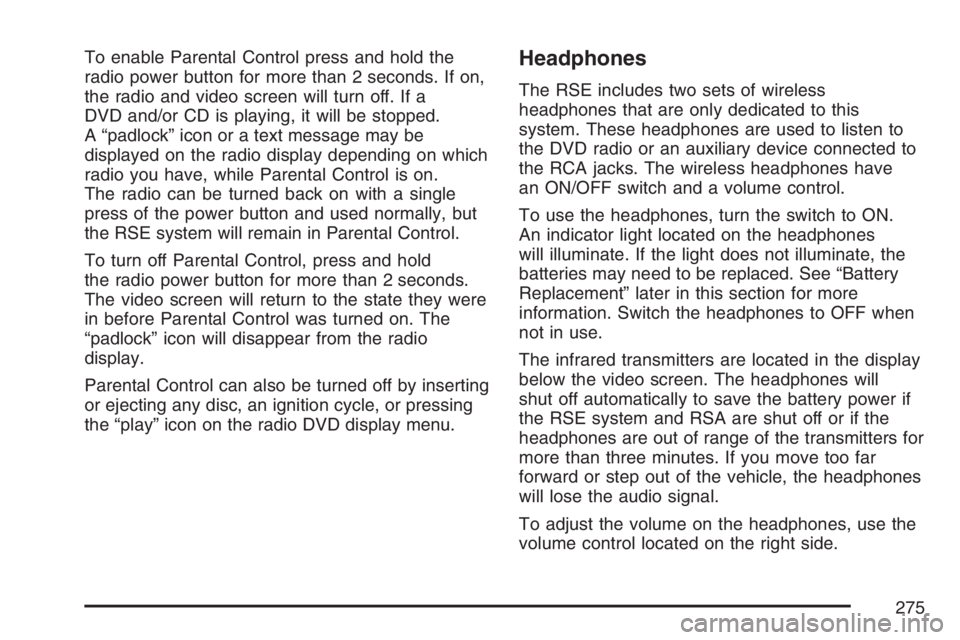
To enable Parental Control press and hold the
radio power button for more than 2 seconds. If on,
the radio and video screen will turn off. If a
DVD and/or CD is playing, it will be stopped.
A “padlock” icon or a text message may be
displayed on the radio display depending on which
radio you have, while Parental Control is on.
The radio can be turned back on with a single
press of the power button and used normally, but
the RSE system will remain in Parental Control.
To turn off Parental Control, press and hold
the radio power button for more than 2 seconds.
The video screen will return to the state they were
in before Parental Control was turned on. The
“padlock” icon will disappear from the radio
display.
Parental Control can also be turned off by inserting
or ejecting any disc, an ignition cycle, or pressing
the “play” icon on the radio DVD display menu.Headphones
The RSE includes two sets of wireless
headphones that are only dedicated to this
system. These headphones are used to listen to
the DVD radio or an auxiliary device connected to
the RCA jacks. The wireless headphones have
an ON/OFF switch and a volume control.
To use the headphones, turn the switch to ON.
An indicator light located on the headphones
will illuminate. If the light does not illuminate, the
batteries may need to be replaced. See “Battery
Replacement” later in this section for more
information. Switch the headphones to OFF when
not in use.
The infrared transmitters are located in the display
below the video screen. The headphones will
shut off automatically to save the battery power if
the RSE system and RSA are shut off or if the
headphones are out of range of the transmitters for
more than three minutes. If you move too far
forward or step out of the vehicle, the headphones
will lose the audio signal.
To adjust the volume on the headphones, use the
volume control located on the right side.
275
Page 283 of 490
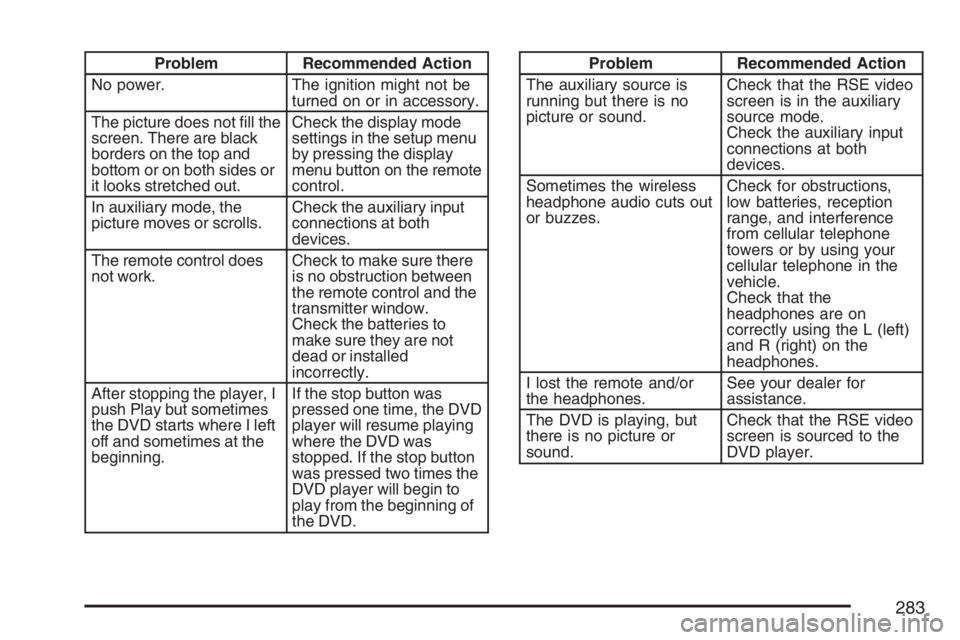
Problem Recommended Action
No power. The ignition might not be
turned on or in accessory.
The picture does not ll the
screen. There are black
borders on the top and
bottom or on both sides or
it looks stretched out.Check the display mode
settings in the setup menu
by pressing the display
menu button on the remote
control.
In auxiliary mode, the
picture moves or scrolls.Check the auxiliary input
connections at both
devices.
The remote control does
not work.Check to make sure there
is no obstruction between
the remote control and the
transmitter window.
Check the batteries to
make sure they are not
dead or installed
incorrectly.
After stopping the player, I
push Play but sometimes
the DVD starts where I left
off and sometimes at the
beginning.If the stop button was
pressed one time, the DVD
player will resume playing
where the DVD was
stopped. If the stop button
was pressed two times the
DVD player will begin to
play from the beginning of
the DVD.Problem Recommended Action
The auxiliary source is
running but there is no
picture or sound.Check that the RSE video
screen is in the auxiliary
source mode.
Check the auxiliary input
connections at both
devices.
Sometimes the wireless
headphone audio cuts out
or buzzes.Check for obstructions,
low batteries, reception
range, and interference
from cellular telephone
towers or by using your
cellular telephone in the
vehicle.
Check that the
headphones are on
correctly using the L (left)
and R (right) on the
headphones.
I lost the remote and/or
the headphones.See your dealer for
assistance.
The DVD is playing, but
there is no picture or
sound.Check that the RSE video
screen is sourced to the
DVD player.
283