stop start PONTIAC TORRENT 2009 User Guide
[x] Cancel search | Manufacturer: PONTIAC, Model Year: 2009, Model line: TORRENT, Model: PONTIAC TORRENT 2009Pages: 436, PDF Size: 2.43 MB
Page 162 of 436
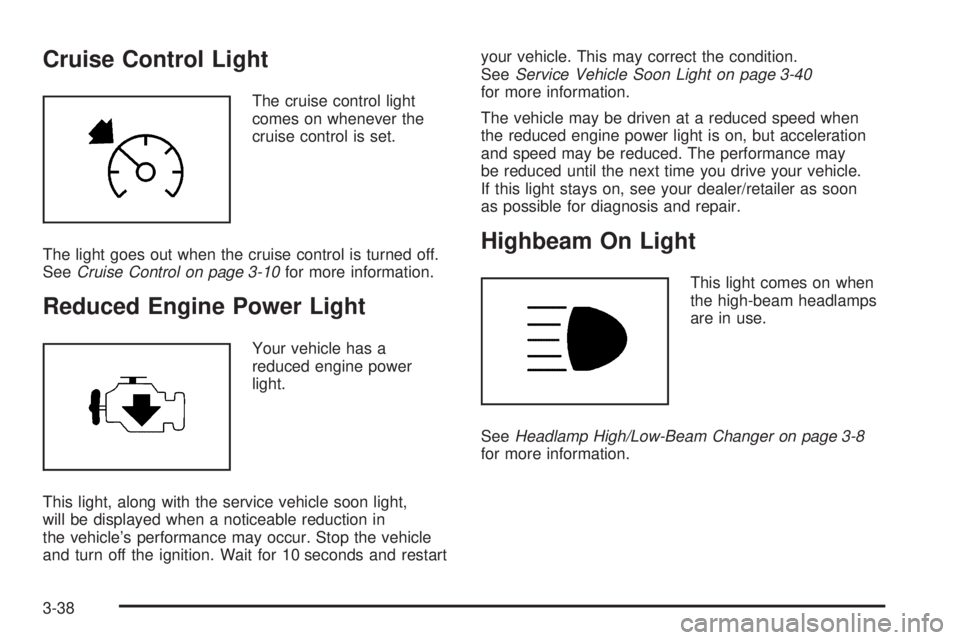
Cruise Control Light
The cruise control light
comes on whenever the
cruise control is set.
The light goes out when the cruise control is turned off.
SeeCruise Control on page 3-10for more information.
Reduced Engine Power Light
Your vehicle has a
reduced engine power
light.
This light, along with the service vehicle soon light,
will be displayed when a noticeable reduction in
the vehicle’s performance may occur. Stop the vehicle
and turn off the ignition. Wait for 10 seconds and restartyour vehicle. This may correct the condition.
SeeService Vehicle Soon Light on page 3-40
for more information.
The vehicle may be driven at a reduced speed when
the reduced engine power light is on, but acceleration
and speed may be reduced. The performance may
be reduced until the next time you drive your vehicle.
If this light stays on, see your dealer/retailer as soon
as possible for diagnosis and repair.
Highbeam On Light
This light comes on when
the high-beam headlamps
are in use.
SeeHeadlamp High/Low-Beam Changer on page 3-8
for more information.
3-38
Page 177 of 436
REMOTE KEY LEARNING ACTIVE
This message displays while you are matching a
Remote Keyless Entry (RKE) transmitter to your vehicle.
See “LEARN REMOTE KEY” underDIC Operation
and Displays on page 3-42for more information.
SERVICE A/C (Air Conditioning)
SYSTEM
This message displays when there is a problem
detected in the air conditioning system. Have the
vehicle serviced by your dealer/retailer.
SERVICE AIR BAG
This message displays when there is a problem with
the airbag system. Have your vehicle serviced by your
dealer/retailer immediately. SeeAirbag Readiness
Light on page 3-28for more information.
SERVICE ALL WHEEL DRIVE
If your vehicle has the All-Wheel Drive (AWD)
system, this message displays along with the service
all-wheel drive light if a problem occurs with this system.
SeeService All-Wheel Drive Light on page 3-39. If this
message appears, stop as soon as possible and turn
off the vehicle. Restart the vehicle and check for themessage on the DIC display. If the message is still
displayed or appears again when you begin driving, the
AWD system needs service. See your dealer/retailer.
SERVICE BATTERY CHARGING
SYSTEM
This message displays when there is a problem with the
generator and battery charging systems. Driving with
this problem could drain the vehicle’s battery. Turn off all
unnecessary accessories. Stop and turn off the vehicle
as soon as it is safe to do so. Have the electrical
system checked by your dealer/retailer immediately.
Connecting a battery charger to your vehicle while the
ignition is in any position other than LOCK/OFF may
cause this message to appear. If you need to charge
your vehicle, make sure that the key is in LOCK/OFF
or out of the ignition during charging.
SERVICE BRAKE SYSTEM
This message displays and a chime sounds when the
brake uid level is low. The brake system warning
light also appears on the instrument panel cluster when
this message appears on the DIC. SeeBrake System
Warning Light on page 3-30. Have the brake system
serviced by your dealer/retailer as soon as possible.
3-53
Page 178 of 436
SERVICE POWER STEERING
On some vehicles, this message displays when a
problem is detected with the power steering system.
When this message is displayed, you may notice
that the effort required to steer the vehicle increases
or feels heavier, but you will still be able to steer
the vehicle. Have your vehicle serviced by your
dealer/retailer immediately.
SERVICE STABILITRAK
This message displays if there has been a problem
detected with the StabiliTrak®System. A warning
light also appears on the instrument panel cluster.
SeeTraction Control System (TCS) Warning Light
on page 3-32. SeeStabiliTrak
®System on page 4-6
for more information.
If this message turns on while you are driving, pull
off the road as soon as possible and stop carefully.
Try resetting the system by turning the ignition off and
then back on. If this message still stays on or turns
back on again while you are driving, your vehicle needs
service. Have the StabiliTrak
®System inspected by
your dealer/retailer as soon as possible.
SERVICE THEFT DETERRENT SYSTEM
This message displays when there is a problem with
the theft-deterrent system. A fault has been detected in
the system which means that the system is disabled
and it is not protecting the vehicle. The vehicle usually
restarts; however, you may want to take the vehicle
to your dealer/retailer before turning off the engine.
SeePASS-Key
®III+ Electronic Immobilizer Operation
on page 2-18for more information.
SERVICE TIRE MONITOR SYSTEM
This message displays if a part on the Tire Pressure
Monitor System (TPMS) is not working properly. The tire
pressure light also ashes and then remains on during
the same ignition cycle. SeeTire Pressure Light on
page 3-33. Several conditions may cause this message
to appear. SeeTire Pressure Monitor Operation on
page 5-59for more information. If the warning comes on
and stays on, there may be a problem with the TPMS.
See your dealer/retailer.
3-54
Page 198 of 436
Radio Messages for XM™ Only
SeeXM Radio Messages on page 3-97later in this
section for further detail.
Playing a CD (Single CD Player)
Insert a CD partway into the slot, label side up.
The player pulls it in and the CD should begin playing.
Playing a CD(s) (Six-Disc CD Player)
LOAD^:Press to load CDs into the CD player.
This CD player holds up to six CDs.
To insert one CD, do the following:
1. Press and release the
^button.
2. Wait for the message to insert the disc.
3. Load a CD. Insert the CD partway into the slot,
label side up. The player pulls the CD in.To insert multiple CDs, do the following:
1. Press and hold the
^button for two seconds.
A beep sounds and Load All Discs displays.
2. Follow the displayed instruction on when to insert
the discs. The CD player takes up to six CDs.
3. Press the
^button again to cancel loading
more CDs.
If the ignition or radio is turned off, with a CD in the
player, it stays in the player. When the ignition or radio
is turned on, the CD starts playing where it stopped,
if it was the last selected audio source.
When a CD is inserted, the CD symbol appears on
the CD. As each new track starts to play, the track
number displays.
The CD player can play the smaller 3 inch (8 cm) single
CDs with an adapter ring. Full-size CDs and the smaller
CDs are loaded in the same manner.
3-74
Page 201 of 436
RPT (Repeat) (Base Radio with CD):With the repeat
setting, one track can be repeated.
To repeat the current track, press and release the
RPT button. An arrow symbol displays. Press again
to turn off repeat play. When repeat is off, the arrow
symbol no longer displays.
4(Information) (Base Radio with CD):Press to switch
the display between the track number, elapsed time
of the track, and the time. When the ignition is off,
press to display the time.
BAND:Press to listen to the radio when a CD is
playing. The CD remains safely inside the radio for
future listening.
CD/AUX (CD/Auxiliary):Press to play a CD when
listening to the radio. The CD icon and a message
showing disc and/or track number displays when
a CD is in the player. Press again and the system
automatically searches for an auxiliary input device,
such as a portable audio player.
Playing a CD (In Either the DVD or
CD Slot)
Insert a CD partway into the slot, label side up.
The player pulls it in and the CD should begin playing
(loading a disc into the system, depending on media
type and format ranges from 5 to 20 seconds for a CD,
and up to 30 seconds for a DVD to begin playing).
If the ignition or radio is turned off, with a CD in the
player, it stays in the player. When the ignition or radio
is turned on, the CD starts playing where it stopped,
if it was the last selected audio source. The CD is
controlled by the buttons on the radio faceplate.
The DVD/CD decks, (upper slot is the DVD deck
and the lower slot is the CD deck) of the radio are
compatible with most audio CDs, CD-R, CD-RW,
and MP3s/WMAs.
When a CD is inserted, the text tab DVD or CD symbol
appears on the left side of the radio display. As each
new track starts to play, the track number displays.
3-77
Page 206 of 436
O(Power):Press to turn the radio on or off. Turn
clockwise or counterclockwise to increase or decrease
the volume. Press and hold for more than two seconds
turns off the entire radio and Rear Seat Entertainment
(RSE) system and starts the parental control feature
which prevents the rear seat occupant from operating
the Rear Seat Audio (RSA) system or remote control.
A lock symbol appears next to the clock display.
The parental control feature remains on until a
subsequent press and hold of the power button is
performed (more than two seconds), or until the
driver turns the ignition off and exits the vehicle.
f(Tune):Turn to change tracks on a CD or DVD,
to manually tune a radio station, or to change clock
or date settings, while in the clock or date setting
mode. See the information given earlier in this section
specic to the radio, CD, and the DVD. Also, see
Setting the Clock on page 3-65, for setting the clock
and date.
©SEEK (Previous Track/Chapter):Press to return to
the start of the current track or chapter. Press again to go
to the previous track or chapter. This button might not
work when the DVD is playing the copyright information
or the previews.SEEK
¨(Next Track/Chapter):Press to go to the
next track or chapter. This button might not work when
the DVD is playing the copyright information or the
previews.
sREV (Fast Reverse):Press to fast reverse the CD
or DVD, ve times the normal speed. The radio displays
the elapsed time while in fast reverse. To stop fast
reversing, press again. This button might not work when
the DVD is playing the copyright information or the
previews.
\FWD (Fast Forward):Press to fast forward the CD
or DVD. The radio displays the elapsed time and fast
forwards ve times the normal speed. To stop fast
forwarding, press again. This button might not work
when the DVD is playing the copyright information or
the previews.
Z(Eject):Press to eject a CD or DVD. If a CD
or DVD is ejected, but not removed, the player
automatically pulls it back in after 15 seconds.
If loading and reading of a CD cannot be completed,
such as unknown format, etc., and the disc fails to eject,
press and hold for more than ve seconds to force
the disc to eject.
3-82
Page 207 of 436
DVD-V (Video) Display Buttons
Once a DVD-V is inserted, the radio display menu
shows several tag options for DVD playing. Press the
pushbuttons located under any desired tag option during
DVD playback. See the tag options listed below for
more information.
The rear seat passenger navigates the DVD-V menus
and controls through the remote control. See “Remote
Control”, underRear Seat Entertainment (RSE) System
on page 3-109for more information. The Video Screen
automatically turns on when the DVD-V is inserted into
the DVD slot.
r/j(Play/Pause):Press either play or pause
displayed on the radio system, to toggle between pausing
or restarting playback of a DVD. If the forward arrow is
showing on the display, the system is in pause mode.
If the pause icon is showing on the display, the system
is in playback mode. If the DVD screen is off, press this
button to turn the screen on.
Some DVDs begin playing after the previews have
nished, although there might be a delay of up to
30 seconds. If the DVD does not begin playing themovie automatically, press the pushbutton located
under the play/pause symbol tag displayed on the radio.
If the DVD still does not play, refer to the on-screen
instructions, if available.
c(Stop):Press to stop playing, rewinding, or fast
forwarding a DVD.
r(Enter):Press to select the choices that are
highlighted in any menu.
y(Menu):Press to access the DVD menu. The DVD
menu is different on every DVD. Use the pushbuttons
located under the navigation arrows to navigate
the cursor through the DVD menu. After making a
selection press the enter button. This button only
operates when using a DVD.
Nav (Navigate):Press to display directional arrows for
navigating through the menus.
q(Return):Press to exit the current active menu
and return to the previous menu. This button operates
only when a DVD is playing and a menu is active.
3-83
Page 213 of 436
Order of Play
Tracks recorded to the CD-R or CD-RW are played in
the following order:
Play begins from the rst track in the rst playlist
and continues sequentially through all tracks in
each playlist. When the last track of the last playlist
has played, play continues from the rst track of
the rst playlist.
Play begins from the rst track in the rst folder
and continues sequentially through all tracks in each
folder. When the last track of the last folder has
played, play continues from the rst track of the
rst folder.
When play enters a new folder, the display does
not automatically show the new folder name unless
the folder mode was chosen as the default display.
The new track name displays.
File System and Naming
The song name that displays is the song name that is
contained in the ID3 tag. If the song name is not present
in the ID3 tag, then the radio displays the le name
without the extension (such as .mp3) as the track name.
Track names longer than 32 characters or four pages
are shortened. Parts of words on the last page of
text and the extension of the lename displays.
Preprogrammed Playlists
Preprogrammed playlists that were created using
WinAmp™, MusicMatch™, or Real Jukebox™ software
can be accessed, however, they cannot be edited
using the radio. These playlists are treated as special
folders containing compressed audio song les.
Playing an MP3/WMA
Insert a CD-R or CD-RW partway into the slot (Single
CD Player), or press the
^button and wait for the
message to insert disc (Six-Disc CD Player), label side
up. The player pulls it in, and the CD-R or CD-RW
should begin playing.
If the ignition or radio is turned off with a CD-R or
CD-RW in the player, it stays in the player. When the
ignition or radio is turned on, the CD-R or CD-RW starts
to play where it stopped, if it was the last selected
audio source.
As each new track starts to play, the track number and
song title displays.
3-89
Page 218 of 436
File System and Naming
The song name that displays is the song name that is
contained in the ID3 tag. If the song name is not present
in the ID3 tag, then the radio displays the le name
without the extension (such as .mp3) as the track name.
Track names longer than 32 characters or four pages
are shortened. Parts of words on the last page of
text and the extension of the lename does not display.
Preprogrammed Playlists
Preprogrammed playlists that were created using
WinAmp™, MusicMatch™, or Real Jukebox™ software
can be accessed, however, they cannot be edited
using the radio. These playlists are treated as special
folders containing compressed audio song les.
Playing an MP3 (In Either the DVD or
CD Slot)
Insert a CD-R or CD-RW partway into either the top or
bottom slot, label side up. The player pulls it in, and
the CD-R or CD-RW should begin playing.
Depending on the format of the disc, a softkey menu
appears and allow navigation of the disc. The menu
reads left to right as RDM (Randomize song play order),a Folder icon with left and right arrows (to move up or
down through available folders), a PL tag if the disc has
a Playlist available, and a Music Navigator tag. If a
Playlist tag is shown, toggling this key brings up a Folder
softkey only or the menu as previously described.
If the ignition or radio is turned off with a CD-R or
CD-RW in the player, it stays in the player. When the
ignition or radio is turned on, the CD-R or CD-RW starts
to play where it stopped, if it was the last selected
audio source.
As each new track starts to play, the track number and
song title displays.
ZCD (Eject):Press and release this button to eject
the CD-R or CD-RW that is currently playing in the bottom
slot. A beep sounds and Ejecting Disc displays. Once
the disc is ejected, Remove Disc displays. The CD-R or
CD-RW can be removed. If the CD-R or CD-RW is not
removed, after several seconds, the CD-R or CD-RW
automatically pulls back into the player.
If loading and reading of a CD cannot be completed, such
as unknown format, etc., and the disc fails to eject, press
and hold this button for more than ve seconds to force
the disc to eject.
3-94
Page 239 of 436
s(Play/Pause):Press this button to start playing a
DVD. Press this button while a DVD is playing to pause
it. Press it again to continue playing the DVD.
When the DVD is playing, depending on the radio, slow
play may be performed by pressing the play/pause button
then pressing the fast forward button. The DVD continues
playing in a slow play mode. Depending on the radio,
slow reverse may be performed by pressing the play/
pause button and then pressing the fast reverse button
while a DVD is playing. To cancel slow play mode, press
this button.
t(Previous Track/Chapter):Press this button to
return to the start of the current track or chapter.
Press this button again to go to the previous track or
chapter. This button might not work when the DVD
is playing the copyright information or the previews.
u(Next Track/Chapter):Press this button to go to
the beginning of the next chapter or track. This button
might not work when the DVD is playing the copyright
information or the previews.
r(Fast Reverse):Press this button to fast reverse
the DVD or CD. To stop fast reversing a DVD video,
press the play/pause button. To stop fast reversing
a DVD audio or CD, release the fast reverse button.
This button might not work when the DVD is playing
the copyright information or the previews.
[(Fast Forward):Press this button to fast forward the
DVD or CD. To stop fast forwarding a DVD video, press
the play/pause button. To stop fast forwarding a DVD
audio or CD, release the fast forward button. This button
might not work when the DVD is playing the copyright
information or the previews.
e(Audio):Press this button to change audio tracks
on DVDs that have this feature when the DVD is playing.
The format and content of this function vary for each disc.
{(Subtitles):Press this button to turn ON/OFF
subtitles and to move through subtitle options when a
DVD is playing. The format and content of this function
vary for each disc.
AUX (Auxiliary):Press this button to switch the system
between the DVD player and an auxiliary source.
d(Camera):Press this button to change camera
angles on DVDs that have this feature when a DVD is
playing. The format and content of this function vary
for each disc.
1 through 0 (Numeric Keypad):The numeric keypad
provides the capability of direct chapter or track number
selection.
3-115