light PONTIAC TORRENT 2009 Owner's Manual
[x] Cancel search | Manufacturer: PONTIAC, Model Year: 2009, Model line: TORRENT, Model: PONTIAC TORRENT 2009Pages: 436, PDF Size: 2.43 MB
Page 113 of 436
Vehicles with OnStar®have three additional control
buttons located at the bottom of the mirror. See your
dealer/retailer for more information on the system and
how to subscribe to OnStar. SeeOnStar
®System on
page 2-38for more information about the services
OnStar provides.
Automatic Dimming Rearview Mirror
Hold the inside rearview mirror in the center to move
it for a clearer view of behind your vehicle.
Adjust the mirror to reduce the glare of headlamps from
behind you. Press AUTO or
(located in the lower
center of the mirror to turn automatic dimming on or off.
The indicator light comes on when this feature is on.
For vehicles with OnStar
®, press theOlocated on the
lower part of the mirror, for up to six seconds to turn
automatic dimming on or off.
Vehicles with OnStar have three additional control
buttons located at the bottom of the mirror. See your
dealer/retailer for more information on the system
and how to subscribe to OnStar. SeeOnStar
®System
on page 2-38for more information about the services
OnStar provides.
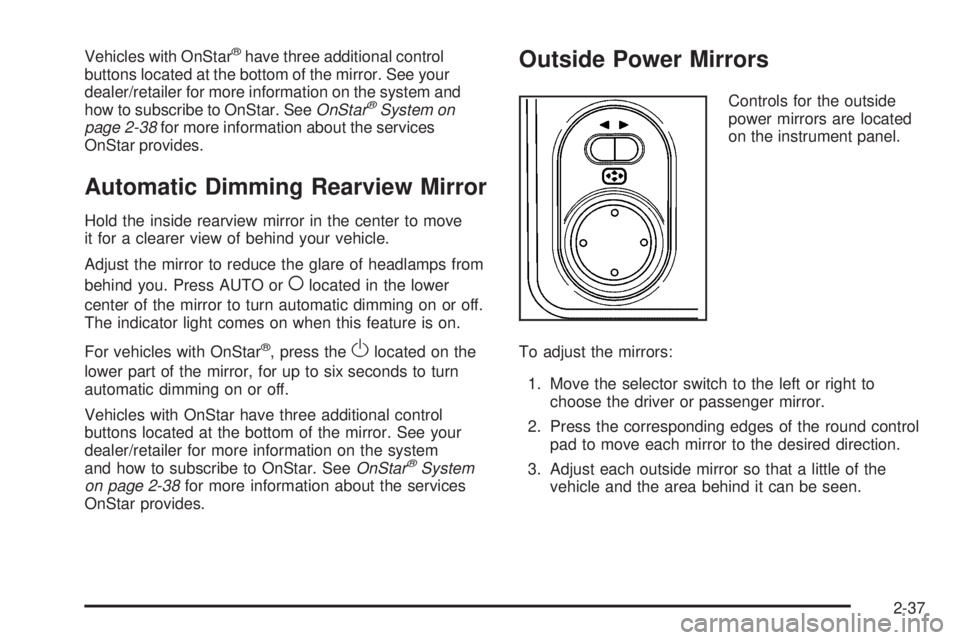
Outside Power Mirrors
Controls for the outside
power mirrors are located
on the instrument panel.
To adjust the mirrors:
1. Move the selector switch to the left or right to
choose the driver or passenger mirror.
2. Press the corresponding edges of the round control
pad to move each mirror to the desired direction.
3. Adjust each outside mirror so that a little of the
vehicle and the area behind it can be seen.
2-37
Page 117 of 436
How OnStar Service Works
The OnStar system can record and transmit vehicle
information. This information is automatically sent to an
OnStar Call Center when the OnStar button is pressed,
the emergency button is pressed, or if the airbags or
AACN system deploy. This information usually includes
the vehicle’s GPS location and, in the event of a crash,
additional information regarding the crash that the vehicle
was involved in (e.g. the direction from which the vehicle
was hit). When the Virtual Advisor feature of OnStar
Hands-Free Calling is used, the vehicle also sends
OnStar the vehicle’s GPS location so they can provide
services where it is located.
OnStar service cannot work unless the vehicle is in a
place where OnStar has an agreement with a wireless
service provider for service in that area. OnStar service
also cannot work unless the vehicle is in a place where
the wireless service provider OnStar has hired for that
area has coverage, network capacity and reception when
the service is needed, and technology that is compatible
with the OnStar service. Not all services are available
everywhere, particularly in remote or enclosed areas, or
at all times.Location information about the vehicle is only available
if the GPS satellite signals are unobstructed and
available.
The vehicle must have a working electrical system,
including adequate battery power, for the OnStar
equipment to operate. There are other problems OnStar
cannot control that may prevent OnStar from providing
OnStar service at any particular time or place. Some
examples are damage to important parts of the vehicle in
a crash, hills, tall buildings, tunnels, weather or wireless
phone network congestion.
Your Responsibility
Increase the volume of the radio if the OnStar advisor
cannot be heard. If the light next to the OnStar buttons
is red, the system may not be functioning properly.
Press the OnStar button and request a vehicle
diagnostic. If the light appears clear (no light is
appearing), your OnStar subscription has expired and
all services have been deactivated. Press the OnStar
button to conrm that the OnStar equipment is active.
2-41
Page 125 of 436
Instrument Panel Overview...............................3-4
Hazard Warning Flashers................................3-6
Horn .............................................................3-6
Tilt Wheel.....................................................3-6
Turn Signal/Multifunction Lever.........................3-7
Turn and Lane-Change Signals........................3-7
Headlamp High/Low-Beam Changer..................3-8
Flash-to-Pass.................................................3-8
Windshield Wipers..........................................3-8
Windshield Washer.........................................3-9
Rear Window Wiper/Washer...........................3-10
Cruise Control..............................................3-10
Headlamps..................................................3-13
Headlamps on Reminder................................3-13
Daytime Running Lamps (DRL).......................3-13
Automatic Headlamp System..........................3-14
Fog Lamps ..................................................3-14
Instrument Panel Brightness...........................3-15
Dome Lamp .................................................3-15
Entry Lighting...............................................3-15
Map Lamps .................................................3-16
Cargo Lamp.................................................3-16
Electric Power Management...........................3-16
Battery Run-Down Protection..........................3-17
Accessory Power Outlet(s).............................3-18
Ashtray(s) and Cigarette Lighter......................3-18Climate Controls............................................3-19
Climate Control System.................................3-19
Outlet Adjustment.........................................3-23
Passenger Compartment Air Filter...................3-23
Warning Lights, Gages, and Indicators............3-24
Instrument Panel Cluster................................3-25
Speedometer and Odometer...........................3-26
Trip Odometer..............................................3-26
Tachometer.................................................3-26
Safety Belt Reminders...................................3-27
Airbag Readiness Light..................................3-28
Passenger Airbag Status Indicator...................3-29
Charging System Light..................................3-30
Brake System Warning Light..........................3-30
Antilock Brake System (ABS) Warning Light.....3-31
Traction Control System (TCS) Warning Light......3-32
Engine Coolant Temperature Warning Light......3-32
Engine Coolant Temperature Gage..................3-33
Tire Pressure Light.......................................3-33
Malfunction Indicator Lamp.............................3-34
Oil Pressure Light (US-Canada)......................3-36
Change Engine Oil Light................................3-37
Security Light...............................................3-37
Fog Lamp Light............................................3-37
Cruise Control Light......................................3-38
Reduced Engine Power Light.........................3-38
Section 3 Instrument Panel
3-1
Page 126 of 436
Highbeam On Light.......................................3-38
Service All-Wheel Drive Light.........................3-39
All-Wheel Drive Disabled Light........................3-39
Gate Ajar Light.............................................3-40
Door Ajar Light.............................................3-40
Service Vehicle Soon Light............................3-40
Fuel Gage...................................................3-41
Low Fuel Warning Light.................................3-41
Driver Information Center (DIC).......................3-42
DIC Operation and Displays...........................3-42
DIC Compass..............................................3-47
DIC Warnings and Messages.........................3-49
DIC Vehicle Personalization............................3-57Audio System(s).............................................3-64
Setting the Clock..........................................3-65
Radio(s)......................................................3-67
Using an MP3 (Radio with CD or
Six-Disc CD Player)...................................3-87
Using an MP3 (Radio with CD and
DVD Player).............................................3-92
XM Radio Messages.....................................3-97
Navigation/Radio System...............................3-98
Bluetooth
®...................................................3-98
Rear Seat Entertainment (RSE) System.........3-109
Theft-Deterrent Feature................................3-118
Audio Steering Wheel Controls......................3-118
Radio Reception.........................................3-119
Multi-Band Antenna.....................................3-120
Section 3 Instrument Panel
3-2
Page 132 of 436
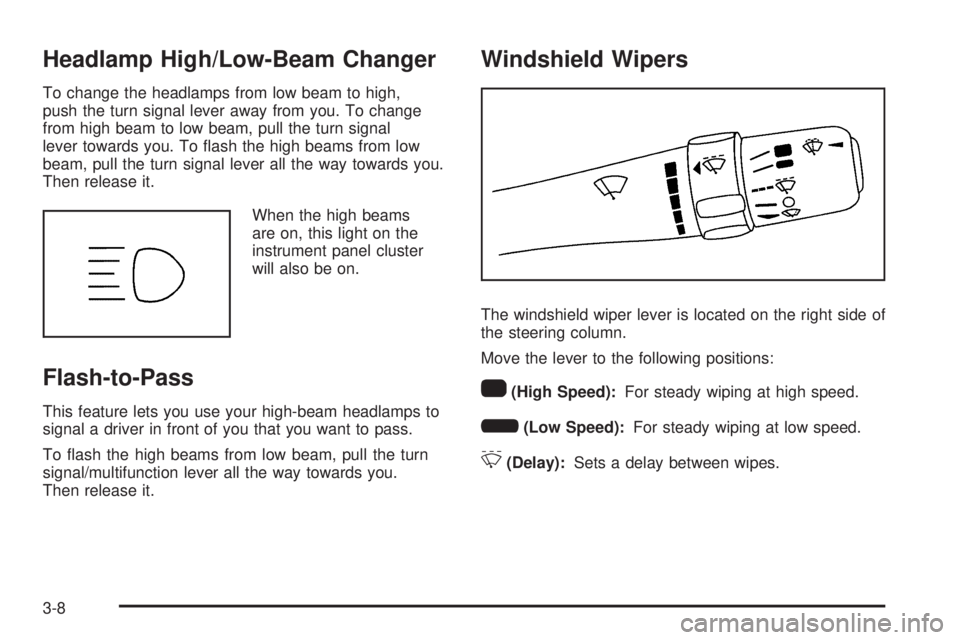
Headlamp High/Low-Beam Changer
To change the headlamps from low beam to high,
push the turn signal lever away from you. To change
from high beam to low beam, pull the turn signal
lever towards you. To ash the high beams from low
beam, pull the turn signal lever all the way towards you.
Then release it.
When the high beams
are on, this light on the
instrument panel cluster
will also be on.
Flash-to-Pass
This feature lets you use your high-beam headlamps to
signal a driver in front of you that you want to pass.
To ash the high beams from low beam, pull the turn
signal/multifunction lever all the way towards you.
Then release it.
Windshield Wipers
The windshield wiper lever is located on the right side of
the steering column.
Move the lever to the following positions:
1(High Speed):For steady wiping at high speed.
6(Low Speed):For steady wiping at low speed.
&(Delay):Sets a delay between wipes.
3-8
Page 135 of 436
Setting Cruise Control
{CAUTION:
If you leave your cruise control on when you are
not using cruise, you might hit a button and go into
cruise when you do not want to. You could be
startled and even lose control. Keep the cruise
control switch off until you want to use cruise
control.
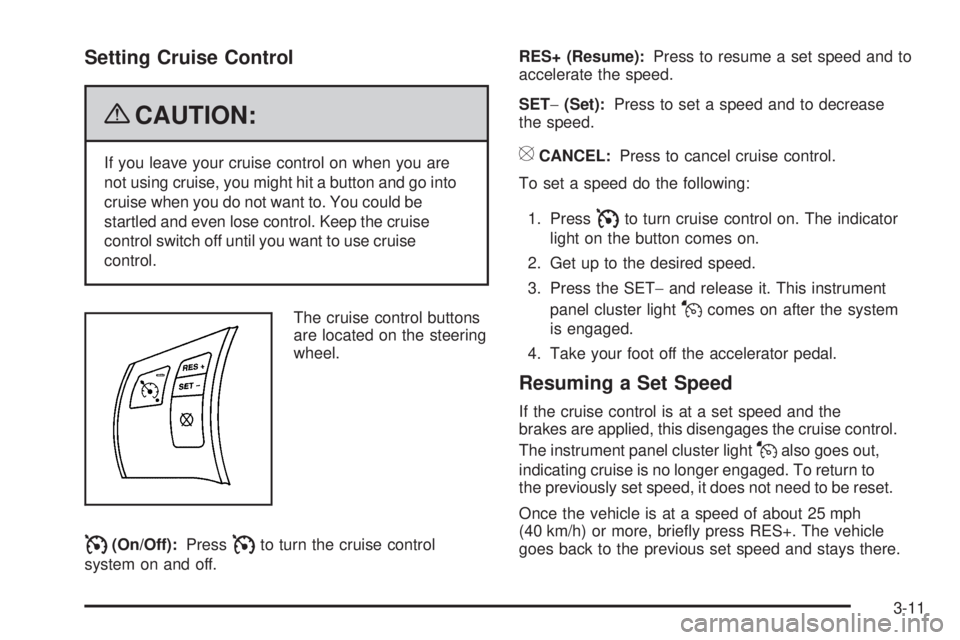
The cruise control buttons
are located on the steering
wheel.
I(On/Off):PressIto turn the cruise control
system on and off.RES+ (Resume):Press to resume a set speed and to
accelerate the speed.
SET−(Set):Press to set a speed and to decrease
the speed.
[CANCEL:Press to cancel cruise control.
To set a speed do the following:
1. Press
Ito turn cruise control on. The indicator
light on the button comes on.
2. Get up to the desired speed.
3. Press the SET−and release it. This instrument
panel cluster light
Jcomes on after the system
is engaged.
4. Take your foot off the accelerator pedal.
Resuming a Set Speed
If the cruise control is at a set speed and the
brakes are applied, this disengages the cruise control.
The instrument panel cluster light
Jalso goes out,
indicating cruise is no longer engaged. To return to
the previously set speed, it does not need to be reset.
Once the vehicle is at a speed of about 25 mph
(40 km/h) or more, briey press RES+. The vehicle
goes back to the previous set speed and stays there.
3-11
Page 136 of 436
Increasing Speed While Using Cruise
Control
There are two ways to go to a higher speed.
If the cruise control system is already engaged,
press and hold the RES+ button until the desired
speed is reached, then release it.
To increase the vehicle speed in small amounts,
briey press the RES+ and then release it.
Each time this is done, the vehicle goes about
1 mph (1.6 km/h) faster.
Reducing Speed While Using Cruise
Control
If the cruise control system is already engaged:
Push and hold the SET−until the desired lower
speed is reached, then release it.
To slow down in small amounts, briey press SET−.
Each time this is done, the vehicle goes about
1 mph (1.6 km/h) slower.
Passing Another Vehicle While Using
Cruise Control
Use the accelerator pedal to increase the vehicle’s
speed. When you take your foot off the pedal, the
vehicle slows down to the cruise control speed that
was set earlier.
Using Cruise Control on Hills
How well the cruise control works on hills depends upon
the vehicle’s speed, load, and the steepness of the hills.
When going up steep hills, you might have to step on the
accelerator pedal to maintain the vehicle’s speed. When
going downhill, you might have to brake or shift to a lower
gear to keep the vehicle at a lower speed. However,
when the brakes are applied the cruise control turns off.
Ending Cruise Control
There are three ways to end the cruise control:
Step lightly on the brake pedal.
Press theIbutton, to turn off the cruise control
system.
Press the[button.
When cruise control disengages, the cruise symbol
in the instrument panel cluster goes out.
Erasing Speed Memory
The cruise control set speed memory is erased when
the cruise control or the ignition is turned off.
3-12
Page 137 of 436

Headlamps
The exterior lamp control is located on the turn
signal/multifunction lever.
O(Exterior Lamp Control):Turn the control with this
symbol on it to operate the exterior lamps.
The exterior lamp control has the following positions:
AUTO (Off/Automatic Headlamps):Automatic
mode turns the exterior lamps on and off depending
upon how much light is available outside of the vehicle.
;(Parking Lamps):Turns on the parking lamps
together with the following:
Sidemarker Lamps
Taillamps
License Plate Lamps
Instrument Panel Lights
53(Headlamps):Turns on the headlamps, together
with the previously listed lamps and lights.
Headlamps on Reminder
If you open the driver’s door with the ignition off and the
lamps on, you will hear a warning chime.
Daytime Running Lamps (DRL)
Daytime Running Lamps (DRL) can make it easier for
others to see the front of your vehicle during the day.
Fully functional Daytime Running Lamps (DRL) are
required on all vehicles rst sold in Canada.
The DRL system will make the low-beam headlamps
come on at a reduced brightness in daylight when
the following conditions are met:
The ignition is on.
The exterior lamp band is in the automatic position.
The transmission is not in P (Park).
The light sensor determines it is daytime.
The parking brake is released.
When the DRL are on, the low-beam headlamps will be
on at a reduced brightness. The taillamps, sidemarker,
instrument panel lights and other lamps will not be on.
When the exterior lamp band is turned to the
headlamp position, the low-beam headlamps come on.
The other lamps that come on with the headlamps will
also come on.
When the headlamps are turned off, the regular lamps
will go off, and the low-beam headlamps come on
to the reduced brightness.
3-13
Page 138 of 436

To idle your vehicle with the DRL off, move the shift
lever to P (Park). The DRL will stay off until the
shift lever is moved out of the P (Park) position.
The regular headlamp system should be turned on
when needed.
Automatic Headlamp System
When it is dark enough outside and the exterior lamps
control is in the automatic position, the headlamps
come on automatically. SeeHeadlamps on page 3-13.
The vehicle has a light sensor located on top of the
instrument panel. Make sure it is not covered, or
the headlamps will be on when they are not needed.
The system may also turn on the headlamps when
driving through a parking garage or tunnel.
Fog Lamps
Use the fog lamps for better visibility in foggy or misty
conditions.
The fog lamps button is located on the instrument panel
above the radio.
The parking lamps or low-beam headlamps must be on
to use the fog lamps.
#:Press to turn the fog lamps on or off.
The fog lamp button is lit when the lamps are on.
The fog lamps will go off whenever the high-beam
headlamps are turned on. When the high-beam
headlamps are turned off, the fog lamps will come
on again.
Some localities have laws that require the headlamps to
be on along with the fog lamps.
3-14
Page 139 of 436
Instrument Panel Brightness
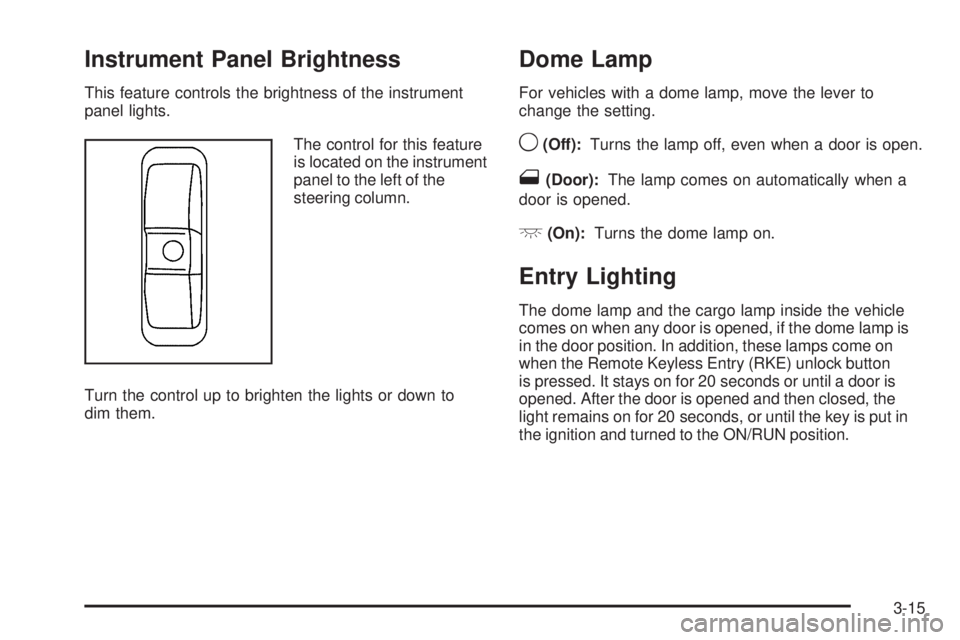
This feature controls the brightness of the instrument
panel lights.
The control for this feature
is located on the instrument
panel to the left of the
steering column.
Turn the control up to brighten the lights or down to
dim them.
Dome Lamp
For vehicles with a dome lamp, move the lever to
change the setting.
9(Off):Turns the lamp off, even when a door is open.
1(Door):The lamp comes on automatically when a
door is opened.
+(On):Turns the dome lamp on.
Entry Lighting
The dome lamp and the cargo lamp inside the vehicle
comes on when any door is opened, if the dome lamp is
in the door position. In addition, these lamps come on
when the Remote Keyless Entry (RKE) unlock button
is pressed. It stays on for 20 seconds or until a door is
opened. After the door is opened and then closed, the
light remains on for 20 seconds, or until the key is put in
the ignition and turned to the ON/RUN position.
3-15