brake light PONTIAC TORRENT 2009 Owners Manual
[x] Cancel search | Manufacturer: PONTIAC, Model Year: 2009, Model line: TORRENT, Model: PONTIAC TORRENT 2009Pages: 436, PDF Size: 2.43 MB
Page 4 of 436
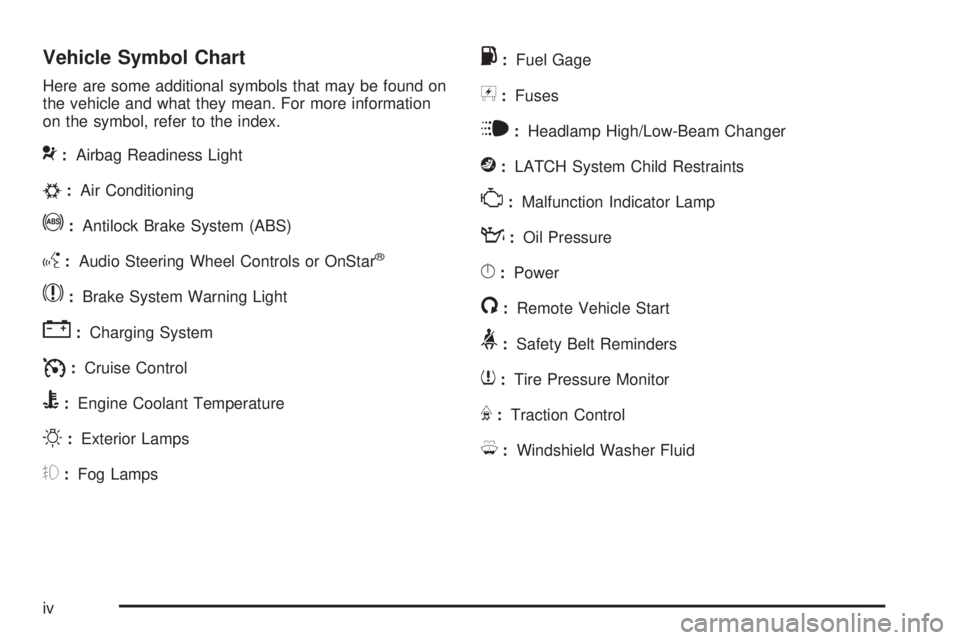
Vehicle Symbol Chart
Here are some additional symbols that may be found on
the vehicle and what they mean. For more information
on the symbol, refer to the index.
9:Airbag Readiness Light
#:Air Conditioning
!:Antilock Brake System (ABS)
g:Audio Steering Wheel Controls or OnStar®
$:Brake System Warning Light
":Charging System
I:Cruise Control
B:Engine Coolant Temperature
O:Exterior Lamps
#:Fog Lamps
.:Fuel Gage
+:Fuses
i:Headlamp High/Low-Beam Changer
j:LATCH System Child Restraints
*:Malfunction Indicator Lamp
::Oil Pressure
}:Power
/:Remote Vehicle Start
>:Safety Belt Reminders
7:Tire Pressure Monitor
F:Traction Control
M:Windshield Washer Fluid
iv
Page 95 of 436

See your dealer/retailer or a locksmith who can service
PASS-Key®III+ to get a new key blank that is cut
exactly as the ignition key that operates the system.
To program the new additional key:
1. Verify that the new key has a
1stamped on it.
2. Insert the original, already programmed, key in the
ignition and start the engine. If the engine will not
start, see your dealer/retailer for service.
3. After the engine has started, turn the key to
LOCK/OFF, and remove the key.
4. Insert the new key to be programmed and turn
it to the ON/RUN position within ve seconds of
removing the original key.
The security light will turn off once the key has
been programmed.
5. Repeat Steps 1 through 4 if additional keys are to
be programmed.
If you lose or damage your PASS-Key
®III+ key, see
your dealer/retailer or a locksmith who can service
PASS-Key
®III+ to have a new key made.
Do not leave the key or device that disarms or
deactivates the theft deterrent system in the vehicle.
Starting and Operating Your
Vehicle
New Vehicle Break-In
Notice:The vehicle does not need an elaborate
break-in. But it will perform better in the long run if
you follow these guidelines:
Do not drive at any one constant speed, fast or
slow, for the rst 500 miles (805 km). Do not
make full-throttle starts. Avoid downshifting to
brake or slow the vehicle.
Avoid making hard stops for the rst 200 miles
(322 km) or so. During this time the new brake
linings are not yet broken in. Hard stops
with new linings can mean premature wear and
earlier replacement. Follow this breaking-in
guideline every time you get new brake linings.
Do not tow a trailer during break-in. SeeTowing
a Trailer on page 4-33for the trailer towing
capabilities of your vehicle and more
information.
Following break-in, engine speed and load can be
gradually increased.
2-19
Page 102 of 436
I (Intermediate):This position is also used for normal
driving. However, it reduces vehicle speed without
using the brakes for slight downgrades where the vehicle
would otherwise accelerate due to steepness of grade.
If constant upshifting or downshifting occurs while
driving up steep hills, this position can be used to
prevent repetitive types of shifts. You might choose
I (Intermediate) instead of D (Drive) when driving on hilly,
winding roads and when towing a trailer, so that there is
less shifting between gears.
L (Low):This position reduces vehicle speed more
than I (Intermediate) without actually using the brakes.
You can use it on very steep hills, or in deep snow
or mud. If the shift lever is placed in L (Low), the
transmission will not shift into L (Low) until the
vehicle is going slowly enough.
Notice:Spinning the tires or holding the vehicle in
one place on a hill using only the accelerator pedal
may damage the transmission. The repair will not be
covered by the vehicle warranty. If you are stuck, do
not spin the tires. When stopping on a hill, use the
brakes to hold the vehicle in place.Transmission Overheating
If the transmission uid temperature rises above
284°F (140°C) or rises rapidly, the Engine Coolant
Temperature Warning Light will ash. SeeEngine
Coolant Temperature Warning Light on page 3-32for
more information. When the transmission overheats it will
go into a protection mode and will default shift into fth
gear if in the D (Drive) position, or second gear if in the
L (Low) position. Continue driving the vehicle in either
position depending on the required vehicle speed and
load. Once the uid temperature lowers to the normal
temperature range, the transmission will return to the
normal shift patterns. Towing or driving on long hills can
cause the transmission uid temperature to be higher
than normal. If the transmission uid temperature will
not cool, you may need to pull over and check the
transmission uid level. You should also check the
engine coolant temperature. If it is hot, seeEngine
Overheating on page 5-28.
2-26
Page 107 of 436
2 (Second) and 3 (Third) Gear Start
Feature
When accelerating the vehicle from a stop in snowy
and icy conditions, you may want to select 2 (Second)
and 3 (Third) gear. A higher gear, and light application of
the gas pedal, may allow you to gain more traction on
slippery surfaces.
With the MSM (Manual Shift Mode), the vehicle can
accelerate from a stop in 2 (Second) or 3 (Third).
1. Move the shift lever from D (Drive) into the
manual gate.
2. With the vehicle stopped, move the shift lever
forward to select 2 (Second) or 3 (Third). The
vehicle will start from a stop position in 2 (Second)
or 3 (Third).
3. Once the vehicle is moving select the desired drive
gear or move the shift lever to the D (Drive)
position.
Parking Brake
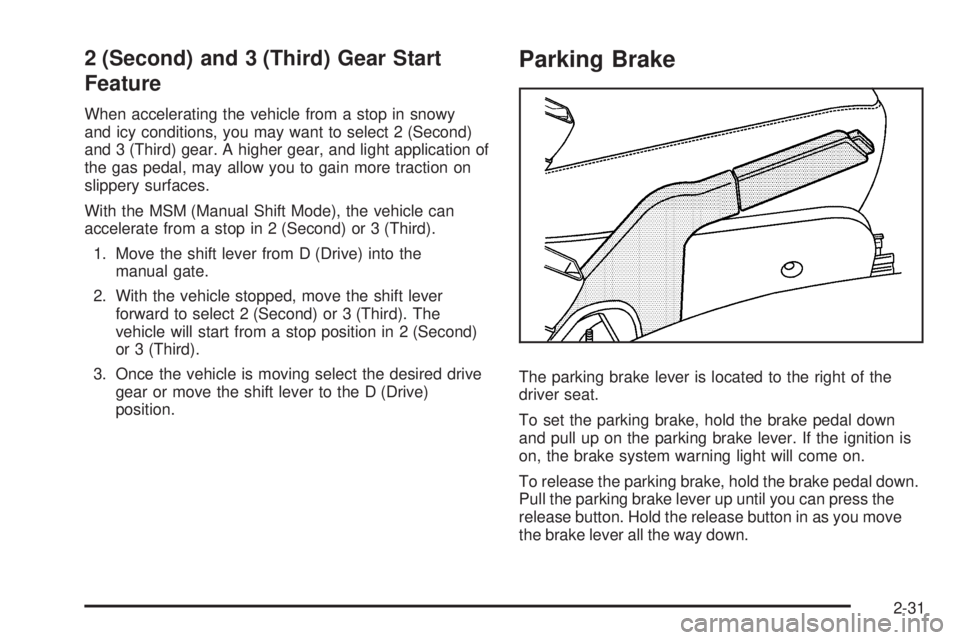
The parking brake lever is located to the right of the
driver seat.
To set the parking brake, hold the brake pedal down
and pull up on the parking brake lever. If the ignition is
on, the brake system warning light will come on.
To release the parking brake, hold the brake pedal down.
Pull the parking brake lever up until you can press the
release button. Hold the release button in as you move
the brake lever all the way down.
2-31
Page 108 of 436
Make sure to release the parking brake before driving
the vehicle.
If the parking brake is applied and the vehicle is moving
at least 4 mph (6 km/h), a chime will activate to
remind you to release the parking brake.
Notice:Driving with the parking brake on can
overheat the brake system and cause premature
wear or damage to brake system parts. Make sure
that the parking brake is fully released and the brake
warning light is off before driving.
Shifting Into Park
{CAUTION:
It can be dangerous to get out of the vehicle if
the shift lever is not fully in P (Park) with the
parking brake rmly set. The vehicle can roll.
CAUTION: (Continued)
CAUTION: (Continued)
If you have left the engine running, the vehicle can
move suddenly. You or others could be injured.
To be sure the vehicle will not move, even when
you are on fairly level ground, use the steps that
follow. If you are pulling a trailer, seeTowing a
Trailer on page 4-33.
1. Hold the brake pedal down and set the parking
brake. SeeParking Brake on page 2-31for more
information.
2. Move the shift lever into P (Park) by pressing the
button on the shift lever and pushing the lever all
the way toward the front of the vehicle.
3. Turn the ignition key to LOCK/OFF.
4. Remove the key and take it with you. If you can
leave the vehicle with the key, the vehicle is in
P (Park).
2-32
Page 125 of 436
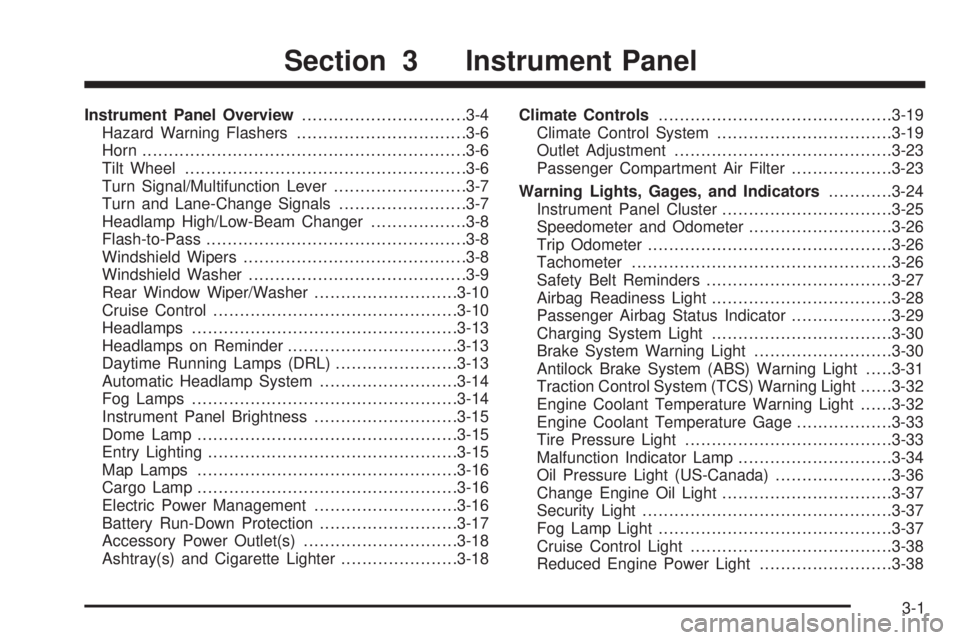
Instrument Panel Overview...............................3-4
Hazard Warning Flashers................................3-6
Horn .............................................................3-6
Tilt Wheel.....................................................3-6
Turn Signal/Multifunction Lever.........................3-7
Turn and Lane-Change Signals........................3-7
Headlamp High/Low-Beam Changer..................3-8
Flash-to-Pass.................................................3-8
Windshield Wipers..........................................3-8
Windshield Washer.........................................3-9
Rear Window Wiper/Washer...........................3-10
Cruise Control..............................................3-10
Headlamps..................................................3-13
Headlamps on Reminder................................3-13
Daytime Running Lamps (DRL).......................3-13
Automatic Headlamp System..........................3-14
Fog Lamps ..................................................3-14
Instrument Panel Brightness...........................3-15
Dome Lamp .................................................3-15
Entry Lighting...............................................3-15
Map Lamps .................................................3-16
Cargo Lamp.................................................3-16
Electric Power Management...........................3-16
Battery Run-Down Protection..........................3-17
Accessory Power Outlet(s).............................3-18
Ashtray(s) and Cigarette Lighter......................3-18Climate Controls............................................3-19
Climate Control System.................................3-19
Outlet Adjustment.........................................3-23
Passenger Compartment Air Filter...................3-23
Warning Lights, Gages, and Indicators............3-24
Instrument Panel Cluster................................3-25
Speedometer and Odometer...........................3-26
Trip Odometer..............................................3-26
Tachometer.................................................3-26
Safety Belt Reminders...................................3-27
Airbag Readiness Light..................................3-28
Passenger Airbag Status Indicator...................3-29
Charging System Light..................................3-30
Brake System Warning Light..........................3-30
Antilock Brake System (ABS) Warning Light.....3-31
Traction Control System (TCS) Warning Light......3-32
Engine Coolant Temperature Warning Light......3-32
Engine Coolant Temperature Gage..................3-33
Tire Pressure Light.......................................3-33
Malfunction Indicator Lamp.............................3-34
Oil Pressure Light (US-Canada)......................3-36
Change Engine Oil Light................................3-37
Security Light...............................................3-37
Fog Lamp Light............................................3-37
Cruise Control Light......................................3-38
Reduced Engine Power Light.........................3-38
Section 3 Instrument Panel
3-1
Page 135 of 436
Setting Cruise Control
{CAUTION:
If you leave your cruise control on when you are
not using cruise, you might hit a button and go into
cruise when you do not want to. You could be
startled and even lose control. Keep the cruise
control switch off until you want to use cruise
control.
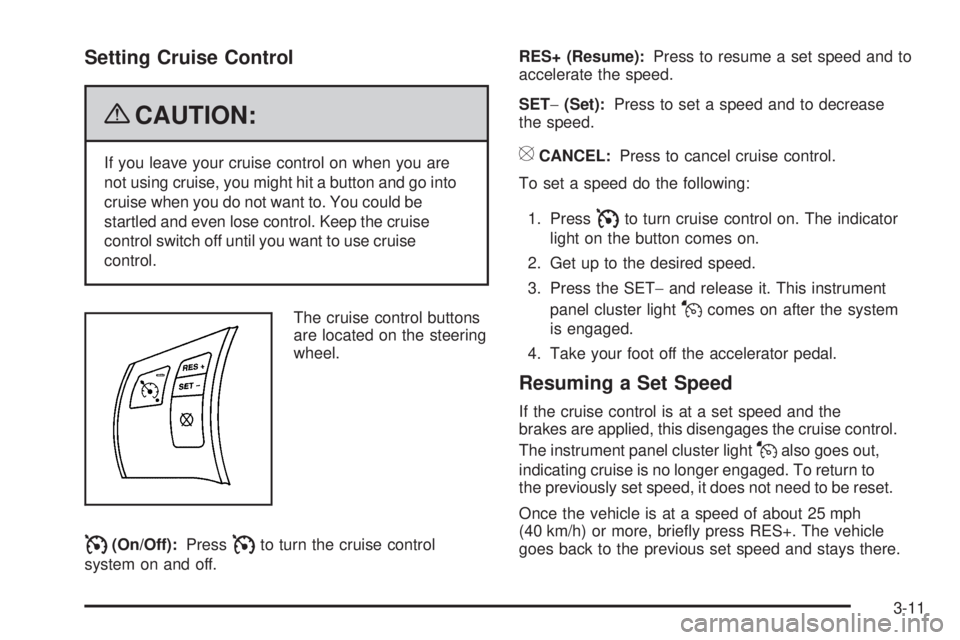
The cruise control buttons
are located on the steering
wheel.
I(On/Off):PressIto turn the cruise control
system on and off.RES+ (Resume):Press to resume a set speed and to
accelerate the speed.
SET−(Set):Press to set a speed and to decrease
the speed.
[CANCEL:Press to cancel cruise control.
To set a speed do the following:
1. Press
Ito turn cruise control on. The indicator
light on the button comes on.
2. Get up to the desired speed.
3. Press the SET−and release it. This instrument
panel cluster light
Jcomes on after the system
is engaged.
4. Take your foot off the accelerator pedal.
Resuming a Set Speed
If the cruise control is at a set speed and the
brakes are applied, this disengages the cruise control.
The instrument panel cluster light
Jalso goes out,
indicating cruise is no longer engaged. To return to
the previously set speed, it does not need to be reset.
Once the vehicle is at a speed of about 25 mph
(40 km/h) or more, briey press RES+. The vehicle
goes back to the previous set speed and stays there.
3-11
Page 136 of 436
Increasing Speed While Using Cruise
Control
There are two ways to go to a higher speed.
If the cruise control system is already engaged,
press and hold the RES+ button until the desired
speed is reached, then release it.
To increase the vehicle speed in small amounts,
briey press the RES+ and then release it.
Each time this is done, the vehicle goes about
1 mph (1.6 km/h) faster.
Reducing Speed While Using Cruise
Control
If the cruise control system is already engaged:
Push and hold the SET−until the desired lower
speed is reached, then release it.
To slow down in small amounts, briey press SET−.
Each time this is done, the vehicle goes about
1 mph (1.6 km/h) slower.
Passing Another Vehicle While Using
Cruise Control
Use the accelerator pedal to increase the vehicle’s
speed. When you take your foot off the pedal, the
vehicle slows down to the cruise control speed that
was set earlier.
Using Cruise Control on Hills
How well the cruise control works on hills depends upon
the vehicle’s speed, load, and the steepness of the hills.
When going up steep hills, you might have to step on the
accelerator pedal to maintain the vehicle’s speed. When
going downhill, you might have to brake or shift to a lower
gear to keep the vehicle at a lower speed. However,
when the brakes are applied the cruise control turns off.
Ending Cruise Control
There are three ways to end the cruise control:
Step lightly on the brake pedal.
Press theIbutton, to turn off the cruise control
system.
Press the[button.
When cruise control disengages, the cruise symbol
in the instrument panel cluster goes out.
Erasing Speed Memory
The cruise control set speed memory is erased when
the cruise control or the ignition is turned off.
3-12
Page 137 of 436

Headlamps
The exterior lamp control is located on the turn
signal/multifunction lever.
O(Exterior Lamp Control):Turn the control with this
symbol on it to operate the exterior lamps.
The exterior lamp control has the following positions:
AUTO (Off/Automatic Headlamps):Automatic
mode turns the exterior lamps on and off depending
upon how much light is available outside of the vehicle.
;(Parking Lamps):Turns on the parking lamps
together with the following:
Sidemarker Lamps
Taillamps
License Plate Lamps
Instrument Panel Lights
53(Headlamps):Turns on the headlamps, together
with the previously listed lamps and lights.
Headlamps on Reminder
If you open the driver’s door with the ignition off and the
lamps on, you will hear a warning chime.
Daytime Running Lamps (DRL)
Daytime Running Lamps (DRL) can make it easier for
others to see the front of your vehicle during the day.
Fully functional Daytime Running Lamps (DRL) are
required on all vehicles rst sold in Canada.
The DRL system will make the low-beam headlamps
come on at a reduced brightness in daylight when
the following conditions are met:
The ignition is on.
The exterior lamp band is in the automatic position.
The transmission is not in P (Park).
The light sensor determines it is daytime.
The parking brake is released.
When the DRL are on, the low-beam headlamps will be
on at a reduced brightness. The taillamps, sidemarker,
instrument panel lights and other lamps will not be on.
When the exterior lamp band is turned to the
headlamp position, the low-beam headlamps come on.
The other lamps that come on with the headlamps will
also come on.
When the headlamps are turned off, the regular lamps
will go off, and the low-beam headlamps come on
to the reduced brightness.
3-13
Page 154 of 436
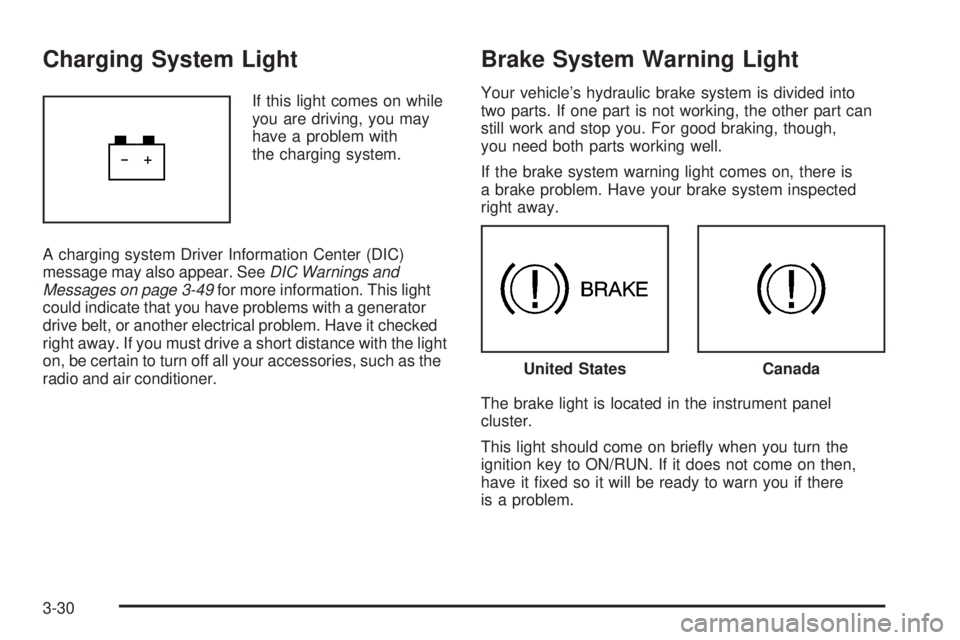
Charging System Light
If this light comes on while
you are driving, you may
have a problem with
the charging system.
A charging system Driver Information Center (DIC)
message may also appear. SeeDIC Warnings and
Messages on page 3-49for more information. This light
could indicate that you have problems with a generator
drive belt, or another electrical problem. Have it checked
right away. If you must drive a short distance with the light
on, be certain to turn off all your accessories, such as the
radio and air conditioner.
Brake System Warning Light
Your vehicle’s hydraulic brake system is divided into
two parts. If one part is not working, the other part can
still work and stop you. For good braking, though,
you need both parts working well.
If the brake system warning light comes on, there is
a brake problem. Have your brake system inspected
right away.
The brake light is located in the instrument panel
cluster.
This light should come on briey when you turn the
ignition key to ON/RUN. If it does not come on then,
have it xed so it will be ready to warn you if there
is a problem.
United StatesCanada
3-30