change time PONTIAC TORRENT 2009 Owners Manual
[x] Cancel search | Manufacturer: PONTIAC, Model Year: 2009, Model line: TORRENT, Model: PONTIAC TORRENT 2009Pages: 436, PDF Size: 2.43 MB
Page 2 of 436
GENERAL MOTORS, GM, the GM Emblem, PONTIAC,
the PONTIAC Emblem, and the name TORRENT are
registered trademarks of General Motors Corporation.
This manual includes the latest information at the time it
was printed. GM reserves the right to make changes after
that time without further notice. For vehicles rst sold in
Canada, substitute the name “General Motors of Canada
Limited” for Pontiac Division wherever it appears in this
manual.
This manual describes features that may or may not be
on your specic vehicle.
Read this manual from beginning to end to learn about
the vehicle’s features and controls. Pictures, symbols,
and words work together to explain vehicle operation.
Keep this manual in the vehicle for quick reference.
Canadian Owners
Canadian Owners
(Propriétaires Canadiens)
A French language copy of this manual can be obtained
from your dealer/retailer or from:
On peut obtenir un exemplaire de ce guide en français
auprès du concessionnaire ou à l’adresse suivante:
Helm, Incorporated
P.O. Box 07130
Detroit, MI 48207
1-800-551-4123
Numéro de poste 6438 de langue française
www.helminc.com
Index
To quickly locate information about the vehicle, use the
index in the back of the manual. It is an alphabetical
list of what is in the manual and the page number where
it can be found.
Litho in U.S.A.
Part No. 15910164 B Second Printing
©2008 General Motors Corporation. All Rights Reserved.
ii
Page 38 of 436
Infants and Young Children
Everyone in a vehicle needs protection! This includes
infants and all other children. Neither the distance
traveled nor the age and size of the traveler changes
the need, for everyone, to use safety restraints. In fact,
the law in every state in the United States and in every
Canadian province says children up to some age must
be restrained while in a vehicle.
{CAUTION:
Children can be seriously injured or strangled if a
shoulder belt is wrapped around their neck and
the safety belt continues to tighten. Never leave
children unattended in a vehicle and never allow
children to play with the safety belts.
Airbags plus lap-shoulder belts offer protection for adults
and older children, but not for young children and infants.
Neither the vehicle’s safety belt system nor its airbagsystem is designed for them. Every time infants and
young children ride in vehicles, they should have the
protection provided by appropriate child restraints.
Children who are not restrained properly can strike other
people, or can be thrown out of the vehicle.
{CAUTION:
Never do this.
Never hold an infant or a child while riding in a
vehicle. Due to crash forces, an infant or a child
will become so heavy it is not possible to hold it
during a crash. For example, in a crash at only
40 km/h (25 mph), a 5.5 kg (12 lb) infant will
suddenly become a 110 kg (240 lb) force on a
person’s arms. An infant should be secured in an
appropriate restraint.
1-34
Page 99 of 436
Notice:The engine is designed to work with the
electronics in the vehicle. If you add electrical parts
or accessories, you could change the way the engine
operates. Before adding electrical equipment, check
with your dealer/retailer. If you do not, the engine
might not perform properly. Any resulting damage
would not be covered by the vehicle warranty.
Engine Coolant Heater
The engine coolant heater can provide easier starting
and better fuel economy during engine warm-up in cold
weather conditions at or below 0°F (−18°C). Vehicles with
an engine coolant heater should be plugged in at least
four hours before starting. An internal thermostat in
the plug-end of the cord may exist which will prevent
engine coolant heater operation at temperatures above
0°F (−18°C).
To Use the Engine Coolant Heater
1. Turn off the engine.
2. Open the hood and unwrap the electrical cord.
The cord is located on the passenger side of the
engine compartment, near the radiator.
3. Plug it into a normal, grounded 110-volt AC outlet.
{CAUTION:
Plugging the cord into an ungrounded outlet could
cause an electrical shock. Also, the wrong kind of
extension cord could overheat and cause a re.
You could be seriously injured. Plug the cord into
a properly grounded three-prong 110-volt AC
outlet. If the cord will not reach, use a heavy-duty
three-prong extension cord rated for at least
15 amps.
4. Before starting the engine, be sure to unplug and
store the cord as it was before to keep it away
from moving engine parts, to prevent damage.
The length of time the heater should remain plugged in
depends on several factors. Ask a dealer/retailer in
the area where you will be parking the vehicle for the
best advice on this.
2-23
Page 125 of 436
Instrument Panel Overview...............................3-4
Hazard Warning Flashers................................3-6
Horn .............................................................3-6
Tilt Wheel.....................................................3-6
Turn Signal/Multifunction Lever.........................3-7
Turn and Lane-Change Signals........................3-7
Headlamp High/Low-Beam Changer..................3-8
Flash-to-Pass.................................................3-8
Windshield Wipers..........................................3-8
Windshield Washer.........................................3-9
Rear Window Wiper/Washer...........................3-10
Cruise Control..............................................3-10
Headlamps..................................................3-13
Headlamps on Reminder................................3-13
Daytime Running Lamps (DRL).......................3-13
Automatic Headlamp System..........................3-14
Fog Lamps ..................................................3-14
Instrument Panel Brightness...........................3-15
Dome Lamp .................................................3-15
Entry Lighting...............................................3-15
Map Lamps .................................................3-16
Cargo Lamp.................................................3-16
Electric Power Management...........................3-16
Battery Run-Down Protection..........................3-17
Accessory Power Outlet(s).............................3-18
Ashtray(s) and Cigarette Lighter......................3-18Climate Controls............................................3-19
Climate Control System.................................3-19
Outlet Adjustment.........................................3-23
Passenger Compartment Air Filter...................3-23
Warning Lights, Gages, and Indicators............3-24
Instrument Panel Cluster................................3-25
Speedometer and Odometer...........................3-26
Trip Odometer..............................................3-26
Tachometer.................................................3-26
Safety Belt Reminders...................................3-27
Airbag Readiness Light..................................3-28
Passenger Airbag Status Indicator...................3-29
Charging System Light..................................3-30
Brake System Warning Light..........................3-30
Antilock Brake System (ABS) Warning Light.....3-31
Traction Control System (TCS) Warning Light......3-32
Engine Coolant Temperature Warning Light......3-32
Engine Coolant Temperature Gage..................3-33
Tire Pressure Light.......................................3-33
Malfunction Indicator Lamp.............................3-34
Oil Pressure Light (US-Canada)......................3-36
Change Engine Oil Light................................3-37
Security Light...............................................3-37
Fog Lamp Light............................................3-37
Cruise Control Light......................................3-38
Reduced Engine Power Light.........................3-38
Section 3 Instrument Panel
3-1
Page 162 of 436
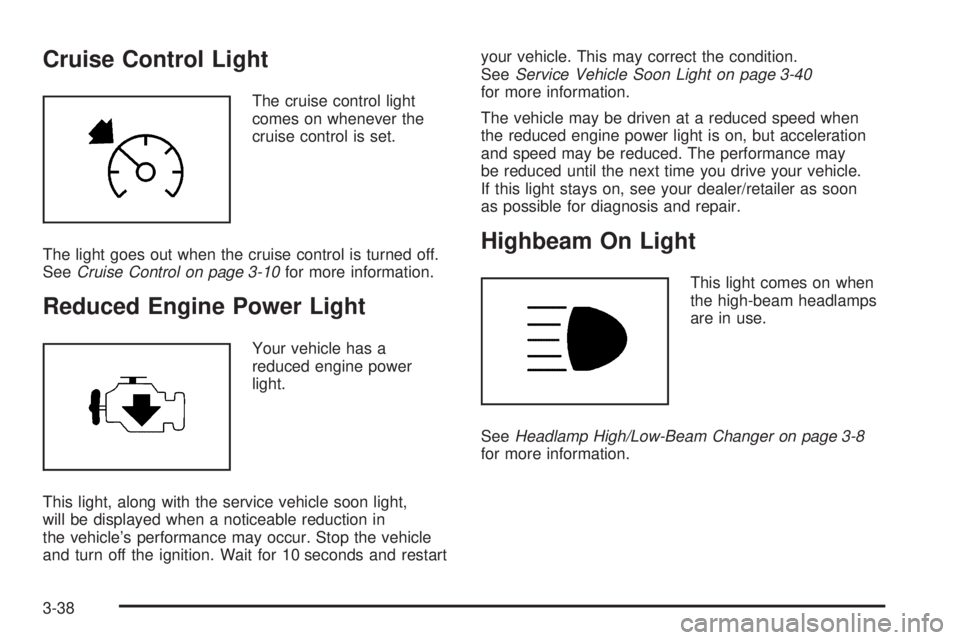
Cruise Control Light
The cruise control light
comes on whenever the
cruise control is set.
The light goes out when the cruise control is turned off.
SeeCruise Control on page 3-10for more information.
Reduced Engine Power Light
Your vehicle has a
reduced engine power
light.
This light, along with the service vehicle soon light,
will be displayed when a noticeable reduction in
the vehicle’s performance may occur. Stop the vehicle
and turn off the ignition. Wait for 10 seconds and restartyour vehicle. This may correct the condition.
SeeService Vehicle Soon Light on page 3-40
for more information.
The vehicle may be driven at a reduced speed when
the reduced engine power light is on, but acceleration
and speed may be reduced. The performance may
be reduced until the next time you drive your vehicle.
If this light stays on, see your dealer/retailer as soon
as possible for diagnosis and repair.
Highbeam On Light
This light comes on when
the high-beam headlamps
are in use.
SeeHeadlamp High/Low-Beam Changer on page 3-8
for more information.
3-38
Page 167 of 436
T(Vehicle Information):Press this button to
scroll through the vehicle information displays and
to personalize the feature settings on your vehicle.
See “Vehicle Information Menu Items” following and
DIC Vehicle Personalization on page 3-57for more
information on these displays.
V(Set/Reset):Press this button to set or reset certain
functions and to turn off or acknowledge messages
on the DIC.
Trip/Fuel Menu Items
3
(Trip/Fuel):Press this button to scroll through
the following displays:
ODOMETER
Press the trip/fuel button until ODOMETER displays.
This display shows the distance the vehicle has been
driven in either miles (mi) or kilometers (km). This display
will also show the outside air temperature in either
degrees Fahrenheit (°F) or degrees Celsius (°C).
To change the DIC display to English or metric units,
see “UNITS” later in this section.
TRIP
Press the trip/fuel button until TRIP displays. This
display shows the current distance traveled in either
miles (mi) or kilometers (km) since the last reset for the
trip odometer. This display will also show the outside
air temperature in either degrees Fahrenheit (°F)
or degrees Celsius (°C).
The trip odometer can be reset to zero by pressing the
set/reset button while the trip odometer is displayed.
AVG (Average) SPD (Speed)
Press the trip/fuel button until AVG (Average) SPD
(Speed) displays. This display shows the average speed
of the vehicle in miles per hour (mph) or kilometers per
hour (km/h). This average is calculated based on the
various vehicle speeds recorded since the last reset of
this value. To reset the value, press and hold the set/
reset button. The display will return to zero.
AVG (Average) ECON (Economy)
Press the trip/fuel button until AVG (Average)
ECON (Economy) displays. This display shows the
approximate average miles per gallon (mpg) or liters
per 100 kilometers (L/100 km). This number is calculated
based on the number of mpg (L/100 km) recorded since
the last time this menu item was reset. To reset this
display, press and hold the set/reset button. The display
will return to zero.
3-43
Page 169 of 436
Remember, you must reset the OIL LIFE yourself
after each oil change. It will not reset itself. Also, be
careful not to reset the OIL LIFE accidentally at any
time other than when the oil has just been changed.
It cannot be reset accurately until the next oil change.
To reset the engine oil life system, seeEngine Oil
Life System on page 5-18.
UNITS
Press the vehicle information button until UNITS
displays. This display allows you to select between
English or Metric units of measurement. Once in this
display, press the set/reset button to select between
ENGLISH or METRIC units.
FRONT TIRES or REAR TIRES
The pressure for each tire can be viewed in the DIC.
The tire pressure will be shown in either pounds per
square inch (psi) or kilopascals (kPa). Press the vehicle
information button until the DIC displays FRONT TIRES
PSI (kPa) LF ## RF ##. Press the vehicle information
button again until the DIC displays REAR TIRES PSI
(kPa) LR ## RR ##.
If a low or high tire pressure condition is detected by
the system while driving, a message advising you
to check the pressure in a specic tire will appear inthe display. SeeInflation - Tire Pressure on page 5-55
andDIC Warnings and Messages on page 3-49for
more information.
If the tire pressure display shows dashes instead of
a value, there may be a problem with your vehicle. If this
consistently occurs, see your dealer/retailer for service.
BATTERY
Press the vehicle information button until BATTERY
displays. This display shows the current battery voltage.
If the voltage is normal, the display will show NORMAL.
If the voltage is low or high, the display will show LOW or
HIGH. Your vehicle’s charging system regulates voltage
based on the state of the battery. The battery voltage
may uctuate when viewing this information on the DIC.
This is normal. SeeCharging System Light on page 3-30
for more information.
If there is a problem with the battery charging system,
the DIC will display SERVICE BATTERY CHARGING
SYSTEM. See “SERVICE BATTERY CHARGING
SYSTEM” underDIC Warnings and Messages on
page 3-49. Also, seeElectric Power Management
on page 3-16for more information.
3-45
Page 170 of 436
LEARN REMOTE KEY
This display allows you to match Remote Keyless
Entry (RKE) transmitters to your vehicle. To match
an RKE transmitter to your vehicle:
1. Make sure the vehicle is in P (Park).
2. Press the vehicle information button until LEARN
REMOTE KEY PRESS
VTO BEGIN displays.
3. Press the set/reset button until REMOTE KEY
LEARNING ACTIVE is displayed.
4. Press and hold the lock and unlock buttons on
the rst transmitter at the same time for about
15 seconds.
A chime will sound indicating that the transmitter is
matched.
5. To match additional transmitters at this time, repeat
Step 3.
Each vehicle can have a maximum of four
transmitters matched to it.
6. To exit the programming mode, you must cycle the
key to LOCK/OFF.
CALIBRATE COMPAS (Compass)
Your vehicle may have this feature. The compass can
be manually calibrated. To calibrate the compass
through the DIC, seeDIC Compass on page 3-47.
CHANGE COMPASS ZONE
Your vehicle may have this feature. To change the
compass zone through the DIC, seeDIC Compass
on page 3-47.
Blank Display
This display shows no information.
FEATURE SETTNGS (Settings):
PRESS
VTO SELCT (Select)
This display allows you to personalize the feature
settings on your vehicle. SeeDIC Vehicle Personalization
on page 3-57for more information.
3-46
Page 174 of 436
CALIBRATING: DRIVE IN CIRCLES
This message displays when calibrating the compass.
Drive the vehicle in circles at less than 5 mph (8 km/h)
to complete the calibration. SeeDIC Compass on
page 3-47for more information.
CALIBRATION COMPLETE
This message displays when the compass calibration
is complete. SeeDIC Compass on page 3-47for
more information.
CHANGE ENGINE OIL SOON
This message displays and the Change Engine Oil Light
in the instrument panel cluster turns on when service
is required for the vehicle. See your dealer/retailer.
SeeChange Engine Oil Light on page 3-37,Engine Oil
on page 5-15andScheduled Maintenance on page 6-4
for more information.
Acknowledging this message will not reset the OIL LIFE
REMAINING display. That must be done at the OIL LIFE
screen under the vehicle information menu. See “OIL
LIFE” underDIC Operation and Displays on page 3-42
andEngine Oil Life System on page 5-18for more
information.
CHECK TIRE PRESSURE
This message displays when the pressure in one
or more of the vehicle’s tires needs to be checked.
This message also displays LEFT FRONT, RIGHT FRNT
(Front), LEFT REAR, or RIGHT REAR to indicate which
tire needs to be checked. You can receive more than
one tire pressure message at a time. To read the other
messages that may have been sent at the same time,
press the set/reset button. If a tire pressure message
appears on the DIC, stop as soon as you can. Have the
tire pressures checked and set to those shown on the
Tire Loading Information label. SeeTires on page 5-48,
Loading the Vehicle on page 4-20, andInflation - Tire
Pressure on page 5-55. The DIC also shows the tire
pressure values. SeeDIC Operation and Displays on
page 3-42. If the tire pressure is low, the low tire pressure
warning light comes on. SeeTire Pressure Light on
page 3-33.
DRIVER DOOR OPEN
This message displays when the driver door is not
closed properly. Close the door completely.
3-50
Page 185 of 436
EXIT LIGHTNG (Lighting)
This feature allows you to select the amount of time you
want the exterior lamps to remain on when it is dark
enough outside. This happens after the key is turned
from ON/RUN to LOCK/OFF.
Press the vehicle information button until EXIT
LIGHTNG (Lighting) appears on the DIC display.
Press the set/reset button to access the settings
for this feature. Then press the vehicle information
button to scroll through the following settings:
OFF:The exterior lamps will not turn on.
30 SECONDS (default):The exterior lamps will stay on
for 30 seconds.
1 MINUTE:The exterior lamps will stay on for
one minute.
2 MINUTES:The exterior lamps will stay on for
two minutes.
NO CHANGE:No change will be made to this feature.
The current setting will remain.
To select a setting, press the set/reset button while the
desired setting is displayed on the DIC.
APPRCH (Approach) LIGHTNG (Lighting)
This feature allows you to select whether or not to
have the exterior lights turn on briey during low light
periods after unlocking the vehicle using the RKE
transmitter.
Press the vehicle information button until APPRCH
(Approach) LIGHTNG (Lighting) appears on the DIC
display. Press the set/reset button to access the settings
for this feature. Then press the vehicle information button
to scroll through the following settings:
OFF:The exterior lights will not turn on when you
unlock the vehicle with the RKE transmitter.
ON (default):If it is dark enough outside, the exterior
lights will turn on briey when you unlock the vehicle
with the RKE transmitter.
The lights will remain on for 20 seconds or until the lock
button on the RKE transmitter is pressed, or the vehicle is
no longer off. SeeRemote Keyless Entry (RKE) System
Operation on page 2-5for more information.
NO CHANGE:No change will be made to this feature.
The current setting will remain.
To select a setting, press the set/reset button while the
desired setting is displayed on the DIC.
3-61