audio PONTIAC VIBE 2006 Owner's Manual
[x] Cancel search | Manufacturer: PONTIAC, Model Year: 2006, Model line: VIBE, Model: PONTIAC VIBE 2006Pages: 388, PDF Size: 2.48 MB
Page 184 of 388

Playing a CD
If the ignition or radio is turned off, with a CD in the
player, it will stay in the player. When the ignition
or radio is turned on, the CD will start playing where it
stopped, if it was the last selected audio source.
When a CD is inserted, the CD symbol will appear on
the CD. As each new track starts to play, the track
number will appear on the display.
The CD player can play the smaller 3 inch (8 cm) single
CDs with an adapter ring. Full-size CDs and the
smaller CDs are loaded in the same manner.
If playing a CD-R, the sound quality may be reduced
due to CD-R quality, the method of recording, the quality
of the music that has been recorded, and the way the
CD-R has been handled. There may be an increase
in skipping, difficulty in nding tracks, and/or difficulty in
loading and ejecting. If these problems occur, check
the bottom surface of the CD. If the surface of the CD is
damaged, such as cracked, broken, or scratched, the
CD will not play properly. If the surface of the CD
is soiled, seeCare of Your CDs on page 3-78for
more information.
If there is no apparent damage, try a known good CD.Do not add any label to a CD, it could get caught in the
CD player. If a CD is recorded on a personal computer
and a description label is needed, try labeling the top of
the recorded CD with a marking pen instead.
Notice:If you add any label to a CD, insert more
than one CD into the slot at a time, or attempt
to play scratched or damaged CDs, you could
damage the CD player. When using the CD player,
use only CDs in good condition without any
label, load one CD at a time, and keep the CD player
and the loading slot free of foreign materials,
liquids, and debris.
If an error appears on the display, see “CD Messages”
later in this section.
LOAD CD
Z:Press the LOAD side of this button to
load CDs into the CD player. This CD player will
hold up to six CDs.
To insert one CD, do the following:
1. Turn the ignition on.
2. Press and release the LOAD button.
3. Wait for the indicator light, located to the right of the
slot, to turn green.
4. Load a CD. Insert the CD partway into the slot,
label side up. The player will pull the CD in.
3-72
Page 228 of 388
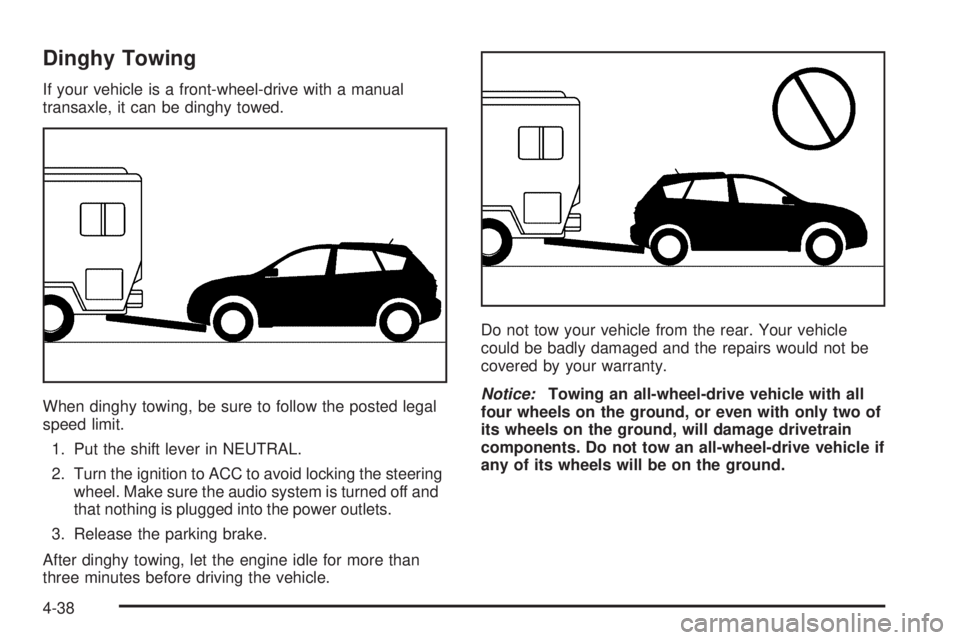
Dinghy Towing
If your vehicle is a front-wheel-drive with a manual
transaxle, it can be dinghy towed.
When dinghy towing, be sure to follow the posted legal
speed limit.
1. Put the shift lever in NEUTRAL.
2. Turn the ignition to ACC to avoid locking the steering
wheel. Make sure the audio system is turned off and
that nothing is plugged into the power outlets.
3. Release the parking brake.
After dinghy towing, let the engine idle for more than
three minutes before driving the vehicle.Do not tow your vehicle from the rear. Your vehicle
could be badly damaged and the repairs would not be
covered by your warranty.
Notice:Towing an all-wheel-drive vehicle with all
four wheels on the ground, or even with only two of
its wheels on the ground, will damage drivetrain
components. Do not tow an all-wheel-drive vehicle if
any of its wheels will be on the ground.
4-38
Page 329 of 388
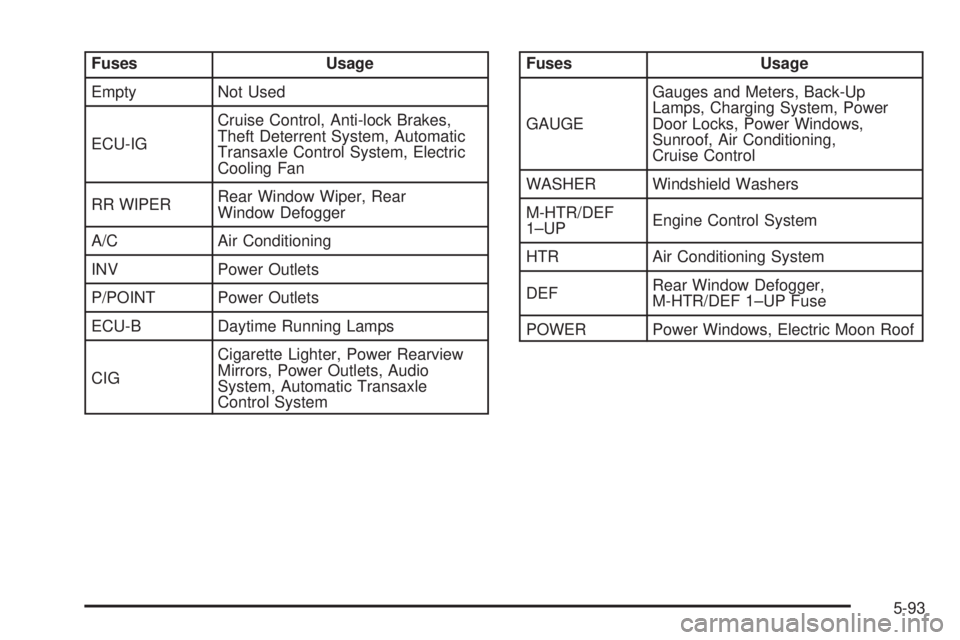
Fuses Usage
Empty Not Used
ECU-IGCruise Control, Anti-lock Brakes,
Theft Deterrent System, Automatic
Transaxle Control System, Electric
Cooling Fan
RR WIPERRear Window Wiper, Rear
Window Defogger
A/C Air Conditioning
INV Power Outlets
P/POINT Power Outlets
ECU-B Daytime Running Lamps
CIGCigarette Lighter, Power Rearview
Mirrors, Power Outlets, Audio
System, Automatic Transaxle
Control SystemFuses Usage
GAUGEGauges and Meters, Back-Up
Lamps, Charging System, Power
Door Locks, Power Windows,
Sunroof, Air Conditioning,
Cruise Control
WASHER Windshield Washers
M-HTR/DEF
1–UPEngine Control System
HTR Air Conditioning System
DEFRear Window Defogger,
M-HTR/DEF 1–UP Fuse
POWER Power Windows, Electric Moon Roof
5-93
Page 331 of 388

Fuses Usage
DOMEInterior Lights, Gauges and Meters,
Audio System, Remote Keyless
Entry System, Navigation System
(If Equipped)
MAIN Starter System, AM2 Fuse
AMP Audio System
MAYDAY OnStar
®System
ALTABS NO.1, ABS NO.2, RDI FAN,
FOG, Heater, AM1, POWER,
DOOR, ECU-B, TAIL, STOP,
P/POINT, INV, OBD Fuses,
Charging System
HEAD RHRight-hand Headlamp, Headlamp
High Beam Indicator Lamp
HEAD LH Left-hand Headlamp
Relays Usage
M/G M/G
HEAD Headlamps
DIMMER Headlamp Dimmer
HORN Horn
FAN NO. 2 Cooling Fan System
FAN NO. 1 Cooling Fan System
EFI Electronic Fuel Injection System
FOG Fog Lamps
5-95
Page 375 of 388
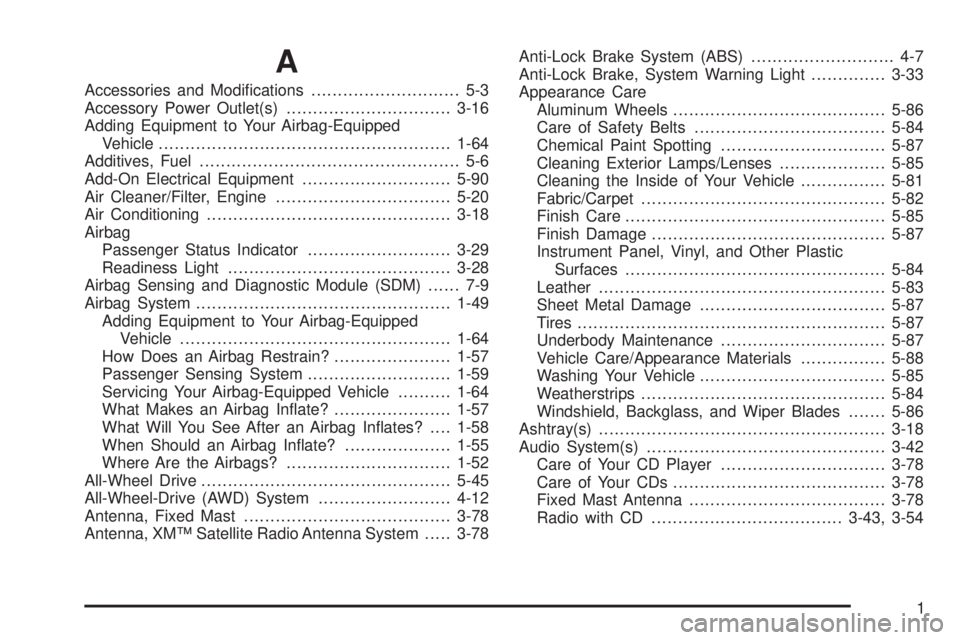
A
Accessories and Modications............................ 5-3
Accessory Power Outlet(s)...............................3-16
Adding Equipment to Your Airbag-Equipped
Vehicle.......................................................1-64
Additives, Fuel................................................. 5-6
Add-On Electrical Equipment............................5-90
Air Cleaner/Filter, Engine.................................5-20
Air Conditioning..............................................3-18
Airbag
Passenger Status Indicator...........................3-29
Readiness Light..........................................3-28
Airbag Sensing and Diagnostic Module (SDM)...... 7-9
Airbag System................................................1-49
Adding Equipment to Your Airbag-Equipped
Vehicle...................................................1-64
How Does an Airbag Restrain?......................1-57
Passenger Sensing System...........................1-59
Servicing Your Airbag-Equipped Vehicle..........1-64
What Makes an Airbag Inate?......................1-57
What Will You See After an Airbag Inates?....1-58
When Should an Airbag Inate?....................1-55
Where Are the Airbags?...............................1-52
All-Wheel Drive...............................................5-45
All-Wheel-Drive (AWD) System.........................4-12
Antenna, Fixed Mast.......................................3-78
Antenna, XM™ Satellite Radio Antenna System.....3-78Anti-Lock Brake System (ABS)........................... 4-7
Anti-Lock Brake, System Warning Light..............3-33
Appearance Care
Aluminum Wheels........................................5-86
Care of Safety Belts....................................5-84
Chemical Paint Spotting...............................5-87
Cleaning Exterior Lamps/Lenses....................5-85
Cleaning the Inside of Your Vehicle................5-81
Fabric/Carpet..............................................5-82
Finish Care.................................................5-85
Finish Damage............................................5-87
Instrument Panel, Vinyl, and Other Plastic
Surfaces.................................................5-84
Leather......................................................5-83
Sheet Metal Damage...................................5-87
Tires..........................................................5-87
Underbody Maintenance...............................5-87
Vehicle Care/Appearance Materials................5-88
Washing Your Vehicle...................................5-85
Weatherstrips..............................................5-84
Windshield, Backglass, and Wiper Blades.......5-86
Ashtray(s)......................................................3-18
Audio System(s).............................................3-42
Care of Your CD Player...............................3-78
Care of Your CDs........................................3-78
Fixed Mast Antenna.....................................3-78
Radio with CD....................................3-43, 3-54
1
Page 376 of 388

Audio System(s) (cont.)
Radio with Six-Disc CD................................3-66
Setting the Time..........................................3-43
Understanding Radio Reception.....................3-77
XM™ Satellite Radio Antenna System............3-78
Automatic Headlamp System............................3-14
Automatic Transaxle
Fluid..........................................................5-21
Operation...................................................2-18
B
Battery..........................................................5-40
Before Leaving on a Long Trip.........................4-22
Brake
Anti-Lock Brake System (ABS)........................ 4-7
Emergencies................................................ 4-9
Panic Assist................................................4-11
Parking......................................................2-24
System Inspection.......................................6-18
System Warning Light..................................3-32
Brakes..........................................................5-37
Braking........................................................... 4-6
Braking in Emergencies..................................... 4-9
Break-In, New Vehicle.....................................2-14
Bulb Replacement...........................................5-46
Back-Up Lamps...........................................5-50
Center High-Mounted Stoplamp (CHMSL)........5-48
Halogen Bulbs............................................5-46Bulb Replacement (cont.)
Headlamps, Front Turn Signal, and
Parking Lamps.........................................5-46
Replacement Bulbs......................................5-51
Taillamps, Turn Signal, and Stoplamps............5-49
Buying New Tires...........................................5-64
C
California Fuel.................................................. 5-6
California Proposition 65 Warning....................... 5-3
Canadian Owners................................................ ii
Capacities and Specications............................5-96
Carbon Monoxide.....................2-9, 2-28, 4-26, 4-40
Care of
Safety Belts................................................5-84
Your CD Player...........................................3-78
Your CDs ...................................................3-78
Cargo Cover..................................................2-36
Cargo Tie Downs............................................2-37
Center Console Storage Area...........................2-34
Center High-Mounted Stoplamp (CHMSL)...........5-48
Chains, Tire...................................................5-68
Charging System Light....................................3-31
Check
Engine Light...............................................3-35
Checking Things Under the Hood......................5-10
Chemical Paint Spotting...................................5-87
2