reset PONTIAC VIBE 2007 User Guide
[x] Cancel search | Manufacturer: PONTIAC, Model Year: 2007, Model line: VIBE, Model: PONTIAC VIBE 2007Pages: 432, PDF Size: 2.54 MB
Page 199 of 432
Finding a Station
AM/FM:Press this button to switch between FM1,
FM2, or AM. The selection displays.
TUNE:Turn this knob to select radio stations.
sSEEKt:Press the right or the left arrow to go
to the next or to the previous station and stay there.
The radio only seeks stations with a strong signal
that are in the selected band.
sSCANt:Press and hold either SCAN arrow
for two seconds until SC displays and a beep
sounds. The radio goes to a station, plays for a
few seconds, then goes to the next station. Press
either SCAN arrow again to stop scanning.
To scan preset stations, press and hold either
SCAN arrow for more than four seconds. PRESET
SCAN displays and a double beep sounds. The
radio goes to a preset station stored on the
pushbuttons, plays for a few seconds, then goes
to the next preset station. Press either SCAN
arrow again to stop scanning presets.
The radio only scans stations with a strong signal
that are in the selected band.
Setting Preset Stations
Up to 18 stations (six FM1, six FM2, and six AM),
can be programmed on the six numbered
pushbuttons, by performing the following steps:
1. Turn the radio on.
2. Press AM/FM to select FM1, FM2, or AM.
3. Tune in the desired station.
4. Press and hold one of the six numbered
pushbuttons until a beep sounds. When
that numbered pushbutton is pressed, the
station that was set, returns and the
equalization that was selected, is stored for
that pushbutton.
5. Repeat the steps for each pushbutton.
199
Page 202 of 432
To use the PTY interrupt feature, press and hold
the P-TYPE button until a beep sounds on the
PTY you want to interrupt with. When selected, an
asterisk displays beside that PTY on the display.
Select multiple interrupts if desired. When listening
to a CD, the last selected RDS station interrupts
play if that selected program type format is
broadcast.
sSCANt:Scan the stations within a PTY by
performing the following:
1. Press the P-TYPE button to activate program
type select mode. P-TYPE and the last
selected PTY displays.
2. Turn the P-TYPE knob to select a PTY.
3. Once the desired PTY is displayed, press and
hold either SCAN arrow, and the radio begins
scanning the stations in the PTY.
4. Press either SCAN arrow to stop at a station.
If both PTY and TRAF are on, the radio scans
for stations with the selected PTY and traffic
announcements.Alternate Frequency:Alternate frequency
allows the radio to switch to a stronger FM station
with the same program type. To turn alternate
frequency on, press and hold AM/FM for
two seconds. AF ON displays. The radio can
switch to FM stations with a stronger frequency.
To turn alternate frequency off, press and hold
AM/FM again for two seconds. AF OFF displays.
The radio does not switch to stronger FM stations.
Setting Preset PTYs
These pushbuttons have factory PTY presets. Up
to 12 PTYs (six FM1 and six FM2), can be
programmed on the six numbered pushbuttons, by
performing the following steps:
1. Press AM/FM to select FM1 or FM2.
2. Press the P-TYPE button to activate program
type select mode. P-TYPE and the last
selected PTY displays.
3. Turn the P-TYPE knob to select a PTY.
4. Press and hold one of the six numbered
pushbuttons until a beep sounds. When
that numbered pushbutton is pressed, the PTY
that was set, returns.
5. Repeat the steps for each pushbutton.
202
Page 206 of 432
Do not repeatedly press the CD eject button to
eject a CD after trying to push it in manually. The
player’s 25-second eject timer resets at each
press of eject, causing the player to not eject the
CD until the 25-second time period has elapsed.
Once the player stops and the CD is ejected,
remove the CD. After removing the CD, push the
PWR knob off and then on again, or wait for
the system to reset. This clears the CD-sensing
feature and enables CDs to be loaded into
the player again.
{REV (Reverse):Press and hold this button to
reverse quickly within a track. Sound is heard
at a reduced volume. Release this button to play
the passage. The elapsed time of the track
displays.
FWD
|(Forward):Press and hold this button to
advance quickly within a track. Sound is heard
at a reduced volume. Release this button to play
the passage. The elapsed time of the track
displays.RPT (Repeat):With the repeat setting, one track
or an entire CD can be repeated.
To use repeat, do the following:
To repeat the track you are listening to, press
and release the RPT button. RPT displays.
Press RPT again to turn off repeat play.
To repeat the CD you are listening to, press
and hold the RPT button for two seconds.
RPT displays. Press RPT again to turn
off repeat play.
RDM (Random):With the random setting, the
tracks can be listened to in random order, rather
than sequential order, on one CD or on all of
the CDs.
To use random, do one of the following:
To play the tracks on the CD in random order,
press and release the RDM button. RANDOM
ONE displays. Press RDM again to turn off
random play.
To play the tracks on all of the CDs that are
loaded in random order, press and hold RDM
for more than two seconds. A beep sounds and
RANDOM ALL displays. Press RDM again to
turn off random play.
206
Page 216 of 432
XM Radio Messages
Radio Display Message Condition Action Required
XL (Explicit Language
Channels)XL on the radio display,
after the channel name,
indicates content with
explicit language.These channels, or any others, can be blocked at a
customer’s request, by calling 1-800-852-XMXM (9696).
Updating Updating encryption code The encryption code in the receiver is being updated, and
no action is required. This process should take no longer
than 30 seconds.
No Signal Loss of signal The system is functioning correctly, but the vehicle is in a
location that is blocking the XM™ signal. When the vehicle
moves into an open area, the signal should return.
Loading XM Acquiring channel audio
(after a four second delay)The audio system is acquiring and processing audio and text
data. No action is needed. This message should disappear
shortly.
CH Off Air Channel not in service This channel is not currently in service. Tune to another
channel.
CH Unavail Channel no longer
availableThis previously assigned channel is no longer assigned. Tune
to another station. If this station was one of the presets,
choose another station for that preset button.
No Info Artist Name/Feature
not availableNo artist information is available at this time on this channel.
The system is working properly.
216
Page 331 of 432
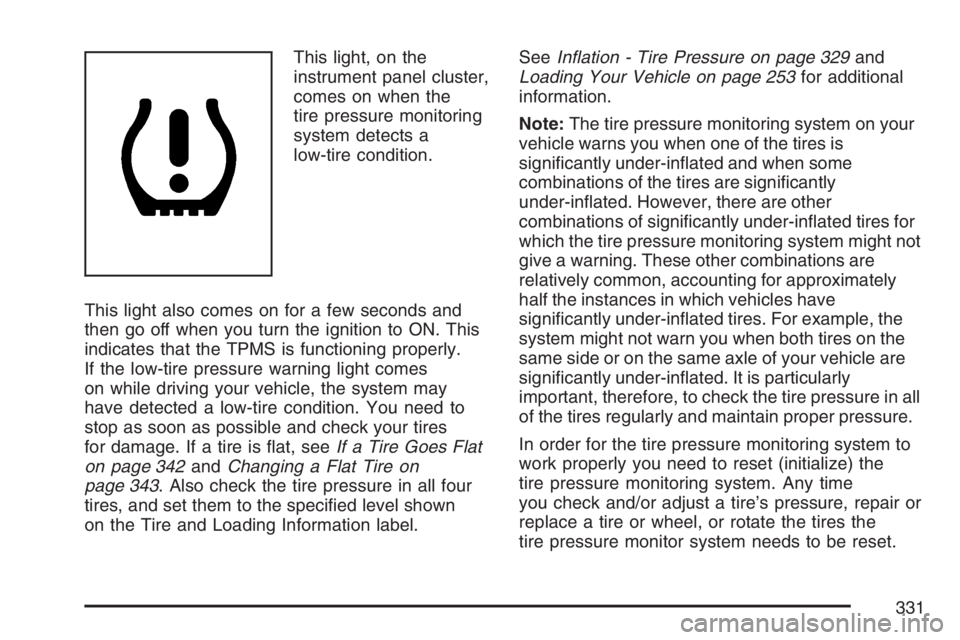
This light, on the
instrument panel cluster,
comes on when the
tire pressure monitoring
system detects a
low-tire condition.
This light also comes on for a few seconds and
then go off when you turn the ignition to ON. This
indicates that the TPMS is functioning properly.
If the low-tire pressure warning light comes
on while driving your vehicle, the system may
have detected a low-tire condition. You need to
stop as soon as possible and check your tires
for damage. If a tire is at, seeIf a Tire Goes Flat
on page 342andChanging a Flat Tire on
page 343. Also check the tire pressure in all four
tires, and set them to the specied level shown
on the Tire and Loading Information label.SeeInation - Tire Pressure on page 329and
Loading Your Vehicle on page 253for additional
information.
Note:The tire pressure monitoring system on your
vehicle warns you when one of the tires is
signicantly under-inated and when some
combinations of the tires are signicantly
under-inated. However, there are other
combinations of signicantly under-inated tires for
which the tire pressure monitoring system might not
give a warning. These other combinations are
relatively common, accounting for approximately
half the instances in which vehicles have
signicantly under-inated tires. For example, the
system might not warn you when both tires on the
same side or on the same axle of your vehicle are
signicantly under-inated. It is particularly
important, therefore, to check the tire pressure in all
of the tires regularly and maintain proper pressure.
In order for the tire pressure monitoring system to
work properly you need to reset (initialize) the
tire pressure monitoring system. Any time
you check and/or adjust a tire’s pressure, repair or
replace a tire or wheel, or rotate the tires the
tire pressure monitor system needs to be reset.
331
Page 332 of 432
Do not reset (initialize) the system without rst
correcting the cause of the low-tire condition. If the
system is reset when the tire pressures are
incorrect, the system will not function properly and
might not alert you when a tire is low.
To reset (initialize) the system:
1. Park the vehicle at a safe place and apply the
parking brake. Turn the engine off.
2. Turn the ignition to ON with the engine off.
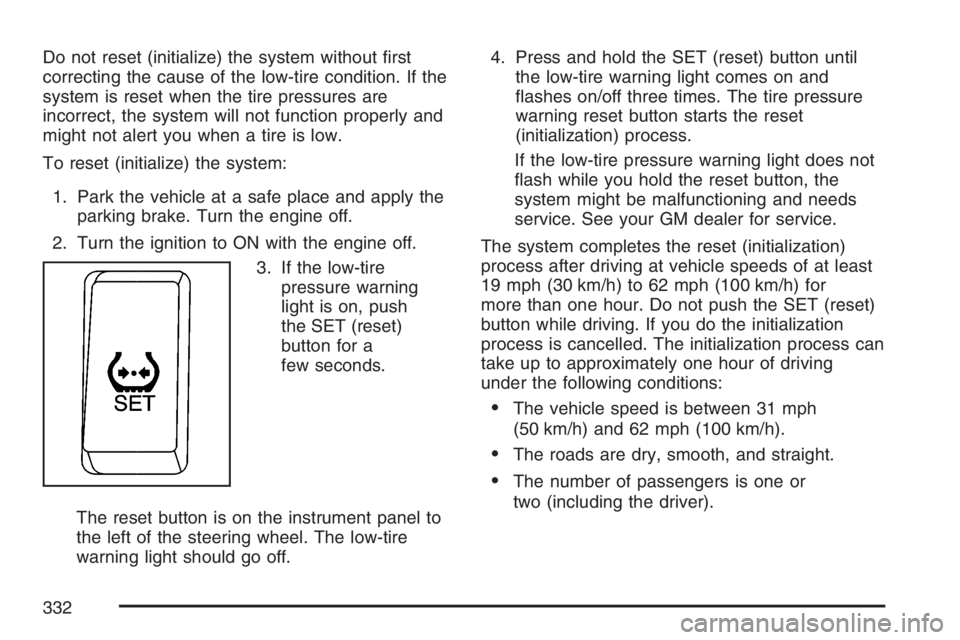
3. If the low-tire
pressure warning
light is on, push
the SET (reset)
button for a
few seconds.
The reset button is on the instrument panel to
the left of the steering wheel. The low-tire
warning light should go off.4. Press and hold the SET (reset) button until
the low-tire warning light comes on and
ashes on/off three times. The tire pressure
warning reset button starts the reset
(initialization) process.
If the low-tire pressure warning light does not
ash while you hold the reset button, the
system might be malfunctioning and needs
service. See your GM dealer for service.
The system completes the reset (initialization)
process after driving at vehicle speeds of at least
19 mph (30 km/h) to 62 mph (100 km/h) for
more than one hour. Do not push the SET (reset)
button while driving. If you do the initialization
process is cancelled. The initialization process can
take up to approximately one hour of driving
under the following conditions:
The vehicle speed is between 31 mph
(50 km/h) and 62 mph (100 km/h).
The roads are dry, smooth, and straight.
The number of passengers is one or
two (including the driver).
332
Page 333 of 432
The low-tire pressure warning light may not come
on even if the tire ination pressure is low, or it
could come on when the tire ination pressure is
set correctly under the following circumstances:
A compact spare tire, snow tires, or tire chains
are installed on your vehicle.
The tires are over-inated, or the tire ination
pressure suddenly drops due to a tire bursting
or other causes.
The vehicle is driven on a slippery road
surface such as rough or frozen roads.
The vehicle speed is less than
19 mph (30 km/h), and the driving duration is
less than ve minutes.
The tires are made by a different manufacturer
or differ in tread pattern than the original
equipment tires.
Rapid acceleration/deceleration or multiple
consecutive sharp turns.
Towing a trailer.
The vehicle is loaded over the limit or not
balanced properly.
The initialization (reset) procedure was not
performed correctly after replacing or
rotating tires or wheels.
The outside temperature is below 32°F (0°C)
or above 104°F (40°C).
Tire Inspection and Rotation
Tires should be rotated every 5,000 to 8,000 miles
(8 000 to 13 000 km).
Any time you notice unusual wear, rotate your
tires as soon as possible and check wheel
alignment. Also check for damaged tires or wheels.
SeeWhen It Is Time for New Tires on page 335
andWheel Replacement on page 340for
more information.
The purpose of regular rotation is to achieve
more uniform wear for all tires on the vehicle.
The rst rotation is the most important. See
Part A: Scheduled Maintenance Services on
page 376for scheduled rotation intervals.
333
Page 334 of 432
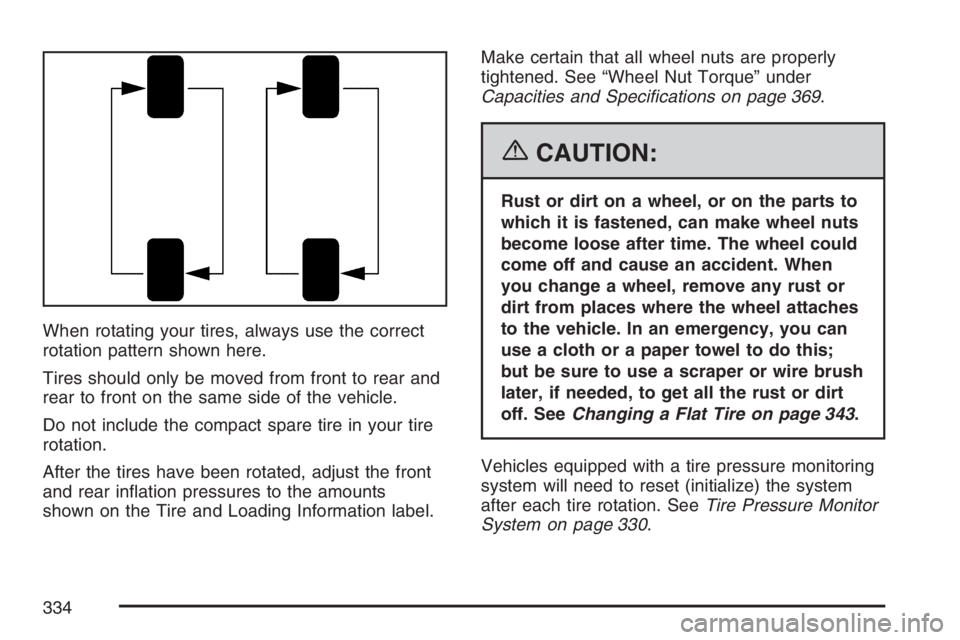
When rotating your tires, always use the correct
rotation pattern shown here.
Tires should only be moved from front to rear and
rear to front on the same side of the vehicle.
Do not include the compact spare tire in your tire
rotation.
After the tires have been rotated, adjust the front
and rear ination pressures to the amounts
shown on the Tire and Loading Information label.Make certain that all wheel nuts are properly
tightened. See “Wheel Nut Torque” under
Capacities and Specications on page 369.
{CAUTION:
Rust or dirt on a wheel, or on the parts to
which it is fastened, can make wheel nuts
become loose after time. The wheel could
come off and cause an accident. When
you change a wheel, remove any rust or
dirt from places where the wheel attaches
to the vehicle. In an emergency, you can
use a cloth or a paper towel to do this;
but be sure to use a scraper or wire brush
later, if needed, to get all the rust or dirt
off. SeeChanging a Flat Tire on page 343.
Vehicles equipped with a tire pressure monitoring
system will need to reset (initialize) the system
after each tire rotation. SeeTire Pressure Monitor
System on page 330.
334