radio PONTIAC VIBE 2007 Service Manual
[x] Cancel search | Manufacturer: PONTIAC, Model Year: 2007, Model line: VIBE, Model: PONTIAC VIBE 2007Pages: 432, PDF Size: 2.54 MB
Page 216 of 432
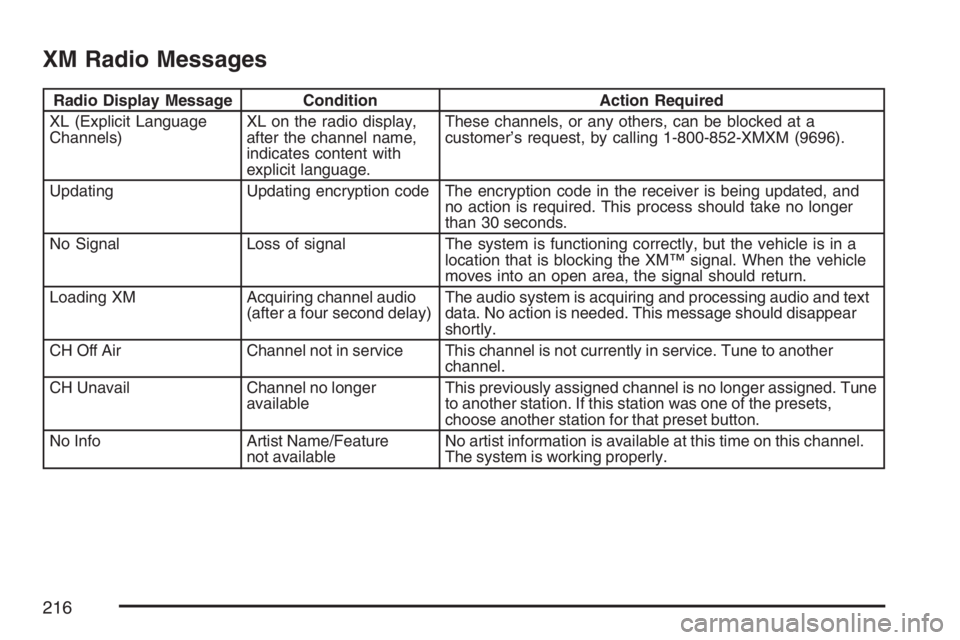
XM Radio Messages
Radio Display Message Condition Action Required
XL (Explicit Language
Channels)XL on the radio display,
after the channel name,
indicates content with
explicit language.These channels, or any others, can be blocked at a
customer’s request, by calling 1-800-852-XMXM (9696).
Updating Updating encryption code The encryption code in the receiver is being updated, and
no action is required. This process should take no longer
than 30 seconds.
No Signal Loss of signal The system is functioning correctly, but the vehicle is in a
location that is blocking the XM™ signal. When the vehicle
moves into an open area, the signal should return.
Loading XM Acquiring channel audio
(after a four second delay)The audio system is acquiring and processing audio and text
data. No action is needed. This message should disappear
shortly.
CH Off Air Channel not in service This channel is not currently in service. Tune to another
channel.
CH Unavail Channel no longer
availableThis previously assigned channel is no longer assigned. Tune
to another station. If this station was one of the presets,
choose another station for that preset button.
No Info Artist Name/Feature
not availableNo artist information is available at this time on this channel.
The system is working properly.
216
Page 217 of 432
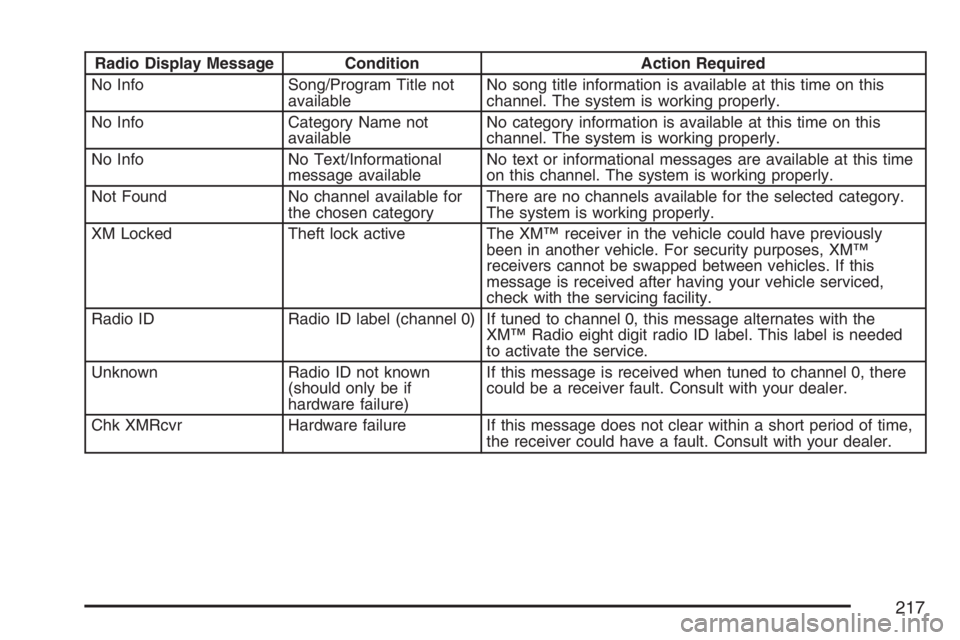
Radio Display Message Condition Action Required
No Info Song/Program Title not
availableNo song title information is available at this time on this
channel. The system is working properly.
No Info Category Name not
availableNo category information is available at this time on this
channel. The system is working properly.
No Info No Text/Informational
message availableNo text or informational messages are available at this time
on this channel. The system is working properly.
Not Found No channel available for
the chosen categoryThere are no channels available for the selected category.
The system is working properly.
XM Locked Theft lock active The XM™ receiver in the vehicle could have previously
been in another vehicle. For security purposes, XM™
receivers cannot be swapped between vehicles. If this
message is received after having your vehicle serviced,
check with the servicing facility.
Radio ID Radio ID label (channel 0) If tuned to channel 0, this message alternates with the
XM™ Radio eight digit radio ID label. This label is needed
to activate the service.
Unknown Radio ID not known
(should only be if
hardware failure)If this message is received when tuned to channel 0, there
could be a receiver fault. Consult with your dealer.
Chk XMRcvr Hardware failure If this message does not clear within a short period of time,
the receiver could have a fault. Consult with your dealer.
217
Page 218 of 432
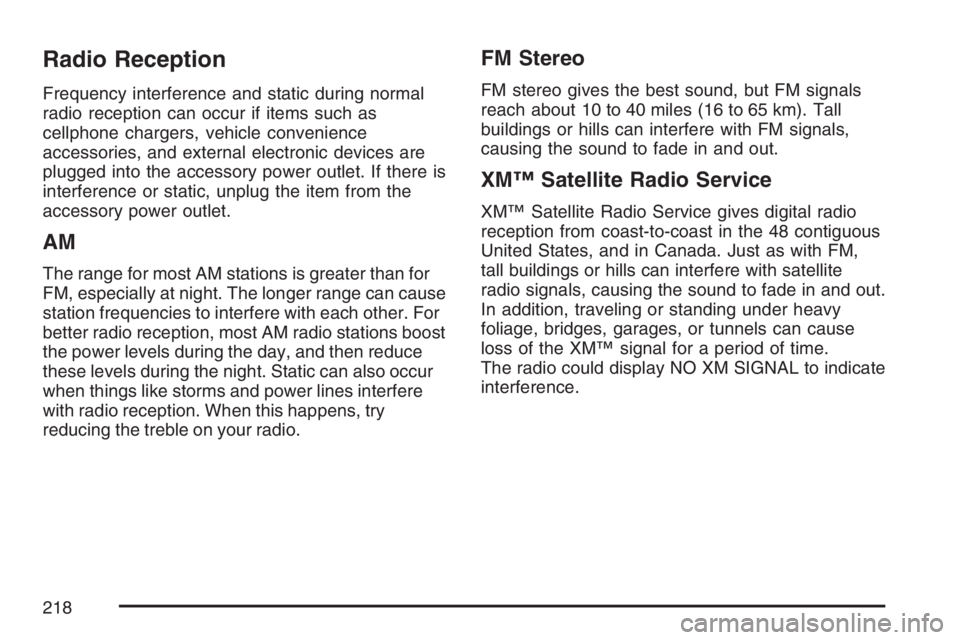
Radio Reception
Frequency interference and static during normal
radio reception can occur if items such as
cellphone chargers, vehicle convenience
accessories, and external electronic devices are
plugged into the accessory power outlet. If there is
interference or static, unplug the item from the
accessory power outlet.
AM
The range for most AM stations is greater than for
FM, especially at night. The longer range can cause
station frequencies to interfere with each other. For
better radio reception, most AM radio stations boost
the power levels during the day, and then reduce
these levels during the night. Static can also occur
when things like storms and power lines interfere
with radio reception. When this happens, try
reducing the treble on your radio.
FM Stereo
FM stereo gives the best sound, but FM signals
reach about 10 to 40 miles (16 to 65 km). Tall
buildings or hills can interfere with FM signals,
causing the sound to fade in and out.
XM™ Satellite Radio Service
XM™ Satellite Radio Service gives digital radio
reception from coast-to-coast in the 48 contiguous
United States, and in Canada. Just as with FM,
tall buildings or hills can interfere with satellite
radio signals, causing the sound to fade in and out.
In addition, traveling or standing under heavy
foliage, bridges, garages, or tunnels can cause
loss of the XM™ signal for a period of time.
The radio could display NO XM SIGNAL to indicate
interference.
218
Page 219 of 432
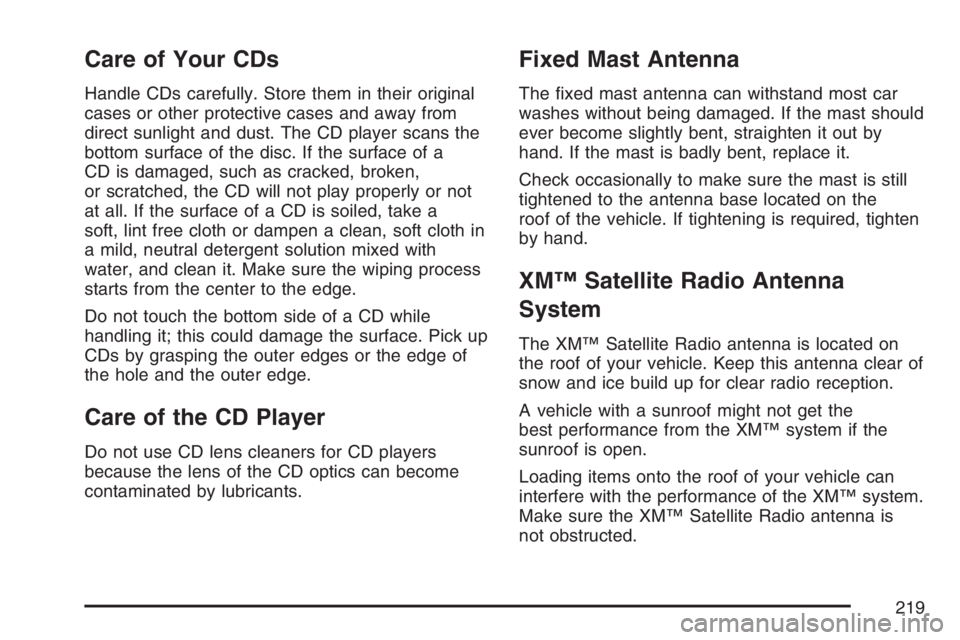
Care of Your CDs
Handle CDs carefully. Store them in their original
cases or other protective cases and away from
direct sunlight and dust. The CD player scans the
bottom surface of the disc. If the surface of a
CD is damaged, such as cracked, broken,
or scratched, the CD will not play properly or not
at all. If the surface of a CD is soiled, take a
soft, lint free cloth or dampen a clean, soft cloth in
a mild, neutral detergent solution mixed with
water, and clean it. Make sure the wiping process
starts from the center to the edge.
Do not touch the bottom side of a CD while
handling it; this could damage the surface. Pick up
CDs by grasping the outer edges or the edge of
the hole and the outer edge.
Care of the CD Player
Do not use CD lens cleaners for CD players
because the lens of the CD optics can become
contaminated by lubricants.
Fixed Mast Antenna
The xed mast antenna can withstand most car
washes without being damaged. If the mast should
ever become slightly bent, straighten it out by
hand. If the mast is badly bent, replace it.
Check occasionally to make sure the mast is still
tightened to the antenna base located on the
roof of the vehicle. If tightening is required, tighten
by hand.
XM™ Satellite Radio Antenna
System
The XM™ Satellite Radio antenna is located on
the roof of your vehicle. Keep this antenna clear of
snow and ice build up for clear radio reception.
A vehicle with a sunroof might not get the
best performance from the XM™ system if the
sunroof is open.
Loading items onto the roof of your vehicle can
interfere with the performance of the XM™ system.
Make sure the XM™ Satellite Radio antenna is
not obstructed.
219
Page 311 of 432
1. Check the other vehicle. It must have a
12-volt battery with a negative ground system.
Notice:If the other vehicle’s system is not a
12-volt system with a negative ground,
both vehicles can be damaged. Only use
vehicles with 12-volt systems with negative
grounds to jump start your vehicle.
2. Get the vehicles close enough so the jumper
cables can reach, but be sure the vehicles are
not touching each other. If they are, it could
cause a ground connection you do not
want. You would not be able to start your
vehicle, and the bad grounding could damage
the electrical systems.
To avoid the possibility of the vehicles rolling,
set the parking brake rmly on both vehicles
involved in the jump start procedure. Put
an automatic transaxle in PARK (P) or
a manual transaxle in NEUTRAL before
setting the parking brake.Notice:If you leave your radio or other
accessories on during the jump starting
procedure, they could be damaged. The repairs
would not be covered by your warranty.
Always turn off your radio and other
accessories when jump starting your vehicle.
3. Turn off the ignition on both vehicles.
Unplug unnecessary accessories plugged into
the cigarette lighter. Turn off the radio and
all lamps that are not needed. This will avoid
sparks and help save both batteries. And
it could save the radio!
311
Page 365 of 432
Fuses and Circuit Breakers
The wiring circuits in your vehicle are protected
from short circuits by fuses, circuit breakers
and fusible thermal links in the wiring itself. This
greatly reduces the chance of res caused by
electrical problems.
Look at the silver-colored band inside the fuse.
If the band is broken or melted, replace the fuse.
Be sure you replace a bad fuse with a new
one of the correct size.
If you ever have a problem on the road and
don’t have a spare fuse, you can borrow one.
Just pick some feature of your vehicle that you
can get along without – like the radio or air
conditioner – and use its fuse, if it is of the value
you need. Replace it as soon as you can.
Before replacing a fuse, turn every electrical
switch off.
Instrument Panel Fuse Block
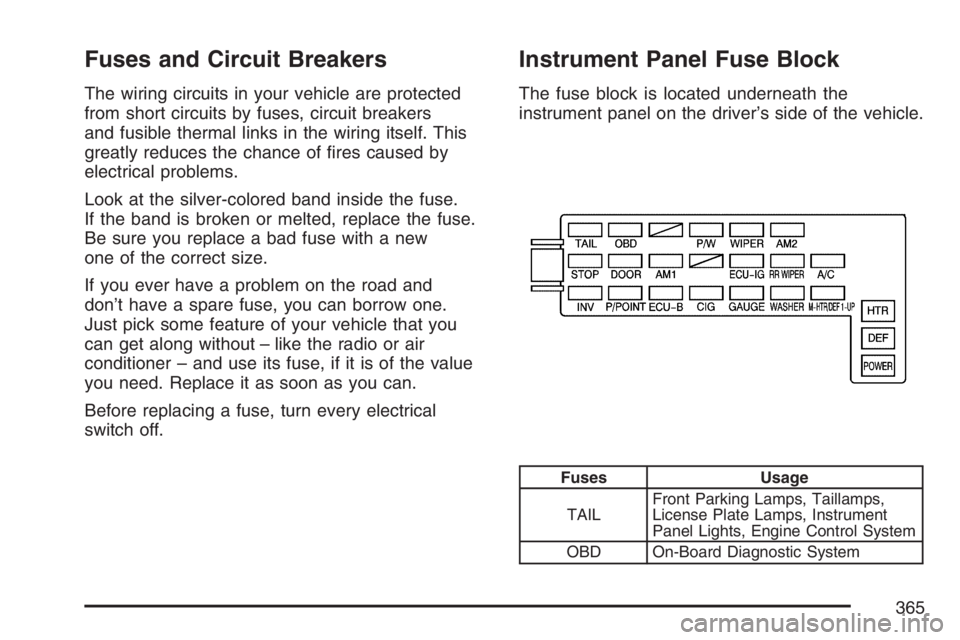
The fuse block is located underneath the
instrument panel on the driver’s side of the vehicle.
Fuses Usage
TAILFront Parking Lamps, Taillamps,
License Plate Lamps, Instrument
Panel Lights, Engine Control System
OBD On-Board Diagnostic System
365
Page 419 of 432
A
Accessories and Modications..................... 272
Accessory Power Outlet(s).......................... 150
Adding Equipment to Your Airbag-Equipped
Vehicle....................................................... 81
Additives, Fuel............................................ 275
Add-On Electrical Equipment....................... 364
Air Cleaner/Filter, Engine............................. 288
Air Conditioning........................................... 152
Airbag
Passenger Status Indicator....................... 163
Readiness Light....................................... 162
Airbag Sensing and Diagnostic
Module (SDM).......................................... 411
Airbag System............................................... 63
Adding Equipment to Your
Airbag-Equipped Vehicle......................... 81
How Does an Airbag Restrain?.................. 72
Passenger Sensing System....................... 74
Servicing Your Airbag-Equipped Vehicle..... 80
What Makes an Airbag Inate?.................. 71
What Will You See After an Airbag
Inates?................................................. 72
When Should an Airbag Inate?................. 70
Where Are the Airbags?............................. 66Antenna, Fixed Mast................................... 219
Antenna, XM™ Satellite Radio
Antenna System....................................... 219
Anti-Lock Brake System (ABS).................... 227
Anti-Lock Brake, System Warning Light....... 167
Appearance Care
Aluminum Wheels.................................... 359
Care of Safety Belts................................ 357
Chemical Paint Spotting........................... 361
Cleaning Exterior Lamps/Lenses.............. 358
Cleaning the Inside of Your Vehicle.......... 354
Fabric/Carpet........................................... 356
Finish Care.............................................. 358
Finish Damage......................................... 361
Instrument Panel, Vinyl, and Other
Plastic Surfaces.................................... 357
Leather.................................................... 356
Sheet Metal Damage............................... 360
Tires........................................................ 360
Underbody Maintenance........................... 361
Vehicle Care/Appearance Materials.......... 362
Washing Your Vehicle.............................. 358
Weatherstrips........................................... 358
Windshield, Backglass, and
Wiper Blades........................................ 359
Ashtray(s).................................................... 151
419
Page 420 of 432
Audio System(s).......................................... 177
Care of Your CD Player........................... 219
Care of Your CDs.................................... 219
Fixed Mast Antenna................................. 219
Radio with CD................................179, 188
Radio with Six-Disc CD............................ 198
Setting the Time...................................... 178
Understanding Radio Reception............... 218
XM™ Satellite Radio Antenna System...... 219
Automatic Headlamp System....................... 147
Automatic Transaxle
Fluid........................................................ 290
Operation................................................. 108
B
Battery........................................................ 309
Before Leaving on a Long Trip.................... 244
Brake
Anti-Lock Brake System (ABS)................. 227
Emergencies............................................ 229
Panic Assist............................................. 231
Parking.................................................... 114
System Inspection.................................... 393
System Warning Light.............................. 166
Brakes........................................................ 306
Braking....................................................... 226Braking in Emergencies............................... 229
Break-In, New Vehicle................................. 102
Bulb Replacement....................................... 315
Back-Up Lamps....................................... 320
Center High-Mounted
Stoplamp (CHMSL)............................... 317
Halogen Bulbs......................................... 315
Headlamps, Front Turn Signal, and
Parking Lamps..................................... 316
Replacement Bulbs.................................. 320
Taillamps, Turn Signal, and Stoplamps..... 318
Buying New Tires........................................ 336
C
California Fuel............................................. 275
California Proposition 65 Warning................ 273
Canadian Owners........................................... 3
Capacities and Specications...................... 369
Carbon Monoxide............... 96,119, 248, 261
Care of
Safety Belts............................................. 357
Your CD Player........................................ 219
Your CDs ................................................. 219
Cargo Cover............................................... 129
Cargo Tie Downs........................................ 130
CD, MP3 ..................................................... 210
420
Page 428 of 432
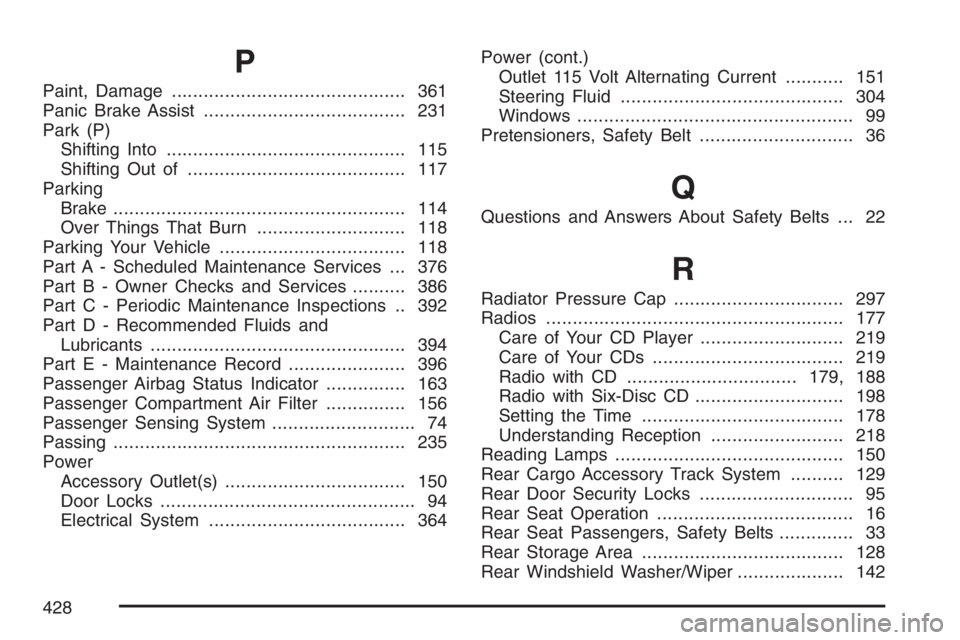
P
Paint, Damage............................................ 361
Panic Brake Assist...................................... 231
Park (P)
Shifting Into............................................. 115
Shifting Out of......................................... 117
Parking
Brake....................................................... 114
Over Things That Burn............................ 118
Parking Your Vehicle................................... 118
Part A - Scheduled Maintenance Services ... 376
Part B - Owner Checks and Services.......... 386
Part C - Periodic Maintenance Inspections .. 392
Part D - Recommended Fluids and
Lubricants................................................ 394
Part E - Maintenance Record...................... 396
Passenger Airbag Status Indicator............... 163
Passenger Compartment Air Filter............... 156
Passenger Sensing System........................... 74
Passing....................................................... 235
Power
Accessory Outlet(s).................................. 150
Door Locks................................................ 94
Electrical System..................................... 364Power (cont.)
Outlet 115 Volt Alternating Current........... 151
Steering Fluid.......................................... 304
Windows.................................................... 99
Pretensioners, Safety Belt............................. 36
Q
Questions and Answers About Safety Belts ... 22
R
Radiator Pressure Cap................................ 297
Radios........................................................ 177
Care of Your CD Player........................... 219
Care of Your CDs.................................... 219
Radio with CD................................179, 188
Radio with Six-Disc CD............................ 198
Setting the Time...................................... 178
Understanding Reception ......................... 218
Reading Lamps........................................... 150
Rear Cargo Accessory Track System.......... 129
Rear Door Security Locks............................. 95
Rear Seat Operation..................................... 16
Rear Seat Passengers, Safety Belts.............. 33
Rear Storage Area...................................... 128
Rear Windshield Washer/Wiper.................... 142
428
Page 431 of 432

TCS Warning Light...................................... 168
Theft-Deterrent Systems.............................. 100
Content Theft-Deterrent............................ 100
Throttle System Inspection.......................... 393
Tilt Wheel.................................................... 139
Time, Setting............................................... 178
Tires........................................................... 322
Aluminum Wheels, Cleaning..................... 359
Buying New Tires..................................... 336
Chains..................................................... 341
Changing a Flat Tire................................ 343
Cleaning.................................................. 360
Compact Spare Tire................................. 354
Different Size........................................... 337
If a Tire Goes Flat................................... 342
Ination - Tire Pressure............................ 329
Inspection and Rotation............................ 333
Installing the Spare Tire........................... 346
Pressure Monitor System......................... 330
Removing the Flat Tire............................. 346
Removing the Spare Tire and Tools......... 344
Storing a Flat or Spare Tire and Tools..... 351
Tire Sidewall Labeling.............................. 323
Tire Terminology and Denitions............... 326
Uniform Tire Quality Grading.................... 338
Wheel Alignment and Tire Balance........... 339
Wheel Replacement................................. 340Tires (cont.)
When It Is Time for New Tires................. 335
Towing
Recreational Vehicle................................. 259
Towing a Trailer....................................... 261
Your Vehicle............................................. 259
Traction
Control System (TCS).............................. 230
Control System Warning Light.................. 168
StabiliTrak
®System................................. 231
Transaxle
Fluid, Automatic....................................... 290
Fluid, Manual........................................... 292
Transaxle Operation, Automatic................... 108
Transaxle Operation, Manual....................... 111
Trip Odometers........................................... 160
Turn and Lane-Change Signals................... 140
Turn Signal/Multifunction Lever.................... 139
U
Understanding Radio Reception................... 218
Uniform Tire Quality Grading....................... 338
431