key PONTIAC VIBE 2008 User Guide
[x] Cancel search | Manufacturer: PONTIAC, Model Year: 2008, Model line: VIBE, Model: PONTIAC VIBE 2008Pages: 368, PDF Size: 5.7 MB
Page 80 of 368

To manually lock the door from the inside, press the
knob on the door forward. To unlock the door, press the
knob rearward. With manual locks, you must use the
key to lock and unlock the liftgate.
Power Door Locks
If your vehicle has this
feature, the power door
lock switch is located
on the armrest of
the driver’s and front
passenger’s door.
e(Power Door Lock): Press the top of the switch
to lock all the doors. Press the bottom of the switch
to unlock all the doors.
2-8
Page 83 of 368

Liftgate/Liftglass Release
To unlock and open the liftgate using the key, insert the
key into the keyhole and turn counterclockwise. Raise
the liftgate by hand.
When closing the liftgate, use the handle to pull it down.To lock the liftgate, turn the key clockwise to the rst
position.
To open the liftglass using the key, insert the key into
the keyhole and turn clockwise to the second position.
Use the handle in the center of the liftglass to help
in lifting the glass.
Your vehicle may have a
liftglass release button
which is located on the
instrument panel to the
left of the steering wheel.
Press this button to release
the liftglass.
SeeRemote Keyless Entry (RKE) System Operation on
page 2-4for more information.
2-11
Page 85 of 368
Power Windows
{CAUTION:
Leaving children, helpless adults, or pets in a
vehicle with the windows closed is dangerous.
They can be overcome from extreme heat in
warm or hot weather and suffer permanent
injuries or even death from heat stroke.
Leaving children in a vehicle with the ignition
key is dangerous for many reasons, children
or others could be badly injured or even killed.
They could operate the power windows or
other controls or even make the vehicle move.
The windows will function with the keys in the
ignition and they could be seriously injured
or killed if caught in the path of a closing
window. Do not leave keys in a vehicle with
children.
When there are children in the rear seat
use the window lockout button to prevent
unintentional operation of the windows.If your vehicle has this
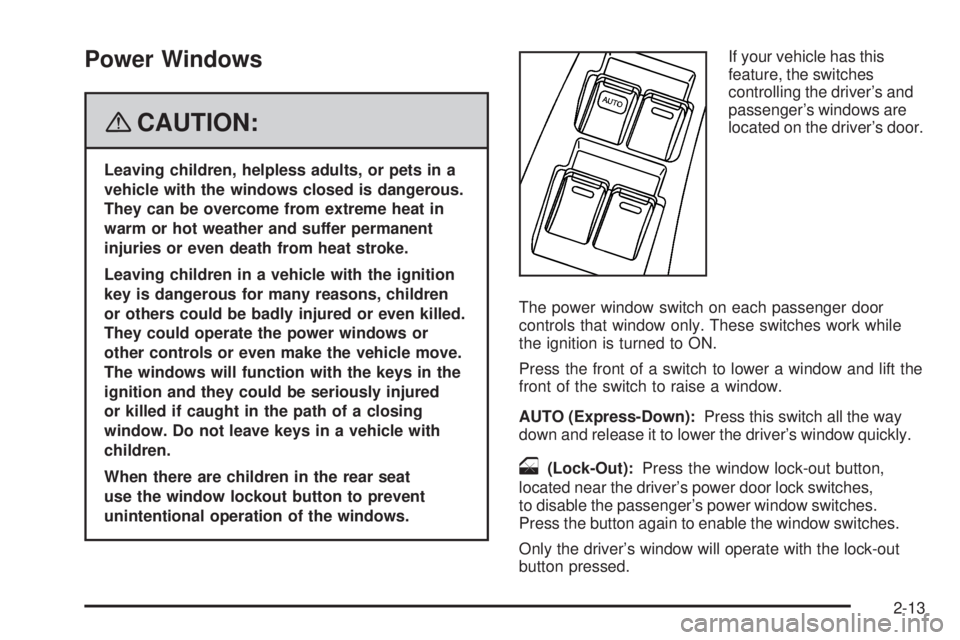
feature, the switches
controlling the driver’s and
passenger’s windows are
located on the driver’s door.
The power window switch on each passenger door
controls that window only. These switches work while
the ignition is turned to ON.
Press the front of a switch to lower a window and lift the
front of the switch to raise a window.
AUTO (Express-Down):Press this switch all the way
down and release it to lower the driver’s window quickly.
o(Lock-Out):Press the window lock-out button,
located near the driver’s power door lock switches,
to disable the passenger’s power window switches.
Press the button again to enable the window switches.
Only the driver’s window will operate with the lock-out
button pressed.
2-13
Page 87 of 368
Immobilizer Operation
(Canada Only)
Your vehicle has a passive theft-deterrent system.
The system is automatically armed when the key
is removed from the ignition.
You do not have to manually arm or disarm the system.
The security light will come on if there is a problem
with arming or disarming the theft-deterrent system.
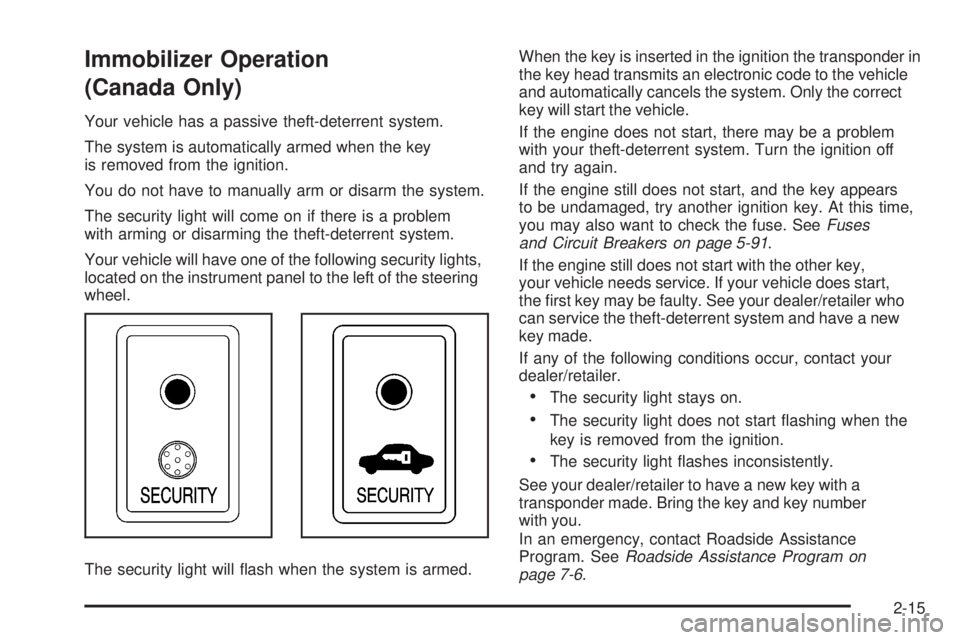
Your vehicle will have one of the following security lights,
located on the instrument panel to the left of the steering
wheel.
The security light will ash when the system is armed.When the key is inserted in the ignition the transponder in
the key head transmits an electronic code to the vehicle
and automatically cancels the system. Only the correct
key will start the vehicle.
If the engine does not start, there may be a problem
with your theft-deterrent system. Turn the ignition off
and try again.
If the engine still does not start, and the key appears
to be undamaged, try another ignition key. At this time,
you may also want to check the fuse. SeeFuses
and Circuit Breakers on page 5-91.
If the engine still does not start with the other key,
your vehicle needs service. If your vehicle does start,
the rst key may be faulty. See your dealer/retailer who
can service the theft-deterrent system and have a new
key made.
If any of the following conditions occur, contact your
dealer/retailer.
The security light stays on.
The security light does not start ashing when the
key is removed from the ignition.
The security light ashes inconsistently.
See your dealer/retailer to have a new key with a
transponder made. Bring the key and key number
with you.
In an emergency, contact Roadside Assistance
Program. SeeRoadside Assistance Program on
page 7-6.
2-15
Page 88 of 368

Do not leave the key or device that disarms
or deactivates the theft deterrent system in
the vehicle.
Content Theft-Deterrent
Your vehicle may have a theft-deterrent system
designed to activate an alarm if someone attempts to
damage or break into your vehicle. The alarm will sound
and the headlamps and turn signal lamps will ash for
about one minute. The interior lights will also come on
when the interior lamps control is in the door position.
Your vehicle will have one of the following security
lights, located on the instrument panel to the left of
the steering wheel.
Arming the System
To arm the system:
1. Remove the key from the ignition.
The security light will ash when the key is removed
from the ignition. SeeImmobilizer Operation (Canada
Only) on page 2-15for additional information.
2. Have all passengers get out of the vehicle.
3. Close and lock all doors including the liftgate/liftglass
with the key or Remote Keyless Entry (RKE)
transmitter.
The security light will come on when all doors and
liftgate are closed and locked.
The system will be automatically set after
30 seconds. When the system is set, the
security light will ash.
4. After the security light starts ashing, you may
leave the vehicle.
Do not leave anyone in the vehicle when you set
the system, because unlocking the vehicle from the
inside will activate the system.
2-16
Page 89 of 368

Testing the Alarm
To test the alarm:
1. Open all the windows.
2. Set the system as described in the previous
procedure. The doors and liftgate should be locked
with the key or RKE transmitter. Be sure to wait
until the security light starts ashing.
3. Unlock the driver’s door from the inside.
The system should activate the alarm.
4. Stop the alarm as described in the disarming
procedure following.
5. Repeat this operation for the other doors.
Also check that the system is activated when
the battery terminal is disconnected and then
reconnected.
If the system does not work properly, have it
checked by your dealer/retailer.
How the System Alarm is Activated
The system will activate the alarm:
If the driver’s or front passenger’s door is unlocked
without using the key or RKE transmitter.
If any door or the liftgate/liftglass is forcibly opened
without the key or RKE transmitter.
If the battery terminal is disconnected and then
reconnected.
If the ignition is hot-wired.
If the side window glass is broken or damaged.
The security light will come on when the system
is activated.
If the driver’s or front passenger’s doors are unlocked
without using the key or RKE transmitter, the other doors
and the liftgate will be automatically locked again.
After one minute the alarm will automatically stop and
the security light will start ashing again.
2-17
Page 90 of 368
Reactivating the System
Once the system is set, it will automatically reset the
alarm after the alarm stops. The alarm will activate again
under the same conditions as described earlier.
Disarming the System
To disarm the alarm:
Turn the ignition key from LOCK/OFF to ON/RUN.
Unlock any of the doors with the key or with the
RKE transmitter.
If the liftgate or liftglass is opened with the key,
the system will still be activated.
Do not leave the key or device that disarms or
deactivates the theft deterrent system in the vehicle.
Starting and Operating Your
Vehicle
New Vehicle Break-In
Notice:Your vehicle does not need an elaborate
break-in. But it will perform better in the long run if
you follow these guidelines:
Do not drive at any one constant speed, fast
or slow, for the rst 500 miles (805 km).
Do not make full-throttle starts. Avoid
downshifting to brake or slow the vehicle.
Avoid making hard stops for the rst
200 miles (322 km) or so. During this time
the new brake linings are not yet broken in.
Hard stops with new linings can mean
premature wear and earlier replacement.
Follow this breaking-in guideline every
time you get new brake linings.
Do not tow a trailer during break-in.
SeeTowing a Trailer on page 4-27for
the trailer towing capabilities of your
vehicle and more information.
Following break-in, engine speed and load can be
gradually increased.
2-18
Page 91 of 368
Ignition Positions
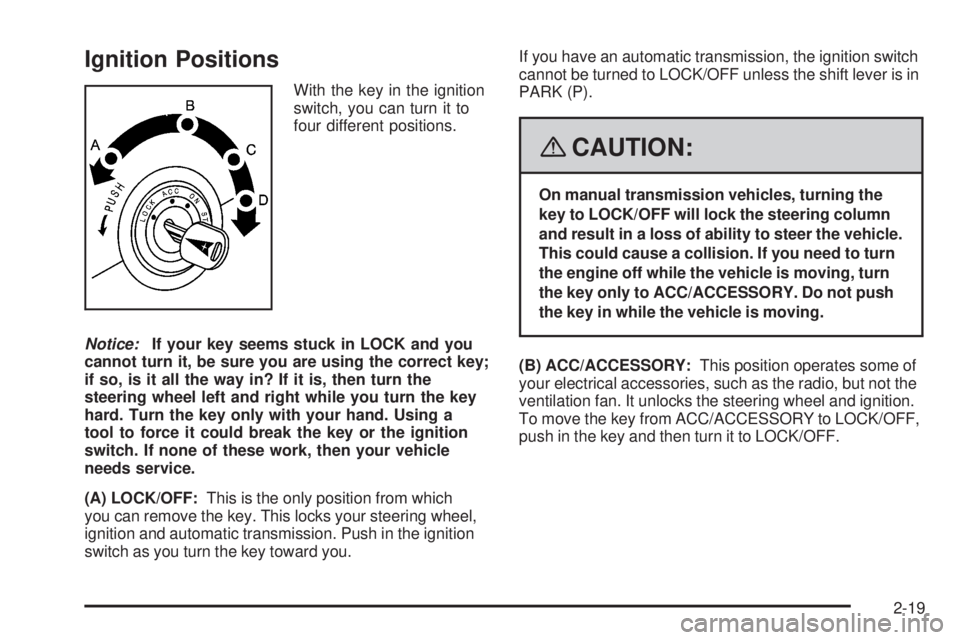
With the key in the ignition
switch, you can turn it to
four different positions.
Notice:If your key seems stuck in LOCK and you
cannot turn it, be sure you are using the correct key;
if so, is it all the way in? If it is, then turn the
steering wheel left and right while you turn the key
hard. Turn the key only with your hand. Using a
tool to force it could break the key or the ignition
switch. If none of these work, then your vehicle
needs service.
(A) LOCK/OFF:This is the only position from which
you can remove the key. This locks your steering wheel,
ignition and automatic transmission. Push in the ignition
switch as you turn the key toward you.If you have an automatic transmission, the ignition switch
cannot be turned to LOCK/OFF unless the shift lever is in
PARK (P).
{CAUTION:
On manual transmission vehicles, turning the
key to LOCK/OFF will lock the steering column
and result in a loss of ability to steer the vehicle.
This could cause a collision. If you need to turn
the engine off while the vehicle is moving, turn
the key only to ACC/ACCESSORY. Do not push
the key in while the vehicle is moving.
(B) ACC/ACCESSORY:This position operates some of
your electrical accessories, such as the radio, but not the
ventilation fan. It unlocks the steering wheel and ignition.
To move the key from ACC/ACCESSORY to LOCK/OFF,
push in the key and then turn it to LOCK/OFF.
2-19
Page 92 of 368
(C) ON/RUN:This is the position the switch returns to
after you start your engine and release the switch. The
switch stays in the ON/RUN position when the engine is
running. But even when the ignition is not running, you
can use ON/RUN to operate your electrical accessories,
including the ventilation fan and 115 volt power outlet,
and to display some warning and indicator lights.
The battery could be drained if you leave the key in the
ACC/ACCESSORY or ON/RUN position with the engine
off. You may not be able to start your vehicle if the battery
is allowed to drain for an extended period of time.
(D) START:This position starts the engine. When
the engine starts, release the key. The ignition switch
will return to ON/RUN for normal driving.
When the engine is not running, ACC/ACCESSORY
and ON/RUN allow you to operate some of your
electrical accessories.
A warning tone will sound if you open the driver’s door
when the ignition is still in ACC/ACCESSORY or
LOCK/OFF and the key is in the ignition.Key In the Ignition
Never leave your vehicle with the keys inside, as it is an
easy target for joy riders or thieves. If you leave the key in
the ignition and park your vehicle, a chime will sound,
when you open the driver’s door. Always remember to
remove your key from the ignition and take it with you.
This will lock your ignition and transmission. Also, always
remember to lock the doors.
The battery could be drained if you leave the key in the
ignition while your vehicle is parked. You may not be
able to start your vehicle after it has been parked for
an extended period of time.
Starting the Engine
Move the transmission in the proper gear.
Automatic Transmission
Move the shift lever to PARK (P) or NEUTRAL (N).
The engine will not start in any other position -- this
is a safety feature. To restart when you are already
moving, use NEUTRAL (N) only.
Notice:Do not try to shift to PARK (P) if your
vehicle is moving. If you do, you could damage
the transmission. Shift to PARK (P) only when
your vehicle is stopped.
2-20
Page 93 of 368
Manual Transmission
The shift lever should be in NEUTRAL and the parking
brake engaged. Hold the clutch pedal down to the oor
and start the engine. Your vehicle will not start if the
clutch pedal is not all the way down. That is a safety
feature.
Starting Procedure
1. With your foot off the accelerator pedal, turn the
ignition key to START. When the engine starts, let go
of the key. The idle speed will go down as the engine
gets warm. Do not race the engine immediately after
starting it. Operate the engine and transmission
gently to allow the oil to warm up and lubricate
all moving parts.
Your vehicle has a Computer-Controlled Cranking
System. This feature assists in starting the engine
and protects components. If the ignition key is turned
to the START position, and then released when the
engine begins cranking, the engine will continue
cranking for a few seconds or until the vehicle starts.
If the engine does not start and the key is held in
START for many seconds, cranking will be stopped
after 15 seconds to prevent cranking motor damage.
To prevent gear damage, this system also prevents
cranking if the engine is already running. Engine
cranking can be stopped by turning the ignition
switch to ACC/ACCESSORY or LOCK/OFF.
When using a key with a transponder chip and
while starting the engine, do not use a key with thekey ring touching the key grip or other transponder
chip keys nearby. This may cause the engine
not to start or may stop it soon after it starts.
Notice:Cranking the engine for long periods of
time, by returning the key to the START position
immediately after cranking has ended, can overheat
and damage the cranking motor, and drain the
battery. Wait at least 15 seconds between each try,
to let the cranking motor cool down.
2. If the engine does not start after 5-10 seconds,
especially in very cold weather (below 0°F or−18°C),
it could be ooded with too much gasoline. Try
pushing the accelerator pedal all the way to the oor
and holding it there as you hold the key in START
for up to a maximum of 15 seconds. Wait at least
15 seconds between each try, to allow the cranking
motor to cool down. When the engine starts, let go of
the key and accelerator. If the vehicle starts briey
but then stops again, do the same thing. This clears
the extra gasoline from the engine. Do not race the
engine immediately after starting it. Operate the
engine and transmission gently until the oil warms
up and lubricates all moving parts.
Notice:The engine is designed to work with the
electronics in your vehicle. If you add electrical parts
or accessories, you could change the way the engine
operates. Before adding electrical equipment, check
with your dealer/retailer. If you do not, your engine
might not perform properly. Any resulting damage
would not be covered by your vehicle’s warranty.
2-21