lights PONTIAC VIBE 2008 User Guide
[x] Cancel search | Manufacturer: PONTIAC, Model Year: 2008, Model line: VIBE, Model: PONTIAC VIBE 2008Pages: 368, PDF Size: 5.7 MB
Page 130 of 368

Exterior Lamps
The lever on the left side of the steering column
operates the exterior lamps.
O(Exterior Lamps):Turn the outside part of the
lever with the symbol on it, to operate the lamps.
For vehicles sold in the U. S., this symbol will appear
on the instrument panel cluster when your exterior lamps
are on.The exterior lamp switch has three positions:
OFF:Turning the switch to this position turns off all
lamps, except the Daytime Running Lamps (DRL).
O(Parking Lamps):Turning the switch to this position
turns on the parking lamps together with the following:
Sidemarker Lamps
Taillamps
License Plate Lamp
Instrument Panel Lights
A symbol will appear on the instrument panel cluster
when your parking lamps are on. SeeLights On
Reminder on page 3-39andTaillamp Indicator Light
on page 3-39for additional information.
3(Headlamps):Turning the switch to this position
turns on the headlamps, together with the previously
listed lamps and lights.
3-14
Page 132 of 368
Automatic Headlamp System
Your vehicle has an automatic light sensor on the top
left corner of the instrument panel, so be sure it is
not covered or the headlamps will be on continuously.
When it is dark enough outside, the automatic headlamp
system will turn on the low-beam headlamps at the
normal brightness along with other lamps such as the
taillamps, sidemarker, parking lamps and instrument
panel lights. This is indicated by the headlamp symbol
on your instrument panel cluster. SeeInstrument
Panel Cluster on page 3-26.
If you are driving through a parking garage, overcast
weather, or a tunnel, the automatic headlamp system
may turn on the low-beam headlamps at a normal
brightness along with the taillamps, sidemarker, parking
lamps and the instrument panel lights. The radio lights
will be dimmer, and the instrument panel cluster lights
may dim. There will be a delay before the lights will turn
on when starting the car at night.
Fog Lamps
-(Fog Lamps):Turn the band on the turn
signal/multifunction lever to the fog lamp symbol
to turn the fog lamps on. They will come on only
when the headlamps are on low beam.
Some localities have laws that require the headlamps to
be on along with the fog lamps.
Instrument Panel Brightness
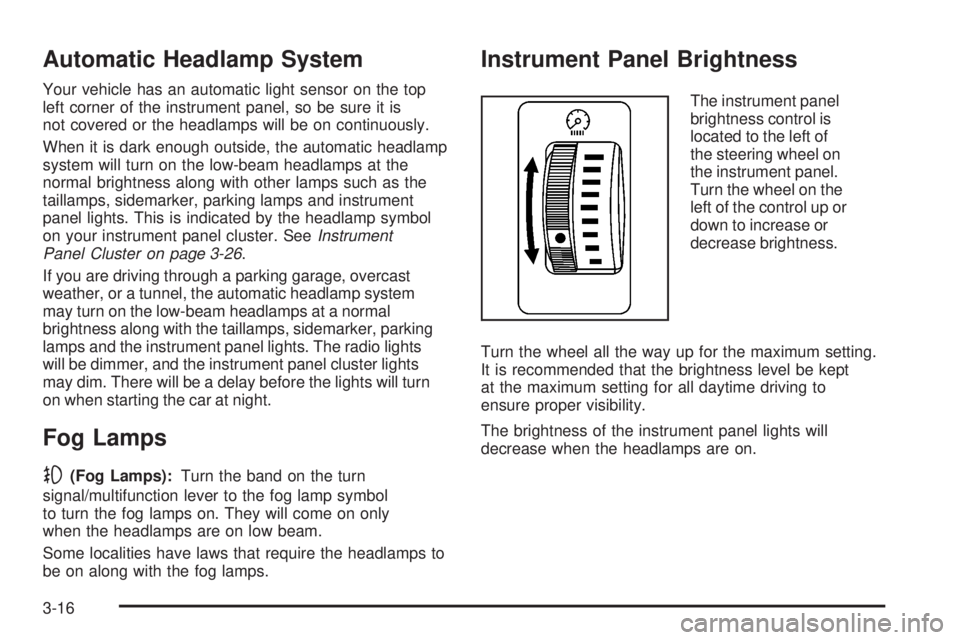
The instrument panel
brightness control is
located to the left of
the steering wheel on
the instrument panel.
Turn the wheel on the
left of the control up or
down to increase or
decrease brightness.
Turn the wheel all the way up for the maximum setting.
It is recommended that the brightness level be kept
at the maximum setting for all daytime driving to
ensure proper visibility.
The brightness of the instrument panel lights will
decrease when the headlamps are on.
3-16
Page 133 of 368
Interior Lamps Control
The interior lights control is located on the overhead
light. To change the interior lights setting, slide the
switch to one of the following positions:
OFF:This position turns the light off.
ON:This position keeps the light on all the time.
Door:This position turns the light on when any door, the
liftgate or the liftglass is opened. The light goes off when
all the side doors, the liftgate and the liftglass are closed.
Entry Lighting
While the interior lights control is in the door position, the
light will come on when any side door, the liftgate or the
liftglass is opened. After all the doors, liftgate and liftglass
are closed, and the key is out of the ignition, in LOCK or
ACC, the light will remain on for about 15 seconds and
then go out except under the following conditions:
The ignition is turned to ACC or ON after all the
doors, the liftgate and the liftglass are closed.
All the doors and liftgate are locked when the liftglass
is closed and the light is still on.When any door is unlocked with the key or remote
keyless entry system transmitter, the light comes on
for 15 seconds, even if the door is not opened.
Reading Lamps
If your vehicle has a sunroof, there will be a reading
lamp near the sunroof switch. Press the button to turn
the lamp on and press it again to turn it off.
If your vehicle does not have a sunroof, the vehicle’s
inside rearview mirror may have reading lamps. If your
vehicle has reading lamps, there are two buttons located
on the bottom of the mirror. Press the buttons to turn the
lamps on and press them again to turn the lamps off.
3-17
Page 141 of 368
Warning Lights, Gages, and
Indicators
This section describes the warning lights and gages on
your vehicle.
Warning lights and gages can signal that something
is wrong before it becomes serious enough to cause an
expensive repair or replacement. Paying attention to
the warning lights and gages could also save you
or others from injury.
Warning lights come on when there may be or is a
problem with one of your vehicle’s functions. As the
details show on the next few pages, some warning lights
come on briey when you start the engine just to let
you know they are working. If you are familiar with this
section, you should not be alarmed when this happens.Gages can indicate when there may be or is a problem
with one of your vehicle’s functions. Often gages
and warning lights work together to let you know
when there is a problem with your vehicle.
When one of the warning lights comes on and stays
on as you are driving, or when one of the gages shows
there may be a problem, check the section that tells
you what to do about it. Please follow this manual’s
advice. Waiting to do repairs can be costly and even
dangerous. So get to know your vehicle’s warning lights
and gages. They can be a big help.
3-25
Page 146 of 368

Passenger Airbag Status Indicator
Your vehicle has the passenger sensing system.
Your instrument panel has a passenger airbag status
indicator.
The indicator next to the
passenger airbag status
indicator lights is the
passenger safety belt
reminder light.
SeeSafety Belt Reminders on page 3-28for more
information on that indicator.
When you start the vehicle, the passenger airbag status
indicator will light ON and OFF for several seconds
as a system check.
Then, after several more seconds, the status indicator
will light either ON or OFF if there is weight on the
seat or if the safety belt is buckled, to let you know
the status of the right front passenger’s frontal
and seat-mounted side impact airbags (if equipped).If the word ON is lit on the passenger airbag status
indicator, it means that the right front passenger’s frontal
and seat-mounted side impact airbag (if equipped)
are enabled (may inate).
{CAUTION:
If the on indicator comes on when you have
a rear-facing child restraint installed in the
right front passenger’s seat, it means that
the passenger sensing system has not turned
off the passenger’s frontal airbag and
seat-mounted side impact airbag (if equipped).
A child in a rear-facing child restraint can be
seriously injured or killed if the right front
passenger’s airbag inates. This is because the
back of the rear-facing child restraint would be
very close to the inating airbag. Do not use a
rear-facing child restraint in the right front
passenger’s seat if the airbag is turned on.
3-30
Page 147 of 368

{CAUTION:
Even though the passenger sensing system is
designed to turn off the right front passenger’s
frontal airbag and seat-mounted side impact
airbag (if equipped) if the system detects a
rear-facing child restraint, no system is
fail-safe, and no one can guarantee that an
airbag will not deploy under some unusual
circumstance, even though it is turned off.
We recommend that rear-facing child restraints
be secured in a rear seat, even if the airbag is
or airbags are off.
If the word OFF is lit on the passenger airbag status
indicator, it means that the passenger sensing system
has turned off the right front passenger’s frontal airbag
and seat-mounted side impact airbag (if equipped).
SeePassenger Sensing System on page 1-59for
more on this, including important safety information.If, after several seconds, all status indicator lights remain
on, or if there are no lights at all, there may be a problem
with the lights or the passenger sensing system. See your
dealer/retailer for service.
{CAUTION:
If the airbag readiness light in the instrument
panel cluster ever comes on and stays on, it
means that something may be wrong with the
airbag system. If this ever happens, have the
vehicle serviced promptly, because an
adult-size person sitting in the right front
passenger’s seat may not have the protection
of the airbag(s). SeeAirbag Readiness Light on
page 3-29for more on this, including important
safety information.
3-31
Page 155 of 368

Lights On Reminder
This light comes on
whenever the headlights
are on.
SeeHeadlamps on Reminder on page 3-15for more
information.
Taillamp Indicator Light
This light will come on
when your taillamps are on.
SeeExterior Lamps on page 3-14for more information.
Cruise Control Light
The CRUISE light comes
on whenever you press the
ON-OFF button to set
your cruise control.
SeeCruise Control Light on page 3-39for more
information.
Overdrive Off Light
The automatic transaxle
has overdrive. This light
comes on whenever
you turn off the overdrive.
SeeOverdrive Off on page 2-25for more information.
Canada Only
3-39
Page 163 of 368

Setting the Tone
(Bass/Midrange/Treble)
TONE:Press and release this button until BASS,
MID (midrange), or TREB (treble) displays. The SELECT
LED indicator lights to show that the tone control can
be adjusted. Turn the SELECT knob to increase or to
decrease. If a station is weak or has static, decrease
the treble.
Press and hold the TONE button until FLAT displays,
to return all of the tone controls to the middle position.
EQ (Equalizer):Press this button to select customized
bass, midrange, and treble equalization settings.
Up to six customized equalization settings, can be
programmed on the six numbered pushbuttons,
by performing the following steps:
1. Turn the radio on.
2. Use the TONE button and the SELECT knob to
create the desired equalization.
3. Press and hold the EQ button for two seconds.
SELECT EQ # displays and the EQ symbol
ashes.
4. Press EQ or turn the SELECT knob to select the
desired EQ number.5. Press and hold the EQ button to store the
equalization setting and the number. A beep
sounds and EQ SAVED displays.
6. Repeat the steps for the other EQ settings and
numbers.
EQ 5 has been programmed at the factory for use with
talk radio, but it can be set to a different tone.
For vehicles that have a radio with a Six-Disc CD
player, see the following for setting the tone.
AUDIO:For the Radio with Six-Disc CD player,
push and release the AUDIO knob until BASS, MID
(midrange), or TREB (treble) displays. Turn the knob to
increase or to decrease the tone. If a station is weak or
has static, decrease the treble.
To adjust bass, midrange, or treble to the middle position,
select BASS, MID, or TREB and push and hold the
AUDIO knob. The radio beeps once and adjusts the
display level to the middle position.
To adjust all tone and speaker controls to the middle
position, push and hold the AUDIO knob when no tone
or speaker controls display. CENTERED displays and a
beep sounds.
3-47
Page 164 of 368

AUTO EQ (Automatic Equalization):For the Radio
with Six-Disc CD player, press this button to select
customized equalization settings designed for country,
jazz, talk, pop, rock, and classical.
To return to the manual mode, press the AUTO EQ
button until CUSTOM displays. Then manually adjust
the bass, midrange, and treble using the AUDIO knob.
Adjusting the Speakers (Balance/Fade)
BAL (Balance):To adjust the balance between the right
and the left speakers, press and release this button until
BAL displays. The SELECT LED indicator lights to show
that the speakers can be adjusted. Turn the SELECT
knob to move the sound toward the right or the left
speakers.
FADE:Press and release this button until FADE
displays, to adjust the fade between the front and the
rear speakers. The SELECT LED indicator lights to
show that the speakers can be adjusted. Turn the
SELECT knob to move the sound toward the front
or the rear speakers.Press and hold the BAL FADE button for two seconds
to return all speaker settings to the middle position.
For vehicles that have a radio with a Six-Disc CD player,
see the following for adjusting the speakers.
AUDIO:For the Radio with Six-Disc CD player, push
and release the AUDIO knob until BAL (balance)
displays, to adjust the balance between the right and
the left speakers. Turn the knob to move the sound
toward the right or the left speakers.
Push and release the AUDIO knob until FAD (fade)
displays, to adjust the fade between the front and rear
speakers. Turn the knob to move the sound toward
the front or the rear speakers.
Select balance or fade and push and hold the AUDIO
knob, to adjust the balance and the fade to the middle
position. The radio beeps once and adjusts the display
level to the middle position.
Push and hold the AUDIO knob when no tone or speaker
controls display, to adjust all tone and speaker controls
to the middle position. CENTERED displays and a beep
sounds.
3-48
Page 237 of 368

When to Check and What to Use
The reservoir is located
at the back of the engine
compartment, on the
driver’s side of the vehicle.
SeeEngine Compartment
Overview on page 5-12
for more information
on location.
Refer to the Maintenance Schedule to determine
how often you should check the uid level in your
master cylinder reservoir and for the proper uid.
SeePart B: Owner Checks and Services on page 6-12
andPart D: Recommended Fluids and Lubricants
on page 6-19.
How to Check and Add Fluid
Check to make sure that the uid level is at or above
the MIN mark. If the level is below the MIN mark,
see the instructions on the reservoir cap.
Engine Coolant
Your vehicle was factory-lled with a coolant developed
to last for ve years or 150,000 miles (240 000 km),
whichever occurs rst. When coolant is added or
changed, use DEX-COOL
®coolant.
The following explains your cooling system and how
to add coolant when it is low. If you have a problem
with engine overheating, seeEngine Overheating
on page 5-26.
A 50/50 mixture of clean, drinkable water and
DEX-COOL
®coolant will:
Give freezing protection down to−34°F (−37°C).
Give boiling protection up to 265°F (129°C).
Protect against rust and corrosion.
Help keep the proper engine temperature.
Let the warning lights and gages work as they should.
Notice:Using coolant other than DEX-COOL
®may
cause premature engine, heater core or radiator
corrosion. In addition, the engine coolant may
require changing sooner, at 30,000 miles (50 000 km)
or 24 months, whichever occurs rst. Any repairs
would not be covered by your warranty. Always use
DEX-COOL
®(silicate-free) coolant in your vehicle.
5-23