wheel PONTIAC VIBE 2008 User Guide
[x] Cancel search | Manufacturer: PONTIAC, Model Year: 2008, Model line: VIBE, Model: PONTIAC VIBE 2008Pages: 368, PDF Size: 5.7 MB
Page 95 of 368
Automatic Transmission Operation
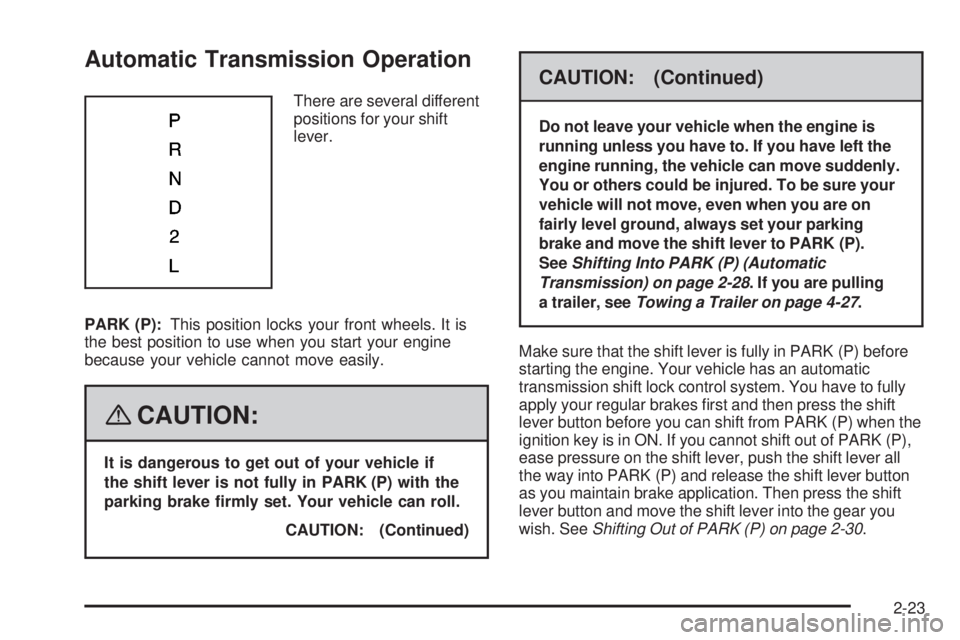
There are several different
positions for your shift
lever.
PARK (P):This position locks your front wheels. It is
the best position to use when you start your engine
because your vehicle cannot move easily.
{CAUTION:
It is dangerous to get out of your vehicle if
the shift lever is not fully in PARK (P) with the
parking brake rmly set. Your vehicle can roll.
CAUTION: (Continued)
CAUTION: (Continued)
Do not leave your vehicle when the engine is
running unless you have to. If you have left the
engine running, the vehicle can move suddenly.
You or others could be injured. To be sure your
vehicle will not move, even when you are on
fairly level ground, always set your parking
brake and move the shift lever to PARK (P).
SeeShifting Into PARK (P) (Automatic
Transmission) on page 2-28. If you are pulling
a trailer, seeTowing a Trailer on page 4-27.
Make sure that the shift lever is fully in PARK (P) before
starting the engine. Your vehicle has an automatic
transmission shift lock control system. You have to fully
apply your regular brakes rst and then press the shift
lever button before you can shift from PARK (P) when the
ignition key is in ON. If you cannot shift out of PARK (P),
ease pressure on the shift lever, push the shift lever all
the way into PARK (P) and release the shift lever button
as you maintain brake application. Then press the shift
lever button and move the shift lever into the gear you
wish. SeeShifting Out of PARK (P) on page 2-30.
2-23
Page 96 of 368
REVERSE (R):Use this gear to back up.
Notice:Shifting to REVERSE (R) while your vehicle
is moving forward could damage the transmission.
The repairs would not be covered by your warranty.
Shift to REVERSE (R) only after your vehicle is
stopped.
To rock your vehicle back and forth to get out of snow,
ice or sand without damaging your transmission,
seeIf Your Vehicle is Stuck in Sand, Mud, Ice,
or Snow on page 4-18.
NEUTRAL (N):In this position, your engine does not
connect with the wheels. To restart when you are
already moving, use NEUTRAL (N) only.
{CAUTION:
Shifting into a drive gear while the engine is
running at high speed is dangerous. Unless
your foot is rmly on the brake pedal, your
vehicle could move very rapidly. You could
lose control and hit people or objects. Do not
shift into a drive gear while your engine is
running at high speed.Notice:Shifting out of PARK (P) or NEUTRAL (N)
with the engine running at high speed may damage
the transmission. The repairs would not be covered
by your warranty. Be sure the engine is not running
at high speed when shifting your vehicle.
DRIVE (D):This position is for normal driving.
It provides the best fuel economy for your vehicle.
If you need more power for passing, and you are:
Going less than about 27 mph (43 km/h), push your
accelerator pedal about halfway down.
Going about 29 mph (47 km/h) or more, push your
accelerator pedal all the way down. You will shift
down to the next gear and have more power.
Downshifting the transmission in slippery road
conditions could result in skidding, see Skidding
underLoss of Control on page 4-10
SECOND (2):This position reduces vehicle speed more
than DRIVE (D) without using your brakes. You can use
SECOND (2) on hills. It can help control your speed as
you go down steep mountain roads, but then you would
also want to use your brakes off and on.
2-24
Page 106 of 368

Automatic Dimming Rearview Mirror
While sitting in a comfortable driving position, adjust
the mirror so you can see clearly behind your vehicle.
Hold the mirror in the center to move it up or down
and side to side.
The mirror may have an automatic dimming feature that
darkens gradually to reduce the glare of headlamps from
behind. When the ignition key is inserted and turned
on, the inside rear view mirror always turns on in the
automatic function mode.An indicator light located on
the mirror will come on to show you that the function
is on. When the inside air temperature is low, it may take
a little longer for the mirror to darken in response to the
detection of headlights.
Press the AUTO button located in the lower center of
the mirror to turn automatic dimming on and the
((off)
button located next to the AUTO button to turn automatic
dimming off.
One photocell on the front of the mirror senses when it
is becoming dark outside. Another photocell, facing
rearward, senses headlamps behind you.
To keep the photocells operating well, occasionally
clean them with a cotton swab and glass cleaner.
Outside Remote Control Mirrors
Your vehicle has outside power adjustable mirrors.
The controls are located
to the left of the steering
wheel on the instrument
panel.
To adjust either mirror, push the button labeled L (left) or
R (right). Use the arrows on the control pad to adjust the
direction of the mirror. Once both mirrors have been
adjusted, move the selector switch back to the center.
This prevents the mirrors from being moved once they
have been adjusted.
2-34
Page 109 of 368

OnStar Hands-Free Calling
OnStar Hands-Free Calling allows eligible OnStar
subscribers to make and receive calls using voice
commands. Hands-Free Calling is fully integrated into
the vehicle, and can be used with OnStar Pre-Paid
Minute Packages. Hands-Free Calling may also
be linked to a Verizon Wireless service plan in the
U.S. or a Bell Mobility service plan in Canada,
depending on eligibility. To nd out more, refer to
the OnStar Owner’s Guide in the vehicle’s glove box,
visit www.onstar.com or www.onstar.ca, or speak
with an OnStar advisor by pressing the OnStar button
or calling 1-888-4-ONSTAR (1-888-466-7827).
OnStar Virtual Advisor
OnStar Virtual Advisor is a feature of OnStar Hands-Free
Calling that uses your minutes to access location-based
weather, local traffic reports, and stock quotes. By
pressing the phone button and giving a few simple voice
commands, you can browse through the various topics.
See the OnStar Owner’s Guide for more information.
(Only available in the continental U.S.)
OnStar Steering Wheel Controls
Your vehicle may be equipped with a Talk/Mute button
that can be used to interact with OnStar Hands-Free
Calling.
On some vehicles, you may have to hold the button
for a few seconds and give the command “ONSTAR” in
order to activate the OnStar Hands-Free Calling feature.
On some vehicles, the mute button can be used to
dial numbers into voicemail systems, or to dial phone
extensions. See the OnStar Owner’s Guide for
more information.
2-37
Page 111 of 368

Storage Areas
Glove Box
To open the glove box, lift up on the lever.
Cupholder(s)
There are two xed cupholders located in the console
area between the two front seats. There are also
two cupholders that fold out of the rear of the console
storage unit.
Coinholder(s)
Your instrument panel may have a coinholder located to
the left of the steering wheel and on the center console
near the parking brake.
Instrument Panel Storage
There are storage compartments located on the
instrument panel in two places. They are below the
interior/instrument panel brightness dial and below the
shift lever. Pull the top of the door toward you to open it
or for the compartment below the shift lever, push the
button to open it.
Center Console Storage
A storage area is located in the console between
the seats.
To access the storage area, pull up the lock release
lever while raising the lid.
Floor Mats
The driver’s side oor mat is held in place by
two locator hooks.
Be sure the driver’s side oor mat is properly placed
on the oor so that it does not block the movement of
the accelerator pedal.
2-39
Page 117 of 368
Instrument Panel Overview...............................3-4
Hazard Warning Flashers................................3-6
Other Warning Devices...................................3-6
Horn.............................................................3-6
Tilt Wheel.....................................................3-7
Turn Signal/Multifunction Lever.........................3-7
Turn and Lane-Change Signals........................3-8
Headlamp High/Low-Beam Changer..................3-8
Flash-to-Pass.................................................3-8
Windshield Wipers..........................................3-9
Windshield Washer.......................................3-10
Rear Window Wiper/Washer...........................3-10
Cruise Control..............................................3-11
Exterior Lamps.............................................3-14
Headlamps on Reminder................................3-15
Daytime Running Lamps (DRL).......................3-15
Automatic Headlamp System..........................3-16
Fog Lamps..................................................3-16
Instrument Panel Brightness...........................3-16
Interior Lamps Control...................................3-17
Entry Lighting...............................................3-17
Reading Lamps............................................3-17
Accessory Power Outlet(s).............................3-18Power Outlet 115 Volt Alternating Current........3-18
Ashtray(s) and Cigarette Lighter......................3-19
Climate Controls............................................3-20
Climate Control System.................................3-20
Outlet Adjustment.........................................3-22
Passenger Compartment Air Filter...................3-23
Warning Lights, Gages, and Indicators............3-25
Instrument Panel Cluster................................3-26
Speedometer and Odometer...........................3-27
Trip Odometers............................................3-27
Tachometer................................................
.3-28
Safety Belt Reminders...................................3-28
Airbag Readiness Light..................................3-29
Passenger Airbag Status Indicator...................3-30
Charging System Light..................................3-32
Brake System Warning Light..........................3-32
Antilock Brake System Warning Light...............3-33
Low Tire Pressure Warning Light....................3-34
Traction Control System (TCS)
Warning Light...........................................3-34
StabiliTrak
®Indicator Light..............................3-35
Engine Coolant Temperature Gage..................3-35
Section 3 Instrument Panel
3-1
Page 121 of 368
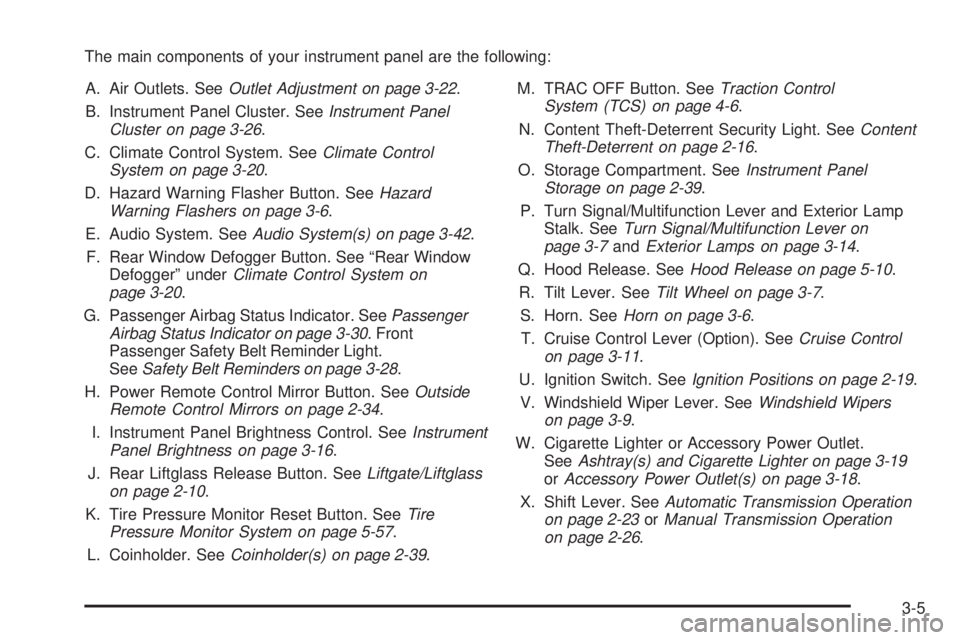
The main components of your instrument panel are the following:
A. Air Outlets. SeeOutlet Adjustment on page 3-22.
B. Instrument Panel Cluster. SeeInstrument Panel
Cluster on page 3-26.
C. Climate Control System. SeeClimate Control
System on page 3-20.
D. Hazard Warning Flasher Button. SeeHazard
Warning Flashers on page 3-6.
E. Audio System. SeeAudio System(s) on page 3-42.
F. Rear Window Defogger Button. See “Rear Window
Defogger” underClimate Control System on
page 3-20.
G. Passenger Airbag Status Indicator. SeePassenger
Airbag Status Indicator on page 3-30. Front
Passenger Safety Belt Reminder Light.
SeeSafety Belt Reminders on page 3-28.
H. Power Remote Control Mirror Button. SeeOutside
Remote Control Mirrors on page 2-34.
I. Instrument Panel Brightness Control. SeeInstrument
Panel Brightness on page 3-16.
J. Rear Liftglass Release Button. SeeLiftgate/Liftglass
on page 2-10.
K. Tire Pressure Monitor Reset Button. SeeTire
Pressure Monitor System on page 5-57.
L. Coinholder. SeeCoinholder(s) on page 2-39.M. TRAC OFF Button. SeeTraction Control
System (TCS) on page 4-6.
N. Content Theft-Deterrent Security Light. SeeContent
Theft-Deterrent on page 2-16.
O. Storage Compartment. SeeInstrument Panel
Storage on page 2-39.
P. Turn Signal/Multifunction Lever and Exterior Lamp
Stalk. SeeTurn Signal/Multifunction Lever on
page 3-7andExterior Lamps on page 3-14.
Q. Hood Release. SeeHood Release on page 5-10.
R. Tilt Lever. SeeTilt Wheel on page 3-7.
S. Horn. SeeHorn on page 3-6.
T. Cruise Control Lever (Option). SeeCruise Control
on page 3-11.
U. Ignition Switch. SeeIgnition Positions on page 2-19.
V. Windshield Wiper Lever. SeeWindshield Wipers
on page 3-9.
W. Cigarette Lighter or Accessory Power Outlet.
SeeAshtray(s) and Cigarette Lighter on page 3-19
orAccessory Power Outlet(s) on page 3-18.
X. Shift Lever. SeeAutomatic Transmission Operation
on page 2-23orManual Transmission Operation
on page 2-26
.
3-5
Page 122 of 368
Y. Power Outlet. SeePower Outlet 115 Volt Alternating
Current on page 3-18.
Z. Parking Brake. SeeParking Brake on page 2-27.
AA. Center Console Storage Area. SeeCenter Console
Storage on page 2-39.
AB. Glove Box. SeeGlove Box on page 2-39.
Hazard Warning Flashers
The hazard warning ashers let you warn the police and
others that you have a problem. The front and rear
turn signal lamps will ash on and off.
The hazard warning
asher button is located
towards the center of
the instrument panel.
Press the button to make the front and rear turn signal
lamps ash on and off. Press the button again to
turn the ashers off.While the hazard warning ashers are on, the turn
signals do not work.
The hazard warning ashers work no matter what
position the key is in, and even if the key is not in
the ignition switch.
Other Warning Devices
If you carry reective triangles, you can set them up at
the side of the road about 300 feet (100 m) behind
your vehicle.
Horn
Press near or on the horn symbols on the steering
wheel pad to sound the horn.
3-6
Page 123 of 368

Tilt Wheel
A tilt steering column allows you to adjust the steering
column before you drive. You can also raise it to the
highest level to give your legs more room when you
exit and enter the vehicle.
The tilt lever is located
underneath, on the left
side of the steering wheel
column.
To tilt the column, move the lever downward. Adjust the
steering wheel to a comfortable position, then move
the lever upward to lock the column in place.
Turn Signal/Multifunction Lever
The turn signal/multifunction lever is located on the left
side of the steering column.
This lever operates the following:
Exterior Lamps. SeeExterior Lamps on page 3-14.
Turn and Lane-Change Signals. SeeTurn and
Lane-Change Signals on page 3-8.
Headlamp High/Low-Beam Changer. SeeHeadlamp
High/Low-Beam Changer on page 3-8.
Flash-to-Pass. SeeFlash-to-Pass on page 3-8.
Fog Lamps. SeeFog Lamps on page 3-16.
3-7
Page 127 of 368
Cruise Control
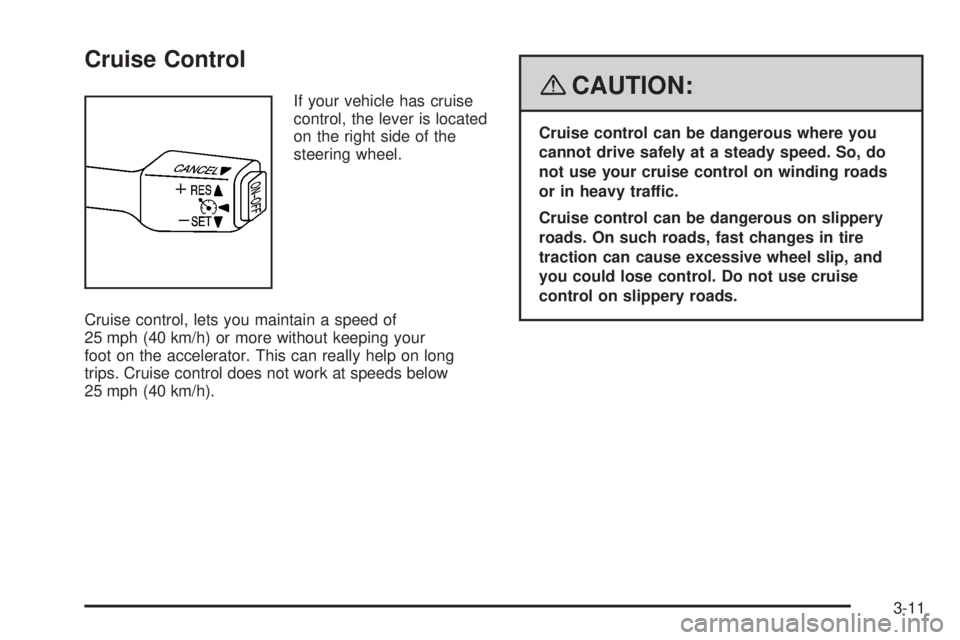
If your vehicle has cruise
control, the lever is located
on the right side of the
steering wheel.
Cruise control, lets you maintain a speed of
25 mph (40 km/h) or more without keeping your
foot on the accelerator. This can really help on long
trips. Cruise control does not work at speeds below
25 mph (40 km/h).{CAUTION:
Cruise control can be dangerous where you
cannot drive safely at a steady speed. So, do
not use your cruise control on winding roads
or in heavy traffic.
Cruise control can be dangerous on slippery
roads. On such roads, fast changes in tire
traction can cause excessive wheel slip, and
you could lose control. Do not use cruise
control on slippery roads.
3-11