infotainment PONTIAC VIBE 2009 User Guide
[x] Cancel search | Manufacturer: PONTIAC, Model Year: 2009, Model line: VIBE, Model: PONTIAC VIBE 2009Pages: 318, PDF Size: 1.53 MB
Page 122 of 318
Root Directory
The root directory is treated as a
folder. All .mp3 les in the root
directory are accessed before
folders in the root directory.
Empty Directory or Folder
Empty folders and directories do
not display. The system ignores
empty directories and folders and
advances to the next directory
or folder that has .mp3 les in it.
No Folder
On a CD that contains only .mp3
les in the root directory the
next and previous folder functions
do not work.
On a CD that contains playlists
and .mp3 les the next and previous
folder functions search playlists
rst and then search .mp3 les in
the root folder.Order of Play
CDs that have playlists play the
tracks in the following order:
1. After the rst track in the rst
playlist ends, play continues
sequentially through all tracks
in each playlist
2. After the last track of the last
playlist ends, play restarts
from the rst track of the rst
playlist.
CDs that do not have playlists play
the tracks in the following order:
1. The rst le in the root directory
plays.
2. After all les from the root
directory have played, les in the
folders play.
3. After playing the last le from the
last folder, play restarts with the
rst le in the root directory.File System and Naming
The radio display shows, track
names that are shorter than
39 characters. Names that are
longer are shortened. The track
name appears as:
The song name that is in the
ID3 tag.
The le name without the le
extension if the song name is
not in the ID3 tag.
Preprogrammed Playlists
Playlists are accessed before les
or folders in the root directory.
Preprogrammed playlists created
by WinAmp™, MusicMatch™,
or Real Jukebox™ software can
be accessed and are treated
as special folders containing
compressed audio song les.
6-10 Infotainment
2009 - Pontiac Vibe Owner Manual
Page 123 of 318
Music Navigator
The music navigator feature lets
MP3 CDs play in order by artist or
album.
The MP3 player scans the disc
to sort the les by artist and
album ID3 tag information.
It can take several minutes to
scan the disc depending
on the number of MP3 les
recorded to the CD-R.
The radio starts playing while
the disc is being scanned.
After the scan is nished,
the disc starts playing.
Playing an MP3
The MP3 player can play the
smaller 3 inch (8 cm) single CDs
with an adapter ring.
1. Insert a CD label side up
partway into the slot.
2. The CD player pulls the CD in
and begins playing.3. The CD stays in the player if the
ignition or radio is turned off.
4. If the CD was the last source
selected, it resumes playing
when the radio is turned on.
Y(EJECT):Press and release
to eject a CD. Once the disc is
ejected it can be removed.
If the CD is not removed after
several seconds the CD player
automatically pulls the disc back
into the player and starts playing.
ySEEK TRACKz:Press to go to
the start of the current track, if
more than ten seconds have played.
Press
zto go to the next track.
Holding or pressing
yorzmultiple
times will cause the player to
continue moving backward or
forward through the tracks on
the CD.
(FWD REV)(Fast Forward/
Fast Reverse):Press and hold
)
to advance playback quickly within
a track. Release
(to resume
playing the track. Press and hold
)
to reverse playback quickly within a
track. Release
(to resume
playing the track.
BAND:Press to listen to the radio
when a CD is playing.
INFO (Information):Press when
an MP3 CD is loaded, then press
the button below the Song, Artist,
Album, or Folder label to view
the information.
CD/AUX (CD/Auxiliary):Press to
play a CD when listening to the
radio.
Press the CD/AUX button again and
the system begins playing audio
from the connected portable audio
player. If a portable audio player
is not connected, “No Input Device
Found” displays.
Infotainment 6-11
2009 - Pontiac Vibe Owner Manual
Page 124 of 318
RDM (Random):Press the button
below the RDM label to hear
the tracks in random order.
Sc(Previous Folder):Press
the button below to go to the
rst track in the previous folder.
cT(Next Folder):Press
the button below to go to the rst
track in the next folder.
h(Music Navigator):Press the
button below to play MP3 les in
order by artist or album.
SORT:Press the button below the
SORT label to change between
playback by artist or album while
using the Music Navigator.
BACK:Press the button below the
BACK label to return to the main
music navigator screen.
ST(Previous/Next):Press the
button below to go to the next
or previous artist or album in
alphabetical order while using
the Music Navigator.
XM Radio Messages
XL (Explicit Language Channels):
These channels, or any others, can
be blocked at a customer’s request,
by calling 1-800-852-XMXM (9696).
Updating:The encryption code
in the receiver is being updated,
and no action is required. This
process should take no longer
than 30 seconds.
No Signal:The system is
functioning correctly, but the vehicle
is in a location that is blocking
the XM™ signal. When the vehicle
is moved into an open area, the
signal should return.
Loading XM:The audio system is
acquiring and processing audio
and text data. No action is needed.
This message should disappear
shortly.CH Off Air:This channel is not
currently in service. Tune to another
channel.
CH Unavail:This previously
assigned channel is no longer
assigned. Tune to another station.
If this station was one of the presets,
choose another station for that
preset button.
No Info:No artist, song title,
category, or text information is
available at this time on this channel.
The system is working properly.
No Info:No text or informational
messages are available at this time
on this channel. The system is
working properly.
Not Found:There are no channels
available for the selected category.
The system is working properly.
6-12 Infotainment
2009 - Pontiac Vibe Owner Manual
Page 125 of 318
XM Locked:The XM™ receiver in
your vehicle may have previously
been in another vehicle. For security
purposes, XM™ receivers cannot
be swapped between vehicles. If this
message is received after having
your vehicle serviced, check
with your dealer/retailer.
Radio ID:If tuned to channel 0,
this message alternates with
the XM™ Radio eight digit radio
ID label. This label is needed
to activate the service.
Unknown:If this message is
received when tuned to channel 0,
there may be a receiver fault.
Consult with your dealer/retailer.
Chk XMRcvr:If this message does
not clear within a short period of
time, the receiver may have a fault.
Consult with your dealer/retailer.Audio Steering Wheel
Controls
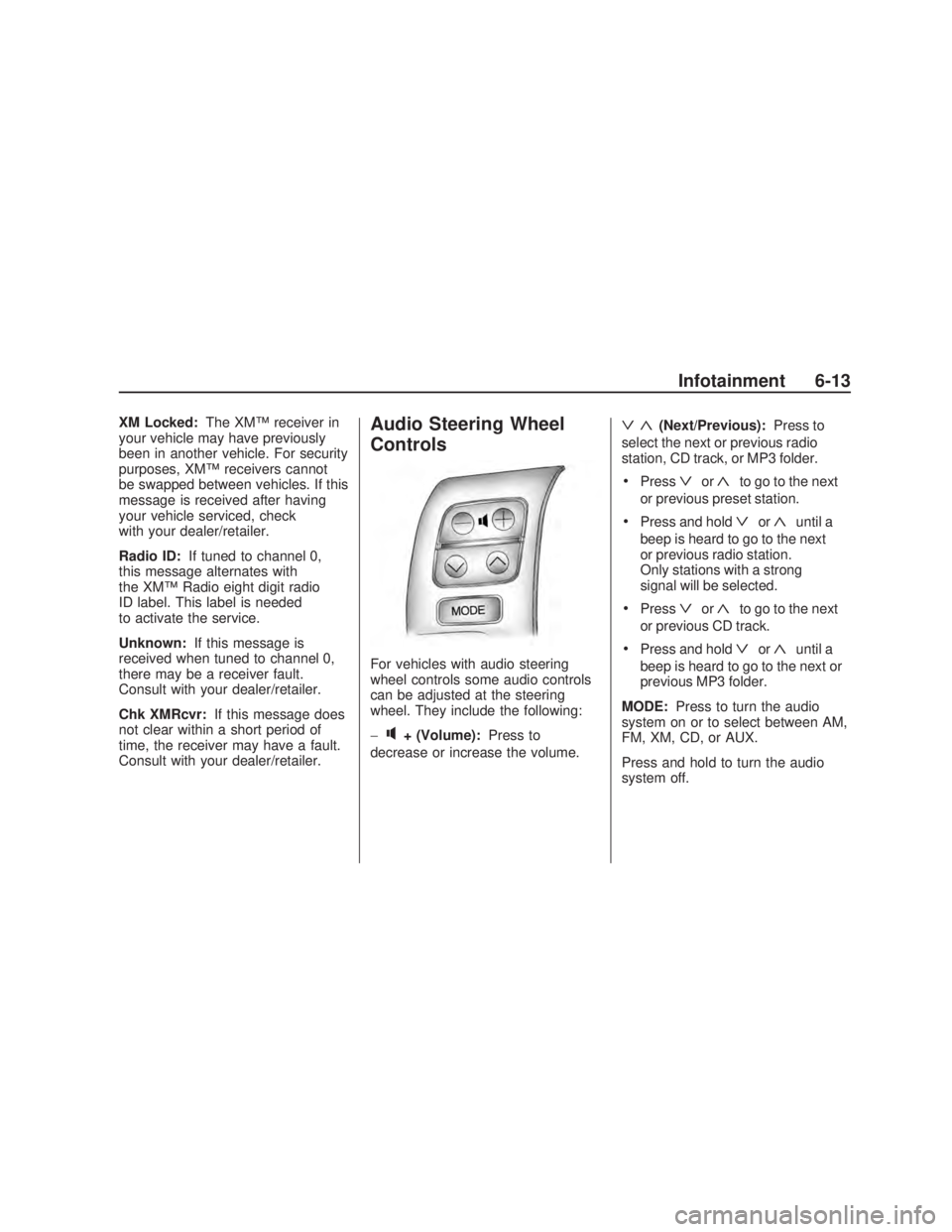
For vehicles with audio steering
wheel controls some audio controls
can be adjusted at the steering
wheel. They include the following:
−
q+ (Volume):Press to
decrease or increase the volume.
ª«(Next/Previous):Press to
select the next or previous radio
station, CD track, or MP3 folder.
Pressªor«to go to the next
or previous preset station.
Press and holdªor«until a
beep is heard to go to the next
or previous radio station.
Only stations with a strong
signal will be selected.
Pressªor«to go to the next
or previous CD track.
Press and holdªor«until a
beep is heard to go to the next or
previous MP3 folder.
MODE:Press to turn the audio
system on or to select between AM,
FM, XM, CD, or AUX.
Press and hold to turn the audio
system off.
Infotainment 6-13
2009 - Pontiac Vibe Owner Manual
Page 126 of 318
Radio Reception
Frequency interference and static
can occur during normal radio
reception if items such as cell phone
chargers, vehicle convenience
accessories, and external electronic
devices are plugged into the
accessory power outlet. If there is
interference or static, unplug the item
from the accessory power outlet.
AM
The range for most AM stations is
greater than for FM, especially at
night. The longer range can cause
station frequencies to interfere
with each other. For better radio
reception, most AM radio stations
boost the power levels during the
day, and then reduce these levels
during the night. Static can also
occur when things like storms and
power lines interfere with radio
reception. When this happens, try
reducing the treble on the radio.
FM Stereo
FM stereo gives the best sound,
but FM signals only reach about
10 to 40 miles (16 to 65 km).
Tall buildings or hills can interfere
with FM signals, causing the
sound to fade in and out.
XM™ Satellite Radio Service
XM Satellite Radio Service gives
digital radio reception from
coast-to-coast in the 48 contiguous
United States, and in Canada. Just
as with FM, tall buildings or hills can
interfere with satellite radio signals,
causing the sound to fade in and out.
In addition, traveling or standing
under heavy foliage, bridges,
garages, or through tunnels could
cause loss of the XM signal for a
period of time. The radio may
display NO XM SIGNAL to indicate
interference.
Fixed Mast Antenna
The xed mast antenna can
withstand most car washes without
being damaged. If the mast should
ever become slightly bent, straighten
it out by hand. If the mast is badly
bent, replace it.
Check occasionally to make sure
the mast is still tightened to the
antenna base located on the roof
of the vehicle. If tightening is
required, tighten by hand.
XM™ Satellite Radio
Antenna System
The XM Satellite Radio antenna is
located on the roof of the vehicle.
Keep this antenna clear of snow and
ice build up for clear radio reception.
If the vehicle has a sunroof, the
performance of the XM system may
be affected if the sunroof is open.
Loading items onto the roof of
the vehicle can interfere with the
performance of the XM system.
Make sure the XM Satellite Radio
antenna is not obstructed.
6-14 Infotainment
2009 - Pontiac Vibe Owner Manual