radio PONTIAC VIBE 2009 Owners Manual
[x] Cancel search | Manufacturer: PONTIAC, Model Year: 2009, Model line: VIBE, Model: PONTIAC VIBE 2009Pages: 318, PDF Size: 1.53 MB
Page 61 of 318
Remote Keyless
Entry (RKE) System
If this vehicle has the Remote
Keyless Entry (RKE) system,
it operates on a radio frequency
subject to Federal Communications
Commission (FCC) Rules and
with Industry Canada.
This device complies with
Part 15 of the FCC Rules.
Operation is subject to the
following two conditions:
1. This device may not cause
interference.
2. This device must accept any
interference received, including
interference that may cause
undesired operation of the device.This device complies with
RSS-210 of Industry Canada.
Operation is subject to the
following two conditions:
1. This device may not cause
interference.
2. This device must accept any
interference received, including
interference that may cause
undesired operation of the device.
Changes or modications to this
system by other than an authorized
service facility could void
authorization to use this equipment.If there is a decrease in the
RKE operating range, try this:Check the distance.
The transmitter may be
too far from the vehicle.
Stand closer during rainy or
snowy weather.
Check the location. Other
vehicles or objects may be
blocking the signal. Take a
few steps to the left or right,
hold the transmitter higher, and
try again.
Check the transmitter’s battery.
See “Battery Replacement”
later in this section.
If the transmitter is still not
working correctly, see your
dealer/retailer or a qualied
technician for service.
Keys, Doors and Windows 2-3
2009 - Pontiac Vibe Owner Manual
Page 96 of 318

If, after several seconds, all status
indicator lights remain on, there
may be a problem with the lights or
the passenger sensing system.
See your dealer/retailer for service.
{CAUTION
If the airbag readiness light in the
instrument panel cluster ever
comes on and stays on, it means
that something may be wrong with
the airbag system. If this ever
happens, have the vehicle
serviced promptly, because an
adult-size person sitting in the
right front passenger’s seat may
not have the protection of the
airbag(s). SeeAirbag Readiness
Light on page 4-14for more on
this, including important safety
information.
Service Airbag
Notication System
Message
If the Service Airbag Notication
System message appears on the
radio display, the vehicle may not
be able to provide the Automatic
Notication of Airbag Deployment
feature. SeeOnStar
®System on
page 4-25for information on this
feature. See your dealer/retailer for
service.
Charging System Light
The charging system light comes on
briey when the ignition is turned
on, but the engine is not running,
as a check to show the light is
working. It should go out when the
engine is started.
If the light stays on, or comes on
while driving, there could be a
problem with the electrical charging
system. Have it checked by your
dealer/retailer. Driving while this light
is on could drain the battery.
If a short distance must be driven
with the light on, be sure to turn off
all accessories, such as the
radio and air conditioner.
4-16 Instruments and Controls
2009 - Pontiac Vibe Owner Manual
Page 107 of 318
To nd out more, refer to the OnStar
Owner’s Guide in the vehicle’s glove
box, visit www.onstar.com or
www.onstar.ca, or speak with
an OnStar advisor by pressing
the OnStar button or calling
1-888-4-ONSTAR (1-888-466-7827).
OnStar Virtual Advisor
OnStar Virtual Advisor is a feature of
OnStar Hands-Free Calling that uses
minutes to access location-based
weather, local traffic reports, and
stock quotes. Press the phone
button and give a few simple voice
commands to browse through the
various topics. See the OnStar
Owner’s Guide for more information.
This feature is only available in the
continental U.S.
How OnStar Service Works
The OnStar system can record
and transmit vehicle information.
This information is automatically
sent to an OnStar Call Center when
the OnStar button is pressed, the
emergency button is pressed, or ifthe airbags deploy. This information
usually includes the vehicles GPS
location and, in the event of a crash,
additional information regarding the
crash that the vehicle was involved in
(e.g. the direction from which the
vehicle was hit). When the Virtual
Advisor feature of OnStar
Hands-Free Calling is used, the
vehicle also sends OnStar the
vehicles GPS location so they can
provide services where it is located.
OnStar service cannot work unless
the vehicle is in a place where
OnStar has an agreement with a
wireless service provider for service
in that area. OnStar service also
cannot work unless the vehicle is in
a place where the wireless service
provider OnStar has hired for that
area has coverage, network capacity
and reception when the service is
needed, and technology that is
compatible with the OnStar service.
Not all services are available
everywhere, particularly in remote
or enclosed areas, or at all times.Location information about the
vehicle is only available if the GPS
satellite signals are unobstructed
and available.
The vehicle must have a working
electrical system, including adequate
battery power, for the OnStar
equipment to operate. There are
other problems OnStar cannot
control that may prevent OnStar from
providing OnStar service at any
particular time or place. Some
examples are damage to important
parts of the vehicle in a crash, hills,
tall buildings, tunnels, weather or
wireless phone network congestion.
Your Responsibility
Increase the volume of the radio if
the OnStar advisor cannot be heard.
If the light next to the OnStar buttons
is red, the system may not be
functioning properly. If the light
appears clear (no light is appearing),
your OnStar subscription has
expired and all services have been
deactivated. Press the OnStar button
to conrm that the OnStar equipment
is active.
Instruments and Controls 4-27
2009 - Pontiac Vibe Owner Manual
Page 113 of 318
Infotainment
Audio System(s)
Audio System(s).................6-1
Setting the Clock................6-2
Radio(s).............................6-3
Using an MP3....................6-9
XM Radio Messages.........6-12
Audio Steering Wheel
Controls..........................6-13
Radio Reception...............6-14
Fixed Mast Antenna..........6-14
XM™ Satellite Radio
Antenna System..............6-14
Audio System(s)
Determine which radio the vehicle
has and read the following pages to
become familiar with its features.
{CAUTION
Taking your eyes off the road for
extended periods could cause
a crash resulting in injury or
death to you or others. Do not
give extended attention to
entertainment tasks while driving.
This system provides access to
many audio and non audio listings.To minimize taking your eyes off the
road while driving, do the following
while the vehicle is parked:
Become familiar with the
operation and controls of
the audio system.
Set up the tone, speaker
adjustments, and preset radio
stations.
For more information, seeDefensive
Driving on page 8-17.
Infotainment 6-1
2009 - Pontiac Vibe Owner Manual
Page 114 of 318
Setting the Clock
The radio has a CLOCK button for
adjusting the time and date.
The date does not automatically
display. To see the date press
CLOCK while the radio is on.
The date with display times out after
a few seconds and goes back to
the normal radio and time display.
To adjust the time and date:
1. Turn the ignition key to
ACC/ACCESSORY or ON/RUN.
2. Press the PWR VOL
(Power/Volume) knob to
turn on the radio.
3. Press the CLOCK button, and
the HR, MIN, MM, DD, YYYY
(hour, minute, month, day,
and year) categories display.
4. Press the button under the
category to be adjusted.5. To increase the time or date,
do one of the following: turn
the TUNE ADJ (Tune/Adjust)
knob clockwise, press
SEEK/TRACK
y, press
FWD
((Forward), or continue
to press the button under the
category to be adjusted.
6. To decrease the time or date,
do one of the following:
turn the TUNE ADJ knob
counterclockwise, press
SEEK/TRACK
z, or press
REV
)(Reverse).
7. To save the settings, press
the CLOCK button, or let
the display time out.To change the time default setting
from 12 hour to 24 hour, and to
change the date default setting from
month/day/year to day/month/year:
1. Press the CLOCK button
and then the button below the
forward arrow label on the
display. The 12H and 24H, and
the date MMDD (month and
day) and DDMM (day and month)
categories will display.
2. Press the button below the
12H or 24H label, and the
date MMDD (month and day) or
DDMM (day and month) label
to choose how the radio displays
the time and date.
3. To save the settings, press
the CLOCK button, or let
the screen time out.
6-2 Infotainment
2009 - Pontiac Vibe Owner Manual
Page 115 of 318
Radio(s)
Playing the Radio
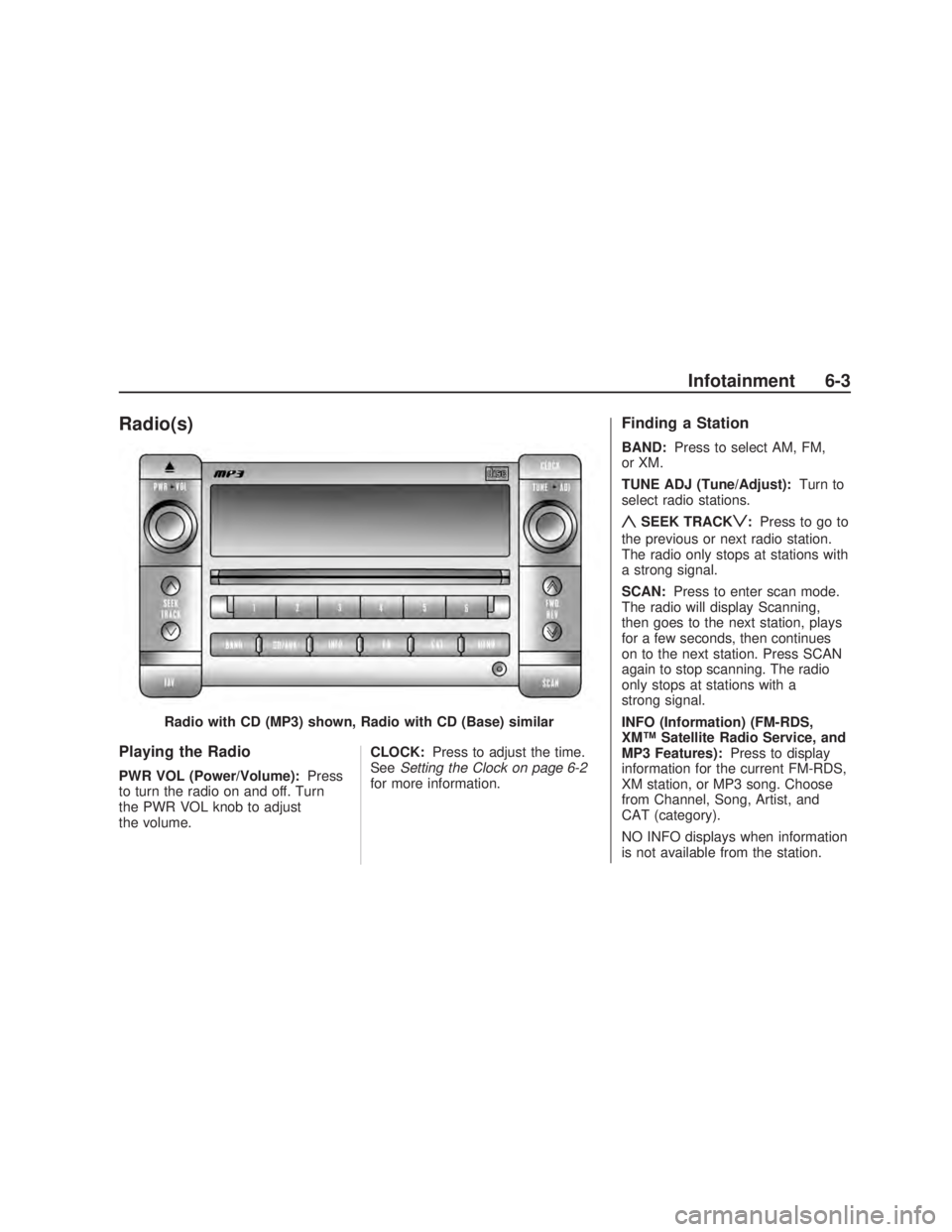
PWR VOL (Power/Volume):Press
to turn the radio on and off. Turn
the PWR VOL knob to adjust
the volume. CLOCK:
Press to adjust the time.
See Setting the Clock on page 6-2
for more information.
Finding a Station
BAND: Press to select AM, FM,
or XM.
TUNE ADJ (Tune/Adjust): Turn to
select radio stations.
ySEEK TRACKz: Press to go to
the previous or next radio station.
The radio only stops at stations with
a strong signal.
SCAN: Press to enter scan mode.
The radio will display Scanning,
then goes to the next station, plays
for a few seconds, then continues
on to the next station. Press SCAN
again to stop scanning. The radio
only stops at stations with a
strong signal.
INFO (Information) (FM-RDS,
XM™ Satellite Radio Service, and
MP3 Features): Press to display
information for the current FM-RDS,
XM station, or MP3 song. Choose
from Channel, Song, Artist, and
CAT (category).
NO INFO displays when information
is not available from the station.
Radio with CD (MP3) shown, Radio with CD (Base) similar
Infotainment 6-3
2009 - Pontiac Vibe Owner Manual
Page 116 of 318
Setting Preset Stations
FAV (Favorites):Press to select
up to six pages of favorites.
Each page contains six favorite
stations, and each page of favorites
can contain any combination of
AM, FM, or XM™ stations.
For vehicles without XM, only
four pages of favorites are available.
To setup the number of favorites
pages:
1. Press the MENU button to
display the radio setup menu.
2. Press the button located below
the FAV 1-6 label.
3. Select the desired number of
favorites pages by pressing
the button located below
the displayed page numbers.
4. Press the FAV button, or let the
menu time out, to return to the
radio screen.To store a radio station as a favorite:
1. Tune to the desired radio station.
2. Press the FAV button to
display the page where it can
be stored.
3. Press and hold one of the
six buttons until a beep sounds.
4. Repeat the steps to store another
radio station.
Setting the Tone
(Bass/Midrange/Treble)
To adjust the bass, midrange, and
treble:
1. Press the TUNE ADJ knob.
2. Turn the TUNE ADJ knob, or
press the button below BASS,
MID, or TREB so it is highlighted.
3. Press the TUNE ADJ knob
to select BASS, MID, or TREB.
4. Turn the TUNE ADJ knob
to adjust the level.
5. Press the TUNE ADJ knob to set
the adjustment.EQ (Equalization):To select
customized equalization settings:
1. Press EQ.
2. Press the button below the label:
POP, ROCK, COUNTRY, TALK,
JAZZ, and CLASSICAL.
Adjusting the Speakers
(Balance/Fade)
To adjust the balance or fade,
perform the following steps:
1. Press the TUNE ADJ knob.
2. Turn the TUNE ADJ knob
or press the button below BAL
FADE so it is highlighted.
3. Press the TUNE ADJ knob to
select the tone to adjust.
4. Turn the TUNE ADJ knob to
adjust the audio balance to
the right or the left speakers
and the fade to adjust the audio
volume to the front or rear
speakers.
5. Press the TUNE ADJ knob to set
the adjustment.
6-4 Infotainment
2009 - Pontiac Vibe Owner Manual
Page 117 of 318
Finding a Category (CAT)
Station (XM Satellite Radio
Service Only)
If CAT times out and is no longer
on the display, return to Step 1.
To select and nd a desired
category:
1. Press the CAT button.
2. Turn the TUNE ADJ knob to
select a category.
3. Press
yorzto go to the
category’s rst station, when the
desired category is displayed.
4. Press
yorzto go to another
station within the selected
category.
5. Press CAT to exit the category
select mode or wait for CAT to
time out.
NOT FOUND displays if the desired
category cannot be found.
Scanning Categories (CAT)
(XM Satellite Radio
Service Only)
To scan a desired category:
1. Press the CAT button to enter
the category select mode.
2. Turn the TUNE ADJ knob to
select a category.
3. Press
yorzfor two seconds
to scan the stations in the
selected category.
4. Press
yorzagain to stop
scanning.
NOT FOUND displays if the desired
category cannot be found.
XM Satellite Radio Service
XM is a satellite radio service
that is based in the 48 contiguous
United States and 10 Canadian
provinces. XM Satellite Radio
has a wide variety of programming
and commercial-free music,
coast-to-coast, and in digital-quality
sound. During your trial or when you
subscribe, you will get unlimited
access to XM Radio Online for when
you are not in your vehicle. A service
fee is required to receive the XM
service. For more information,
contact XM at www.xmradio.com
or call 1-800-929-2100 in the U.S.
and www.xmradio.ca or call
1-877-438-9677 in Canada.
Infotainment 6-5
2009 - Pontiac Vibe Owner Manual
Page 118 of 318
Radio Data System (RDS)
The audio system has Radio Data
System (RDS). RDS features are
available for use only on FM stations
that broadcast RDS information.
With RDS:
Stations can be selected based
on programming.
Stations with traffic
announcements can be selected.
Announcements concerning local
and national emergencies can be
received.
Messages display from radio
stations.
RDS relies on receiving specic
information from radio stations and
only works when the information
is available. In rare cases, a
radio station could broadcast
incorrect information that causes the
radio features to work improperly.
Contact the radio station if this
happens.When the radio is tuned to an RDS
station, the station name or call
letters display instead of the
frequency. RDS stations can also
provide the time of day, a program
type (PTY) for current programming,
and the name of the program being
broadcast.
RDS Messages
ALERT:Displays when local or
national emergency announcements
are received. If the radio tunes to
a related network station for the
announcement, it returns to the
original station when the
announcement ends. The
announcement should be heard
even if the volume is low or a CD is
playing. If a CD is playing, it will stop
playing during the announcement.
The RDS alert feature is not
supported by all RDS radio
stations.
The RDS alert feature cannot be
turned off.
Alert is not affected by tests of the
emergency broadcast system.
MSG (Message):Displays if the
current RDS station has a message.
The message displays the artist,
song title, call in phone numbers,
etc. If the entire message does not
display, parts of the message appear
every three seconds until the
message is completed. MSG
disappears from the display once the
completed message has displayed.
Radio Messages for XM Only
SeeXM Radio Messages on
page 6-12later in this section for
further detail.
6-6 Infotainment
2009 - Pontiac Vibe Owner Manual
Page 119 of 318
Playing a CD
The CD player can play the smaller
3 inch (8 cm) single CDs with an
adapter ring.
1. Insert a CD label side up
partway into the slot.
2. The CD player pulls the CD in
and begins playing.
3. The CD symbol and track
number displays.
4. The CD stays in the player if the
ignition or radio is turned off.
5. If the CD was the last source
selected, it resumes playing
when the radio is turned on.
Y(EJECT):Press and release to
eject a CD. Once ejected it can be
removed. If the CD is not removed
after several seconds the CD player
automatically pulls the disc back into
the player and starts playing.TUNE ADJ:Turn the TUNE ADJ
knob to select tracks on the CD.
ySEEK TRACKz:Pressyto
go to the start of the current
track, if more than ten seconds
have played. Press
zto go to the
next track. Holding or pressing
yorzmultiple times causes the
player to continue moving backward
or forward through the tracks on
the CD.
(FWD REV)(Fast Forward/
Fast Reverse):Press and hold
(
to advance playback quickly within a
track. Release to resume playing the
track. Press and hold
)to reverse
playback quickly within a track.
Release to resume playing the track.
BAND:Press to listen to the radio
when a CD is playing.CD/AUX (CD/Auxiliary):Press to
play a CD when listening to the radio.
Press the CD/AUX button again and
the system begins playing audio from
the connected portable audio player.
If a portable audio player is not
connected, “No Input Device Found”
displays.
See “Using the Auxiliary Input Jack”
later in this section.
INFO (Information):Press to
switch the display between the
track number, elapsed time of the
track, and the time. When the
ignition is off, press this button to
display the time.
EQ (Equalization):Press to select
an equalization setting while playing
a CD. See “EQ” listed previously for
more information. If an EQ setting is
selected for a CD, it is activated each
time a CD is played.
Infotainment 6-7
2009 - Pontiac Vibe Owner Manual