memory PORSCHE 911 2009 5.G User Guide
[x] Cancel search | Manufacturer: PORSCHE, Model Year: 2009, Model line: 911, Model: PORSCHE 911 2009 5.GPages: 310, PDF Size: 3.39 MB
Page 83 of 310

Operation, Safety
81
Welcome Home LightingSwitching onfMove light switch to the HOME position.
For improved visibility and security when you get
in and out of the car, the daytime driving lights and
the tail lights remain on for a certain period of
time:
–When you get out of the car, the lights are
turned on for approx. 30 seconds after the
door is opened. The off-delay time resumes
when the vehicle is locked.
On vehicles with the Sport Chrono Package
Plus, the PCM can be used to set the off-delay
time. This setting also changes the lighting
period for unlocking the vehicle.
Please observe the chapter “Individual
Memory” in the separate PCM operating
instructions.
– The lights are turned on for approx.
30 seconds when the vehicle is unlocked.
The lights go out if the ignition is switched on
or when leaving the Welcome Home lighting.
Automatic Headlight Beam
Adjustment Vehicles with Bi-Xenon headlights feature
dynamic headlight beam adjustment.
When the ignition is switched on, the level of the
headlight beam automatically changes in accord-
ance with the vehicle load.
The level of the headlight beam is automatically
kept constant during acceleration and braking. Checking operation 1. Switch the low beam on.
2. Insert ignition key and switch ignition on.
The light beam first dips all the way down and
is then adapted to the vehicle load.
If this test item is not met, the headlight beam
adjustment system must be checked by an author-
ized Porsche dealer.
Page 84 of 310
82
Operation, Safety
Turn Signal / Headlight Dimmer /
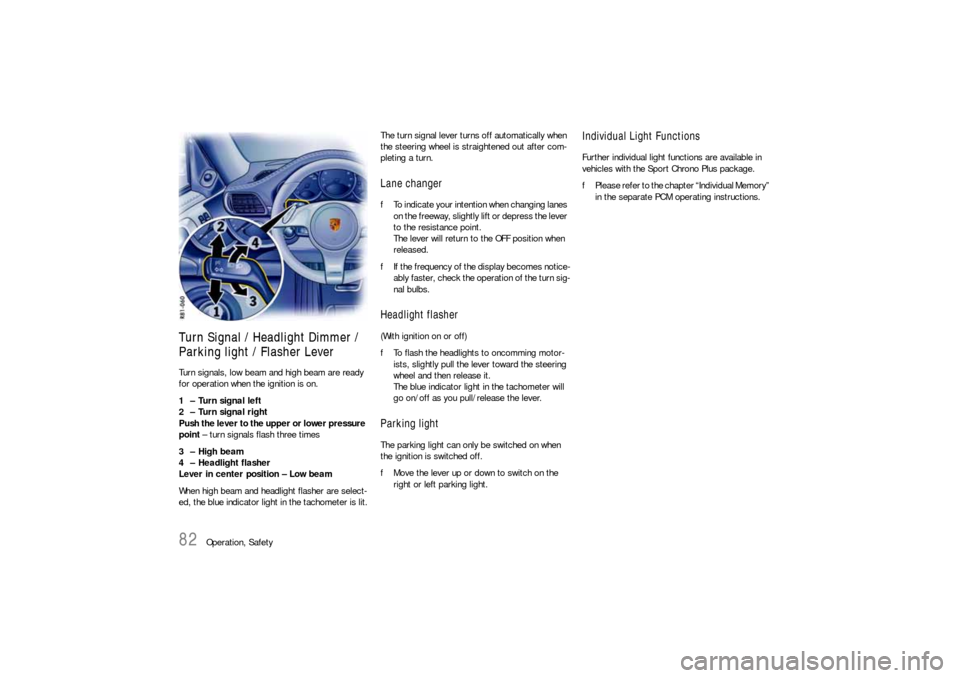
Parking light / Flasher Lever Turn signals, low beam and high beam are ready
for operation when the ignition is on.
1 – Turn signal left
2 – Turn signal right
Push the lever to the upper or lower pressure
point – turn signals flash three times
3 – High beam
4 – Headlight flasher
Lever in center position – Low beam
When high beam and headlight flasher are select-
ed, the blue indicator light in the tachometer is lit.The turn signal lever turns off automatically when
the steering wheel is straightened out after com-
pleting a turn.
Lane changer fTo indicate your intention when changing lanes
on the freeway, slightly lift or depress the lever
to the resistance point.
The lever will return to the OFF position when
released.
fIf the frequency of the display becomes notice-
ably faster, check the operation of the turn sig-
nal bulbs. Headlight flasher (With ignition on or off)
fTo flash the headlights to oncomming motor-
ists, slightly pull the lever toward the steering
wheel and then release it.
The blue indicator light in the tachometer will
go on/off as you pull/release the lever.Parking lightThe parking light can only be switched on when
the ignition is switched off.
fMove the lever up or down to switch on the
right or left parking light.
Individual Light FunctionsFurther individual light functions are available in
vehicles with the Sport Chrono Plus package.
fPlease refer to the chapter “Individual Memory”
in the separate PCM operating instructions.
Page 86 of 310

84
Operation, Safety
Rear Wiper6 – Rear window wiper – intermittent
operation
fMove wiper lever forwards to the first click.
The rear window wiper wipes at preset inter-
vals.The rear wiper is automatically switched off when
a speed of 130 mph (210 km/h) is exceeded. It is
switched on again when the speed falls below
124 mph (200 km/h).
On vehicles with the Sport Chrono Package Plus,
further rear wiper functions can be selected via
the PCM.
fPlease observe the chapter “Individual
Memory” in the separate PCM operating
instructions.
Page 87 of 310

Operation, Safety
85
Rain sensorThe rain sensor on the windshield measures the
amount of rainfall (snowfall too). Wiper speed is
automatically adjusted accordingly.
Switching on
fMove wiper lever upwards to the first click.
Switching off
fMove wiper lever to position 0.
The rain sensor remains switched off if the wiper
lever is already in position 1 when the ignition is
switched on.To switch the rain sensor on again:
fMove wiper lever to position 0 and then to
position 1 or
fOperate windshield washer system 5 or
fChange the sensitivity of the rain sensor with
four-stage switch A.
Switch-on is confirmed by one wipe of the wind-
shield.
On vehicles with the Sport Chrono Package Plus,
further rain sensor functions can be selected via
the PCM.
fPlease see the chapter “Individual Memory” in
the separate PCM operating instructions.
Changing the sensitivity of the rain sensor
Sensitivity can be set with switch A in 4 stages:
fAdjust switch A upwards –
high sensitivity.
The setting is confirmed by one wipe of the
windshield.
fAdjust switch A downwards –
low sensitivity.Maintenance note
fPeriodically clean the wiper blades with a win-
dow cleaner, especially after the vehicle has
been washed in a car wash. We recommend
Porsche window cleaner. If they are very dirty
(e.g. with insect remains), they can be cleaned
with a sponge or cloth.
If the wiper blades rub or squeak, this may be as
a result of the following:
If the vehicle is washed in an automatic car wash,
wax residues may be adhering to the windshield.
These wax residues can only be removed by using
a window cleaner concentrate.
fPlease see the chapter “WASHER FLUID” on
Page 220.
fPlease contact your authorized Porsche dealer
for further information.
The wiper blades may be damaged or worn.
fReplace wiper blades as soon as possible.
Page 89 of 310

Operation, Safety
87
Decelerating Option 1
fPull operating lever towards the steering wheel
(position 2) until the desired speed is reached.
The speed reached is maintained and stored
when the lever is released.
Option 2
fBriefly move lever towards the steering wheel
(position 2) (a maximum of 10 times).
The speed is reduced by 1 mph (1.6 km/h),
each time the lever is moved towards the
steering wheel.
Vehicles with PDK
Downshifts are carried out to improve decelera-
tion (especially when driving downhill).
Interrupting automatic speed control
operation fPull operating lever downwards briefly
(position 3) or
fOperate brake or clutch pedal or
fSwitch PDK to selector lever position N.
fPlease see the chapter “PORSCHE DOPPEL-
KUPPLUNG (PDK)” on Page 170.
The speed driven before the interruption remains
stored in the memory.
Automatic speed control operation is
interrupted automatically:
– If the set vehicle speed is exceeded by more
than approx. 16 mph (25 km/h) for longer than
20 seconds.
– If the actual vehicle speed falls to approx.
37 mph (60 km/h) below the set vehicle speed
for longer than 60 seconds (upward slopes).
– For PSM control operations.
Resuming the stored speed fBriefly push operating lever upwards
(position4).
The speed control accelerates/decelerates
the vehicle to the stored speed.
The stored speed should only be recalled when
traffic conditions and the road surface so permit.Switching automatic speed control
readiness off fPress button A on the automatic speed control
lever.
The green readiness light in the speedometer
goes off.
Note
The stored speed value is cleared when the
vehicle is parked and the ignition is switched off.
Important note
On upward or downward slopes, the set speed
cannot always be maintained by the automatic
speed control.
fTo obtain sufficient engine braking or a better
engine-speed range, a lower gear needs to be
selected.
Page 110 of 310
108
Automatic air conditioning system, Heated rear window/Door mirror heating Switching recirculating-air setting on or off
fPress button E.
The outside-air supply is interrupted and only
the inside air is circulated.
The light-emitting diode in the button lights up.
Over approx. 37 °F/3 °C
If the air-conditioning compressor was off, it
switches on automatically. The duration of recircu-
lating-air setting is not limited.
Below approx. 37 °F/3 °C
The air-conditioning compressor is switched off.
Recirculating-air setting is automatically ended
after approx. 3 minutes.
Air distributionThe individual air distributions can be combined as
desired.
Recommended setting in Summer:
Air distribution to central and side vents.
Recommended setting in Winter:
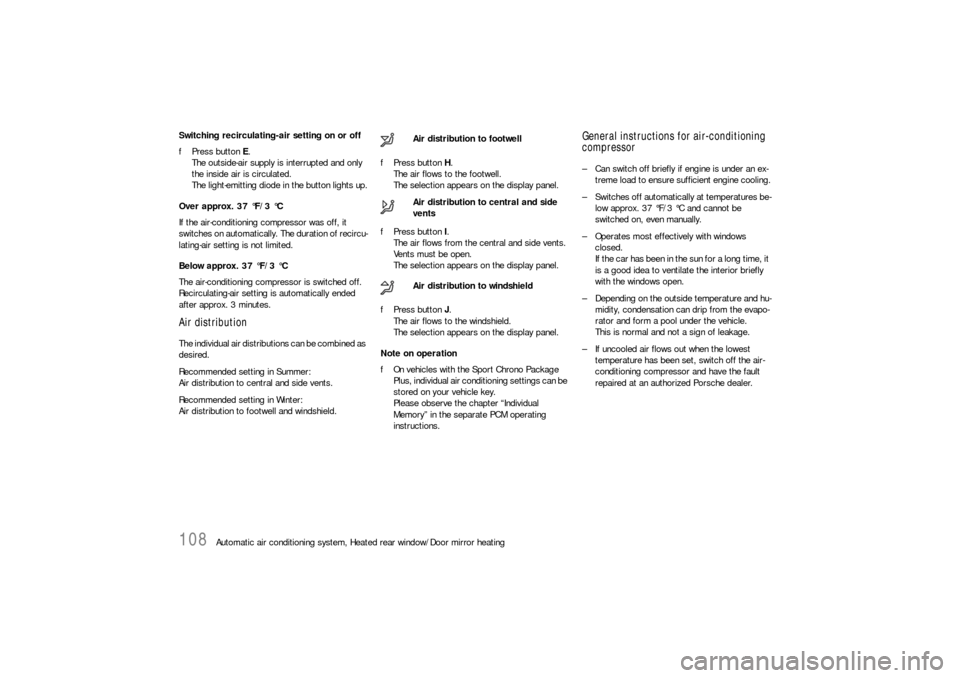
Air distribution to footwell and windshield.fPress button H.
The air flows to the footwell.
The selection appears on the display panel.
fPress button I.
The air flows from the central and side vents.
Vents must be open.
The selection appears on the display panel.
fPress button J.
The air flows to the windshield.
The selection appears on the display panel.
Note on operation
fOn vehicles with the Sport Chrono Package
Plus, individual air conditioning settings can be
stored on your vehicle key.
Please observe the chapter “Individual
Memory” in the separate PCM operating
instructions.
General instructions for air-conditioning
compressor– Can switch off briefly if engine is under an ex-
treme load to ensure sufficient engine cooling.
– Switches off automatically at temperatures be-
low approx. 37 °F/3 °C and cannot be
switched on, even manually.
– Operates most effectively with windows
closed.
If the car has been in the sun for a long time, it
is a good idea to ventilate the interior briefly
with the windows open.
– Depending on the outside temperature and hu-
midity, condensation can drip from the evapo-
rator and form a pool under the vehicle.
This is normal and not a sign of leakage.
– If uncooled air flows out when the lowest
temperature has been set, switch off the air-
conditioning compressor and have the fault
repaired at an authorized Porsche dealer. Air distribution to footwell
Air distribution to central and side
vents
Air distribution to windshield
Page 114 of 310

112
Instruments, On-Board Computer, Warnings
Instrument Panel USA Models Also refer to the corresponding chapters in
the Owner’s Manual.
1. Engine oil temperature gage
2. Speedometer with analogue display
3. Tire pressure warning light
4. Turn signal indicator light, left
5. Tachometer
6. High beam indicator light
7. Turn signal indicator light, right
8. ABS warning light
9. Cooling system
Temperature gage, warning light
10.Fuel
Level gage, warning light
11.Engine oil pressure gage
12.Adjustment button for instrument illumination
and trip counter
13.Odometer and daily trip mileage display
14.Automatic speed control indicator light15.Light sensor for instrument illumination
16.Airbag warning light
17.Check Engine warning light
(Emission control warning light)
18.Central warning light
19.On-board computer display
20.Porsche Stability Management
PSM Multifunctional light
21.Brake warning light
22.Safety belt warning light
23.PDK transmission, gear display
24.PDK transmission, selector lever position
25.Clock and outside temperature display
26.Adjustment button for clockWhen the ignition is switched on, the warning
lights light up for a lamp check.
Note
Warnings that have been given are stored in the
appropriate control unit memory and can be read
out at an authorized Porsche dealer.
This information can help to warn you about situa-
tions which may be hazardous to you or your car.
Page 116 of 310

114
Instruments, On-Board Computer, Warnings
Instrument Panel Canada Models Also refer to the corresponding chapters in
the Owner’s Manual.
1. Engine oil temperature gage
2. Speedometer with analogue display
3. Tire pressure warning light
4. Turn signal indicator light, left
5. Tachometer
6. High beam indicator light
7. Turn signal indicator light, right
8. ABS warning light
9. Cooling system
Temperature gage, warning light
10.Fuel
Level gage, warning light
11.Engine oil pressure gage
12.Adjustment button for instrument illumination
and trip counter
13.Odometer and daily trip mileage display
14.Automatic speed control indicator light15.Light sensor for instrument illumination
16.Airbag warning light
17.Check Engine warning light
(Emission control warning light)
18.Central warning light
19.On-board computer display
20.Porsche Stability Management
PSM Multifunctional light
21.Brake warning light
22.Safety belt warning light
23.PDK transmission, gear display
24.PDK transmission, selector lever position
25.Clock and outside temperature display
26.Adjustment button for clockWhen the ignition is switched on, the warning
lights light up for a lamp check.
Note
Warnings that have been given are stored in the
appropriate control unit memory and can be read
out at an authorized Porsche dealer.
This information can help to warn you about situa-
tions which may be hazardous to you or your car.
Page 127 of 310
Instruments, On-Board Computer, Warnings
125
Check Engine
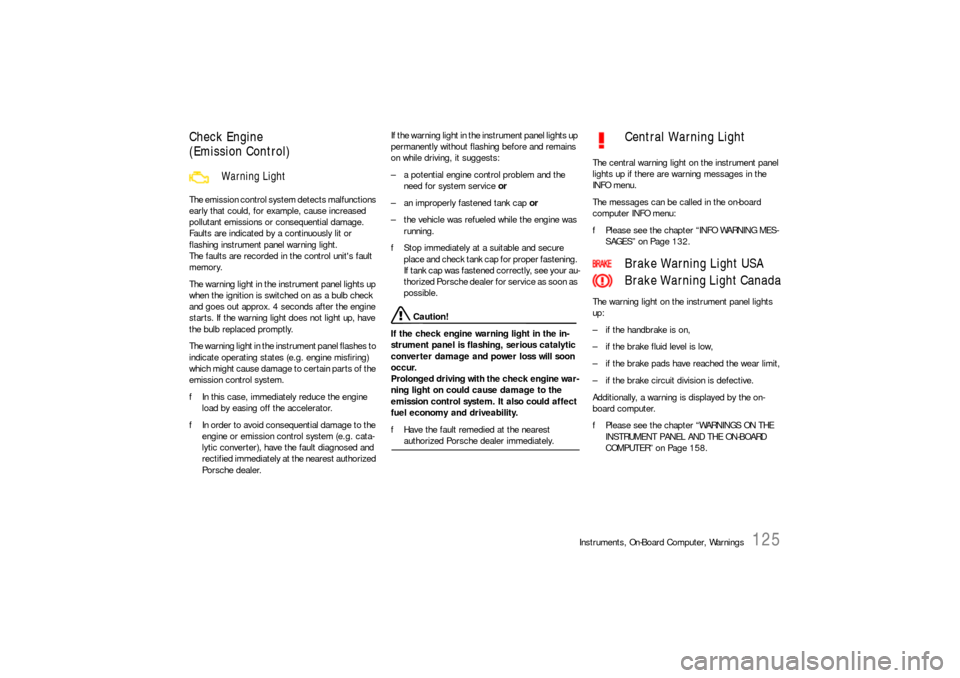
(Emission Control)The emission control system detects malfunctions
early that could, for example, cause increased
pollutant emissions or consequential damage.
Faults are indicated by a continuously lit or
flashing instrument panel warning light.
The faults are recorded in the control unit's fault
memory.
The warning light in the instrument panel lights up
when the ignition is switched on as a bulb check
and goes out approx. 4 seconds after the engine
starts. If the warning light does not light up, have
the bulb replaced promptly.
The warning light in the instrument panel flashes to
indicate operating states (e.g. engine misfiring)
which might cause damage to certain parts of the
emission control system.
fIn this case, immediately reduce the engine
load by easing off the accelerator.
fIn order to avoid consequential damage to the
engine or emission control system (e.g. cata-
lytic converter), have the fault diagnosed and
rectified immediately at the nearest authorized
Porsche dealer.If the warning light in the instrument panel lights up
permanently without flashing before and remains
on while driving, it suggests:
– a potential engine control problem and the
need for system service or
– an improperly fastened tank cap or
– the vehicle was refueled while the engine was
running.
fStop immediately at a suitable and secure
place and check tank cap for proper fastening.
If tank cap was fastened correctly, see your au-
thorized Porsche dealer for service as soon as
possible.
Caution!
If the check engine warning light in the in-
strument panel is flashing, serious catalytic
converter damage and power loss will soon
occur.
Prolonged driving with the check engine war-
ning light on could cause damage to the
emission control system. It also could affect
fuel economy and driveability.
fHave the fault remedied at the nearest authorized Porsche dealer immediately.The central warning light on the instrument panel
lights up if there are warning messages in the
INFO menu.
The messages can be called in the on-board
computer INFO menu:
fPlease see the chapter “INFO WARNING MES-
SAGES” on Page 132.
The warning light on the instrument panel lights
up:
– if the handbrake is on,
– if the brake fluid level is low,
– if the brake pads have reached the wear limit,
– if the brake circuit division is defective.
Additionally, a warning is displayed by the on-
board computer.
fPlease see the chapter “WARNINGS ON THE
INSTRUMENT PANEL AND THE ON-BOARD
COMPUTER” on Page 158.
Warning Light
Central Warning Light
Brake Warning Light USA
Brake Warning Light Canada
Page 144 of 310
142
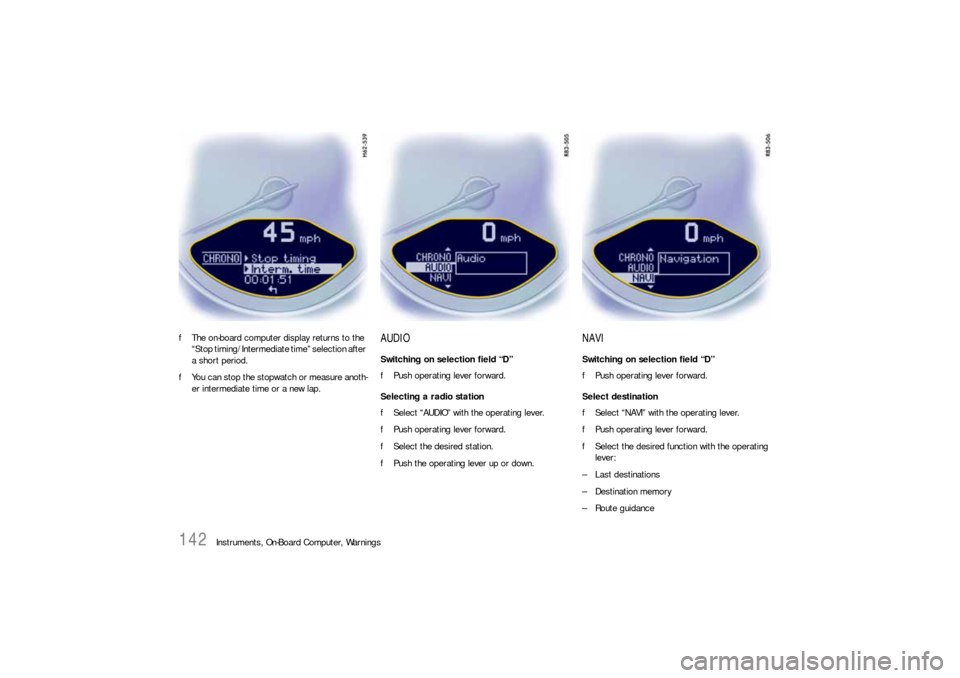
Instruments, On-Board Computer, Warnings fThe on-board computer display returns to the
“Stop timing/Intermediate time” selection after
a short period.
fYou can stop the stopwatch or measure anoth-
er intermediate time or a new lap.
AUDIOSwitching on selection field “D”
fPush operating lever forward.
Selecting a radio station
fSelect “AUDIO” with the operating lever.
fPush operating lever forward.
fSelect the desired station.
fPush the operating lever up or down.
NAVISwitching on selection field “D”
fPush operating lever forward.
Select destination
fSelect “NAVI” with the operating lever.
fPush operating lever forward.
fSelect the desired function with the operating
lever:
– Last destinations
– Destination memory
–Route guidance