stop start PORSCHE 911 2009 5.G User Guide
[x] Cancel search | Manufacturer: PORSCHE, Model Year: 2009, Model line: 911, Model: PORSCHE 911 2009 5.GPages: 310, PDF Size: 3.39 MB
Page 127 of 310
Instruments, On-Board Computer, Warnings
125
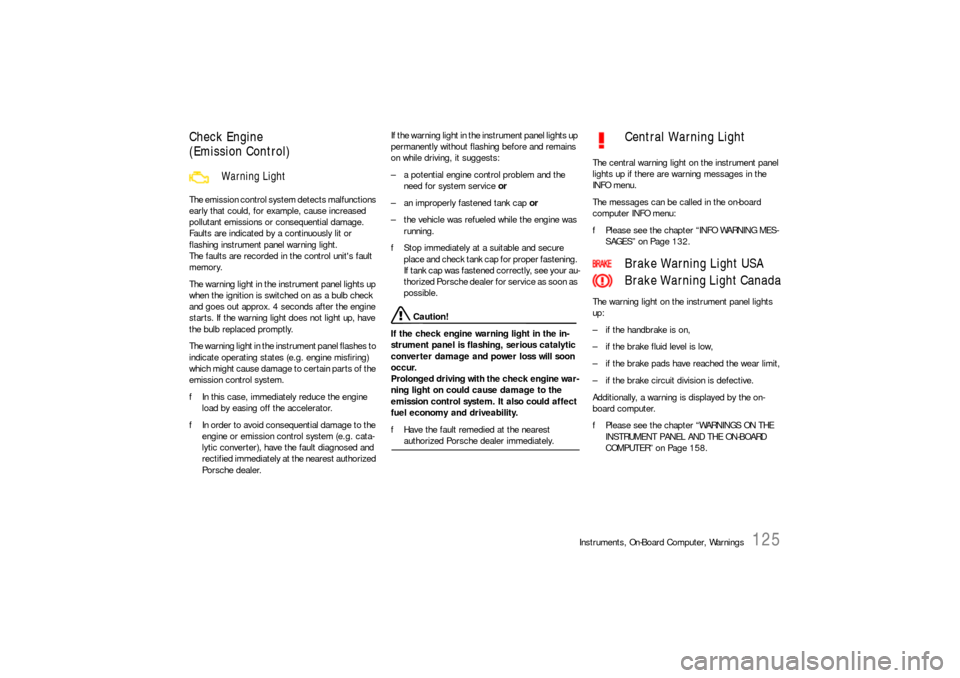
Check Engine
(Emission Control)The emission control system detects malfunctions
early that could, for example, cause increased
pollutant emissions or consequential damage.
Faults are indicated by a continuously lit or
flashing instrument panel warning light.
The faults are recorded in the control unit's fault
memory.
The warning light in the instrument panel lights up
when the ignition is switched on as a bulb check
and goes out approx. 4 seconds after the engine
starts. If the warning light does not light up, have
the bulb replaced promptly.
The warning light in the instrument panel flashes to
indicate operating states (e.g. engine misfiring)
which might cause damage to certain parts of the
emission control system.
fIn this case, immediately reduce the engine
load by easing off the accelerator.
fIn order to avoid consequential damage to the
engine or emission control system (e.g. cata-
lytic converter), have the fault diagnosed and
rectified immediately at the nearest authorized
Porsche dealer.If the warning light in the instrument panel lights up
permanently without flashing before and remains
on while driving, it suggests:
– a potential engine control problem and the
need for system service or
– an improperly fastened tank cap or
– the vehicle was refueled while the engine was
running.
fStop immediately at a suitable and secure
place and check tank cap for proper fastening.
If tank cap was fastened correctly, see your au-
thorized Porsche dealer for service as soon as
possible.
Caution!
If the check engine warning light in the in-
strument panel is flashing, serious catalytic
converter damage and power loss will soon
occur.
Prolonged driving with the check engine war-
ning light on could cause damage to the
emission control system. It also could affect
fuel economy and driveability.
fHave the fault remedied at the nearest authorized Porsche dealer immediately.The central warning light on the instrument panel
lights up if there are warning messages in the
INFO menu.
The messages can be called in the on-board
computer INFO menu:
fPlease see the chapter “INFO WARNING MES-
SAGES” on Page 132.
The warning light on the instrument panel lights
up:
– if the handbrake is on,
– if the brake fluid level is low,
– if the brake pads have reached the wear limit,
– if the brake circuit division is defective.
Additionally, a warning is displayed by the on-
board computer.
fPlease see the chapter “WARNINGS ON THE
INSTRUMENT PANEL AND THE ON-BOARD
COMPUTER” on Page 158.
Warning Light
Central Warning Light
Brake Warning Light USA
Brake Warning Light Canada
Page 138 of 310
136
Instruments, On-Board Computer, Warnings
CHRONO
StopwatchYou can use the stopwatch to measure time inter-
vals, e.g. on the race circuit or on work-related
journeys. Measured lap times can be stored and
evaluated if the vehicle is equipped with Porsche
Communication Management (PCM).
fPlease observe the chapter “Sport display” in
the separate PCM operating instructions.Stopwatch on the instrument panel
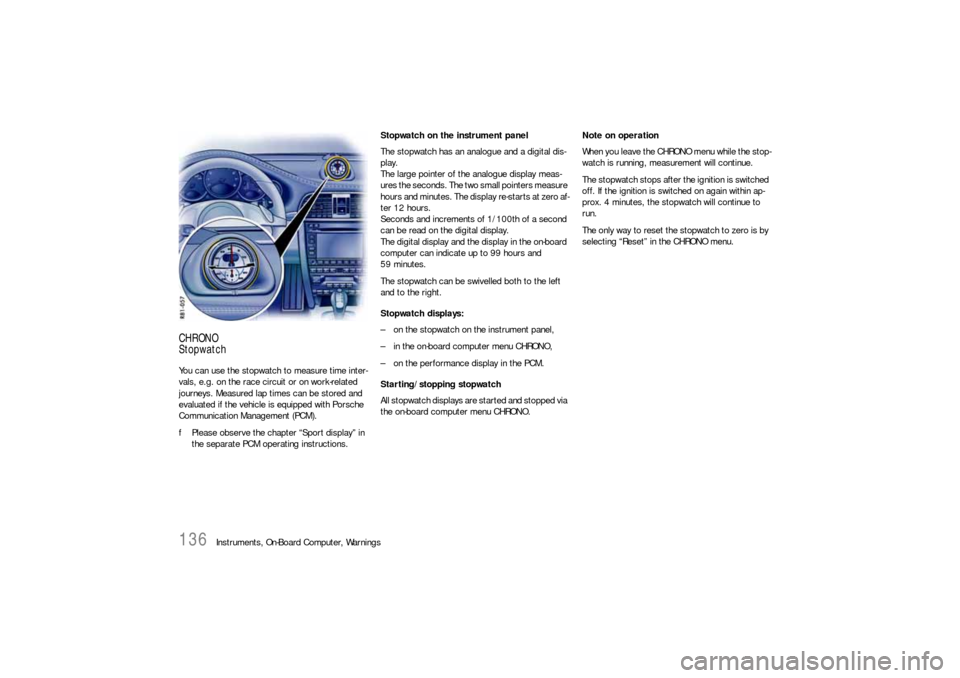
The stopwatch has an analogue and a digital dis-
play.
The large pointer of the analogue display meas-
ures the seconds. The two small pointers measure
hours and minutes. The display re-starts at zero af-
ter 12 hours.
Seconds and increments of 1/100th of a second
can be read on the digital display.
The digital display and the display in the on-board
computer can indicate up to 99 hours and
59 minutes.
The stopwatch can be swivelled both to the left
and to the right.
Stopwatch displays:
– on the stopwatch on the instrument panel,
– in the on-board computer menu CHRONO,
– on the performance display in the PCM.
Starting/stopping stopwatch
All stopwatch displays are started and stopped via
the on-board computer menu CHRONO.Note on operation
When you leave the CHRONO menu while the stop-
watch is running, measurement will continue.
The stopwatch stops after the ignition is switched
off. If the ignition is switched on again within ap-
prox. 4 minutes, the stopwatch will continue to
run.
The only way to reset the stopwatch to zero is by
selecting “Reset” in the CHRONO menu.
Page 139 of 310
Instruments, On-Board Computer, Warnings
137
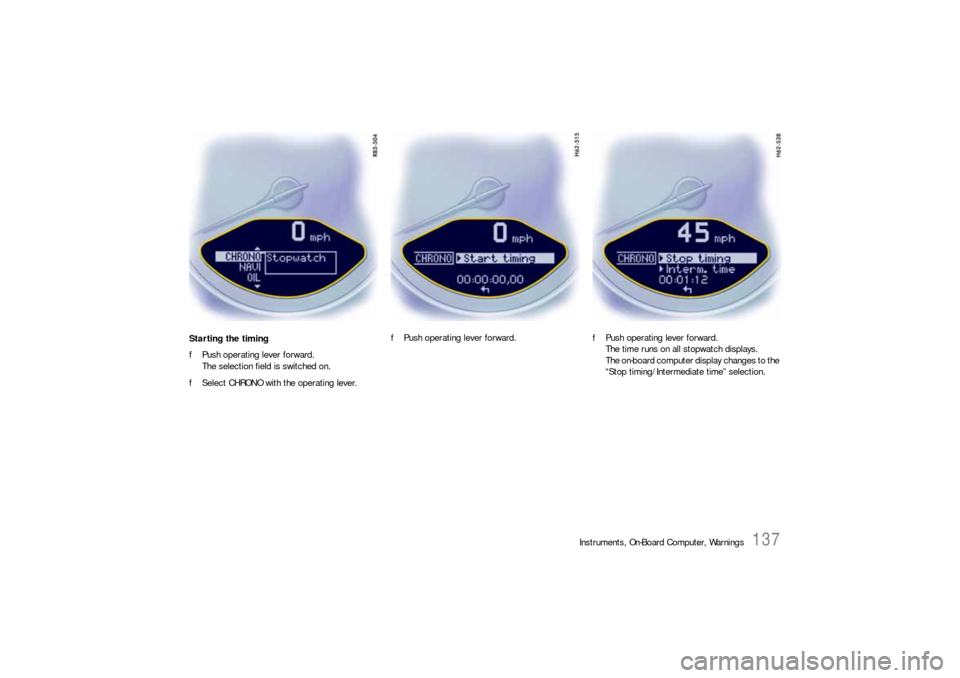
Starting the timing
fPush operating lever forward.
The selection field is switched on.
fSelect CHRONO with the operating lever.fPush operating lever forward.fPush operating lever forward.
The time runs on all stopwatch displays.
The on-board computer display changes to the
“Stop timing/Intermediate time” selection.
Page 140 of 310
138
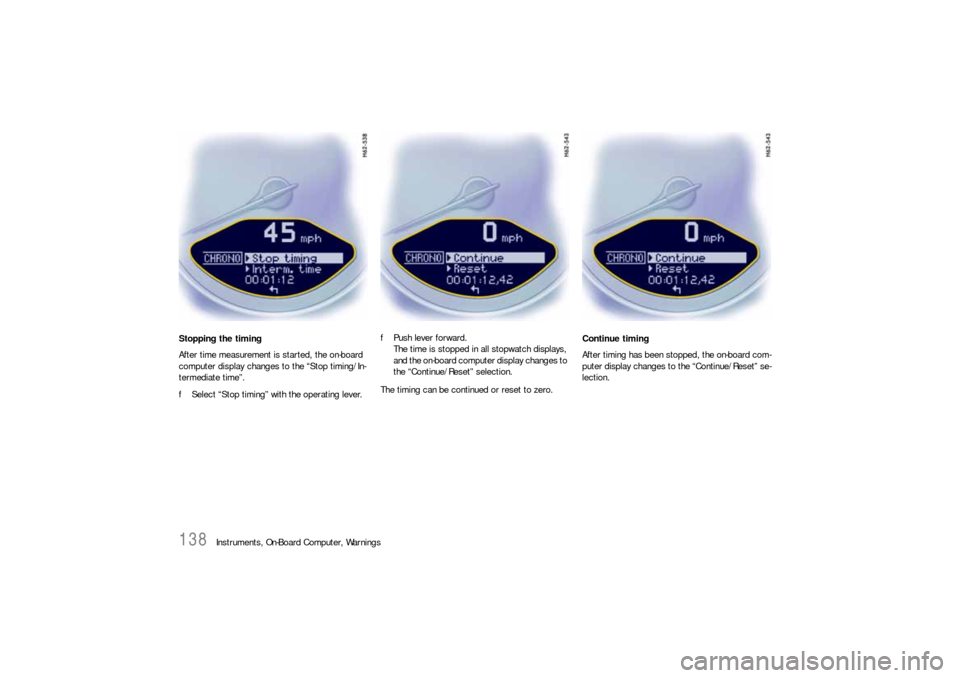
Instruments, On-Board Computer, Warnings Stopping the timing
After time measurement is started, the on-board
computer display changes to the “Stop timing/In-
termediate time”.
fSelect “Stop timing” with the operating lever.fPush lever forward.
The time is stopped in all stopwatch displays,
and the on-board computer display changes to
the “Continue/Reset” selection.
The timing can be continued or reset to zero.Continue timing
After timing has been stopped, the on-board com-
puter display changes to the “Continue/Reset” se-
lection.
Page 141 of 310
Instruments, On-Board Computer, Warnings
139
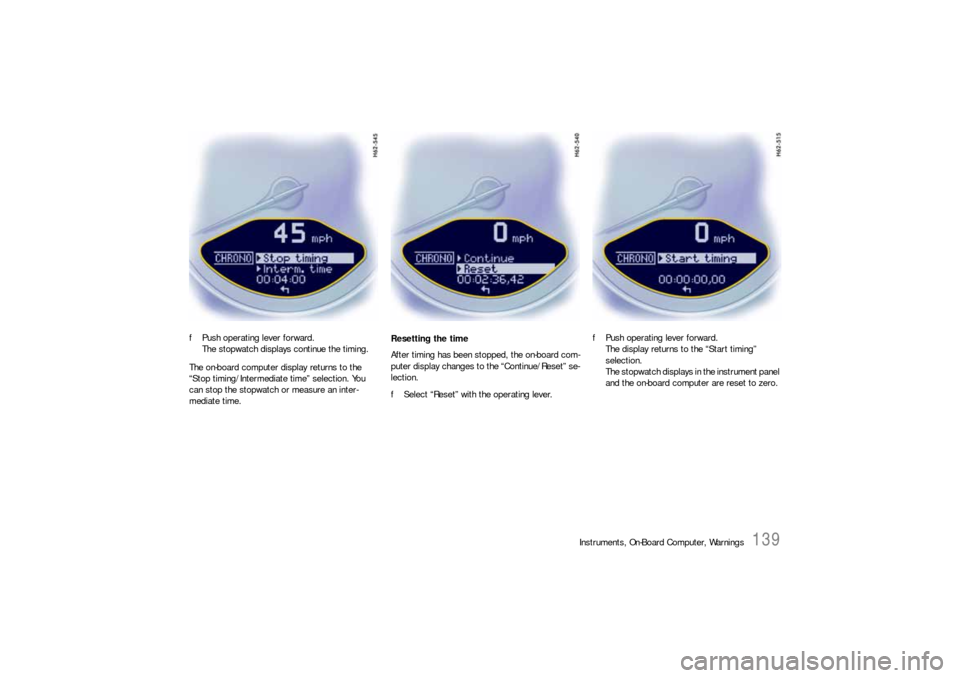
fPush operating lever forward.
The stopwatch displays continue the timing.
The on-board computer display returns to the
“Stop timing/Intermediate time” selection. You
can stop the stopwatch or measure an inter-
mediate time.Resetting the time
After timing has been stopped, the on-board com-
puter display changes to the “Continue/Reset” se-
lection.
fSelect “Reset” with the operating lever.fPush operating lever forward.
The display returns to the “Start timing”
selection.
The stopwatch displays in the instrument panel
and the on-board computer are reset to zero.
Page 142 of 310
140
Instruments, On-Board Computer, Warnings
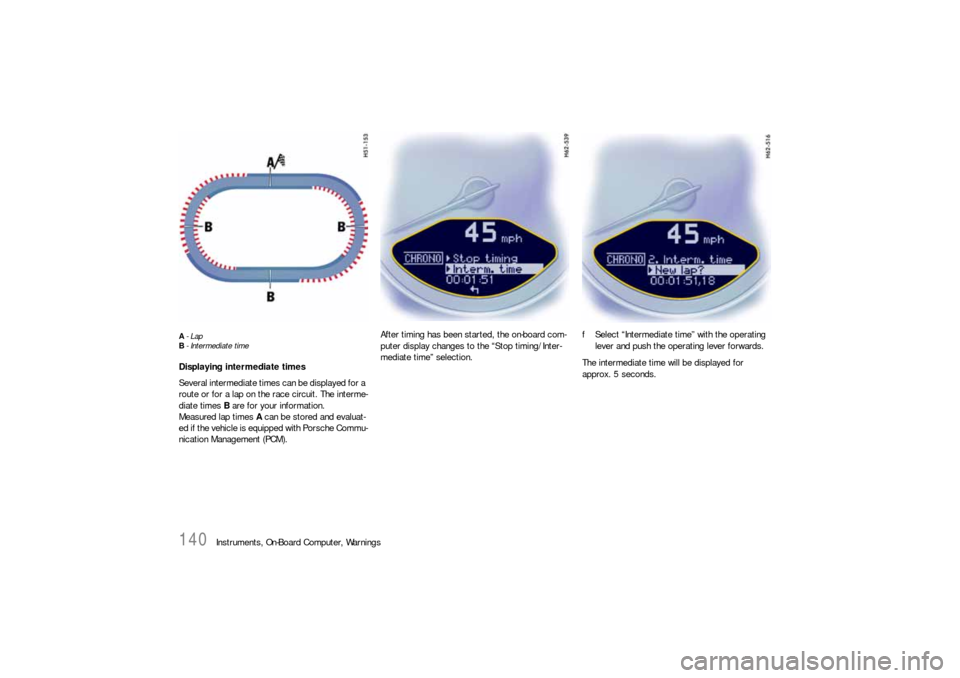
A-Lap
B- Intermediate timeDisplaying intermediate times
Several intermediate times can be displayed for a
route or for a lap on the race circuit. The interme-
diate times B are for your information.
Measured lap times A can be stored and evaluat-
ed if the vehicle is equipped with Porsche Commu-
nication Management (PCM).After timing has been started, the on-board com-
puter display changes to the “Stop timing/Inter-
mediate time” selection.fSelect “Intermediate time” with the operating
lever and push the operating lever forwards.
The intermediate time will be displayed for
approx. 5 seconds.
Page 143 of 310
Instruments, On-Board Computer, Warnings
141
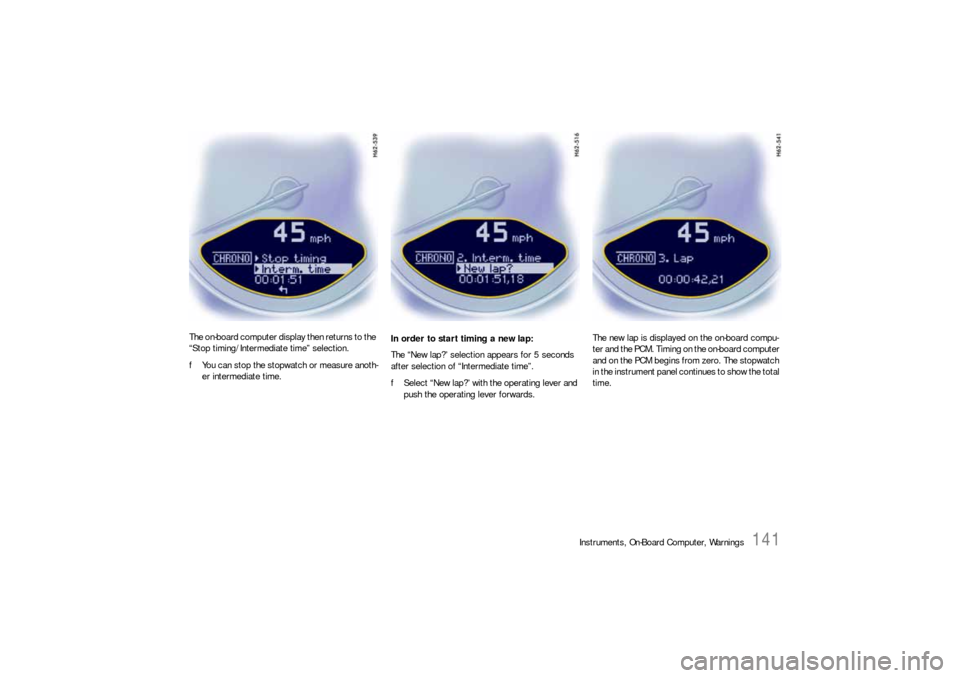
The on-board computer display then returns to the
“Stop timing/Intermediate time” selection.
fYou can stop the stopwatch or measure anoth-
er intermediate time.In order to start timing a new lap:
The “New lap?” selection appears for 5 seconds
after selection of “Intermediate time”.
fSelect “New lap?” with the operating lever and
push the operating lever forwards.The new lap is displayed on the on-board compu-
ter and the PCM. Timing on the on-board computer
and on the PCM begins from zero. The stopwatch
in the instrument panel continues to show the total
time.
Page 162 of 310

160
Warnings
LIMIT
Cannot be accepted
with vehicle stoppedThe current speed can only b e a c c e p t e d f o r t h e
acoustic warning signal when the vehicle is in
motion.
LIMIT
30Selected speed limit (e.g. 30 mph) for the
acoustic warning signal has been exceeded.
Adjust your speed if necessary.
Fuel gage warning
lightConsider remaining range Refuel at next opportunity.
Check engine oil level Start engine oil level measurement in the
on-board computer.
Engine oil pressure too low Stop immediately at a suitable place, measure
oil level with the on-board computer and, if nec-
essary, add engine oil.
Warning light
Temperature gageEngine temperature too high Switch engine off and let it cool.
Check coolant level and, if necessary,
add coolant.
Temperature gage
warning light flash-
esCheck coolant level Switch engine off and let it cool.
Check coolant level and, if necessary, add cool-
ant.
Engine diagnostics – workshop Stop immediately at a suitale place and check
tank cap for proper fastening. If the tank cap
was fastened correctly, consult your authorized
Porsche dealer.
Reduced engine power Consult your authorized Porsche dealer.
Temperature gage
warning light flash-
esFailure of
engine compartment blowerConsult your authorized Porsche dealer.
Instrument
panelOn-board
computerText display on on-board
computerMeaning/measure
Page 165 of 310

Warnings
163
Failure spoiler control Driving stability is impaired.
Adjust your driving style. Reduce speed.
Have the fault remedied at an authorized
Porsche dealer.
Display of
selector lever posi-
tion flashesSelector lever is not engaged Porsche Doppelkupplung:
Selector lever can be between two positions.
Engage the selector lever correctly.
Move selector lever to P Porsche Doppelkupplung:
Move selector lever to position P before with-
drawing key from ignition lock.
Apply brake Porsche Doppelkupplung:
Apply the brake when starting.
Depress clutch pedal Manual transmission:
Depress clutch pedal when starting.
Move selector lever
to position P or NPorsche Doppelkupplung:
The vehicle can be started only in the selector
lever position P or N.
Text display in white:
Transmission
emergency runRestricted gearshift comfort,
failure of reverse gear.
Have the fault remedied at an authorized
Porsche dealer.
Text display in red:
Transmission
emergency runNo selector lever position is displayed on the
instrument cluster.
Vehicle can be driven only until it comes to a
stop.
It is not possible to continue driving. Immedi-
ately stop the vehicle in a suitable place. Have
the vehicle towed to an authorized Porsche
dealer.
Instrument
panelOn-board
computerText display on on-board
computerMeaning/measure
Page 177 of 310

Shifting Gears
175
Depending on driving speed and engine speed,
you can shift up or down at any time.
Gear changes which would exceed the upper or
lower engine speed limit are not executed by the
controller.
There is no automatic upshift at the upper engine
speed limit in selector lever position M. Upshift
suppression can be cancelled by kickdown opera-
tion. If, for example, the engine speed limit is
reached during overtaking and the automatic
upshift does not occur, the transmission in this
case shifts up as a result of kickdown operation.
fSelect an appropriately low gear on upward
and downward slopes.
This will ensure optimum use of engine power
and engine braking.
In order to shift up automatically at the upper
engine speed limit:
fDepress the accelerator pedal beyond the full-
throttle point (kickdown).Failure of the selector lever display on the
instrument cluster
The warning “Transmission emergency run” is
displayed in red on the on-board computer.
–Effect:
No selector lever position is displayed on the
instrument cluster.
Vehicle can be driven only until it comes to a
stop.
Remedy:
It is not possible to continue driving. Immedi-
ately stop the vehicle in a suitable place. Have
the vehicle towed to an authorized Porsche
dealer.
StoppingfFor a brief stop (e.g. at a traffic light), leave the
selector lever in drive position and hold the
vehicle with the brake pedal.
fDo not hold the car on a slope using the
accelerator. Use the brake pedal or the
handbrake instead.
fBefore leaving the vehicle, always apply the
handbrake and move the selector lever to
position P.ParkingfGo easy on the accelerator!
fWhen parking or manoeuvring in a small
space, control the speed by careful use of the
footbrake.Driving in winterIn wintry road conditions it is advisable to take
steep inclines in manual mode. This prevents gear
changes occurring that could cause wheelspin.Tow-starting, towingfPlease see the chapter “TOWING” on
Page 280.