ESP PORSCHE 911 2009 5.G Owner's Manual
[x] Cancel search | Manufacturer: PORSCHE, Model Year: 2009, Model line: 911, Model: PORSCHE 911 2009 5.GPages: 310, PDF Size: 3.39 MB
Page 89 of 310

Operation, Safety
87
Decelerating Option 1
fPull operating lever towards the steering wheel
(position 2) until the desired speed is reached.
The speed reached is maintained and stored
when the lever is released.
Option 2
fBriefly move lever towards the steering wheel
(position 2) (a maximum of 10 times).
The speed is reduced by 1 mph (1.6 km/h),
each time the lever is moved towards the
steering wheel.
Vehicles with PDK
Downshifts are carried out to improve decelera-
tion (especially when driving downhill).
Interrupting automatic speed control
operation fPull operating lever downwards briefly
(position 3) or
fOperate brake or clutch pedal or
fSwitch PDK to selector lever position N.
fPlease see the chapter “PORSCHE DOPPEL-
KUPPLUNG (PDK)” on Page 170.
The speed driven before the interruption remains
stored in the memory.
Automatic speed control operation is
interrupted automatically:
– If the set vehicle speed is exceeded by more
than approx. 16 mph (25 km/h) for longer than
20 seconds.
– If the actual vehicle speed falls to approx.
37 mph (60 km/h) below the set vehicle speed
for longer than 60 seconds (upward slopes).
– For PSM control operations.
Resuming the stored speed fBriefly push operating lever upwards
(position4).
The speed control accelerates/decelerates
the vehicle to the stored speed.
The stored speed should only be recalled when
traffic conditions and the road surface so permit.Switching automatic speed control
readiness off fPress button A on the automatic speed control
lever.
The green readiness light in the speedometer
goes off.
Note
The stored speed value is cleared when the
vehicle is parked and the ignition is switched off.
Important note
On upward or downward slopes, the set speed
cannot always be maintained by the automatic
speed control.
fTo obtain sufficient engine braking or a better
engine-speed range, a lower gear needs to be
selected.
Page 90 of 310
88
Operation, Safety
Cupholder(holder for drink cans and cups)fKeep the cupholder closed while driving.
Warning!
Risk of scalding or damage due to spilling
drinks.
fOnly use beverage containers which fit.
fNever put overfull containers in the cupholder.
fNever place hot drinks in the cupholder.
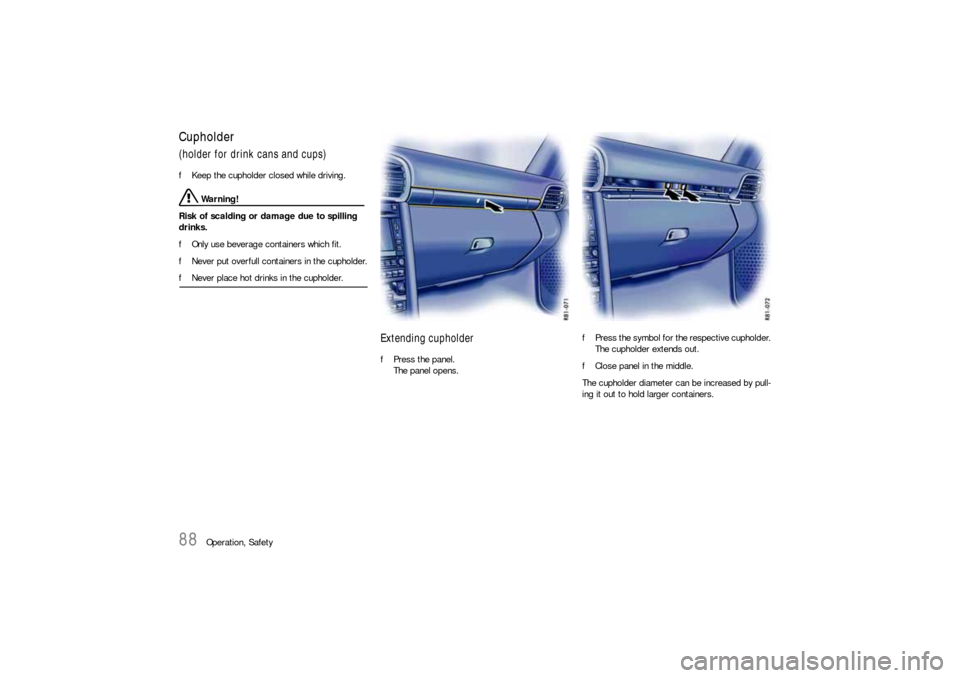
Extending cupholderfPress the panel.
The panel opens.fPress the symbol for the respective cupholder.
The cupholder extends out.
fClose panel in the middle.
The cupholder diameter can be increased by pull-
ing it out to hold larger containers.
Page 95 of 310
Operation, Safety
93
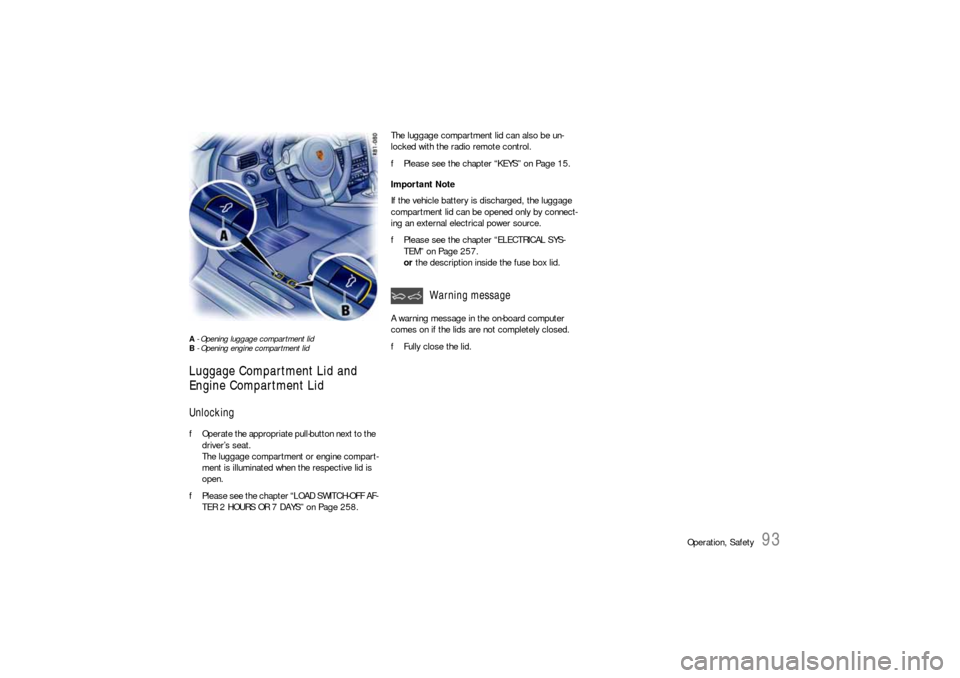
A - Opening luggage compartment lid
B - Opening engine compartment lid Luggage Compartment Lid and
Engine Compartment LidUnlocking fOperate the appropriate pull-button next to the
driver’s seat.
The luggage compartment or engine compart-
ment is illuminated when the respective lid is
open.
fPlease see the chapter “LOAD SWITCH-OFF AF-
TER 2 HOURS OR 7 DAYS” on Page 258.The luggage compartment lid can also be un-
locked with the radio remote control.
fPlease see the chapter “KEYS” on Page 15.
Important Note
If the vehicle battery is discharged, the luggage
compartment lid can be opened only by connect-
ing an external electrical power source.
fPlease see the chapter “ELECTRICAL SYS-
TEM” on Page 257.
or the description inside the fuse box lid.
A warning message in the on-board computer
comes on if the lids are not completely closed.
fFully close the lid.
Warning message
Page 101 of 310
Operation, Safety
99
Fading and drifting
FM range is limited to about 25 miles (40 km),
except for some high power stations.
If a vehicle is moving away from the desired sta-
tion’s transmitter, the signal will tend to fade and/
or drift. This condition is more prevalent with FM
than AM, and is often accompanied by distortion.
Fading and drifting can be minimized to a certain
degree by careful attention to fine tuning or selec-
tion of a stronger signal.
Static and fluttering
When the line-of-sight link between a transmitter
and vehicle is blocked by large buildings or moun-
tains, the radio sound may be accompanied with
static or fluttering because of the characteristic of
FM.
In a similar effect, a fluttering noise is sometimes
heard when driving along a tree-lined road.
This static and fluttering can be reduced by adjust-
ing the tone control for greater bass response un-
til the disturbance has passed.
Multipath
Because of the reflecting characteristics of FM,
direct and reflected signals may reach the antenna
at the same time (multipath) and cancel each other
out.
As a vehicle moves through these electronic dead
spots, the listener may hear a momentary flutter
or loss of reception. Station swapping
When two FM stations are close to each other, and
an electronic dead spot, such as static or multi-
path area, interrupts the original signal, some-
times the stronger second signal will be selected
automatically until the original one returns.
This swapping can also occur as you drive away
from the selected station and approach another
station of a stronger signal.
Compact disc player
Caution!
To avoid damage to compact disc player and
discs.
fUse only compact discs labeled as shown, hav-
ing no dirt, damage or warpage.
fNever attempt to disassemble or oil any part
of the player unit.
Do not insert any object other than a disc into
the slot.
Remember there are no user-serviceable parts
inside the compact disc player.
fDo not allow the disc to sustain any finger-
prints, scrapes or stickers on the surfaces.
This may cause poor sound quality.
Hold the disc only on the edge or center hole. fWhen not in use, take the disc out of the player,
put the disc back into its case and store it
away from dust, heat, damp and direct
sunlight.
Leaving the disc on the dashboard in the sun
can damage the disc.
fIf the disc gets dirty, clean the disc by wiping
the surfaces from the center to the outside in
a radial direction with a soft cloth.
Do not use a conventional record cleaner or
anti-static record preservative.
Disc cleaners are available in audio stores.
Page 105 of 310
Operation, Safety
103
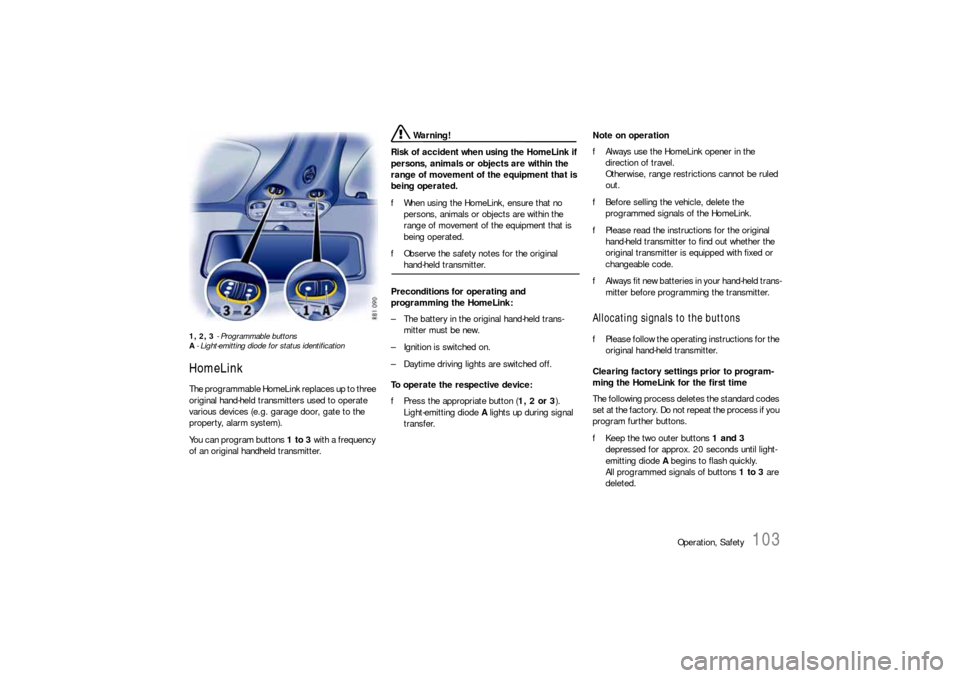
1, 2, 3 - Programmable buttons
A- Light-emitting diode for status identificationHomeLinkThe programmable HomeLink replaces up to three
original hand-held transmitters used to operate
various devices (e.g. garage door, gate to the
property, alarm system).
You can program buttons 1 to 3 with a frequency
of an original handheld transmitter.
Warning!
Risk of accident when using the HomeLink if
persons, animals or objects are within the
range of movement of the equipment that is
being operated.
fWhen using the HomeLink, ensure that no
persons, animals or objects are within the
range of movement of the equipment that is
being operated.
fObserve the safety notes for the original hand-held transmitter.
Preconditions for operating and
programming the HomeLink:
– The battery in the original hand-held trans-
mitter must be new.
– Ignition is switched on.
– Daytime driving lights are switched off.
To operate the respective device:
fPress the appropriate button (1, 2 or 3).
Light-emitting diode A lights up during signal
transfer.Note on operation
fAlways use the HomeLink opener in the
direction of travel.
Otherwise, range restrictions cannot be ruled
out.
fBefore selling the vehicle, delete the
programmed signals of the HomeLink.
fPlease read the instructions for the original
hand-held transmitter to find out whether the
original transmitter is equipped with fixed or
changeable code.
fAlways fit new batteries in your hand-held trans-
mitter before programming the transmitter.
Allocating signals to the buttonsfPlease follow the operating instructions for the
original hand-held transmitter.
Clearing factory settings prior to program-
ming the HomeLink for the first time
The following process deletes the standard codes
set at the factory. Do not repeat the process if you
program further buttons.
fKeep the two outer buttons 1 and 3
depressed for approx. 20 seconds until light-
emitting diode A begins to flash quickly.
All programmed signals of buttons 1 to 3 are
deleted.
Page 109 of 310
Automatic air conditioning system, Heated rear window/Door mirror heating
107
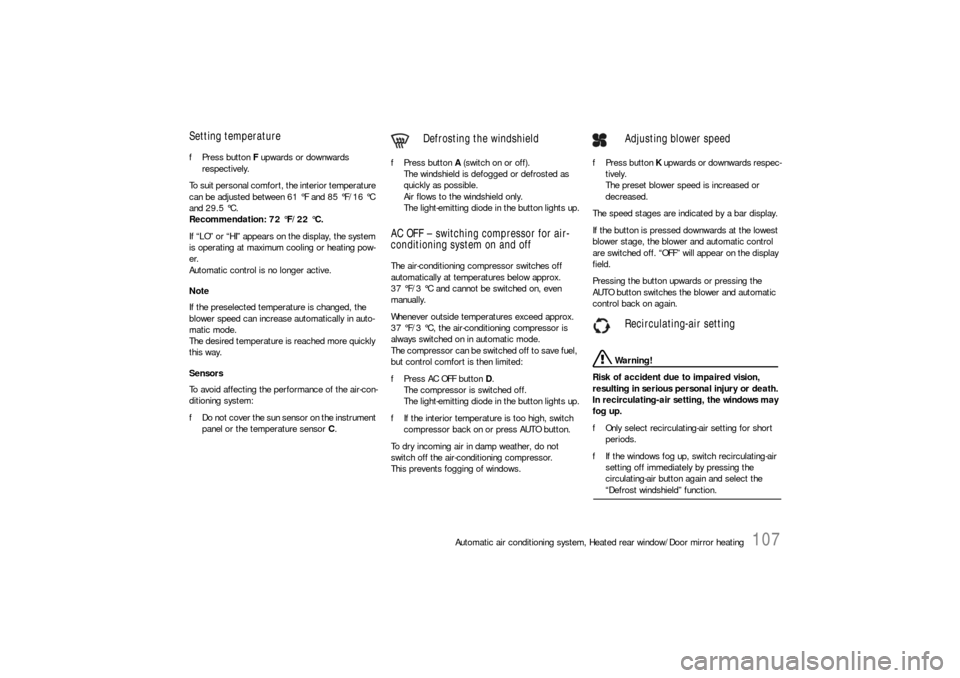
Setting temperaturefPress button F upwards or downwards
respectively.
To suit personal comfort, the interior temperature
can be adjusted between 61 °F and 85 °F/16 °C
and 29.5 °C.
Recommendation: 72 °F/22 °C.
If “LO” or “HI” appears on the display, the system
is operating at maximum cooling or heating pow-
er.
Automatic control is no longer active.
Note
If the preselected temperature is changed, the
blower speed can increase automatically in auto-
matic mode.
The desired temperature is reached more quickly
this way.
Sensors
To avoid affecting the performance of the air-con-
ditioning system:
fDo not cover the sun sensor on the instrument
panel or the temperature sensor C.fPress button A (switch on or off).
The windshield is defogged or defrosted as
quickly as possible.
Air flows to the windshield only.
The light-emitting diode in the button lights up.
AC OFF – switching compressor for air-
conditioning system on and offThe air-conditioning compressor switches off
automatically at temperatures below approx.
37 °F/3 °C and cannot be switched on, even
manually.
Whenever outside temperatures exceed approx.
37 °F/3 °C, the air-conditioning compressor is
always switched on in automatic mode.
The compressor can be switched off to save fuel,
but control comfort is then limited:
fPress AC OFF button D.
The compressor is switched off.
The light-emitting diode in the button lights up.
fIf the interior temperature is too high, switch
compressor back on or press AUTO button.
To dry incoming air in damp weather, do not
switch off the air-conditioning compressor.
This prevents fogging of windows.fPress button K upwards or downwards respec-
tively.
The preset blower speed is increased or
decreased.
The speed stages are indicated by a bar display.
If the button is pressed downwards at the lowest
blower stage, the blower and automatic control
are switched off. “OFF” will appear on the display
field.
Pressing the button upwards or pressing the
AUTO button switches the blower and automatic
control back on again.
Warning!
Risk of accident due to impaired vision,
resulting in serious personal injury or death.
In recirculating-air setting, the windows may
fog up.
fOnly select recirculating-air setting for short
periods.
fIf the windows fog up, switch recirculating-air
setting off immediately by pressing the
circulating-air button again and select the “Defrost windshield” function.
Defrosting the windshield
Adjusting blower speed
Recirculating-air setting
Page 114 of 310

112
Instruments, On-Board Computer, Warnings
Instrument Panel USA Models Also refer to the corresponding chapters in
the Owner’s Manual.
1. Engine oil temperature gage
2. Speedometer with analogue display
3. Tire pressure warning light
4. Turn signal indicator light, left
5. Tachometer
6. High beam indicator light
7. Turn signal indicator light, right
8. ABS warning light
9. Cooling system
Temperature gage, warning light
10.Fuel
Level gage, warning light
11.Engine oil pressure gage
12.Adjustment button for instrument illumination
and trip counter
13.Odometer and daily trip mileage display
14.Automatic speed control indicator light15.Light sensor for instrument illumination
16.Airbag warning light
17.Check Engine warning light
(Emission control warning light)
18.Central warning light
19.On-board computer display
20.Porsche Stability Management
PSM Multifunctional light
21.Brake warning light
22.Safety belt warning light
23.PDK transmission, gear display
24.PDK transmission, selector lever position
25.Clock and outside temperature display
26.Adjustment button for clockWhen the ignition is switched on, the warning
lights light up for a lamp check.
Note
Warnings that have been given are stored in the
appropriate control unit memory and can be read
out at an authorized Porsche dealer.
This information can help to warn you about situa-
tions which may be hazardous to you or your car.
Page 116 of 310

114
Instruments, On-Board Computer, Warnings
Instrument Panel Canada Models Also refer to the corresponding chapters in
the Owner’s Manual.
1. Engine oil temperature gage
2. Speedometer with analogue display
3. Tire pressure warning light
4. Turn signal indicator light, left
5. Tachometer
6. High beam indicator light
7. Turn signal indicator light, right
8. ABS warning light
9. Cooling system
Temperature gage, warning light
10.Fuel
Level gage, warning light
11.Engine oil pressure gage
12.Adjustment button for instrument illumination
and trip counter
13.Odometer and daily trip mileage display
14.Automatic speed control indicator light15.Light sensor for instrument illumination
16.Airbag warning light
17.Check Engine warning light
(Emission control warning light)
18.Central warning light
19.On-board computer display
20.Porsche Stability Management
PSM Multifunctional light
21.Brake warning light
22.Safety belt warning light
23.PDK transmission, gear display
24.PDK transmission, selector lever position
25.Clock and outside temperature display
26.Adjustment button for clockWhen the ignition is switched on, the warning
lights light up for a lamp check.
Note
Warnings that have been given are stored in the
appropriate control unit memory and can be read
out at an authorized Porsche dealer.
This information can help to warn you about situa-
tions which may be hazardous to you or your car.
Page 123 of 310
Instruments, On-Board Computer, Warnings
121
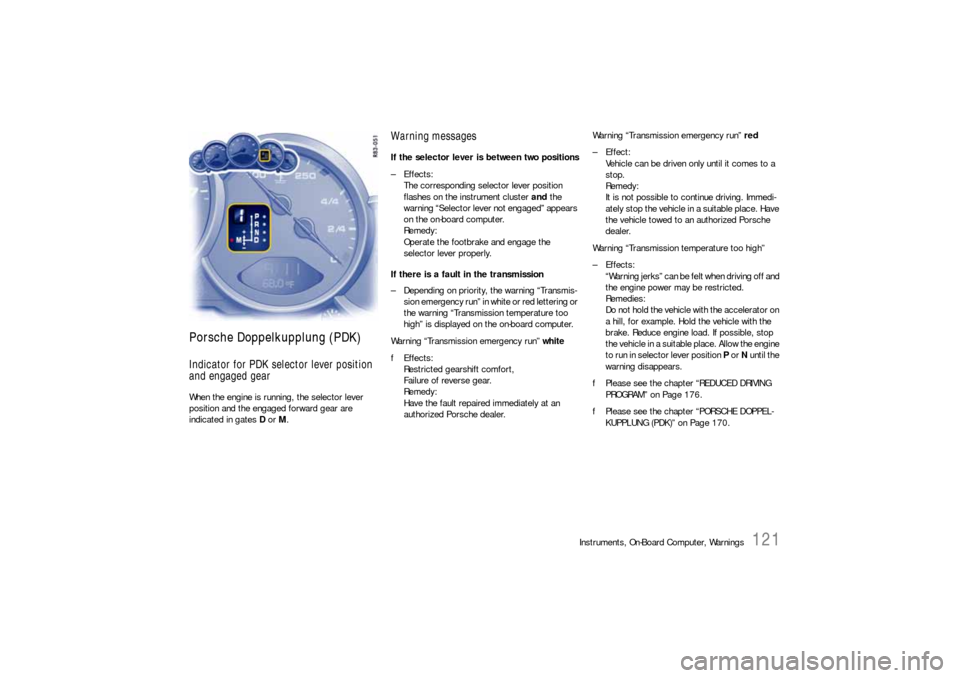
Porsche Doppelkupplung (PDK)Indicator for PDK selector lever position
and engaged gearWhen the engine is running, the selector lever
position and the engaged forward gear are
indicated in gates D or M.
Warning messagesIf the selector lever is between two positions
–Effects:
The corresponding selector lever position
flashes on the instrument cluster and the
warning “Selector lever not engaged” appears
on the on-board computer.
Remedy:
Operate the footbrake and engage the
selector lever properly.
If there is a fault in the transmission
– Depending on priority, the warning “Transmis-
sion emergency run” in white or red lettering or
the warning “Transmission temperature too
high” is displayed on the on-board computer.
Warning “Transmission emergency run” white
fEffects:
Restricted gearshift comfort,
Failure of reverse gear.
Remedy:
Have the fault repaired immediately at an
authorized Porsche dealer.Warning “Transmission emergency run” red
– Effect:
Vehicle can be driven only until it comes to a
stop.
Remedy:
It is not possible to continue driving. Immedi-
ately stop the vehicle in a suitable place. Have
the vehicle towed to an authorized Porsche
dealer.
Warning “Transmission temperature too high”
–Effects:
“Warning jerks” can be felt when driving off and
the engine power may be restricted.
Remedies:
Do not hold the vehicle with the accelerator on
a hill, for example. Hold the vehicle with the
brake. Reduce engine load. If possible, stop
the vehicle in a suitable place. Allow the engine
to run in selector lever position P or N until the
warning disappears.
fPlease see the chapter “REDUCED DRIVING
PROGRAM” on Page 176.
fPlease see the chapter “PORSCHE DOPPEL-
KUPPLUNG (PDK)” on Page 170.
Page 145 of 310
Instruments, On-Board Computer, Warnings
143
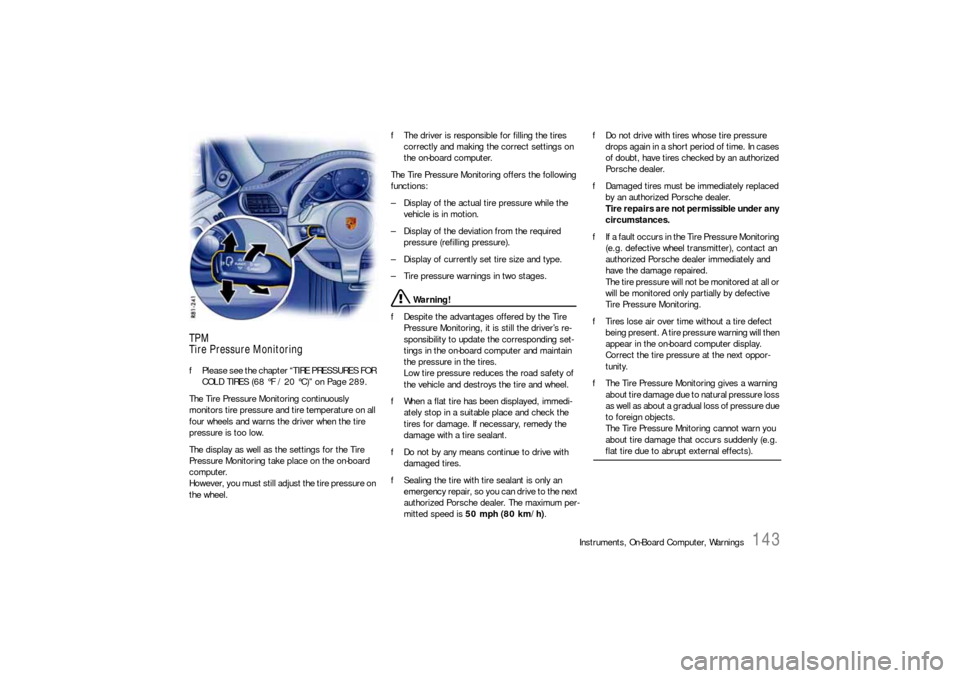
TPM
Tire Pressure MonitoringfPlease see the chapter “TIRE PRESSURES FOR
COLD TIRES (68 °F / 20 °C)” on Page 289.
The Tire Pressure Monitoring continuously
monitors tire pressure and tire temperature on all
four wheels and warns the driver when the tire
pressure is too low.
The display as well as the settings for the Tire
Pressure Monitoring take place on the on-board
computer.
However, you must still adjust the tire pressure on
the wheel.fThe driver is responsible for filling the tires
correctly and making the correct settings on
the on-board computer.
The Tire Pressure Monitoring offers the following
functions:
– Display of the actual tire pressure while the
vehicle is in motion.
– Display of the deviation from the required
pressure (refilling pressure).
– Display of currently set tire size and type.
– Tire pressure warnings in two stages.
Warning!
fDespite the advantages offered by the Tire
Pressure Monitoring, it is still the driver’s re-
sponsibility to update the corresponding set-
tings in the on-board computer and maintain
the pressure in the tires.
Low tire pressure reduces the road safety of
the vehicle and destroys the tire and wheel.
fWhen a flat tire has been displayed, immedi-
ately stop in a suitable place and check the
tires for damage. If necessary, remedy the
damage with a tire sealant.
fDo not by any means continue to drive with
damaged tires.
fSealing the tire with tire sealant is only an
emergency repair, so you can drive to the next
authorized Porsche dealer. The maximum per-
mitted speed is 50 mph (80 km/h).fDo not drive with tires whose tire pressure
drops again in a short period of time. In cases
of doubt, have tires checked by an authorized
Porsche dealer.
fDamaged tires must be immediately replaced
by an authorized Porsche dealer.
Tire repairs are not permissible under any
circumstances.
fIf a fault occurs in the Tire Pressure Monitoring
(e.g. defective wheel transmitter), contact an
authorized Porsche dealer immediately and
have the damage repaired.
The tire pressure will not be monitored at all or
will be monitored only partially by defective
Tire Pressure Monitoring.
fTires lose air over time without a tire defect
being present. A tire pressure warning will then
appear in the on-board computer display.
Correct the tire pressure at the next oppor-
tunity.
fThe Tire Pressure Monitoring gives a warning
about tire damage due to natural pressure loss
as well as about a gradual loss of pressure due
to foreign objects.
The Tire Pressure Mnitoring cannot warn you
about tire damage that occurs suddenly (e.g.
flat tire due to abrupt external effects).