steering PORSCHE 911 2009 5.G Owner's Manual
[x] Cancel search | Manufacturer: PORSCHE, Model Year: 2009, Model line: 911, Model: PORSCHE 911 2009 5.GPages: 310, PDF Size: 3.39 MB
Page 84 of 310
82
Operation, Safety
Turn Signal / Headlight Dimmer /
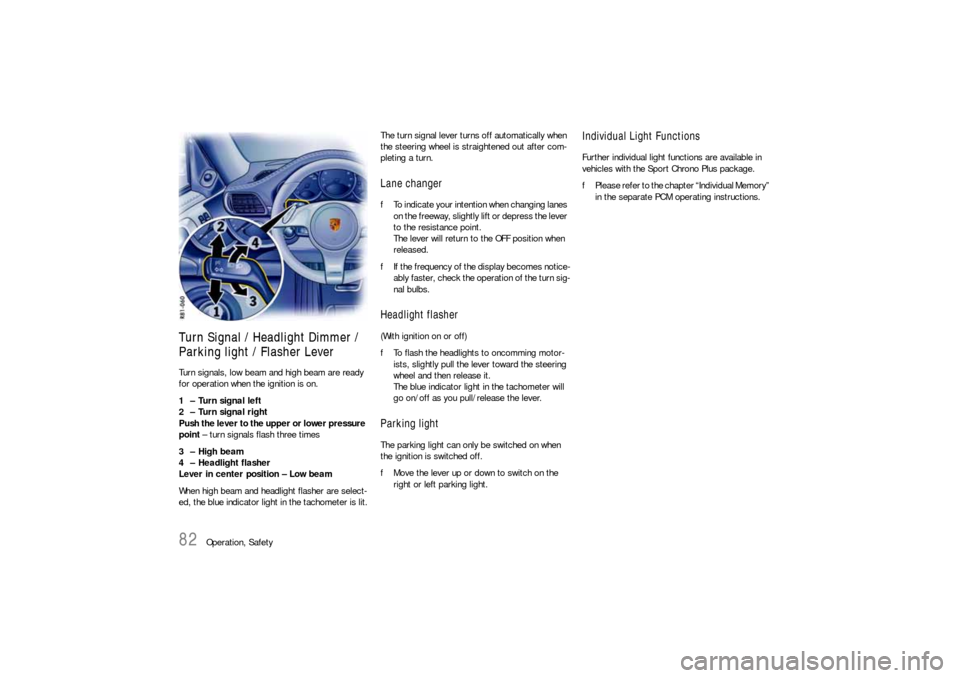
Parking light / Flasher Lever Turn signals, low beam and high beam are ready
for operation when the ignition is on.
1 – Turn signal left
2 – Turn signal right
Push the lever to the upper or lower pressure
point – turn signals flash three times
3 – High beam
4 – Headlight flasher
Lever in center position – Low beam
When high beam and headlight flasher are select-
ed, the blue indicator light in the tachometer is lit.The turn signal lever turns off automatically when
the steering wheel is straightened out after com-
pleting a turn.
Lane changer fTo indicate your intention when changing lanes
on the freeway, slightly lift or depress the lever
to the resistance point.
The lever will return to the OFF position when
released.
fIf the frequency of the display becomes notice-
ably faster, check the operation of the turn sig-
nal bulbs. Headlight flasher (With ignition on or off)
fTo flash the headlights to oncomming motor-
ists, slightly pull the lever toward the steering
wheel and then release it.
The blue indicator light in the tachometer will
go on/off as you pull/release the lever.Parking lightThe parking light can only be switched on when
the ignition is switched off.
fMove the lever up or down to switch on the
right or left parking light.
Individual Light FunctionsFurther individual light functions are available in
vehicles with the Sport Chrono Plus package.
fPlease refer to the chapter “Individual Memory”
in the separate PCM operating instructions.
Page 85 of 310

Operation, Safety
83
Windshield Wiper / Washer Lever
Warning!
Danger of injury when the windshield wipers
operate unintentionally, e.g. in intermittent
or rain sensor operation.
Risk of damage to the windshield and wiper
system.
fAvoid running the wiper blades over a dry wind-
shield to prevent scratching the glass. Spray
washer fluid on the windshield first.
A scratched windshield will reduce visibility.
fAlways loosen wiper blades from frozen glass
before operating wipers to prevent damage to
the wiper motor or blades. fAlways switch off windshield wipers in car
wash to prevent them wiping unintentionally
(intermittent or sensor operation).
fAlways switch off windshield wipers before
cleaning the windshield to avoid unintentional
operation (intermittent or sensor operation).
fDo not operate the headlight washer in car
washes.
fDo not operate headlight washer when it is
frozen.
Front wiper and headlight washer system0 – Windshield wipers off
1 – Rain sensor operation for front
windshield wipers
fMove wiper lever upwards to the first click.
Please see the chapter “RAIN SENSOR” on
Page 85.
2 – Windshield wipers slow
fMove wiper lever upwards to the second click.
3 – Windshield wipers fast
fMove wiper lever upwards to the third click.
4 – Front windshield wiper – one-touch oper-
ation:
fMove wiper lever downwards. The front wind-
shield wipers wipe once.5 – Windshield wipers and washer system:
fPull wiper lever towards the steering wheel.
The washer system sprays and wipes while the
lever is pulled towards the steering wheel.
When the wiper lever is released, a few drying
wipes are executed.
A - Headlight washer:
The washer sprays only while low beam or high
beam is switched on.
fBriefly push button A to operate headlight
washer system.
fIf heavily soiled, repeat wash.
The headlight washer system automatically sprays
once for every ten times the front windshield
washer system is operated.
Note
The windshield washer nozzles are heated
when the ignition is on, as a precaution against
freezing.
Page 88 of 310
86
Operation, Safety
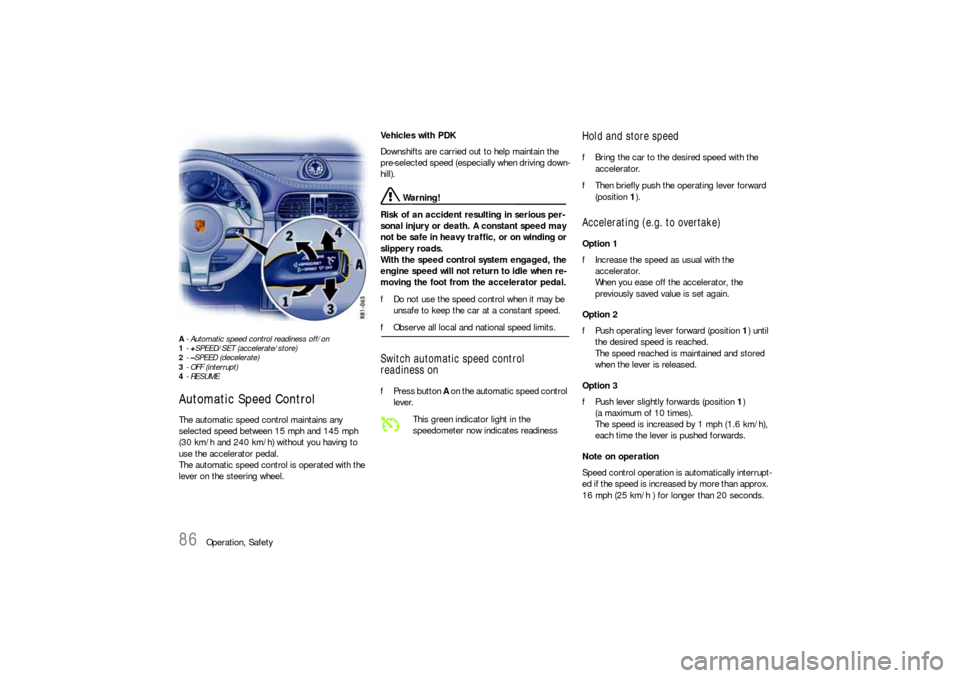
A- Automatic speed control readiness off/on
1-+SPEED/SET (accelerate/store)
2-–SPEED (decelerate)
3- OFF (interrupt)
4-RESUMEAutomatic Speed Control The automatic speed control maintains any
selected speed between 15 mph and 145 mph
(30 km/h and 240 km/h) without you having to
use the accelerator pedal.
The automatic speed control is operated with the
lever on the steering wheel. Vehicles with PDK
Downshifts are carried out to help maintain the
pre-selected speed (especially when driving down-
hill).
Warning!
Risk of an accident resulting in serious per-
sonal injury or death. A constant speed may
not be safe in heavy traffic, or on winding or
slippery roads.
With the speed control system engaged, the
engine speed will not return to idle when re-
moving the foot from the accelerator pedal.
fDo not use the speed control when it may be
unsafe to keep the car at a constant speed.
fObserve all local and national speed limits. Switch automatic speed control
readiness onfPress button A on the automatic speed control
lever.
Hold and store speed fBring the car to the desired speed with the
accelerator.
fThen briefly push the operating lever forward
(position 1).Accelerating (e.g. to overtake) Option 1
fIncrease the speed as usual with the
accelerator.
When you ease off the accelerator, the
previously saved value is set again.
Option 2
fPush operating lever forward (position 1) until
the desired speed is reached.
The speed reached is maintained and stored
when the lever is released.
Option 3
fPush lever slightly forwards (position 1)
(a maximum of 10 times).
The speed is increased by 1 mph (1.6 km/h),
each time the lever is pushed forwards.
Note on operation
Speed control operation is automatically interrupt-
ed if the speed is increased by more than approx.
16 mph (25 km/h ) for longer than 20 seconds.
This green indicator light in the
speedometer now indicates readiness
Page 89 of 310

Operation, Safety
87
Decelerating Option 1
fPull operating lever towards the steering wheel
(position 2) until the desired speed is reached.
The speed reached is maintained and stored
when the lever is released.
Option 2
fBriefly move lever towards the steering wheel
(position 2) (a maximum of 10 times).
The speed is reduced by 1 mph (1.6 km/h),
each time the lever is moved towards the
steering wheel.
Vehicles with PDK
Downshifts are carried out to improve decelera-
tion (especially when driving downhill).
Interrupting automatic speed control
operation fPull operating lever downwards briefly
(position 3) or
fOperate brake or clutch pedal or
fSwitch PDK to selector lever position N.
fPlease see the chapter “PORSCHE DOPPEL-
KUPPLUNG (PDK)” on Page 170.
The speed driven before the interruption remains
stored in the memory.
Automatic speed control operation is
interrupted automatically:
– If the set vehicle speed is exceeded by more
than approx. 16 mph (25 km/h) for longer than
20 seconds.
– If the actual vehicle speed falls to approx.
37 mph (60 km/h) below the set vehicle speed
for longer than 60 seconds (upward slopes).
– For PSM control operations.
Resuming the stored speed fBriefly push operating lever upwards
(position4).
The speed control accelerates/decelerates
the vehicle to the stored speed.
The stored speed should only be recalled when
traffic conditions and the road surface so permit.Switching automatic speed control
readiness off fPress button A on the automatic speed control
lever.
The green readiness light in the speedometer
goes off.
Note
The stored speed value is cleared when the
vehicle is parked and the ignition is switched off.
Important note
On upward or downward slopes, the set speed
cannot always be maintained by the automatic
speed control.
fTo obtain sufficient engine braking or a better
engine-speed range, a lower gear needs to be
selected.
Page 102 of 310

100
Operation, Safety
AntennafAlways unscrew the external antenna before
using an automatic car-wash.
On the Cabriolet and Targa the external antenna is
mounted on the right front fender.
Car Telephone and
Aftermarket Alarms Important legal and safety information
regarding the use of cellular telephones
Some states may prohibit the use of cellular tele-
phones while driving a vehicle. Check the laws and
regulations on the use of cellular telephones in the
areas where you drive.
Danger!
Risk of an accident.
Severe personal injury or death can result in
the event of an accident.
Looking away from the road or turning your
attention away from your driving can cause
an accident and serious or fatal injury.
When using your cellular telephone, you should al-
ways:
fGive full attention to your driving - pull off the
road and park before making or answering a
call if traffic conditions so require; and
fKeep both hands on the steering wheel - use
hands-free operation (if available) - pull off the
road and park before using a hand-held tele-phone. It is essential to observe the telephone
manufacturer's instructions before operating
the telephone.
Any portable telephone or radio transmitter which
is used in a Porsche must be properly installed in
accordance with the technical requirements of
Porsche.
The transmission power must not exceed
10 W.
The devices must possess a type approval for
your vehicle and have an “e” symbol.
If you should require equipment with transmission
power values greater than 10 W, please consult
your authorized Porsche dealer for this purpose.
The dealer is familiar with the technical require-
ments for installing devices of this kind.
The antennas for all radios and telephones with a
transmitting antenna must be externally mounted.
The improper installation of radios or telephones
or use of a radio or telephone with a transmitting
antenna inside the car may cause the warning
lights to come on.
Improper installation of such equipment can cre-
ate a discharged battery or excessive current
draw from added equipment.
Page 118 of 310

116
Instruments, On-Board Computer, Warnings The engine oil temperature is indicated in the left
instrument.
A- Adjustment button for instrument illumination and
trip counter Indicates automatic speed control readiness.
Instrument Illumination The illumination is automatically adjusted to the
ambient brightness by the light sensor in the
tachometer.
In addition, when the car lights are switched on,
the instrument and switch symbol brightness can
be manually adjusted.
Warning!
Risk of loss of control or accident, resulting
in serious personal injury or death.
fDo not reach through the steering-wheel spokes while driving.
Note
When the car lights are switched on, the instru-
ment lighting for light dials switches on and off
automatically depending on the ambient bright-
ness.
Engine Oil Temperature
Automatic Speed Control
Indicator light
Page 119 of 310

Instruments, On-Board Computer, Warnings
117
Dimming instrument illumination
fTurn adjustment button A in the appropriate di-
rection and hold it until the desired brightness
has been reached.
The chosen level of brightness is indicated by a
bar display in the display field of the on-board
computer.
Trip Odometer
Warning!
Risk of loss of control or accident, resulting
in serious personal injury or death.
fDo not reach through the steering-wheel spokes while driving.
Resetting to zero fPress adjustment button A for approximately
one second or
fReset the distance in the “SET” menu of the on-
board computer.
Please see the chapter “SET BASIC SETTING
ON ON-BOARD COMPUTER” on Page 155.
After exceeding 6,213 miles or 9,999 kilometers,
the counter returns to “0”.
Page 125 of 310
Instruments, On-Board Computer, Warnings
123
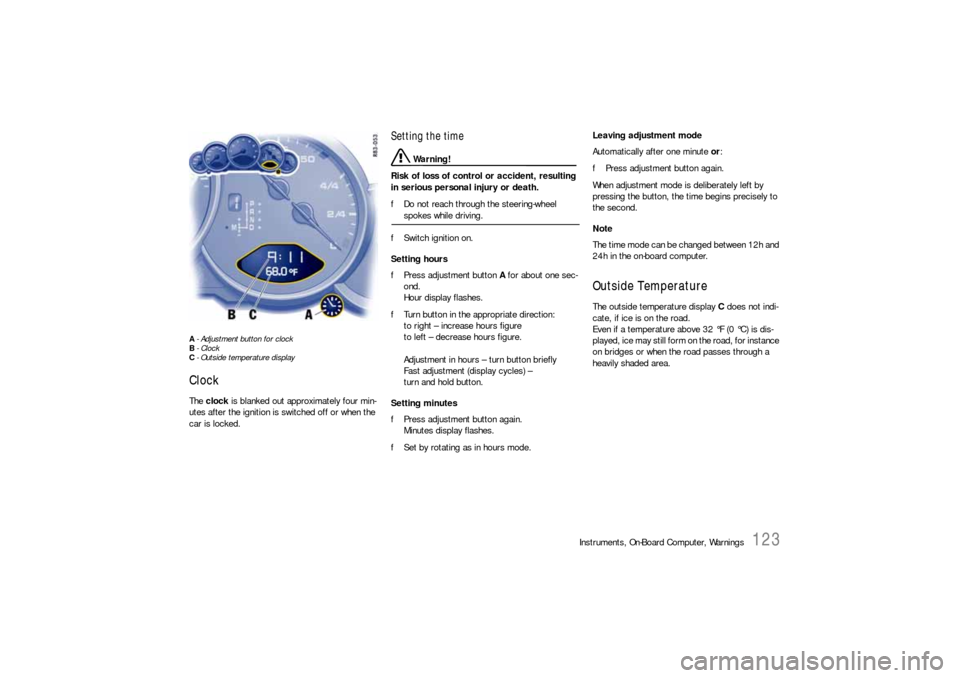
A- Adjustment button for clock
B- Clock
C- Outside temperature displayClock The clock is blanked out approximately four min-
utes after the ignition is switched off or when the
car is locked.
Setting the time
Warning!
Risk of loss of control or accident, resulting
in serious personal injury or death.
fDo not reach through the steering-wheel spokes while driving.
fSwitch ignition on.
Setting hours
fPress adjustment button A for about one sec-
ond.
Hour display flashes.
fTurn button in the appropriate direction:
to right – increase hours figure
to left – decrease hours figure.
Adjustment in hours – turn button briefly
Fast adjustment (display cycles) –
turn and hold button.
Setting minutes
fPress adjustment button again.
Minutes display flashes.
fSet by rotating as in hours mode. Leaving adjustment mode
Automatically after one minute or:
fPress adjustment button again.
When adjustment mode is deliberately left by
pressing the button, the time begins precisely to
the second.
Note
The time mode can be changed between 12h and
24h in the on-board computer.
Outside Temperature The outside temperature display C does not indi-
cate, if ice is on the road.
Even if a temperature above 32 °F (0 °C) is dis-
played, ice may still form on the road, for instance
on bridges or when the road passes through a
heavily shaded area.
Page 126 of 310

124
Instruments, On-Board Computer, Warnings The oil pressure is controlled as required and
should be at least 3.5 bar at an engine speed of
5000 rpm.
The engine oil pressure varies depending on the
engine speed, engine load and engine tempera-
ture.If oil pressure drops abruptly and a message
is displayed on the on-board computer when
the engine is running on or when driving:
fStop immediately in a suitable place.
fSwitch off the engine.
fCheck whether there is an obvious oil leak on
or under the car.
fIf no oil leak can be detected: With the engine
idling, measure the oil level with the on-board
computer.
fPlease see the chapter “OIL DISPLAY AND
MEASUREMENT OF THE ENGINE OIL LEVEL”
on Page 153.
fPlease see the chapter “ENGINE OIL LEVEL”
on Page 208.
fAdd engine oil if necessary.
Caution!
Risk of engine damage.
fDo not continue driving if there is an obvious oil
leak.
fDo not continue driving if the warning lights
come on even though oil level is correct.
fHave the fault remedied at the nearest authorized Porsche dealer.If the battery voltage drops abruptly, a warning
message will be displayed by the on-board compu-
ter.
If the warning is displayed by the on-board
computer while the engine is running or while
driving:
fStop the car in a safe place and stop the
engine.
Possible causes
– Defect in the battery charging system.
– Broken drive belt.
Warning!
Risk of engine damage with resultant loss of
control and accident, leading to serious per-
sonal injury or death.
A broken drive belt means there is no power
assistance to the steering (more effort is re-
quired to steer) and coolant pump function
will stop.
fDo not continue driving.
fHave the fault remedied at the nearest author-ized Porsche dealer.
Engine Oil Pressure
Battery
Page 128 of 310
126
Instruments, On-Board Computer, Warnings
On-Board Computer (BC)Display fieldThe display field is beneath the tachometer.Readiness for operation– With ignition switched on,
– with engine running.
Operation, controlsIt is not possible to describe all details of the on-
board computer functions in this Owner’s Manual.
However, the examples will quickly familiarize you
with the operational principle and help you to
navigate through the menu structure.
You can restore the factory default settings at any
time by using the “SET” menu.
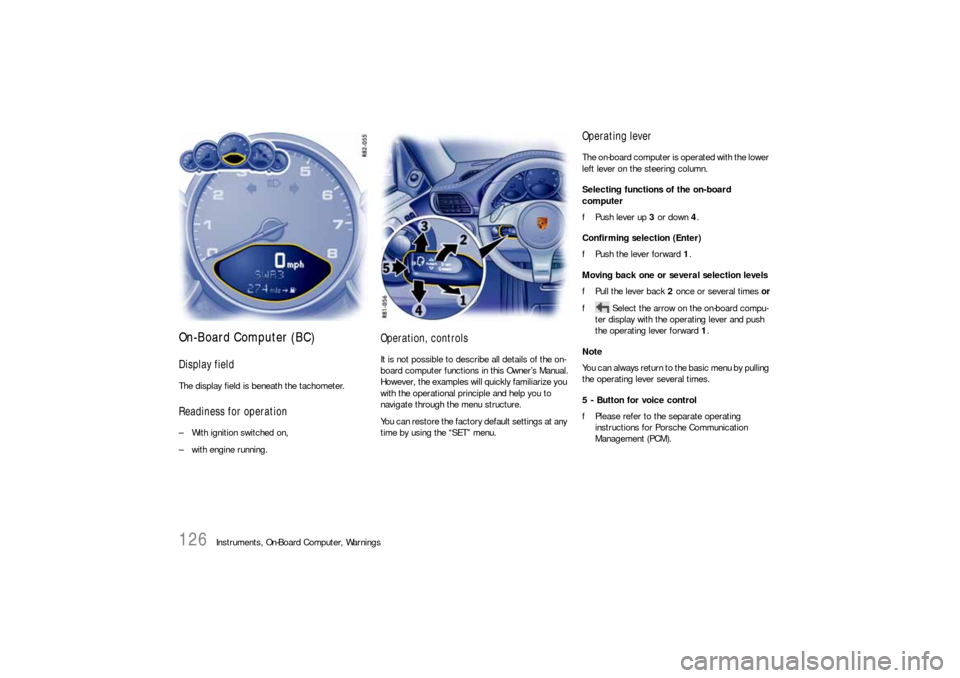
Operating leverThe on-board computer is operated with the lower
left lever on the steering column.
Selecting functions of the on-board
computer
fPush lever up 3 or down 4.
Confirming selection (Enter)
fPush the lever forward 1.
Moving back one or several selection levels
fPull the lever back 2 once or several times or
f Select the arrow on the on-board compu-
ter display with the operating lever and push
the operating lever forward 1.
Note
You can always return to the basic menu by pulling
the operating lever several times.
5 - Button for voice control
fPlease refer to the separate operating
instructions for Porsche Communication
Management (PCM).