warning PORSCHE 911 CARRERA 2006 5.G User Guide
[x] Cancel search | Manufacturer: PORSCHE, Model Year: 2006, Model line: 911 CARRERA, Model: PORSCHE 911 CARRERA 2006 5.GPages: 308, PDF Size: 3.69 MB
Page 26 of 308
26
Controls, Instruments
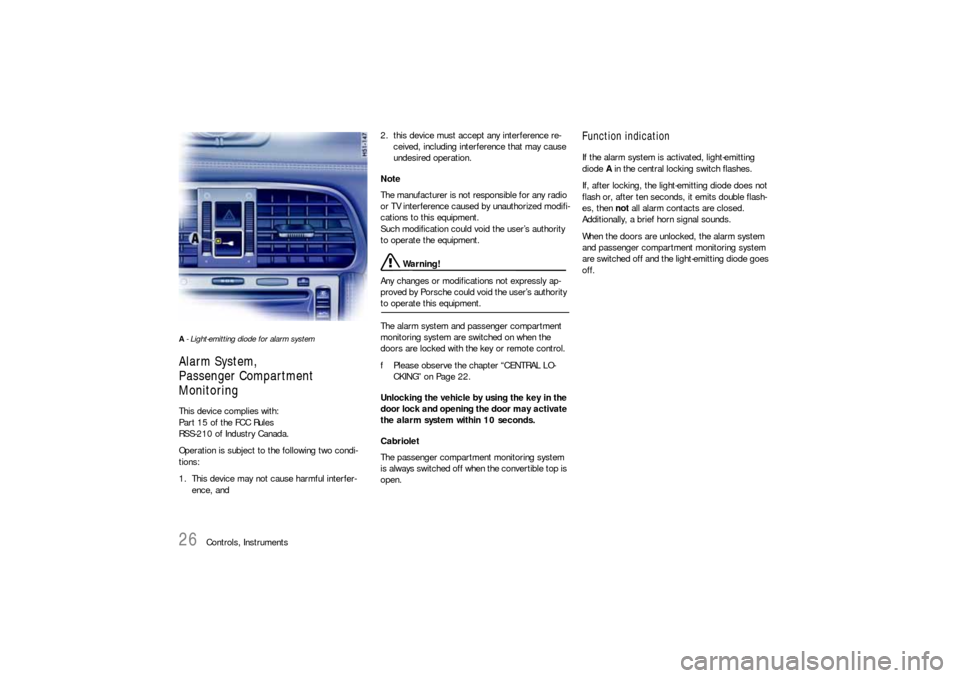
A- Light-emitting diode for alarm systemAlarm System,
Passenger Compartment
MonitoringThis device complies with:
Part 15 of the FCC Rules
RSS-210 of Industry Canada.
Operation is subject to the following two condi-
tions:
1. This device may not cause harmful interfer-
ence, and2. this device must accept any interference re-
ceived, including interference that may cause
undesired operation.
Note
The manufacturer is not responsible for any radio
or TV interference caused by unauthorized modifi-
cations to this equipment.
Such modification could void the user’s authority
to operate the equipment.
Warning!
Any changes or modifications not expressly ap-
proved by Porsche could void the user’s authority
to operate this equipment.
The alarm system and passenger compartment
monitoring system are switched on when the
doors are locked with the key or remote control.
fPlease observe the chapter “CENTRAL LO-
CKING” on Page 22.
Unlocking the vehicle by using the key in the
door lock and opening the door may activate
the alarm system within 10 seconds.
Cabriolet
The passenger compartment monitoring system
is always switched off when the convertible top is
open.
Function indication If the alarm system is activated, light-emitting
diode A in the central locking switch flashes.
If, after locking, the light-emitting diode does not
flash or, after ten seconds, it emits double flash-
es, then not all alarm contacts are closed.
Additionally, a brief horn signal sounds.
When the doors are unlocked, the alarm system
and passenger compartment monitoring system
are switched off and the light-emitting diode goes
off.
Page 28 of 308
28
Controls, Instruments
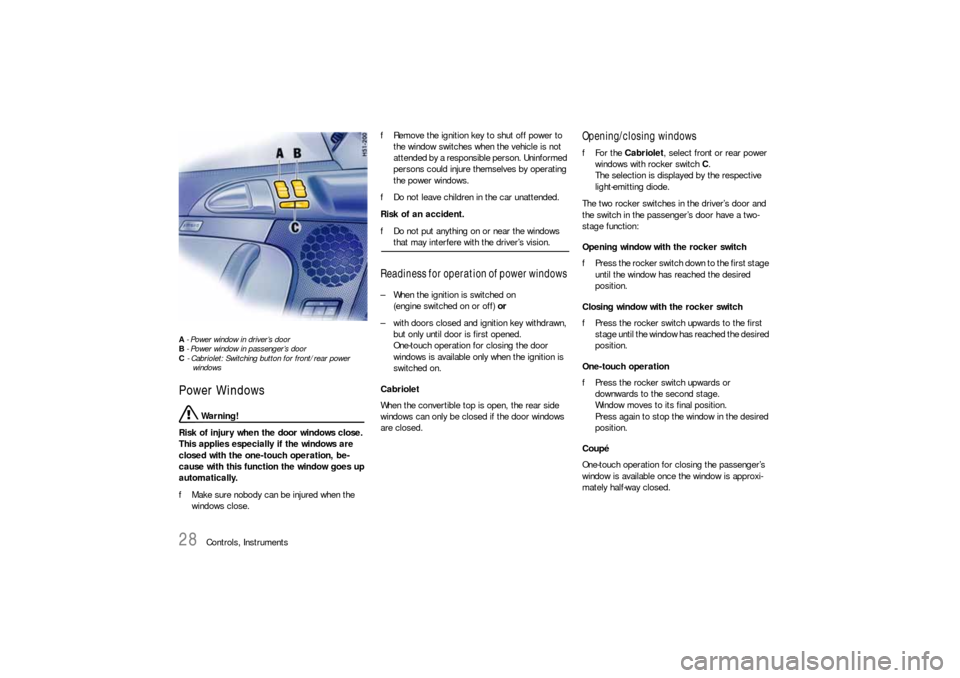
A - Power window in driver’s door
B - Power window in passenger’s door
C - Cabriolet: Switching button for front/rear power
windowsPower Windows
Warning!
Risk of injury when the door windows close.
This applies especially if the windows are
closed with the one-touch operation, be-
cause with this function the window goes up
automatically.
fMake sure nobody can be injured when the
windows close. fRemove the ignition key to shut off power to
the window switches when the vehicle is not
attended by a responsible person. Uninformed
persons could injure themselves by operating
the power windows.
fDo not leave children in the car unattended.
Risk of an accident.
fDo not put anything on or near the windows
that may interfere with the driver’s vision.
Readiness for operation of power windows – When the ignition is switched on
(engine switched on or off) or
– with doors closed and ignition key withdrawn,
but only until door is first opened.
One-touch operation for closing the door
windows is available only when the ignition is
switched on.
Cabriolet
When the convertible top is open, the rear side
windows can only be closed if the door windows
are closed.
Opening/closing windowsfFor the Cabriolet, select front or rear power
windows with rocker switch C.
The selection is displayed by the respective
light-emitting diode.
The two rocker switches in the driver’s door and
the switch in the passenger’s door have a two-
stage function:
Opening window with the rocker switch
fPress the rocker switch down to the first stage
until the window has reached the desired
position.
Closing window with the rocker switch
fPress the rocker switch upwards to the first
stage until the window has reached the desired
position.
One-touch operation
fPress the rocker switch upwards or
downwards to the second stage.
Window moves to its final position.
Press again to stop the window in the desired
position.
Coupé
One-touch operation for closing the passenger’s
window is available once the window is approxi-
mately half-way closed.
Page 29 of 308

Controls, Instruments
29
Comfort function when unlocking the vehicle
fUnlock car with the remote control.
Hold car key in door lock in the unlocking direc-
tion until the windows have reached the
desired position.
Anti-crushing protection If a side window is blocked during closing, it will
stop and open again by about an inch.
Warning!
Risk of severe personal injuries.
If the rocker switch is pressed again within
10
seconds of the window being blocked, the
window will close with its full closing force.
Anti-crushing protection is disabled.
fOnce the anti-crushing protection acts to stop
the window and opens it slightly, do not press
the rocker switch again within 10 seconds
without checking to make sure that nothing is
blocking the path of the window.The window will close with full closing force.
One-touch operation is disabled for 10 seconds
after blockage of a side window.
Automatic window lowering fPlease observe the chapter “DOORS” on
Page 21.Storing end position of the windowsIf the battery is disconnected and reconnected,
the windows will not be raised automatically when
the door is closed.
1. Close the windows with the rocker switch
once.
2. Press the rocker switch upwards again to store
the end position of the windows in the control
unit.
Page 30 of 308
30
Controls, Instruments
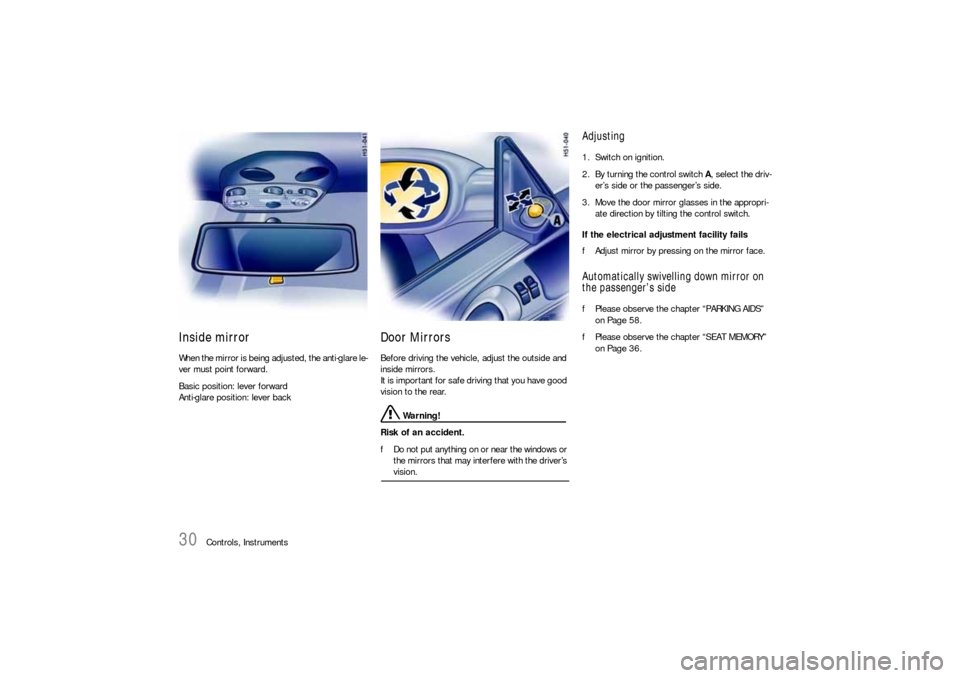
Inside mirror When the mirror is being adjusted, the anti-glare le-
ver must point forward.
Basic position: lever forward
Anti-glare position: lever back
Door Mirrors Before driving the vehicle, adjust the outside and
inside mirrors.
It is important for safe driving that you have good
vision to the rear.
Warning!
Risk of an accident.
fDo not put anything on or near the windows or
the mirrors that may interfere with the driver’s vision.
Adjusting 1. Switch on ignition.
2. By turning the control switch A, select the driv-
er’s side or the passenger’s side.
3. Move the door mirror glasses in the appropri-
ate direction by tilting the control switch.
If the electrical adjustment facility fails
fAdjust mirror by pressing on the mirror face.Automatically swivelling down mirror on
the passenger’s sidefPlease observe the chapter “PARKING AIDS”
on Page 58.
fPlease observe the chapter “SEAT MEMORY”
on Page 36.
Page 31 of 308
Controls, Instruments
31
Folding in door mirrors
Warning!
Danger of injury to fingers if the mirror
accidentally flips back when being folded in.
fExercise extreme caution when folding in
mirror by hand. Do not let go of the mirror
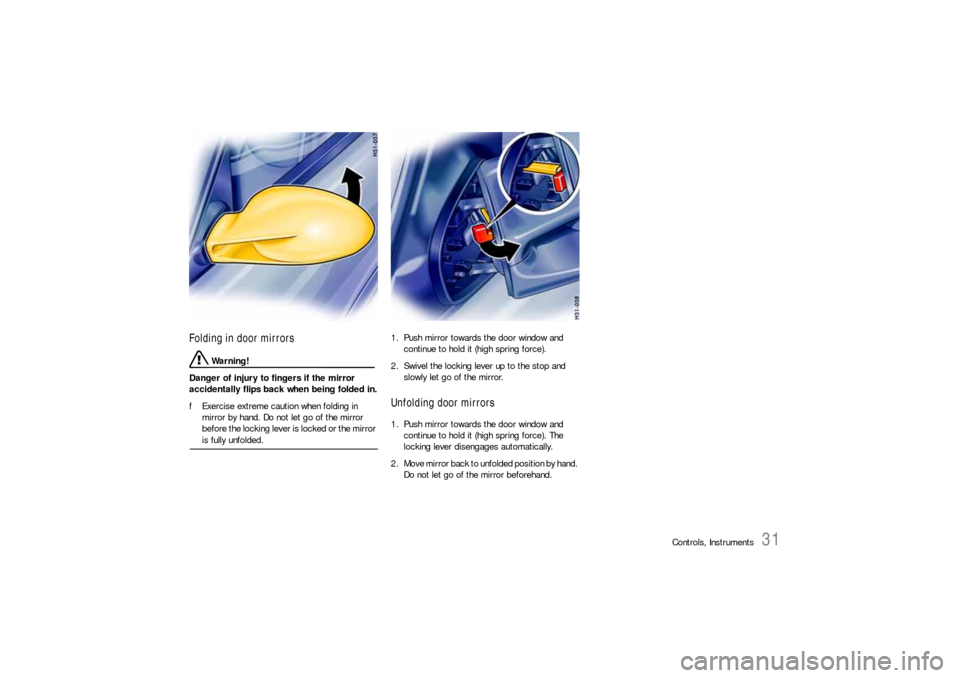
before the locking lever is locked or the mirror is fully unfolded.1. Push mirror towards the door window and
continue to hold it (high spring force).
2. Swivel the locking lever up to the stop and
slowly let go of the mirror.
Unfolding door mirrors1. Push mirror towards the door window and
continue to hold it (high spring force). The
locking lever disengages automatically.
2. Move mirror back to unfolded position by hand.
Do not let go of the mirror beforehand.
Page 32 of 308
32
Controls, Instruments
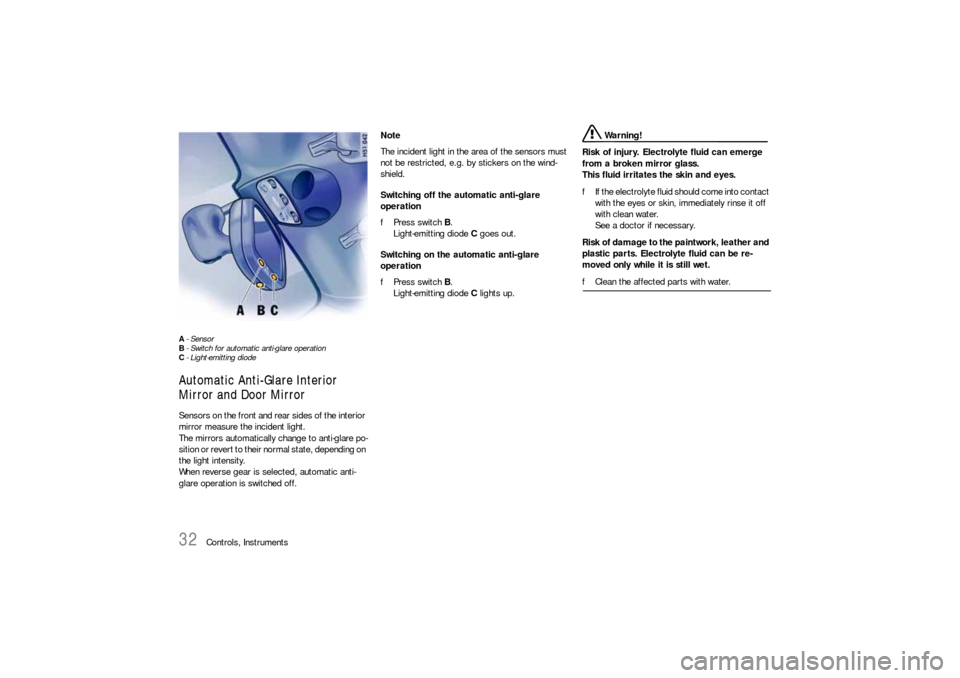
A-Sensor
B- Switch for automatic anti-glare operation
C- Light-emitting diode Automatic Anti-Glare Interior
Mirror and Door Mirror Sensors on the front and rear sides of the interior
mirror measure the incident light.
The mirrors automatically change to anti-glare po-
sition or revert to their normal state, depending on
the light intensity.
When reverse gear is selected, automatic anti-
glare operation is switched off. Note
The incident light in the area of the sensors must
not be restricted, e.g. by stickers on the wind-
shield.
Switching off the automatic anti-glare
operation
fPress switch B.
Light-emitting diode C goes out.
Switching on the automatic anti-glare
operation
fPress switch B.
Light-emitting diode C lights up.
Warning!
Risk of injury. Electrolyte fluid can emerge
from a broken mirror glass.
This fluid irritates the skin and eyes.
fIf the electrolyte fluid should come into contact
with the eyes or skin, immediately rinse it off
with clean water.
See a doctor if necessary.
Risk of damage to the paintwork, leather and
plastic parts. Electrolyte fluid can be re-
moved only while it is still wet.
fClean the affected parts with water.
Page 34 of 308
34
Controls, Instruments
Seat Adjustment
Warning!
The seat may move unexpectedly if you
attempt to adjust while driving. This could
cause sudden loss of control or personal in-
jury.
fDo not adjust seats while the vehicle is in mo-
tion.
The backrest locks must be engaged at all
times while the vehicle is in motion.
Safety belts only offer protection when the
backrest is upright and the belts are properly
positioned on the body.
Improperly positioned safety belts or safety
belts worn by passengers in an excessively
reclined position can cause serious personal
injury in an accident.
fDo not operate the car with the driver or
passenger backrests excessively reclined
(see “Seat position”).
In the cabriolet, the windstop may be
damaged during seat adjustment and when
folding back the front-seat backrest.
fAdjust seat so that the seat backrest does not touch the windstop.
Seat position An ergonomically correct sitting position is
important for safe and fatigue-free driving.
We recommend the following procedure for adjust-
ing the driver’s seat to suit individual
requirements:
1. Vehicles with manual transmission:
Adjust the seat until, with the clutch pedal fully
depressed, your leg remains at a slight angle.
Vehicles with Tiptronic S:
Adjust the seat until, with your left foot on the
footrest, your left leg remains at a slight angle.2. Rest your outstretched arm on the steering
wheel.
Set the backrest angle and the steering-wheel
position so that your wrist rests on the outer
rim of the steering wheel. At the same time,
the shoulders must still be in noticeable
contact with the backrest.
3. Adjust the seat height to give yourself enough
headroom and a good overview of the vehicle.
4. Electrically adjustable seat:
Adjust the seat angle until your thighs rest
lightly on the seat cushion.
Manually adjustable
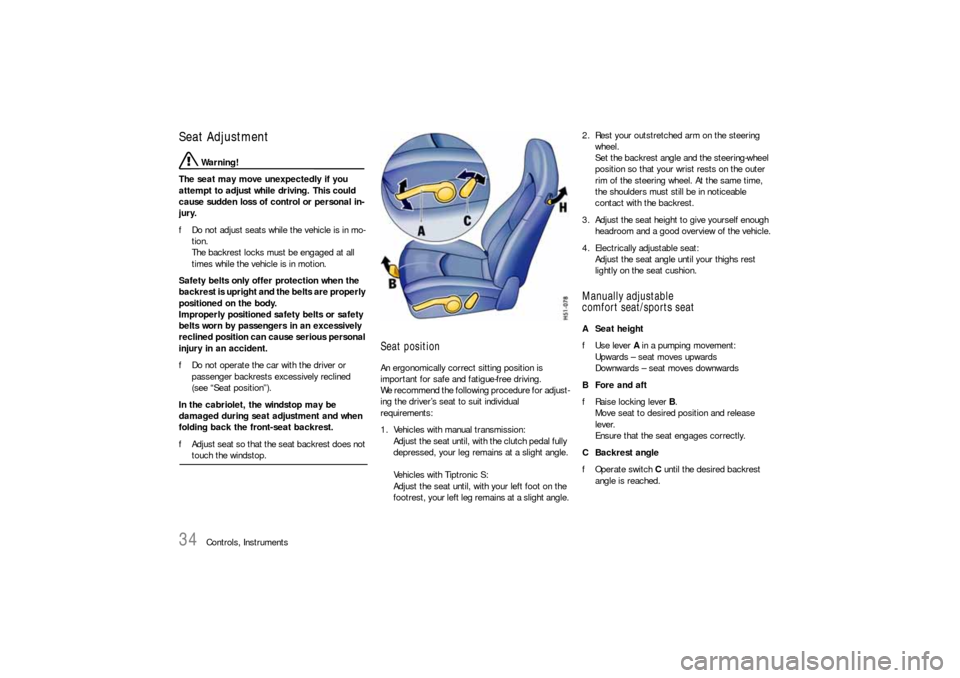
comfort seat/sports seatA Seat height
fUse lever A in a pumping movement:
Upwards – seat moves upwards
Downwards – seat moves downwards
B Fore and aft
fRaise locking lever B.
Move seat to desired position and release
lever.
Ensure that the seat engages correctly.
CBackrest angle
fOperate switch C until the desired backrest
angle is reached.
Page 36 of 308
36
Controls, Instruments
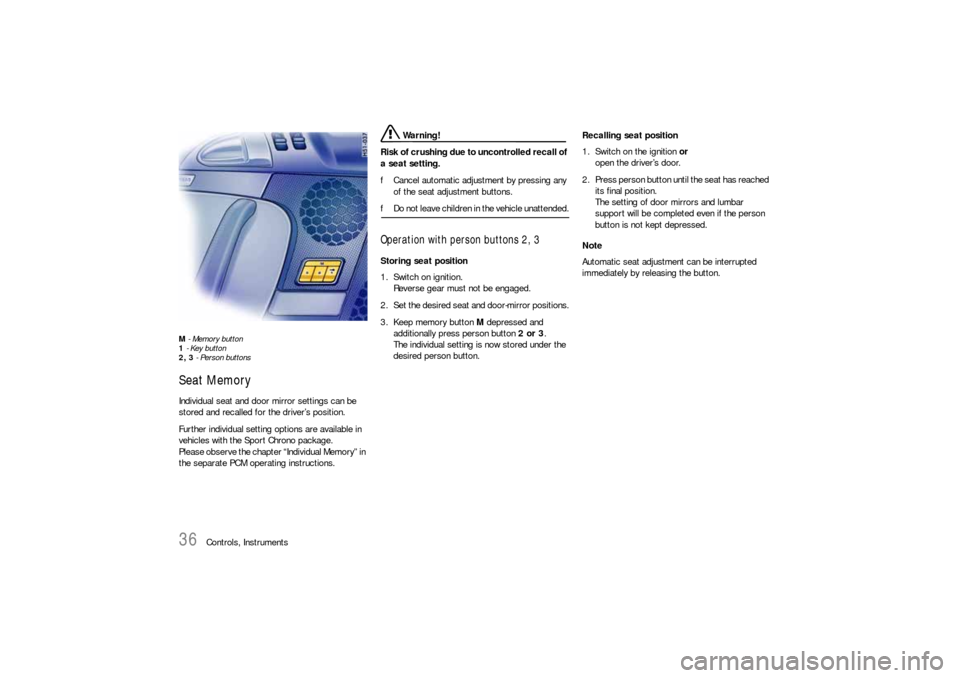
M - Memory button
1 - Key button
2, 3 - Person buttonsSeat MemoryIndividual seat and door mirror settings can be
stored and recalled for the driver’s position.
Further individual setting options are available in
vehicles with the Sport Chrono package.
Please observe the chapter “Individual Memory” in
the separate PCM operating instructions.
Warning!
Risk of crushing due to uncontrolled recall of
a seat setting.
fCancel automatic adjustment by pressing any
of the seat adjustment buttons.
fDo not leave children in the vehicle unattended.Operation with person buttons 2, 3Storing seat position
1. Switch on ignition.
Reverse gear must not be engaged.
2. Set the desired seat and door-mirror positions.
3. Keep memory button M depressed and
additionally press person button 2 or 3.
The individual setting is now stored under the
desired person button.Recalling seat position
1. Switch on the ignition or
open the driver’s door.
2. Press person button until the seat has reached
its final position.
The setting of door mirrors and lumbar
support will be completed even if the person
button is not kept depressed.
Note
Automatic seat adjustment can be interrupted
immediately by releasing the button.
Page 39 of 308
Controls, Instruments
39
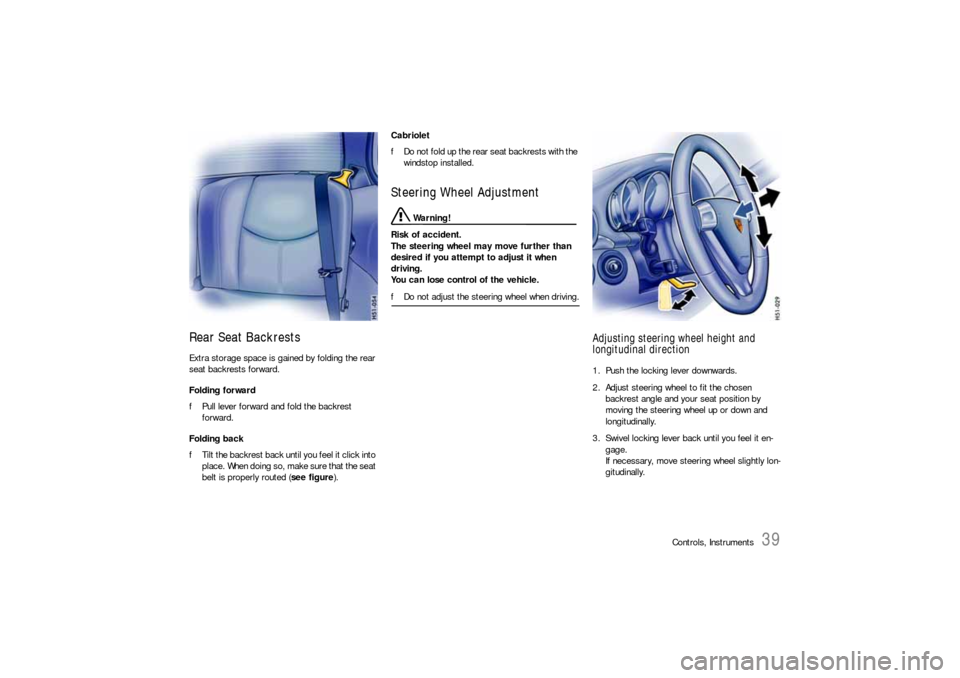
Rear Seat BackrestsExtra storage space is gained by folding the rear
seat backrests forward.
Folding forward
fPull lever forward and fold the backrest
forward.
Folding back
fTilt the backrest back until you feel it click into
place. When doing so, make sure that the seat
belt is properly routed (see figure).Cabriolet
fDo not fold up the rear seat backrests with the
windstop installed.
Steering Wheel Adjustment
Warning!
Risk of accident.
The steering wheel may move further than
desired if you attempt to adjust it when
driving.
You can lose control of the vehicle.
fDo not adjust the steering wheel when driving.
Adjusting steering wheel height and
longitudinal direction1. Push the locking lever downwards.
2. Adjust steering wheel to fit the chosen
backrest angle and your seat position by
moving the steering wheel up or down and
longitudinally.
3. Swivel locking lever back until you feel it en-
gage.
If necessary, move steering wheel slightly lon-
gitudinally.
Page 40 of 308
40
Controls, Instruments
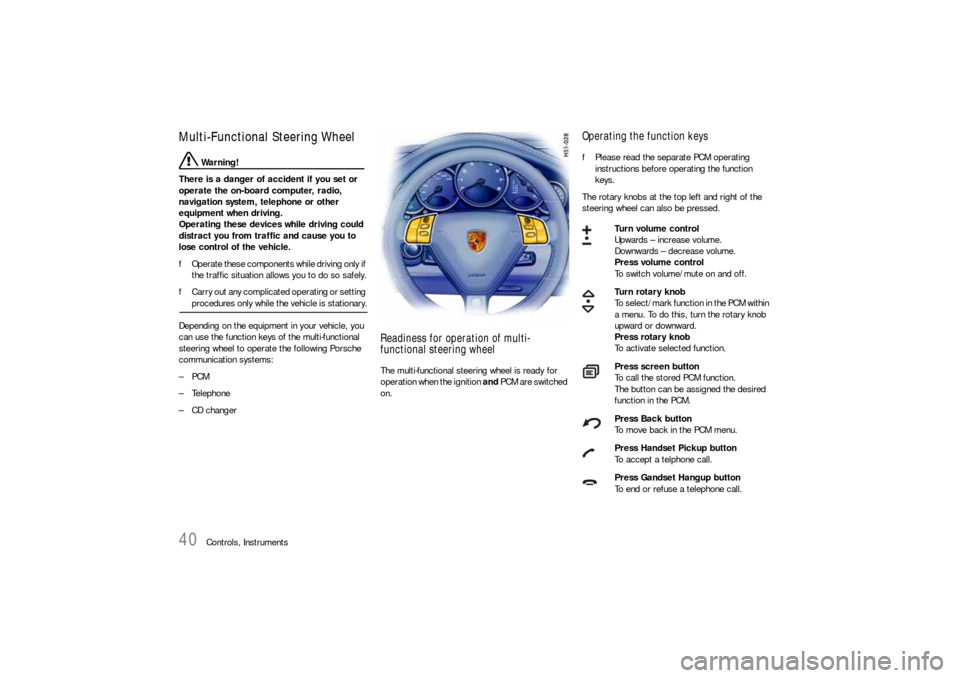
Multi-Functional Steering Wheel
Warning!
There is a danger of accident if you set or
operate the on-board computer, radio,
navigation system, telephone or other
equipment when driving.
Operating these devices while driving could
distract you from traffic and cause you to
lose control of the vehicle.
fOperate these components while driving only if
the traffic situation allows you to do so safely.
fCarry out any complicated operating or setting procedures only while the vehicle is stationary.
Depending on the equipment in your vehicle, you
can use the function keys of the multi-functional
steering wheel to operate the following Porsche
communication systems:
–PCM
– Telephone
– CD changer
Readiness for operation of multi-
functional steering wheelThe multi-functional steering wheel is ready for
operation when the ignition and PCM are switched
on.
Operating the function keysfPlease read the separate PCM operating
instructions before operating the function
keys.
The rotary knobs at the top left and right of the
steering wheel can also be pressed.
Turn volume control
Upwards – increase volume.
Downwards – decrease volume.
Press volume control
To switch volume/mute on and off.
Turn rotary knob
To select/mark function in the PCM within
a menu. To do this, turn the rotary knob
upward or downward.
Press rotary knob
To activate selected function.
Press screen button
To call the stored PCM function.
The button can be assigned the desired
function in the PCM.
Press Back button
To move back in the PCM menu.
Press Handset Pickup button
To accept a telphone call.
Press Gandset Hangup button
To end or refuse a telephone call.