trip computer PORSCHE 911 CARRERA 2006 5.G Owners Manual
[x] Cancel search | Manufacturer: PORSCHE, Model Year: 2006, Model line: 911 CARRERA, Model: PORSCHE 911 CARRERA 2006 5.GPages: 308, PDF Size: 3.69 MB
Page 7 of 308

7
Environmentally friendly vehiclesModern environmental technology ensures compli-
ance with all emission laws applicable worldwide.
These have the following advantages:
– Rapid operational readiness of the catalytic
converters ensures low emissions, even in
short-trip operation.
– Reliable operation and good emission control
over a long useful life.
fPlease refer to the chapter “FUEL ECONOMY”
on page 207.
Recycling – for a Porsche, this is virtually
an academic question More than two-thirds of all Porsches ever built are
still running.
Just in case recycling is ever necessary, we
take the following precautionary measures:
– Identification of all materials.
– Use of recyclable materials.
– Reusable components designed for simple
removal.
– These reasons result in a further increase in
the recycling rate which is currently 80 per
cent.
Emission control is built inInnovative engine technology combines high en-
gine performance and environmental compati-
bility.
The engine diagnosis system electronically moni-
tors the components and systems that affect ex-
haust gases.
This continuous monitoring and fault storage ena-
bles swift, reliable diagnosis and fault detection.
Any fault messages are indicated to the driver by
the ”Check Engine“ warning light and the on-board
computer.
fPlease refer to the chapter “WARNINGS ON
THE INSTRUMENT PANEL AND THE ON-
BOARD COMPUTER” on page 122.
Page 13 of 308

Controls, Instruments
13 Controls, Instruments
Before driving off ......................................... 14
Break in hints for the first
2,000 miles/3,000 kilometers ...................... 16
Keys ........................................................... 19
Security Wheel Bolts.................................... 19
Doors ......................................................... 21
Central Locking ........................................... 22
Alarm System,
Passenger Compartment Monitoring ............. 26
Power Windows ........................................... 28
Inside mirror ................................................ 30
Door Mirrors................................................ 30
Rear Window Defogger,
Door Mirror Heating ..................................... 33
Seat Adjustment .......................................... 34
Seat Memory ............................................... 36
Heated Seats .............................................. 38
Rear Seat Backrests.................................... 39
Steering Wheel Adjustment ........................... 39
Multi-Functional Steering Wheel ..................... 40
Sun Visors................................................... 41
Safety Belts................................................. 42
Airbag Systems ........................................... 45
Child Restraint Systems ............................... 51
LATCH System
Child seat bracket on the passenger’s seat .... 55
Child Restraint Anchorages ........................... 56
Rollover Protection System........................... 57
Parking Aids ................................................ 58
Four-Wheel Drive .......................................... 61
Retractable Rear Spoiler............................... 63
Clutch Pedal ................................................ 65Parking Brake .............................................. 65
Brakes ........................................................ 66
ABS Brake System
(Antilock Brake System)................................ 69
Sport Mode ................................................. 71
Porsche Stability Management (PSM)............. 72
Porsche Active Suspension
Management (PASM) .................................... 75
Interior Lights .............................................. 76
Operation, Instruments ................................. 78
Ignition/Starter Switch with anti-theft
Steering Lock .............................................. 80
Starting Procedures ..................................... 82
Stopping Engine .......................................... 83
Instrument Panel USA Models ....................... 84
Instrument Panel Canada Models................... 86
Engine oil temperature ................................. 88
Automatic Speed Control Indicator light ......... 88
Instrument Illumination.................................. 88
Trip Odometer ............................................. 89
Speedometer .............................................. 90
Changing over between
Miles / Kilometers........................................ 90
Tachometer................................................. 91
Turn Signal Indicator Light ............................ 91
High Beam .................................................. 91
Cooling System ........................................... 92
Tiptronic ...................................................... 93
Fuel ............................................................ 94
Clock .......................................................... 95
Outside temperature .................................... 95
Engine Oil Pressure ...................................... 96Check Engine
Warning Light .............................................. 97
On-Board Computer (BC).............................. 98
Emergency Flasher Switch .......................... 130
Light Switch .............................................. 131
Welcome Home Lighting............................. 131
Automatic Headlight Beam Adjustment......... 132
Turn Signal / Headlight Dimmer /
Parking light / Flasher Lever ....................... 132
Windshield Wiper / Washer Lever ................ 133
Automatic Speed Control ............................ 136
Automatic Air Conditioning System .............. 138
Central and Side Vents ............................... 141
Fresh-air Intake .......................................... 141
Ashtray ..................................................... 142
Cigarette Lighter ........................................ 143
Cupholder ................................................. 144
Storage in the Passenger Compartment ...... 146
Luggage Compartment Lid and Engine
Compartment Lid ....................................... 148
Luggage Compartment
(911 Carrera, 911 Carrera S) ..................... 150
Luggage Compartment
(911 Carrera 4, 911 Carrera 4S) ................ 151
Trunk Entrapment ...................................... 152
Fire Extinguisher ........................................ 154
HomeLink .................................................. 155
Porsche Communication
Management (PCM) .................................... 158
Car Telephone and
Aftermarket Alarms .................................... 161
Page 84 of 308

84
Controls, Instruments
Instrument Panel USA Models Also refer to the corresponding chapters in
the Owner’s Manual.
1. Engine oil temperature gauge
2. Speedometer with analogue display
3. Tire pressure warning light
4. Turn signal indicator light, left
5. Tachometer
6. High beam indicator light
7. Turn signal indicator light, right
8. ABS warning light
9. Cooling system
Temperature gauge, warning light
10.Fuel
Level gauge, warning light
11.Engine oil pressure gauge
12.Adjustment button for instrument illumination
and trip counter
13.Odometer and daily trip mileage display
14.Automatic speed control indicator light15.Light sensor for instrument illumination
16.Airbag warning light
17.Emission control warning light
(Check Engine)
18.Central warning light
19.On-board computer display
20.Porsche Stability Management
Multifunctional PSM light
21.Brake warning light
22.Safety belt warning light
23.Tiptronic indicator
24.Clock and outside temperature display
25 Adjustment button for clockWhen the ignition is switched on, the warning
lights light up for a lamp check.
Note
Warnings that have been given are stored in the
appropriate control unit memory and can be read
out at an authorized Porsche dealer.
This information can help to warn you about situa-
tions which may be hazardous to you or your car.
Page 86 of 308

86
Controls, Instruments
Instrument Panel Canada Models Also refer to the corresponding chapters in
the Owner’s Manual.
1. Engine oil temperature gauge
2. Speedometer with analogue display
3. Tire pressure warning light
4. Turn signal indicator light, left
5. Tachometer
6. High beam indicator light
7. Turn signal indicator light, right
8. ABS warning light
9. Cooling system
Temperature gauge, warning light
10.Fuel
Level gauge, warning light
11.Engine oil pressure gauge
12.Adjustment button for instrument illumination
and trip counter
13.Odometer and daily trip mileage display
14.Automatic speed control indicator light15.Light sensor for instrument illumination
16.Airbag warning light
17.Emission control warning light
(Check Engine)
18.Central warning light
19.On-board computer display
20.Porsche Stability Management
Multifunctional PSM light
21.Brake warning light
22.Safety belt warning light
23.Tiptronic indicator
24.Clock and outside temperature display
25 Adjustment button for clockWhen the ignition is switched on, the warning
lights light up for a lamp check.
Note
Warnings that have been given are stored in the
appropriate control unit memory and can be read
out at an authorized Porsche dealer.
This information can help to warn you about situa-
tions which may be hazardous to you or your car.
Page 89 of 308
Controls, Instruments
89
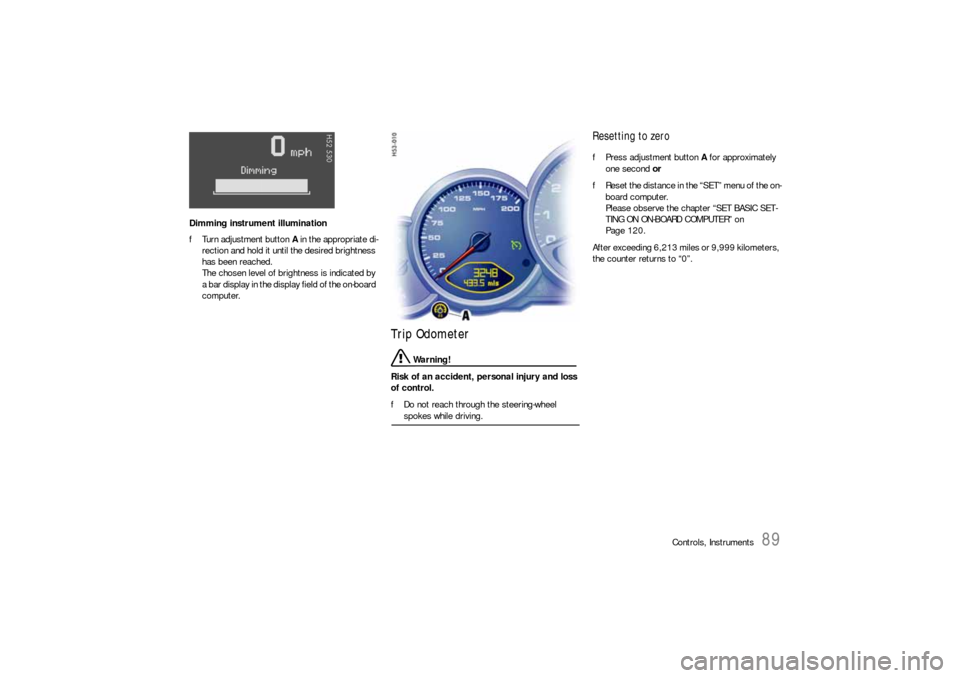
Dimming instrument illumination
fTurn adjustment button A in the appropriate di-
rection and hold it until the desired brightness
has been reached.
The chosen level of brightness is indicated by
a bar display in the display field of the on-board
computer.
Trip Odometer
Warning!
Risk of an accident, personal injury and loss
of control.
fDo not reach through the steering-wheel spokes while driving.
Resetting to zero fPress adjustment button A for approximately
one second or
fReset the distance in the “SET” menu of the on-
board computer.
Please observe the chapter “SET BASIC SET-
TING ON ON-BOARD COMPUTER” on
Page 120.
After exceeding 6,213 miles or 9,999 kilometers,
the counter returns to “0”.
Page 99 of 308
Controls, Instruments
99
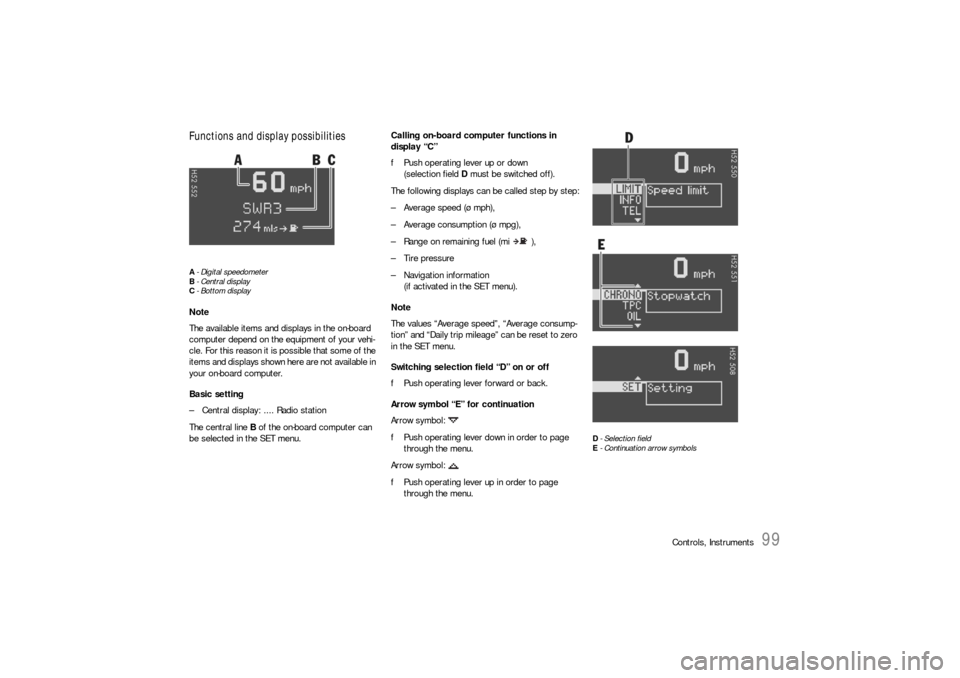
Functions and display possibilitiesA- Digital speedometer
B-Central display
C- Bottom displayNote
The available items and displays in the on-board
computer depend on the equipment of your vehi-
cle. For this reason it is possible that some of the
items and displays shown here are not available in
your on-board computer.
Basic setting
– Central display: .... Radio station
The central line B of the on-board computer can
be selected in the SET menu.Calling on-board computer functions in
display “C”
fPush operating lever up or down
(selection field D must be switched off).
The following displays can be called step by step:
– Average speed (ø mph),
– Average consumption (ø mpg),
– Range on remaining fuel (mi ),
– Tire pressure
– Navigation information
(if activated in the SET menu).
Note
The values “Average speed”, “Average consump-
tion” and “Daily trip mileage” can be reset to zero
in the SET menu.
Switching selection field “D” on or off
fPush operating lever forward or back.
Arrow symbol “E” for continuation
Arrow symbol:
fPush operating lever down in order to page
through the menu.
Arrow symbol:
fPush operating lever up in order to page
through the menu.
D- Selection field
E- Continuation arrow symbols
Page 105 of 308
Controls, Instruments
105
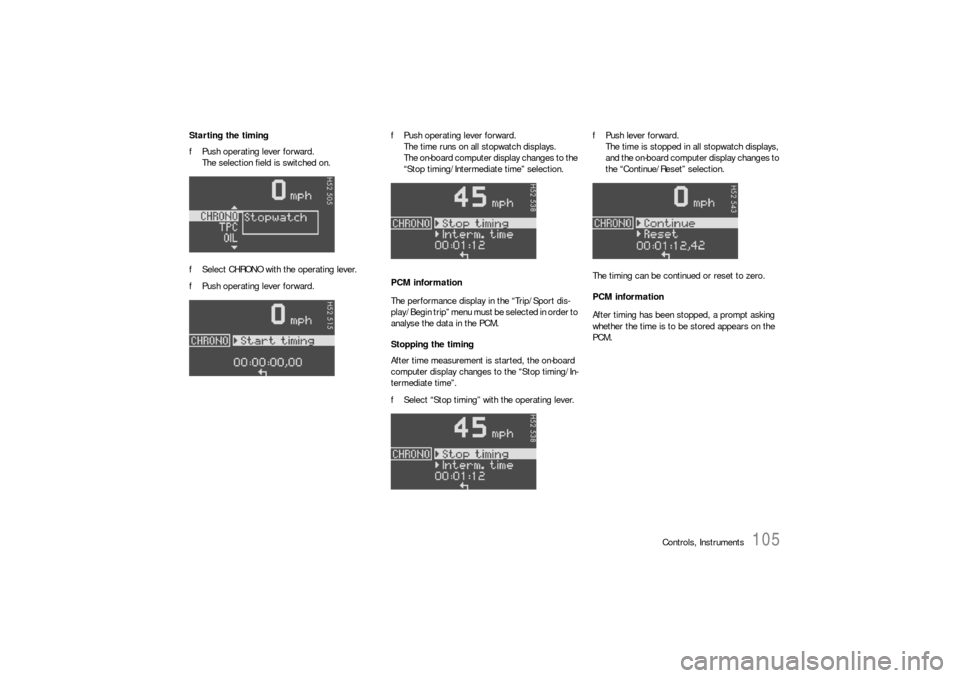
Starting the timing
fPush operating lever forward.
The selection field is switched on.
fSelect CHRONO with the operating lever.
fPush operating lever forward.fPush operating lever forward.
The time runs on all stopwatch displays.
The on-board computer display changes to the
“Stop timing/Intermediate time” selection.
PCM information
The performance display in the “Trip/Sport dis-
play/Begin trip” menu must be selected in order to
analyse the data in the PCM.
Stopping the timing
After time measurement is started, the on-board
computer display changes to the “Stop timing/In-
termediate time”.
fSelect “Stop timing” with the operating lever.fPush lever forward.
The time is stopped in all stopwatch displays,
and the on-board computer display changes to
the “Continue/Reset” selection.
The timing can be continued or reset to zero.
PCM information
After timing has been stopped, a prompt asking
whether the time is to be stored appears on the
PCM.
Page 108 of 308
108
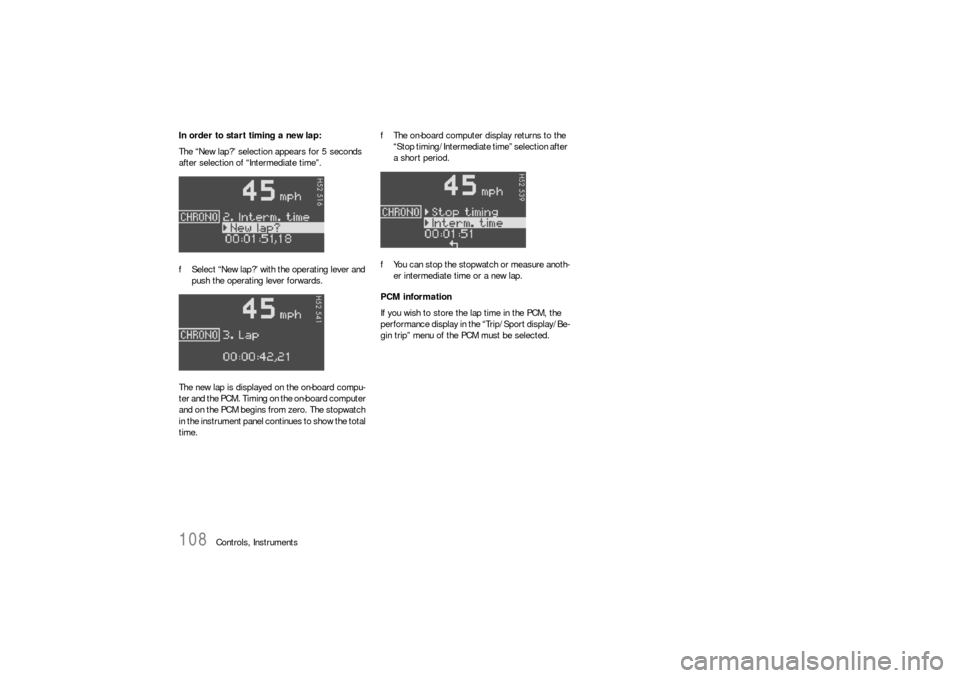
Controls, Instruments In order to start timing a new lap:
The “New lap?” selection appears for 5 seconds
after selection of “Intermediate time”.
fSelect “New lap?” with the operating lever and
push the operating lever forwards.
The new lap is displayed on the on-board compu-
ter and the PCM. Timing on the on-board computer
and on the PCM begins from zero. The stopwatch
in the instrument panel continues to show the total
time.fThe on-board computer display returns to the
“Stop timing/Intermediate time” selection after
a short period.
fYou can stop the stopwatch or measure anoth-
er intermediate time or a new lap.
PCM information
If you wish to store the lap time in the PCM, the
performance display in the “Trip/Sport display/Be-
gin trip” menu of the PCM must be selected.
Page 120 of 308
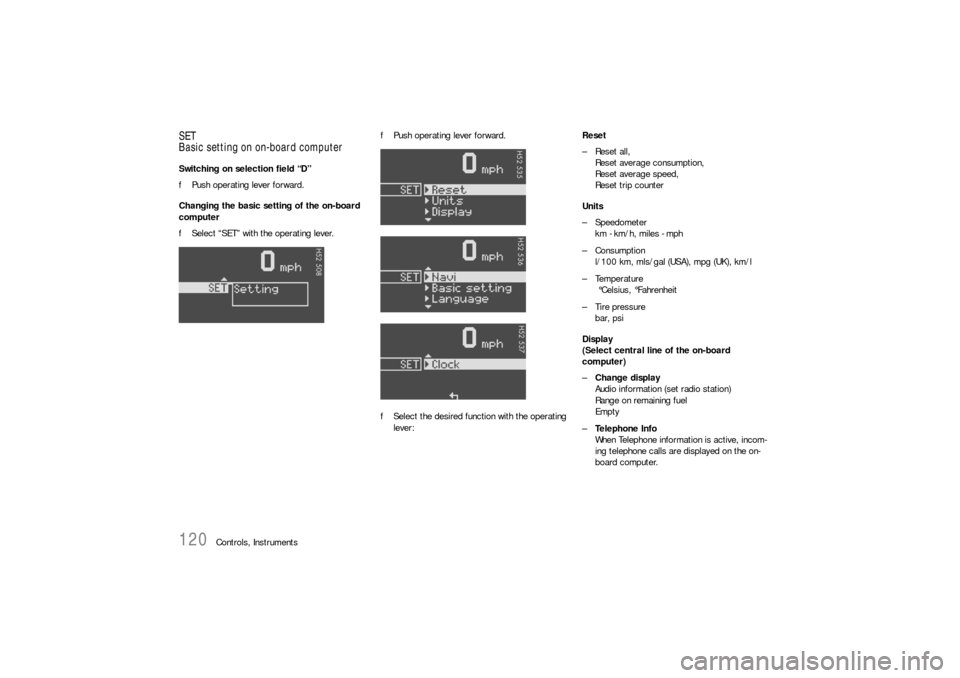
120
Controls, Instruments
SET
Basic setting on on-board computerSwitching on selection field “D”
fPush operating lever forward.
Changing the basic setting of the on-board
computer
fSelect “SET” with the operating lever.fPush operating lever forward.
fSelect the desired function with the operating
lever:Reset
– Reset all,
Reset average consumption,
Reset average speed,
Reset trip counter
Units
– Speedometer
km - km/h, miles - mph
–Consumption
l/100 km, mls/gal (USA), mpg (UK), km/l
–Temperature
°Celsius, °Fahrenheit
– Tire pressure
bar, psi
Display
(Select central line of the on-board
computer)
–Change display
Audio information (set radio station)
Range on remaining fuel
Empty
–Te l e p h o n e I n f o
When Telephone information is active, incom-
ing telephone calls are displayed on the on-
board computer.
Page 121 of 308

Controls, Instruments
121
Navigation
– Integrated in the BC
(Navigation instructions can be recalled on the
on-board computer display)
– When turning off
(Navigation instructions are only shown before
changing direction)
Basic setting
– Restore the basic setting of the on-board com-
puter
Language
– Select language version
12/24h mode
– Select time mode:
12h (small squares on the right side of the time
display for AM/PM),
24h
General information regarding the
on-board computer functionsRange on remaining fuel
The range on remaining fuel is continuously recal-
culated during the journey based on the fuel level,
current consumption and average consumption.
The more the fuel level falls, the more spontan-
eously the display reacts. For this reason, the
range on remaining fuel is not displayed if less
than 9 miles (15 kilometers).
If the vehicle's inclination changes while driving or
refuelling, incorrect range information may tempo-
rarily be given.
Note
If the tank is nearly empty and you top up with only
a small quantity of fuel, an accurate range on re-
maining fuel is impossible.Average consumption and average speed
The values displayed are based on the distance
travelled since the last reset to “zero”.
You can set the starting time for a measurement
before or during the trip.
Switching the ignition off does not reset the meas-
urements. It is therefore possible to collect values
over long periods.
Disconnecting the car battery will cause these
memories to be erased.
memories to be erased.
Tire pressure
The Tire pressure function of the on-board com-
puter displays the tire pressures dependent on
temperature in the four wheels. You can watch the
tire pressure rise and fall while driving.
The display is only for information. To correct the
tire pressures, always use the displayed values
from the “Info pressure” display in the Tire pres-
sure menu.