steering PORSCHE 911 GT3 2004 5.G User Guide
[x] Cancel search | Manufacturer: PORSCHE, Model Year: 2004, Model line: 911 GT3, Model: PORSCHE 911 GT3 2004 5.GPages: 195, PDF Size: 16.94 MB
Page 49 of 195
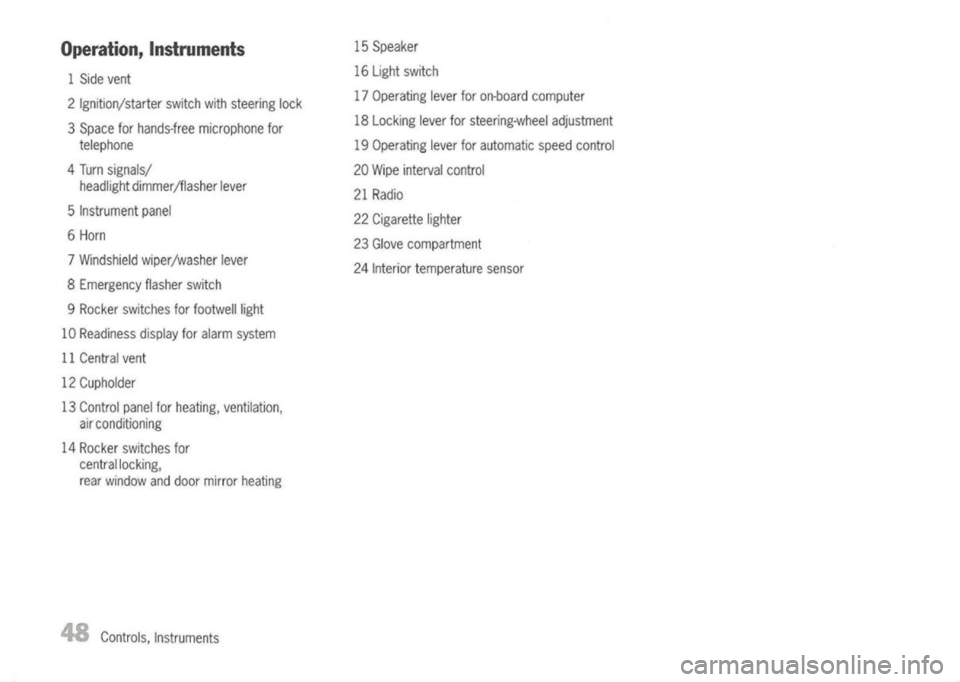
Operation, Instruments
1 Side vent
2 Ignition/starter switchwithsteering lock
3 Space forhands-free microphone for
telephone
4 Turn signals/
headlight dimmer/flasher lever
5 Instrument panel
6 Horn
7 Windshield wiper/washer lever
8 Emergency flasherswitch
9 Rocker switches forfootwelilight
10 Readiness displayforalarm system
11 Central vent
12 Cupholder
13 Control panelforheating, ventilation,
air conditioning
14 Rocker switches for
central locking,
rear window anddoor mirror heating
48
Controls, Instruments 15
Speaker
16 Light switch
17 Operating leverforon-board computer
18 Locking leverforsteering-wheel adjustment
19 Operating leverforautomatic speedcontrol
20 Wipe interval control
21 Radio
22 Cigarette lighter
23 Glove compartment
24 Interior temperature sensor
Page 51 of 195
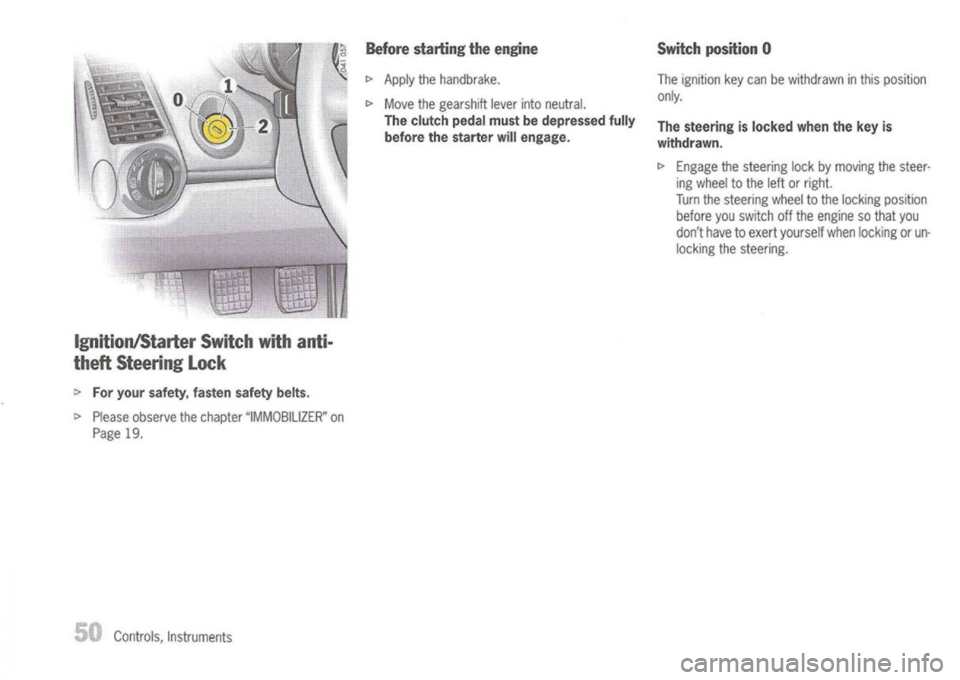
Ignition/Starter Switchwithanti-
theft Steering Lock
I>
For your safety, fastensafetybelts.
I>
Please observe thechapter "IMMOBILIZER" on
Page 19.
Controls, Instruments
Before
starting theengine
I>
Apply thehandbrake.
I>
Move thegearshift leverintoneutral.
The clutch pedalmustbedepressed fully
before thestarter willengage.
Switch
position 0
The ignition keycan bewithdrawn inthis position
only.
The steering islocked whenthekey is
withdrawn.
I>
Engage thesteering lockbymoving thesteer-
ing wheel tothe leftorright.
Turn thesteering wheeltothe locking position
before youswitch offthe engine sothat you
don't havetoexert yourself whenlocking orun-
locking thesteering.
Page 52 of 195
Switchposition 1
Ignition ison.
All electrical equipment canbeswitched on.
The warning lightslightupfor alamp check.
Please notethedescription ofthe individual warn-
ing lights.
I>
When turning thekey toposition 1,relieve the
steering lockwith aslight steering movement.
Note
To conserve batterypoweratlow rpm (traffic
jams, towndriving etc.),switch offallelectrical
consumers whicharenotneeded atthat moment.
Switch
position 2
Starting theengine
I>
Turn thekey from position 1to position 2.
The clutch pedalmustbedepressed fully
before thestarter willengage.
The first operation ofthe starter isended automat-
ically when theengine starts.
If the engine doesnotstart, subsequent starter
operations willnotbeended automatically.
If the engine doesnotstart atthe first time or
stalls atany time, thekey must bereturned to
position O.
When theengine isrunning, thewarning lights
should gooff. Ifa light does notgooff, take
appropriate actionasindicated inthis manual.
Switching
engineoff
I>
Turn theignition keyfrom position 1to
position O.
/!\
Warning!
Risk ofan accident.
The steering wheel
willlock
andwillcause
loss ofsteering.
I>
Never remove keyfrom theignition lockorturn
the key offwhile thevehicle ismoving.
I>
Toavoid battery run-down, alwaysremove the
ignition keyfrom theignition lock.
Please observe thechapter "SATTERY" on
Page 155.
I>
Turn thesteering wheeluntilthesteering lock
is engaged.
Gong
If you leave thekey inthe ignition/steering lock,a
gong willsound whenthedriver's doorisopened.
This isareminder toremove thekey.
Controls, Instruments
51
Page 54 of 195
Stopping Engine
I>
Turn keyback toposition
O.
I>
Donot stop engine immediately afterhardor
extended driving.
Keep engine running atincreased idlefor
about twominutes toprevent excessive heat
build-up beforeturning offengine.
I>
Toavoid battery run-down, alwaysremove the
ignition keyfrom theignition lock.
I>
Make surethatwhen youleave thecar, even
briefly, youhave withdrawn theignition key.
I>
Engage thesteering lockbymoving thesteer-
ing wheel tothe leftorright.
Turn thesteering wheeltothe locking position
before youswitch offthe engine sothat you
don't havetoexert yourself whenlocking or
unlocking thesteering.
A
Warning!
Hot engine compartment componentscan
burn skinoncontact.
I>
Before working onany part inthe engine com-
partment, turntheengine offand letitcool
down sufficiently.
Engine-compartment
blower,
radiator fan
The radiator andradiator fansareinthe front of
the car.
The engine-compartment blowerismounted on
the engine compartment lid.
A
Warning!
Risk ofinjury.
After theengine isswitched off,theengine-
compartment andcoolant temperatures are
monitored forapprox. 20minutes.
During thisperiod, anddepending ontem-
perature, theengine-compartment blower
and radiator fansmaycontinue torun or
start torun.
I>
Carry outwork inthese areasonlywith theen-
gine off,theignition off,and exercise extreme
caution.
Automatic
garagedoor
The ignition systeminyour Porsche mayinterfere
with your electronically operatedgaragedoor.
I>
Tocheck this,drive yourPorsche closetothe
garage door.Make surenottointerfere with
the operating rangeofthe door.
I>
Run theengine atdifferent speeds.
If the garage dooropens orcloses without youop-
erating thegarage doorunitinyour car,contact
the dealer whoinstalled theautomatic garage
door tohave thefrequency and/orcodingofthe
garage doorsignal changed ormodified.
Controls, Instruments
Page 59 of 195
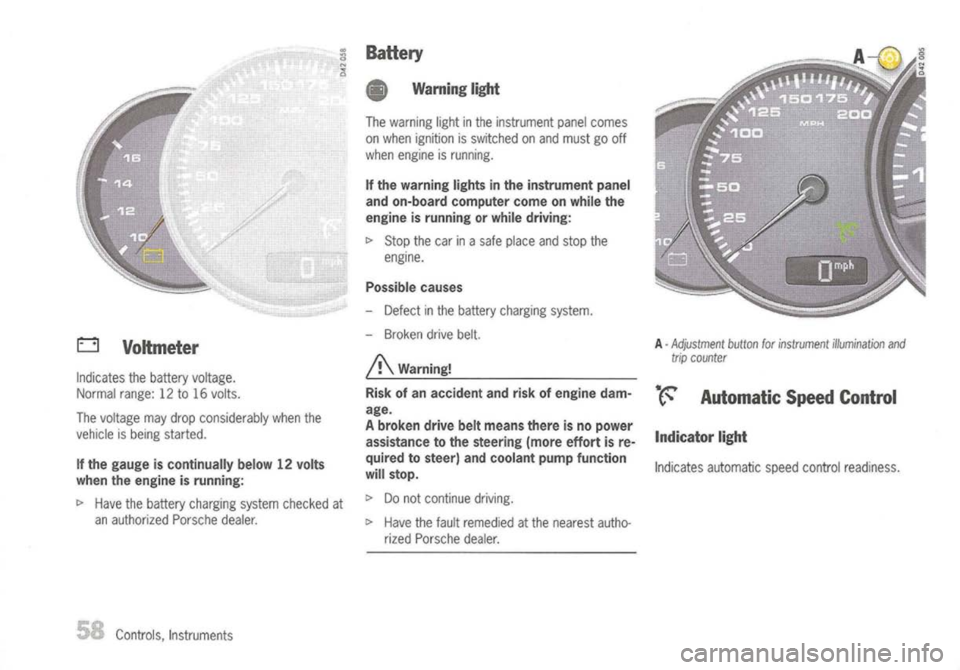
o
Voltmeter
Indicates thebattery voltage.
Normal range:12to16 volts.
The voltage maydrop considerably whenthe
vehicle isbeing started.
If the gauge iscontinually below12volts
when theengine isrunning:
t>
Have thebattery charging systemchecked at
an authorized Porschedealer.
Controls, Instruments
BaHery
• Warning light
The warning lightinthe instrument panelcomes
on when ignition isswitched onand must gooff
when engine isrunning.
If the warning lightsinthe instrument panel
and on-board computer comeonwhile the
engine isrunning orwhile driving:
t>
Stop thecarinasafe place andstop the
engine.
Possible causes
- Defect inthe battery charging system.
- Broken drivebelt.
A
Warning!
Risk ofan accident andriskofengine dam-
age.
A broken drivebeltmeans thereisno power
assistance tothe steering (moreeffortisre-
quired tosteer) andcoolant pumpfunction
will stop.
t>
Donot continue driving.
t>
Have thefault remedied atthe nearest autho-
rized Porsche dealer.
A
-
Adjustment buttonforinstrument illumination and
trip counter
•. ~ Automatic SpeedControl
Indicator light
Indicates automatic speedcontrol readiness.
Page 60 of 195
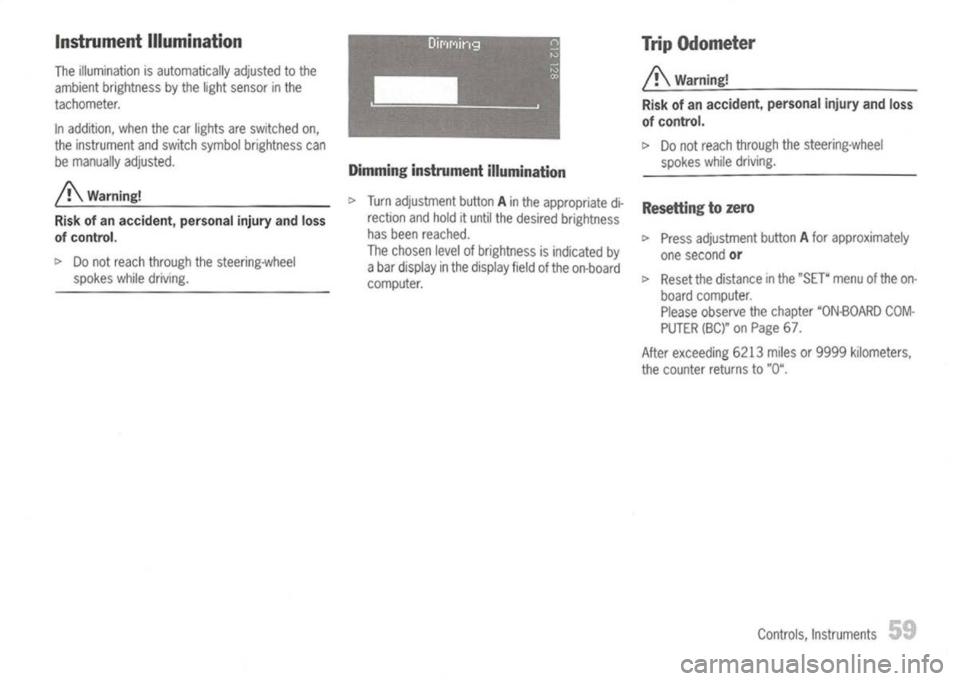
Instrument Illumination
The illumination isautomatically adjustedtothe
ambient brightness bythe light sensor inthe
tachometer.
In addition, whenthecar lights areswitched on,
the instrument andswitch symbol brightness can
be manually adjusted.
/!\
Warning!
Risk ofan accident, personalinjuryandloss
of control.
t>
Donot reach through thesteering-wheel
spokes whiledriving. Dimming
instrument illumination
t>
Turn adjustment buttonAin the appropriate di-
rection andhold ituntil thedesired brightness
has been reached.
The chosen levelofbrightness isindicated by
a bar display inthe display fieldofthe on-board
computer. Trip
Odometer
/!\
Warning!
Risk ofan accident, personalinjuryandloss
of control.
t>
Donot reach through thesteering-wheel
spokes whiledriving.
Resetting tozero
t>
Press adjustment buttonAfor approximately
one second
or
t>
Reset thedistance inthe "SET" menuofthe on-
board computer.
Please observe thechapter "ON-BOARD COM-
PUTER (BC)"onPage 67.
After exceeding 6213milesor9999 kilometers,
the counter returnsto"0".
Controls, Instruments
59
Page 61 of 195
A
Warning!
Risk ofan accident, personalinjuryandloss
of control.
I>
Donot reach through thesteering-wheel
spokes whiledriving.
Switching betweenunits
I>
With theignition on,hold adjustment buttonA
turned tothe leftforapprox. 5seconds.
Note
The units ofthe distance andspeed displays can
also bechanged inthe "SET" menuofthe on-
board computer.
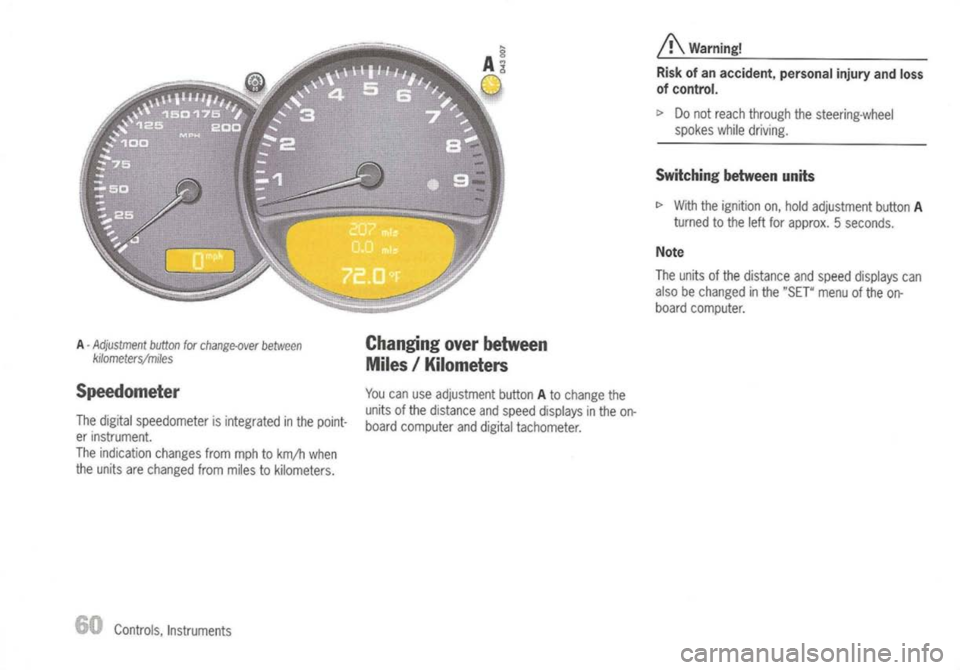
A -
Adjustment button
for
change-over between
kilometers/miles
Speedometer
The digital speedometer isintegrated inthe point-
er instrument.
The indication changesfrommphtokm/h when
the units arechanged frommiles tokilometers.
Controls, Instruments
Changing
overbetween
Miles /Kilometers
You canuseadjustment buttonAto change the
units ofthe distance andspeed displays inthe on-
board computer anddigital tachometer.
Page 65 of 195
A-
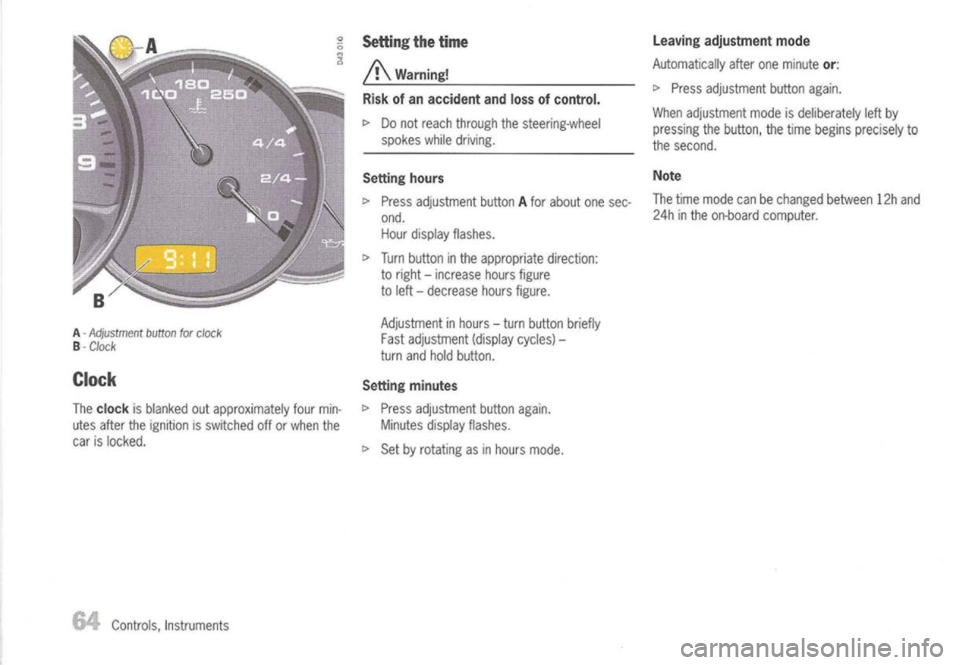
Adjustment buttonforclock
B -
Clock
Clock
The
clock
isblanked outapproximately fourmin-
utes after theignition isswitched offorwhen the
car islocked.
Controls, Instruments
Setting
thetime
/!\
Warning!
Risk ofan accident andlossofcontrol.
c>
Donot reach through thesteering-wheel
spokes whiledriving.
Setting hours
c>
Press adjustment buttonAfor about onesec-
ond. Hour display flashes.
c>
Turn button inthe appropriate direction:
to right -increase hoursfigure
to left -decrease hoursfigure.
Adjustment inhours -turn button briefly
Fast adjustment (displaycycles)-
turn andhold button.
Setting minutes
c>
Press adjustment buttonagain.
Minutes displayflashes.
c>
Set byrotating asinhours mode.
Leaving
adjustment mode
Automatically afteroneminute
or:
c>
Press adjustment buttonagain.
When adjustment modeisdeliberately leftby
pressing thebutton, thetime begins precisely to
the second.
Note
The time mode canbechanged between12hand
24h inthe on-board computer.
Page 68 of 195
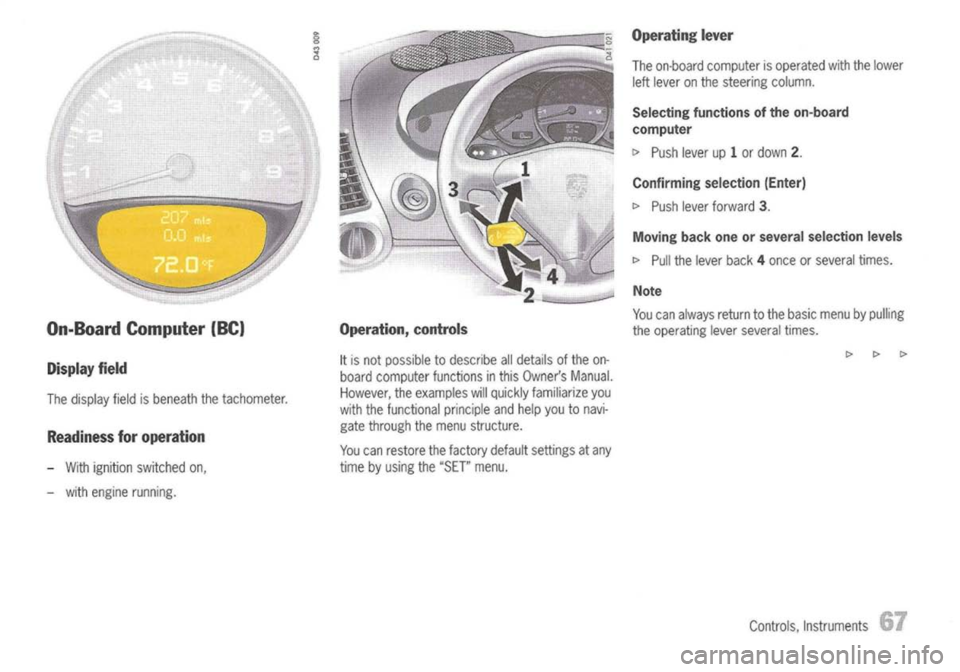
On-Board Computer (BC)
Display field
The display fieldisbeneath thetachometer.
Readiness foroperation
- With ignition switched on,
- with engine running.
Operation,
controls
It
is not possible todescribe alldetails ofthe on-
board computer functionsinthis Owner's Manual.
However, theexamples willquickly familiarize you
with thefunctional principleandhelp youtonavi-
gate through themenu structure.
You canrestore thefactory defaultsettings atany
time byusing the
"SET"
menu.
Operating
lever
The on-board computer isoperated withthelower
left lever onthe steering column.
Selecting functions ofthe on-board
computer
I>
Push leverup1or down
2.
Confirming selection(Enter)
I>
Push leverforward
3.
Moving backoneorseveral selection levels
I>
Pull thelever back4once orseveral times.
Note
You canalways returntothe basic menu bypulling
the operating leverseveral times.
Controls, Instruments
Page 84 of 195
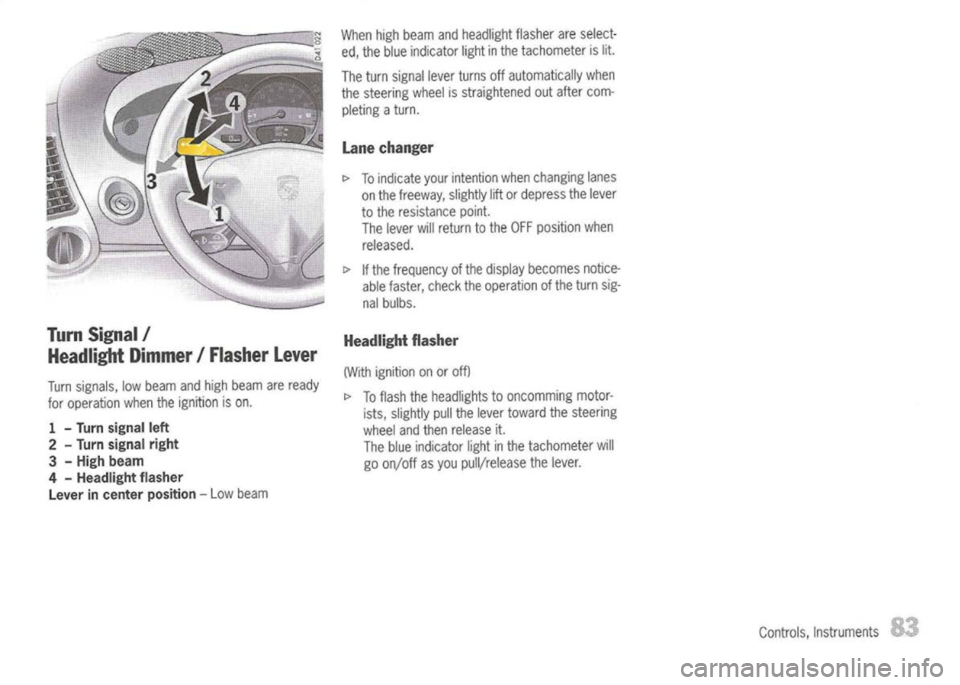
TurnSignal /
Headlight Dimmer/Flasher Lever
Turn signals, lowbeam andhigh beam areready
for operation whentheignition ison.
1 -
Turn
signal left
2 -
Turn signal right
3 -
High beam
4 -
Headlight flasher
Lever incenter position -
Low beam When
highbeam andheadlight flasherareselect-
ed, the blue indicator lightinthe tachometer islit.
The turn signal leverturns offautomatically when
the steering wheelisstraightened outafter com-
pleting aturn.
Lane changer
[>
Toindicate yourintention whenchanging lanes
on the freeway, slightlyliftordepress thelever
to the resistance point.
The lever willreturn tothe OFF position when
released.
[>
Ifthe frequency ofthe display becomes notice-
able faster, checktheoperation ofthe turn sig-
nal bulbs.
Headlight flasher
(With ignition onoroff)
[>
Toflash theheadlights tooncomming motor-
ists, slightly pullthelever toward thesteering
wheel andthen release it.
The blue indicator lightinthe tachometer will
go on/off asyou pull/release thelever.
Controls,Instruments