fuel PORSCHE BOXSTER 2005 2.G User Guide
[x] Cancel search | Manufacturer: PORSCHE, Model Year: 2005, Model line: BOXSTER, Model: PORSCHE BOXSTER 2005 2.GPages: 276, PDF Size: 4.05 MB
Page 82 of 276
82
Controls, Instruments
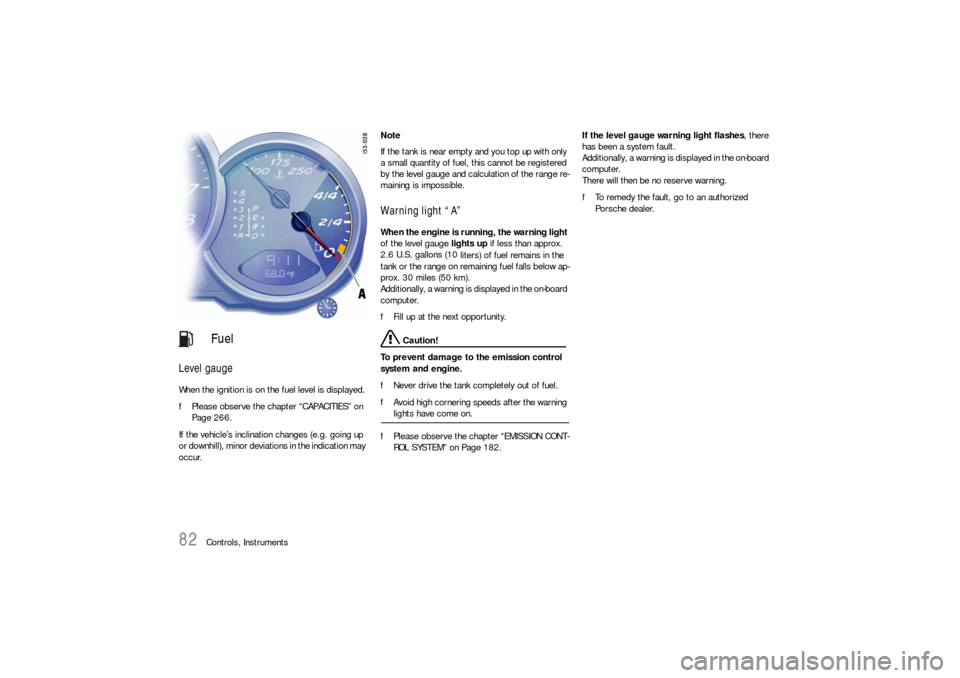
Level gauge
When the ignition is on the fuel level is displayed.
fPlease observe the chapter “CAPACITIES” on
Page 266.
If the vehicle’s inclination changes (e.g. going up
or downhill), minor deviations in the indication may
occur. Note
If the tank is near empty and you top up with only
a small quantity of fuel, this cannot be registered
by the level gauge and calculation of the range re-
maining is impossible.
Warning light “A” When the engine is running, the warning light
of the level gauge lights up if less than approx.
2.6 U.S. gallons (10
liters) of fuel remains in the
tank or the range on remaining fuel falls below ap-
prox. 30 miles (50 km).
Additionally, a warning is displayed in the on-board
computer.
fFill up at the next opportunity.
Caution!
To prevent damage to the emission control
system and engine.
fNever drive the tank completely out of fuel.
fAvoid high cornering speeds after the warning lights have come on.
fPlease observe the chapter “EMISSION CONT-
ROL SYSTEM” on Page 182.If the level gauge warning light flashes, there
has been a system fault.
Additionally, a warning is displayed in the on-board
computer.
There will then be no reserve warning.
fTo remedy the fault, go to an authorized
Porsche dealer.
Fuel
Page 84 of 276

84
Controls, Instruments If the battery voltage drops abruptly, a warning
m e s s a g e w i l l b e d i s p l a y e d b y t h e o n - b o a rd c o m p u -
ter.
If the warning is displayed by the on-board
computer while the engine is running or while
driving:
fStop the car in a safe place and stop the
engine.
Possible causes
– Defect in the battery charging system.
– Broken drive belt. Warning!
Risk of an accident and risk of engine dam-
age.
A broken drive belt means there is no power
assistance to the steering (more effort is re-
quired to steer) and coolant pump function
will stop.
fDo not continue driving.
fHave the fault remedied at the nearest author-ized Porsche dealer. The warning light in the instrument panel comes
on when the ignition is first turned on and remains
on briefly as a bulb check. If the light does not
come on, have the bulb replaced promptly.
If the warning lights in the instrument panel and on-
board computer come on and remain on while
driving, it suggests:
– a potential engine control problem and the
need for system service or
– an improperly fastened tank cap or
– refuelling with engine running.
Although the vehicle is usually driveable and will
not require towing, see your dealer for service as
soon as possible.
Caution!
If the Check engine light in the instrument
panel is flashing, severe catalytic converter
damage and power loss will soon occur.
Prolonged driving with the Check engine light
on could cause damage to the emission con-
trol system. It also could affect fuel economy
and driveability.
fHave the fault remedied at the nearest author-ized Porsche dealer immediately.
Battery
Check Engine
Warning Light
Page 87 of 276
Controls, Instruments
87
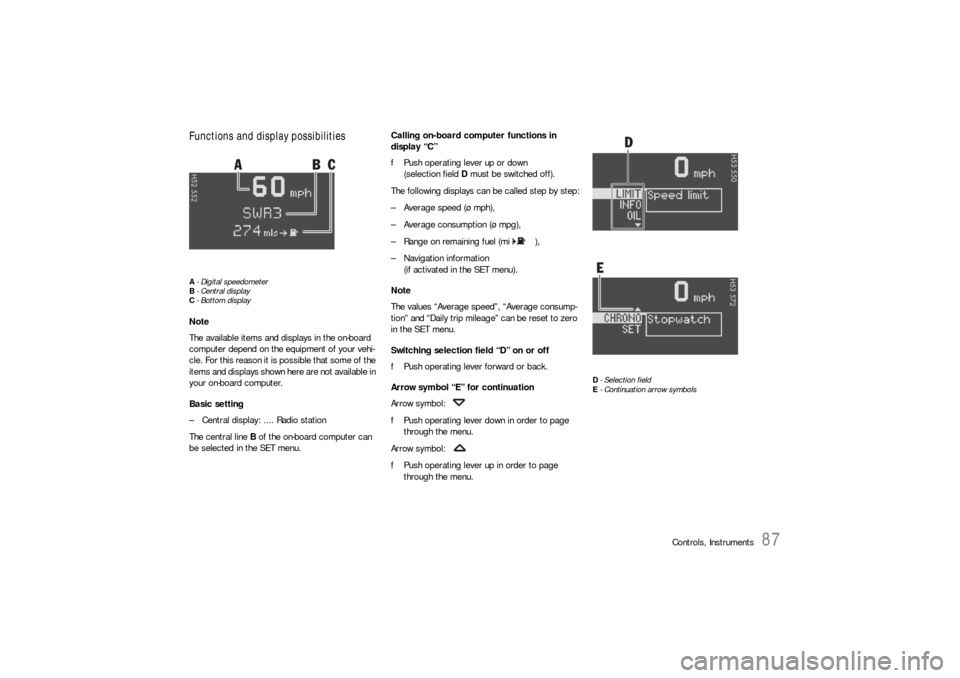
Functions and display possibilitiesA- Digital speedometer
B-Central display
C- Bottom displayNote
The available items and displays in the on-board
computer depend on the equipment of your vehi-
cle. For this reason it is possible that some of the
items and displays shown here are not available in
your on-board computer.
Basic setting
– Central display: .... Radio station
The central line B of the on-board computer can
be selected in the SET menu.Calling on-board computer functions in
display “C”
fPush operating lever up or down
(selection field D must be switched off).
The following displays can be called step by step:
– Average speed (ø mph),
– Average consumption (ø mpg),
– Range on remaining fuel (mi ),
– Navigation information
(if activated in the SET menu).
Note
The values “Average speed”, “Average consump-
tion” and “Daily trip mileage” can be reset to zero
in the SET menu.
Switching selection field “D” on or off
fPush operating lever forward or back.
Arrow symbol “E” for continuation
Arrow symbol:
fPush operating lever down in order to page
through the menu.
Arrow symbol:
fPush operating lever up in order to page
through the menu.
D- Selection field
E- Continuation arrow symbols
Page 97 of 276
Controls, Instruments
97
OIL
Display and measurement of the engine
oil level
Caution!
Risk of engine damage.
fRegularly check the oil level after refuelling.
fDo not allow the oil level to fall below the mini-mum mark.
Conditions for measuring the oil level
1. It is important to ensure that the vehicle is
horizontal for correct oil level measurement
to occur.
2. Engine is off.
3. Ignition on.Oil return time
Before the oil level is measured, the engine oil has
to have flowed back into the oil pan.
The time taken for the engine oil to flow back de-
pends on the engine temperature and how long
the engine has been stopped.
This waiting time is counted down in the on-board
computer display when the ignition is switched on.
The oil level display segments start to “cycle”.
fIt is best to measure the engine oil level before
embarking on a journey (if the vehicle has not
been driven for an extended period) or with the
engine at operating temperature. Shorter wait-
ing times are achieved in this way.Initiating oil level measurement
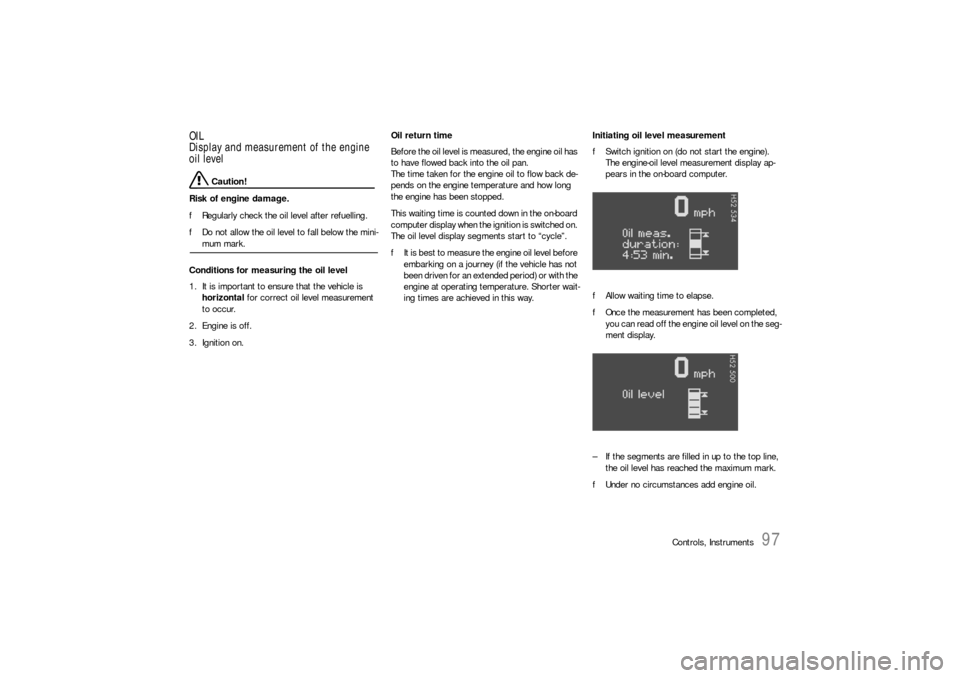
fSwitch ignition on (do not start the engine).
The engine-oil level measurement display ap-
pears in the on-board computer.
fAllow waiting time to elapse.
fOnce the measurement has been completed,
you can read off the engine oil level on the seg-
ment display.
– If the segments are filled in up to the top line,
the oil level has reached the maximum mark.
fUnder no circumstances add engine oil.
Page 98 of 276
98
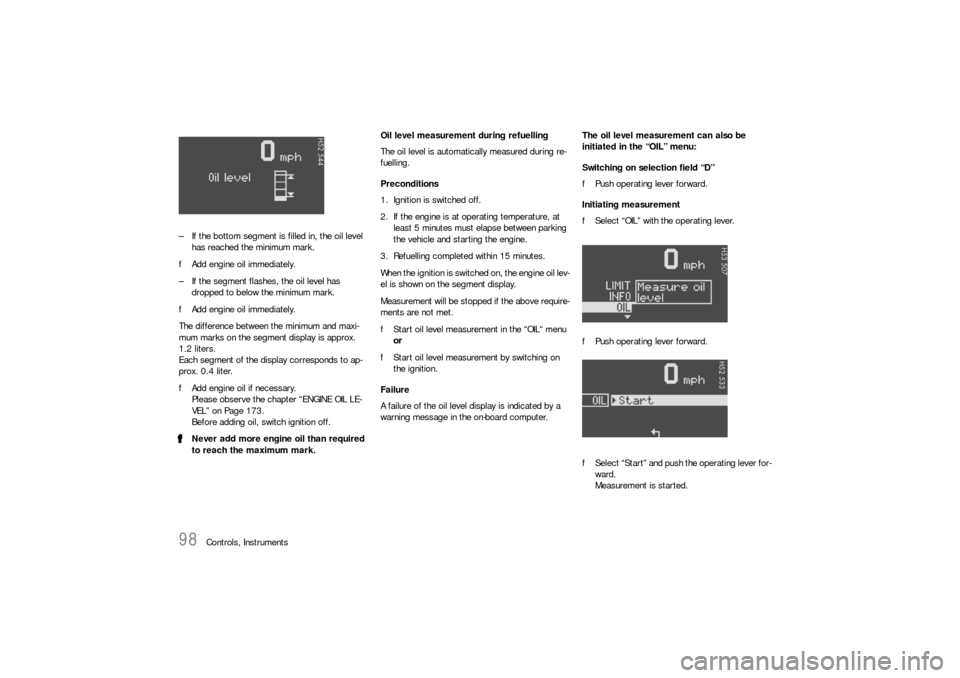
Controls, Instruments – If the bottom segment is filled in, the oil level
has reached the minimum mark.
fAdd engine oil immediately.
– If the segment flashes, the oil level has
dropped to below the minimum mark.
fAdd engine oil immediately.
The difference between the minimum and maxi-
mum marks on the segment display is approx.
1.2 liters.
Each segment of the display corresponds to ap-
prox. 0.4 liter.
fAdd engine oil if necessary.
Please observe the chapter “ENGINE OIL LE-
VEL” on Page 173.
Before adding oil, switch ignition off.
fNever add more engine oil than required
to reach the maximum mark.Oil level measurement during refuelling
The oil level is automatically measured during re-
fuelling.
Preconditions
1. Ignition is switched off.
2. If the engine is at operating temperature, at
least 5 minutes must elapse between parking
the vehicle and starting the engine.
3. Refuelling completed within 15 minutes.
When the ignition is switched on, the engine oil lev-
el is shown on the segment display.
Measurement will be stopped if the above require-
ments are not met.
fStart oil level measurement in the “OIL“ menu
or
fStart oil level measurement by switching on
the ignition.
Failure
A failure of the oil level display is indicated by a
warning message in the on-board computer.The oil level measurement can also be
initiated in the “OIL” menu:
Switching on selection field “D”
fPush operating lever forward.
Initiating measurement
fSelect “OIL” with the operating lever.
fPush operating lever forward.
fSelect “Start” and push the operating lever for-
ward.
Measurement is started.
Page 99 of 276
Controls, Instruments
99
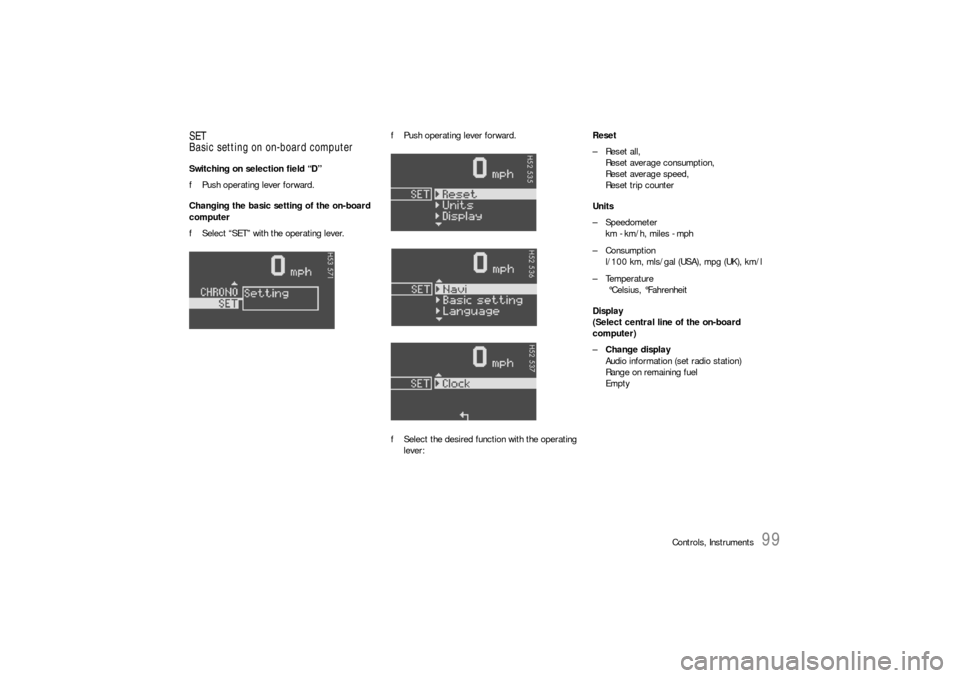
SET
Basic setting on on-board computerSwitching on selection field “D”
fPush operating lever forward.
Changing the basic setting of the on-board
computer
fSelect “SET” with the operating lever.fPush operating lever forward.
fSelect the desired function with the operating
lever:Reset
– Reset all,
Reset average consumption,
Reset average speed,
Reset trip counter
Units
– Speedometer
km - km/h, miles - mph
–Consumption
l/100 km, mls/gal (USA), mpg (UK), km/l
– Temperature
°Celsius, °Fahrenheit
Display
(Select central line of the on-board
computer)
–Change display
Audio information (set radio station)
Range on remaining fuel
Empty
Page 100 of 276

100
Controls, Instruments Navigation
– Integrated in the BC
(Navigation instructions can be recalled on the
on-board computer display)
– When turning off
(Navigation instructions are only shown before
changing direction)
Basic setting
– Restore the basic setting of the on-board com-
puter
Language
– Select language version
12/24h mode
– Select time mode:
12h (small squares on the right side of the time
display for AM/PM),
24h
General information regarding the
on-board computer functionsRange on remaining fuel
The range on remaining fuel is continuously recal-
culated during the journey based on the fuel level,
current consumption and average consumption.
The more the fuel level falls, the more spontan-
eously the display reacts. For this reason, the
range on remaining fuel is not displayed if less
than 9 miles (15 kilometers).
If the vehicle's inclination changes while driving or
refuelling, incorrect range information may tempo-
rarily be given.
Note
If the tank is nearly empty and you top up with only
a small quantity of fuel, an accurate range on re-
maining fuel is impossible.Average consumption and average speed
The values displayed are based on the distance
travelled since the last reset to “zero”.
You can set the starting time for a measurement
before or during the trip.
Switching the ignition off does not reset the meas-
urements. It is therefore possible to collect values
over long periods.
Disconnecting the car battery will cause these
memories to be erased.
Page 102 of 276

102
Controls, Instruments
Warnings on the instrument panel and the on-board computerIf a warning message appears, always refer to the corresponding chapters in the Owner’s Manual.
Warning messages are issued only if all measurement preconditions are met. Therefore, check all fluid levels regularly –
in particular, always check the engine oil level after refuelling.
Instrument
panelOn-board
computerText display on on-board
computerMeaning/measure
Seat belt Driver and passengers must fasten their seat
belts.
Handbrake Handbrake is still on.
Ignition key
not removed
Replace battery
in the ignition keyReplace the remote-control battery.
Ignition lock faulty,
please go to workshopHave the fault remedied at an authorized
Porsche dealer.
Ignition lock faulty,
go to workshop immediatelyHave the fault remedied at an authorized
Porsche dealer.
Relieve steering Relieve the steering l o c k b y m o v i n g t h e s t e e r i n g
wheel to the left or right.
Steering locked The steering wheel lock remains engaged.
Have the fault remedied at an authorized
Porsche dealer.
Lights on
Page 103 of 276

Controls, Instruments
103
Check left/right dipped beam (low
beam)
also applies to:
front side lights, direction indicator,
high beam, fog lights, side indicator
light, brake light, tail light, rear fog
light, reversing light, raised brake
light, side markerThe reported light is faulty. Check bulb.
Have the fault remedied at an authorized
Porsche dealer.
Daytime
driving lights offDaytime driving lights switch off when the engi-
ne is shut off. Switch on lights if necessary.
Headlight beam
adjustment faultyHave the fault remedied at an authorized
Porsche dealer.
Front lid not closed Close luggage compartment lid properly.
Rear lid not closed Close engine compartment lid properly.
Front lid release
faultyLuggage compartment lid release is faulty.
Have the fault remedied at an authorized
Porsche dealer.
Rain sensor faulty Have the fault remedied at an authorized
Porsche dealer.
Top up washer fluid
LIMIT
Cannot be accepted
with vehicle stoppedThe current speed can only be accepted for the
acoustic warning signal when the vehicle is in
motion.
LIMIT
30Selected speed limit (e.g. 30 mph) for the
acoustic warning signal has been exceeded.
Adjust your speed if necessary.
Fuel gauge war-
ning lightPlease observe range
on remaining fuelRefuel at next opportunity.
Instrument
panelOn-board
computerText display on on-board
computerMeaning/measure
Page 107 of 276
Controls, Instruments
107
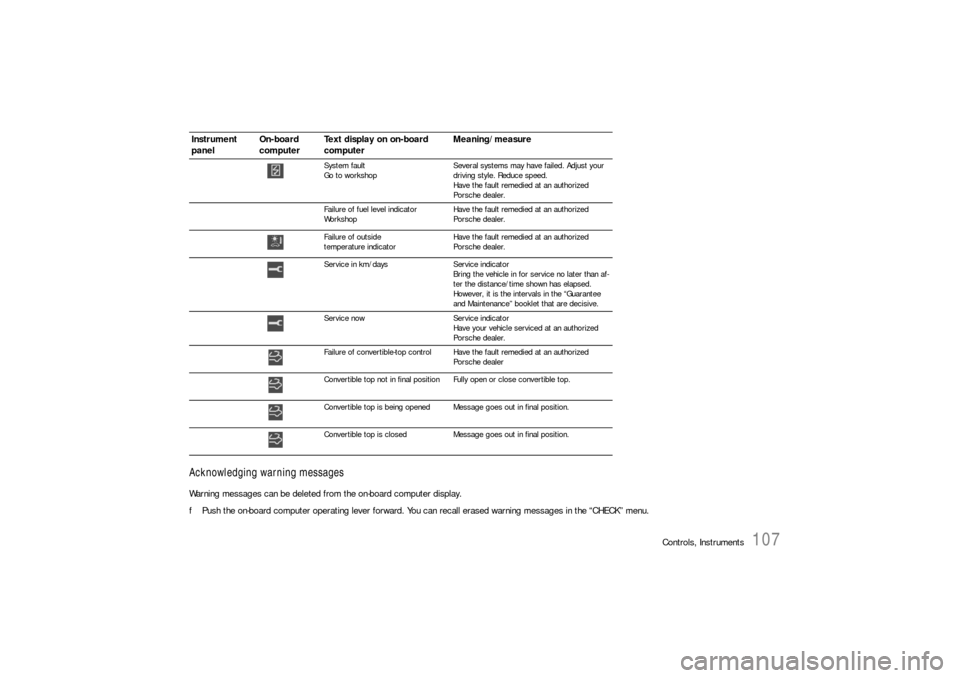
Acknowledging warning messagesWarning messages can be deleted from the on-board computer display.
fPush the on-board computer operating lever forward. You can recall erased warning messages in the “CHECK” menu.
System fault
Go to workshopSeveral systems may have failed. Adjust your
driving style. Reduce speed.
Have the fault remedied at an authorized
Porsche dealer.
Failure of fuel level indicator
WorkshopHave the fault remedied at an authorized
Porsche dealer.
Failure of outside
temperature indicatorHave the fault remedied at an authorized
Porsche dealer.
Service in km/days Service indicator
Bring the vehicle in for service no later than af-
ter the distance/time shown has elapsed.
However, it is the intervals in the “Guarantee
and Maintenance” booklet that are decisive.
Service now Service indicator
Have your vehicle serviced at an authorized
Porsche dealer.
Failure of convertible-top control Have the fault remedied at an authorized
Porsche dealer
Convertible top not in final positionFully open or close convertible top.
Convertible top is being opened Message goes out in final position.
Convertible top is closed Message goes out in final position.
Instrument
panelOn-board
computerText display on on-board
computerMeaning/measure