instrument panel PORSCHE BOXSTER 2005 2.G Owner's Manual
[x] Cancel search | Manufacturer: PORSCHE, Model Year: 2005, Model line: BOXSTER, Model: PORSCHE BOXSTER 2005 2.GPages: 276, PDF Size: 4.05 MB
Page 85 of 276

Controls, Instruments
85
The central warning light on the instrument panel
lights up if there are warning messages in the
INFO menu.
The messages can be called in the on-board
computer INFO menu:
fPlease observe the chapter “INFO WARNING
MESSAGES” on Page 90.
The warning light on the instrument panel lights
up:
– if the handbrake is on,
– if the brake fluid level is low,
– if the brake pads have reached the wear limit,
– if the brake circuit division is defective.
Additionally, a warning is displayed by the on-
board computer.
fPlease observe the chapter “WARNINGS ON
THE INSTRUMENT PANEL AND THE ON-
BOARD COMPUTER” on Page 102.
Central warning light
Brake warning light USA
Brake warning light Canada
Page 92 of 276
92
Controls, Instruments
CHRONO
StopwatchYou can use the stopwatch to measure time inter-
vals, e.g. on the race circuit or on work-related
journeys. Measured lap times can be stored and
evaluated if the vehicle is equipped with Porsche
Communication Management (PCM).
fPlease observe the chapter “Sport display” in
the separate PCM operating instructions.Stopwatch on the instrument panel
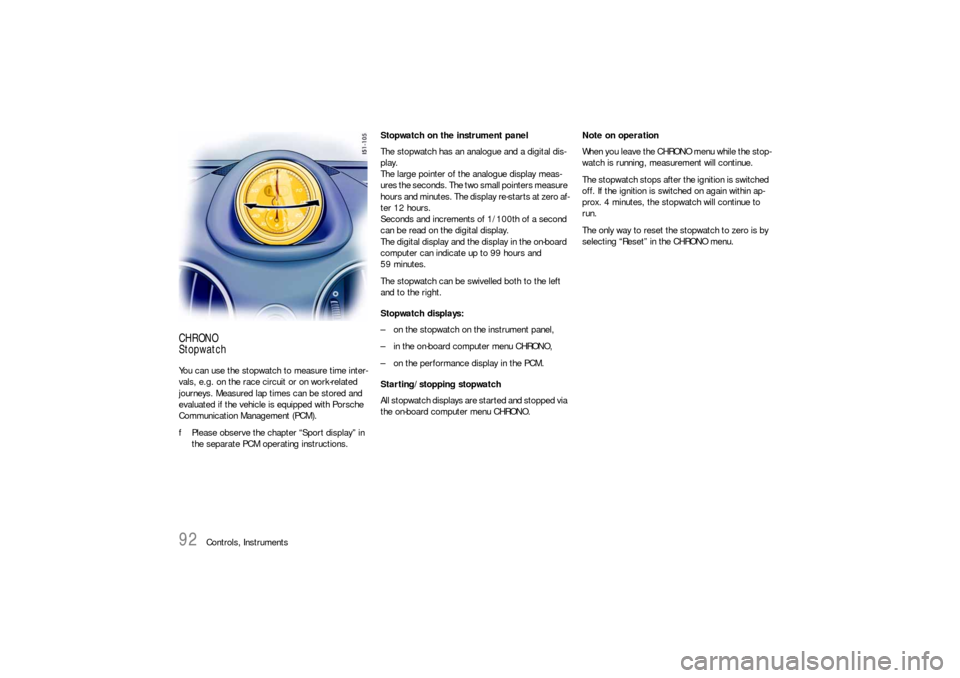
The stopwatch has an analogue and a digital dis-
play.
The large pointer of the analogue display meas-
ures the seconds. The two small pointers measure
hours and minutes. The display re-starts at zero af-
ter 12 hours.
Seconds and increments of 1/100th of a second
can be read on the digital display.
The digital display and the display in the on-board
computer can indicate up to 99 hours and
59 minutes.
The stopwatch can be swivelled both to the left
and to the right.
Stopwatch displays:
– on the stopwatch on the instrument panel,
– in the on-board computer menu CHRONO,
– on the performance display in the PCM.
Starting/stopping stopwatch
All stopwatch displays are started and stopped via
the on-board computer menu CHRONO.Note on operation
When you leave the CHRONO menu while the stop-
watch is running, measurement will continue.
The stopwatch stops after the ignition is switched
off. If the ignition is switched on again within ap-
prox. 4 minutes, the stopwatch will continue to
run.
The only way to reset the stopwatch to zero is by
selecting “Reset” in the CHRONO menu.
Page 94 of 276
94
Controls, Instruments Continue timing
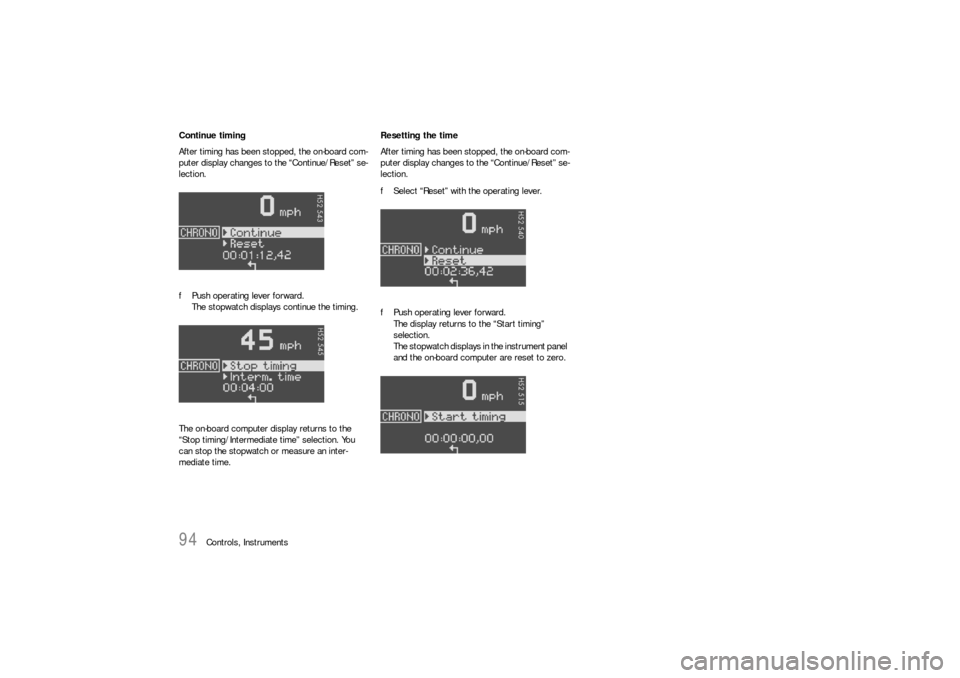
After timing has been stopped, the on-board com-
puter display changes to the “Continue/Reset” se-
lection.
fPush operating lever forward.
The stopwatch displays continue the timing.
The on-board computer display returns to the
“Stop timing/Intermediate time” selection. You
can stop the stopwatch or measure an inter-
mediate time.Resetting the time
After timing has been stopped, the on-board com-
puter display changes to the “Continue/Reset” se-
lection.
fSelect “Reset” with the operating lever.
fPush operating lever forward.
The display returns to the “Start timing”
selection.
The stopwatch displays in the instrument panel
and the on-board computer are reset to zero.
Page 96 of 276

96
Controls, Instruments In order to start timing a new lap:
The “New lap?” selection appears for 5 seconds
after selection of “Intermediate time”.
fSelect “New lap?” with the operating lever and
push the operating lever forwards.
The new lap is displayed on the on-board compu-
ter and the PCM. Timing on the on-board computer
and on the PCM begins from zero. The stopwatch
in the instrument panel continues to show the total
time.fThe on-board computer display returns to the
“Stop timing/Intermediate time” selection after
a short period.
fYou can stop the stopwatch or measure anoth-
er intermediate time or a new lap.
PCM information
If you wish to store the lap time in the PCM, the
performance display in the “Trip/Sport display/Be-
gin trip” menu of the PCM must be selected.
Page 102 of 276

102
Controls, Instruments
Warnings on the instrument panel and the on-board computerIf a warning message appears, always refer to the corresponding chapters in the Owner’s Manual.
Warning messages are issued only if all measurement preconditions are met. Therefore, check all fluid levels regularly –
in particular, always check the engine oil level after refuelling.
Instrument
panelOn-board
computerText display on on-board
computerMeaning/measure
Seat belt Driver and passengers must fasten their seat
belts.
Handbrake Handbrake is still on.
Ignition key
not removed
Replace battery
in the ignition keyReplace the remote-control battery.
Ignition lock faulty,
please go to workshopHave the fault remedied at an authorized
Porsche dealer.
Ignition lock faulty,
go to workshop immediatelyHave the fault remedied at an authorized
Porsche dealer.
Relieve steering Relieve the steering l o c k b y m o v i n g t h e s t e e r i n g
wheel to the left or right.
Steering locked The steering wheel lock remains engaged.
Have the fault remedied at an authorized
Porsche dealer.
Lights on
Page 103 of 276

Controls, Instruments
103
Check left/right dipped beam (low
beam)
also applies to:
front side lights, direction indicator,
high beam, fog lights, side indicator
light, brake light, tail light, rear fog
light, reversing light, raised brake
light, side markerThe reported light is faulty. Check bulb.
Have the fault remedied at an authorized
Porsche dealer.
Daytime
driving lights offDaytime driving lights switch off when the engi-
ne is shut off. Switch on lights if necessary.
Headlight beam
adjustment faultyHave the fault remedied at an authorized
Porsche dealer.
Front lid not closed Close luggage compartment lid properly.
Rear lid not closed Close engine compartment lid properly.
Front lid release
faultyLuggage compartment lid release is faulty.
Have the fault remedied at an authorized
Porsche dealer.
Rain sensor faulty Have the fault remedied at an authorized
Porsche dealer.
Top up washer fluid
LIMIT
Cannot be accepted
with vehicle stoppedThe current speed can only be accepted for the
acoustic warning signal when the vehicle is in
motion.
LIMIT
30Selected speed limit (e.g. 30 mph) for the
acoustic warning signal has been exceeded.
Adjust your speed if necessary.
Fuel gauge war-
ning lightPlease observe range
on remaining fuelRefuel at next opportunity.
Instrument
panelOn-board
computerText display on on-board
computerMeaning/measure
Page 104 of 276
104
Controls, Instruments
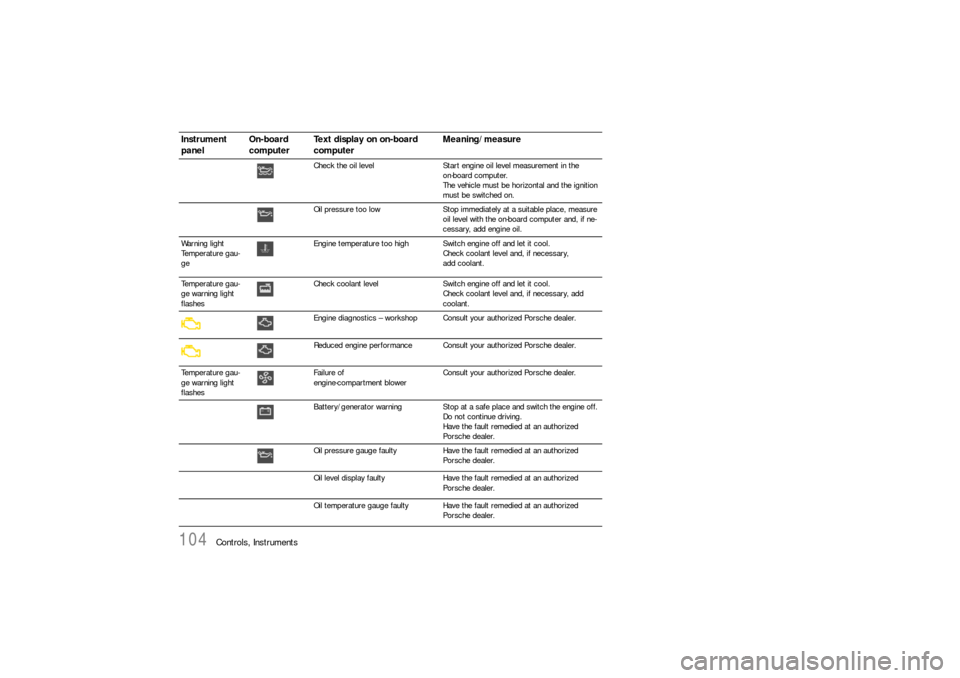
Check the oil level Start engine oil level measurement in the
on-board computer.
The vehicle must be horizontal and the ignition
must be switched on.
Oil pressure too low Stop immediately at a suitable place, measure
oil level with the on-board computer and, if ne-
cessary, add engine oil.
Warning light
Temperature gau-
geEngine temperature too high Switch engine off and let it cool.
Check coolant level and, if necessary,
add coolant.
Temperature gau-
ge warning light
flashesCheck coolant level Switch engine off and let it cool.
Check coolant level and, if necessary, add
coolant.
Engine diagnostics – workshop Consult your authorized Porsche dealer.
Reduced engine performance Consult your authorized Porsche dealer.
Temperature gau-
ge warning light
flashesFailure of
engine-compartment blowerConsult your authorized Porsche dealer.
Battery/generator warning Stop at a safe place and switch the engine off.
Do not continue driving.
Have the fault remedied at an authorized
Porsche dealer.
Oil pressure gauge faulty Have the fault remedied at an authorized
Porsche dealer.
Oil level display faulty Have the fault remedied at an authorized
Porsche dealer.
Oil temperature gauge faulty Have the fault remedied at an authorized
Porsche dealer.
Instrument
panelOn-board
computerText display on on-board
computerMeaning/measure
Page 105 of 276

Controls, Instruments
105
Indicator faulty Coolant indicator failed.
Have the fault remedied at an authorized
Porsche dealer.
Brake pad wear Have the brake pads changed immediately at an
authorized Porsche dealer.
Warning – Brake fluid level Stop immediately in a suitable place.
Do not continue driving. Have the fault remedied
at an authorized Porsche dealer.
Warning – Brake circuit division Stop immediately in a suitable place.
Do not continue driving. Have the fault remedied
at an authorized Porsche dealer.
ABS failure Have the fault remedied at an authorized
Porsche dealer.
PSM off Porsche Stability Management has been swit-
ched off.
PSM on Porsche Stability Management has been swit-
ched on.
PSM failure Have the fault remedied at an authorized
Porsche dealer.
PASM Normal/Sport Indicator for selected PASM mode
PASM failure Have the fault remedied at an authorized
Porsche dealer.
PASM indicator faulty Have the fault remedied at an authorized
Porsche dealer.
Sport mode failure Have the fault remedied at an authorized
Porsche dealer.
Instrument
panelOn-board
computerText display on on-board
computerMeaning/measure
Page 106 of 276

106
Controls, Instruments
Airbag system fault Airbag is faulty.
Have the fault remedied at an authorized
Porsche dealer.
Passenger airbag off Passenger's airbag is switched off.
It is important to switch the passenger’s airbag
on again after removing the child seat.
Passenger airbag on Passenger's airbag is switched on.
Spoiler control failure Driving stability is impaired.
Adjust your driving style. Reduce speed.
Have the fault remedied at an authorized
Porsche dealer.
Display of
selector lever posi-
tion flashesSelector lever is not engaged Tiptronic S:
Selector lever can be between two positions.
Engage the selector lever correctly.
Move selector lever to P Tiptronic S:
Move selector lever to position P before with-
drawing key from ignition lock.
Apply the brake Tiptronic S:
Apply the brake when starting.
Depress the clutch Manual transmission:
Depress clutch pedal when starting.
Move selector lever
to position P or NTiptronic S:
The vehicle can be started only in the selector
lever position P or N.
Display of
selector lever posi-
tion flashesTiptronic emergency run Have the fault remedied at an authorized
Porsche dealer.
Instrument
panelOn-board
computerText display on on-board
computerMeaning/measure
Page 107 of 276
Controls, Instruments
107
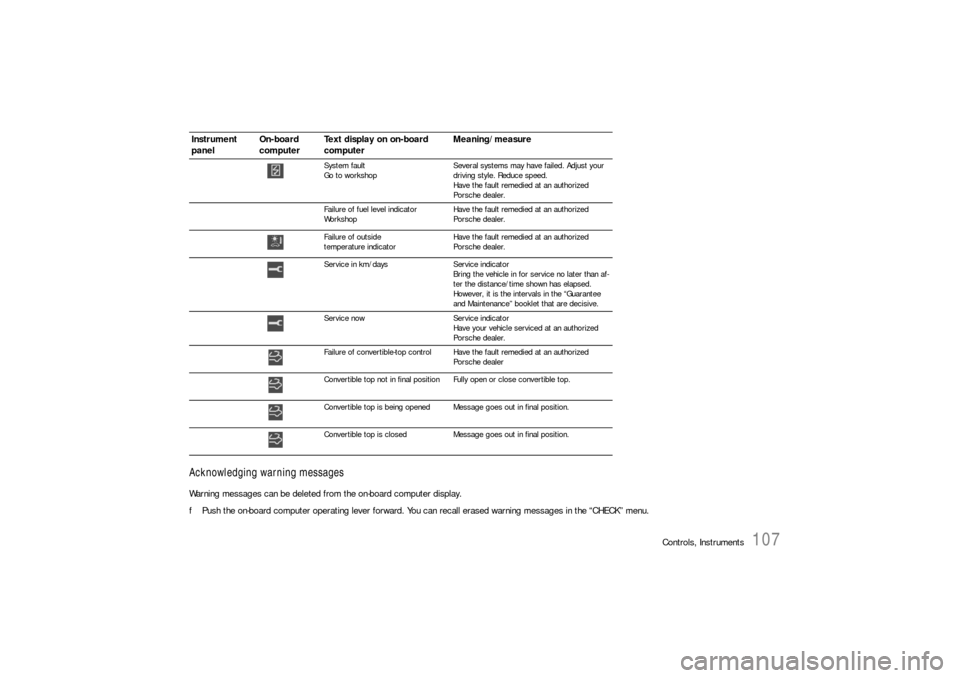
Acknowledging warning messagesWarning messages can be deleted from the on-board computer display.
fPush the on-board computer operating lever forward. You can recall erased warning messages in the “CHECK” menu.
System fault
Go to workshopSeveral systems may have failed. Adjust your
driving style. Reduce speed.
Have the fault remedied at an authorized
Porsche dealer.
Failure of fuel level indicator
WorkshopHave the fault remedied at an authorized
Porsche dealer.
Failure of outside
temperature indicatorHave the fault remedied at an authorized
Porsche dealer.
Service in km/days Service indicator
Bring the vehicle in for service no later than af-
ter the distance/time shown has elapsed.
However, it is the intervals in the “Guarantee
and Maintenance” booklet that are decisive.
Service now Service indicator
Have your vehicle serviced at an authorized
Porsche dealer.
Failure of convertible-top control Have the fault remedied at an authorized
Porsche dealer
Convertible top not in final positionFully open or close convertible top.
Convertible top is being opened Message goes out in final position.
Convertible top is closed Message goes out in final position.
Instrument
panelOn-board
computerText display on on-board
computerMeaning/measure