brake PORSCHE BOXSTER 2006 2.G Owner's Manual
[x] Cancel search | Manufacturer: PORSCHE, Model Year: 2006, Model line: BOXSTER, Model: PORSCHE BOXSTER 2006 2.GPages: 296, PDF Size: 4.12 MB
Page 79 of 296

Controls, Instruments
79
Instrument Panel USA Models Also refer to the corresponding chapter in
the Owner’s Manual.
1 Speedometer with analogue display
2 Tire pressure warning light
3 Turn signal indicator light left/right
4 Tachometer
5 High beam indicator light
6 ABS warning light
7 Cooling system
Temperature gauge, warning light
8Fuel
Level gauge, warning light
9 Adjusting button for instrument illumination
and trip counter
10 Odometer and daily trip mileage display
11 Automatic speed control indicator light
12 Light sensor for instrument illumination13 Airbag warning light
14 Emission control warning light (Check Engine)
15 Central warning light
16 On-board computer display
17 Porsche Stability Management
Multifunctional PSM light
18 Brake warning light
19 Safety belt warning light
20 Tiptronic indicator
21 Clock and outside temperature display
22 Adjustment button for clockWhen the ignition is switched on, the warning
lights light up for a lamp check.
Note
Warnings that have been given are stored in the
appropriate control unit memory and can be read
out at an authorized Porsche dealer.
This information can help to warn you about situa-
tions which may be hazardous to you or your car.
Page 81 of 296

Controls, Instruments
81
Instrument Panel Canada Models Also refer to the corresponding chapter in
the Owner’s Manual.
1 Speedometer with analogue display
2 Tire pressure warning light
3 Turn signal indicator light left/right
4 Tachometer
5 High beam indicator light
6 ABS warning light
7 Cooling system
Temperature gauge, warning light
8Fuel
Level gauge, warning light
9 Adjusting button for instrument illumination
and trip counter
10 Odometer and daily trip mileage display
11 Automatic speed control indicator light
12 Light sensor for instrument illumination13 Airbag warning light
14 Emission control warning light (Check Engine)
15 Central warning light
16 On-board computer display
17 Porsche Stability Management
Multifunctional PSM light
18 Brake warning light
19 Safety belt warning light
20 Tiptronic indicator
21 Clock and outside temperature display
22 Adjustment button for clockWhen the ignition is switched on, the warning
lights light up for a lamp check.
Note
Warnings that have been given are stored in the
appropriate control unit memory and can be read
out at an authorized Porsche dealer.
This information can help to warn you about situa-
tions which may be hazardous to you or your car.
Page 91 of 296

Controls, Instruments
91
The central warning light on the instrument panel
lights up if there are warning messages in the
INFO menu.
The messages can be called in the on-board
computer INFO menu:
fPlease observe the chapter “INFO WARNING
MESSAGES” on Page 96.
The warning light on the instrument panel lights
up:
– if the handbrake is on,
– if the brake fluid level is low,
– if the brake pads have reached the wear limit,
– if the brake circuit division is defective.
Additionally, a warning is displayed by the on-
board computer.
fPlease observe the chapter “WARNINGS ON
THE INSTRUMENT PANEL AND THE ON-
BOARD COMPUTER” on Page 116.
Central warning light
Brake warning light USA
Brake warning light Canada
Page 116 of 296

116
Controls, Instruments
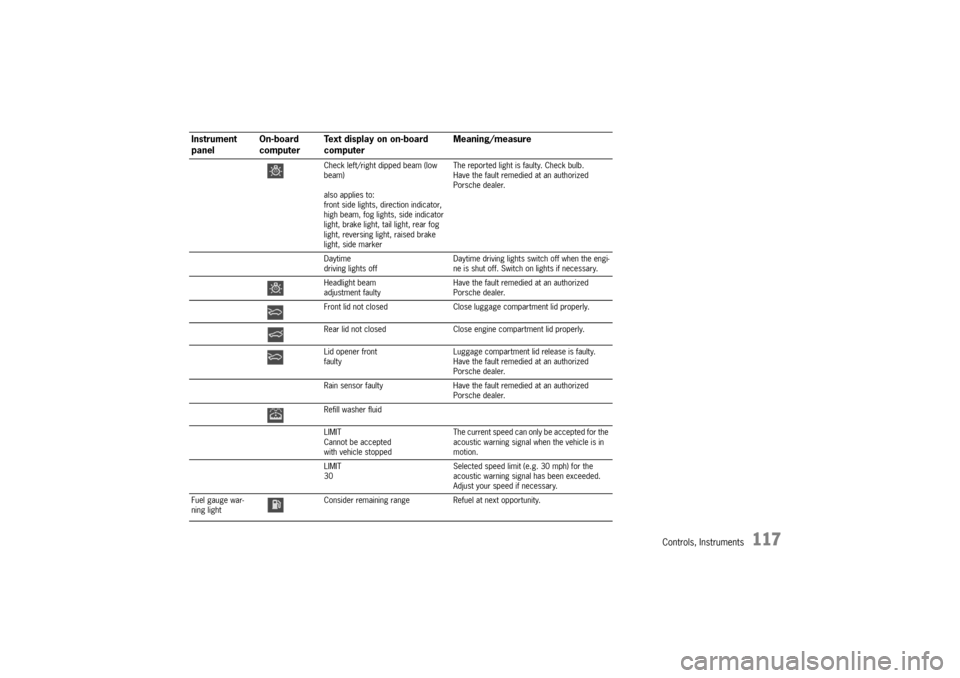
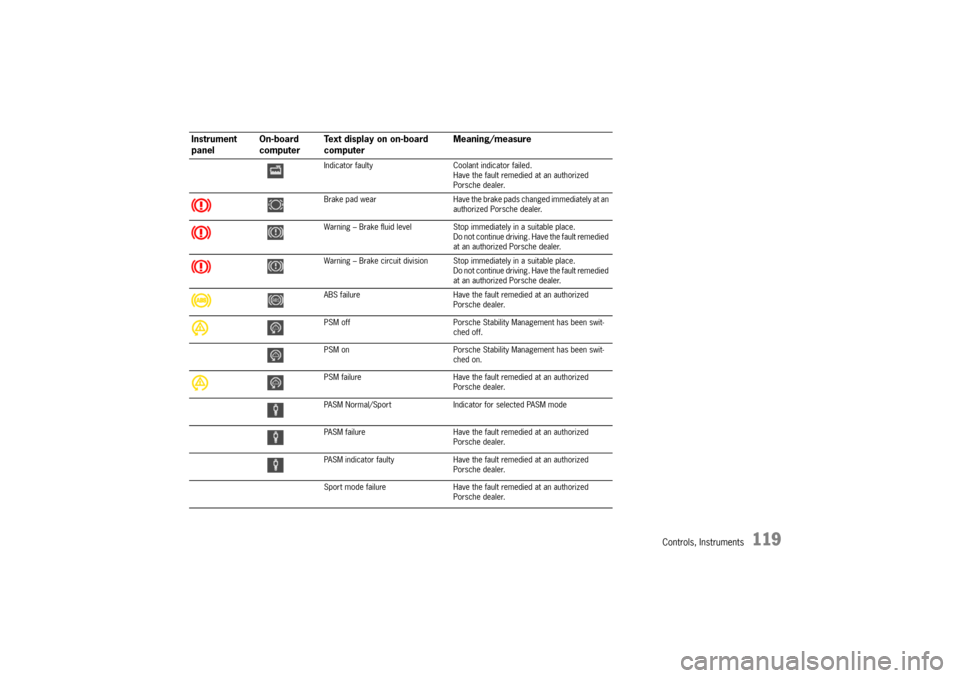
Warnings on the instrument panel and the on-board computerIf a warning message appears, always refer to the corresponding chapters in the Owner’s Manual.
Warning messages are issued only if all measurement preconditions are met. Therefore, check all fluid levels regularly –
in particular, always check the engine oil level after refuelling.
Instrument
panelOn-board
computerText display on on-board
computerMeaning/measure
Seat belt Driver and passengers must fasten their seat
belts.
Handbrake Handbrake is still on.
Ignition key
not removed
Replace battery
in ignition keyReplace the remote-control battery.
Ignition lock faulty,
please go to workshopHave the fault remedied at an authorized
Porsche dealer.
Ignition lock faulty,
visit workshop nowHave the fault remedied at an authorized
Porsche dealer.
Relieve steering Relieve the steering l o c k b y m o v i n g t h e s t e e r i n g
wheel to the left or right.
Steering locked The steering wheel lock remains engaged.
Have the fault remedied at an authorized
Porsche dealer.
Lights on Dipped beam/side light on.
Parking light on Left/right parking light on.
Page 117 of 296
Controls, Instruments
117
Check left/right dipped beam (low
beam)
also applies to:
front side lights, direction indicator,
high beam, fog lights, side indicator
light, brake light, tail light, rear fog
light, reversing light, raised brake
light, side markerThe reported light is faulty. Check bulb.
Have the fault remedied at an authorized
Porsche dealer.
Daytime
driving lights offDaytime driving lights switch off when the engi-
ne is shut off. Switch on lights if necessary.
Headlight beam
adjustment faultyHave the fault remedied at an authorized
Porsche dealer.
Front lid not closed Close luggage compartment lid properly.
Rear lid not closed Close engine compartment lid properly.
Lid opener front
faultyLuggage compartment lid release is faulty.
Have the fault remedied at an authorized
Porsche dealer.
Rain sensor faulty Have the fault remedied at an authorized
Porsche dealer.
Refill washer fluid
LIMIT
Cannot be accepted
with vehicle stoppedThe current speed can only be accepted for the
acoustic warning signal when the vehicle is in
motion.
LIMIT
30Selected speed limit (e.g. 30 mph) for the
acoustic warning signal has been exceeded.
Adjust your speed if necessary.
Fuel gauge war-
ning lightConsider remaining range Refuel at next opportunity.
Instrument
panelOn-board
computerText display on on-board
computerMeaning/measure
Page 119 of 296
Controls, Instruments
119
Indicator faulty Coolant indicator failed.
Have the fault remedied at an authorized
Porsche dealer.
Brake pad wear Have the brake pads changed immediately at an
authorized Porsche dealer.
Warning – Brake fluid level Stop immediately in a suitable place.
Do not continue driving. Have the fault remedied
at an authorized Porsche dealer.
Warning – Brake circuit division Stop immediately in a suitable place.
Do not continue driving. Have the fault remedied
at an authorized Porsche dealer.
ABS failure Have the fault remedied at an authorized
Porsche dealer.
PSM off Porsche Stability Management has been swit-
ched off.
PSM on Porsche Stability Management has been swit-
ched on.
PSM failure Have the fault remedied at an authorized
Porsche dealer.
PASM Normal/Sport Indicator for selected PASM mode
PASM failure Have the fault remedied at an authorized
Porsche dealer.
PASM indicator faulty Have the fault remedied at an authorized
Porsche dealer.
Sport mode failure Have the fault remedied at an authorized
Porsche dealer.
Instrument
panelOn-board
computerText display on on-board
computerMeaning/measure
Page 120 of 296

120
Controls, Instruments
Airbag system fault Airbag is faulty.
Have the fault remedied at an authorized
Porsche dealer.
Check passenger’s seat setting Weight sensing is impaired on the passenger's
seat (Advanced Airbag).
When the backrest is in contact with the engine
compartment wall, the backrest can warp.
Correct the seating position, set the backrest
upright, do not support weight on the armrests,
or lift on the handles.
Failure spoiler control Driving stability is impaired.
Adjust your driving style. Reduce speed.
Have the fault remedied at an authorized
Porsche dealer.
Display of
selector lever posi-
tion flashesSelector lever is not engaged Tiptronic S:
Selector lever can be between two positions.
Engage the selector lever correctly.
Move selector lever to P Tiptronic S:
Move selector lever to position P before with-
drawing key from ignition lock.
Apply brake Tiptronic S:
Apply the brake when starting.
Depress clutch pedal Manual transmission:
Depress clutch pedal when starting.
Move selector lever
to position P or NTiptronic S:
The vehicle can be started only in the selector
lever position P or N.
Display of
selector lever posi-
tion flashesTiptronic emergency run Have the fault remedied at an authorized
Porsche dealer.
Instrument
panelOn-board
computerText display on on-board
computerMeaning/measure
Page 129 of 296

Controls, Instruments
129
Decelerating Option 1
fPull operating lever towards the steering wheel
(position 2) until the desired speed is reached.
The speed reached is maintained and stored
when the lever is released.
Option 2
fBriefly move lever towards the steering wheel
(position 2) (a maximum of 10 times).
The speed is reduced by 1 mph (1.6 km/h)
each time.
Interrupting automatic speed control
operation fPull operating lever downwards briefly
(position 3) or
fOperate brake or clutch pedal or
fSwitch Tiptronic transmission to selector lever
position N.
fPlease observe the chapter “TIPTRONIC S” on
Page 163.
The speed driven before the interruption remains
stored in the memory.
Automatic speed control operation is
interrupted automatically:
– If the set vehicle speed is exceeded by more
than approx. 16 mph (25 km/h) for longer than
20 seconds.
– If the actual vehicle speed falls to approx.
6 mph (10 km/h) below the set vehicle speed
for longer than 5 seconds (upward slopes).
– For PSM control operations.
Resuming the stored speed fBriefly push operating lever upwards
(position4).
The speed control accelerates/decelerates
the vehicle to the stored speed.
The stored speed should only be recalled when
traffic conditions and the road surface so permit.Switching automatic speed control
readiness off fPress button A on the automatic speed control
lever.
The green readiness light in the speedometer
goes off.
When the vehicle is parked and the ignition
switched off, the memory is cleared.
Important note
On upward or downward slopes, the set speed
cannot always be maintained by the automatic
speed control.
To obtain sufficient engine braking or a better en-
gine-speed range, therefore, you have to select a
lower gear.
Page 163 of 296
Shifting Gear
163
Tiptronic SThe Porsche Tiptronic is a five-speed transmission
with an “automatic” and a “manual” selection
mode.
In automatic selection mode (selector lever po-
sition D), gear changing is automatic.
You can change temporarily from automatic to
manual mode using the rocker switches on the
steering wheel.
In manual selection mode (selector lever posi-
tion M), you change gear using the rocker switch-
es on the steering wheel.
You can change between selector lever position D
and M as you wish while driving.
Note
Take care not to operate the rocker switches on
the steering wheel inadvertently in either auto mat-
ic or manual mode, thereby triggering undesired
gear changes.Keylock positionThe ignition key can be withdrawn only in selec-
tor lever position P.
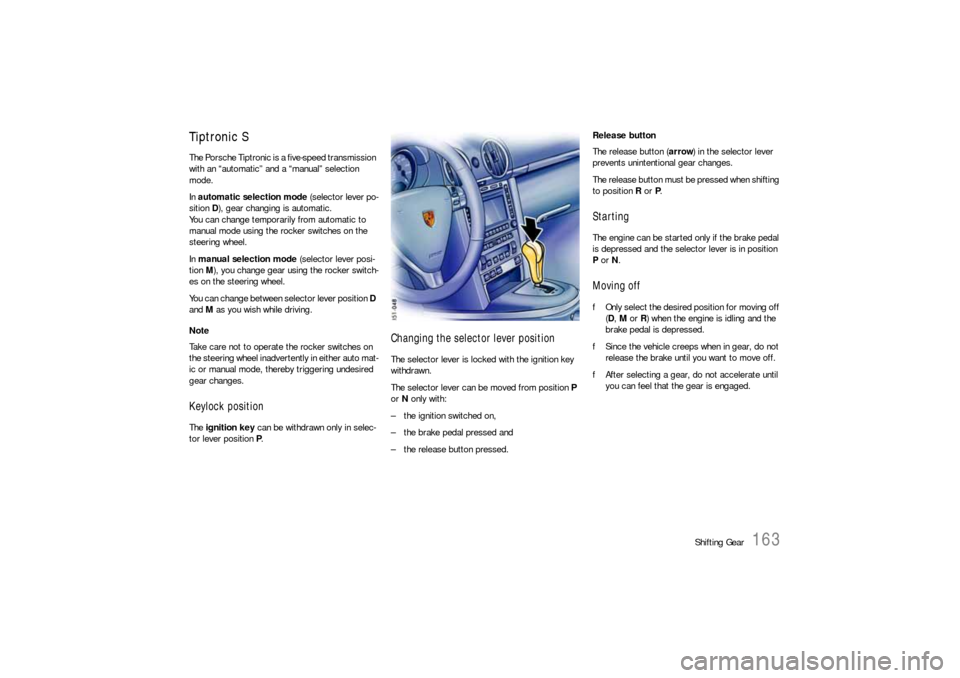
Changing the selector lever positionThe selector lever is locked with the ignition key
withdrawn.
The selector lever can be moved from position P
or N only with:
– the ignition switched on,
– the brake pedal pressed and
– the release button pressed.Release button
The release button (arrow) in the selector lever
prevents unintentional gear changes.
The release button must be pressed when shifting
to position R or P.
StartingThe engine can be started only if the brake pedal
is depressed and the selector lever is in position
P or N.Moving offfOnly select the desired position for moving off
(D, M or R) when the engine is idling and the
brake pedal is depressed.
fSince the vehicle creeps when in gear, do not
release the brake until you want to move off.
fAfter selecting a gear, do not accelerate until
you can feel that the gear is engaged.
Page 165 of 296

Shifting Gear
165
Selector Lever Positions P – Parking lock fSelect only when car has been stopped.
fEngage parking lock after applying the hand-
brake and release it before releasing the hand-
brake.
The ignition key can be withdrawn only in
selector lever position P. R – Reverse fSelect only when car has been stopped and
the brake is applied. N – Neutral Selector lever position N must be selected for to-
wing or in car washes, for example.
fSelect the desired position for moving off (D,
M or R) only when the engine is idling and while
depressing the brake pedal.
D – Automatic selection mode fSelect position D for “normal” driving. The ge-
ars are shifted automatically according to the
accelerator position and speed.
Depending on the way the vehicle is driven and on
the resistance (e.g. uphill), the gear-changing
points are shifted towards higher or lower engine-
speed ranges.
The accelerator position, driving speed, engine
speed, longitudinal and lateral acceleration and
the road profile all have an influence on the gear-
changing characteristic.
Unwanted upward shifts, e.g. before bends, are
prevented by swiftly releasing the accelerator pe-
dal.
Depending on lateral acceleration, upward shifts
on bends are not made until the engine-speed limit
is reached.
Under braking, and depending on the amount of
deceleration, the Tiptronic shifts down earlier.
For subsequent cornering, the right gear is enga-
ged when pressure is applied to the brakes before
the bend.
The bend is taken in the right gear, and when you
accelerate out of the bend you do not have to shift
down. Sport mode switched on
fPlease observe the chapter “SPORT MODE” on
Page 63.
If the Sport mode programme is switched on,
Tiptronic switches to a sporty gear-changing map
and shortens the shifting periods.
Deceleration downshifts are commenced earlier.
Downshifts are already carried out in the case of
slight decelerations, even at higher engine
speeds.
Driving off
In 2nd gear, the vehicle drives off with the throttle
only slightly open.
Drive off in 1st gear with the throttle open wider
or when the engine is cold.