trip computer PORSCHE BOXSTER 2009 2.G Owners Manual
[x] Cancel search | Manufacturer: PORSCHE, Model Year: 2009, Model line: BOXSTER, Model: PORSCHE BOXSTER 2009 2.GPages: 294, PDF Size: 6.89 MB
Page 9 of 294
Table of Contents
7
Trip Odometer ........................................... 121
Speedometer ................ ............................ 122
Changing over between Miles / Kilometers .. 122
Tachometer ............... ................................ 123
Turn Signal Indicator Light .......................... 123
High Beam Indicator Li ght ........................... 123
Gear Shift Indicator
(in vehicles with manual transmission) .......... 123
Cooling System ......... ................................ 124
Porsche Doppelkupplung (PDK) ................... 125
Fuel .......................... ................................ 126
Clock ............................ ............................ 127
Outside Temperature ................................. 127
Check Engine (Emission Control) ................. 129
On-Board Computer (B C) ............................ 130
Warnings on the instrument panel and the on-
board computer ............. ............................ 162Shifting Gears.................................. 171Manual Transmission, Cl utch ....................... 172
Drive-Off Assistant ..... ................................ 173
Porsche Doppelkupplung (PDK) ................... 174Mobile Roofs ................................... 181Convertible Top ......... ................................ 182
Windstop ................... ................................ 189
Hardtop ........................ ............................ 190Maintenance, Car Care .................... 195Exercise Extreme Caution when Working
on your Vehicle .......................................... 196
Coolant Level ............ ................................ 197
Engine Oil ................. ................................ 199 Engine Oil Level ..
......................................199
Engine Oil Recommendat ion ........................200
Brake Fluid Level ...... ..................................202
Fuel Economy .......... ..................................204
Operating your Porsche in other Countries ...204
Fuel Recommendation s ..............................206
Portable Fuel Containers ............................207
Fuel Evaporation Control ............................207
Emission Control Syst em ............................208
How Emission Control Works ......................209
Washer Fluid ............ ..................................210
Power Steering ........ ..................................211
Air Filter .................. ..................................211
Combination Filter .... ..................................211
Fluids/Oils for Manual Transmission
and Porsche Doppelkuppl ung (PDK) .............211
Wiper Blades .......... ..................................212
Car Care Instructions ................................213
Practical Tips, Emergency Service .... 221Exercise Extreme Caution when Working
on your Vehicle ............................ .............222
Tires/Wheels ............... ............................. 223
Loading Information ...................... .............234
Wheel Bolts ................................. .............236
Changing a wheel .......................... .............237
Flat Tire........................ ............................. 239
Lifting the Vehicle with a Lifting Platform
or Garage Lift ...... ......................................242
Spacers ...................... ..............................243
Electrical System ......................................245
Battery ................... ..................................249
Replacing the remote-control battery ..........254
Emergency Starting with Jumper Cables ......255 Bulb chart ..............
................................... 257
Lights, Replacing Bulb s ............................. 257
Headlights ............. ................................... 258
Number Plate Light . ................................... 266
Changing Light-Emitting Diodes and Long-Life
Bulbs ......................... .............................. 266
Adjusting Headlights .................................. 267
Towing ....................... .............................. 269
Vehicle Identification,
Technical Data ......... ....................... 273Vehicle Identification .................................. 274
Technical Data ....... ................................... 276
Tire Pressure for Cold Tires ....................... 277
Tires, Rims, Tracks .................................. 278
Driving Performance* ................. .............. 280
Capacities ............. ................................... 281
Weights ..................... .............................. 282
Dimensions ........... ................................... 282
Diagrams ................... .............................. 283
Page 117 of 294
Instruments, On-Board Computer, Warnings
115
Instruments, On-Board Computer, Warnings
Instrument Panel USA Models ..................... 116
Instrument Panel Canada Models ................ 118
Automatic Speed Control Indicator light ...... 120
Instrument Illumination
............................... 120
Trip Odometer ....... ................................... 121
Speedometer .............. .............................. 122
Changing over between Miles / Kilometers .. 122
Tachometer ................ .............................. 123
Turn Signal Indicator Light ......................... 123
High Beam Indicator Light .......................... 123
Gear Shift Indicator
(in vehicles with manual transmission) ......... 123
Cooling System ...... ................................... 124
Porsche Doppelkupplung (PDK) .................. 125
Fuel ............... ......................... .................. 126
Clock ............ ......................... .................. 127
Outside Temperature ................................. 127
Check Engine (Emission Control) ................ 129
On-Board Computer (BC) ............................ 130
Warnings on the instrument panel and the on-
board computer .......... .............................. 162
Page 118 of 294

116
Instruments, On-Board Computer, Warnings
Instrument Panel USA Models Also refer to the corresponding chapters in
the Owner’s Manual.1. Speedometer with analogue display
2. Automatic speed control indicator light
3. Tire pressure warning light
4. Turn signal indicator light, left/right
5. Tachometer
6. High beam indicator light
7. ABS warning light
8. Cooling system Temperature gage, warning light
9. Fuel Level gage, warning light
10.Adjustment button for instrument illumination and trip counter
11.Odometer and daily trip mileage display
12.Light sensor for instrument illumination
13.Airbag warning light 14.Check Engine warning light
(Emission control warning light)
15.Central warning light
16.On-board computer display
17.Porsche Stability Management PSM Multifunctional light
18.Brake warning light
19.Safety belt warning light
20.Gear display
21.PDK transmission, selector lever position
22.Clock and outside temperature display
23.Adjustment button for clock When the ignition is switched on, the warning
lights light up for a lamp check.
Note
Warnings that have been given are stored in the
appropriate control unit me
mory and can be read
out at an authorized Porsche dealer.
This information can help to warn you about situa-
tions which may be hazardous to you or your car.
Page 120 of 294

118
Instruments, On-Board Computer, Warnings
Instrument Panel Canada Models Also refer to the corresponding chapters in
the Owner’s Manual.1. Speedometer with analogue display
2. Automatic speed control indicator light
3. Tire pressure warning light
4. Turn signal indicator light, left/right
5. Tachometer
6. High beam indicator light
7. ABS warning light
8. Cooling system Temperature gage, warning light
9. Fuel Level gage, warning light
10.Adjustment button for instrument illumination and trip counter
11.Odometer and daily trip mileage display
12.Light sensor for instrument illumination
13.Airbag warning light 14.Check Engine warning light
(Emission control warning light)
15.Central warning light
16.On-board computer display
17.Porsche Stability Management PSM Multifunctional light
18.Brake warning light
19.Safety belt warning light
20.Gear display
21.PDK transmission, selector lever position
22.Clock and outside temperature display
23.Adjustment button for clock When the ignition is switched on, the warning
lights light up for a lamp check.
Note
Warnings that have been given are stored in the
appropriate control unit me
mory and can be read
out at an authorized Porsche dealer.
This information can help to warn you about situa-
tions which may be hazardous to you or your car.
Page 122 of 294
120
Instruments, On-Board Computer, Warnings
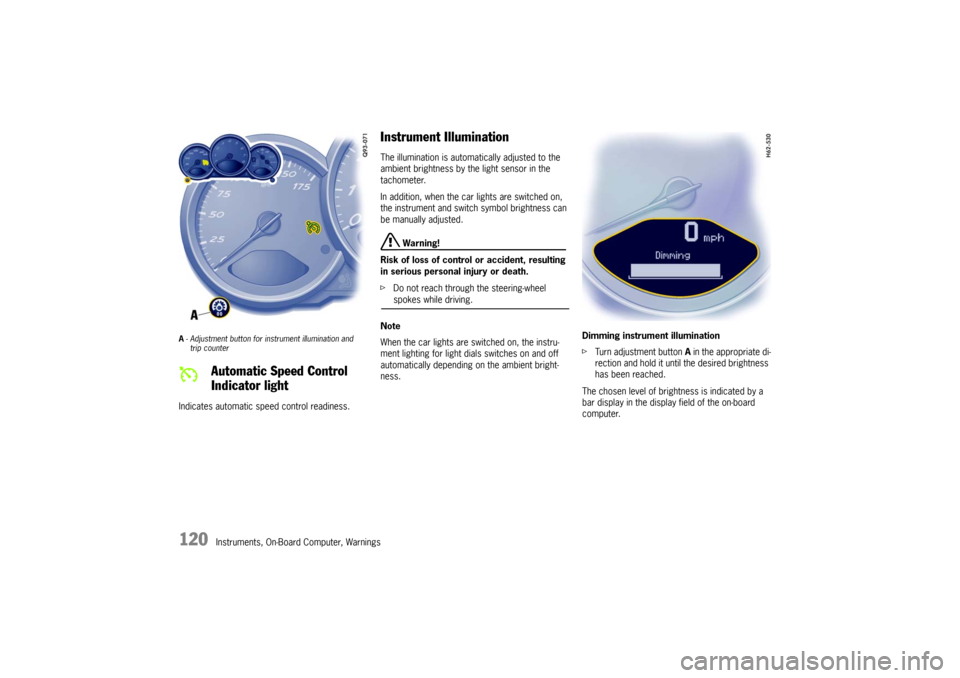
A- Adjustment button for in strument illumination and
trip counter Indicates automatic speed control readiness.
Instrument Illumination The illumination is automatically adjusted to the
ambient brightness by the light sensor in the
tachometer.
In addition, when the car lights are switched on,
the instrument and switch symbol brightness can
be manually adjusted.
Warning!
Risk of loss of control or accident, resulting
in serious personal injury or death.
f Do not reach through the steering-wheel spokes while driving.
Note
When the car lights are switched on, the instru-
ment lighting for light dials switches on and off
automatically depending on the ambient bright-
ness. Dimming instrument illumination
f
Turn adjustment button A in the appropriate di-
rection and hold it unti l the desired brightness
has been reached.
The chosen level of brightness is indicated by a
bar display in the display field of the on-board
computer.
Automatic Speed Control
Indicator light
Page 123 of 294
Instruments, On-Board Computer, Warnings
121
Trip Odometer
Warning!
Risk of loss of control or accident, resulting
in serious personal injury or death.
f Do not reach through the steering-wheel spokes while driving.
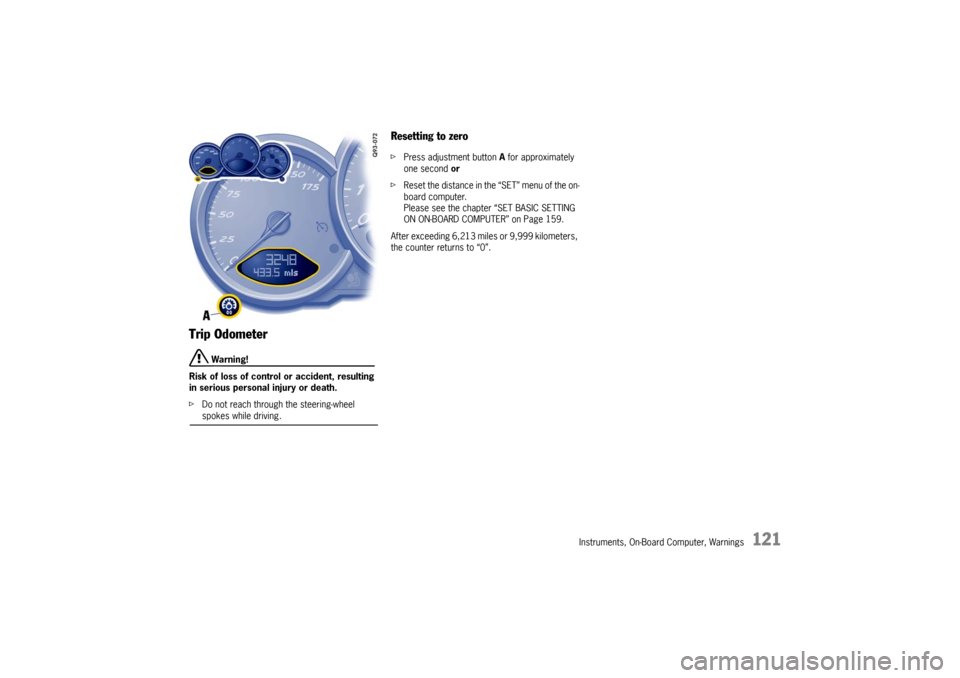
Resetting to zero fPress adjustment button A for approximately
one second or
f Reset the distance in the “SET” menu of the on-
board computer.
Please see the chapter “SET BASIC SETTING
ON ON-BOARD COMPUTER” on Page 159.
After exceeding 6,213 mile s or 9,999 kilometers,
the counter returns to “0”.
Page 133 of 294
Instruments, On-Board Computer, Warnings
131
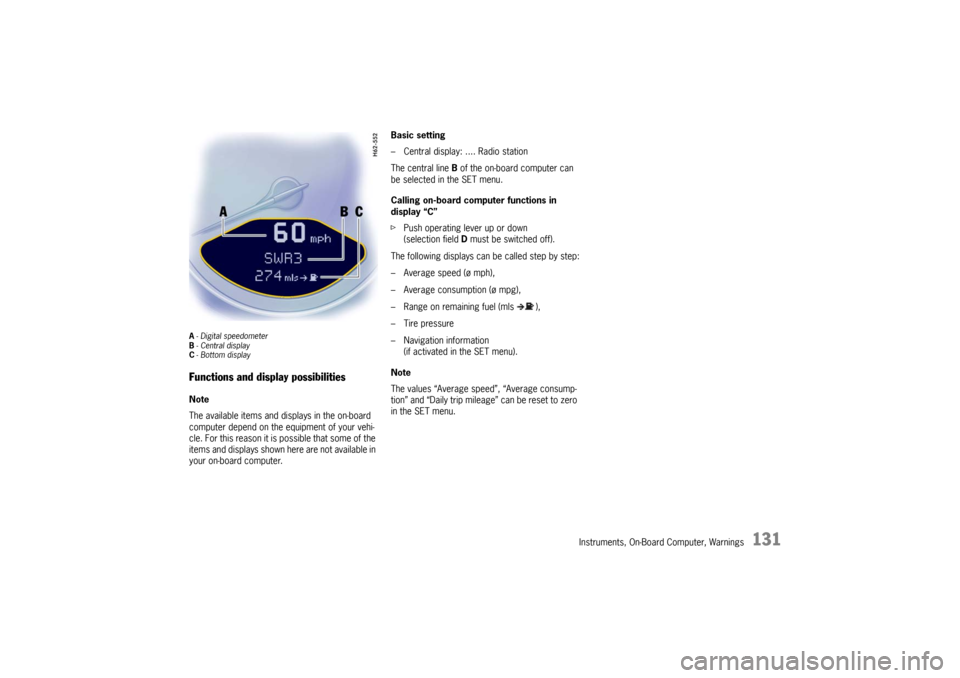
A- Digital speedometer
B -Central display
C - Bottom displayFunctions and display possibilitiesNote
The available items and displays in the on-board
computer depend on the equipment of your vehi-
cle. For this reason it is possible that some of the
items and displays shown here are not available in
your on-board computer. Basic setting
– Central display: .... Radio station
The central line
B of the on-board computer can
be selected in the SET menu.
Calling on-board computer functions in
display “C”
f Push operating lever up or down
(selection field D must be switched off).
The following displays can be called step by step:
– Average speed (ø mph),
– Average consumption (ø mpg),
– Range on remaining fuel (mls ),
– Tire pressure
– Navigation information (if activated in the SET menu).
Note
The values “Average speed”, “Average consump-
tion” and “Daily trip mileag e” can be reset to zero
in the SET menu.
Page 161 of 294
Instruments, On-Board Computer, Warnings
159
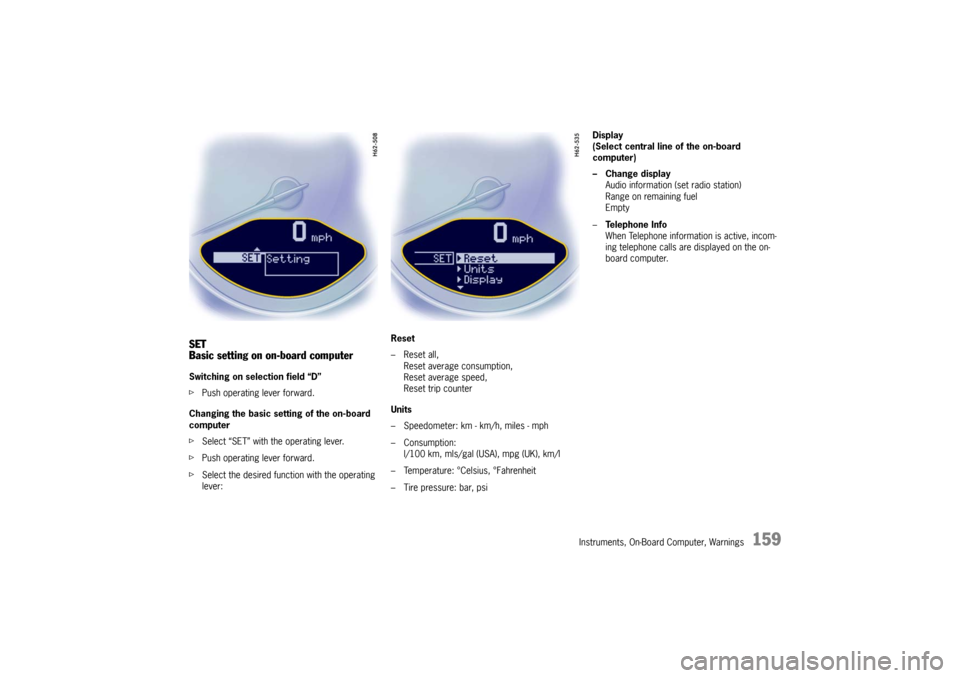
SET
Basic setting on on-board computerSwitching on selection field “D”
fPush operating lever forward.
Changing the basic sett ing of the on-board
computer
f Select “SET” with the operating lever.
f Push operating lever forward.
f Select the desired function with the operating
lever: Reset
– Reset all,
Reset average consumption,
Reset average speed,
Reset trip counter
Units
– Speedometer: km - km/h, miles - mph
– Consumption: l/100 km, mls/gal (USA), mpg (UK), km/l
– Temperature: °Celsius, °Fahrenheit
– Tire pressure: bar, psi Display
(Select central line of the on-board
computer)
– Change display
Audio information (set radio station)
Range on remaining fuel
Empty
– Te l e p h o n e I n f o
When Telephone informat ion is active, incom-
ing telephone calls are displayed on the on-
board computer.
Page 163 of 294

Instruments, On-Board Computer, Warnings
161
Average consumption and average speed
The values displayed are based on the distance
travelled since the last reset to “zero”.
You can set the starting time for a measurement
before or during the trip.
Switching the ignition off does not reset the meas-
urements. It is therefore possible to collect values
over long periods.
Disconnecting the car ba ttery will cause these
memories to be erased.
Tire pressure
The Tire pressure function of the on-board
computer displays the ti re pressures dependent
on temperature in the four wheels. You can watch
the tire pressure rise and fall while driving.
The display is only for information.
f To correct the tire pressures, always use the
displayed values from the “Info pressure”
display in the tire pressure menu.
Page 201 of 294

Maintenance, Car Care
199
Engine Oil It is important to perform oil changes regularly in
accordance with the intervals specified in the
“Maintenance” booklet.
Engine oil consumption
It is normal for your engine to consume oil.
The rate of oil consumption depends on the quality
and viscosity of oil, the speed at which the engine
is operated, the climate, road conditions as well
as the amount of dilution and oxidation of the
lubricant.
If the vehicle is used for repeated short trips, and
consumes a normal amount of oil, the engine oil
measurement may not show any drop in the oil
level at all, even after 600 miles (1,000 km) or
more. This is because the oil is gradually becom-
ing diluted with fuel or mo isture, making it appear
that the oil level has not changed.
The diluting ingredients evaporate out when the
vehicle is driven at high speeds, as on an express-
way, making it then appear that oil is excessively
consumed after driving at high speeds.
If the conditions you drive your vehicle in are
dusty, humid, or hot, the frequency of the oil
change intervals should be greater. If the vehicle is driven at a high rate of speed,
climatic conditions are warm, and the load is high,
the oil should be checked more frequently, as
driving conditions will determine the rate of oil
consumption.
– The engine in your vehicle depends on oil to
lubricate and cool all of its moving parts.
Therefore, the engine oil should be checked
regularly and kept at the required level.
– Make it a habit to have the engine oil level checked at every fuel filling.
– The oil pressure warning light is not an oil level indicator.
The oil pressure warning light indicates serious
engine damage may be occuring when lit, if en-
gine rpm is above idle speed.
Engine Oil Level f Please see the chapter “EXERCISE EXTREME
CAUTION WHEN WORKING ON YOUR VEHICLE”
on Page 196.
f Regularly check the oil level using the on-board
computer after the vehicle is refuelled.
Please see the chapter “OIL DISPLAY AND
MEASUREMENT OF THE ENGINE OIL LEVEL”
on Page 157.
The difference between the minimum and maxi-
mum marks on the segment display is approx.
1.3 quarts (1.25 liters).
Each segment of the display corresponds to ap-
prox. 0.42 quart (0.4 liter).