radio controls PORSCHE CAYMAN 2006 1.G User Guide
[x] Cancel search | Manufacturer: PORSCHE, Model Year: 2006, Model line: CAYMAN, Model: PORSCHE CAYMAN 2006 1.GPages: 280, PDF Size: 4.89 MB
Page 112 of 280
112
Controls, Instruments
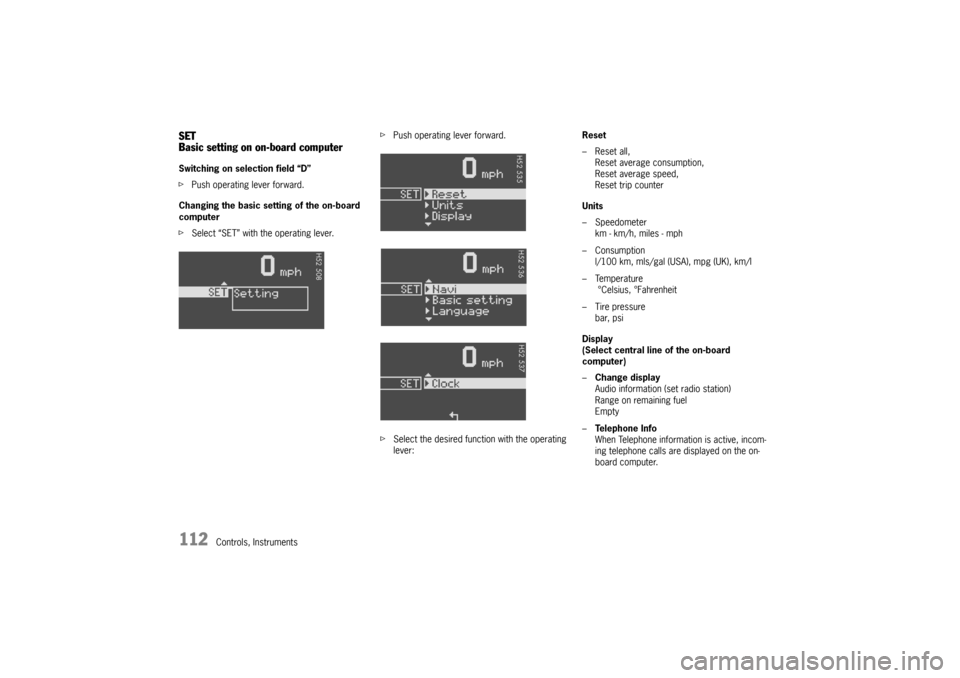
SET
Basic setting on on-board computerSwitching on selection field “D”
fPush operating lever forward.
Changing the basic setting of the on-board
computer
fSelect “SET” with the operating lever.fPush operating lever forward.
fSelect the desired function with the operating
lever:Reset
– Reset all,
Reset average consumption,
Reset average speed,
Reset trip counter
Units
– Speedometer
km - km/h, miles - mph
–Consumption
l/100 km, mls/gal (USA), mpg (UK), km/l
–Temperature
°Celsius, °Fahrenheit
– Tire pressure
bar, psi
Display
(Select central line of the on-board
computer)
–Change display
Audio information (set radio station)
Range on remaining fuel
Empty
–Te l e p h o n e I n f o
When Telephone information is active, incom-
ing telephone calls are displayed on the on-
board computer.
Page 155 of 280

Controls, Instruments
155
Porsche Communication
Management (PCM) fRefer to the separate operating instructions
before putting the PCM into operation.
fPlease observe the chapter “LOAD SWITCH-
OFF AFTER 2 HOURS OR 7 DAYS” on Page
232.
Warning!
There is a danger of accident if you set or
operate the on-board computer, radio, navi-
gation system, telephone or other equipment
when driving.
This could distract you from the traffic and
cause you to lose control of the vehicle resul-
ting in serious personal injury or death.
fOperate the components while driving only if
the traffic situation allows you to do safely.
fCarry out any complicated operating or setting procedures only with the vehicle stationary.The reception conditions for the radio module inte-
grated in the PCM change continuously as you
drive. Interference from buildings, terrain and the
weather is unavoidable.
FM stereo reception is particularly susceptible to
varying reception conditions.
Accessories which have not been tested and
approved by Porsche may impair radio function
and reception.
NavigationWhen put into operation for the first time, a
distance of approx. 31 miles (50 km) must be dri-
ven in order for the navigation system to complete
the process of fine calibration.
The same applies when the tires are changed (e.g.
summer/snow tires) or new tires fitted.
Full location accuracy is not yet achieved during
the fine-calibration process.
If the vehicle has been transported (e.g. ferry, car
train), the system may take a few minutes after
being switched on before it determines the current
location.
Serious tire slip (e.g. spinning wheels on snow)
may result in temporarily inaccurate navigation.
When the battery has been disconnected, it may
take up to 15 minutes before the navigation
system becomes operational again.
Page 156 of 280

156
Controls, Instruments
Car Audio Operation/Tips For radio operation see your radio manual
which is included with your on-board
literature.
fPlease observe the chapter “LOAD SWITCH-
OFF AFTER 2 HOURS OR 7 DAYS” on Page
232. FM reception A vehicle is not an ideal place to listen to a radio.
Because the vehicle moves, reception conditions
are constantly changing.
Buildings, terrain, signal distance and noise from
other vehicles are all working against good recep-
tion.
Some conditions affecting FM may appear to be
problems when they are not.
The following characteristics are completely nor-
mal for a given reception area, and they do not in-
dicate any problem with the radio itself.
Note
Electronic accessories should only be installed by
your authorized Porsche dealer.
Equipment which has not been tested and appro-
ved by Porsche may impair radio function and re-
ception. Fading and drifting
FM range is limited to about 25 miles (40 km), ex-
cept for some high power stations.
If a vehicle is moving away from the desired stati-
on’s transmitter, the signal will tend to fade and/or
drift. This condition is more prevalent with FM than
AM, and is often accompanied by distortion.
Fading and drifting can be minimized to a certain
degree by careful attention to fine tuning or selec-
tion of a stronger signal.
Static and fluttering
When the line-of-sight link between a transmitter
and vehicle is blocked by large buildings or moun-
tains, the radio sound may be accompanied with
static or fluttering because of the characteristic of
FM.
In a similar effect, a fluttering noise is sometimes
heard when driving along a tree-lined road.
This static and fluttering can be reduced by adjus-
ting the tone control for greater bass response un-
til the disturbance has passed. Multipath
Because of the reflecting characteristics of FM, di-
rect and reflected signals may reach the antenna
at the same time (multipath) and cancel each other
out.
As a vehicle moves through these electronic dead
spots, the listener may hear a momentary flutter
or loss of reception.
Station swapping
When two FM stations are close to each other, and
an electronic dead spot, such as static or multi-
path area, interrupts the original signal, someti-
mes the stronger second signal will be selected
automatically until the original one returns.
This swapping can also occur as you drive away
from the selected station and approach another
station of a stronger signal.
Page 158 of 280

158
Controls, Instruments It is essential to observe the instructions of
the telephone manufacturer before putting
the telephone into operation.
Any portable telephone or radio transmitter which
is used in a Porsche must be properly installed in
accordance with the technical requirements of
Porsche.
The transmission power must not exceed
10 W.
The devices must possess a type approval for
your vehicle and have an “e” symbol.
If you should require equipment with transmission
power values greater than 10 W, please consult
your authorized Porsche dealer for this purpose.
He is familiar with the technical requirements for
installing devices of this kind.
The antennas for all radios and telephones with a
transmitting antenna must be externally mounted.
The improper installation of radios or telephones
or use of a radio or telephone with a transmitting
antenna inside the car may cause the warning
lights to come on.
Improper installation of such equipment can crea-
te a discharged battery or excessive current draw
from added equipment. If aftermarket systems are installed by non-dealer-
ship technicians or outside the selling dealer, pro-
blems may result. Installation of aftermarket
equipment is not covered under the New Car War-
ranty.
fConsult your authorized Porsche dealer about
the installation of non Porsche approved equip-
ment.
Reception quality
The reception quality of your car telephone will
change constantly when you are driving. Interfe-
rence caused by buildings, landscape and
weather is unavoidable. It may become particular-
ly difficult to hear when using the hands-free func-
tion due to external noise such as engine and wind
noise.
Antenna
Always unscrew the external antenna before using
an automatic car-wash.