reset PORSCHE CAYMAN 2006 1.G User Guide
[x] Cancel search | Manufacturer: PORSCHE, Model Year: 2006, Model line: CAYMAN, Model: PORSCHE CAYMAN 2006 1.GPages: 280, PDF Size: 4.89 MB
Page 113 of 280

Controls, Instruments
113
Navigation
– Integrated in the BC
(Navigation instructions can be recalled on the
on-board computer display)
– When turning off
(Navigation instructions are only shown before
changing direction)
Basic setting
– Restore the basic setting of the on-board com-
puter
Language
– Select language version
12/24h mode
– Select time mode:
12h (small squares on the right side of the time
display for AM/PM),
24h
General information regarding the
on-board computer functionsRange on remaining fuel
The range on remaining fuel is continuously recal-
culated during the journey based on the fuel level,
current consumption and average consumption.
The more the fuel level falls, the more spontan-
eously the display reacts. For this reason, the
range on remaining fuel is not displayed if less
than 9 miles (15 kilometers).
If the vehicle's inclination changes while driving or
refueling, incorrect range information may tempo-
rarily be given.
Note
If the tank is nearly empty and you top up with only
a small quantity of fuel, an accurate range on re-
maining fuel is impossible.Average consumption and average speed
The values displayed are based on the distance
travelled since the last reset to “zero”.
You can set the starting time for a measurement
before or during the trip.
Switching the ignition off does not reset the meas-
urements. It is therefore possible to collect values
over long periods.
Disconnecting the car battery will cause these
memories to be erased.
Tire pressure
The Tire pressure function of the on-board com-
puter displays the tire pressures dependent on
temperature in the four wheels. You can watch the
tire pressure rise and fall while driving.
The display is only for information. To correct the
tire pressures, always use the displayed values
from the “Info pressure” display in the Tire pres-
sure menu.
Page 127 of 280
Controls, Instruments
127
Maintenance note
fPeriodically clean the wiper blades with a
window cleaner, especially after the vehicle
has been washed in a car wash.
We recommend Porsche window cleaner.
If they are very dirty (e.g. with insect remains),
they can be cleaned with a sponge or cloth.
If the wiper blades rub or squeak, this may be as
a result of the following:
– If the vehicle is washed in an automatic car
wash, wax residues may be adhering to the
windshield.
These wax residues can be removed using a
window cleaner concentrate.
Please observe the chapter “WASHER FLUID”
on Page 192.
Please contact your authorized Porsche dealer
for further information.
– The wiper blades may be damaged.
fReplace damaged wiper blades as soon as
possible.
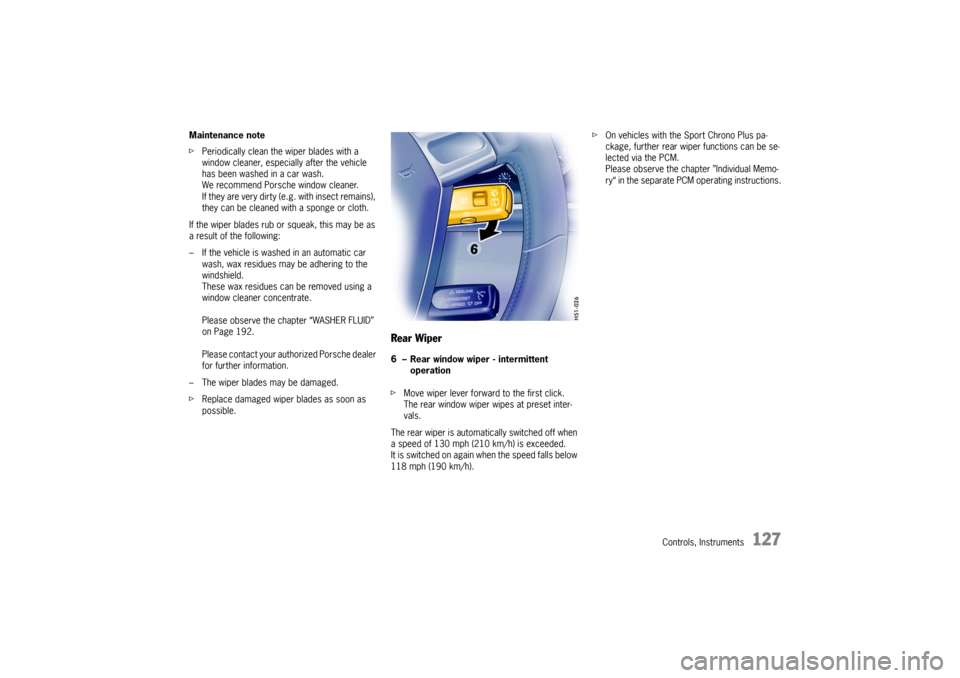
Rear Wiper6 – Rear window wiper - intermittent
operation
fMove wiper lever forward to the first click.
The rear window wiper wipes at preset inter-
vals.
The rear wiper is automatically switched off when
a speed of 130 mph (210 km/h) is exceeded.
It is switched on again when the speed falls below
118 mph (190 km/h).fOn vehicles with the Sport Chrono Plus pa-
ckage, further rear wiper functions can be se-
lected via the PCM.
Please observe the chapter ”Individual Memo-
ry“ in the separate PCM operating instructions.
Page 134 of 280

134
Controls, Instruments
Setting temperaturefPress button H upwards or downwards
respectively.
To suit personal comfort, the interior temperature
can be adjusted between 61°F and 85°F/16°C
and 29.5°C.
Recommendation: 72°F/22 °C.
If “LO” or “HI” appears on the display, the system
is operating at maximum cooling or heating
power.
Automatic control is no longer active.
Note
If the preselected temperature is changed, the
blower speed can increase automatically in
automatic mode.
The desired temperature is reached more quickly
this way.
Sensors
To avoid affecting the performance of the air-
conditioning system:
fDo not cover the sun sensor on the instrument
panel or the temperature sensor D.
Defrost windshieldfPress button B (switch on or off).
The windshield is demisted or defrosted as
quickly as possible.
Air flows to the windshield only.
The light-emitting diode in the button lights up.ECO – switching the air-conditioning
compressor on and offThe air conditioning compressor switches off
automatically at temperatures below approx.
37°F/3°C and cannot be switched on, even
manually.
Whenever outside temperatures exceed approx.
37°F/3°C, the air-conditioning compressor is
always switched on in automatic mode.
The compressor can be switched off manually to
save fuel, but control comfort is then limited:
fPress ECO button E.
The compressor is switched off.
The light-emitting diode in the button lights up.
fIf the interior temperature is too high, switch
compressor back on or press AUTO button.
To dry incoming air in damp weather, do not
switch off the air-conditioning compressor.
This prevents misting of windows.
Adjusting blower speedfPress button M upwards or downwards
respectively.
The preset blower speed is increased or
decreased.
The speeds are indicated by a bar display.
The compressor is switched off at low blower
speeds.
If the button is pressed downwards at the lowest
blower stage, the blower and automatic control
are switched off. “OFF” will appear on the display
field.
Pressing the button upwards or pressing the
AUTO button switches the blower and automatic
control back on again.Circulating-air mode
Warning!
Risk of accident due to hampered vision.
In circulating-air mode, the windows may
mist up.
fOnly select circulating-air mode for short
periods.
fIf the windows mist up, switch air-circulation
mode by pressing the air-circulation button
again and selecting the “Defrost windshield” function.