computer PORSCHE CAYMAN 2006 1.G Owner's Guide
[x] Cancel search | Manufacturer: PORSCHE, Model Year: 2006, Model line: CAYMAN, Model: PORSCHE CAYMAN 2006 1.GPages: 280, PDF Size: 4.89 MB
Page 93 of 280

Controls, Instruments
93
Functions and display possibilitiesA- Digital speedometer
B-Central display
C- Bottom displayNote
The available items and displays in the on-board
computer depend on the equipment of your vehi-
cle. For this reason it is possible that some of the
items and displays shown here are not available in
your on-board computer.
Basic setting
– Central display: .... Radio station
The central line B of the on-board computer can
be selected in the SET menu.Calling on-board computer functions in
display “C”
fPush operating lever up or down
(selection field D must be switched off).
The following displays can be called step by step:
– Average speed (ø mph),
– Average consumption (ø mpg),
– Range on remaining fuel (mi ),
– Tire pressure
– Navigation information
(if activated in the SET menu).
Note
The values “Average speed”, “Average consump-
tion” and “Daily trip mileage” can be reset to zero
in the SET menu.
Switching selection field “D” on or off
fPush operating lever forward or back.
Arrow symbol “E” for continuation
Arrow symbol:
fPush operating lever down in order to page
through the menu.
Arrow symbol:
fPush operating lever up in order to page
through the menu.
D- Selection field
E- Continuation arrow symbols
Page 98 of 280
98
Controls, Instruments
CHRONO
StopwatchYou can use the stopwatch to measure time inter-
vals, e.g. on the race circuit or on work-related
journeys. Measured lap times can be stored and
evaluated if the vehicle is equipped with Porsche
Communication Management (PCM).
fPlease observe the chapter “Sport display” in
the separate PCM operating instructions.Stopwatch on the instrument panel
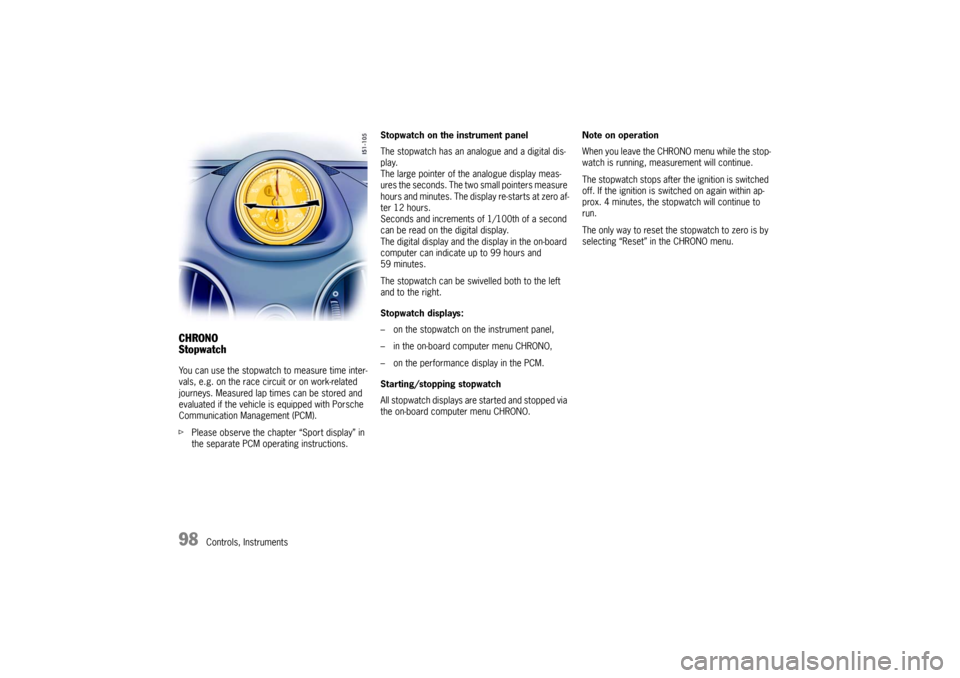
The stopwatch has an analogue and a digital dis-
play.
The large pointer of the analogue display meas-
ures the seconds. The two small pointers measure
hours and minutes. The display re-starts at zero af-
ter 12 hours.
Seconds and increments of 1/100th of a second
can be read on the digital display.
The digital display and the display in the on-board
computer can indicate up to 99 hours and
59 minutes.
The stopwatch can be swivelled both to the left
and to the right.
Stopwatch displays:
– on the stopwatch on the instrument panel,
– in the on-board computer menu CHRONO,
– on the performance display in the PCM.
Starting/stopping stopwatch
All stopwatch displays are started and stopped via
the on-board computer menu CHRONO.Note on operation
When you leave the CHRONO menu while the stop-
watch is running, measurement will continue.
The stopwatch stops after the ignition is switched
off. If the ignition is switched on again within ap-
prox. 4 minutes, the stopwatch will continue to
run.
The only way to reset the stopwatch to zero is by
selecting “Reset” in the CHRONO menu.
Page 99 of 280
Controls, Instruments
99
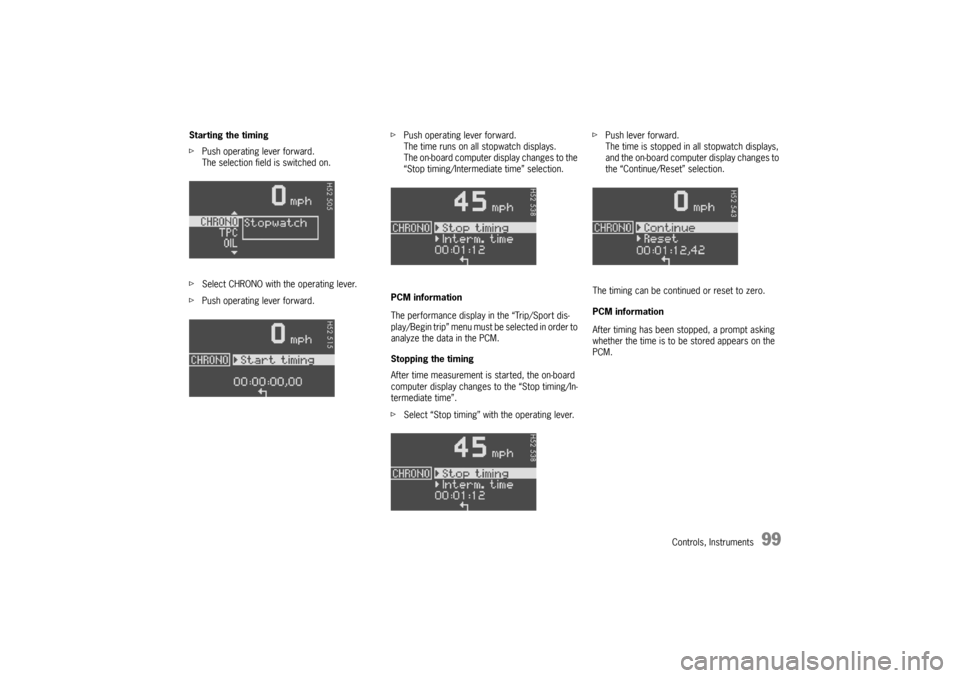
Starting the timing
fPush operating lever forward.
The selection field is switched on.
fSelect CHRONO with the operating lever.
fPush operating lever forward.fPush operating lever forward.
The time runs on all stopwatch displays.
The on-board computer display changes to the
“Stop timing/Intermediate time” selection.
PCM information
The performance display in the “Trip/Sport dis-
play/Begin trip” menu must be selected in order to
analyze the data in the PCM.
Stopping the timing
After time measurement is started, the on-board
computer display changes to the “Stop timing/In-
termediate time”.
fSelect “Stop timing” with the operating lever.fPush lever forward.
The time is stopped in all stopwatch displays,
and the on-board computer display changes to
the “Continue/Reset” selection.
The timing can be continued or reset to zero.
PCM information
After timing has been stopped, a prompt asking
whether the time is to be stored appears on the
PCM.
Page 100 of 280

100
Controls, Instruments Continue timing
After timing has been stopped, the on-board com-
puter display changes to the “Continue/Reset” se-
lection.
fPush operating lever forward.
The stopwatch displays continue the timing.
The on-board computer display returns to the
“Stop timing/Intermediate time” selection. You
can stop the stopwatch or measure an inter-
mediate time.Resetting the time
After timing has been stopped, the on-board com-
puter display changes to the “Continue/Reset” se-
lection.
fSelect “Reset” with the operating lever.
fPush operating lever forward.
The display returns to the “Start timing”
selection.
The stopwatch displays in the instrument panel
and the on-board computer are reset to zero.
Page 101 of 280
Controls, Instruments
101
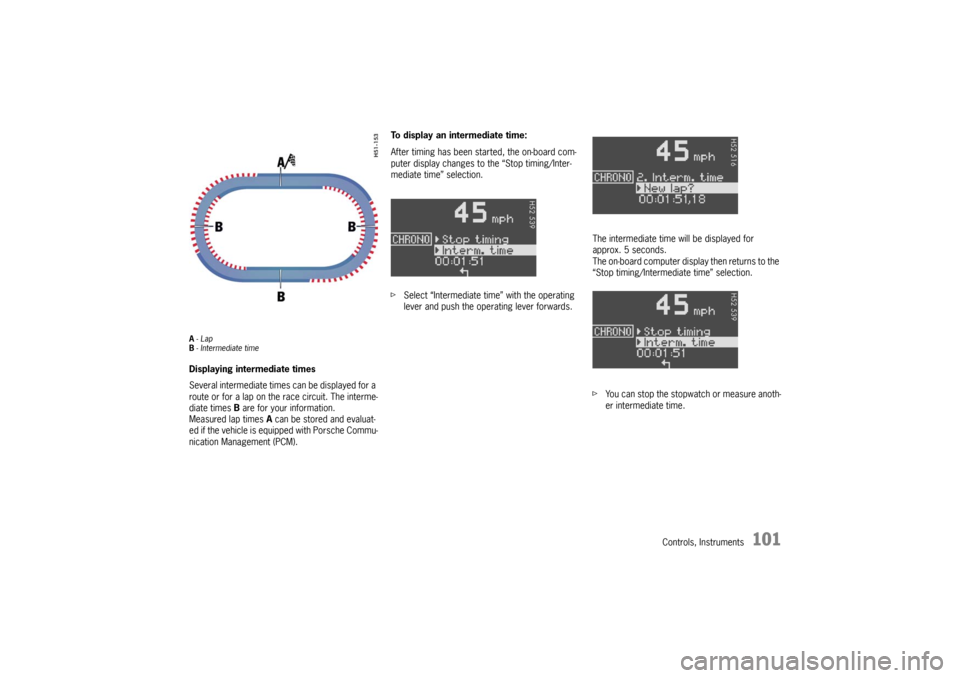
A-Lap
B- Intermediate timeDisplaying intermediate times
Several intermediate times can be displayed for a
route or for a lap on the race circuit. The interme-
diate times B are for your information.
Measured lap times A can be stored and evaluat-
ed if the vehicle is equipped with Porsche Commu-
nication Management (PCM).To display an intermediate time:
After timing has been started, the on-board com-
puter display changes to the “Stop timing/Inter-
mediate time” selection.
fSelect “Intermediate time” with the operating
lever and push the operating lever forwards.The intermediate time will be displayed for
approx. 5 seconds.
The on-board computer display then returns to the
“Stop timing/Intermediate time” selection.
fYou can stop the stopwatch or measure anoth-
er intermediate time.
Page 102 of 280
102
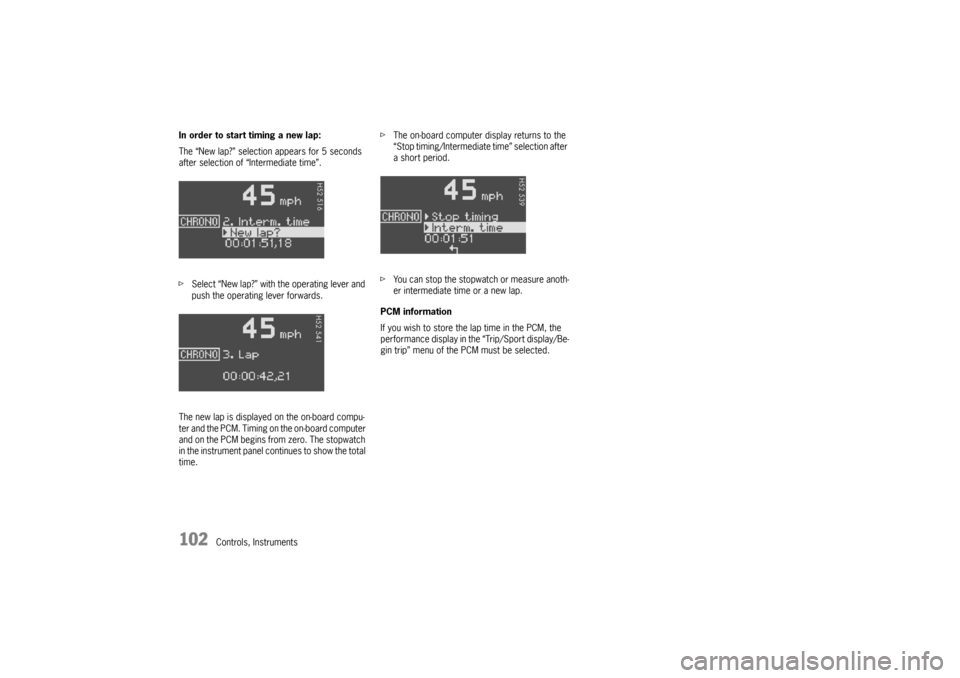
Controls, Instruments In order to start timing a new lap:
The “New lap?” selection appears for 5 seconds
after selection of “Intermediate time”.
fSelect “New lap?” with the operating lever and
push the operating lever forwards.
The new lap is displayed on the on-board compu-
ter and the PCM. Timing on the on-board computer
and on the PCM begins from zero. The stopwatch
in the instrument panel continues to show the total
time.fThe on-board computer display returns to the
“Stop timing/Intermediate time” selection after
a short period.
fYou can stop the stopwatch or measure anoth-
er intermediate time or a new lap.
PCM information
If you wish to store the lap time in the PCM, the
performance display in the “Trip/Sport display/Be-
gin trip” menu of the PCM must be selected.
Page 103 of 280

Controls, Instruments
103
TPC Tire pressure monitoringfPlease observe the chapter “TIRES, RIMS,
TRACKS” on Page 268.
The tire pressure monitoring continuously
monitors tire pressure and tire temperature on all
four wheels and warns the driver when the tire
pressure is too low.
The display as well as the settings for the tire
pressure monitoring take place on the on-board
computer.
However, you must still adjust the tire pressure on
the wheel.
fThe driver is responsible for filling the tires
correctly and making the correct settings on
the on-board computer.
The tire pressure monitoring offers the following
functions:
– Display of the actual tire pressure while the
vehicle is in motion
– Display of the deviation from the required
pressure (refilling pressure)
– Display of currently set tire size and type
– Tire pressure warnings in two stages
Safety notes!
Despite the advantages offered by the tire
pressure monitoring, it is still the driver’s
responsibility to update the corresponding
settings in the on-board computer and
maintain the pressure in the tires. Low tire
pressure reduces the road safety of the
vehicle and destroys the tire and wheel.
fWhen a flat tire has been displayed, immedi-
ately stop in a suitable place and check the
tires for damage. If necessary, remedy the
damage with a tire sealant.
fDo not by any means continue to drive with
defective tires.
fSealing the tire with tire sealant is only an
emergency repair, so you can drive to the next
authorized Porsche dealer. The maximum per-
mitted speed is 50 mph (80 km/h).
fDo not drive with tires whose tire pressure
drops again in a short period of time. In cases
of doubt, have tires checked by an authorized
Porsche dealer.
fDefective tires must be immediately replaced
by an authorized Porsche dealer.
Tire repairs are not permissible under any
circumstances.fIf the tire pressure monitoring is defective (e.g.
defective wheel transmitter), contact an
authorized Porsche dealer immediately and
have the damage repaired.
The tire pressure will not be monitored by a
defective tire pressure monitoring.
fTires lose air over time without a tire defect
being present. A tire pressure warning will then
appear in the on-board computer display.
Correct the tire pressure at the next oppor-
tunity.
fThe tire pressure monitoring gives a warning
about tire damage due to natural pressure loss
as well as about a gradual loss of pressure due
to foreign objects.
The tire pressure monitoring cannot warn you
about tire damage that occurs suddenly (e.g.
flat tire due to abrupt external effects).
Page 104 of 280
104
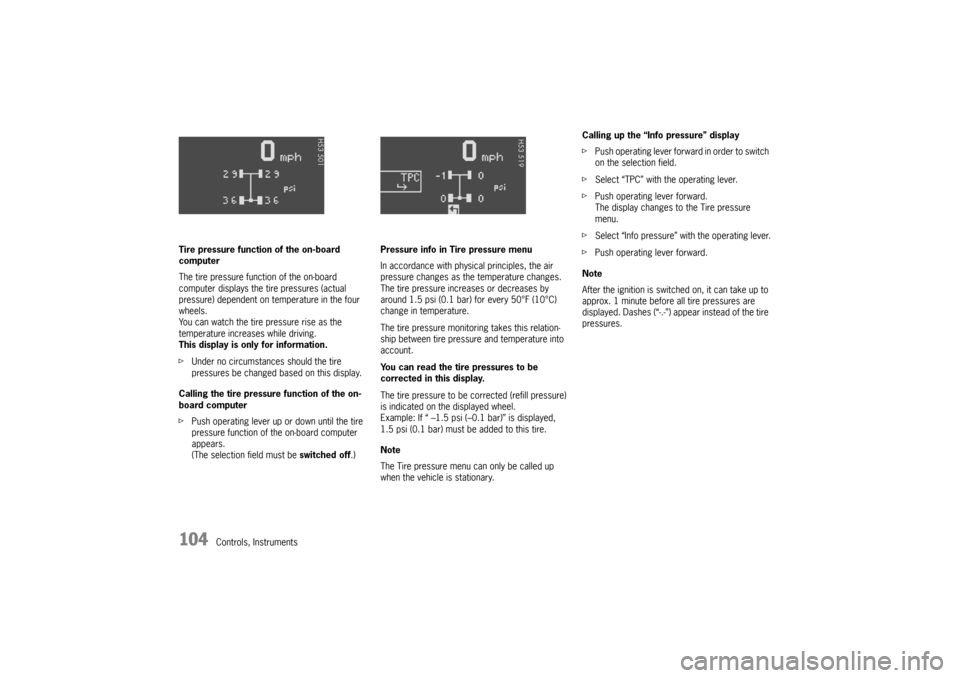
Controls, Instruments Tire pressure function of the on-board
computer
The tire pressure function of the on-board
computer displays the tire pressures (actual
pressure) dependent on temperature in the four
wheels.
You can watch the tire pressure rise as the
temperature increases while driving.
This display is only for information.
fUnder no circumstances should the tire
pressures be changed based on this display.
Calling the tire pressure function of the on-
board computer
fPush operating lever up or down until the tire
pressure function of the on-board computer
appears.
(The selection field must be switched off.)Pressure info in Tire pressure menu
In accordance with physical principles, the air
pressure changes as the temperature changes.
The tire pressure increases or decreases by
around 1.5 psi (0.1 bar) for every 50°F (10°C)
change in temperature.
The tire pressure monitoring takes this relation-
ship between tire pressure and temperature into
account.
You can read the tire pressures to be
corrected in this display.
The tire pressure to be corrected (refill pressure)
is indicated on the displayed wheel.
Example: If “ –1.5 psi (–0.1 bar)” is displayed,
1.5 psi (0.1 bar) must be added to this tire.
Note
The Tire pressure menu can only be called up
when the vehicle is stationary.Calling up the “Info pressure” display
fPush operating lever forward in order to switch
on the selection field.
fSelect “TPC” with the operating lever.
fPush operating lever forward.
The display changes to the Tire pressure
menu.
fSelect “Info pressure” with the operating lever.
fPush operating lever forward.
Note
After the ignition is switched on, it can take up to
approx. 1 minute before all tire pressures are
displayed. Dashes (“-.-”) appear instead of the tire
pressures.
Page 106 of 280
106
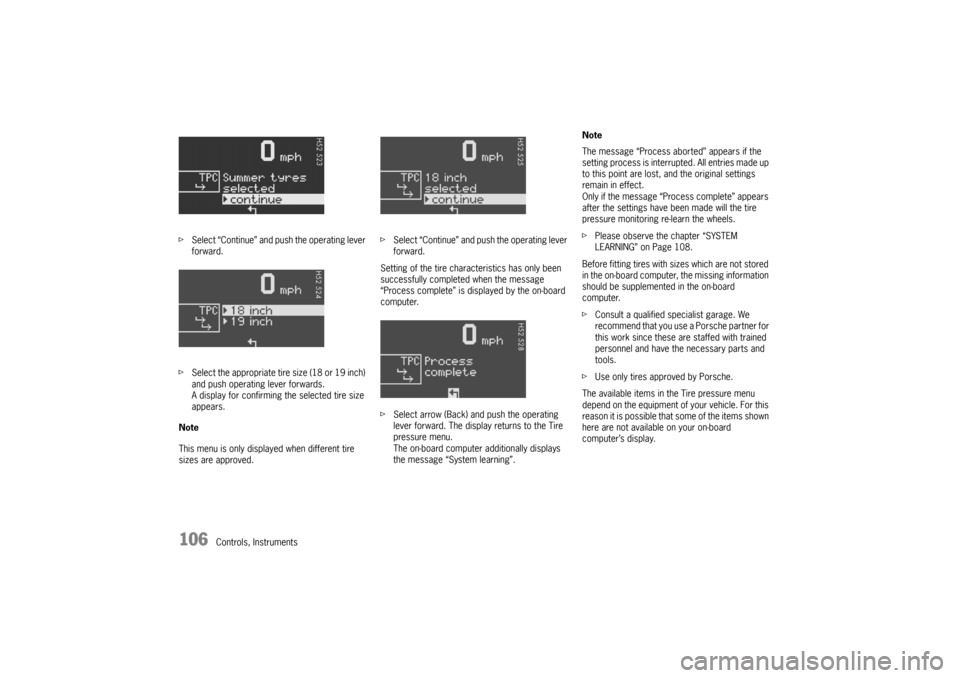
Controls, Instruments fSelect “Continue” and push the operating lever
forward.
fSelect the appropriate tire size (18 or 19 inch)
and push operating lever forwards.
A display for confirming the selected tire size
appears.
Note
This menu is only displayed when different tire
sizes are approved.fSelect “Continue” and push the operating lever
forward.
Setting of the tire characteristics has only been
successfully completed when the message
“Process complete” is displayed by the on-board
computer.
fSelect arrow (Back) and push the operating
lever forward. The display returns to the Tire
pressure menu.
The on-board computer additionally displays
the message “System learning”.Note
The message “Process aborted” appears if the
setting process is interrupted. All entries made up
to this point are lost, and the original settings
remain in effect.
Only if the message “Process complete” appears
after the settings have been made will the tire
pressure monitoring re-learn the wheels.
fPlease observe the chapter “SYSTEM
LEARNING” on Page 108.
Before fitting tires with sizes which are not stored
in the on-board computer, the missing information
should be supplemented in the on-board
computer.
fConsult a qualified specialist garage. We
recommend that you use a Porsche partner for
this work since these are staffed with trained
personnel and have the necessary parts and
tools.
fUse only tires approved by Porsche.
The available items in the Tire pressure menu
depend on the equipment of your vehicle. For this
reason it is possible that some of the items shown
here are not available on your on-board
computer’s display.
Page 107 of 280
Controls, Instruments
107
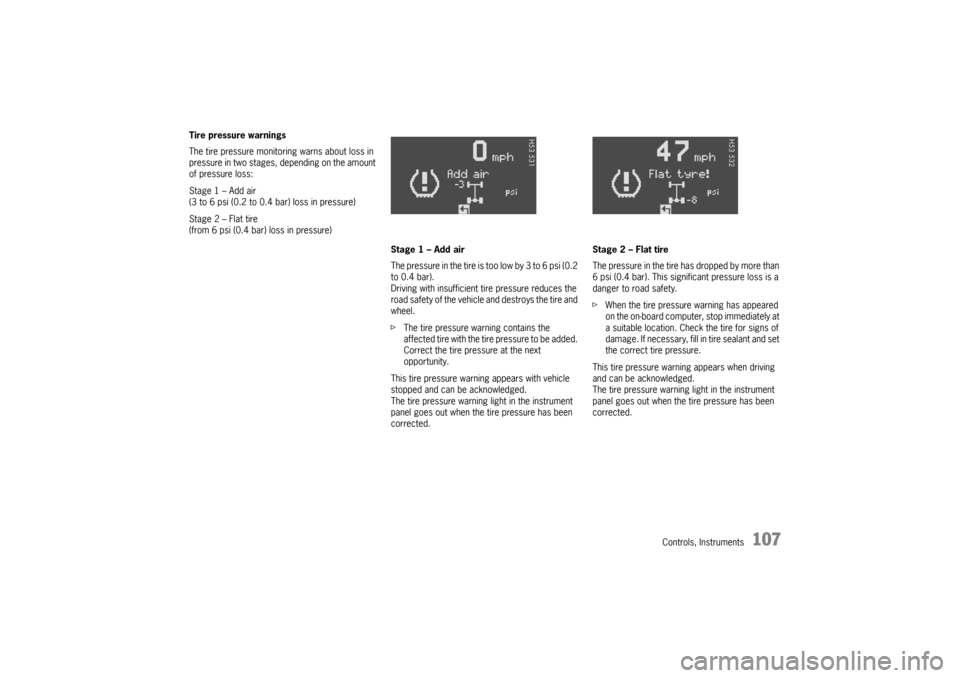
Tire pressure warnings
The tire pressure monitoring warns about loss in
pressure in two stages, depending on the amount
of pressure loss:
Stage 1 – Add air
(3 to 6 psi (0.2 to 0.4 bar) loss in pressure)
Stage 2 – Flat tire
(from 6 psi (0.4 bar) loss in pressure)
Stage 1 – Add air
The pressure in the tire is too low by 3 to 6 psi (0.2
to 0.4 bar).
Driving with insufficient tire pressure reduces the
road safety of the vehicle and destroys the tire and
wheel.
fThe tire pressure warning contains the
affected tire with the tire pressure to be added.
Correct the tire pressure at the next
opportunity.
This tire pressure warning appears with vehicle
stopped and can be acknowledged.
The tire pressure warning light in the instrument
panel goes out when the tire pressure has been
corrected.Stage 2 – Flat tire
The pressure in the tire has dropped by more than
6 psi (0.4 bar). This significant pressure loss is a
danger to road safety.
fWhen the tire pressure warning has appeared
on the on-board computer, stop immediately at
a suitable location. Check the tire for signs of
damage. If necessary, fill in tire sealant and set
the correct tire pressure.
This tire pressure warning appears when driving
and can be acknowledged.
The tire pressure warning light in the instrument
panel goes out when the tire pressure has been
corrected.