ignition PORSCHE CAYMAN 2006 1.G Workshop Manual
[x] Cancel search | Manufacturer: PORSCHE, Model Year: 2006, Model line: CAYMAN, Model: PORSCHE CAYMAN 2006 1.GPages: 280, PDF Size: 4.89 MB
Page 113 of 280

Controls, Instruments
113
Navigation
– Integrated in the BC
(Navigation instructions can be recalled on the
on-board computer display)
– When turning off
(Navigation instructions are only shown before
changing direction)
Basic setting
– Restore the basic setting of the on-board com-
puter
Language
– Select language version
12/24h mode
– Select time mode:
12h (small squares on the right side of the time
display for AM/PM),
24h
General information regarding the
on-board computer functionsRange on remaining fuel
The range on remaining fuel is continuously recal-
culated during the journey based on the fuel level,
current consumption and average consumption.
The more the fuel level falls, the more spontan-
eously the display reacts. For this reason, the
range on remaining fuel is not displayed if less
than 9 miles (15 kilometers).
If the vehicle's inclination changes while driving or
refueling, incorrect range information may tempo-
rarily be given.
Note
If the tank is nearly empty and you top up with only
a small quantity of fuel, an accurate range on re-
maining fuel is impossible.Average consumption and average speed
The values displayed are based on the distance
travelled since the last reset to “zero”.
You can set the starting time for a measurement
before or during the trip.
Switching the ignition off does not reset the meas-
urements. It is therefore possible to collect values
over long periods.
Disconnecting the car battery will cause these
memories to be erased.
Tire pressure
The Tire pressure function of the on-board com-
puter displays the tire pressures dependent on
temperature in the four wheels. You can watch the
tire pressure rise and fall while driving.
The display is only for information. To correct the
tire pressures, always use the displayed values
from the “Info pressure” display in the Tire pres-
sure menu.
Page 114 of 280

114
Controls, Instruments
Warnings on the instrument panel and the on-board computerIf a warning message appears, always refer to the corresponding chapters in the Owner’s Manual.
Warning messages are issued only if all measurement preconditions are met. Therefore, check all fluid levels regularly –
in particular, always check the engine oil level after refueling.
Instrument
panelOn-board
computerText display on on-board
computerMeaning/measure
Seat belt Driver and passengers must fasten their seat
belts.
Handbrake Handbrake is still on.
Ignition key
not removed
Replace battery
in ignition keyReplace the remote-control battery.
Ignition lock faulty,
please go to workshopHave the fault remedied at an authorized
Porsche dealer.
Ignition lock faulty,
visit workshop nowHave the fault remedied at an authorized
Porsche dealer.
Relieve steering Relieve the steering l o c k b y m o v i n g t h e s t e e r i n g
wheel to the left or right.
Steering locked The steering wheel lock remains engaged.
Have the fault remedied at an authorized
Porsche dealer.
Lights on Dipped beam/side light on.
Parking light on Left/right parking light on.
Page 116 of 280

116
Controls, Instruments
Check engine oil level Start engine oil level measurement in the
on-board computer.
The vehicle must be horizontal and the ignition
must be switched on.
Engine oil pressure too low Stop immediately at a suitable place, measure
oil level with the on-board computer and, if ne-
cessary, add engine oil.
Warning light
Temperature gau-
geEngine temperature too high Switch engine off and let it cool.
Check coolant level and, if necessary,
add coolant.
Temperature gau-
ge warning light
flashesCheck coolant level Switch engine off and let it cool.
Check coolant level and, if necessary, add
coolant.
Engine diagnostics – workshop Consult your authorized Porsche dealer.
Reduced engine power Consult your authorized Porsche dealer.
Temperature gau-
ge warning light
flashesFailure of
engine compartment blowerConsult your authorized Porsche dealer.
Warning Battery/generator Stop at a safe place and switch the engine off.
Do not continue driving.
Have the fault remedied at an authorized
Porsche dealer.
Oil pressure gauge faulty Have the fault remedied at an authorized
Porsche dealer.
Oil level display faulty Have the fault remedied at an authorized
Porsche dealer.
Oil temperature gauge faulty Have the fault remedied at an authorized
Porsche dealer.
Instrument
panelOn-board
computerText display on on-board
computerMeaning/measure
Page 118 of 280

118
Controls, Instruments
Airbag system fault Airbag is faulty.
Have the fault remedied at an authorized
Porsche dealer.
Check passenger’s seat setting Weight sensing is impaired on the passenger's
seat (Advanced Airbag).
When the backrest is in contact with the engine
compartment wall, the backrest can warp.
Correct the seating position, set the backrest
upright, do not support weight on the armrests,
or lift on the handles.
Failure spoiler control Driving stability is impaired.
Adjust your driving style. Reduce speed.
Have the fault remedied at an authorized
Porsche dealer.
Display of
selector lever posi-
tion flashesSelector lever is not engaged Tiptronic S:
Selector lever can be between two positions.
Engage the selector lever correctly.
Move selector lever to P Tiptronic S:
Move selector lever to position P before with-
drawing key from ignition lock.
Apply brake Tiptronic S:
Apply the brake when starting.
Depress clutch pedal Manual transmission:
Depress clutch pedal when starting.
Move selector lever
to position P or NTiptronic S:
The vehicle can be started only in the selector
lever position P or N.
Display of
selector lever posi-
tion flashesTiptronic emergency run Have the fault remedied at an authorized
Porsche dealer.
Instrument
panelOn-board
computerText display on on-board
computerMeaning/measure
Page 122 of 280
122
Controls, InstrumentsIf the ignition key is withdrawn and the door is
opened while the lights (not the parking light or
Welcome Home lighting) are on, a chime warns of
possible battery discharge.
In some countries, differences are possible
due to provisions of law.
Note on operation
Further individual light functions (e.g. daytime driv-
ing lights) are available in vehicles with the Sport
Chrono Plus package.
fPlease observe the chapter “Individual Memo-
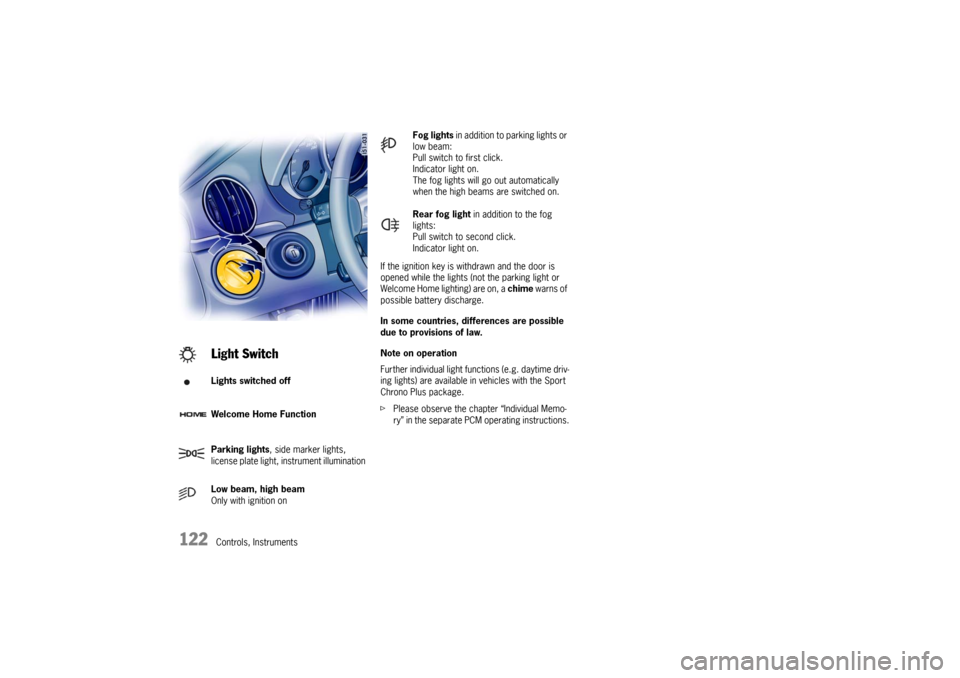
ry” in the separate PCM operating instructions.Light SwitchLights switched off
Welcome Home Function
Parking lights, side marker lights,
license plate light, instrument illumination
Low beam, high beam
Only with ignition on
Fog lights in addition to parking lights or
low beam:
Pull switch to first click.
Indicator light on.
The fog lights will go out automatically
when the high beams are switched on.
Rear fog light in addition to the fog
lights:
Pull switch to second click.
Indicator light on.
Page 123 of 280

Controls, Instruments
123
Welcome Home LightingSwitching onfMove light switch to the HOME position.
For improved visibility and security when you get
in and out of the car, the fog lights and the tail
lights remain on for a certain period of time:
–When you get out of the car, the lights are
turned on for approx. 30 seconds after the
door is opened. The off-delay time resumes
when the vehicle is locked.
On vehicles with the Sport Chrono Plus
package, the PCM can be used to set the off-
delay time. This setting also changes the
lighting period for unlocking the vehicle.
Please observe the chapter “Individual
Memory” in the separate PCM operating
instructions.
The lights are turned on for approx. 30 seconds
when the vehicle is unlocked.
The lights go out if the ignition is switched on or
when leaving the Welcome Home lighting
If the ignition key is withdrawn and the door is ope-
ned while the lights (not the parking light left/right)
are on, a gong warns of possible battery dis-
charge.
In some countries, differences are possible
due to provisions of law.
Automatic Headlight Beam
Adjustment Vehicles with Litronic headlights feature auto-
matic headlight beam adjustment.
When the ignition is switched on, the level of the
headlight beam automatically changes in accord-
ance with the vehicle load.
The level of the headlight beam is automatically
kept constant during acceleration and braking.
Checking operation
1. Switch the low beam on.
2. Switch ignition on.
The light beam first dips all the way down and
is then adapted to the vehicle load.
The level of the low beam rises perceptibly
when the high beam is switched on.
If these test items are not met, the headlight beam
adjustment must be checked by an authorized
Porsche dealer.
Page 124 of 280
124
Controls, Instruments
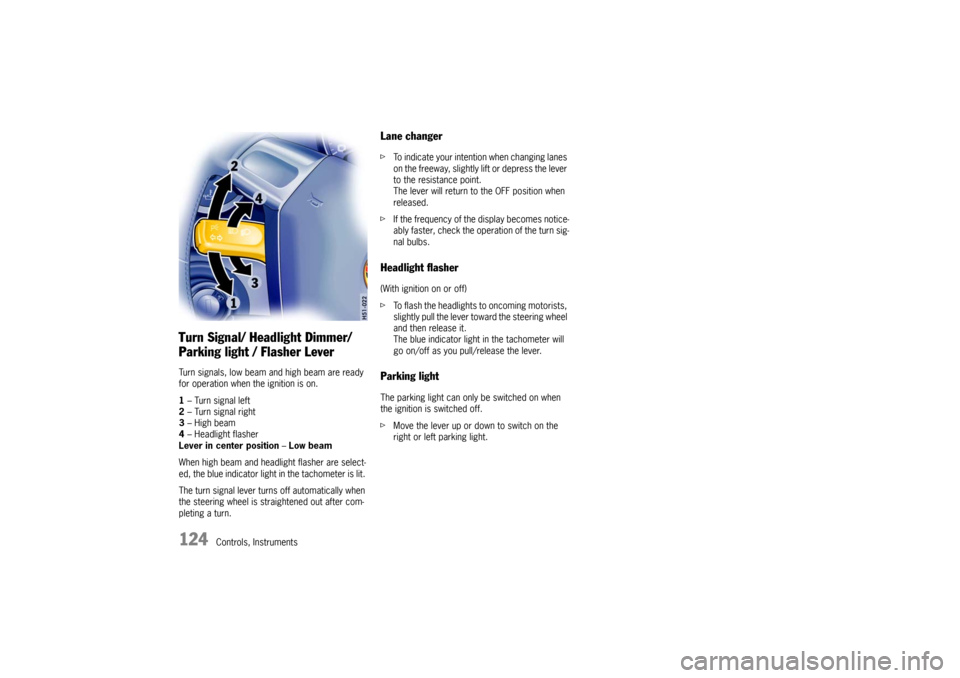
Turn Signal/ Headlight Dimmer/
Parking light / Flasher Lever Turn signals, low beam and high beam are ready
for operation when the ignition is on.
1– Turn signal left
2– Turn signal right
3–High beam
4– Headlight flasher
Lever in center position–Low beam
When high beam and headlight flasher are select-
ed, the blue indicator light in the tachometer is lit.
The turn signal lever turns off automatically when
the steering wheel is straightened out after com-
pleting a turn.
Lane changer fTo indicate your intention when changing lanes
on the freeway, slightly lift or depress the lever
to the resistance point.
The lever will return to the OFF position when
released.
fIf the frequency of the display becomes notice-
ably faster, check the operation of the turn sig-
nal bulbs. Headlight flasher (With ignition on or off)
fTo flash the headlights to oncoming motorists,
slightly pull the lever toward the steering wheel
and then release it.
The blue indicator light in the tachometer will
go on/off as you pull/release the lever. Parking lightThe parking light can only be switched on when
the ignition is switched off.
fMove the lever up or down to switch on the
right or left parking light.
Page 125 of 280
Controls, Instruments
125
Windshield Wiper / Washer Lever
Warning!
Danger of injury when the windshield wipers
operate unintentionally.
Risk of damage to the windshield and wiper
system.
fAvoid running the wiper blades over a dry wind-
shield to prevent scratching the glass. Spray
washer fluid on the windshield first.
A scratched windshield will reduce visibility.
fAlways loosen wiper blades from frozen glass
before operating wipers to prevent damage to
the wiper motor or blades. fAlways switch off windshield wipers in car
wash to prevent them wiping unintentionally
(intermittent or sensor operation).
fAlways switch off windshield wipers before
cleaning the windshield to avoid unintentional
operation (intermittent or sensor operation).
fDo not operate the headlight washer in car
washes.
fDo not operate headlight washer when it is
frozen.
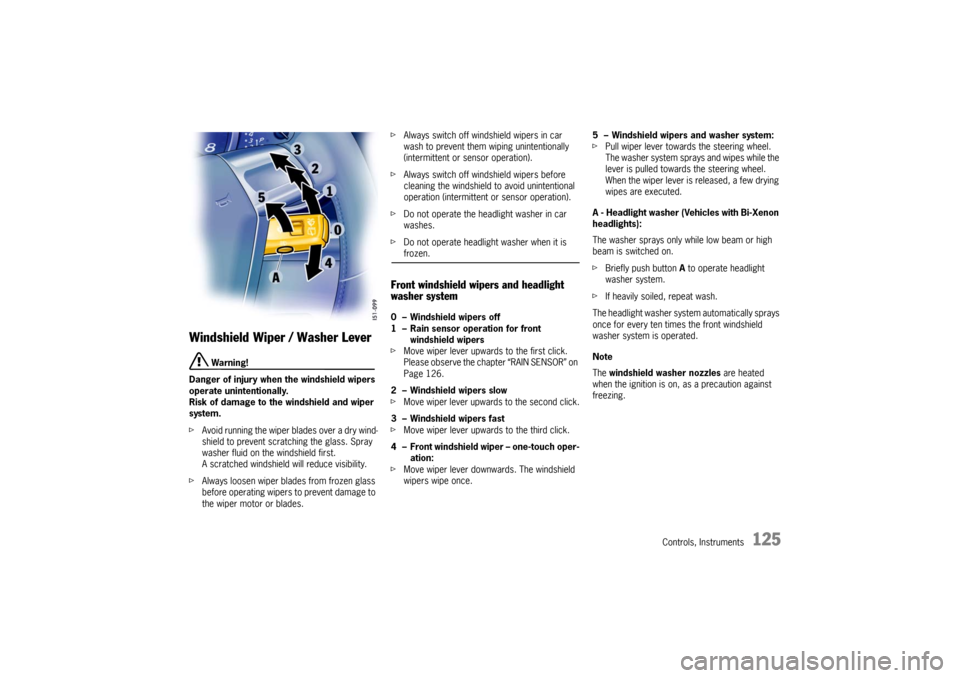
Front windshield wipers and headlight
washer system0 – Windshield wipers off
1 – Rain sensor operation for front
windshield wipers
fMove wiper lever upwards to the first click.
Please observe the chapter “RAIN SENSOR” on
Page 126.
2 – Windshield wipers slow
fMove wiper lever upwards to the second click.
3 – Windshield wipers fast
fMove wiper lever upwards to the third click.
4 – Front windshield wiper – one-touch oper-
ation:
fMove wiper lever downwards. The windshield
wipers wipe once.5 – Windshield wipers and washer system:
fPull wiper lever towards the steering wheel.
The washer system sprays and wipes while the
lever is pulled towards the steering wheel.
When the wiper lever is released, a few drying
wipes are executed.
A - Headlight washer (Vehicles with Bi-Xenon
headlights):
The washer sprays only while low beam or high
beam is switched on.
fBriefly push button A to operate headlight
washer system.
fIf heavily soiled, repeat wash.
The headlight washer system automatically sprays
once for every ten times the front windshield
washer system is operated.
Note
The windshield washer nozzles are heated
when the ignition is on, as a precaution against
freezing.
Page 126 of 280

126
Controls, Instruments
Wipe interval controlOn vehicles without a rain sensor, the wiping
intervals can be adjusted in four steps.
Decreasing intervals
fAdjust switch A upwards.
The setting is confirmed by one wipe of the
windshield.
Increasing intervals
fAdjust switch A downwards.
Rain sensorIn vehicles with a rain sensor the amount of rain or
snow which has settled on the windshield is
measured. Wiper speed is automatically adjusted
accordingly.
Switching on
fMove wiper lever upwards to the first click.
Switching off
fMove wiper lever to position 0.
The rain sensor remains switched off if the wiper
lever is already in position 1 when the ignition is
switched on.
To switch the rain sensor on again:
fMove wiper lever to position 0 and then to
position 1 or
fOperate windshield washer system 5 or
fChange the sensitivity of the rain sensor with
four-stage switch A.
Switch-on is confirmed by one wipe of the wind-
shield.
On vehicles with the Sport Chrono package, fur-
ther rain sensor functions can be selected via the
PCM.
fPlease observe the chapter “Individual Memo-
ry” in the separate PCM operating instructions.Changing the sensitivity of the rain sensor
Sensitivity can be set with switch A in 4 stages:
fAdjust switch A upwards –
high sensitivity.
The setting is confirmed by one wipe of the
windshield.
fAdjust switch A downwards –
low sensitivity.
Page 129 of 280

Controls, Instruments
129
Decelerating Option 1
fPull operating lever towards the steering wheel
(position 2) until the desired speed is reached.
The speed reached is maintained and stored
when the lever is released.
Option 2
fBriefly move lever towards the steering wheel
(position 2) (a maximum of 10 times).
The speed is reduced by 1 mph (1.6 km/h)
each time.
Interrupting automatic speed control
operation fPull operating lever downwards briefly
(position 3) or
fOperate brake or clutch pedal or
fSwitch Tiptronic transmission to selector lever
position N.
fPlease observe the chapter “TIPTRONIC S” on
Page 165.
The speed driven before the interruption remains
stored in the memory.
Automatic speed control operation is
interrupted automatically:
– If the set vehicle speed is exceeded by more
than approx. 16 mph (25 km/h) for longer than
20 seconds.
– If the actual vehicle speed falls to approx.
6 mph (10 km/h) below the set vehicle speed
for longer than 5 seconds (upward slopes).
– For PSM control operations.
Resuming the stored speed fBriefly push operating lever upwards
(position4).
The speed control accelerates/decelerates
the vehicle to the stored speed.
The stored speed should only be recalled when
traffic conditions and the road surface so permit.Switching automatic speed control
readiness off fPress button A on the automatic speed control
lever.
The green readiness light in the speedometer
goes off.
When the vehicle is parked and the ignition
switched off, the memory is cleared.
Important note
On upward or downward slopes, the set speed
cannot always be maintained by the automatic
speed control.
To obtain sufficient engine braking or a better en-
gine-speed range, therefore, you have to select a
lower gear.