warning PORSCHE CAYMAN 2006 1.G Workshop Manual
[x] Cancel search | Manufacturer: PORSCHE, Model Year: 2006, Model line: CAYMAN, Model: PORSCHE CAYMAN 2006 1.GPages: 280, PDF Size: 4.89 MB
Page 89 of 280

Controls, Instruments
89
A- Adjustment button for clock
B- Clock
C- Outside temperature displayClock The clock is blanked out approximately four min-
utes after the ignition is switched off or when the
car is locked.
Setting the time
Warning!
Risk of an accident and loss of control.
fDo not reach through the steering-wheel spokes while driving.
Setting hours
fPress adjustment button A for about one sec-
ond.
Hour display flashes.
fTurn button in the appropriate direction:
to right – increase hours figure
to left – decrease hours figure.
Adjustment in hours – turn button briefly.
Fast adjustment (display cycles) –
turn and hold button.
Setting minutes
fPress adjustment button again.
Minutes display flashes.
fSet by rotating as in hours mode. Leaving adjustment mode
Automatically after one minute or:
fPress adjustment button again.
When adjustment mode is deliberately left by
pressing the button, the time begins precisely to
the second.
Note
The time mode can be changed between 12h and
24h in the on-board computer.
Outside temperature The outside temperature display C does not indi-
cate, if ice is on the road.
Even if a temperature above 32°F (0°C) is dis-
played, ice may still form on the road, for instance
on bridges or when the road passes through a
heavily shaded area.
Page 90 of 280

90
Controls, Instruments If the battery voltage drops abruptly, a warning
m e s s a g e w i l l b e d i s p l a y e d b y t h e o n - b o a rd c o m p u -
ter.
If the warning is displayed by the on-board
computer while the engine is running or while
driving:
fStop the car in a safe place and stop the
engine.
Possible causes
– Defect in the battery charging system.
– Broken drive belt. Warning!
Risk of an accident and risk of engine dam-
age.
A broken drive belt means there is no power
assistance to the steering (more effort is re-
quired to steer) and coolant pump function
will stop.
fDo not continue driving.
fHave the fault remedied at the nearest author-ized Porsche dealer. The warning light in the instrument panel comes
on when the ignition is first turned on and remains
on briefly as a bulb check. If the light does not
come on, have the bulb replaced promptly.
If the warning lights in the instrument panel and on-
board computer come on and remain on while
driving, it suggests:
– a potential engine control problem and the
need for system service or
– an improperly fastened tank cap or
– refueling with engine running.
Although the vehicle is usually driveable and will
not require towing, see your dealer for service as
soon as possible.
Caution!
If the Check engine light in the instrument
panel is flashing, severe catalytic converter
damage and power loss will soon occur.
Prolonged driving with the Check engine light
on could cause damage to the emission con-
trol system. It also could affect fuel economy
and driveability.
fHave the fault remedied at the nearest author-ized Porsche dealer immediately.
Battery
Check Engine
Warning Light
Page 91 of 280

Controls, Instruments
91
The central warning light on the instrument panel
lights up if there are warning messages in the
INFO menu.
The messages can be called in the on-board
computer INFO menu:
fPlease observe the chapter “INFO WARNING
MESSAGES” on Page 96.
The warning light on the instrument panel lights
up:
– if the handbrake is on,
– if the brake fluid level is low,
– if the brake pads have reached the wear limit,
– if the brake circuit division is defective.
Additionally, a warning is displayed by the on-
board computer.
fPlease observe the chapter “WARNINGS ON
THE INSTRUMENT PANEL AND THE ON-
BOARD COMPUTER” on Page 114.
Central warning light
Brake warning light USA
Brake warning light Canada
Page 94 of 280

94
Controls, Instruments
LIMIT
Acoustic warning signal for speed limitThe acoustic warning signal can be activated for
speeds above 6 mph (10 km/h).
The signal sounds when the preset speed is ex-
ceeded.
For the signal to sound again, the driving speed
must fall below the preset speed by at least
3 mph (5 km/h).
Switching on selection field “D”
fPush operating lever forward.Setting the speed
fSelect LIMIT with the operating lever.
fPush operating lever forward.Option 1:
Accepting current speed
fPush operating lever forward.
The acoustic warning signal is activated for the
current speed.
Display:
Page 95 of 280
Controls, Instruments
95
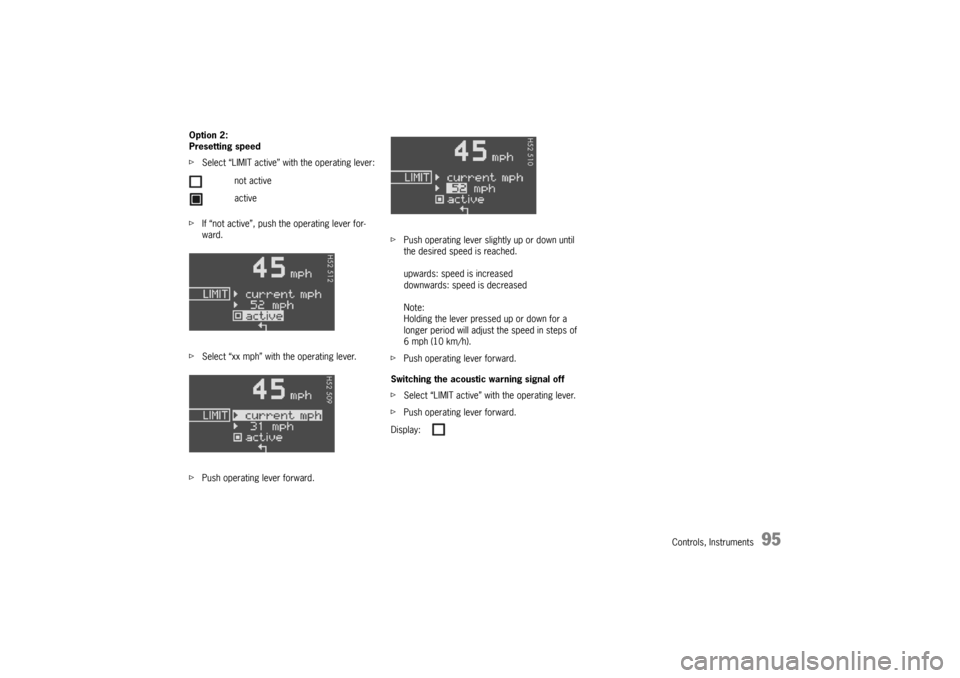
Option 2:
Presetting speed
fSelect “LIMIT active” with the operating lever:
fIf “not active”, push the operating lever for-
ward.
fSelect “xx mph” with the operating lever.
fPush operating lever forward.fPush operating lever slightly up or down until
the desired speed is reached.
upwards: speed is increased
downwards: speed is decreased
Note:
Holding the lever pressed up or down for a
longer period will adjust the speed in steps of
6 mph (10 km/h).
fPush operating lever forward.
Switching the acoustic warning signal off
fSelect “LIMIT active” with the operating lever.
fPush operating lever forward. not active
active
Display:
Page 96 of 280

96
Controls, Instruments
INFO
Warning messagesSwitching on selection field “D”
fPush operating lever forward.
Calling warning messages
fSelect INFO with the operating lever.
fPush operating lever forward.
Any existing warning messages can be called us-
ing the operating lever.
You also can call warning messages which were
cancelled during the journey (but only until the next
time the ignition is switched on).fPush operating lever forward.
fPush operating lever forwards or pull back-
wards.
The display returns to the Info menu.
Page 103 of 280

Controls, Instruments
103
TPC Tire pressure monitoringfPlease observe the chapter “TIRES, RIMS,
TRACKS” on Page 268.
The tire pressure monitoring continuously
monitors tire pressure and tire temperature on all
four wheels and warns the driver when the tire
pressure is too low.
The display as well as the settings for the tire
pressure monitoring take place on the on-board
computer.
However, you must still adjust the tire pressure on
the wheel.
fThe driver is responsible for filling the tires
correctly and making the correct settings on
the on-board computer.
The tire pressure monitoring offers the following
functions:
– Display of the actual tire pressure while the
vehicle is in motion
– Display of the deviation from the required
pressure (refilling pressure)
– Display of currently set tire size and type
– Tire pressure warnings in two stages
Safety notes!
Despite the advantages offered by the tire
pressure monitoring, it is still the driver’s
responsibility to update the corresponding
settings in the on-board computer and
maintain the pressure in the tires. Low tire
pressure reduces the road safety of the
vehicle and destroys the tire and wheel.
fWhen a flat tire has been displayed, immedi-
ately stop in a suitable place and check the
tires for damage. If necessary, remedy the
damage with a tire sealant.
fDo not by any means continue to drive with
defective tires.
fSealing the tire with tire sealant is only an
emergency repair, so you can drive to the next
authorized Porsche dealer. The maximum per-
mitted speed is 50 mph (80 km/h).
fDo not drive with tires whose tire pressure
drops again in a short period of time. In cases
of doubt, have tires checked by an authorized
Porsche dealer.
fDefective tires must be immediately replaced
by an authorized Porsche dealer.
Tire repairs are not permissible under any
circumstances.fIf the tire pressure monitoring is defective (e.g.
defective wheel transmitter), contact an
authorized Porsche dealer immediately and
have the damage repaired.
The tire pressure will not be monitored by a
defective tire pressure monitoring.
fTires lose air over time without a tire defect
being present. A tire pressure warning will then
appear in the on-board computer display.
Correct the tire pressure at the next oppor-
tunity.
fThe tire pressure monitoring gives a warning
about tire damage due to natural pressure loss
as well as about a gradual loss of pressure due
to foreign objects.
The tire pressure monitoring cannot warn you
about tire damage that occurs suddenly (e.g.
flat tire due to abrupt external effects).
Page 107 of 280
Controls, Instruments
107
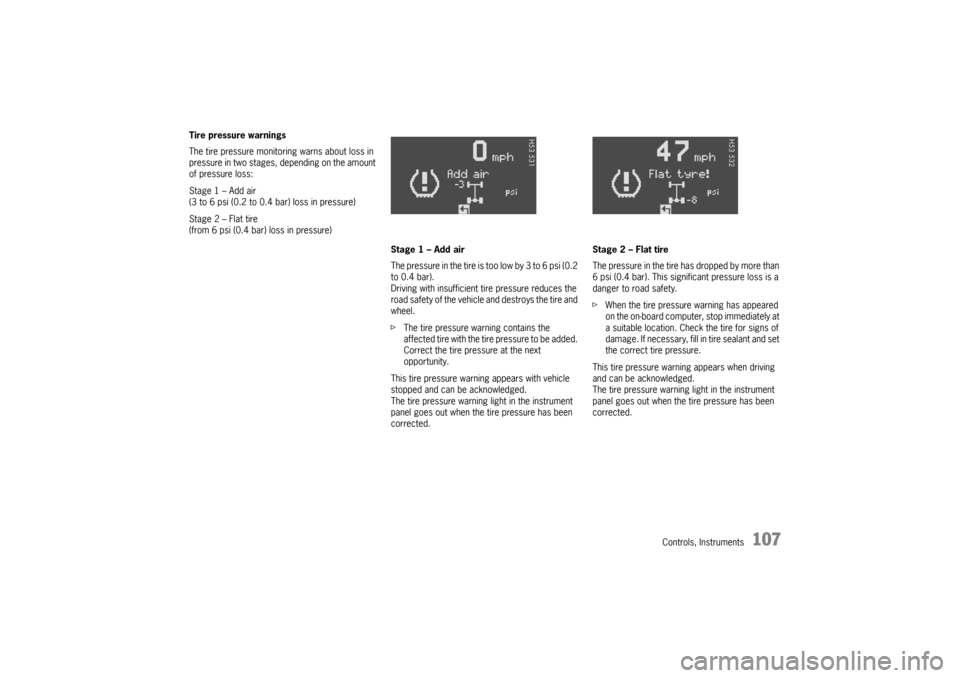
Tire pressure warnings
The tire pressure monitoring warns about loss in
pressure in two stages, depending on the amount
of pressure loss:
Stage 1 – Add air
(3 to 6 psi (0.2 to 0.4 bar) loss in pressure)
Stage 2 – Flat tire
(from 6 psi (0.4 bar) loss in pressure)
Stage 1 – Add air
The pressure in the tire is too low by 3 to 6 psi (0.2
to 0.4 bar).
Driving with insufficient tire pressure reduces the
road safety of the vehicle and destroys the tire and
wheel.
fThe tire pressure warning contains the
affected tire with the tire pressure to be added.
Correct the tire pressure at the next
opportunity.
This tire pressure warning appears with vehicle
stopped and can be acknowledged.
The tire pressure warning light in the instrument
panel goes out when the tire pressure has been
corrected.Stage 2 – Flat tire
The pressure in the tire has dropped by more than
6 psi (0.4 bar). This significant pressure loss is a
danger to road safety.
fWhen the tire pressure warning has appeared
on the on-board computer, stop immediately at
a suitable location. Check the tire for signs of
damage. If necessary, fill in tire sealant and set
the correct tire pressure.
This tire pressure warning appears when driving
and can be acknowledged.
The tire pressure warning light in the instrument
panel goes out when the tire pressure has been
corrected.
Page 108 of 280
108
Controls, Instruments
System learningThe tire pressure monitoring begins to “learn” the
wheels after a wheel change, wheel transmitter
replacement or update of the tire settings. During
this process, the tire pressure monitoring recog-
nizes the tires and their locations. The on-board
computer displayes the message “TPC inactive –
system learning”.
The tire pressure monitoring requires a certain
amount of time to learn the wheels. During this
time, the current tire pressures are not available
on the on-board-computer:
– The displays of the Tire pressure function of
the on-board computer shows lines.
– The required pressures for cold tires at 68°F
(20°C) are indicated in the Info pressure
display in the Tire pressure menu.
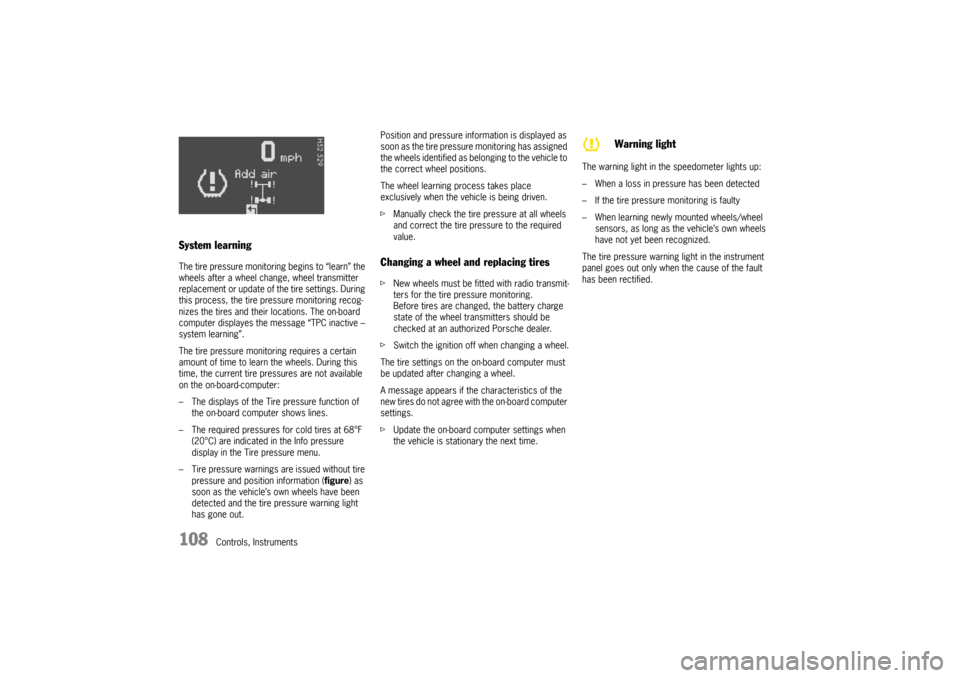
– Tire pressure warnings are issued without tire
pressure and position information (figure) as
soon as the vehicle’s own wheels have been
detected and the tire pressure warning light
has gone out.Position and pressure information is displayed as
soon as the tire pressure monitoring has assigned
the wheels identified as belonging to the vehicle to
the correct wheel positions.
The wheel learning process takes place
exclusively when the vehicle is being driven.
fManually check the tire pressure at all wheels
and correct the tire pressure to the required
value.
Changing a wheel and replacing tiresfNew wheels must be fitted with radio transmit-
ters for the tire pressure monitoring.
Before tires are changed, the battery charge
state of the wheel transmitters should be
checked at an authorized Porsche dealer.
fSwitch the ignition off when changing a wheel.
The tire settings on the on-board computer must
be updated after changing a wheel.
A message appears if the characteristics of the
new tires do not agree with the on-board computer
settings.
fUpdate the on-board computer settings when
the vehicle is stationary the next time.The warning light in the speedometer lights up:
– When a loss in pressure has been detected
– If the tire pressure monitoring is faulty
– When learning newly mounted wheels/wheel
sensors, as long as the vehicle’s own wheels
have not yet been recognized.
The tire pressure warning light in the instrument
panel goes out only when the cause of the fault
has been rectified.
Warning light
Page 109 of 280
Controls, Instruments
109
No monitoringIn the event of faults the tire pressure monitoring
cannot monitor the tire pressure.
The warning light on the instrument panel lights up
and a corresponding message appears on the
on-board computer.
Monitoring is not active when:
– the tire pressure monitoring is faulty,
– wheel transmitters for the tire pressure
monitoring are missing,
– temporarily after changing a wheel (learning
phase),
– more than four wheel transmitters are
detected,
– there is external interference by other radio
sources, e.g. wireless headphones,
– tire temperatures are too high.
fPlease observe the chapter “WARNINGS ON
THE INSTRUMENT PANEL AND THE ON-
BOARD COMPUTER” on Page 114.
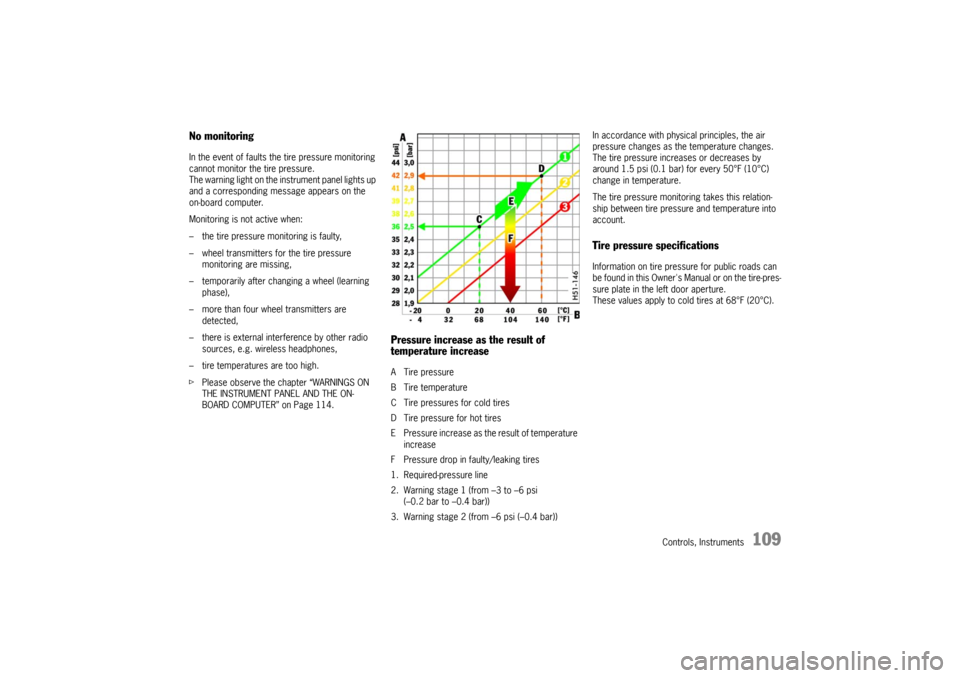
Pressure increase as the result of
temperature increaseA Tire pressure
B Tire temperature
C Tire pressures for cold tires
D Tire pressure for hot tires
E Pressure increase as the result of temperature
increase
F Pressure drop in faulty/leaking tires
1. Required-pressure line
2. Warning stage 1 (from –3 to –6 psi
(–0.2 bar to –0.4 bar))
3. Warning stage 2 (from –6 psi (–0.4 bar))In accordance with physical principles, the air
pressure changes as the temperature changes.
The tire pressure increases or decreases by
around 1.5 psi (0.1 bar) for every 50°F (10°C)
change in temperature.
The tire pressure monitoring takes this relation-
ship between tire pressure and temperature into
account.
Tire pressure specificationsInformation on tire pressure for public roads can
be found in this Owner's Manual or on the tire-pres-
sure plate in the left door aperture.
These values apply to cold tires at 68°F (20°C).