change time PORSCHE CAYMAN 2009 1.G User Guide
[x] Cancel search | Manufacturer: PORSCHE, Model Year: 2009, Model line: CAYMAN, Model: PORSCHE CAYMAN 2009 1.GPages: 284, PDF Size: 5.94 MB
Page 103 of 284

Operation, Safety
101
Porsche Communication
Management (PCM) fRefer to the separate operating instructions
before putting the PCM into operation.
f Please see the chapter “LOAD SWITCH-OFF
AFTER 2 HOURS OR 7 DAYS” on Page 236.
Warning!
There is a danger of accident if you set or
operate the on-board computer, radio, navi-
gation system, telephone or other equipment
when driving.
This could distract you from the traffic and
cause you to lose control of the vehicle re-
sulting in serious personal injury or death.
f Operate the components while driving only if
the traffic situation allows you to do so safely.
f Carry out any complicated operating or setting procedures only with the vehicle stationary.
The reception conditions for the radio module
integrated in the PCM ch ange continuously as you
drive. Interference from buildings, terrain and the
weather is unavoidable.
FM stereo reception is particularly susceptible to
varying reception conditions.
Electronic accessories should only be retrofitted
by your authorized Porsche dealer. Accessories which have not been tested and
approved by Porsche may impair radio function
and reception.
NavigationWhen put into operation for the first time, a
distance of approx. 30 miles (50 km) must be
driven in order for the navigation system to
complete the process of fine calibration.
The same applies when the tires are changed (e.g.
summer/snow tires) or new tires fitted.
Full location accuracy is not yet achieved during
the fine-calibration process.
If the vehicle has been transported (e.g. ferry, car
train), the system may take a few minutes to deter-
mine the current locati
on after it has been
switched on.
Serious tire slip (e.g. spinning wheels on snow)
may result in temporaril y inaccurate navigation.
When the battery has been disconnected, it may
take up to 15 minutes before the navigation
system is operational again.
Car Audio Operation/Tips For radio operation see your radio manual
which is included with your on-board litera-
ture.
f Please see the chapter “LOAD SWITCH-OFF AF-
TER 2 HOURS OR 7 DAYS” on Page 236.
FM reception
A vehicle is not an ideal pl ace to listen to a radio.
Because the vehicle moves, reception conditions
are constantly changing.
Buildings, terrain, signal distance and noise from
other vehicles are all working against good recep-
tion.
Some conditions affecting FM may appear to be
problems when they are not.
The following characteristics are completely nor-
mal for a given reception area, and they do not in-
dicate any problem with the radio itself.
Note
Electronic accessories shou ld only be installed by
your authorized Porsche dealer.
Equipment which has not been tested and ap-
proved by Porsche may impair radio reception.
Page 108 of 284
106
Operation, Safety
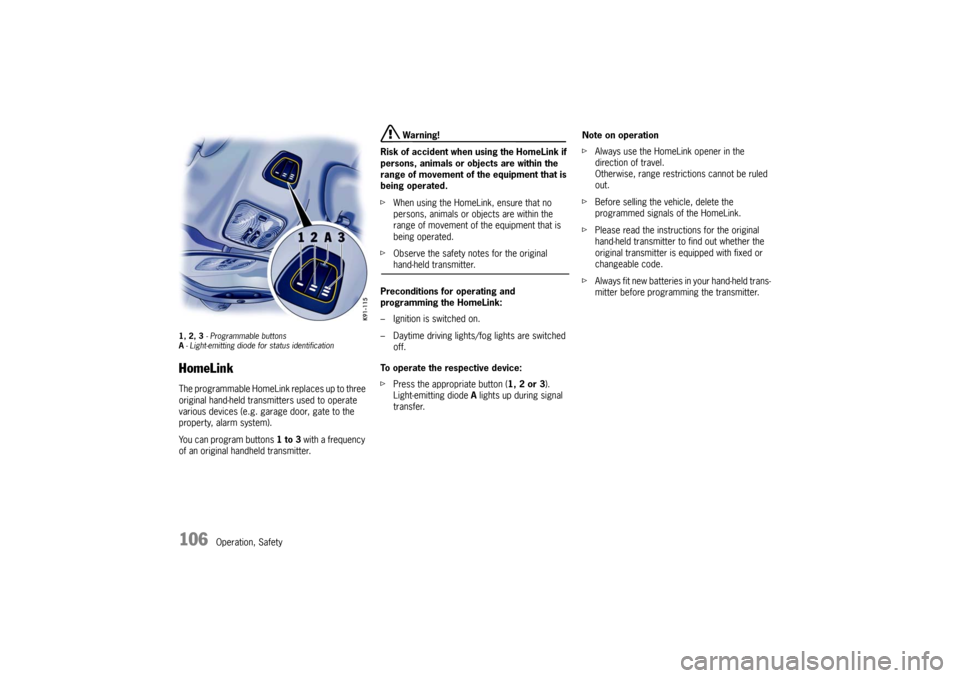
1, 2, 3 - Programmable buttons
A - Light-emitting diode for status identificationHomeLinkThe programmable HomeLink replaces up to three
original hand-held transmitters used to operate
various devices (e.g. garage door, gate to the
property, alarm system).
You can program buttons 1 to 3 with a frequency
of an original handheld transmitter.
Warning!
Risk of accident when using the HomeLink if
persons, animals or objects are within the
range of movement of the equipment that is
being operated.
f When using the HomeLink, ensure that no
persons, animals or objects are within the
range of movement of the equipment that is
being operated.
f Observe the safety notes for the original hand-held transmitter.
Preconditions for operating and
programming the HomeLink:
– Ignition is switched on.
– Daytime driving lights/fog lights are switched off.
To operate the respective device:
f Press the appropriate button ( 1, 2 or 3).
Light-emitting diode A lights up during signal
transfer. Note on operation
f
Always use the HomeLink opener in the
direction of travel.
Otherwise, range restrictions cannot be ruled
out.
f Before selling the vehicle, delete the
programmed signals of the HomeLink.
f Please read the instructions for the original
hand-held transmitter to find out whether the
original transmitter is equipped with fixed or
changeable code.
f Always fit new batteries in your hand-held trans-
mitter before programming the transmitter.
Page 109 of 284
Operation, Safety
107
Allocating signals to the buttonsfPlease follow the operating instructions for the
original hand-held transmitter.
Prior to programming the HomeLink for the
first time
The following process dele tes the standard codes
set at the factory. Do not repeat the process if you
program further buttons.
f Keep the two outer buttons 1 and 3
depressed for approx. 20 seconds until light-
emitting diode A begins to flash quickly.
All programmed signals of buttons 1 to 3 are
deleted. Programming HomeLink with fixed code
hand-held transmitters
1. Press and hold the desired button until the
light-emitting diode begins to flash slowly.
You then have approx. 5 minutes to perform
steps 2 and 3.
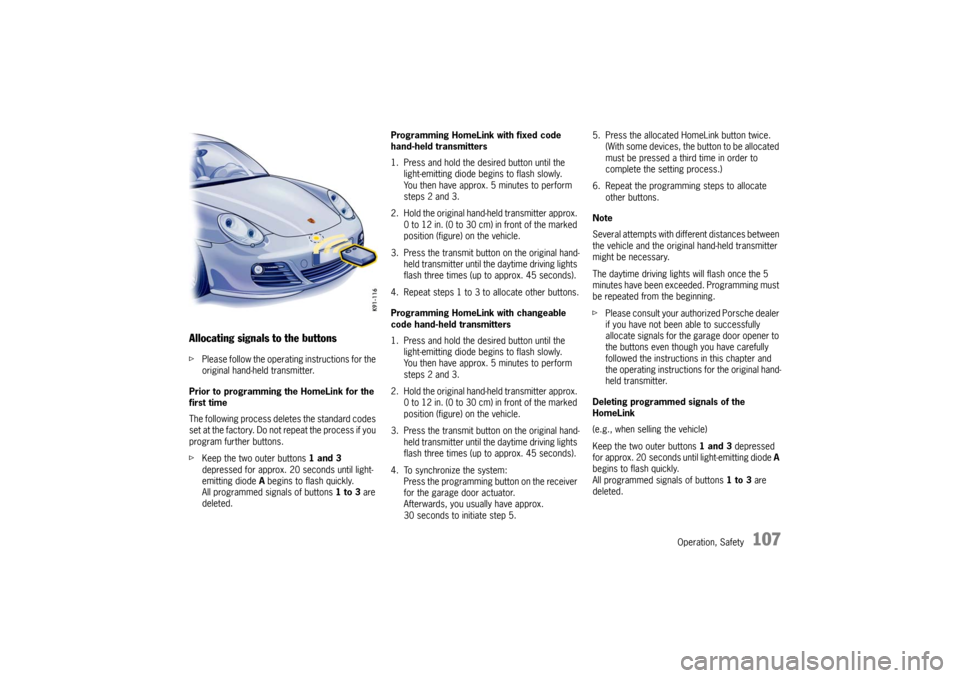
2. Hold the original hand -held transmitter approx.
0 to 12 in. (0 to 30 cm ) in front of the marked
position (figure) on the vehicle.
3. Press the transmit button on the original hand- held transmitter until the daytime driving lights
flash three times (up to approx. 45 seconds).
4. Repeat steps 1 to 3 to allocate other buttons.
Programming HomeLink with changeable
code hand-held transmitters
1. Press and hold the desired button until the light-emitting diode begins to flash slowly.
You then have approx. 5 minutes to perform
steps 2 and 3.
2. Hold the original hand -held transmitter approx.
0 to 12 in. (0 to 30 cm ) in front of the marked
position (figure) on the vehicle.
3. Press the transmit button on the original hand- held transmitter until the daytime driving lights
flash three times (up to approx. 45 seconds).
4. To synchronize the system: Press the programming button on the receiver
for the garage door actuator.
Afterwards, you usually have approx.
30 seconds to initiate step 5. 5. Press the allocated HomeLink button twice.
(With some devices, the button to be allocated
must be pressed a third time in order to
complete the setting process.)
6. Repeat the programming steps to allocate other buttons.
Note
Several attempts with different distances between
the vehicle and the original hand-held transmitter
might be necessary.
The daytime driving lights will flash once the 5
minutes have been exceeded. Programming must
be repeated from the beginning.
f Please consult your authorized Porsche dealer
if you have not been able to successfully
allocate signals for the garage door opener to
the buttons even though you have carefully
followed the instructions in this chapter and
the operating instructions for the original hand-
held transmitter.
Deleting programmed signals of the
HomeLink
(e.g., when selling the vehicle)
Keep the two outer buttons 1 and 3 depressed
for approx. 20 seconds until light-emitting diode A
begins to flash quickly.
All programmed signals of buttons 1 to 3 are
deleted.
Page 133 of 284
Instruments, On-Board Computer, Warnings
131
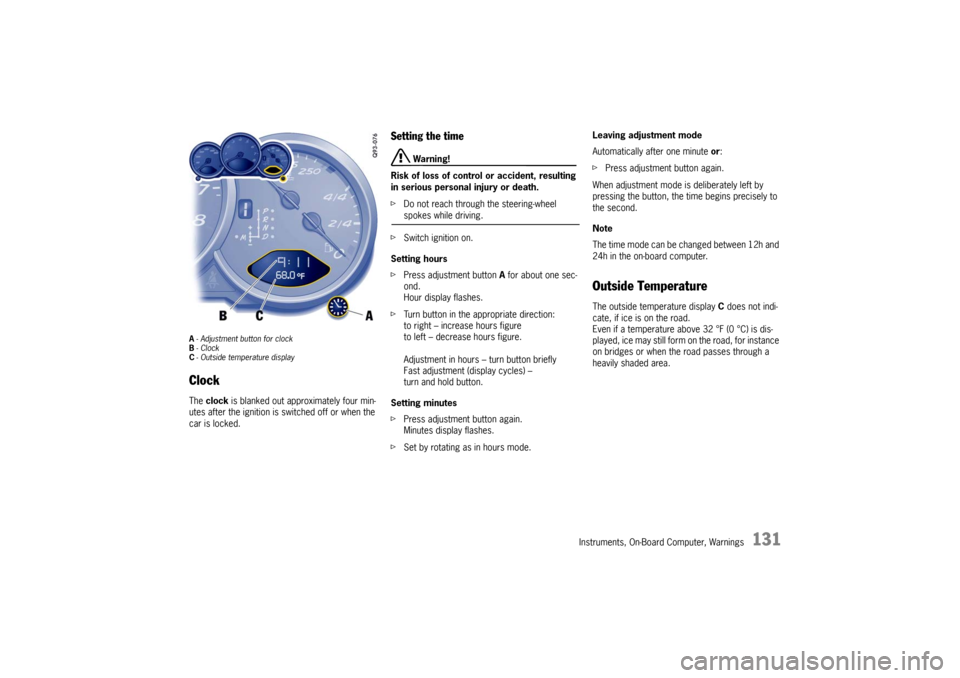
A- Adjustment button for clock
B - Clock
C - Outside temperature displayClock The clock is blanked out approximately four min-
utes after the ignition is switched off or when the
car is locked.
Setting the time
Warning!
Risk of loss of control or accident, resulting
in serious personal injury or death.
f Do not reach through the steering-wheel spokes while driving.
f Switch ignition on.
Setting hours
f Press adjustment button A for about one sec-
ond.
Hour display flashes.
f Turn button in the appropriate direction:
to right – increase hours figure
to left – decrease hours figure.
Adjustment in hours – turn button briefly
Fast adjustment (display cycles) –
turn and hold button.
Setting minutes
f Press adjustment button again.
Minutes display flashes.
f Set by rotating as in hours mode. Leaving adjustment mode
Automatically after one minute
or:
f Press adjustment button again.
When adjustment mode is deliberately left by
pressing the button, the time begins precisely to
the second.
Note
The time mode can be changed between 12h and
24h in the on-board computer.
Outside Temperature The outside temperature display C does not indi-
cate, if ice is on the road.
Even if a temperature above 32 °F (0 °C) is dis-
played, ice may still form on the road, for instance
on bridges or when the road passes through a
heavily shaded area.
Page 147 of 284

Instruments, On-Board Computer, Warnings
145
Starting the timing
fPush operating lever forward.
The selection field is switched on.
f Select CHRONO with the operating lever. f
Push operating lever forward. fPush operating lever forward.
The time runs on all stopwatch displays.
The on-board computer display changes to the
“Stop timing/Intermediate time” selection.
Page 148 of 284

146
Instruments, On-Board Computer, Warnings
Stopping the timing
After time measurement is started, the on-board
computer display changes
to the “Stop timing/In-
termediate time”.
f Select “Stop timing” with the operating lever. f
Push lever forward.
The time is stopped in all stopwatch displays,
and the on-board computer display changes to
the “Continue/Reset” selection.
The timing can be continued or reset to zero. Continue timing
After timing has been stopped, the on-board com-
puter display changes to the “Continue/Reset” se-
lection.
Page 149 of 284

Instruments, On-Board Computer, Warnings
147
fPush operating lever forward.
The stopwatch displays continue the timing.
The on-board computer display returns to the
“Stop timing/Intermediate time” selection. You
can stop the stopwatch or measure an inter-
mediate time. Resetting the time
After timing has been stopped, the on-board com-
puter display changes to the “Continue/Reset” se-
lection.
f
Select “Reset” with the operating lever. f
Push operating lever forward.
The display returns to the “Start timing”
selection.
The stopwatch displays in the instrument panel
and the on-board computer are reset to zero.
Page 150 of 284
148
Instruments, On-Board Computer, Warnings
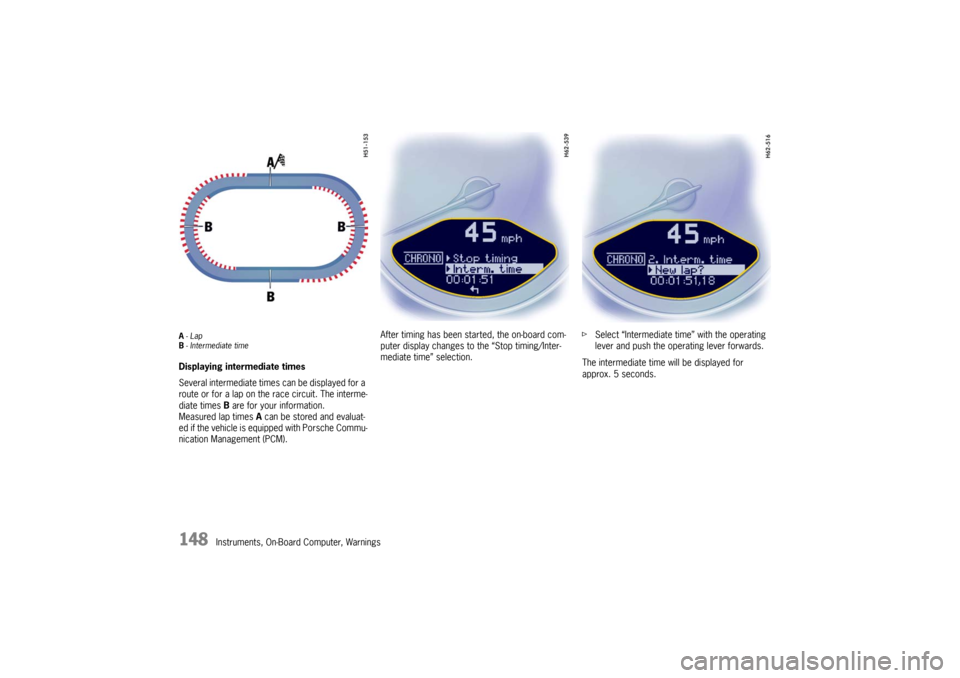
A-Lap
B - Intermediate timeDisplaying intermediate times
Several intermediate time s can be displayed for a
route or for a lap on the race circuit. The interme-
diate times B are for your information.
Measured lap times A can be stored and evaluat-
ed if the vehicle is equipped with Porsche Commu-
nication Management (PCM). After timing has been started, the on-board com-
puter display changes to the “Stop timing/Inter-
mediate time” selection.
f
Select “Intermediate time” with the operating
lever and push the operating lever forwards.
The intermediate time will be displayed for
approx. 5 seconds.
Page 160 of 284

158
Instruments, On-Board Computer, Warnings
System learningThe Tire Pressure Monitoring begins to “learn” the
wheels after a wheel change, wheel transmitter
replacement or update of the tire settings. During
this process, the Tire Pressure Monitoring recog-
nizes the tires and their locations.
The on-board computer displayes the message
“TPM is learning, monitoring not act.” .The Tire Pressure Monitoring requires a certain
amount of time to learn the wheels. During this
time, the current tire pressures are not available
on the on-board-computer:
– The tire pressure warning light remains lit until
all wheels have been learned.
– The display of the tire pressure function of the on-board computer shows lines.
– The required pressures for cold tires at 68 °F (20 °C) are indicated in the Info pressure
display in the tire pressure menu.
Position and pressure information is displayed as
soon as the Tire Pressure Monitoring has as-
signed the wheels identified as belonging to the
vehicle to the correct wheel positions.
The wheel learning process takes place
exclusively when the vehicle is being driven
(vehicle speed above 25 km/h (16 mph)).
f Check the tire pressure for all wheels on the
“Info pressure” display.
f Correct the tire pressure to the required
pressure if necessary.
Changing a wheel and replacing tiresfNew wheels must be fitt ed with radio transmit-
ters for the Tire Pressure Monitoring.
Before tires are changed, the battery charge
state of the wheel transmitters should be
checked at an authorized Porsche dealer.
f Switch the ignition off when changing a wheel.
The tire settings on the on-board computer must
be updated after changing a wheel.
If the tire settings are not updated, the message
“Wheel change? Input new TPM settings!” is
displayed on the on-board computer.
f Update the on-board computer settings when
the vehicle is stationary the next time.
Page 166 of 284

164
Instruments, On-Board Computer, Warnings
Navigation
– Integrated in the BC
(Navigation instructions can be recalled on the
on-board computer display)
– When turning off (Navigation instructions are only shown before
changing direction)
Basic setting
– Restore the basic setting of the on-board com- puter
Language
– Select language version 12/24h mode
Select time mode:
– 12h (small squares on the right side of the time
display for AM/PM),
–24h
Light
USA only:
Switch daytime driving lights on and off. f
Please see the chapter “DAYTIME DRIVING
LIGHTS” on Page 78.
f Please see the chapter “DAYTIME DRIVING
LIGHTS” on Page 80.
General information regarding the
on-board computer functionsRange on remaining fuel
The range on remaining fuel is continuously recal-
culated during the journey based on the fuel level,
current consumption and average consumption.
The more the fuel level falls, the more spontan-
eously the display reacts. For this reason, the
range on remaining fuel is not displayed if less
than 9 miles (15 kilometers).
If the vehicle's inclination changes while driving or
refueling, incorrect range information may tempo-
rarily be given.
Note
If the tank is nearly empty and you top up with only
a small quantity of fuel, an accurate range on re-
maining fuel is impossible.
Daytime driving lights
(daytime driving lights switched off)
Daytime driving lights
(daytime driving lights switched on)