key PORSCHE CAYNNE 2004 1.G User Guide
[x] Cancel search | Manufacturer: PORSCHE, Model Year: 2004, Model line: CAYENNE, Model: PORSCHE CAYENNE 2004 1.GPages: 379, PDF Size: 13.91 MB
Page 24 of 379
24
Opening and Locking fMake sure that there is sufficient clearance be-
hind or above the vehicle (e.g. roof transport
systems, garage ceiling).
fRemove rear rack systems before opening the
rear lid automatically. Warning!
Risk of being locked out of vehicles with
Porsche Entry & Drive.
fDo not leave the key in the vehicle if the vehicle
is locked and access is gained through the
rear window. The vehicle is automatically
locked when the rear lid is closed.
If the key has been left in the vehicle, the emer-
gency flasher flashes twice and a warning
signal sounds. The rear lid can be opened
again within approx. 30 seconds.
After 30 seconds have elapsed, the vehicle
can be unlocked again only with the second key.
Acoustic indication during opening/closing
of the rear lid
Opening and closing of the rear lid are indicated
by three warning tones.
You can have the warning tones activated/deacti-
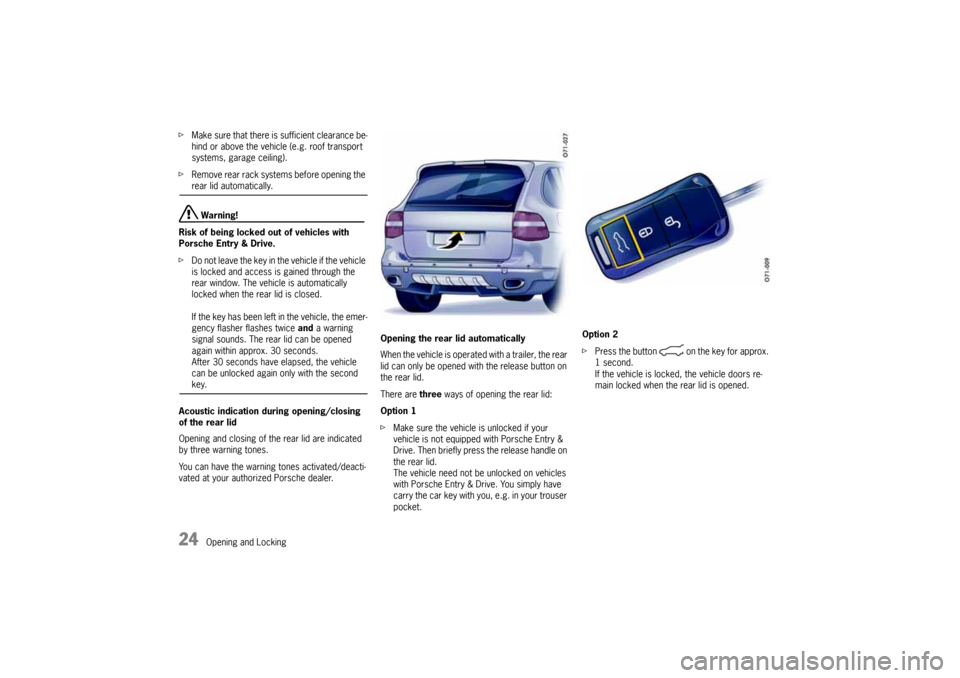
vated at your authorized Porsche dealer.Opening the rear lid automatically
When the vehicle is operated with a trailer, the rear
lid can only be opened with the release button on
the rear lid.
There are three ways of opening the rear lid:
Option 1
fMake sure the vehicle is unlocked if your
vehicle is not equipped with Porsche Entry &
Drive. Then briefly press the release handle on
the rear lid.
The vehicle need not be unlocked on vehicles
with Porsche Entry & Drive. You simply have
carry the car key with you, e.g. in your trouser
pocket.Option 2
fPress the button on the key for approx.
1 second.
If the vehicle is locked, the vehicle doors re-
main locked when the rear lid is opened.
10_Cayenne_21_KW17.book Seite 24 Donnerstag, 9. April 2009 3:33 15
Page 25 of 379
Opening and Locking
25
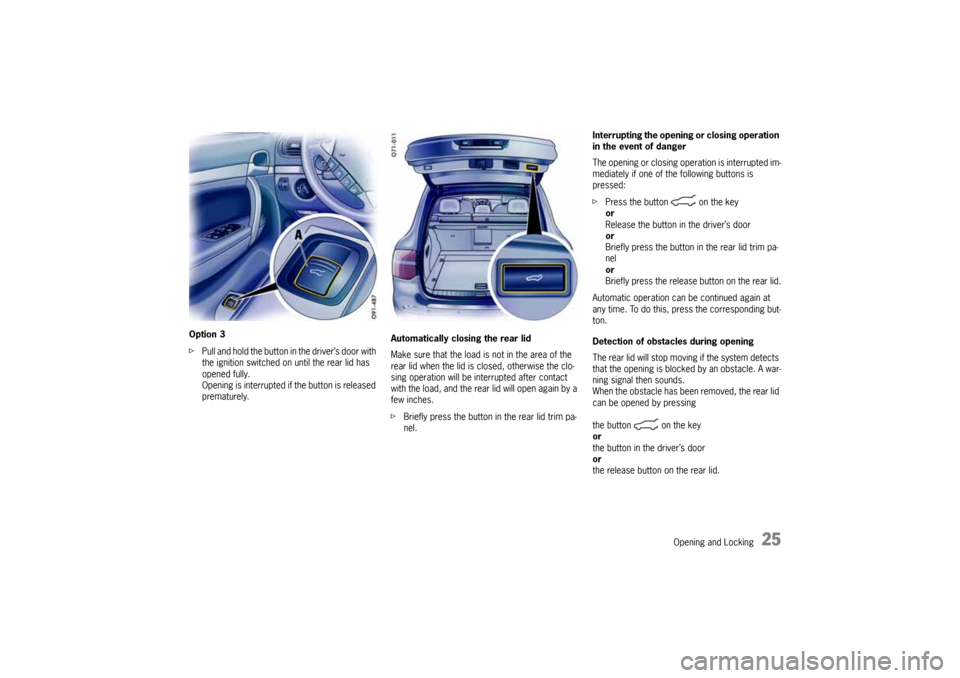
Option 3
fPull and hold the button in the driver’s door with
the ignition switched on until the rear lid has
opened fully.
Opening is interrupted if the button is released
prematurely.Automatically closing the rear lid
Make sure that the load is not in the area of the
rear lid when the lid is closed, otherwise the clo-
sing operation will be interrupted after contact
with the load, and the rear lid will open again by a
few inches.
fBriefly press the button in the rear lid trim pa-
nel.Interrupting the opening or closing operation
in the event of danger
The opening or closing operation is interrupted im-
mediately if one of the following buttons is
pressed:
fPress the button on the key
or
Release the button in the driver’s door
or
Briefly press the button in the rear lid trim pa-
nel
or
Briefly press the release button on the rear lid.
Automatic operation can be continued again at
any time. To do this, press the corresponding but-
ton.
Detection of obstacles during opening
The rear lid will stop moving if the system detects
that the opening is blocked by an obstacle. A war-
ning signal then sounds.
When the obstacle has been removed, the rear lid
can be opened by pressing
the button on the key
or
the button in the driver’s door
or
the release button on the rear lid.
10_Cayenne_21_KW17.book Seite 25 Donnerstag, 9. April 2009 3:33 15
Page 26 of 379
26
Opening and Locking Detection of obstacles during closing Warning!
Danger of crushing.
fDespite the presence of this detection system,
you are still responsible for keeping yourself
and others entirely out of the way of the door as it is closing.
The closing operation is interrupted if closing of
the rear lid is blocked by an obstacle.
A warning signal sounds and the rear lid opens
again by a few inches.
When the obstacle has been removed, the rear lid
can be closed by pressing one of the correspon-
ding buttons.Adjusting the opening height of the rear lid
The opening height of the rear lid can be individu-
ally adjusted so that the rear lid does not collide
with the garage ceiling, for example.
On vehicles with level control, the vehicle height
changes depending on the setting of the level con-
trol system. For this reason, always adjust the ope-
ning height with the vehicle at the highest level set-
ting so that the rear lid cannot accidentally collide
with the garage ceiling, for example.
1. Stand behind the vehicle and open the rear lid.
2. Press the button on the key to stop the
automatic opening operation at around 2/3 of
the opening height.
3. Now move the rear lid up by hand until the desi-
red opening height is reached. Make sure that
there is a sufficient minimum clearance from
any obstacle.
4. Press and hold the button in the rear lid trim pa-
nel for approx. 3 seconds.
An acknowledgement signal sounds, and the
emergency flasher lights up once.
The opening height of the rear lid has now
been programmed.
The rear lid can now be closed by briefly pres-
sing the button.
This setting cannot be deleted. If a different set-
ting is required, repeat steps 1 to 4.Malfunctions of the rear lid drive
The automatic function is not active if the battery
voltage is too low.
If a button is pressed, the rear lid lock is unlocked
and a warning signal sounds for 3 seconds. The
rear lid can now be opened by hand.
fCharge the vehicle battery.
Emergency operation of the rear lid
A warning signal sounds for approx. 3 seconds if
the automatic opening or closing operation is in-
terrupted by a fault.
fOpen or close the rear lid by hand.
10_Cayenne_21_KW17.book Seite 26 Donnerstag, 9. April 2009 3:33 15
Page 27 of 379
Opening and Locking
27
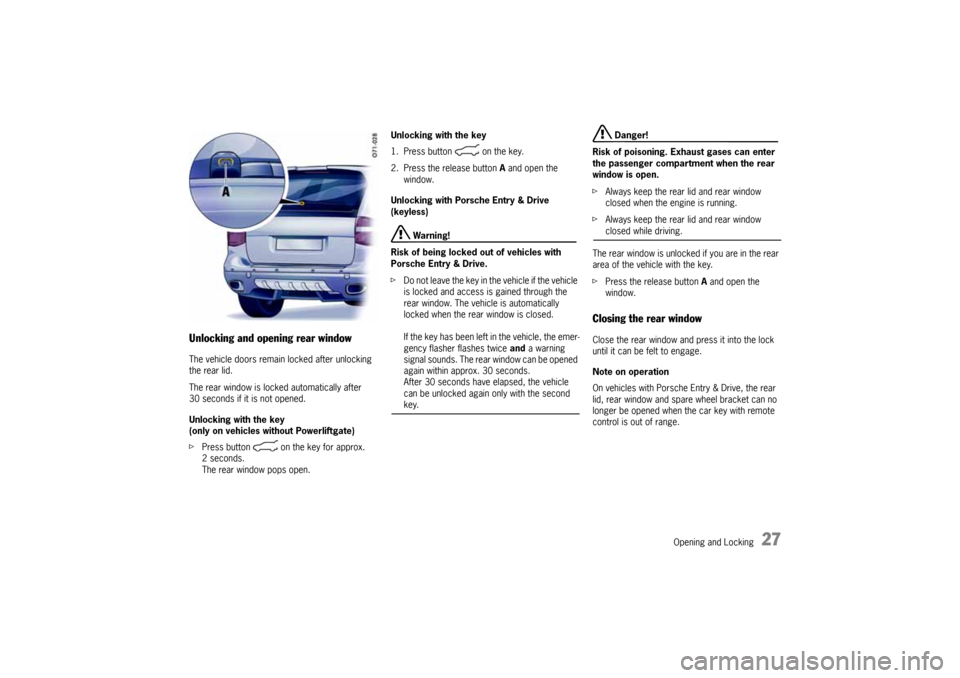
Unlocking and opening rear windowThe vehicle doors remain locked after unlocking
the rear lid.
The rear window is locked automatically after
30 seconds if it is not opened.
Unlocking with the key
(only on vehicles without Powerliftgate)
fPress button on the key for approx.
2seconds.
The rear window pops open.Unlocking with the key
1. Press button on the key.
2. Press the release button A and open the
window.
Unlocking with Porsche Entry & Drive
(keyless)
Warning!
Risk of being locked out of vehicles with
Porsche Entry & Drive.
fDo not leave the key in the vehicle if the vehicle
is locked and access is gained through the
rear window. The vehicle is automatically
locked when the rear window is closed.
If the key has been left in the vehicle, the emer-
gency flasher flashes twice and a warning
signal sounds. The rear window can be opened
again within approx. 30 seconds.
After 30 seconds have elapsed, the vehicle
can be unlocked again only with the second key.
Danger!
Risk of poisoning. Exhaust gases can enter
the passenger compartment when the rear
window is open.
fAlways keep the rear lid and rear window
closed when the engine is running.
fAlways keep the rear lid and rear window closed while driving.
The rear window is unlocked if you are in the rear
area of the vehicle with the key.
fPress the release button A and open the
window.
Closing the rear windowClose the rear window and press it into the lock
until it can be felt to engage.
Note on operation
On vehicles with Porsche Entry & Drive, the rear
lid, rear window and spare wheel bracket can no
longer be opened when the car key with remote
control is out of range.
10_Cayenne_21_KW17.book Seite 27 Donnerstag, 9. April 2009 3:33 15
Page 28 of 379
28
Opening and Locking
Opening and locking from insideThe factory settings of the vehicle are described
in this chapter.
You can change the settings and store them on
the respective key on the multi-purpose display of
the instrument panel.
fFor further information on the possible settings
(e.g. Auto Lock and Auto Unlock) on the multi-
purpose display:
Please see the chapter “CHANGING SETTINGS
FOR OPENING AND LOCKING THE VEHICLE”
on Page 143.
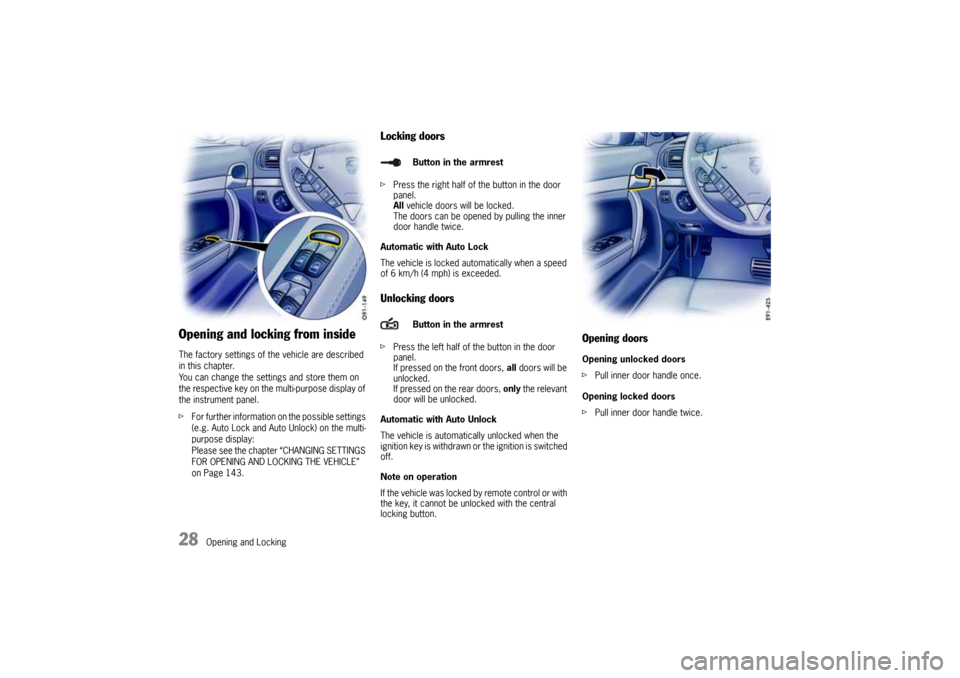
Locking doorsfPress the right half of the button in the door
panel.
All vehicle doors will be locked.
The doors can be opened by pulling the inner
door handle twice.
Automatic with Auto Lock
The vehicle is locked automatically when a speed
of 6 km/h (4 mph) is exceeded.Unlocking doorsfPress the left half of the button in the door
panel.
If pressed on the front doors, all doors will be
unlocked.
If pressed on the rear doors, only the relevant
door will be unlocked.
Automatic with Auto Unlock
The vehicle is automatically unlocked when the
ignition key is withdrawn or the ignition is switched
off.
Note on operation
If the vehicle was locked by remote control or with
the key, it cannot be unlocked with the central
locking button.
Opening doorsOpening unlocked doors
fPull inner door handle once.
Opening locked doors
fPull inner door handle twice.
Button in the armrest
Button in the armrest
10_Cayenne_21_KW17.book Seite 28 Donnerstag, 9. April 2009 3:33 15
Page 31 of 379

Opening and Locking
31
Malfunctions when opening and
closingEmergency operation of rear lidIf the rear lid cannot be opened with the radio re-
mote control (e.g., if the battery of the remote
control is dead), the emergency operation must
be performed:
1. Unlock and open the driver’s door with the car
key.
2. Switch on the ignition so that the alarm system
will not be triggered.
3. Check if the TAILGATE function is activated in
the multi-purpose display of the instrument
panel.
Please see the chapter “SETTING REAR LID
LOCKING” on Page 144.
4. Press the central locking button in the armrest.
The rear lid is now unlocked and can be opened
with the unlocking handle.
Only one door is unlockedThe setting for locking and unlocking the doors
and rear lid has been changed on the multi-
purpose display of the instrument panel. You can
open all doors irrespective of the setting made.
fPress button on the key twice within
2seconds.The vehicle cannot be unlockedThe remote control of the key may
– not function correctly due to radio waves (also
radio contact between remote control and
vehicle in the case of Porsche Entry & Drive),
– fail due to a fault,
– fail due to an exhausted battery.
fUnlock the vehicle with the unfolded key in the
key lock.
fIf you unlock the vehicle with the key at the
door lock, only the driver’s door can be
opened.
In order to prevent the alarm system from
being triggered, you must switch the ignition
on within 15 seconds of opening the door.
The vehicle cannot be lockedThis is recognizable by the fact that the
emergency flasher does not flash and there is no
locking noise.
The remote control of the key may
– not function correctly due to radio waves (also
radio contact between remote control and
vehicle in the case of Porsche Entry & Drive),
– fail due to a fault,
– fail due to an exhausted battery.
fLock the vehicle with the unfolded key at the
door lock.
If there is a defect in the central locking system,
operating the lock barrel in the driver’s door will
lock all functioning locking elements of the central
locking system.
fFor information on locking the doors by means
of the emergency operation:
Please see the chapter “NOT ALL VEHICLE
DOORS ARE LOCKED” on Page 32.
fHave faults in the central locking system reme-
died at an authorized Porsche dealer.
10_Cayenne_21_KW17.book Seite 31 Donnerstag, 9. April 2009 3:33 15
Page 32 of 379
32
Opening and Locking
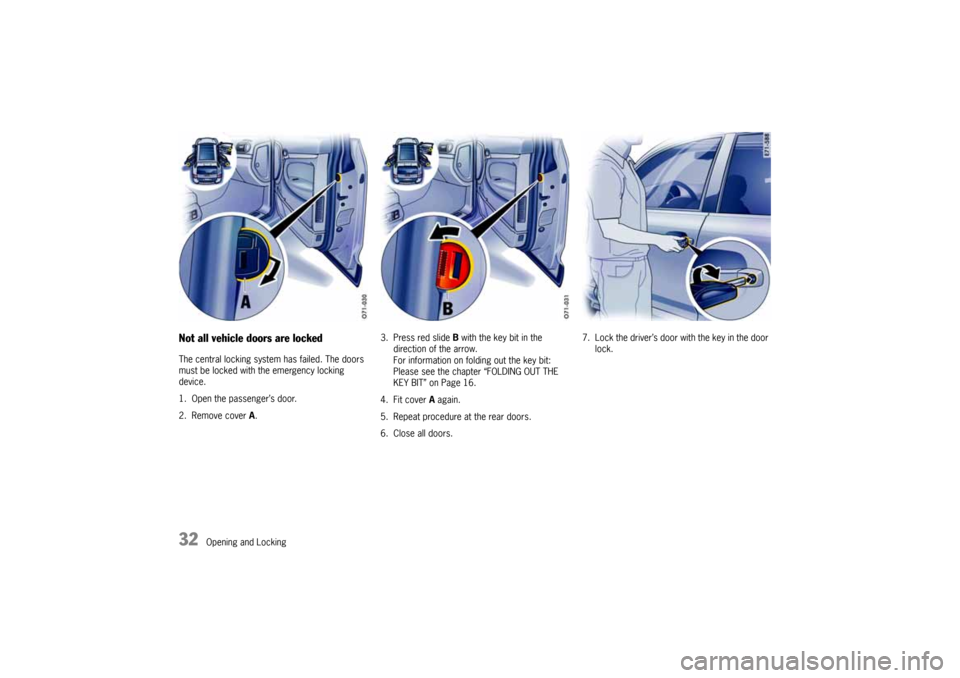
Not all vehicle doors are lockedThe central locking system has failed. The doors
must be locked with the emergency locking
device.
1. Open the passenger’s door.
2. Remove cover A.3. Press red slide B with the key bit in the
direction of the arrow.
For information on folding out the key bit:
Please see the chapter “FOLDING OUT THE
KEY BIT” on Page 16.
4. Fit cover A again.
5. Repeat procedure at the rear doors.
6. Close all doors.7. Lock the driver’s door with the key in the door
lock.10_Cayenne_21_KW17.book Seite 32 Donnerstag, 9. April 2009 3:33 15
Page 37 of 379
Seats, Mirrors and Steering Wheel
37
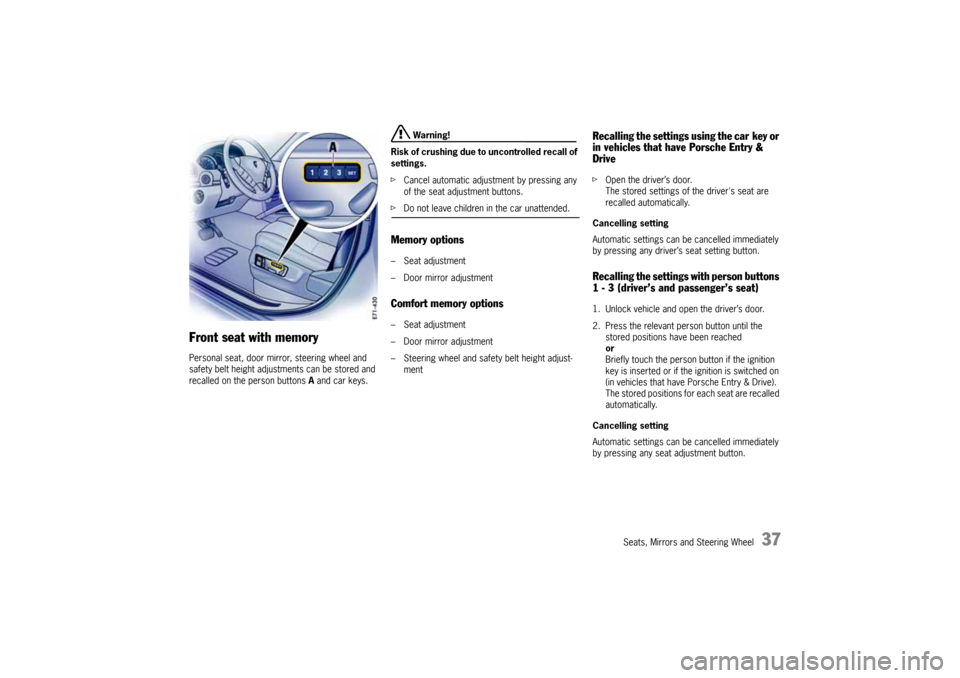
Front seat with memoryPersonal seat, door mirror, steering wheel and
safety belt height adjustments can be stored and
recalled on the person buttons A and car keys.
Warning!
Risk of crushing due to uncontrolled recall of
settings.
fCancel automatic adjustment by pressing any
of the seat adjustment buttons.
fDo not leave children in the car unattended.Memory options–Seat adjustment
– Door mirror adjustmentComfort memory options–Seat adjustment
– Door mirror adjustment
– Steering wheel and safety belt height adjust-
ment
Recalling the settings using the car key or
in vehicles that have Porsche Entry &
DrivefOpen the driver’s door.
The stored settings of the driver's seat are
recalled automatically.
Cancelling setting
Automatic settings can be cancelled immediately
by pressing any driver’s seat setting button.Recalling the settings with person buttons
1 - 3 (driver’s and passenger’s seat)1. Unlock vehicle and open the driver’s door.
2. Press the relevant person button until the
stored positions have been reached
or
Briefly touch the person button if the ignition
key is inserted or if the ignition is switched on
(in vehicles that have Porsche Entry & Drive).
The stored positions for each seat are recalled
automatically.
Cancelling setting
Automatic settings can be cancelled immediately
by pressing any seat adjustment button.
10_Cayenne_21_KW17.book Seite 37 Donnerstag, 9. April 2009 3:33 15
Page 38 of 379
38
Seats, Mirrors and Steering Wheel
Storing driver’s seat settingsStoring settings on a person button and a car
key
1. Apply the parking brake.
2. Switch ignition on.
3. Make the required adjustments to the seat,
mirror, steering wheel and safety belt.
4. Briefly press the SET memory button and,
within 10 seconds, hold down one of the per-
son buttons (1, 2 or 3) until an acknowledge
tone is obtained.
The settings are now stored on the desired
person button.
5. Withdraw car key or switch ignition off in
vehicles that have Porsche Entry & Drive.
6. Press the SET memory button within
10 seconds and keep the button depressed
until an acknowledge tone is obtained.
The settings are now assigned to the car key.
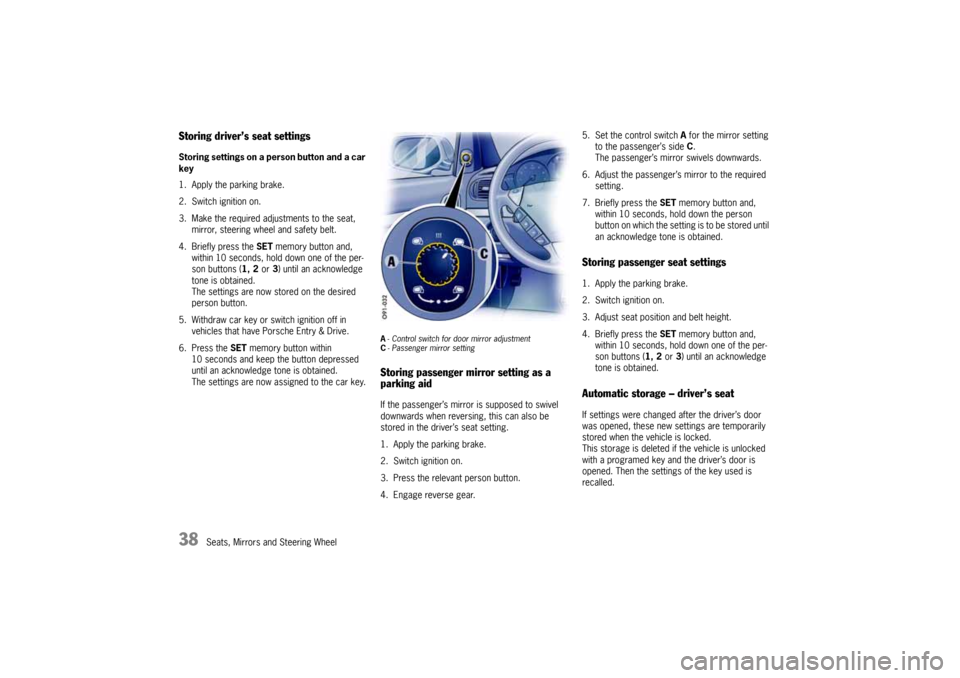
A-Control switch for door mirror adjustment
C- Passenger mirror settingStoring passenger mirror setting as a
parking aidIf the passenger’s mirror is supposed to swivel
downwards when reversing, this can also be
stored in the driver’s seat setting.
1. Apply the parking brake.
2. Switch ignition on.
3. Press the relevant person button.
4. Engage reverse gear.5. Set the control switch A for the mirror setting
to the passenger’s side C.
The passenger’s mirror swivels downwards.
6. Adjust the passenger’s mirror to the required
setting.
7. Briefly press the SET memory button and,
within 10 seconds, hold down the person
button on which the setting is to be stored until
an acknowledge tone is obtained.
Storing passenger seat settings1. Apply the parking brake.
2. Switch ignition on.
3. Adjust seat position and belt height.
4. Briefly press the SET memory button and,
within 10 seconds, hold down one of the per-
son buttons (1, 2 or 3) until an acknowledge
tone is obtained.Automatic storage – driver’s seatIf settings were changed after the driver’s door
was opened, these new settings are temporarily
stored when the vehicle is locked.
This storage is deleted if the vehicle is unlocked
with a programed key and the driver’s door is
opened. Then the settings of the key used is
recalled.
10_Cayenne_21_KW17.book Seite 38 Donnerstag, 9. April 2009 3:33 15
Page 39 of 379
Seats, Mirrors and Steering Wheel
39
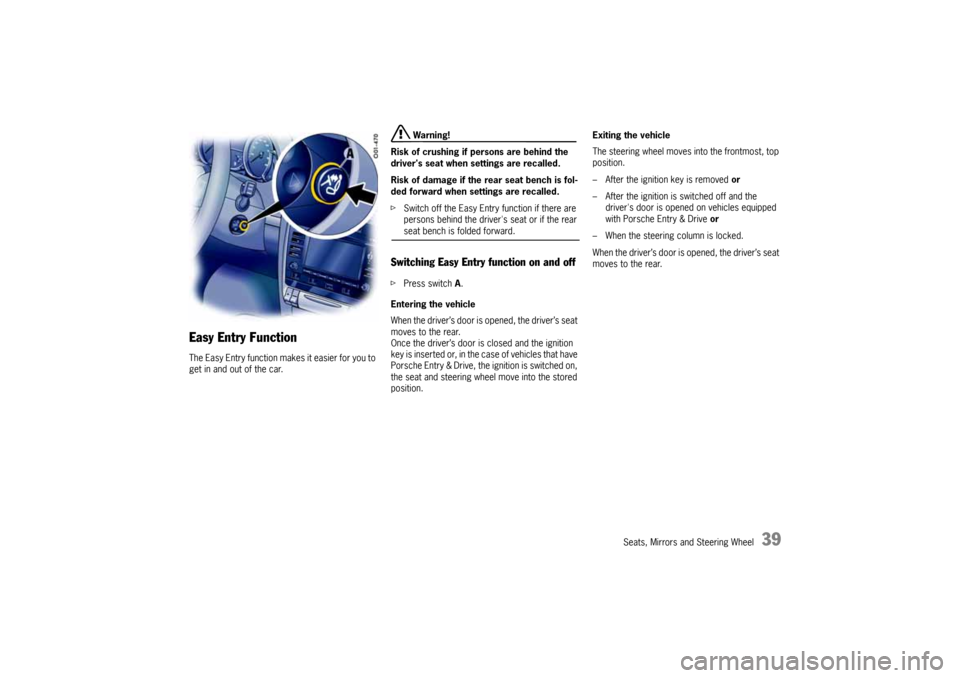
Easy Entry Function The Easy Entry function makes it easier for you to
get in and out of the car.
Warning!
Risk of crushing if persons are behind the
driver's seat when settings are recalled.
Risk of damage if the rear seat bench is fol-
ded forward when settings are recalled.
fSwitch off the Easy Entry function if there are
persons behind the driver's seat or if the rear seat bench is folded forward.
Switching Easy Entry function on and offfPress switch A.
Entering the vehicle
When the driver’s door is opened, the driver’s seat
moves to the rear.
Once the driver’s door is closed and the ignition
key is inserted or, in the case of vehicles that have
Porsche Entry & Drive, the ignition is switched on,
the seat and steering wheel move into the stored
position.Exiting the vehicle
The steering wheel moves into the frontmost, top
position.
– After the ignition key is removed or
– After the ignition is switched off and the
driver's door is opened on vehicles equipped
with Porsche Entry & Drive or
– When the steering column is locked.
When the driver’s door is opened, the driver’s seat
moves to the rear.
10_Cayenne_21_KW17.book Seite 39 Donnerstag, 9. April 2009 3:33 15