reset PORSCHE CAYNNE 2010 1.G User Guide
[x] Cancel search | Manufacturer: PORSCHE, Model Year: 2010, Model line: CAYENNE, Model: PORSCHE CAYENNE 2010 1.GPages: 379, PDF Size: 13.91 MB
Page 124 of 379
124
Multi-Purpose Display and Instruments
Operating the multi-purpose
display on the instrument panelOn-board computer information can be displayed
on the multi-purpose display. Additional functions
are also available in the main menu which allow
you to change the settings for your vehicle.
Warning!
There is a danger of accident, resulting in
serious personal injury or death if you set or
operate the multi-purpose display, radio,
navigation system, telephone or other equip-
ment while driving. Operating these devices
while driving could distract you from traffic
and cause you to lose control of the vehicle.
fOperate these components while driving only if
the traffic situation allows you to do so safely.
fCarry out any complicated operating or setting procedures only with the vehicle stationary.
It is not possible to describe all details of the
functions in this Owner’ s Manual.
The examples clearly demonstrate the functional
principle and clarify the menu structure.Note on operation
Depending on the equipment of your vehicle,
some information or functions may not be avai-
lable on the multi-purpose display (e.g. navigation,
audio system, compass or tire pressure)
Various menus can only be called up when the
vehicle is stationary.
Note
The multi-purpose display is ready for operation
only when the ignition is on.
Note on operation
By selecting the menu items
MAIN MENU > SETTINGS > FACTORY SET, you
can reset all individual settings to the basic factory
settings.
Note on operation
Arrows at the top and bottom of the menu indicate
additional entries.
fPress rocker switch A up or down.
In the COMFORT menu, the menu scrolls
automatically as you approach the end of the list.
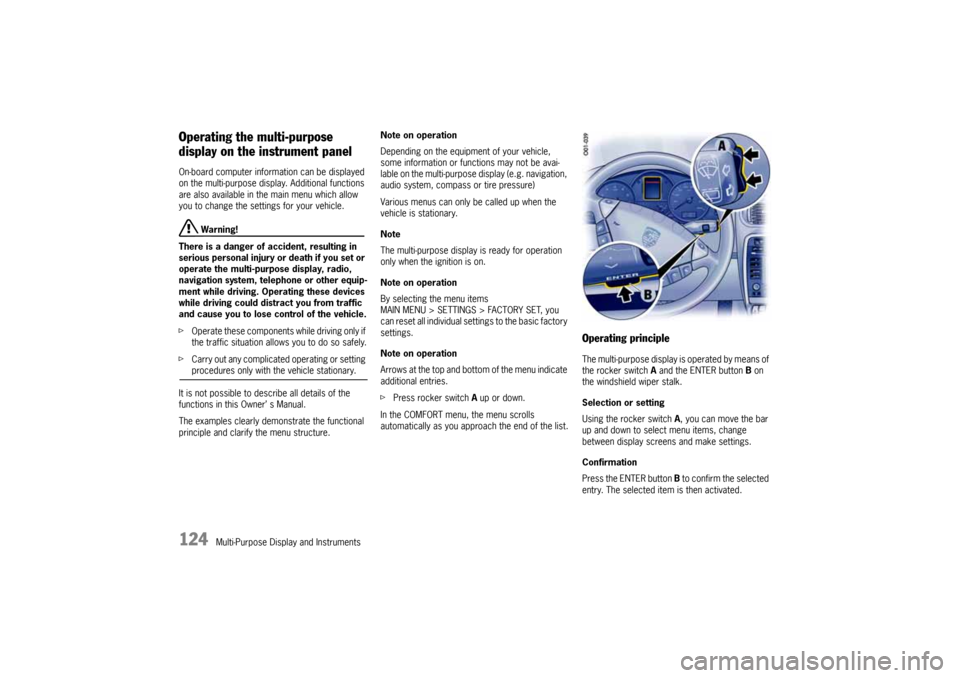
Operating principleThe multi-purpose display is operated by means of
the rocker switch A and the ENTER button B on
the windshield wiper stalk.
Selection or setting
Using the rocker switch A, you can move the bar
up and down to select menu items, change
between display screens and make settings.
Confirmation
Press the ENTER button B to confirm the selected
entry. The selected item is then activated.
10_Cayenne_21_KW17.book Seite 124 Donnerstag, 9. April 2009 3:33 15
Page 125 of 379
Multi-Purpose Display and Instruments
125
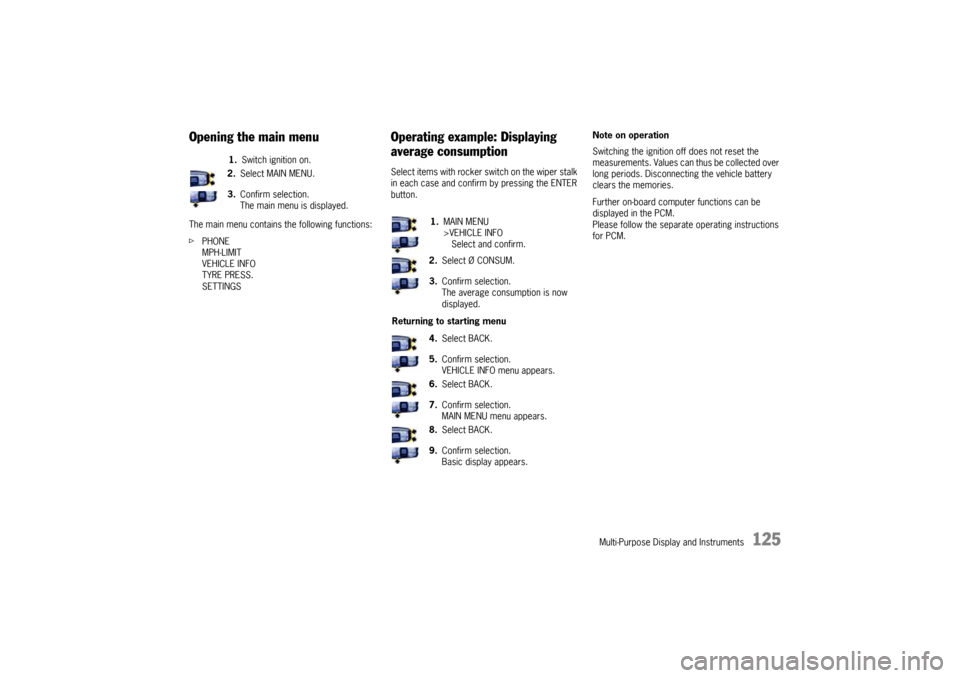
Opening the main menuThe main menu contains the following functions:
fPHONE
MPH-LIMIT
VEHICLE INFO
TYRE PRESS.
SETTINGS
Operating example: Displaying
average consumptionSelect items with rocker switch on the wiper stalk
in each case and confirm by pressing the ENTER
button.Note on operation
Switching the ignition off does not reset the
measurements. Values can thus be collected over
long periods. Disconnecting the vehicle battery
clears the memories.
Further on-board computer functions can be
displayed in the PCM.
Please follow the separate operating instructions
for PCM. 1.Switch ignition on.
2.Select MAIN MENU.
3.Confirm selection.
The main menu is displayed.
1.MAIN MENU
>VEHICLE INFO
Select and confirm.
2.Select Ø CONSUM.
3.Confirm selection.
The average consumption is now
displayed.
Returning to starting menu
4.Select BACK.
5.Confirm selection.
VEHICLE INFO menu appears.
6.Select BACK.
7.Confirm selection.
MAIN MENU menu appears.
8.Select BACK.
9.Confirm selection.
Basic display appears.
10_Cayenne_21_KW17.book Seite 125 Donnerstag, 9. April 2009 3:33 15
Page 127 of 379

Multi-Purpose Display and Instruments
127
Displaying/resetting average
speed
Displaying range on remaining fuelThe range on remaining fuel is continuously
recomputed while driving based on fuel level,
current consumption and average consumption.
Displaying tire pressureThis display is available only in conjunction with the
Tire Pressure Monitoring option.
The current tire pressures at the actually present
levels are displayed in the “Tyre pressure” screen
of the on-board computer. These values would be
identical to those of a pressure gage connected to
the four valves. These pressures change while the
vehicle is being driven.
– The tire pressures increase as the temperature
in the tires rises, e.g. during high-speed
motorway driving.
– The tire pressures decrease as the tempera-
tures drop, e.g. during trips in cold regions
(such as mountains).
The values displayed therefore do not allow
conclusions to be drawn about possible pressure
deviations.
fIn order to display pressure deviations from
the prescribed pressure, select the menu item
TYRE PRESS. in the MAIN MENU.
Displaying compassThis display is available only in conjunction with the
Compass or PCM option.Displaying navigation informationNavigation information can also be displayed on
the multi-purpose display.
This display is available only in conjunction with the
Navigation (PCM) option. Displaying average speed
1.Switch ignition on.
2.Select Ø MPH.
The average speed is displayed.
The displayed values are based on the
distance travelled since the last reset to
“zero”.
Resetting average speed
3.Select Ø MPH.
The average speed is displayed.
4.Press the ENTER button for longer than
1second.
1.Switch ignition on.
2.Select remaining range.1.Switch ignition on.
2.Select TYRE PRESS.1.Switch ignition on.
2.Select COMPASS.
1.Switch ignition on.
2.Select NAVIGATION.
The navigation arrows are displayed.
10_Cayenne_21_KW17.book Seite 127 Donnerstag, 9. April 2009 3:33 15
Page 130 of 379
130
Multi-Purpose Display and Instruments
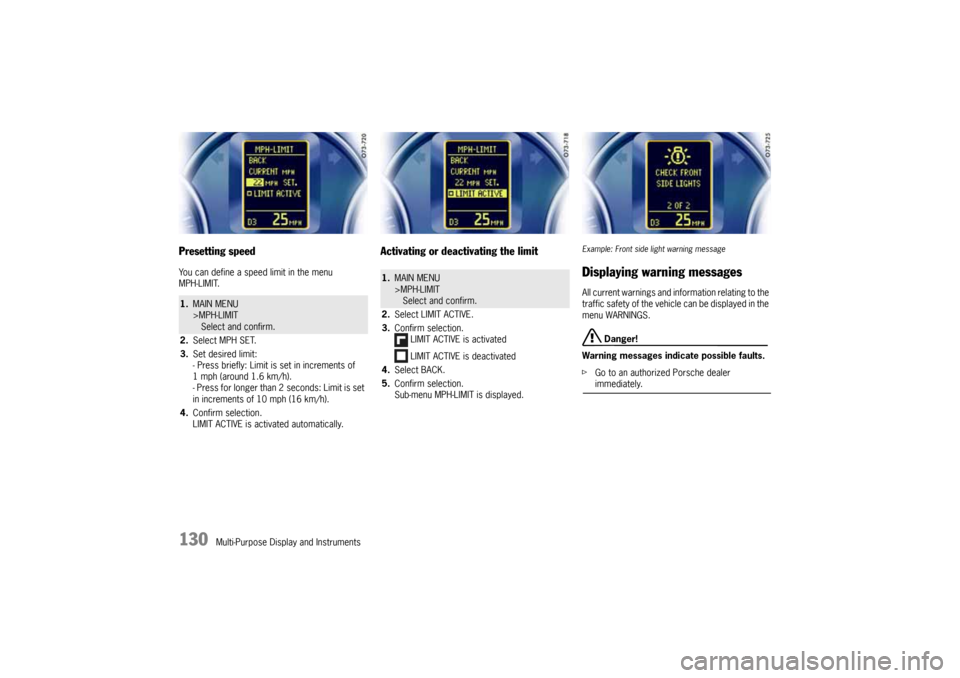
Presetting speedYou can define a speed limit in the menu
MPH-LIMIT.
Activating or deactivating the limit
Example: Front side light warning messageDisplaying warning messagesAll current warnings and information relating to the
traffic safety of the vehicle can be displayed in the
menu WARNINGS.
Danger!
Warning messages indicate possible faults.
fGo to an authorized Porsche dealer immediately.
1.MAIN MENU
>MPH-LIMIT
Select and confirm.
2.Select MPH SET.
3.Set desired limit:
- Press briefly: Limit is set in increments of
1 mph (around 1.6 km/h).
- Press for longer than 2 seconds: Limit is set
in increments of 10 mph (16 km/h).
4.Confirm selection.
LIMIT ACTIVE is activated automatically.
1.MAIN MENU
>MPH-LIMIT
Select and confirm.
2.Select LIMIT ACTIVE.
3.Confirm selection.
LIMIT ACTIVE is activated
LIMIT ACTIVE is deactivated
4.Select BACK.
5.Confirm selection.
Sub-menu MPH-LIMIT is displayed.
10_Cayenne_21_KW17.book Seite 130 Donnerstag, 9. April 2009 3:33 15
Page 132 of 379
132
Multi-Purpose Display and Instruments
Displaying average consumptionNote on operation
fFor information on the operating principle of
the multi-purpose display:
Please see the chapter “OPERATING
PRINCIPLE” on Page 124.
Setting Tire Pressure Monitoring
Danger!
Risk of serious personal injury or death.
Driving the vehicle with low tire pressure
increases risk of a tire failure and resulting
loss of control. Furthermore, low tire
pressure increases rate of wear of the
affected tires.
Despite the advantages offered by Tire
Pressure Monitoring, it is not a substitute for
proper tire maintenance, and it is still the
driver’s responsibility to update the settings
in the multi-purpose display and maintain the
correct tire pressure, even if under-inflation
has not reached the level to trigger illumina-
tion of Tire Pressure Monitoring low tire
pressure message. Low tire pressure
reduces the road safety of the vehicle and
destroys the tire and wheel.
fWhen a flat tire has been displayed, immedi-
ately stop in a suitable place and check the
tires for damage. If necessary, remedy the damage with tire sealant or fit the spare wheel.
fDo not by any means continue to drive with
leaking tires.
fSealing the tire with the tire sealant is only an
emergency repair so you can drive to the next
authorized Porsche dealer.
The maximum permitted speed is 50 mph
(80 km/h).
fDefective tires must be immediately replaced
by an authorized Porsche dealer.
Tire repairs are not permissible under any
circumstances.
fDo not drive with tires whose tire pressure
drops again in a short period of time. Have
tires checked by an authorized Porsche dealer.
fIf Tire Pressure Monitoring is defective (e.g.
defective wheel transmitters), contact an
authorized Porsche dealer immediately and
have the damage repaired.
The tire pressure will not be monitored by
defective Tire Pressure Monitoring.
For information on warning messages on the
multi-purpose display: Please see the chapter
“OVERVIEW OF WARNING MESSAGES” on
Page 149.
fTire Pressure Monitoring gives a warning about
tire damage due to insufficient tire pressure as
well as about a gradual loss of pressure due to
foreign objects. Tire Pressure Monitoring
cannot warn you about tire damage that
occurs suddenly (e.g. flat tire due to acute
external effects).
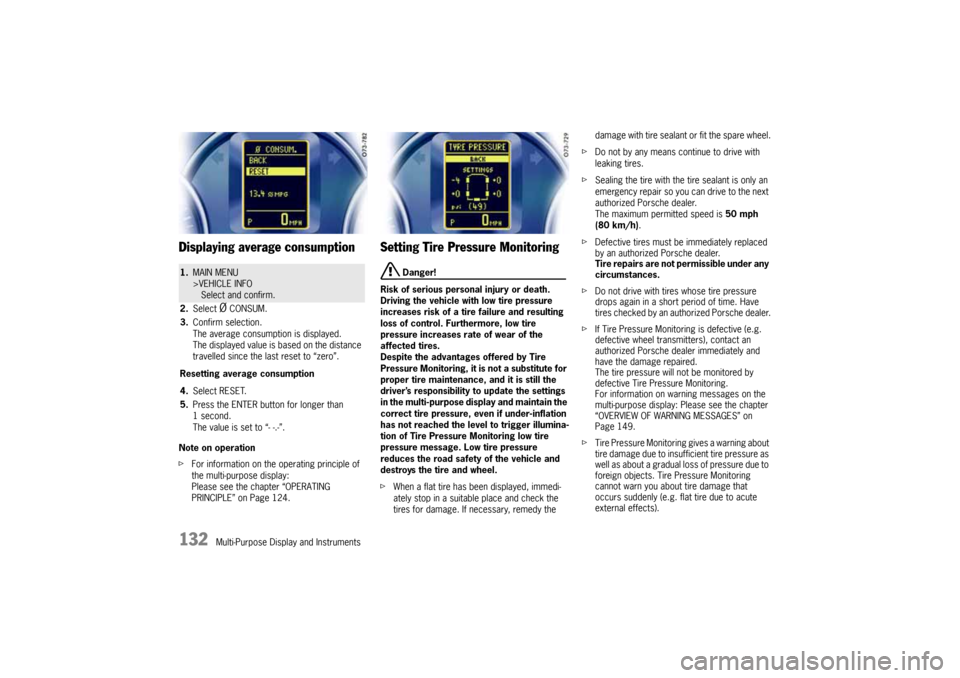
1.MAIN MENU
>VEHICLE INFO
Select and confirm.
2.Select
Ø CONSUM.
3.Confirm selection.
The average consumption is displayed.
The displayed value is based on the distance
travelled since the last reset to “zero”.
Resetting average consumption
4.Select RESET.
5.Press the ENTER button for longer than
1second.
The value is set to “- -.-”.
10_Cayenne_21_KW17.book Seite 132 Donnerstag, 9. April 2009 3:33 15
Page 148 of 379
148
Multi-Purpose Display and Instruments
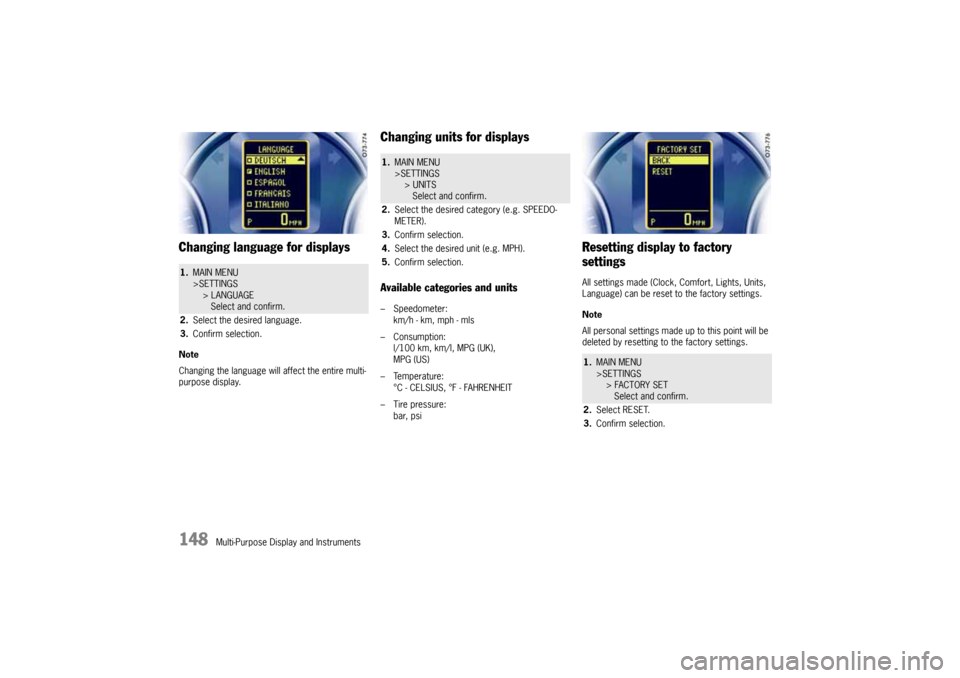
Changing language for displaysNote
Changing the language will affect the entire multi-
purpose display.
Changing units for displaysAvailable categories and units– Speedometer:
km/h - km, mph - mls
– Consumption:
l/100 km, km/l, MPG (UK),
MPG (US)
– Temperature:
°C - CELSIUS, °F - FAHRENHEIT
– Tire pressure:
bar, psi
Resetting display to factory
settingsAll settings made (Clock, Comfort, Lights, Units,
Language) can be reset to the factory settings.
Note
All personal settings made up to this point will be
deleted by resetting to the factory settings.
1.MAIN MENU
>SETTINGS
> LANGUAGE
Select and confirm.
2.Select the desired language.
3.Confirm selection.
1.MAIN MENU
>SETTINGS
> UNITS
Select and confirm.
2.Select the desired category (e.g. SPEEDO-
METER).
3.Confirm selection.
4.Select the desired unit (e.g. MPH).
5.Confirm selection.
1.MAIN MENU
>SETTINGS
> FACTORY SET
Select and confirm.
2.Select RESET.
3.Confirm selection.
10_Cayenne_21_KW17.book Seite 148 Donnerstag, 9. April 2009 3:33 15
Page 180 of 379

180
Driving and Driving Safety Switching Sport mode on and off
Sport mode can be activated when the ignition is
switched on and when the on-road driving program
High Range (without reduction) is selected.
fPress SPORT button E in the center console.
When Sport mode is switched on, the light-
emitting diode F in the SPORT button is lit.
When Sport mode is switched on, the logo SPORT
appears on the multi-purpose display.
After the ignition is switched off, Sport mode is
automatically reset to Normal mode.
Warning messages
A warning appears on the multi-purpose display of
the instrument panel in the event of a fault.
fFor information on warning messages on the
multi-purpose display:
Please see the chapter “OVERVIEW OF
WARNING MESSAGES” on Page 149.Vehicles with air suspension
If you wish to use the characteristics of Sport
mode and the sports exhaust system, but would
like a more comfortable running-gear setup, you
can:
– switch PASM and PDCC separately to Normal
or Comfort mode and/or
– raise the ride height of the vehicle.
fPress the corresponding PASM button in the
center console. The light-emitting diode in the
button of the selected running-gear setup
lights up.
In addition, the selected running-gear setup is
shown on the multi-purpose display of the
instrument panel for approx. 12 seconds.
Please see the chapter “PORSCHE ACTIVE
SUSPENSION MANAGEMENT (PASM)” on
Page 193.
Please see the chapter “PORSCHE DYNAMIC
CHASSIS CONTROL (PDCC)” on Page 194.
Press the rocker switch in the center console for-
ward. The corresponding light-emitting diode next
to the rocker switch lights up continuously after
the adjustment process. The level change is also
indicated on the multi-purpose display of the in-
strument panel.
Please see the chapter “AIR SUSPENSION WITH
LEVEL CONTROL AND HEIGHT ADJUSTMENT” on
Page 190.
10_Cayenne_21_KW17.book Seite 180 Donnerstag, 9. April 2009 3:33 15
Page 363 of 379
Index
363
Air pressure
Comfort tire pressure (bar/psi)
......................... 354
Data (bar/psi)
................................................ 354
Plate
............................................................ 348
Warning message on multi-purpose display
......... 151
Air suspension
.............................................. 225
, 238
Compressor connection for inflating tires.
.......... 308
Displaying status of level control
on multi-purpose display
.................................. 131
Lowering the car
............................................ 191
Lowering the car for loading
............................ 191
Overview
...................................................... 190
Raising the car
.............................................. 191
Setting loading level
....................................... 191
Setting low level
............................................. 191
Setting normal level
........................................ 191
Setting special terrain level
.............................. 191
Setting terrain level
........................................ 191
Warning message on the multi-purpose display
.... 192
Air vents
Adjusting
........................................................ 79
Opening/closing
.............................................. 79
Airbag
Airbag warning light on the tachometer
................ 49
Automatic deactivation of the passenger airbag
..... 47
Care Instructions
............................................ 277
Disposal
......................................................... 46
Function
......................................................... 46
Functional description
....................................... 45
Installation location
........................................... 45
Passenger airbag warning light
........................... 48
Unit
............................................................... 58
Air-conditioning compressor
Information on air-conditioning compressor
........... 65
Switching on/off (ECON mode)
........................... 65
Air-conditioning sensors
For 2-zone air conditioning
................................. 71
For 4-zone air conditioning
................................. 76
Alarm button
............................................................ 17
Alarm system
......................................................... 245
Function
....................................................... 245
Function indication
......................................... 247
Functional description
..................................... 245
Hitching a trailer
............................................ 230
Persons/animals remaining in the locked vehicle
. 246
Switching off alarm
......................................... 245
Switching off
passenger compartment monitoring system
....... 246
Switching on/off
............................................ 246
When disconnecting battery
............................. 321
Alcantara
Care instructions
............................................ 277
All-Season tires
Overview
................................... 350
, 351
, 352
All-Terrain tires
Overview
................................... 350
, 351
, 352
All-wheel drive
Functional description
..................................... 182
Warning message on multi-purpose display
......... 154
Aluminum rims
Care instructions
............................................ 276
Inscription
..................................................... 291
Antifreeze
.............................................................. 255
In coolant
..................................................... 255
In washer fluid
............................................... 258
Anti-freeze content
.................................................. 255
Anti-lock brake system (ABS)
Functional description
..................................... 186
Off-road ABS functional description
.................... 187
Warning light on the tachometer
....................... 187
Warning message on multi-purpose display
......... 153
Armrest
Opening front storage compartment
.................. 224
Opening rear storage compartment
................... 224
Ashtray
Front, emptying
............................................. 227
Front, opening
............................................... 227
Rear, emptying
.............................................. 228
Rear, opening
................................................ 228
Assembly aid for wheel changes
................................ 303
Assistance when driving downhill
(Engine Braking Support)
.......................................... 189
Audio
Tips
............................................................. 218
Audio interface, installation position
............................ 221
auto (light switch)
Functional description, driving light assistant
....... 104
Switching on driving light assistant
.................... 104
AUTO button
2-zone air conditioning
...................................... 71
4-zone air conditioning
...................................... 76
Automatic (Tiptronic S)
Functional description
..................................... 170
Gear selector
................................................ 171
Rocker switches on the steering wheel
................. 58
Selector lever
................................................ 171
Automatic anti-dazzle function for interior mirror
.............57
Automatic anti-dazzle operation
...................................57
Automatic brake differential (ABD)
Automatic deactivation
....................................184
Functional description
.....................................182
Automatic headlight beam adjustment
Functional description
.....................................106
Automatic speed control (cruise control)
Accelerating
..................................................167
Decelerating
..................................................168
Functional description
.....................................167
Interrupting operation
......................................168
Storing speed
................................................167
Switching off
.................................................168
Switching on
..................................................167
Automatic transmission fluid
......................................260
Automatically closing the rear lid
..................................25
AUX interface, installation position
..............................221
Average consumption
Displaying/resetting average consumption
on multi-purpose display
..................................132
Avoiding false alarms
...............................................245
BBaby seat
Installing with LATCH system
..............................53
LATCH restraint system
.....................................53
Prescribed installation direction
..........................50
Battery
..................................................................220After charging
................................................325
Care
............................................................321
Changing in car key
........................................322
Charge state
.................................................320
Charging
.......................................................325
General information
........................................320
Location
.......................................................320
Procedure after battery connection
...................322
Putting vehicle into operation
............................322
Replacing
......................................................321
Starting with jumper cables
..............................323
Vehicle electrical system voltage indication
.........121
Voltage indication
...........................................121
Warning message on multi-purpose display
.........152
Winter driving
................................................321
Before driving off
.............................................. 4
, 196
10_Cayenne_21_KW17.book Seite 363 Donnerstag, 9. April 2009 3:33 15
Page 367 of 379
Index
367
Emergency unlocking
Of the filler flap
.............................................. 267
Spare wheel bracket
....................................... 311
Emission control (check engine)
Functional description
..................................... 123
Warning light on the tachometer
....................... 123
Emission Control System
.......................................... 263
Engaging the rear differential lock
.............................. 178
Engine
Break in hints
.................................................... 6
Cooling system
.............................................. 122
Data
............................................................ 349
Idling
........................................................... 171
Starting
........................................................ 160
Stopping
...................................................... 161
Engine Braking Support
(assistance when driving downhill)
.............................. 189
Engine drag torque control (MSR)
Functional description
..................................... 184
Engine oil
.............................................................. 251Change
........................................................ 253
Change quantity
............................................. 359
Checking oil level with oil dipstick
...................... 252
Choosing the right oil
...................................... 253
Consumption
................................................. 349
Dipstick
........................................................ 253
Engine oil pressure
......................................... 153
Filler opening
................................................. 254
General information
........................................ 253
Level
........................................................... 252
Oil-level warning on the multi-purpose display
...... 252
Recommendation
........................................... 253
Temperature gage
......................................... 120
Topping up
................................................... 254
Engine oil level
....................................................... 252
Checking
...................................................... 252
Entry & Drive
Locking vehicle door with Porsche Entry & Drive
.... 21
Opening/closing Panorama roof system
with car key
.................................................... 99
Unlocking vehicle door with Porsche Entry & Drive
.20
Entry aid
Functional description
....................................... 39
Switching on/off
.............................................. 39
Error messages
Displaying
..................................................... 130
Overview of warning messages
on the multi-purpose display
............................. 149
Exhaust gas
Monitoring warning light
........................ 117
, 119
Exhaust pipes
............................................................. 3
Stainless steel tailpipes, care instructions
........... 276
Exit aid
Functional description
....................................... 39
Switching on/off
.............................................. 39
External audio source, interface
................................. 221
FFabric linings, care instructions
................................. 277
Factory settings
Resetting multi-purpose display
......................... 148
Faults
After charging the battery
................................ 325
Emergency operation of automatic rear lid
........... 26
Emergency operation of ignition key
in ignition lock
............................................... 159
Emergency operation of rear lid
.......................... 31
Emergency operation of sliding/lifting roof
............ 94
Emergency operation
of the Panorama roof system
........................... 101
Emergency operation of the spare wheel bracket
.311
Emergency operation of Tiptronic selector lever
.. 175
Emergency unlocking of the filler flap
................. 267
Overview of warning messages
on the multi-purpose display
............................. 149
Panorama roof system
...................................... 99
ParkAssist
.................................................... 240
Parking heater
................................................. 85
Power windows
................................................ 90
Sliding/lifting roof
............................................. 94
When opening and closing
................................. 31
Filler flap
............................................................... 267Emergency unlocking
...................................... 267
Filling pressure
Plate location
................................................ 348
Reducing
............................................ 307
, 308
Tires (bar/psi)
............................................... 354
Warning light on speedometer
.......................... 141
Warning message on multi-purpose display
......... 151
Filter
Air cleaner maintenance instructions
.................. 260
Particle filter maintenance instructions
............... 260
Fire extinguisher
....................................................... 40
Floor mats, care instructions
..................................... 277
Fluids and fuels
Brake fluid
....................................................359
Coolant
........................................................359
Engine oil
......................................................359
Fuel
.............................................................359
Hydraulic fluid for power steering
......................259
Overview
......................................................359
Washer fluid
..................................................359
Folding key bit in/out
.................................................16
Folding wedges to prevent rolling
...............................296
Footbrake
..............................................................163
Warning light
.................................................164
Footwell lightning
Dimming
.......................................................109
Four-wheel drive
Functional description
.....................................182
Warning message on multi-purpose display
.........154
Four-zone air conditioning
Air-conditioning sensors
.....................................76
Controlling rear air-conditioned areas
with the front control panel
................................79
Defrosting windshield
........................................75
Disabling control panel (rear)
..............................79
Disabling control panel for air-conditioned areas
at the rear
.......................................................79
Operating overview, front
...................................75
Operating overview, rear
...................................76
REST mode
.....................................................65
Setting air distribution
.......................................77
Setting air quantity
...........................................77
Setting temperature
..........................................77
Switching ECON mode on/off
.............................65
Switching Mono function on/off
...........................78
Switching on automatic recirculating-air mode
.......78
Switching on recirculating-air mode
.....................78
Using engine residual heat
.................................65
Fresh-air intake
.........................................................80
Front seat
Adjusting
........................................................36
Drawer under the right front seat
......................225
Passenger mirror as parking aid
.........................38
Recalling settings (memory)
...............................37
Storing driver’s seat settings (memory)
................38
Storing passenger’s seat settings (memory)
..........38
Front seat with memory
..............................................37
Storing door mirror settings
...............................56
Front seats
..............................................................34
10_Cayenne_21_KW17.book Seite 367 Donnerstag, 9. April 2009 3:33 15
Page 371 of 379
Index
371
Emergency operation of ignition key
in ignition lock
............................................... 159
Emergency operation of rear lid
.......................... 31
Emergency operation of sliding/lifting roof
........... 94
Emergency operation, Panorama roof system
..... 101
Emergency operation, spare wheel bracket
........ 311
Emergency unlocking of the filler flap
................ 267
Overview of warning messages
on the multi-purpose display
............................. 149
Panorama roof system
...................................... 99
ParkAssist
.................................................... 240
Parking heater
................................................. 85
Power windows
................................................ 90
Tiptronic selector lever emergency operation
...... 175
When opening and closing
................................. 31
Manual air conditioning
Defrosting windshield
........................................ 67
Information on air-conditioning compressor
........... 65
Opening the cover flap
...................................... 64
Operating overview
........................................... 67
REST mode
..................................................... 65
Setting air distribution
....................................... 68
Setting air quantity
........................................... 68
Setting fan
...................................................... 68
Setting temperature
......................................... 68
Switching air-conditioning compressor on/off
........ 65
Switching ECON mode on/off
............................. 65
Switching on recirculating-air mode
..................... 68
Using engine residual heat
................................. 65
Manual headlight beam adjustment
............................. 234
Manual transmission
Clutch
.......................................................... 169
Shift pattern
.................................................. 169
Maximum permitted engine speeds
............................ 169
Measurements, Technical data
.................................. 360
Memory
.................................................................. 37Automatic storage
............................................ 38
Recalling seat settings
...................................... 37
Storing driver’s seat settings
.............................. 38
Storing passenger’s seat settings
....................... 38
Minor repairs
In the event of a flat tire
.................................. 295
Jack in the luggage compartment
..................... 291
Securing the vehicle against rolling
................... 295
Tool kit in the luggage compartment
................. 292
Towing the vehicle
.......................................... 342
Mirrors
.......................................................... 62
, 234
Activating synchronous adjustment
of door mirrors
.............................................. 143
Additional door mirrors when towing a trailer
....... 234
Adjusting door mirrors
...................................... 55
Adjusting door mirrors as parking aid
.................. 56
Adjusting the door mirrors synchronously
............. 55
Automatic anti-dazzle function for interior mirror
.... 57
Folding in door mirrors
...................................... 55
Interior mirror
.................................................. 57
Storing door mirror settings (memory)
................. 56
Switching automatic anti-dazzle operation
on and off
....................................................... 57
Switching door mirror heating on/off
................... 56
Switching on manual anti-dazzle operation
............ 57
Unfolding door mirrors
...................................... 55
Motion sensor (passenger compartment monitoring)
Switching off on the multi-purpose display
.......... 142
Moving-off assistant
For Tiptronic S (hillholder)
................................ 187
On vehicles with manual transmission
(Porsche Drive-Off Assistant)
............................ 188
Multi-functional steering wheel
Functional description
....................................... 60
Illumination of steering wheel buttons,
switching on/off
............................................... 61
Operating the function keys
................................ 60
Multi-purpose display
Activating synchronous mirror adjustment
.......... 143
Changing settings
for opening and locking the vehicle
.................... 143
Changing settings of central locking system
....... 143
Displaying status of level control
....................... 131
Displaying status of locks/reduction
.................. 131
Displaying warning messages
........................... 130
Displaying/resetting average consumption
.......... 132
Gear display for Tiptronic S
.............................. 171
Operating principle
......................................... 124
Overview of warning messages
......................... 149
Resetting to factory settings
............................ 148
Setting a speed limit
....................................... 129
Setting compass
............................................ 147
Setting language for displays
........................... 148
Setting lighting off delay
.................................. 146
Setting the clock
............................................ 146
Setting the tire type and size
............................ 134
Setting Tire Pressure Monitoring
....................... 132
Setting tire sealant/sealing set
......................... 140
Setting units of displays
..................................148
Setting vehicle loading
....................................135
Switching daytime driving lights on/off
...............145
Switching off passenger compartment monitoring
142
Using the telephone
........................................128
NNavigation system
...................................................220
Nearfield lighting
.....................................................124
Normal level
...........................................................190
OOctane rating, fuel
...................................................269
Octane ratings
........................................................269
Odometer
Display
.........................................................121
Resetting
......................................................121
Off delay
Setting
.........................................................146
Switching on
..................................................109
Off-road
Crossing obstacles
.........................................201
Driving downhill
..............................................198
Driving systems for off-road driving
...................196
Engaging the center differential lock
..................178
Engaging the rear differential lock
.....................178
Low Range indicator light
.................................179
Rules for off-road driving
..................................195
Sand
............................................................201
Setting special terrain level
..............................191
Setting terrain level
.........................................191
Switching on Low Range (reduction)
...................178
Track ruts
.....................................................202
Uphill driving
..................................................197
Water crossing
..............................................199
Off-road ABS
..........................................................198
Off-road ABS functional description
.............................187
Off-road driving
Crossing obstacles
.........................................201
Downhill driving
..............................................198
Driving rules
..................................................195
Engaging the center differential lock
..................178
Engaging the rear differential lock
.....................178
Low Range (reduction) indicator light
.................179
Recommendation
...........................................196
Rules for driving
.............................................195
10_Cayenne_21_KW17.book Seite 371 Donnerstag, 9. April 2009 3:33 15