PCM PORSCHE CAYNNE 2010 1.G Owners Manual
[x] Cancel search | Manufacturer: PORSCHE, Model Year: 2010, Model line: CAYENNE, Model: PORSCHE CAYENNE 2010 1.GPages: 379, PDF Size: 13.91 MB
Page 8 of 379
8
Table of ContentsMulti-Purpose Display
and Instruments .............................. 115Instrument Panel USA Models ...................... 117
Instrument Panel Canada Models.................. 119
Oil Temperature Gage ................................. 120
Tachometer................................................ 120
Clock ......................................................... 120
Fuel Gage................................................... 120
Speedometer ............................................. 120
Odometer .................................................. 121
Voltmeter ................................................... 121
Cooling System .......................................... 122
Emission Control......................................... 123
Operating the multi-purpose display on the
instrument panel ......................................... 124
Opening the main menu............................... 125
Operating example: Displaying average
consumption .............................................. 125
Displaying/resetting average speed ............. 127
Displaying range on remaining fuel ............... 127
Displaying tire pressure ............................... 127
Displaying compass .................................... 127
Displaying navigation information ................. 127
Operating the telephone via the
multi-purpose display .................................. 128
Setting speed limit on the multi-purpose
display ....................................................... 129
Displaying warning messages ...................... 130
Displaying status of level control .................. 131
Displaying status of locks/reduction ............. 131
Displaying average consumption .................. 132
Setting Tire Pressure Monitoring .................. 132Switching off passenger compartment
monitoring on the multi-purpose display ........142
Synchronous adjustment of door mirrors ......143
Changing settings for opening and locking
the vehicle ..................................................143
Switching daytime driving lights on/off..........145
Setting lighting off delay ..............................146
Setting the clock .........................................146
Setting compass.........................................147
Changing language for displays....................148
Changing units for displays ..........................148
Resetting display to factory settings .............148
Overview of warning messages...............149
Driving and Driving Safety ................ 157Ignition Lock/Steering Lock .........................158
Starting and Stopping the Engine .................160
Parking Brake .............................................162
Brakes .......................................................163
Cruise Control ............................................167
Manual transmission, clutch .........................169
Tiptronic S..................................................170
Selector Lever Positions ..............................171
Driving Programs for On-Road and
Off-Road Driving ..........................................177
Power-Transmission and
Running-Gear Control Systems .....................181
Air Suspension with Level Control and
Height Adjustment .......................................190
Porsche Active Suspension Management
(PASM) .......................................................193
Porsche Dynamic Chassis Control (PDCC) .....194
Off-Road Driving ..........................................195
Luggage Compartment,
Loadspace and Storage.................... 203Folding rear seats forward and returning
to upright position ...................................... 204
Loadspace ................................................ 207
Cargo management system ........................ 208
Luggage Compartment Cover ..................... 211
Luggage safety net .................................... 212
Ski Bag ..................................................... 214
Roof Transport System............................... 216
Off-road roof-mounted Headlights
Cayenne S Transsyberia............................. 217
Car Audio Operation/Tips............................ 218
Porsche Communication Management
(PCM) ........................................................ 220
iPod, USB and AUX..................................... 221
Storage ..................................................... 222
Cupholder.................................................. 226
Ashtray...................................................... 227
Cigarette Lighter ........................................ 228Trailer Hitch .................................... 229Trailer Coupling.......................................... 230
Loading Information.................................... 231Parking ........................................... 236Parking Aids .............................................. 237
Swivelling down mirror glass as parking aid.. 241
Garage door opener................................... 241
10_Cayenne_21_KW17.book Seite 8 Donnerstag, 9. April 2009 3:33 15
Page 13 of 379
Overview Illustrations
13
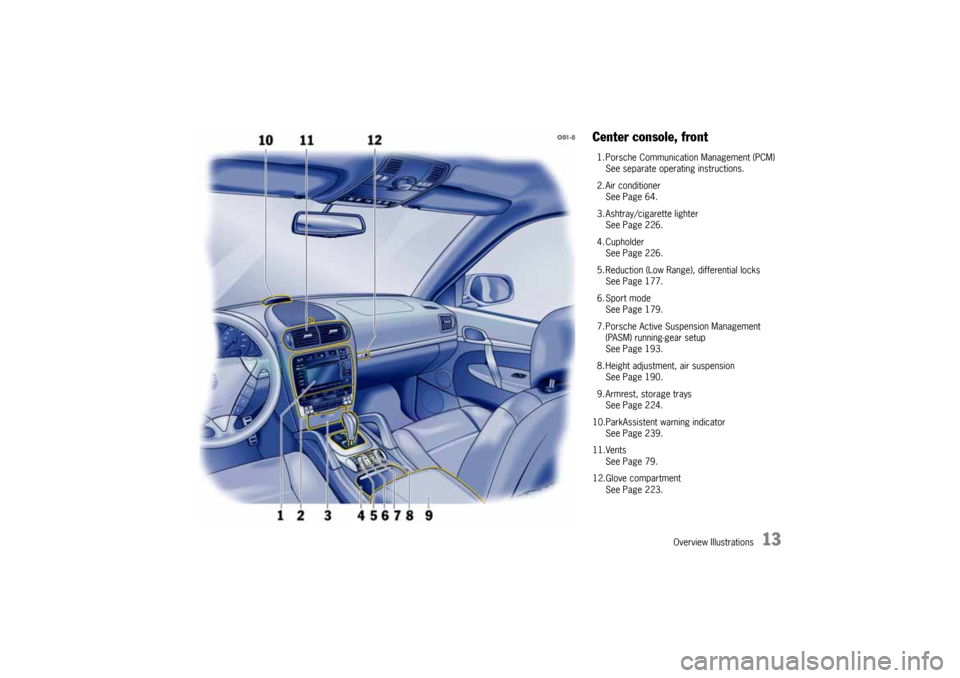
Center console, front1. Porsche Communication Management (PCM)
See separate operating instructions.
2. Air conditioner
See Page 64.
3. Ashtray/cigarette lighter
See Page 226.
4. Cupholder
See Page 226.
5. Reduction (Low Range), differential locks
See Page 177.
6. Sport mode
See Page 179.
7. Porsche Active Suspension Management
(PASM) running-gear setup
See Page 193.
8. Height adjustment, air suspension
See Page 190.
9. Armrest, storage trays
See Page 224.
10.ParkAssistent warning indicator
See Page 239.
11.Vents
See Page 79.
12.Glove compartment
See Page 223.
10_Cayenne_21_KW17.book Seite 13 Donnerstag, 9. April 2009 3:33 15
Page 60 of 379
60
Seats, Mirrors and Steering Wheel
Multi-Functional Steering Wheel
Warning!
There is a danger of accident if you set or
operate the on-board computer, radio, navi-
gation system, telephone or other equipment
when driving.
This could distract you from the traffic and
cause you to lose control of the vehicle resul-
ting in serious personal injury or death.
fOperate the components while driving only if
the traffic situation allows you to do so safely.
fCarry out any complicated operating or setting procedures only with the vehicle stationary.
Depending on the equipment in your vehicle, you
can use these function keys to operate the
following Porsche communication systems:
–PCM
–Radio
– Telephone,
– TV tuner,
– CD audio, DVD audio, DVD video,
or an iPod or USB storage device connected via
the universal audio interface.
Readiness for operation of multi-
functional steering wheel– With ignition switched on and
– With Porsche communication systems
switched on.
fPlease read and understand the operating in-
structions supplied for the Porsche communi-
cation systems before operating the function
keys.
Note on operation
The Porsche communication systems cannot be
switched on and off using the multi-functional
steering wheel.
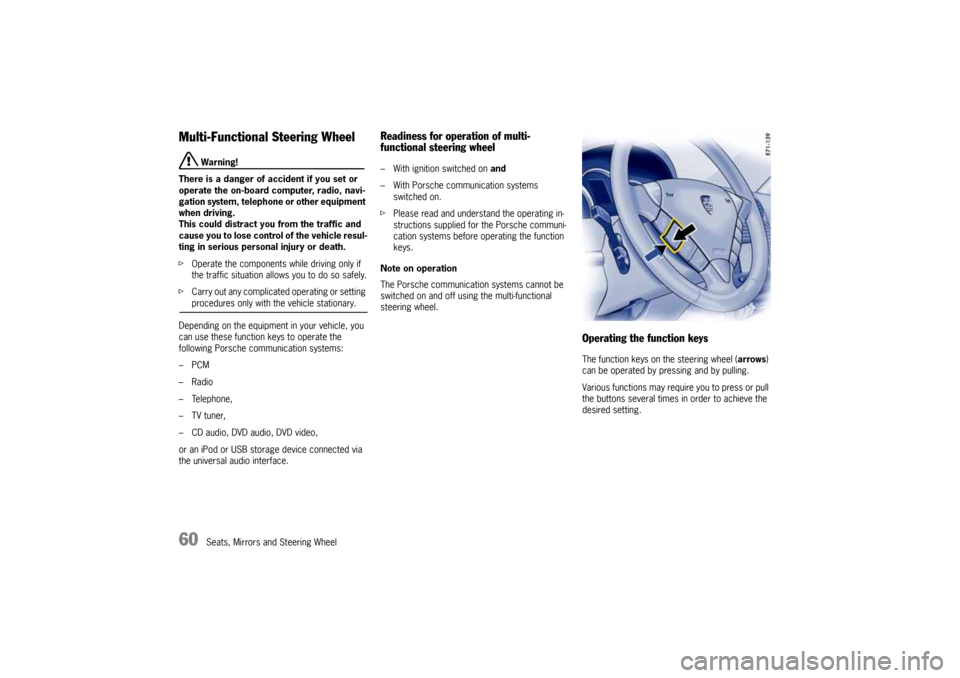
Operating the function keysThe function keys on the steering wheel (arrows)
can be operated by pressing and by pulling.
Various functions may require you to press or pull
the buttons several times in order to achieve the
desired setting.
10_Cayenne_21_KW17.book Seite 60 Donnerstag, 9. April 2009 3:33 15
Page 106 of 379
106
Lights, Turn Signals and Windshield Wipers
Automatic Headlight Beam
AdjustmentVehicles with Bi-Xenon headlights feature
automatic headlight beam adjustment.
When the ignition and the low beam are switched
on, the level of the headlight beam automatically
changes in accordance with the vehicle load. The
level of the headlight beam is automatically kept
constant during acceleration and braking.
Checking operation
1. Switch the low beam on.
2. Switch ignition on.
The light beam first dips all the way down and
is then adapted to the vehicle load. It this test
item is not met, the headlight beam adjustment
system must be checked by an authorized
Porsche dealer.
Turn signal/High Beam/Headlight
Flasher StalkTurn signals, low beam and high beam are ready
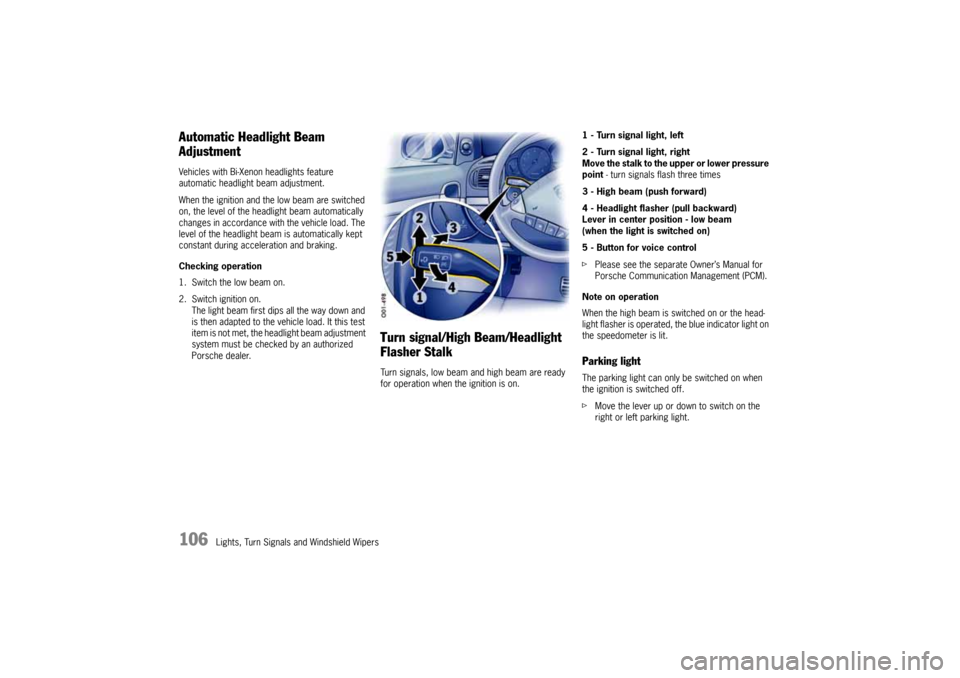
for operation when the ignition is on.1 - Turn signal light, left
2 - Turn signal light, right
Move the stalk to the upper or lower pressure
point - turn signals flash three times
3 - High beam (push forward)
4 - Headlight flasher (pull backward)
Lever in center position - low beam
(when the light is switched on)
5 - Button for voice control
fPlease see the separate Owner’s Manual for
Porsche Communication Management (PCM).
Note on operation
When the high beam is switched on or the head-
light flasher is operated, the blue indicator light on
the speedometer is lit.
Parking lightThe parking light can only be switched on when
the ignition is switched off.
fMove the lever up or down to switch on the
right or left parking light.
10_Cayenne_21_KW17.book Seite 106 Donnerstag, 9. April 2009 3:33 15
Page 125 of 379
Multi-Purpose Display and Instruments
125
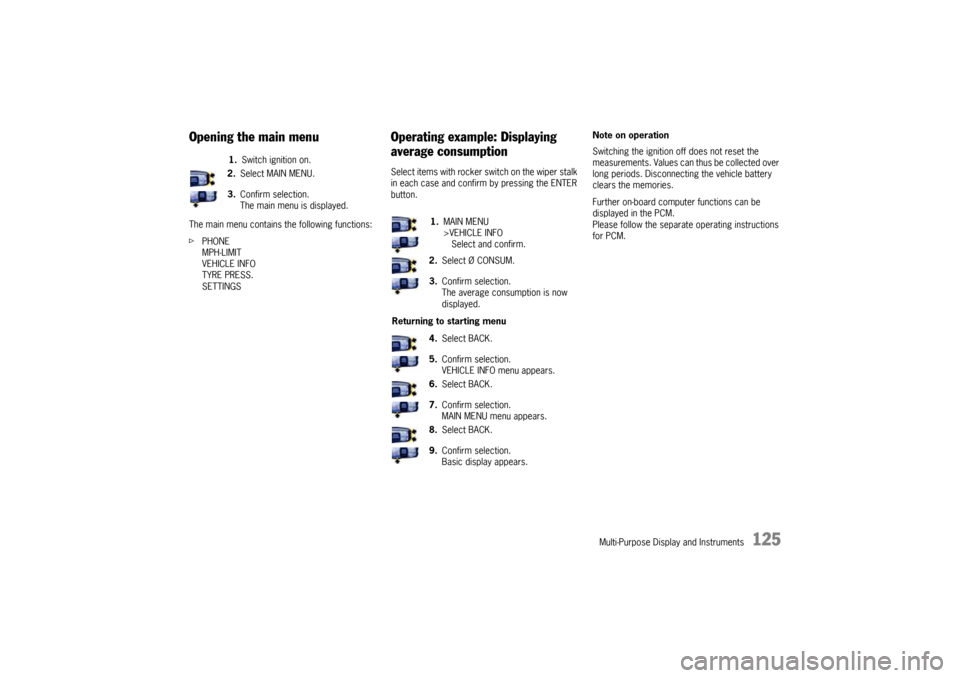
Opening the main menuThe main menu contains the following functions:
fPHONE
MPH-LIMIT
VEHICLE INFO
TYRE PRESS.
SETTINGS
Operating example: Displaying
average consumptionSelect items with rocker switch on the wiper stalk
in each case and confirm by pressing the ENTER
button.Note on operation
Switching the ignition off does not reset the
measurements. Values can thus be collected over
long periods. Disconnecting the vehicle battery
clears the memories.
Further on-board computer functions can be
displayed in the PCM.
Please follow the separate operating instructions
for PCM. 1.Switch ignition on.
2.Select MAIN MENU.
3.Confirm selection.
The main menu is displayed.
1.MAIN MENU
>VEHICLE INFO
Select and confirm.
2.Select Ø CONSUM.
3.Confirm selection.
The average consumption is now
displayed.
Returning to starting menu
4.Select BACK.
5.Confirm selection.
VEHICLE INFO menu appears.
6.Select BACK.
7.Confirm selection.
MAIN MENU menu appears.
8.Select BACK.
9.Confirm selection.
Basic display appears.
10_Cayenne_21_KW17.book Seite 125 Donnerstag, 9. April 2009 3:33 15
Page 127 of 379

Multi-Purpose Display and Instruments
127
Displaying/resetting average
speed
Displaying range on remaining fuelThe range on remaining fuel is continuously
recomputed while driving based on fuel level,
current consumption and average consumption.
Displaying tire pressureThis display is available only in conjunction with the
Tire Pressure Monitoring option.
The current tire pressures at the actually present
levels are displayed in the “Tyre pressure” screen
of the on-board computer. These values would be
identical to those of a pressure gage connected to
the four valves. These pressures change while the
vehicle is being driven.
– The tire pressures increase as the temperature
in the tires rises, e.g. during high-speed
motorway driving.
– The tire pressures decrease as the tempera-
tures drop, e.g. during trips in cold regions
(such as mountains).
The values displayed therefore do not allow
conclusions to be drawn about possible pressure
deviations.
fIn order to display pressure deviations from
the prescribed pressure, select the menu item
TYRE PRESS. in the MAIN MENU.
Displaying compassThis display is available only in conjunction with the
Compass or PCM option.Displaying navigation informationNavigation information can also be displayed on
the multi-purpose display.
This display is available only in conjunction with the
Navigation (PCM) option. Displaying average speed
1.Switch ignition on.
2.Select Ø MPH.
The average speed is displayed.
The displayed values are based on the
distance travelled since the last reset to
“zero”.
Resetting average speed
3.Select Ø MPH.
The average speed is displayed.
4.Press the ENTER button for longer than
1second.
1.Switch ignition on.
2.Select remaining range.1.Switch ignition on.
2.Select TYRE PRESS.1.Switch ignition on.
2.Select COMPASS.
1.Switch ignition on.
2.Select NAVIGATION.
The navigation arrows are displayed.
10_Cayenne_21_KW17.book Seite 127 Donnerstag, 9. April 2009 3:33 15
Page 128 of 379
128
Multi-Purpose Display and Instruments
Operating the telephone via the
multi-purpose displayNote
The telephone function of the multi-purpose
display is linked to both the PCM and the multi-
functional buttons on the steering wheel as well as
the control stalk.
A SIM card must be inserted in the drawer of
the PCM as a prerequisite for telephone
operation.
If the link to the network is lost, no PIN is entered,
no SIM card is inserted or the telephone is
switched off, a corresponding indication will
appear.
Note
The phone number of an incoming call is shown on
the multi-purpose display. The name of the caller
is shown only if the caller is stored in the telephone
book.Notes on operation
If the rocker switch is pressed for longer than one
second, the initial letters for which entries exist
are shown.
This allows the desired entry to be found more
quickly.
fFor information on the operating principle of
the multi-purpose display:
Please see the chapter “OPERATING
PRINCIPLE” on Page 124.
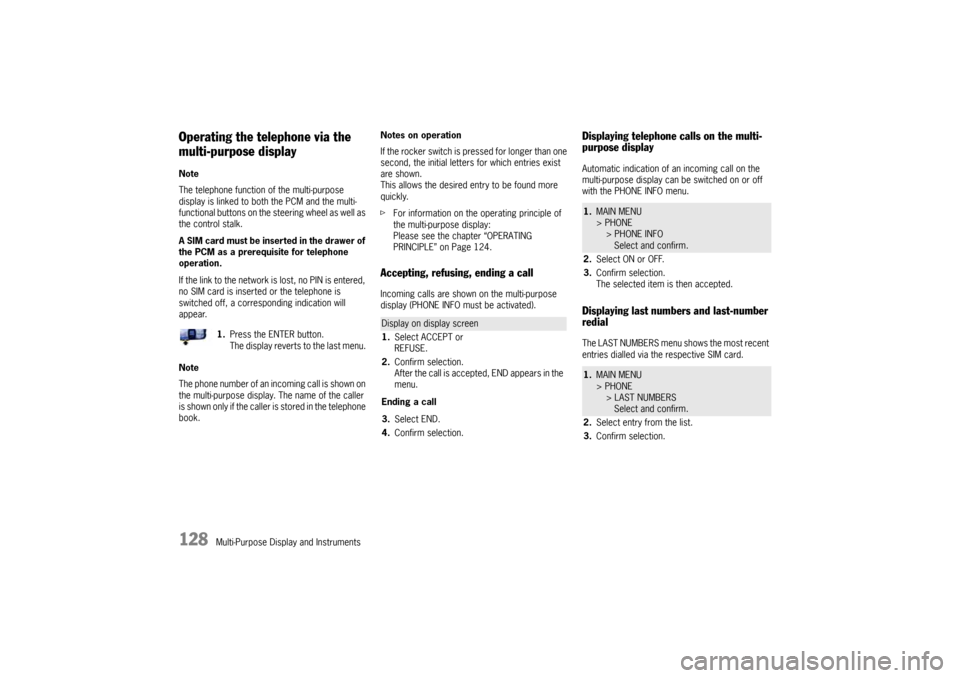
Accepting, refusing, ending a callIncoming calls are shown on the multi-purpose
display (PHONE INFO must be activated).
Displaying telephone calls on the multi-
purpose displayAutomatic indication of an incoming call on the
multi-purpose display can be switched on or off
with the PHONE INFO menu.Displaying last numbers and last-number
redialThe LAST NUMBERS menu shows the most recent
entries dialled via the respective SIM card. 1.Press the ENTER button.
The display reverts to the last menu.
Display on display screen
1.Select ACCEPT or
REFUSE.
2.Confirm selection.
After the call is accepted, END appears in the
menu.
Ending a call
3.Select END.
4.Confirm selection.
1.MAIN MENU
> PHONE
> PHONE INFO
Select and confirm.
2.Select ON or OFF.
3.Confirm selection.
The selected item is then accepted.1.MAIN MENU
> PHONE
> LAST NUMBERS
Select and confirm.
2.Select entry from the list.
3.Confirm selection.
10_Cayenne_21_KW17.book Seite 128 Donnerstag, 9. April 2009 3:33 15
Page 203 of 379
Luggage Compartment, Loadspace and Storage
203 Luggage Compartment, Loadspace and Storage
Folding rear seats forward and returning
to upright position ...................................... 204
Loadspace ................................................ 207
Cargo management system ........................ 208
Luggage Compartment Cover ..................... 211
Luggage safety net .................................... 212
Ski Bag ..................................................... 214
Roof Transport System............................... 216
Off-road roof-mounted Headlights
Cayenne S Transsyberia............................. 217
Car Audio Operation/Tips............................ 218
Porsche Communication Management
(PCM) ........................................................ 220
iPod, USB and AUX..................................... 221
Storage ..................................................... 222
Cupholder.................................................. 226
Ashtray...................................................... 227
Cigarette Lighter ........................................ 228
10_Cayenne_21_KW17.book Seite 203 Donnerstag, 9. April 2009 3:33 15
Page 220 of 379

220
Luggage Compartment, Loadspace and Storage If aftermarket systems are installed by non-dealer-
ship technicians or outside the selling dealer,
problems may result. Installation of aftermarket
equipment is not covered under the New Car
Warranty.
fConsult your authorized Porsche dealer about
the installation of non Porsche approved equip-
ment.
Reception quality
The reception quality of your car telephone will
change constantly when you are driving. Interfe-
rence caused by buildings, landscape and wea-
ther is unavoidable. It may become particularly
difficult to hear when using the hands-free function
due to external noise such as engine and wind
noise.
Automatic car-wash
fUnscrew external antennas before using an au-
tomatic car-wash.
Porsche Communication
Management (PCM)
Warning!
There is danger of accident if you set or
operate the on-board computer, radio, navi-
gation system, telephone or other equipment
when driving.
This could distract you from traffic and
cause you to lose control of the vehicle re-
sulting in serious personal injury or death.
fOperate the components while driving only if
the traffic situation allows you to do so safely.
fCarry out any complicated operating or setting
procedures only with the vehicle stationary.
fIf it is necessary to operate these components
while the vehicle is in motion, use the function keys on the multi-functional steering wheel.
fRefer to the separate operating instructions
before putting the PCM into operation.
When put into operation for the first time, a
distance of approx. 3 miles (5 km) must be driven
in order for the navigation system to complete the
process of fine calibration. The same applies
when the tires are changed (e.g. summer/winter
tires) or new tires fitted. Full location accuracy is
not yet achieved during the fine-calibration
process.If the vehicle has been transported (e.g. ferry, car
train), the system may take a few minutes after
being switched on before it determines the current
location.
Serious tire slip (e.g. spinning wheels on snow)
may result in temporarily inaccurate navigation.
When the battery has been disconnected, it may
take up to 15 minutes before the navigation
system is operational once more.
Satellite radioYou must have the satellite radio activated before
you can put it into operation. You will need a
contract with a provider in order to use this radio.
fRefer to the separate radio operating instruc-
tions before putting into operation.
10_Cayenne_21_KW17.book Seite 220 Donnerstag, 9. April 2009 3:33 15
Page 221 of 379
Luggage Compartment, Loadspace and Storage
221
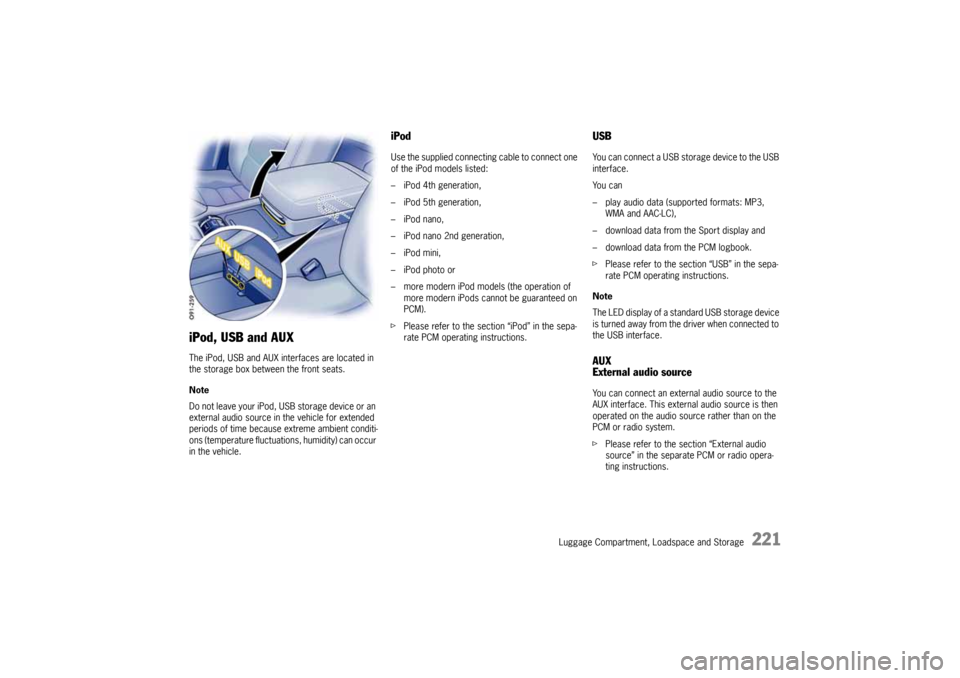
iPod, USB and AUXThe iPod, USB and AUX interfaces are located in
the storage box between the front seats.
Note
Do not leave your iPod, USB storage device or an
external audio source in the vehicle for extended
periods of time because extreme ambient conditi-
ons (temperature fluctuations, humidity) can occur
in the vehicle.
iPodUse the supplied connecting cable to connect one
of the iPod models listed:
– iPod 4th generation,
– iPod 5th generation,
– iPod nano,
– iPod nano 2nd generation,
–iPod mini,
– iPod photo or
– more modern iPod models (the operation of
more modern iPods cannot be guaranteed on
PCM).
fPlease refer to the section “iPod” in the sepa-
rate PCM operating instructions.
USBYou can connect a USB storage device to the USB
interface.
Yo u c a n
– play audio data (supported formats: MP3,
WMA and AAC-LC),
– download data from the Sport display and
– download data from the PCM logbook.
fPlease refer to the section “USB” in the sepa-
rate PCM operating instructions.
Note
The LED display of a standard USB storage device
is turned away from the driver when connected to
the USB interface.AUX
External audio sourceYou can connect an external audio source to the
AUX interface. This external audio source is then
operated on the audio source rather than on the
PCM or radio system.
fPlease refer to the section “External audio
source” in the separate PCM or radio opera-
ting instructions.
10_Cayenne_21_KW17.book Seite 221 Donnerstag, 9. April 2009 3:33 15