phone PORSCHE CAYNNE S 2005 1.G Owners Manual
[x] Cancel search | Manufacturer: PORSCHE, Model Year: 2005, Model line: CAYENNE S, Model: PORSCHE CAYENNE S 2005 1.GPages: 380, PDF Size: 3.17 MB
Page 3 of 380

3
Regularly check your vehicle for signs of
damage.
Damaged or missing aerodynamic compo-
nents such as spoilers or underside panels
affect the driving behavior and therefore
must be replaced immediately.
Your car may have all or some of the components
described in this manual.
Should you have difficulty understanding any of
the explanations of features or equipment installed
in your vehicle, contact your authorized Porsche
dealer. He/She will be glad to assist you. Also
check with your dealer on other available options
or equipment.
Throughout this booklet, left is designated as the
driver's side of the vehicle, and right as the pas-
senger's side of the vehicle.
Text, illustrations and specifications in this manual
are based on the information available at the time
of printing.
It has always been Porsche's policy to continuous-
ly improve its products. Porsche, therefore, re-
serves the right to make changes in design and
specification, and to make additions or improve-
ments in its product without incurring any obliga-
tion to install them on products previously manu-
factured.
We wish you many miles of safe and pleasurable
driving in your Porsche.
Important!
For your own protection and longer service life of
your car, please heed all operating instructions
and special warnings. These special warnings use
the safety alert symbol, followed by the words
Danger, Warning and Caution. These special
warnings contain important messages regarding
your safety and/or the potential for damage to
your Porsche. Ignoring them could result in se-
rious mechanical failure or even physical injury.
fDo not alter your Porsche. Any alteration could
create dangerous conditions or defeat safety
engineering features built into your car.
fDo not misuse your Porsche. Use it safely, and
consistently with the law, according to the dri-
ving conditions, and the instructions in this ma-
nual.
Alteration or misuse of your Porsche could
cause accidents and severe or fatal personal
injuries.
Note to ownersIn Canada, this manual is also available in French.
To obtain a copy contact your dealer or write to:Note aux proprietairesAu Canada on peut se procurer un exemplaire de
ce Manuel en français auprès du concessionaire
ou du:
Porsche Cars Canada, Ltd.
Automobiles Porsche Canada, LTEE
5045 Orbitor Drive
Building #8, Suite 200
Mississauga, Ontario
Canada L4W 4Y4
Telephone number for customer assistance:
1-800-PORSCHE / Option 3
Page 6 of 380

6Setting and operating vehicle
components when driving
Warning!
There is a danger of accident if you set or
operate the on-board computer, radio, navi-
gation system, telephone or other equipment
when driving.
This could distract you from the traffic and
cause you to lose control of the vehicle.
fOperate the components while driving only if
the traffic situation allows you to do so safely.
fCarry out any complicated operating or setting procedures only with the vehicle stationary.
Portable Fuel Containers
Danger!
Portable fuel containers, full or partially
empty, may leak, causing an explosion, or
result in fire in case of an accident.
fNever carry additional fuel in portable contain-ers in your vehicle.
Engine Exhaust
Danger!
Engine exhaust is dangerous if inhaled.
Engine exhaust fumes have many compo-
nents which you can smell. They also contain
carbon monoxide (CO), which is a colorless
and odorless gas.
Carbon monoxide can cause unconscious-
ness and even death if inhaled.
fNever start or let the engine run in an en-
closed, unventilated area.
It is not recommended to sit in your car for pro-
longed periods with the engine on and the car not moving.
Page 16 of 380

16
Controls, Safety, Instruments
Never invite car theft!An unlocked car with the key in the ignition lock in-
vites car theft.
A steering wheel lock and a gong alarm are stan-
dard equipment in your Porsche. The gong alarm
will sound if you open the driver's door while the
key is still in the ignition lock. It is your reminder to
pull the key out of the ignition lock and to lock the
doors.
Warning!
Any uncontrolled movement of the vehicle
may result in serious personal injury and
property damage.
Never leave your vehicle unattended with the
key in the ignition lock, especially if children
and/or pets are left unattended in the vehi-
cle. They can operate power windows and
other controls. If the engine is left running,
they may accidentally engage the shift lever.
fAlways remove the ignition key.
fAlways set the parking brake.
fLock the doors with the key or with the remote control.
Warning!
Risk of a serious accident.
The steering column will lock when you re-
move the key while you are driving or as the
car is rolling to a stop. You will not be able to
steer the car.
fNever remove the key from the steering lock while you are driving.To protect your vehicle and your possessions
from theft, you should always proceed as fol-
lows when leaving your vehicle:
fClose windows.
fClose sliding/lifting roof or Panorama Roof
System.
fRemove ignition key (switch ignition off in vehi-
cles that have Porsche Entry & Drive).
fEngage steering lock.
fLock storage tray between the front seats and
glove compartment.
fRemove valuables (e.g. car documents, radio
control module, telephone, house keys) from
the car.
fLock doors.
fLock the glove compartment.
fClose oddment trays.
fCover luggage compartment with the luggage
compartment cover.
fClose rear lid and rear window.
Page 27 of 380

Controls, Safety, Instruments
27
A- Light-emitting diode for alarm systemAlarm System, Ultrasound
Passenger Compartment
Monitoring System, Inclination
SensorfPlease observe the chapter “ALARM” on
Page 103.
Avoiding false alarmsfAlways close the sliding/lifting roof or the
Panorama roof system, and all door windows.
fDo not leave a mobile phone switched on in the
glasses case of the roof console.
fAlways turn off the alarm system before you at-
tach a trailer. The inclination sensor could trig-
ger the alarm unintentionally.Switching onfLock the vehicle.
The alarm system, passenger compartment
monitoring system and inclination sensor are
switched on.
fPlease observe the chapter “CENTRAL LO-
CKING SYSTEM” on Page 21.Switching offfUnlock the vehicle.
The alarm system, passenger compartment
monitoring system and inclination sensor are
switched off automatically.
Note on operation
If you unlock the vehicle with the key at the door
lock, you must switch the ignition on (ignition lock
position1) within 15 seconds of opening the door
in order to prevent the alarm system from being
triggered.
Switching off the alarm system if it is
triggeredfUnlock vehicle doors or
fSwitch ignition on.Function indicationThe locking condition of the vehicle is indicated by
a rapid flashing of the light-emitting diode A on the
driver’s door.
The light-emitting diode goes out when the vehicle
is unlocked.
The passenger compartment monitoring
system and inclination sensor are switched
on
fThe light-emitting diode flashes for 2 seconds,
rapidly, then slowly.
The passenger compartment monitoring
system and inclination sensor are switched
off
fThe light-emitting diode flashes rapidly for
2 seconds, goes out for 28 seconds and then
flashes slowly.
Faults
fThe light-emitting diode flashes rapidly for
2 seconds, shines for 28 seconds and then
flashes slowly.
Page 54 of 380
54
Controls, Safety, Instruments
Multi-Functional Steering Wheel
Warning!
There is a danger of accident if you set or
operate the on-board computer, radio, navi-
gation system, telephone or other equipment
when driving.
This could distract you from the traffic and
cause you to lose control of the vehicle.
fOperate the components while driving only if
the traffic situation allows you to do so safely.
fCarry out any complicated operating or setting procedures only with the vehicle stationary.
Depending on the equipment in your vehicle, you
can use these function keys to operate the follow-
ing Porsche communication systems:
– Radio with CD drive
– CD changer
– Satelite radio
Readiness for operation of multi-
functional steering wheel– With ignition switched on and
– With Porsche communication systems
switched on.
fPlease observe the operating instructions sup-
plied for the Porsche communication systems
before operating the function keys.
Note on operation
The Porsche communication systems cannot be
switched on and off using the multi-functional
steering wheel.
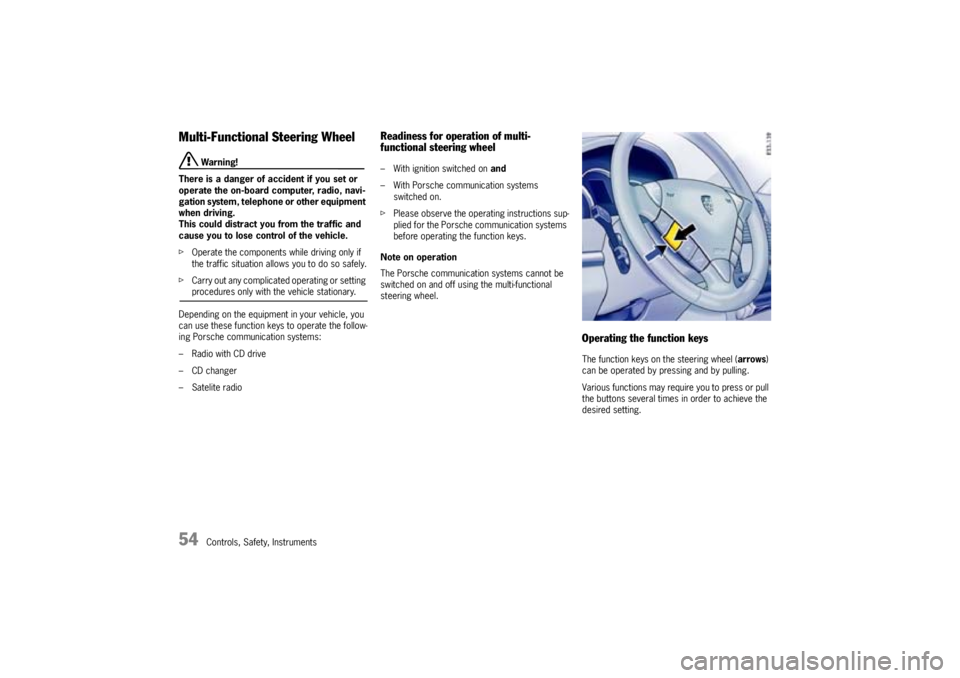
Operating the function keysThe function keys on the steering wheel (arrows)
can be operated by pressing and by pulling.
Various functions may require you to press or pull
the buttons several times in order to achieve the
desired setting.
Page 80 of 380
80
Controls, Safety, Instruments
Multi-Purpose Display
Warning!
There is a danger of accident if you set or
operate the on-board computer, radio, navi-
gation system, telephone or other equipment
when driving.
This could distract you from the traffic and
cause you to lose control of the vehicle.
fOperate the components while driving only if
the traffic situation allows you to do so safely.
fCarry out any complicated operating or setting procedures only with the vehicle stationary.
It is not possible to describe all details of the
functions in this Owner's Manual.
The examples clearly demonstrate the functional
principle and clarify the menu structure.
As a rule, you can use the menu items:
MAIN MENU > SETTINGS > FACTORY SETTINGS
to return to the basic factory settings.
fPlease observe the chapter “FACTORY SET-
TINGS” on Page 107.
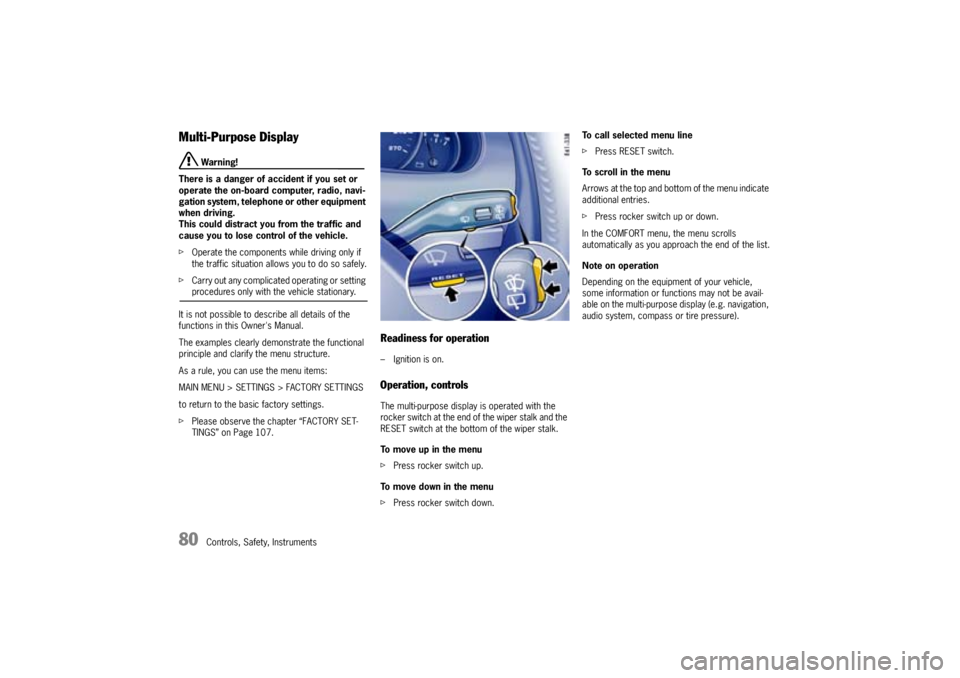
Readiness for operation– Ignition is on.Operation, controlsThe multi-purpose display is operated with the
rocker switch at the end of the wiper stalk and the
RESET switch at the bottom of the wiper stalk.
To move up in the menu
fPress rocker switch up.
To move down in the menu
fPress rocker switch down.To call selected menu line
fPress RESET switch.
To scroll in the menu
Arrows at the top and bottom of the menu indicate
additional entries.
fPress rocker switch up or down.
In the COMFORT menu, the menu scrolls
automatically as you approach the end of the list.
Note on operation
Depending on the equipment of your vehicle,
some information or functions may not be avail-
able on the multi-purpose display (e.g. navigation,
audio system, compass or tire pressure).
Page 99 of 380

Controls, Safety, Instruments
99
Ye s :
– In case of sealing-set operation, the menu
changes directly to the basic screen. All
settings are retained.
– If the vehicle is operated with a collapsible
spare wheel or spare wheel, the warning mes-
sage “SYSTEM NOT ACTIVE, WORKSHOP” is
initially displayed for 10 seconds. The system
then returns to the basic screen.
No:
The display automatically returns to the menu
TYRE PRESSURE > SETTINGS.
fSet the mounted tire set with tire type and tire
size. The system will re-learn the tires.
No monitoringIn the event of faults the tire pressure monitoring
cannot monitor the tire pressure.
The warning light on the instrument panel and a
message on the multi-purpose display light up.
Monitoring is not active when:
– the tire pressure monitoring system is faulty,
– wheel transmitters for the tire pressure
monitoring system are not present,
– temporarily after changing a wheel,
– has detected too many wheel transmitters,
– there is external interference by other radio
sources, e.g., wireless headphones,
– tire temperatures are too high.
fPlease observe the chapter “WARNING LIGHTS
AND WARNING MESSAGES” on Page 108.fAll warnings and messages in the tire pressure
monitoring system are also indicated by the
warning light in the instrument panel.
The warning light goes out as soon as all faults
are remedied.
Tire pressure monitoring system
warning light
Page 110 of 380

110
Controls, Safety, Instruments
Warning – Flat tire – Check tires Stop in a suitable place and check the tires. Change wheel if
necessary.
Check spare wheel – Required pressure:
50 psi/3.4 barAppears about every 6 months.
Check if the pressure of the mounted spare wheel matches the
required pressure, as it is not monitored electronically.
Tire pressure too low – Add air System detects a pressure loss of at least 2.9 psi. (0.2 bar).
Correct tire pressure at the next opportunity.
Collapsible spare wheel/sealing set
max. 50 mph (80 km/h) Observe maximum permitted speed.
Collapsible spare wheel 51 psi/3.5 bar
max. 50 mph (80 km/h) Information on driving with a collapsible spare wheel.
Observe maximum speed of max 50 mph or 80 km/h and
required pressure of 51 psi or 3.5 bar.
System not activeIndication when spare wheel or collapsible spare wheel is used
or tire pressure monitoring system is faulty.
Consult a qualified specialist workshop.
Select new set of wheels in the Tire pressure menu after
changing the wheels.
System not active – Brief disturbanceExternal interference (e.g., wireless headphones) or excessive
temperature (over 248 °F/120 °C) at the wheel transmitters.
Tire pressure monitoring system will reactivate itself.
System not active –
Too many wheel transmittersTire pressure monitoring system detects more than 4 wheel
transmitters (winter wheels in in the luggage compartment,
for example).
System will reactivate itself.
No monitoring – System learning After the tire type and size are selected in the tire pressure
menu, the system re-learns the tires.
Wheel change? Check settings Display after a wheel change without changed settings in the tire
pressure menu. Select tire type and size.
Instrument
panelMulti-purpose
displayText display Meaning/measures
Page 173 of 380

Controls, Safety, Instruments
173
Compact disc player
Caution!
To avoid damage to compact disc player and
discs.
fUse only compact discs labeled as shown, hav-
ing no dirt, damage or warpage.
fNever attempt to disassemble or oil any part
of the player unit. Do not insert any object oth-
er than a disc into the slot.Remember there are
no user-serviceable parts inside the compact
disc player.
fDo not allow the disc to sustain any finger-
prints, scrapes or stickers on the surfaces.
This may cause poor sound quality.
Hold the disc only on the edge or center hole.
fWhen not in use, take the disc out of the player,
put the disc back into its case and store it
away from dust, heat, damp and direct sun-
light.
Leaving the disc on the dashboard in the sun
can damage the disc.fIf the disc gets dirty, clean the disc by wiping
the surfaces from the center to the outside in
a radial direction with a soft cloth.
Do not use a conventional record cleaner or
anti-static record preservative.
Disc cleaners are available in audio stores.
Car Telephone and Aftermarket Alarms Important legal and safety information re-
garding the use of cellular telephones
Some states may prohibit the use of cellular tele-
phones while driving a vehicle. Check the laws and
regulations on the use of cellular telephones in the
areas where you drive.
Danger!
Risk of an accident.
Severe personal injury or death can result in
the event of an accident.
Looking away from the road or turning your
attention away from your driving can cause
an accident and serious personal injury or
death.
When using your cellular telephone, you should al-
ways:
fGive full attention to your driving - pull off the
road and park before making or answering a
call if traffic conditions so require; andfKeep both hands on the steering wheel - use
hands-free operation (if available) - pull off the
road and park before using a hand-held tele-
phone.
It is essential to observe the instructions of
the telephone manufacturer before putting
the telephone into operation.
Any portable telephone or radio transmitter which
is used in a Porsche must be properly installed in
accordance with the technical requirements of
Porsche.
The transmission power must not exceed
10 W.
The devices must possess a type approval for
your vehicle and have an “e“ symbol.
If you should require equipment with transmission
power values greater than 10 W, please consult
your authorized Porsche dealer for this purpose.
He is familiar with the technical requirements for
installing devices of this kind.
The antennas for all radios and telephones with a
transmitting antenna must be externally mounted.
The improper installation of radios or telephones
or use of a radio or telephone with a transmitting
antenna inside the car may cause the warning
lights to come on.
Improper installation of such equipment can cre-
ate a discharged battery or excessive current
draw from added equipment.
f f f
Page 174 of 380

174
Controls, Safety, Instruments If aftermarket systems are installed by non-dealer-
ship technicians or outside the selling dealer,
problems may result. Installation of aftermarket
equipment is not covered under the New Car War-
ranty.
fConsult your authorized Porsche dealer about
the installation of non Porsche approved equip-
ment.
Reception quality
The reception quality of your car telephone will
change constantly when you are driving. Interfer-
ence caused by buildings, landscape and weather
is unavoidable. It may become particularly difficult
to hear when using the hands-free function due to
external noise such as engine and wind noise.
Automatic car-wash
fUnscrew external antennas before using an au-
tomatic car-wash.
Porsche Communication
Management (PCM)
Warning!
There is a danger of accident if you set or
operate the on-board computer, radio, navi-
gation system, telephone or other equipment
when driving.
This could distract you from the traffic and
cause you to lose control of the vehicle re-
sulting in serious personal injury or death.
fOperate the components while driving only if
the traffic situation allows you to do so safely.
fCarry out any complicated operating or setting
procedures only with the vehicle stationary
fIf it is necessary to operate these components
while the vehicle is in motion, use the function keys on the multi-functional steering wheel.
fRefer to the separate operating instructions
before putting the PCM into operation.
When put into operation for the first time, a dis-
tance of approx. 3 miles (5 km) must be driven in
order for the navigation system to complete the
process of fine calibration. The same applies
when the tires are changed (e.g. summer/winter
tires) or new tires fitted. Full location accuracy is
not yet achieved during the fine-calibration pro-
cess.If the vehicle has been transported (e.g. ferry, car
train), the system may take a few minutes after be-
ing switched on before it determines the current
location.
Serious tire slip (e.g. spinning wheels on snow)
may result in temporarily inaccurate navigation.
When the battery has been disconnected, it may
take up to 15 minutes before the navigation
system is operational once more.
Satellite radioYou must have the satellite radio activated before
you can put it into operation. You will need a con-
tract with a provider in order to use this radio.
fRefer to the separate radio operating instruc-
tions before putting into operation.