lock PORSCHE CAYNNE TURBO 2005 1.G Owner's Guide
[x] Cancel search | Manufacturer: PORSCHE, Model Year: 2005, Model line: CAYENNE TURBO, Model: PORSCHE CAYENNE TURBO 2005 1.GPages: 369, PDF Size: 3.17 MB
Page 59 of 369

Controls, Safety, Instruments
59
Ignition lock position 1Ignition on
fTurn ignition key to position 1.
Ignition is switched on.
Note on operation
All electrical equipment can be switched on.
The warning lights light up for a lamp check.
fPlease observe the chapter “INSTRUMENT PA-
NEL USA MODELS” on Page 68.Ignition lock position 2Starting engine
fOperate footbrake.
fMove selector lever to position P or N.
fDo not press the accelerator pedal.
The engine control module will provide the
correct starting mixture.
fTurn ignition key to ignition lock position 2.
fDo not operate the starter longer than approx.
10 seconds.
If necessary, repeat the starting procedure af-
ter a pause of approx. 10 seconds.
Turn the ignition key to ignition lock position 3
(ignition off) first.fDo not warm up the engine when stationary.
Drive off immediately.
Avoid high revolutions and full throttle until the
engine has reached operating temperature.
fIf battery output is insufficient, jump leads can
be used to start the engine.
Please observe the chapter “EMERGENCY
STARTING WITH JUMPER CABLES” on
Page 323.
Notes on operation
The first operation of the starter is ended
automatically when the engine starts.
If the engine does not start, subsequent starter
operations will not be ended automatically.
When the engine is started, the warning lights
must go out.
Ignition lock position 3Ignition off
fTurn ignition key to ignition lock position 3.
Locking the steering columnVehicles without Porsche Entry & Drive
The steering column is automatically locked
when the ignition key is withdrawn from the igni-
tion lock.
The steering column is automatically unlocked
when the ignition key is inserted into the ignition
lock.
Vehicles with Porsche Entry & Drive
The steering column is automatically locked
when the ignition is switched off and the vehicle is
locked.
fTo lock intentionally, once the ignition is
switched off, turn the control unit again to the
ignition lock position 3 and hold it there for
2seconds.
The steering column is locked.
The steering column is automatically unlocked
by turning the control unit from ignition lock posi-
tion 0.
Page 60 of 369

60
Controls, Safety, Instruments
Starting and Stopping the EnginefPlease observe the chapter “IMMOBILIZER” on
Page 19.
fPlease observe the chapter “EMISSION
CONTROL SYSTEM” on Page 254.
Danger!
Risk of poisoning. Exhaust gas contains
colorless and odorless carbon monoxide
(CO), which is toxic even in low concentra-
tion. Carbon monoxide can cause uncon-
sciousness and even death if inhaled.
fNever start or let the engine run in an en-
closed, unventilated area. It is not recommend-
ed to sit in your car for prolonged periods with
the engine on and the car not moving.
An unattended vehicle with a running engine
is potentially hazardous. If warning lights
should come on to indicate improper opera-
tion, they would go unnoticed.
fNever leave the engine idling unattended.
Danger of fire.
fDo not drive or park your car where combusti-
ble materials, such as dry grass or leaves,
can come into contact with the hot exhaust sy-
stem.
fIf your car catches on fire for any reason, call
the fire department. Do not endanger your life by attempting to put out the fire.
StartingfOperate footbrake.
fMove selector lever to position P or N.
fDo not press the accelerator pedal.
The engine control module will provide the
correct starting mixture.
fTurn ignition key to ignition lock position 2.
fDo not operate the starter longer than approx.
10 seconds.
If necessary, repeat the starting procedure af-
ter a pause of approx. 10 seconds. Turn the ig-
nition key back to ignition lock position 3first.
The first operation of the starter is ended
automatically when the engine starts.
If the engine does not start, subsequent starter
operations will not be ended automatically.
fDo not warm up the engine when stationary.
Drive off immediately.
Avoid high revolutions and full throttle until the
engine has reached operating temperature.
fIf battery output is insufficient, jump leads can
be used to start the engine.
Please observe the chapter “EMERGENCY
STARTING WITH JUMPER CABLES” on
Page 323.Note on operation
To ensure a good charge condition for the battery
and thus its ability to start the engine, all electrical
accessories which are not required should be
switched off when the ignition is switched on and
when engine revolutions are low (in stop and go
traffic).
Starting with auxiliary batteryIf your vehicle is fitted with an additional battery
in the luggage compartment, you have the possi-
bility of starting the engine with the ignition key,
even if the main battery fails.
In vehicles with Porsche Entry & Drive:
1. Remove the Porsche Entry & Drive control unit
from the ignition lock.
Please observe the chapter “REMOVING THE
CONTROL UNIT FROM THE IGNITION LOCK” on
Page 58.
2. Insert the ignition key into the ignition lock and
start the engine as described.
fPlease have the cause of the fault remedied at
an authorized Porsche dealer.
Page 61 of 369

Controls, Safety, Instruments
61
StoppingfWithdraw the ignition key only when the vehicle
is stationary, otherwise the steering lock en-
gages and the vehicle cannot be steered.
fOnly switch the ignition off when the vehicle
comes to a stop as the steering assistance
and brake boost are deactivated when the
ignition is switched off.
fAlways withdraw the ignition key and engage
the parking brake when leaving the vehicle.
The control unit always remains in the ignition
lock in vehicles that have Porsche Entry &
Drive.
Note on operation
The vehicle battery discharges if the ignition key is
left inserted.
Warning!
Danger of injury. Hot engine compartment
components can burn skin on contact.
fBefore working on any part in the engine com-
partment, turn the engine off and let it cool down sufficiently.Radiator fans
The radiator and radiator fans are in the front of
the car.
Warning!
Danger of injury. After the ignition is
switched off, the engine compartment and
coolant temperatures are monitored for ap-
prox. 30 minutes. During this period, and de-
pending on temperature, the radiator fan
may continue to run or start to run.
fCarry out work in these areas only with the en-gine off and exercise extreme caution.
Page 68 of 369
68
Controls, Safety, Instruments
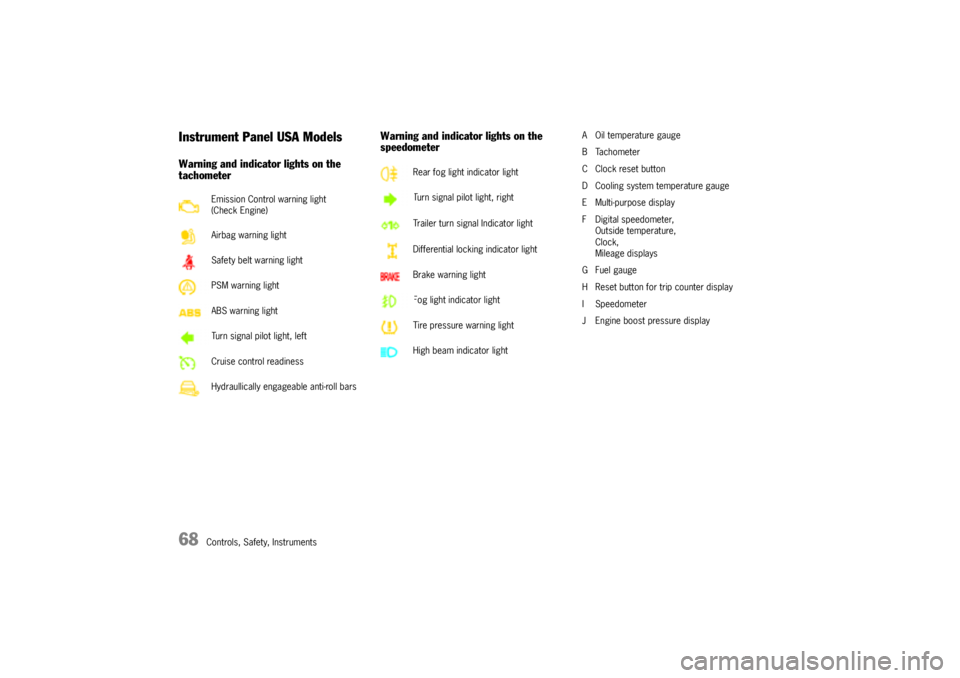
Instrument Panel USA ModelsWarning and indicator lights on the
tachometerWarning and indicator lights on the
speedometer
A Oil temperature gauge
BTachometer
C Clock reset button
D Cooling system temperature gauge
E Multi-purpose display
F Digital speedometer,
Outside temperature,
Clock,
Mileage displays
G Fuel gauge
H Reset button for trip counter display
I Speedometer
J Engine boost pressure display Emission Control warning light
(Check Engine)
Airbag warning light
Safety belt warning light
PSM warning light
ABS warning light
Turn signal pilot light, left
Cruise control readiness
Hydraullically engageable anti-roll bars
Rear fog light indicator light
Turn signal pilot light, right
Trailer turn signal Indicator light
Differential locking indicator light
Brake warning light
Fog light indicator light
Tire pressure warning light
High beam indicator light
Page 70 of 369
70
Controls, Safety, Instruments
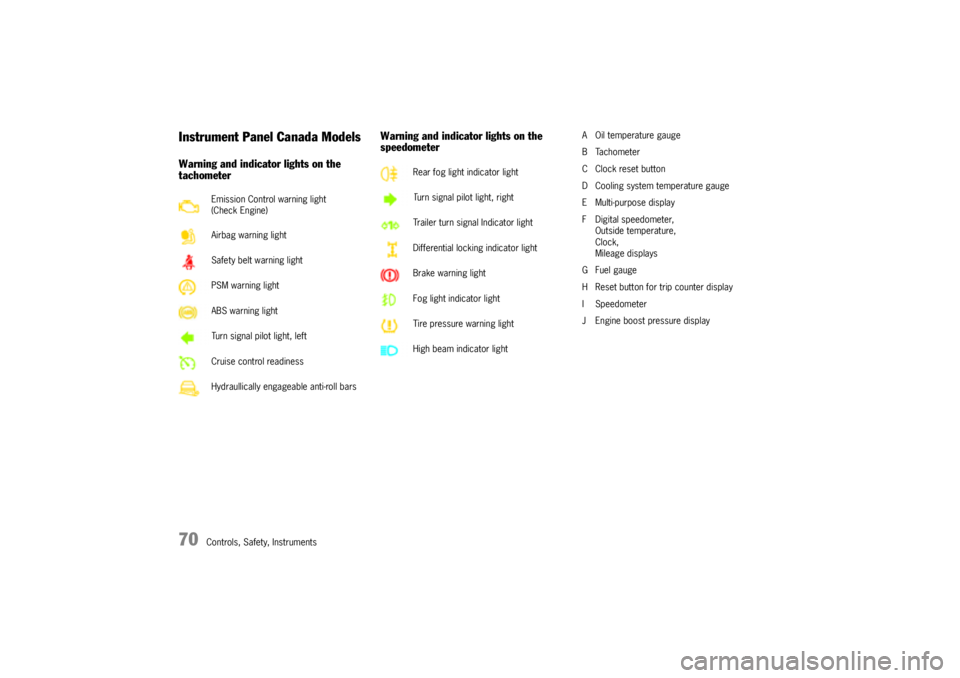
Instrument Panel Canada ModelsWarning and indicator lights on the
tachometerWarning and indicator lights on the
speedometer
A Oil temperature gauge
BTachometer
C Clock reset button
D Cooling system temperature gauge
E Multi-purpose display
F Digital speedometer,
Outside temperature,
Clock,
Mileage displays
G Fuel gauge
H Reset button for trip counter display
I Speedometer
J Engine boost pressure display Emission Control warning light
(Check Engine)
Airbag warning light
Safety belt warning light
PSM warning light
ABS warning light
Turn signal pilot light, left
Cruise control readiness
Hydraullically engageable anti-roll bars
Rear fog light indicator light
Turn signal pilot light, right
Trailer turn signal Indicator light
Differential locking indicator light
Brake warning light
Fog light indicator light
Tire pressure warning light
High beam indicator light
Page 82 of 369
82
Controls, Safety, Instruments
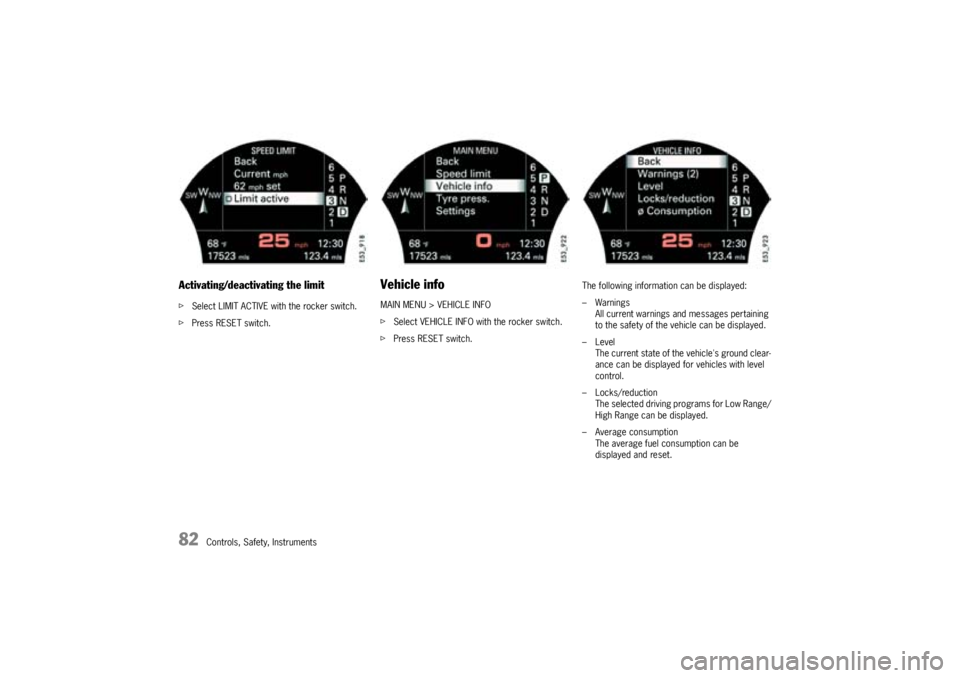
Activating/deactivating the limitfSelect LIMIT ACTIVE with the rocker switch.
fPress RESET switch.
Vehicle infoMAIN MENU > VEHICLE INFO
fSelect VEHICLE INFO with the rocker switch.
fPress RESET switch.The following information can be displayed:
–Warnings
All current warnings and messages pertaining
to the safety of the vehicle can be displayed.
–Level
The current state of the vehicle's ground clear-
ance can be displayed for vehicles with level
control.
– Locks/reduction
The selected driving programs for Low Range/
High Range can be displayed.
– Average consumption
The average fuel consumption can be
displayed and reset.
Page 84 of 369
84
Controls, Safety, Instruments
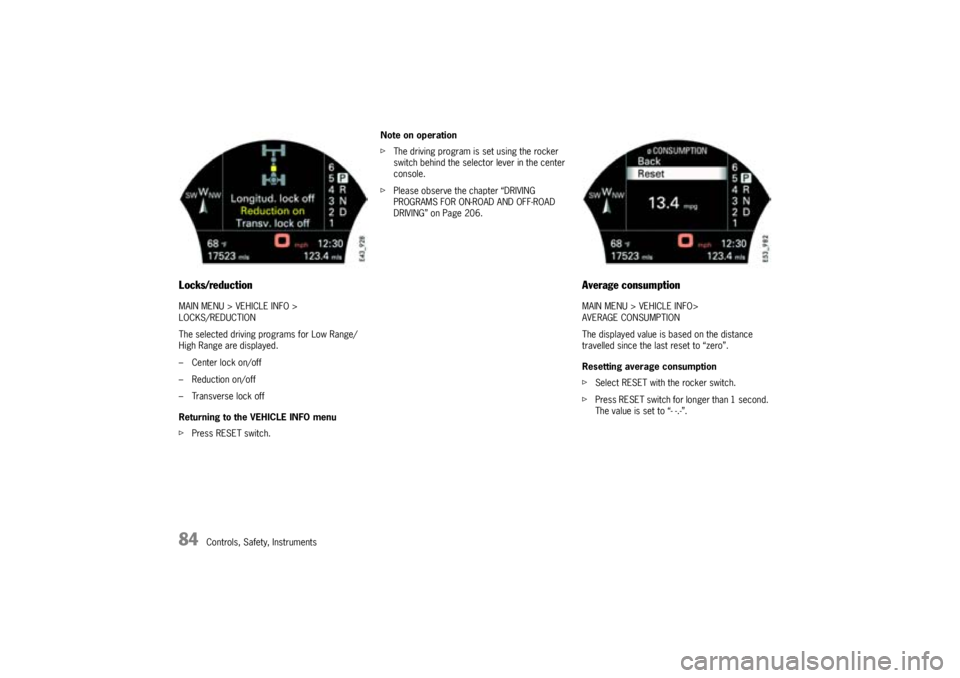
Locks/reductionMAIN MENU > VEHICLE INFO >
LOCKS/REDUCTION
The selected driving programs for Low Range/
High Range are displayed.
– Center lock on/off
– Reduction on/off
– Transverse lock off
Returning to the VEHICLE INFO menu
fPress RESET switch.Note on operation
fThe driving program is set using the rocker
switch behind the selector lever in the center
console.
fPlease observe the chapter “DRIVING
PROGRAMS FOR ON-ROAD AND OFF-ROAD
DRIVING” on Page 206.
Average consumptionMAIN MENU > VEHICLE INFO>
AVERAGE CONSUMPTION
The displayed value is based on the distance
travelled since the last reset to “zero”.
Resetting average consumption
fSelect RESET with the rocker switch.
fPress RESET switch for longer than 1 second.
The value is set to “- -.-”.
Page 99 of 369
Controls, Safety, Instruments
99
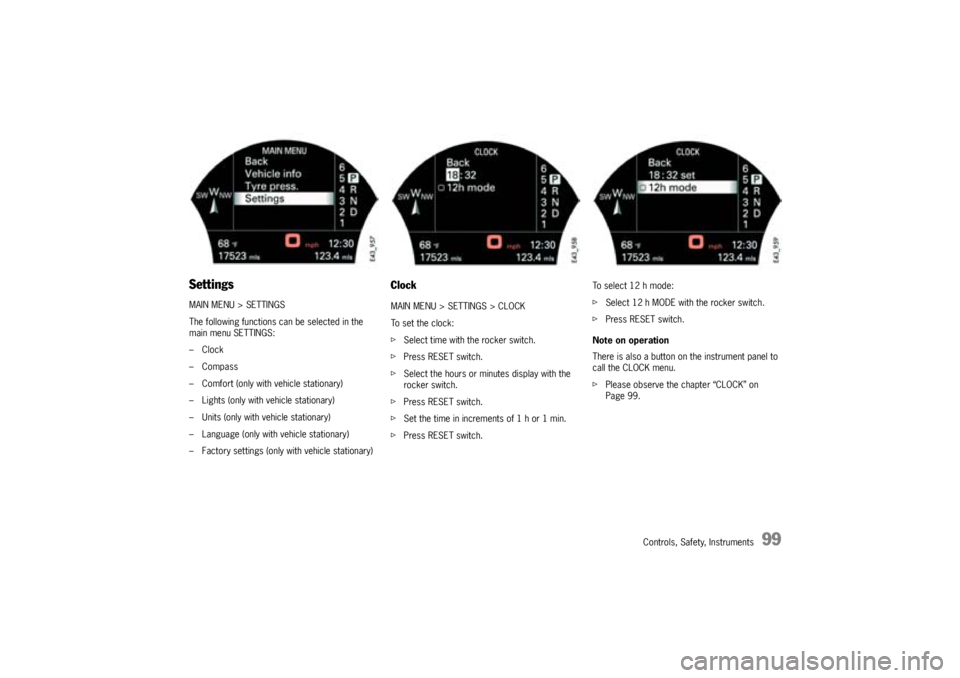
SettingsMAIN MENU > SETTINGS
The following functions can be selected in the
main menu SETTINGS:
–Clock
–Compass
– Comfort (only with vehicle stationary)
– Lights (only with vehicle stationary)
– Units (only with vehicle stationary)
– Language (only with vehicle stationary)
– Factory settings (only with vehicle stationary)
ClockMAIN MENU > SETTINGS > CLOCK
To set the clock:
fSelect time with the rocker switch.
fPress RESET switch.
fSelect the hours or minutes display with the
rocker switch.
fPress RESET switch.
fSet the time in increments of 1 h or 1 min.
fPress RESET switch.To select 12 h mode:
fSelect 12 h MODE with the rocker switch.
fPress RESET switch.
Note on operation
There is also a button on the instrument panel to
call the CLOCK menu.
fPlease observe the chapter “CLOCK” on
Page 99.
Page 101 of 369
Controls, Safety, Instruments
101
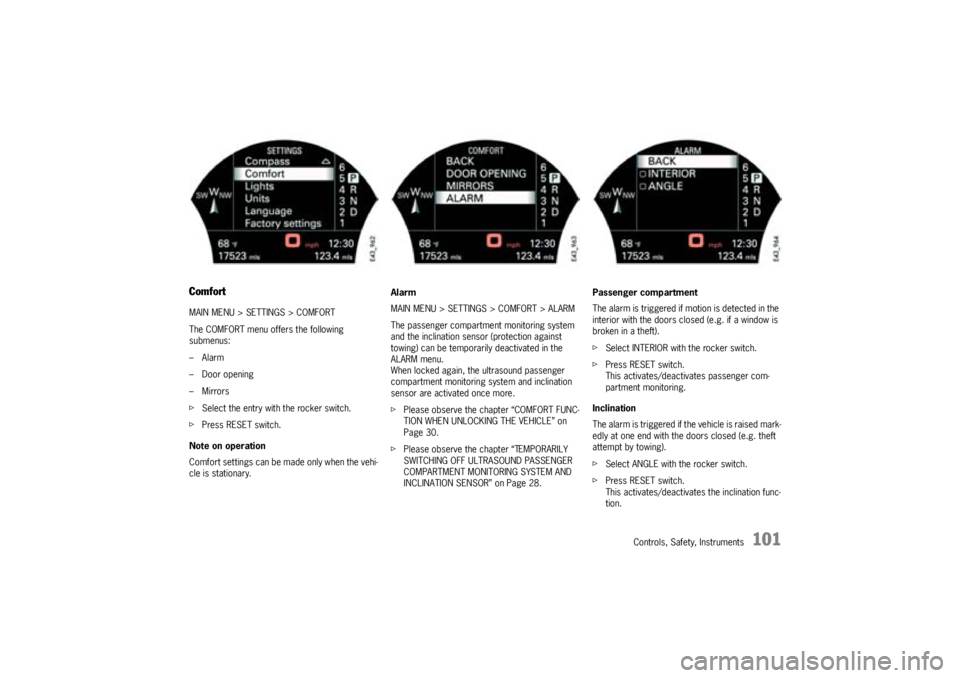
ComfortMAIN MENU > SETTINGS > COMFORT
The COMFORT menu offers the following
submenus:
–Alarm
–Door opening
–Mirrors
fSelect the entry with the rocker switch.
fPress RESET switch.
Note on operation
Comfort settings can be made only when the vehi-
cle is stationary.Alarm
MAIN MENU > SETTINGS > COMFORT > ALARM
The passenger compartment monitoring system
and the inclination sensor (protection against
towing) can be temporarily deactivated in the
ALARM menu.
When locked again, the ultrasound passenger
compartment monitoring system and inclination
sensor are activated once more.
fPlease observe the chapter “COMFORT FUNC-
TION WHEN UNLOCKING THE VEHICLE” on
Page 30.
fPlease observe the chapter “TEMPORARILY
SWITCHING OFF ULTRASOUND PASSENGER
COMPARTMENT MONITORING SYSTEM AND
INCLINATION SENSOR” on Page 28.Passenger compartment
The alarm is triggered if motion is detected in the
interior with the doors closed (e.g. if a window is
broken in a theft).
fSelect INTERIOR with the rocker switch.
fPress RESET switch.
This activates/deactivates passenger com-
partment monitoring.
Inclination
The alarm is triggered if the vehicle is raised mark-
edly at one end with the doors closed (e.g. theft
attempt by towing).
fSelect ANGLE with the rocker switch.
fPress RESET switch.
This activates/deactivates the inclination func-
tion.
Page 102 of 369
102
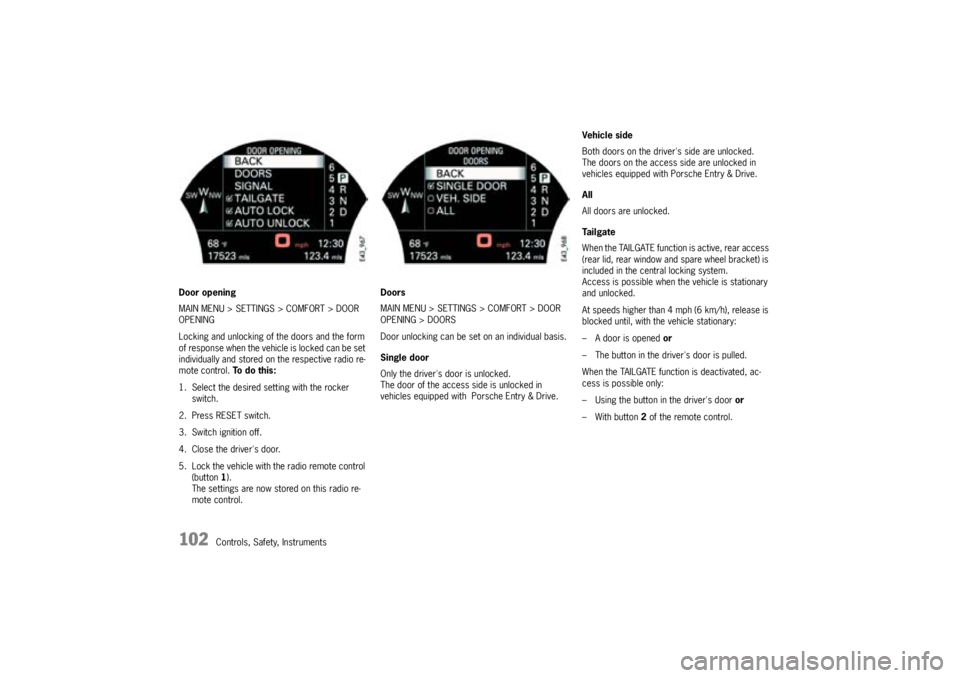
Controls, Safety, Instruments Door opening
MAIN MENU > SETTINGS > COMFORT > DOOR
OPENING
Locking and unlocking of the doors and the form
of response when the vehicle is locked can be set
individually and stored on the respective radio re-
mote control. To d o t h i s :
1. Select the desired setting with the rocker
switch.
2. Press RESET switch.
3. Switch ignition off.
4. Close the driver's door.
5. Lock the vehicle with the radio remote control
(button1).
The settings are now stored on this radio re-
mote control.Doors
MAIN MENU > SETTINGS > COMFORT > DOOR
OPENING > DOORS
Door unlocking can be set on an individual basis.
Single door
Only the driver's door is unlocked.
The door of the access side is unlocked in
vehicles equipped with Porsche Entry & Drive.Vehicle side
Both doors on the driver's side are unlocked.
The doors on the access side are unlocked in
vehicles equipped with Porsche Entry & Drive.
All
All doors are unlocked.
Ta i l g a t e
When the TAILGATE function is active, rear access
(rear lid, rear window and spare wheel bracket) is
included in the central locking system.
Access is possible when the vehicle is stationary
and unlocked.
At speeds higher than 4 mph (6 km/h), release is
blocked until, with the vehicle stationary:
– A door is opened or
– The button in the driver's door is pulled.
When the TAILGATE function is deactivated, ac-
cess is possible only:
– Using the button in the driver's door or
– With button 2of the remote control.