instrument panel PORSCHE CAYNNE TURBO 2005 1.G Service Manual
[x] Cancel search | Manufacturer: PORSCHE, Model Year: 2005, Model line: CAYENNE TURBO, Model: PORSCHE CAYENNE TURBO 2005 1.GPages: 369, PDF Size: 3.17 MB
Page 137 of 369
Controls, Safety, Instruments
137
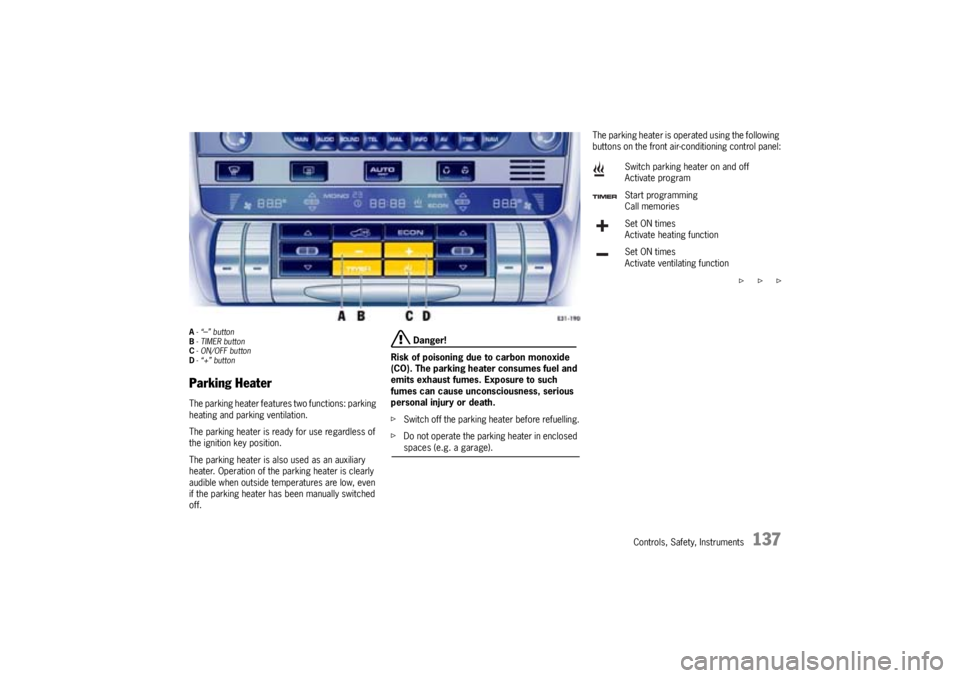
A-“
–” button
B- TIMER button
C- ON/OFF button
D-“+” button
Parking HeaterThe parking heater features two functions: parking
heating and parking ventilation.
The parking heater is ready for use regardless of
the ignition key position.
The parking heater is also used as an auxiliary
heater. Operation of the parking heater is clearly
audible when outside temperatures are low, even
if the parking heater has been manually switched
off.
Danger!
Risk of poisoning due to carbon monoxide
(CO). The parking heater consumes fuel and
emits exhaust fumes. Exposure to such
fumes can cause unconsciousness, serious
personal injury or death.
fSwitch off the parking heater before refuelling.
fDo not operate the parking heater in enclosed spaces (e.g. a garage).
The parking heater is operated using the following
buttons on the front air-conditioning control panel:
f f f Switch parking heater on and off
Activate program
Start programming
Call memories
Set ON times
Activate heating function
Set ON times
Activate ventilating function
Page 138 of 369
138
Controls, Safety, Instruments Notes on operation
The parking heater runs on fuel, and it therefore
cannot be switched on after the reserve warning
lights up.
fPlease observe the chapter “FUEL RESERVE
WARNING” on Page 74.
The parking heater must be operated at least
once per month, with the engine cold and the
blower at its lowest setting.
Ignition off: When the parking heater is running,
the remaining running time is shown on the display
panel.
Operation of the parking heater is clearly audible
when outside temperatures are low and the engine
is cold.Switching on
fPress ON/OFF button C.
The programed parking heating or parking ven-
tilation function is switched on.
Switching off
fPress ON/OFF button C again.
Note on operation
fAfter switching off the parking heater using
ON/OFF button C wait for at least 2 minutes
before you press the button again.
The combusion chamber is cleaned.
Switching parking heater on and
off
Page 139 of 369
Controls, Safety, Instruments
139
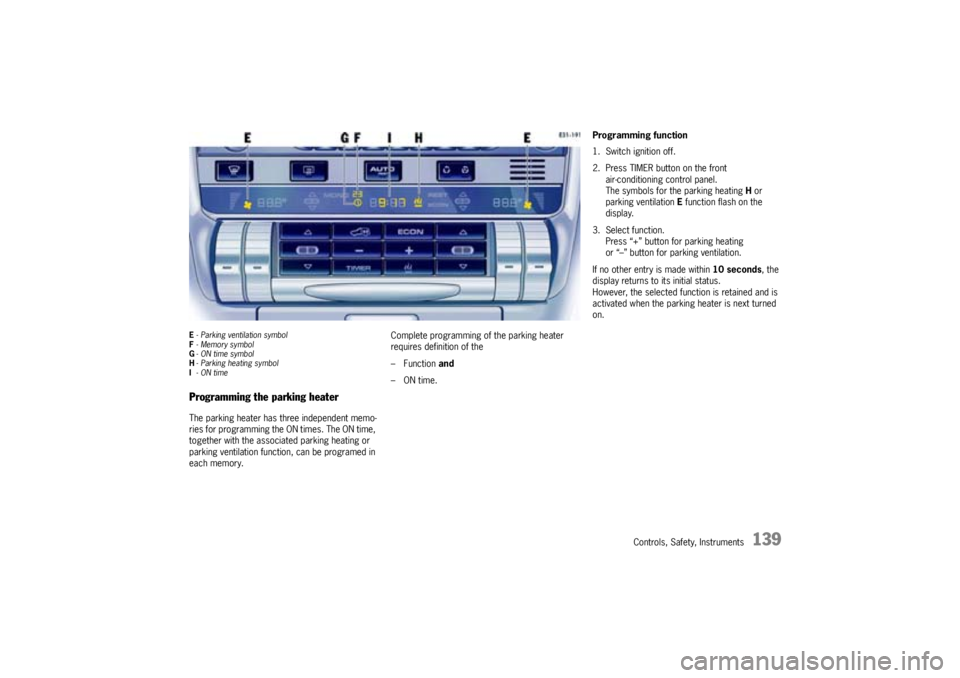
E- Parking ventilation symbol
F-Memory symbol
G- ON time symbol
H-Parking heating symbol
I- ON timeProgramming the parking heaterThe parking heater has three independent memo-
ries for programming the ON times. The ON time,
together with the associated parking heating or
parking ventilation function, can be programed in
each memory.Complete programming of the parking heater
requires definition of the
– Function and
–ON time.
Programming function
1. Switch ignition off.
2. Press TIMER button on the front
air-conditioning control panel.
The symbols for the parking heating H or
parking ventilation E function flash on the
display.
3. Select function.
Press “+” button for parking heating
or “–” button for parking ventilation.
If no other entry is made within 10 seconds, the
display returns to its initial status.
However, the selected function is retained and is
activated when the parking heater is next turned
on.
Page 140 of 369

140
Controls, Safety, Instruments Programming ON times
1. Switch ignition off.
2. Press TIMER button.
3. Select function (parking heating or parking
ventilation).
4. Select the memory using TIMER button.
The desired memory can be selected by
pressing button several times.
5. Set ON time using the “+” and “–” buttons.
Pressing the buttons adjusts the time on a
minute-by-minute basis. If the button is kept
depressed, the time is adjusted faster.
ON times are only valid for 24 hours.
6. Press ON/OFF button.
Displays F and G flash for approx. 10 seconds.
The ON/OFF button can be pressed again to
switch off the displays before this time has
elapsed.
After the ON/OFF button has been pressed,
the ON time I, clock symbol F and memory G
are displayed for 2 minutes.
The display then goes out.
The parking heater has now been programed
and the selected memory is active (symbol G
is lit).
Note on operation
Onlyone memory can be active at any one time.Activating the memory
The parking heater runs for 30 minutes. It then
switches itself off automatically.
The program must be reactivated for every subse-
quent run.
To do this:
1. Switch ignition off.
2. Press TIMER button B.
3. Select function (parking heating or parking
ventilation).
4. Select the memory using TIMER button. The
ON time that was last saved is displayed.
5. Press ON/OFF button.
The program is reactivated.
Displays F and G flash for approx. 10 seconds.
The ON/OFF button can be pressed again to
switch off the displays before this time has
elapsed.
After the ON/OFF button has been pressed,
the ON time I, clock symbol F and memory G
are displayed for 2 minutes.
The display then goes out.
The parking heater has now been programed
and the selected memory is active (symbol G
is lit).
Note on operation
Onlyone memory can be active at any one time.Example:
The parking heater is to activate the parking
heating function at 9:48 a.m.
To do this:
1. Switch ignition off.
2. Press TIMER button B on the front air-condi-
tioning control panel.
The symbols for the parking heating or parking
ventilation function flash on the display.
3. Press “+” button D.
This selects the parking heating function.
4. Select the memory using TIMER button B.
5. Set ON time to 9:48 a.m. using the “+” and
“–” buttons (AandD).
6. Press ON/OFF button C.
The parking heater has now been programed
and the selected memory is active.
Note on operation
If the parking heater is switched on manually prior
to program start of an active memory, this will
delete the programming.
The memory must be reactivated if it is needed.
If the memory is not reactivated, the parking
heater will not switch on.
Page 143 of 369
Controls, Safety, Instruments
143
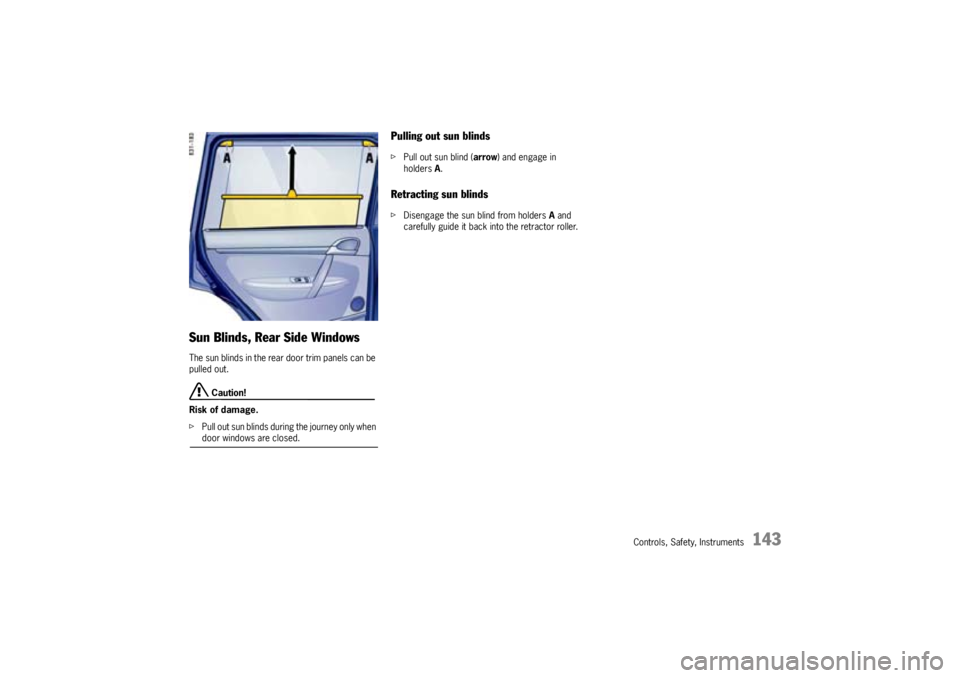
Sun Blinds, Rear Side WindowsThe sun blinds in the rear door trim panels can be
pulled out.
Caution!
Risk of damage.
fPull out sun blinds during the journey only when door windows are closed.
Pulling out sun blindsfPull out sun blind (arrow) and engage in
holdersA.Retracting sun blindsfDisengage the sun blind from holders A and
carefully guide it back into the retractor roller.
Page 146 of 369
146
Controls, Safety, Instruments
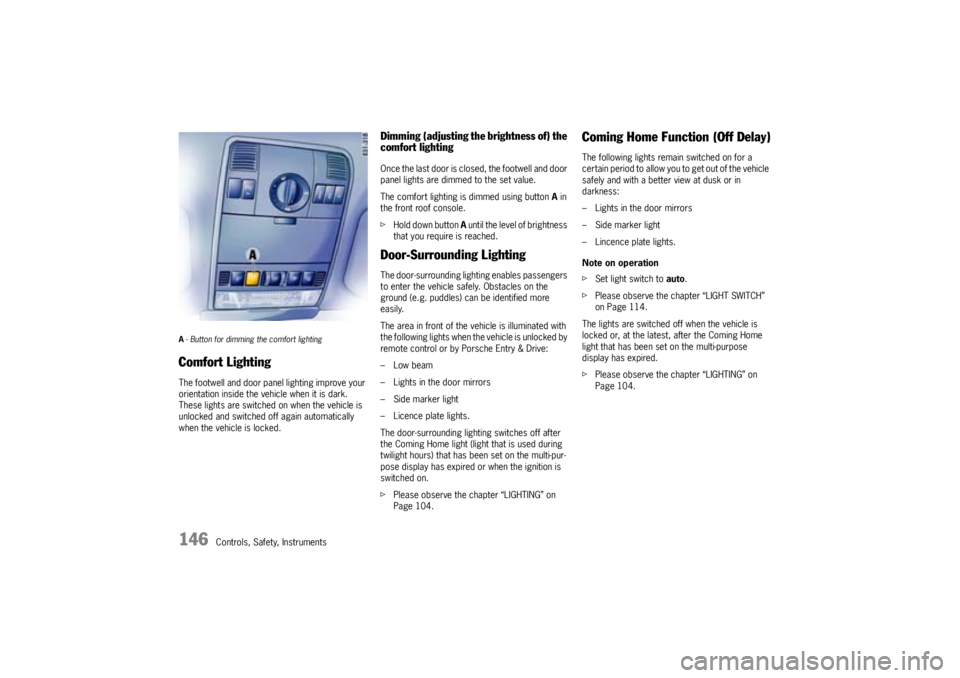
A- Button for dimming the comfort lighting Comfort LightingThe footwell and door panel lighting improve your
orientation inside the vehicle when it is dark.
These lights are switched on when the vehicle is
unlocked and switched off again automatically
when the vehicle is locked.
Dimming (adjusting the brightness of) the
comfort lightingOnce the last door is closed, the footwell and door
panel lights are dimmed to the set value.
The comfort lighting is dimmed using button A in
the front roof console.
fHold down button A until the level of brightness
that you require is reached.Door-Surrounding LightingThe door-surrounding lighting enables passengers
to enter the vehicle safely. Obstacles on the
ground (e.g. puddles) can be identified more
easily.
The area in front of the vehicle is illuminated with
the following lights when the vehicle is unlocked by
remote control or by Porsche Entry & Drive:
–Low beam
– Lights in the door mirrors
– Side marker light
– Licence plate lights.
The door-surrounding lighting switches off after
the Coming Home light (light that is used during
twilight hours) that has been set on the multi-pur-
pose display has expired or when the ignition is
switched on.
fPlease observe the chapter “LIGHTING” on
Page 104.
Coming Home Function (Off Delay)The following lights remain switched on for a
certain period to allow you to get out of the vehicle
safely and with a better view at dusk or in
darkness:
– Lights in the door mirrors
– Side marker light
– Lincence plate lights.
Note on operation
fSet light switch to auto.
fPlease observe the chapter “LIGHT SWITCH”
on Page 114.
The lights are switched off when the vehicle is
locked or, at the latest, after the Coming Home
light that has been set on the multi-purpose
display has expired.
fPlease observe the chapter “LIGHTING” on
Page 104.
Page 165 of 369
Controls, Safety, Instruments
165
Ashtray
Warning!
Danger of fire.
fNever use ashtray for waste paper disposal, as it could pose a fire hazard.
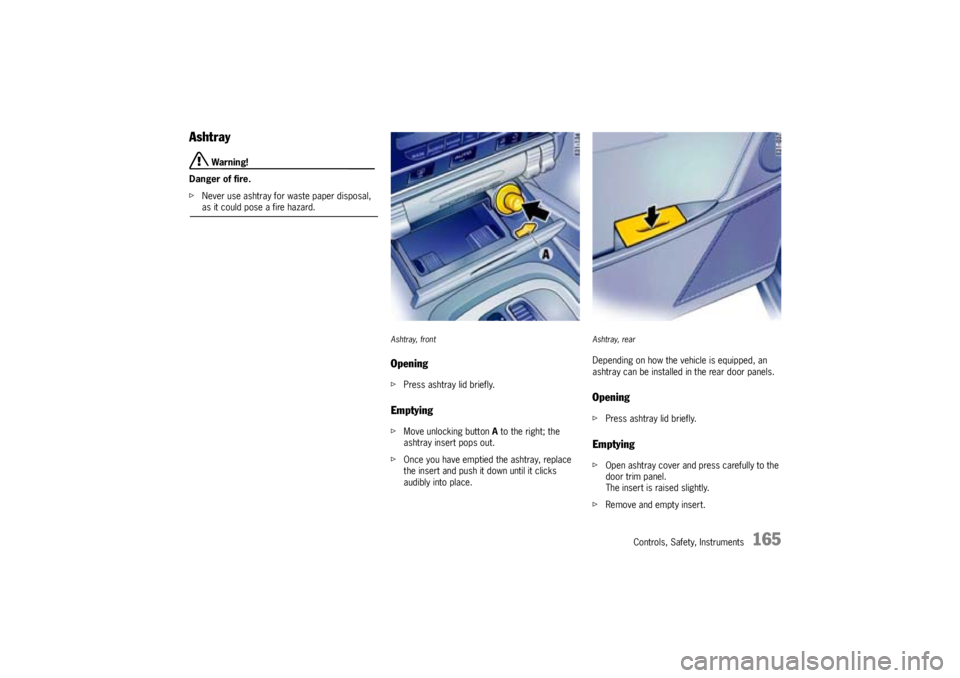
Ashtray, frontOpeningfPress ashtray lid briefly.EmptyingfMove unlocking button A to the right; the
ashtray insert pops out.
fOnce you have emptied the ashtray, replace
the insert and push it down until it clicks
audibly into place.
Ashtray, rearDepending on how the vehicle is equipped, an
ashtray can be installed in the rear door panels.OpeningfPress ashtray lid briefly.EmptyingfOpen ashtray cover and press carefully to the
door trim panel.
The insert is raised slightly.
fRemove and empty insert.
Page 172 of 369
172
Controls, Safety, Instruments
Storage
Warning!
Unsecured luggage and heavy objects may
come loose during braking, rapid directional
changes or in an accident and cause serious
personal injury or death.
fDo not carry items of luggage or objects in the
passenger compartment unsecured.
fDo not transport any heavy objects in open
storage trays.
fAlways keep the storage trays closed while
driving.
fAlways protect the passenger compartment
with a safety net and a luggage compartment cover.
fPlease observe the chapter “LOADING INFOR-
MATION” on Page 191.
Storage options– In the glasses case in the roof console
– In the glove compartment, pen holder
– In the front and rear armrests
– In the drawer underneath the passenger’s seat
– In the storage compartments at the sides of
the luggage compartment
– In the door trim panels
– In the center console, front and rear
– On the back of the front seats
– Coat hook on the rear grab handles
– Under the load compartment floor
– In the front and rear cupholders
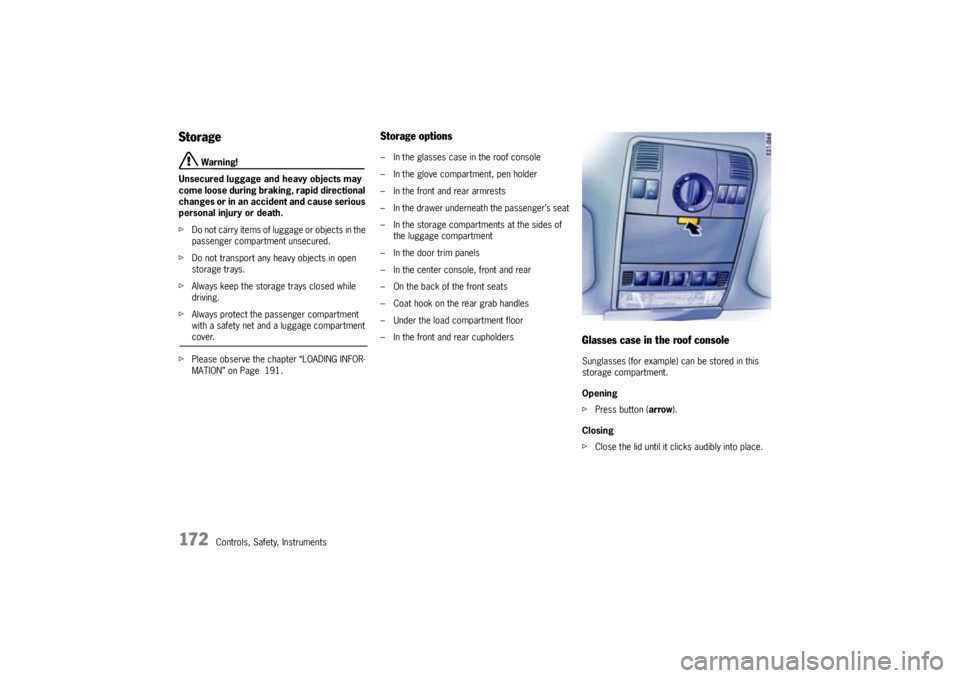
Glasses case in the roof consoleSunglasses (for example) can be stored in this
storage compartment.
Opening
fPress button (arrow).
Closing
fClose the lid until it clicks audibly into place.
Page 181 of 369
Controls, Safety, Instruments
181
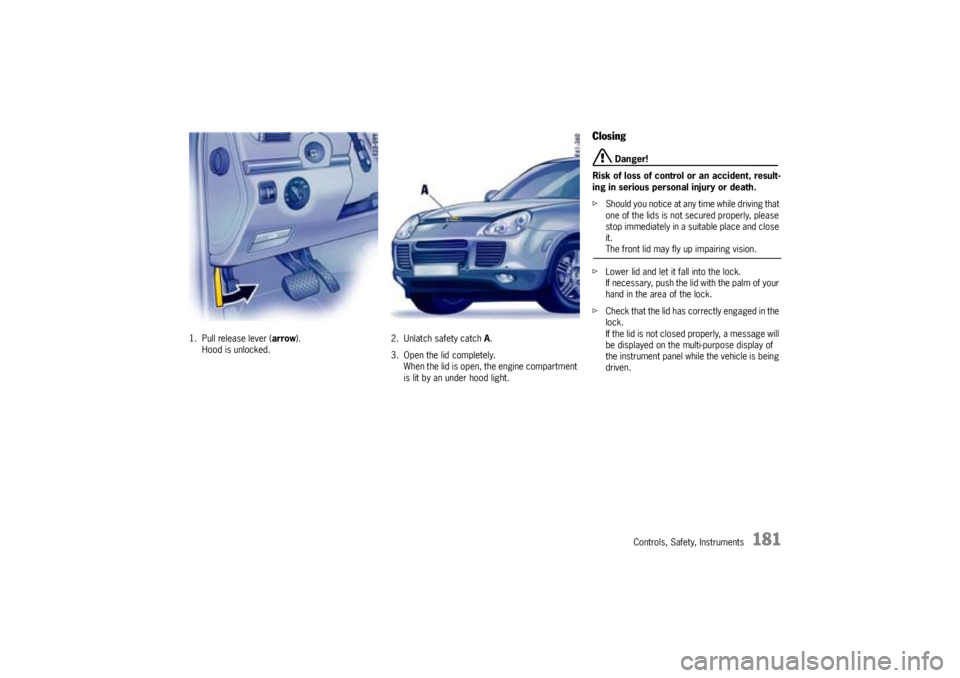
1. Pull release lever (arrow).
Hood is unlocked.2. Unlatch safety catch A.
3. Open the lid completely.
When the lid is open, the engine compartment
is lit by an under hood light.
Closing
Danger!
Risk of loss of control or an accident, result-
ing in serious personal injury or death.
fShould you notice at any time while driving that
one of the lids is not secured properly, please
stop immediately in a suitable place and close
it.The front lid may fly up impairing vision.
fLower lid and let it fall into the lock.
If necessary, push the lid with the palm of your
hand in the area of the lock.
fCheck that the lid has correctly engaged in the
lock.
If the lid is not closed properly, a message will
be displayed on the multi-purpose display of
the instrument panel while the vehicle is being
driven.
Page 202 of 369
202
Shifting Gear, Traction Systems
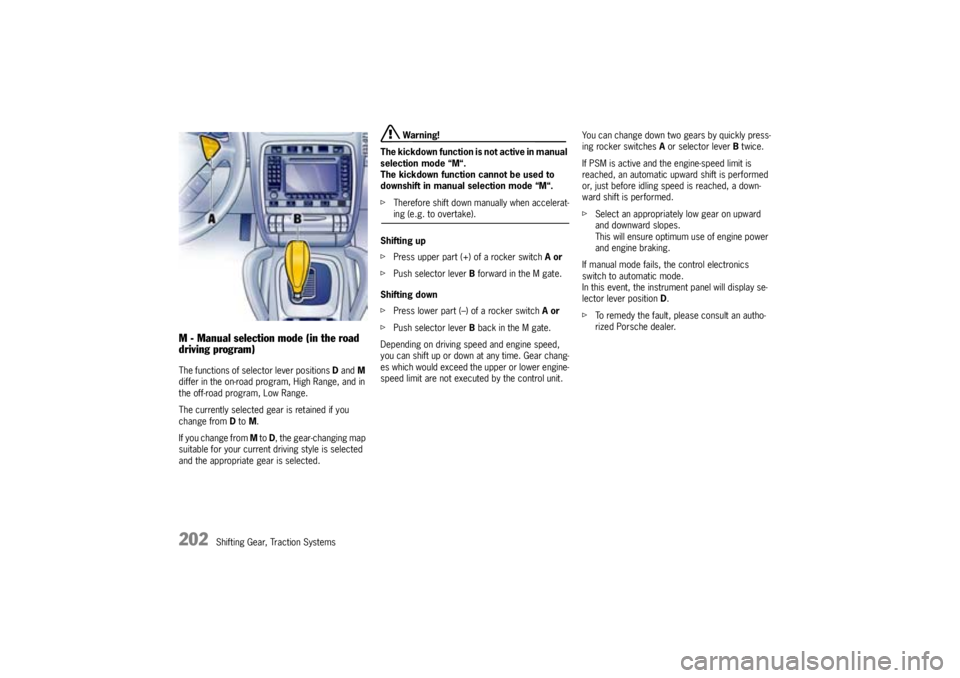
M - Manual selection mode (in the road
driving program)The functions of selector lever positions Dand M
differ in the on-road program, High Range, and in
the off-road program, Low Range.
The currently selected gear is retained if you
change from D to M.
If you change from M to D, the gear-changing map
suitable for your current driving style is selected
and the appropriate gear is selected.
Warning!
The kickdown function is not active in manual
selection mode “M“.
The kickdown function cannot be used to
downshift in manual selection mode “M“.
fTherefore shift down manually when accelerat-ing (e.g. to overtake).
Shifting up
fPress upper part (+) of a rocker switch Aor
fPush selector lever B forward in the M gate.
Shifting down
fPress lower part (–) of a rocker switch Aor
fPush selector lever B back in the M gate.
Depending on driving speed and engine speed,
you can shift up or down at any time. Gear chang-
es which would exceed the upper or lower engine-
speed limit are not executed by the control unit.You can change down two gears by quickly press-
ing rocker switches A or selector lever B twice.
If PSM is active and the engine-speed limit is
reached, an automatic upward shift is performed
or, just before idling speed is reached, a down-
ward shift is performed.
fSelect an appropriately low gear on upward
and downward slopes.
This will ensure optimum use of engine power
and engine braking.
If manual mode fails, the control electronics
switch to automatic mode.
In this event, the instrument panel will display se-
lector lever position D.
fTo remedy the fault, please consult an autho-
rized Porsche dealer.