windshield wipers PORSCHE PANAMERA 2009 1.G Information Manual
[x] Cancel search | Manufacturer: PORSCHE, Model Year: 2009, Model line: PANAMERA, Model: PORSCHE PANAMERA 2009 1.GPages: 343, PDF Size: 7.96 MB
Page 99 of 343
Lights, Turn Signals and Windshield Wipers
97
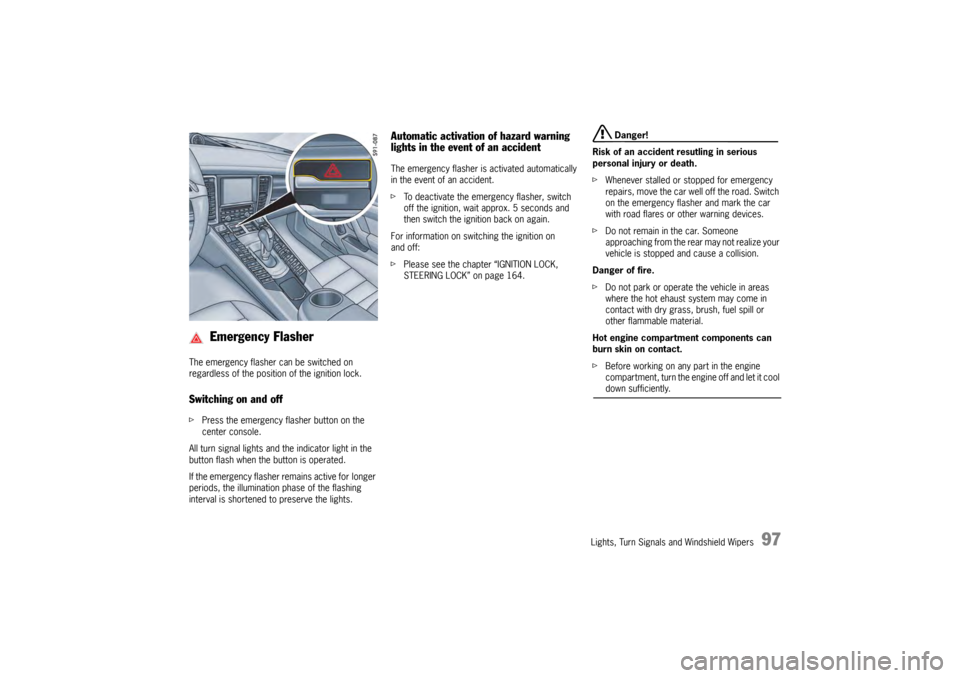
The emergency flasher can be switched on
regardless of the position of the ignition lock.Switching on and offfPress the emergency fl asher button on the
center console.
All turn signal lights and the indicator light in the
button flash when the button is operated.
If the emergency flasher remains active for longer
periods, the illumination phase of the flashing
interval is shortened to preserve the lights.
Automatic activation of hazard warning
lights in the event of an accidentThe emergency flasher is activated automatically
in the event of an accident.
f To deactivate the emergency flasher, switch
off the ignition, wait approx. 5 seconds and
then switch the ignition back on again.
For information on switching the ignition on
and off:
f Please see the chapter “IGNITION LOCK,
STEERING LOCK” on page 164.
Danger!
Risk of an accident resutling in serious
personal injury or death.
f Whenever stalled or stopped for emergency
repairs, move the car well off the road. Switch
on the emergency flasher and mark the car
with road flares or other warning devices.
f Do not remain in the car. Someone
approaching from the rear may not realize your
vehicle is stopped and cause a collision.
Danger of fire.
f Do not park or operate the vehicle in areas
where the hot ehaust system may come in
contact with dry grass, brush, fuel spill or
other flammable material.
Hot engine compartment components can
burn skin on contact.
f Before working on any part in the engine
compartment, turn the engine off and let it cool down sufficiently.
Emergency Flasher
Page 100 of 343
98
Lights, Turn Signals and Windshield Wipers
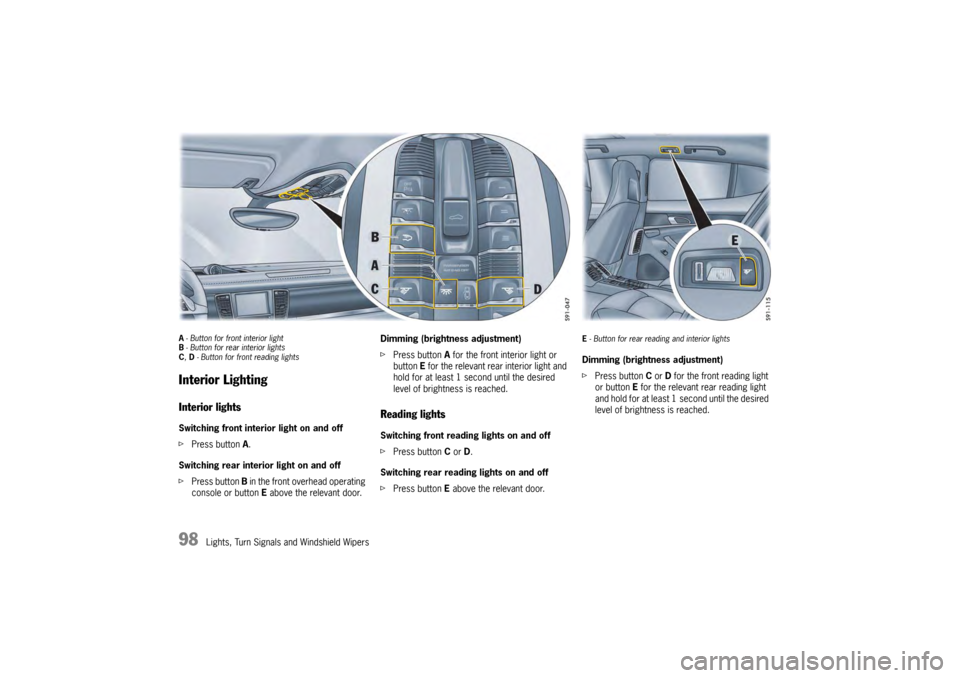
A- Button for front interior light
B - Button for rear interior lights
C , D - Button for front reading lightsInterior LightingInterior lightsSwitching front interior light on and off
f Press button A.
Switching rear interior light on and off
f Press button B in the front overhead operating
console or button E above the relevant door. Dimming (brightness adjustment)
f
Press button A for the front interior light or
button E for the relevant rear interior light and
hold for at least 1 second until the desired
level of brightness is reached.
Reading lights Switching front reading lights on and off
f Press button C or D.
Switching rear reading lights on and off
f Press button E above the relevant door.
E- Button for rear reading and interior lightsDimming (brightness adjustment)
f Press button C or D for the front reading light
or button E for the relevant rear reading light
and hold for at least 1 second until the desired
level of brightness is reached.
Page 101 of 343
Lights, Turn Signals and Windshield Wipers
99
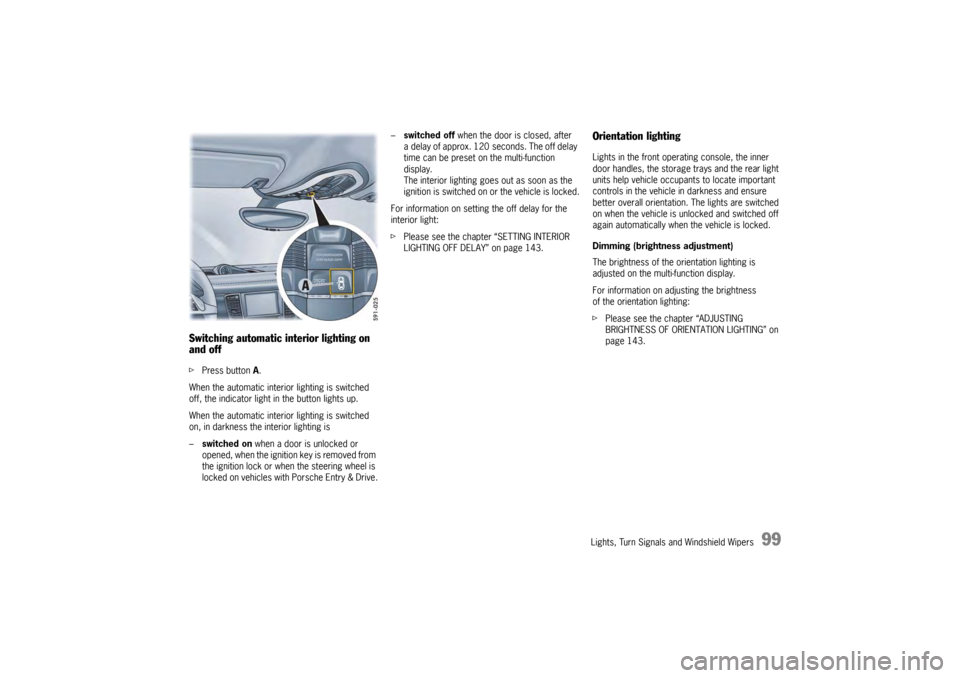
Switching automatic interior lighting on
and off fPress button A.
When the automatic interior lighting is switched
off, the indicator light in the button lights up.
When the automatic interior lighting is switched
on, in darkness the interior lighting is
– switched on when a door is unlocked or
opened, when the ignition key is removed from
the ignition lock or when the steering wheel is
locked on vehicles with Porsche Entry & Drive. –
switched off when the door is closed, after
a delay of approx. 120 seconds. The off delay
time can be preset on the multi-function
display.
The interior lighting goes out as soon as the
ignition is switched on or the vehicle is locked.
For information on setting the off delay for the
interior light:
f Please see the chapter “SETTING INTERIOR
LIGHTING OFF DELAY” on page 143.
Orientation lightingLights in the front operating console, the inner
door handles, the storage trays and the rear light
units help vehicle occupa nts to locate important
controls in the vehicle in darkness and ensure
better overall orientation. The lights are switched
on when the vehicle is unlocked and switched off
again automatically when the vehicle is locked.
Dimming (brightness adjustment)
The brightness of the orientation lighting is
adjusted on the multi-function display.
For information on adjusting the brightness
of the orientation lighting:
f Please see the chapter “ADJUSTING
BRIGHTNESS OF ORIENTATION LIGHTING” on
page 143.
Page 102 of 343
100
Lights, Turn Signals and Windshield Wipers
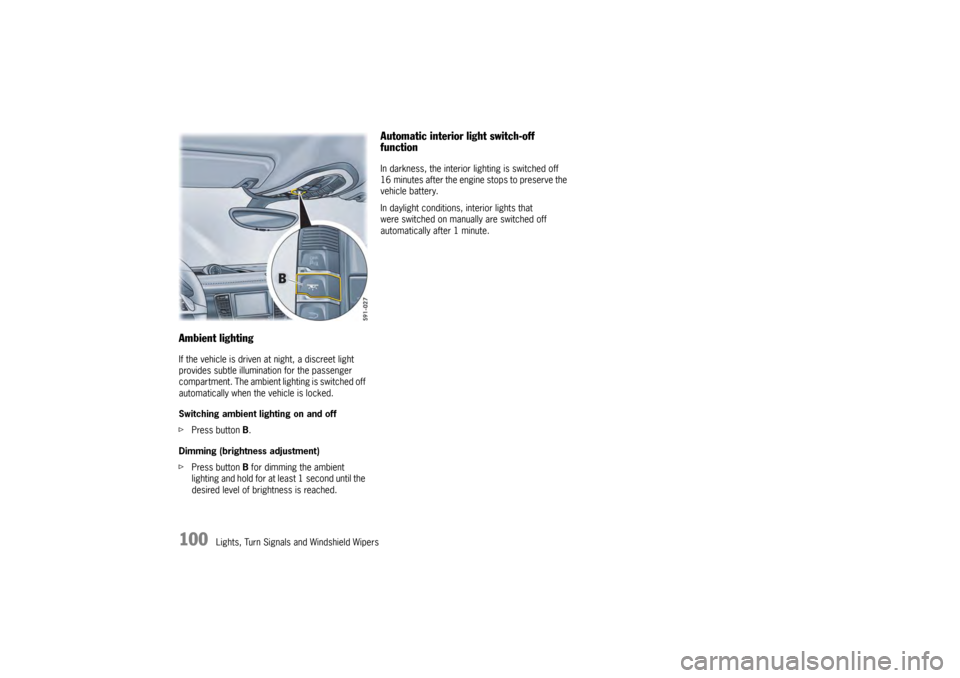
Ambient lightingIf the vehicle is driven at night, a discreet light
provides subtle illumination for the passenger
compartment. The ambient lighting is switched off
automatically when the vehicle is locked.
Switching ambient lighting on and off
fPress button B.
Dimming (brightness adjustment)
f Press button B for dimming the ambient
lighting and hold for at least 1 second until the
desired level of brightness is reached.
Automatic interior light switch-off
functionIn darkness, the interior lighting is switched off
16 minutes after the engine stops to preserve the
vehicle battery.
In daylight conditions, interior lights that
were switched on manually are switched off
automatically after 1 minute.
Page 103 of 343
Lights, Turn Signals and Windshield Wipers
101
Brief Overview – Windshield
WipersThis brief overview does not replace the
information provided under “WINDSHIELD WIPER/
WASHER STALK”.
Warnings, in particular, are not replaced by this
brief overview.
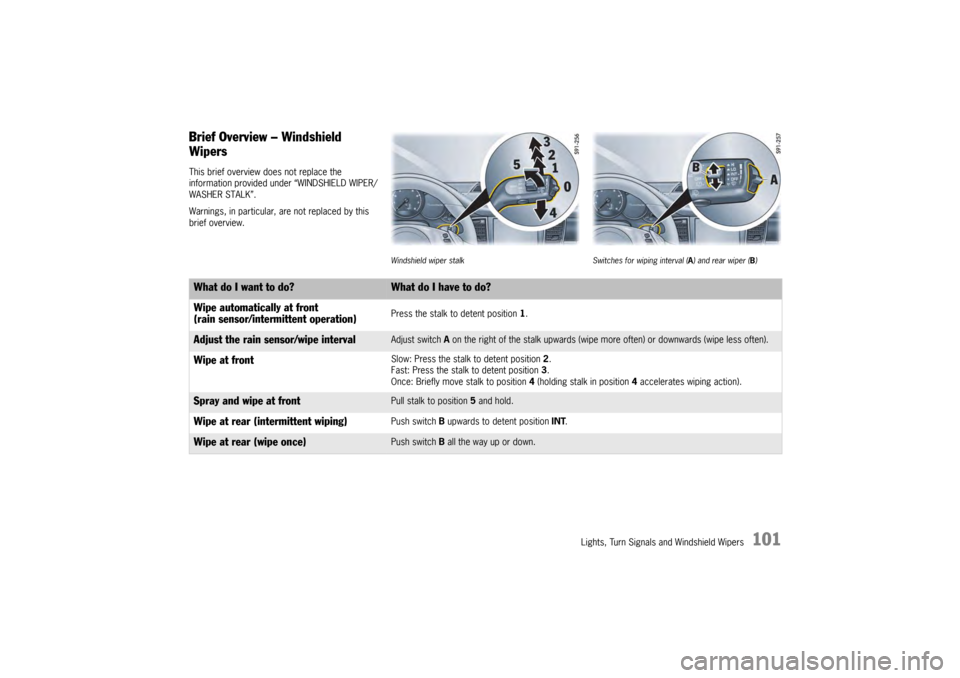
Windshield wiper stalkSwitches for wiping interval ( A) and rear wiper ( B)
What do I want to do?
What do I have to do?
Wipe automatically at front
(rain sensor/intermittent operation)Press the stalk to detent position 1 .
Adjust the rain sensor/wipe interval
Adjust switch A on the right of the stalk upwards (wipe mo re often) or downwards (wipe less often).
Wipe at front
Slow: Press the stalk to detent position 2.
Fast: Press the stalk to detent position 3 .
Once: Briefly move stalk to position 4 (holding stalk in position 4 accelerates wiping action).
Spray and wipe at front
Pull stalk to position 5 and hold.
Wipe at rear (intermittent wiping)
Push switch B upwards to detent position INT.
Wipe at rear (wipe once)
Push switch B all the way up or down.
Page 104 of 343
102
Lights, Turn Signals and Windshield Wipers
Windshield Wiper/Washer Stalk
Caution!
Danger of injury if the windshield wipers
operate unintentionally.
Risk of damage to the engine compartment
lid, windshield and wiper system.
f Only wipe the windshield when sufficiently wet,
otherwise it could become scratched.
f Loosen frozen wiper blades before starting
to drive.
f Do not operate a frozen headlight washer
system.
f Always switch off windshield wipers in car
washes to prevent them wiping unintentionally
(rain sensor operation).
f Do not operate headlight washer system in
car washes.
f Always switch off windshield wipers before
cleaning the windshield to avoid unintentional
operation (rain sensor operation).
f Always hold the wiper arm securely when
replacing the wiper blade.
f Always switch off windshield wipers before
opening the engine compartment lid (wiper switch in position 0).
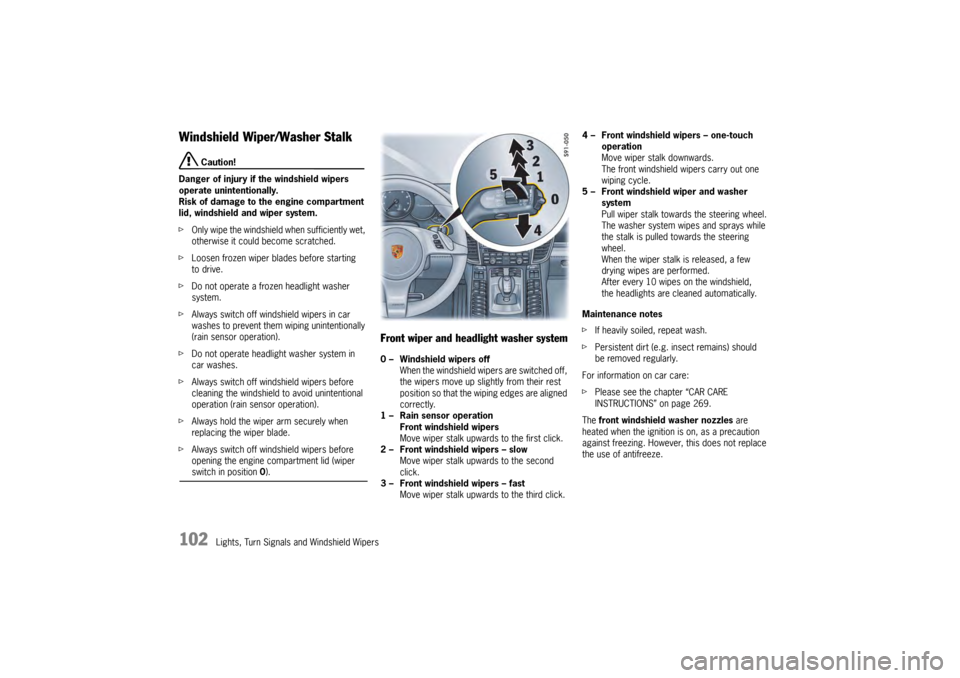
Front wiper and headlight washer system0 – Windshield wipers off
When the windshield wipers are switched off,
the wipers move up slightly from their rest
position so that the wiping edges are aligned
correctly.
1 – Rain sensor operation Front windshield wipers
Move wiper stalk upwards to the first click.
2 – Front windshield wipers – slow Move wiper stalk upwards to the second
click.
3 – Front windshield wipers – fast Move wiper stalk upwards to the third click. 4 – Front windshield wipers – one-touch
operation
Move wiper stalk downwards.
The front windshield wipers carry out one
wiping cycle.
5 – Front windshield wiper and washer system
Pull wiper stalk toward s the steering wheel.
The washer system wipes and sprays while
the stalk is pulled towards the steering
wheel.
When the wiper stalk is released, a few
drying wipes are performed.
After every 10 wipes on the windshield,
the headlights are cleaned automatically.
Maintenance notes
f If heavily soiled, repeat wash.
f Persistent dirt (e.g. insect remains) should
be removed regularly.
For information on car care:
f Please see the chapter “CAR CARE
INSTRUCTIONS” on page 269.
The front windshield washer nozzles are
heated when the ignition is on, as a precaution
against freezing. However, this does not replace
the use of antifreeze.
Page 105 of 343
Lights, Turn Signals and Windshield Wipers
103
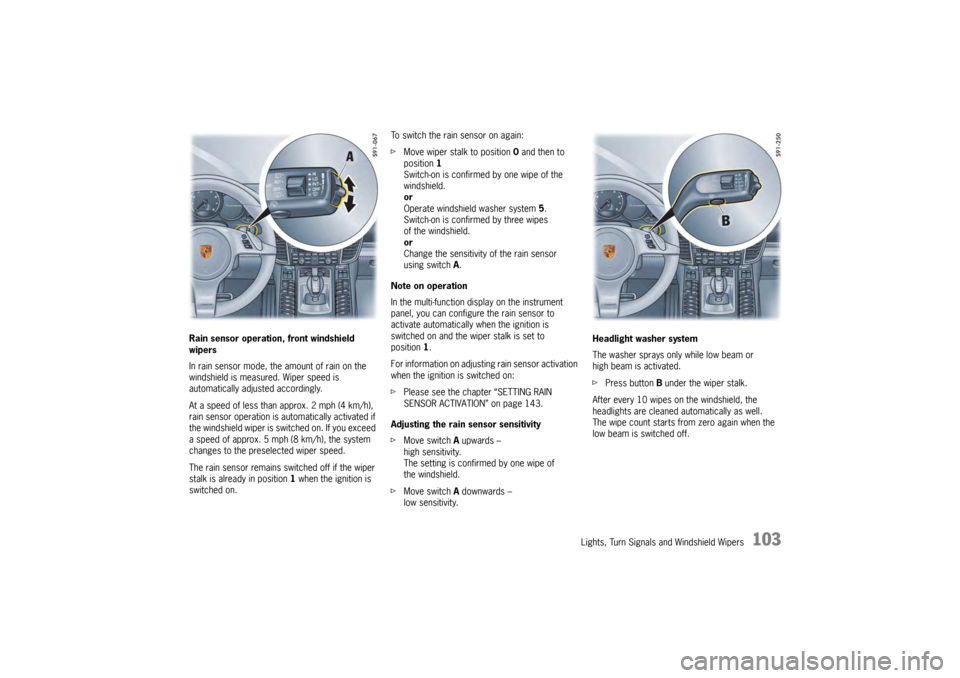
Rain sensor operation, front windshield
wipers
In rain sensor mode, the amount of rain on the
windshield is measured. Wiper speed is
automatically adjusted accordingly.
At a speed of less than approx. 2 mph (4 km/h),
rain sensor operation is automatically activated if
the windshield wiper is switched on. If you exceed
a speed of approx. 5 mph (8 km/h), the system
changes to the preselected wiper speed.
The rain sensor remains switched off if the wiper
stalk is already in position 1 when the ignition is
switched on. To switch the rain sensor on again:
f
Move wiper stalk to position 0 and then to
position 1
Switch-on is confirmed by one wipe of the
windshield.
or
Operate windshield washer system 5.
Switch-on is confirmed by three wipes
of the windshield.
or
Change the sensitivity of the rain sensor
using switch A .
Note on operation
In the multi-function display on the instrument
panel, you can configur e the rain sensor to
activate automatically when the ignition is
switched on and the wiper stalk is set to
position 1.
For information on adjusting rain sensor activation
when the ignition is switched on:
f Please see the chapter “SETTING RAIN
SENSOR ACTIVATION” on page 143.
Adjusting the rain sensor sensitivity
f Move switch A upwards –
high sensitivity.
The setting is confirmed by one wipe of
the windshield.
f Move switch A downwards –
low sensitivity. Headlight washer system
The washer sprays only while low beam or
high beam is activated.
f
Press button B under the wiper stalk.
After every 10 wipes on the windshield, the
headlights are cleaned automatically as well.
The wipe count starts from zero again when the
low beam is switched off.
Page 106 of 343
104
Lights, Turn Signals and Windshield Wipers
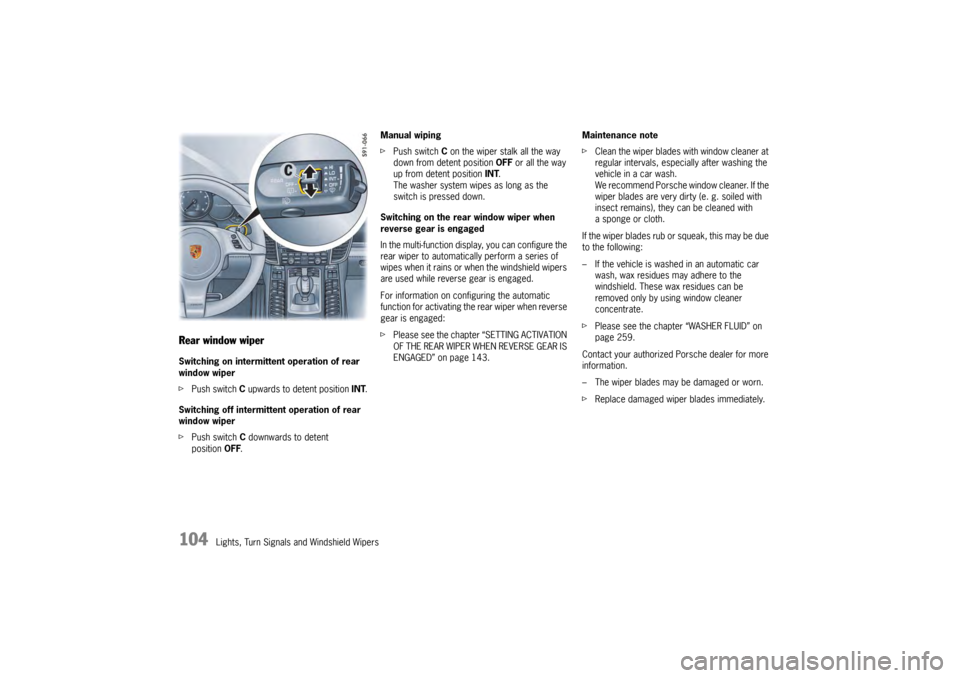
Rear window wiperSwitching on intermittent operation of rear
window wiper
fPush switch C upwards to detent position INT .
Switching off intermittent operation of rear
window wiper
f Push switch C downwards to detent
position OFF. Manual wiping
f
Push switch C on the wiper stalk all the way
down from detent position OFF or all the way
up from detent position INT.
The washer system wipes as long as the
switch is pressed down.
Switching on the rear window wiper when
reverse gear is engaged
In the multi-function display, you can configure the
rear wiper to automatically perform a series of
wipes when it rains or when the windshield wipers
are used while reverse gear is engaged.
For information on configuring the automatic
function for activating the rear wiper when reverse
gear is engaged:
f Please see the chapter “SETTING ACTIVATION
OF THE REAR WIPER WHEN REVERSE GEAR IS
ENGAGED” on page 143. Maintenance note
f
Clean the wiper blades with window cleaner at
regular intervals, especi ally after washing the
vehicle in a car wash.
We recommend Porsche window cleaner. If the
wiper blades are very dirty (e. g. soiled with
insect remains), they can be cleaned with
a sponge or cloth.
If the wiper blades rub or squeak, this may be due
to the following:
– If the vehicle is washed in an automatic car
wash, wax residues may adhere to the
windshield. These wax residues can be
removed only by using window cleaner
concentrate.
f Please see the chapter “WASHER FLUID” on
page 259.
Contact your authorized Porsche dealer for more
information.
– The wiper blades may be damaged or worn.
f Replace damaged wiper blades immediately.
Page 145 of 343
Instrument Panel and Multi-Function Display
143
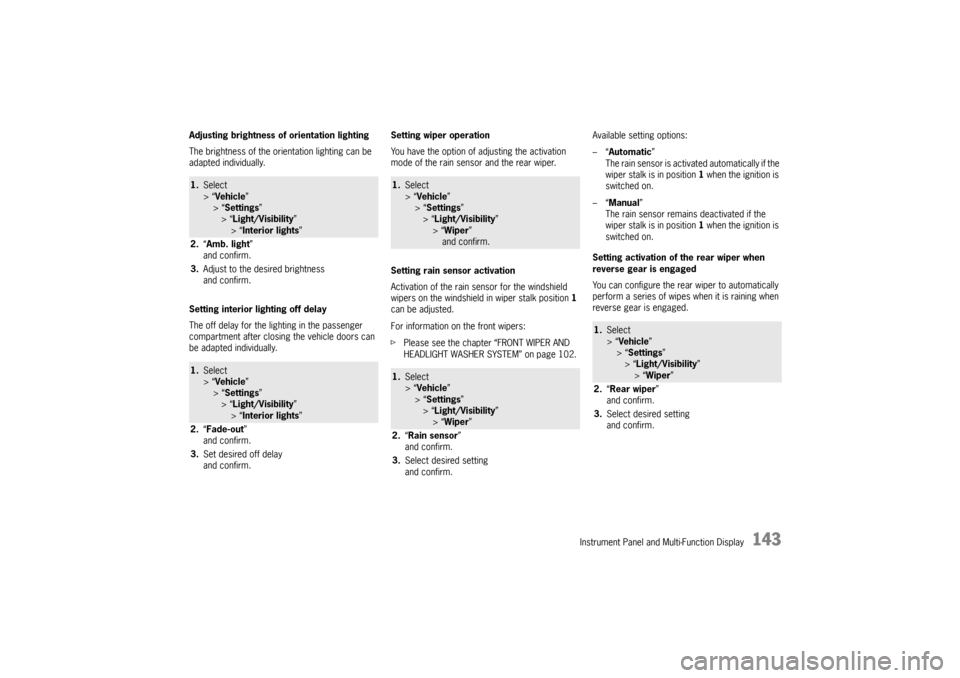
Adjusting brightness of orientation lighting
The brightness of the orientation lighting can be
adapted individually.
Setting interior lighting off delay
The off delay for the lighting in the passenger
compartment after closing the vehicle doors can
be adapted individually.Setting wiper operation
You have the option of adjusting the activation
mode of the rain sensor and the rear wiper.
Setting rain sensor activation
Activation of the rain sensor for the windshield
wipers on the windshield in wiper stalk position
1
can be adjusted.
For information on the front wipers:
f Please see the chapter “FRONT WIPER AND
HEADLIGHT WASHER SYSTEM” on page 102. Available setting options:
–“
Automatic ”
The rain sensor is activa ted automatically if the
wiper stalk is in position 1 when the ignition is
switched on.
–“ Manual ”
The rain sensor remains deactivated if the
wiper stalk is in position 1 when the ignition is
switched on.
Setting activation of the rear wiper when
reverse gear is engaged
You can configure the rear wiper to automatically
perform a series of wipes when it is raining when
reverse gear is engaged.1. Select
> “Vehicle ”
> “ Settings ”
> “Light/Visibility ”
> “Interior lights ”
2. “Amb. light ”
and confirm.
3. Adjust to the desired brightness
and confirm.1.Select
> “Vehicle ”
> “ Settings ”
> “Light/Visibility ”
> “Interior lights ”
2. “Fade-out ”
and confirm.
3. Set desired off delay
and confirm.
1.Select
> “Vehicle ”
> “Settings ”
> “ Light/Visibility ”
> “ Wiper ”
and confirm.1. Select
> “Vehicle ”
> “Settings ”
> “ Light/Visibility ”
> “ Wiper ”
2. “Rain sensor ”
and confirm.
3. Select desired setting
and confirm.
1.Select
> “Vehicle ”
> “ Settings ”
> “Light/Visibility ”
> “Wiper ”
2. “Rear wiper ”
and confirm.
3. Select desired setting
and confirm.
Page 273 of 343

Maintenance and Car Care
271
fStart washing the vehicle by thoroughly
wetting the paintwork and rinsing the heavy
dirt off.
f After washing the vehicle, rinse it thoroughly
with water and rub it dry with chamois-leather.
Do not use the same chamois for rubbing
dry as you use for cleaning the windshield
and windows.
Warning!
Risk of accidents! Reduced or uneven
braking action may be caused by wet
brakes.
f After washing the vehicle, test the brakes
and steering and briefly brake the discs dry.
When doing so, make sure that vehicles travelling behind you are not affected. Cleaning in car washes
Optional add-on parts or parts that project beyond
the contours of the vehi
cle may be damaged by
design features of car washes.
The following parts are particularly at risk:
– Windshield wipers and rear wiper (always switch them off – wiper stalk in
position 0 – to prevent them wiping
unintentionally in intermittent or sensor
operation).
– Exterior mirrors (always fold in).
– External antenna (always unscrew).
– Roof transport system (always remove completely).
– Spoiler.
– Wheels (the wider the rim and the lower the tire height, the greater the risk of damage).
f Please consult the operator before using
automatic car washes.
f All parts not reached by a car wash, such
as door and lid seams or door sills, must
be washed and polished by hand.
Paint careIn order to protect the pa int on your vehicle in
the best possible way against mechanical and
chemical damage, you should
– preserve it regularly,
– polish it if necessary,
– remove spots and stains, and
– repair damaged paintwork.
General Notes
f Never rub a dusty vehicle with a dry cloth,
because the grains of dirt will damage
the paintwork.
f Do not treat matt-painted components with
preservatives or polishes as these remove
the matt effect.
Preservation
The paint surface becomes dull over time due
to weathering.
f Preserve paint regularly.
f Apply paint preservative after washing the
vehicle and polish it smooth to preserve
the paintwork.
This keeps the paint shin y and elastic. Dirt is
prevented from adhering to the paint surface and
industrial dust is prevented from penetrating
the paint.