ESP PORSCHE PANAMERA 2009 1.G Information Manual
[x] Cancel search | Manufacturer: PORSCHE, Model Year: 2009, Model line: PANAMERA, Model: PORSCHE PANAMERA 2009 1.GPages: 343, PDF Size: 7.96 MB
Page 130 of 343

128
Instrument Panel and Multi-Function Display
f
Use only the pressure differences shown in the
“Fill info” display in the tire pressure menu or
from the corresponding tire pressure warning
when correcting the tire pressure.
f Tires can lose air over time without a tire
defect being present. A tire pressure warning
will then appear on the multi-function display.
Check the tire pressure at the next opportunity.
Warning!
Your vehicle has also been equipped with a TPM
malfunction indicator to in dicate when the system
is not operating properly.
The TPM malfunction indicator is combined with
the low tire pressure telltale.
When the system detects a malfunction, the
telltale will flash for approximately one minute and
then remain continuously illuminated. This
sequence will continue upon subsequent vehicle
start-ups as long as the malfunction exists.
When the malfunction indicator is illuminated, the
system may not be able to detect or signal low tire
pressure as intended.
TPM malfunctions may occur for a variety of
reasons, including the installation of replacement
or alternate tires or wheels on the vehicle that
prevent the TPM from functioning properly.
f Always check the TPM malfunction telltale after
replacing one or more tires or wheels on your
vehicle to ensure that the replacement or
alternate tires and wheels allow the TPM to continue to function properly. The warning light in the instrument panel lights up:
– When a loss in pressure has been detected.
– In the event of a defect in Tire Pressure
Monitoring or a temporary fault.
– When learning new fitted wheels/wheel transmitters, as long as the vehicle’s own
wheels have not ye t been recognized.
The tire pressure warning light on the instrument
panel goes out only when the cause of the fault
has been rectified.Warning light
Page 132 of 343
130
Instrument Panel and Multi-Function Display
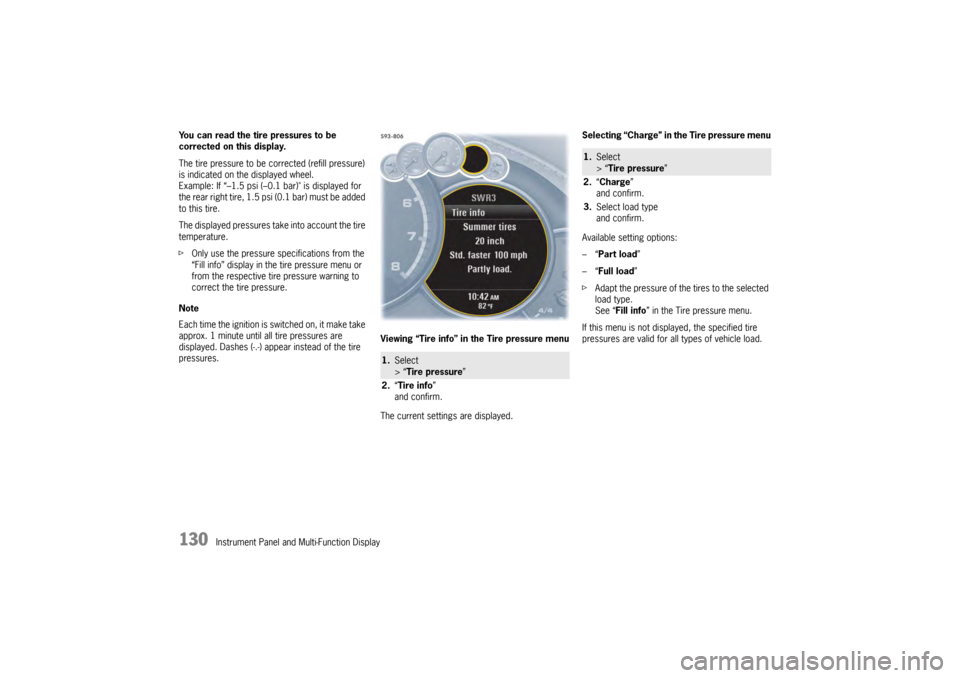
You can read the tire pressures to be
corrected on this display.
The tire pressure to be corrected (refill pressure)
is indicated on the displayed wheel.
Example: If “–1.5 psi (–0.
1 bar)" is displayed for
the rear right tire, 1.5 psi (0.1 bar) must be added
to this tire.
The displayed pressures take into account the tire
temperature.
f Only use the pressure specifications from the
“Fill info” display in the tire pressure menu or
from the respective tire pressure warning to
correct the tire pressure.
Note
Each time the ignition is switched on, it make take
approx. 1 minute until all tire pressures are
displayed. Dashes (-.-) appear instead of the tire
pressures. Viewing “Tire info” in the Tire pressure menu
The current settings are displayed.Selecting “Charge” in the Tire pressure menu
Available setting options:
–“
Part load ”
–“ Full load ”
f Adapt the pressure of the tires to the selected
load type.
See “ Fill info ” in the Tire pressure menu.
If this menu is not displayed, the specified tire
pressures are valid for al l types of vehicle load.
1.Select
> “Tire pressure ”
2. “Tire info ”
and confirm.
1. Select
> “Tire pressure ”
2. “Charge”
and confirm.
3. Select load type
and confirm.
Page 134 of 343
132
Instrument Panel and Multi-Function Display
Selecting settings in the Tire pressure menu
(type and size of fitted tire)
Warning!
Risk of accident due to excessive speed. This
could lead to serious personal injury or
death.
f Always observe the permissible maximum
speed of the respective tire.
f Exceeding maximum tire speed could result in
a tire burst, causing loss of control of the
vehicle. This could lead to serious personal
injury or death.
Moreover, Porsche recommends obeying all
traffic laws at all times to maintain the safety of yourself and all vehicle occupants. Warning!
Incomplete entries or selection of the wrong
tires on the multi-function display affect
correct indication of warnings and
messages.
f The settings must be updated in the “Tire
pressure ” menu after changing a wheel, filling
with tire sealant or adding air (after previous
warning “ Tire pressure!”).
f Please see the chapter “RED WARNING – TIRE PRESSURE!” on page 133. The new tire type and tire
size must be selected
even if the settings for the new set of wheels are
the same as for the old wheels.
Available setting options:
–“ 18 inch ”
–“ 19 inch ”
–“ 20 inch ”
Tire selection has only been successfully
completed when the following message appears
on the multi-function display (example).
“Summer tires 19-inch was set. No monitoring,
system is learning”.
f Please see the chapter “SYSTEM LEARNING”
on page 134. Notes
The message “Action cancelled” appears if the
setting process is interrupted. All entries made up
to this point are lost, and the original settings
remain in effect.
Before fitting tires with dimensions that are not
already stored in the mult
i-function display, the
missing information should be added to the
multi-function display.
f Please contact a qualified specialist workshop.
We recommend that you have an authorized
Porsche dealer to do this work as they have
trained workshop personnel and the necessary
parts and tools.
f Use only tires approved by Porsche.
The available items in the tire pressure menu
depend on the model type. For this reason it is
possible that some of the selection options shown
here are not available on your multi-function
display.
1. Select
> “Tire pressure ”
2. “Adjust ”
and confirm.
3. Select “ Summer tires ” or
“ Winter tires ” or
“ All-season ”
and confirm.
4. Select the tire size
and confirm.
Page 135 of 343
Instrument Panel and Multi-Function Display
133
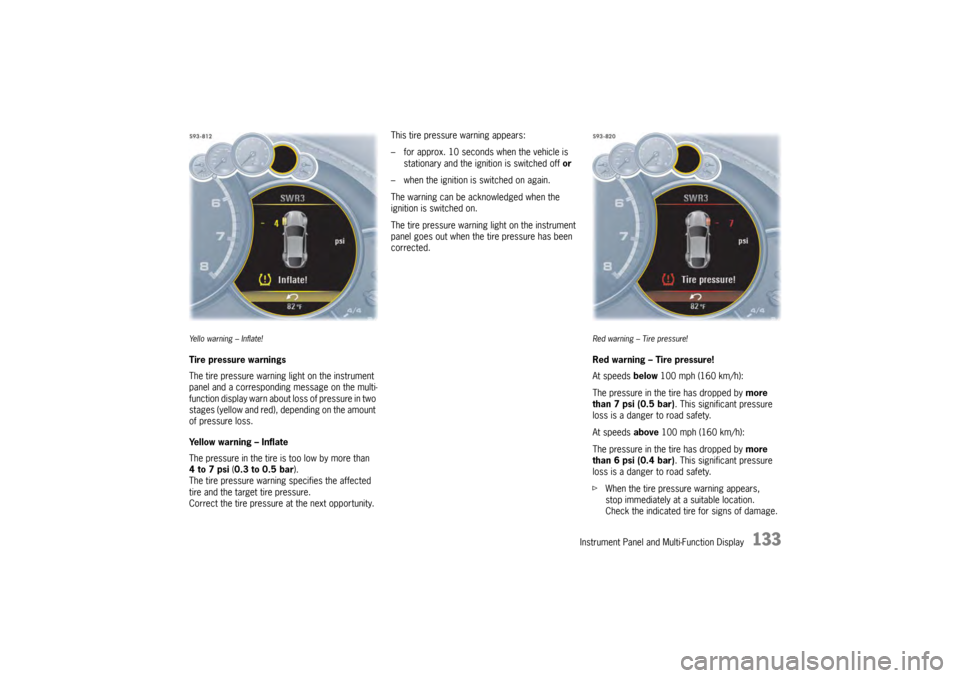
Ye l l o w a r n i n g – I n f l a t e !Tire pressure warnings
The tire pressure warning light on the instrument
panel and a corresponding message on the multi-
function display warn about loss of pressure in two
stages (yellow and red), depending on the amount
of pressure loss.
Yellow warning – Inflate
The pressure in the tire is too low by more than
4to7psi (0.3 to 0.5 bar ).
The tire pressure warning specifies the affected
tire and the target tire pressure.
Correct the tire pressure at the next opportunity. This tire pressure warning appears:
– for approx. 10 seconds when the vehicle is
stationary and the ignition is switched off or
– when the ignition is switched on again.
The warning can be acknowledged when the
ignition is switched on.
The tire pressure warning light on the instrument
panel goes out when the tire pressure has been
corrected.
Red warning – Tire pressure!Red warning – Tire pressure!
At speeds below 100 mph (160 km/h):
The pressure in the tire has dropped by more
than 7 psi (0.5 bar). This significant pressure
loss is a danger to road safety.
At speeds above 100 mph (160 km/h):
The pressure in the tire has dropped by more
than 6 psi (0.4 bar). This significant pressure
loss is a danger to road safety.
f When the tire pressure warning appears,
stop immediately at a suitable location.
Check the indicated tire for signs of damage.
Page 137 of 343
Instrument Panel and Multi-Function Display
135
No monitoringIn the event of faults, Tire Pressure Monitoring
cannot monitor the tire pressure.
The warning light on the instrument panel lights up
and a corresponding message appears on the
multi-function display.
Monitoring is not active:
– if Tire Pressure Monitoring is faulty,
– if wheel transmitters for Tire Pressure Monitoring are missing,
– during the learning phase after the tire settings have been updated,
– after a wheel change without updating the tire settings,
– if more than four wheel transmitters are recognized,
– if there is external interference by other radio sources, e.g. wireless headphones,
– if tire temperatures are too high.
f Please see the chapter “OVERVIEW OF
WARNING MESSAGES” on page 152.
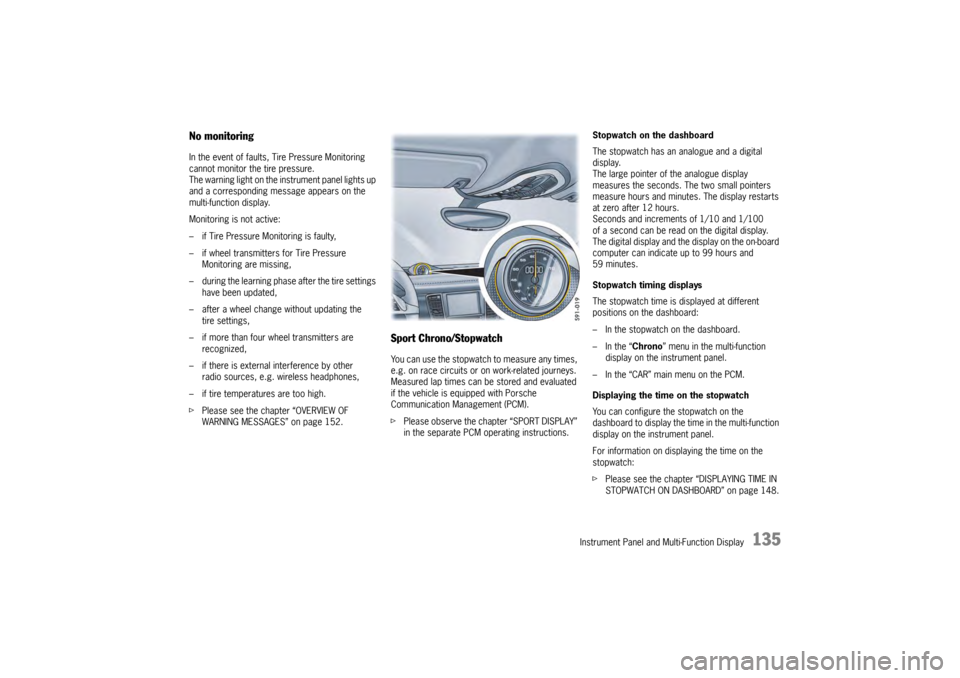
Sport Chrono/StopwatchYou can use the stopwatch to measure any times,
e.g. on race circuits or on work-related journeys.
Measured lap times can be stored and evaluated
if the vehicle is equipped with Porsche
Communication Management (PCM).
fPlease observe the chapter “SPORT DISPLAY”
in the separate PCM operating instructions. Stopwatch on the dashboard
The stopwatch has an analogue and a digital
display.
The large pointer of the analogue display
measures the seconds. The two small pointers
measure hours and minutes. The display restarts
at zero after 12 hours.
Seconds and increments of 1/10 and 1/100
of a second can be read on the digital display.
The digital display and the
display on the on-board
computer can indicate up to 99 hours and
59 minutes.
Stopwatch timing displays
The stopwatch time is displayed at different
positions on the dashboard:
– In the stopwatch on the dashboard.
– In the “ Chrono” menu in the multi-function
display on the instrument panel.
– In the “CAR” main menu on the PCM.
Displaying the time on the stopwatch
You can configure the stopwatch on the
dashboard to display the ti me in the multi-function
display on the instrument panel.
For information on displaying the time on the
stopwatch:
f Please see the chapter “DISPLAYING TIME IN
STOPWATCH ON DASHBOARD” on page 148.
Page 154 of 343
152
Instrument Panel and Multi-Function Display
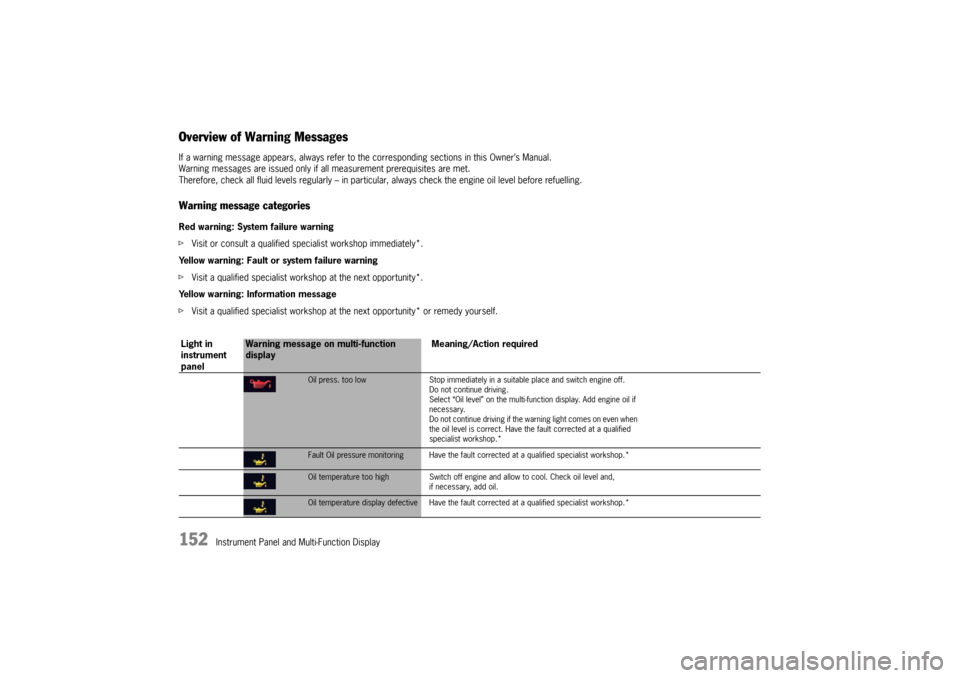
Overview of Warning MessagesIf a warning message appears, always refer to the corresponding sections in this Owner’s Manual.
Warning messages are issued only if all measurement prerequisites are met.
Therefore, check all fluid levels regu larly – in particular, always check the engine oil level before refuelling.Warning message categoriesRed warning: System failure warning
fVisit or consult a qualified spec ialist workshop immediately*.
Yellow warning: Fault or system failure warning
f Visit a qualified specialist worksh op at the next opportunity*.
Yellow warning: Information message
f Visit a qualified specialist workshop at the next opportunity* or remedy yourself.
Light in
instrument
panel
Warning message on multi-function
display Meaning/Action required
Oil press. too low
Stop immediately in a suitable place and switch engine off.
Do not continue driving.
Select “Oil level” on the multi-func tion display. Add engine oil if
necessary.
Do not continue driving if the wa rning light comes on even when
the oil level is correct. Have the fault corrected at a qualified
specialist workshop.*Fault Oil pressure monitoring Have the faul t corrected at a qualified specialist workshop.*Oil temperature too highSwitch off engine and allow to cool. Check oil level and,
if necessary, add oil.Oil temperature display defective Have the faul t corrected at a qualified specialist workshop.*
Page 172 of 343
170
Driving and Driving Safety
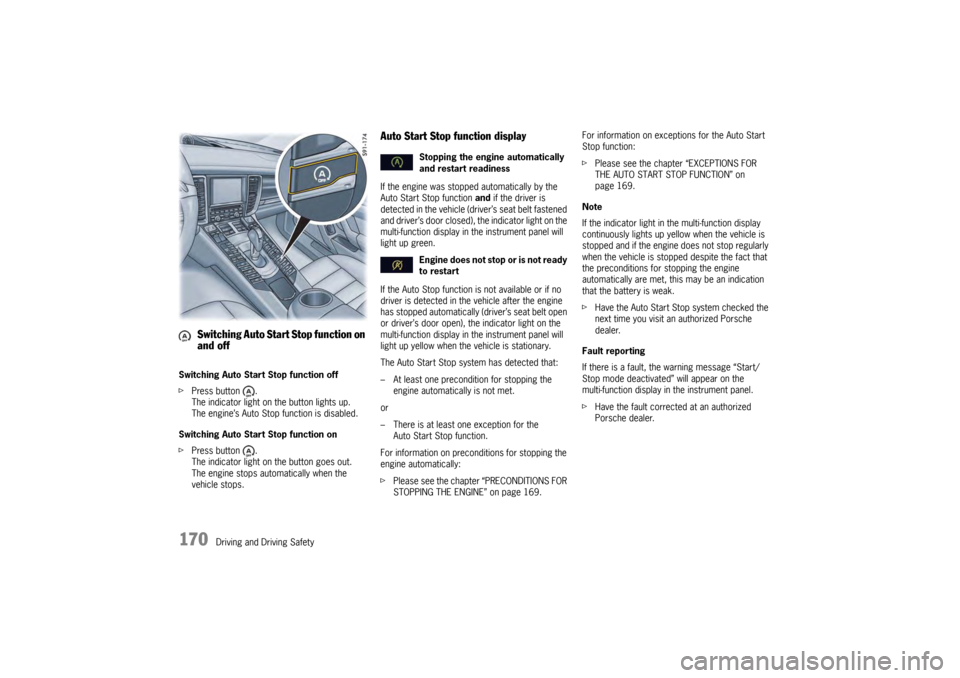
Switching Auto Start Stop function off
f
Press button .
The indicator light on the button lights up.
The engine’s Auto Stop function is disabled.
Switching Auto Start Stop function on
f Press button .
The indicator light on the button goes out.
The engine stops automatically when the
vehicle stops.
Auto Start Stop function displayIf the engine was stoppe d automatically by the
Auto Start Stop function and if the driver is
detected in the vehicle (driver’s seat belt fastened
and driver’s door closed), the indicator light on the
multi-function display in the instrument panel will
light up green.
If the Auto Stop function is not available or if no
driver is detected in the vehicle after the engine
has stopped automatically (driver’s seat belt open
or driver’s door open), the indicator light on the
multi-function display in the instrument panel will
light up yellow when the vehicle is stationary.
The Auto Start Stop system has detected that:
– At least one precondition for stopping the engine automatically is not met.
or
– There is at least one exception for the Auto Start Stop function.
For information on preconditions for stopping the
engine automatically:
f Please see the chapter “PRECONDITIONS FOR
STOPPING THE ENGINE” on page 169. For information on exceptions for the Auto Start
Stop function:
f
Please see the chapter “EXCEPTIONS FOR
THE AUTO START STOP FUNCTION” on
page 169.
Note
If the indicator light in the multi-function display
continuously lights up yellow when the vehicle is
stopped and if the engine does not stop regularly
when the vehicle is stoppe d despite the fact that
the preconditions for stopping the engine
automatically are met, this may be an indication
that the battery is weak.
f Have the Auto Start Stop system checked the
next time you visit an authorized Porsche
dealer.
Fault reporting
If there is a fault, the warning message “Start/
Stop mode deactivated” will appear on the
multi-function display in the instrument panel.
f Have the fault corrected at an authorized
Porsche dealer.
Switching Auto Start Stop function on
and off
Stopping the engine automatically
and restart readiness
Engine does not stop or is not ready
to restart
Page 178 of 343
176
Driving and Driving Safety
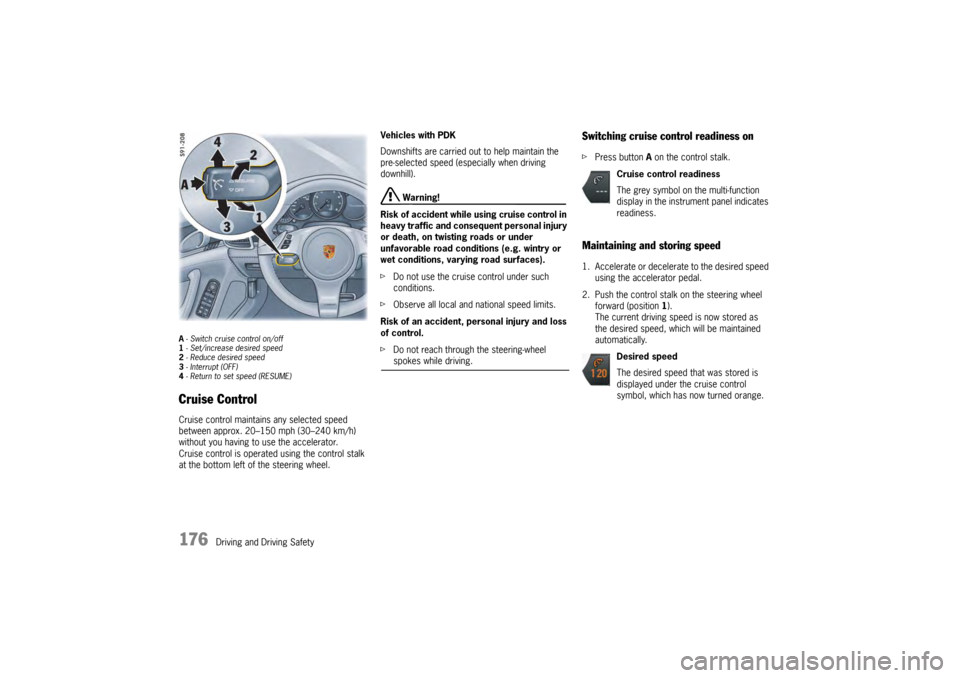
A- Switch cruise control on/off
1 - Set/increase desired speed
2 - Reduce desired speed
3 - Interrupt (OFF)
4 - Return to set speed (RESUME)Cruise ControlCruise control maintains any selected speed
between approx. 20–150 mph (30–240 km/h)
without you having to use the accelerator.
Cruise control is operated using the control stalk
at the bottom left of the steering wheel. Vehicles with PDK
Downshifts are carried out to help maintain the
pre-selected speed (especially when driving
downhill).
Warning!
Risk of accident while using cruise control in
heavy traffic and consequent personal injury
or death, on twisting roads or under
unfavorable road conditions (e.g. wintry or
wet conditions, varying road surfaces).
f Do not use the cruise control under such
conditions.
f Observe all local and national speed limits.
Risk of an accident, personal injury and loss
of control.
f Do not reach through the steering-wheel spokes while driving.
Switching cruise control readiness onfPress button A on the control stalk.Maintaining and storing speed1. Accelerate or decelera te to the desired speed
using the accelerator pedal.
2. Push the control stalk on the steering wheel forward (position 1).
The current driving speed is now stored as
the desired speed, which will be maintained
automatically.
Cruise control readiness
The grey symbol on the multi-function
display in the instrument panel indicates
readiness.
Desired speed
The desired speed that was stored is
displayed under the cruise control
symbol, which has now turned orange.
Page 179 of 343

Driving and Driving Safety
177
Accelerating (e.g. to overtake)Variant 1
fIncrease the speed as usual with the
accelerator pedal.
When you ease off the accelerator, the
previously stored value is set again.
Variant 2
f Push the control stalk on the steering wheel
forward (position 1).
The desired speed is increased in steps of
1mph (1km/h).
or
Press the control stalk on the steering wheel
forward and keep it pressed (position 1).
The desired speed is increased in steps of
5 mph (10 km/h).
The new desired speed is displayed on the
multi-function display in the instrument panel.
Deceleratingf Briefly pull the control stalk on the steering
wheel towards the steering wheel (position 2).
The desired speed is decreased in steps of
1 mph (1 km/h).
or
Pull the control stalk on the steering wheel
towards the steering whee l and keep it pulled
(position 2).
The desired speed is decreased in steps of
5 mph (10 km/h).
The new desired speed is displayed on the
multi-function display in the instrument panel.
Vehicles with PDK
Downshifts are carried out to help maintain the
pre-selected speed (especially when driving
downhill).
Interrupting cruise control
operation–OFFThe speed driven before the interruption remains
stored in the memory and can be reactivated by
pressing the control stalk.
f Please see the chapter “RESUMING THE
STORED SPEED – RESUME” on page 178.
f Press the control stalk down (position 3).
or
Press the brake or clutch pedal or move
the PDK selector lever to position N.
For more information on driving with Porsche
Doppelkupplung:
f Please see the chapter “PORSCHE
DOPPELKUPPLUNG (PDK)” on page 193.
Cruise control operation is interrupted
automatically:
– If the set vehicle speed is exceeded by more than approx. 16 mph (25 km/h) for longer
than 20 seconds.
– If the actual vehicle speed falls below the set vehicle speed by approx. 37 mph (60 km/h)
for longer than 60 seconds (e.g. gradients).
– If Porsche Stability Management (PSM) intervenes for longer than 0.5 seconds.
Page 186 of 343

184
Driving and Driving Safety
Possible distance settings
Automatic braking to a stopIf the vehicle in front stops, adaptive cruise control
will slow your vehicle down
to a stop provided this
is possible within the control limits of the system.
The display lights up on the instrument panel.
The vehicle is actively held at a stop.
For information on the HOLD function:
f Please see the chapter “HOLD FUNCTION:
DRIVE-OFF ASSISTANT AND STANDSTILL
MANAGEMENT” on page 206.
Note
Depending on the traffic flow, e.g. slow moving
traffic, stopping is initiated by a slow crawling
phase which ends in vehicle standstill.
Caution!
Brake pedal feels different. When adaptive
cruise control is operating normally or when
the HOLD function is active, the brake pedal
may feel different and you may hear
hydraulic noises.
This behavior is no rmal for the system.
It is not a fault.
Driving off againThe vehicle can be driven off again after being
stopped and speed and distance control will be
resumed, depending on the operating state of the
adaptive cruise control system.
For information on the operating states of the
adaptive cruise control system:
fPlease see the chapter “OPERATING STATES
WHEN ADAPTIVE CRUISE CONTROL IS
SWITCHED ON” on page 182.
Adaptive cruise control active
1. Press the control stalk on the steering wheel up (position 4, RESUME ).
2. Briefly press the accelerator pedal. Your vehicle drives on automatically.
Note
Your vehicle will not drive off if the vehicle
detected in front is stationary.
Adaptive cruise control is ready
Automatic speed and distance control can only
be resumed when your vehicle is moving.
1. Drive off normally.
2. Press the control stalk on the steering wheel up (position 4, RESUME ).
or
Set or change the desired speed.
Suitable for speedy driving in lines of
traffic. The time headway is 1 second.
This corresponds to 36 yd. (33 meters)
at a speed of 75 mph (120 km/h).
Suitable for driving comfortably in lines
of traffic. The time headway is
1.3 seconds. This corresponds to
47 yd. (43 meters) at a speed of
75 mph (120 km/h).
Preset distance
Corresponds to the general
recommendation of the road traffic
safety regulation (“two seconds time
headway”). The time headway is
1.8 seconds. This corresponds to
66 yd. (60 meters) at a speed of
75 mph (120 km/h).
Suitable for driving on country roads.
The time headway is 2.3 seconds.
This corresponds to 63 yd. (58 meters)
at a speed of 56 mph (90 km/h).