Pressure PORSCHE PANAMERA 2009 1.G Information Manual
[x] Cancel search | Manufacturer: PORSCHE, Model Year: 2009, Model line: PANAMERA, Model: PORSCHE PANAMERA 2009 1.GPages: 343, PDF Size: 7.96 MB
Page 137 of 343
Instrument Panel and Multi-Function Display
135
No monitoringIn the event of faults, Tire Pressure Monitoring
cannot monitor the tire pressure.
The warning light on the instrument panel lights up
and a corresponding message appears on the
multi-function display.
Monitoring is not active:
– if Tire Pressure Monitoring is faulty,
– if wheel transmitters for Tire Pressure Monitoring are missing,
– during the learning phase after the tire settings have been updated,
– after a wheel change without updating the tire settings,
– if more than four wheel transmitters are recognized,
– if there is external interference by other radio sources, e.g. wireless headphones,
– if tire temperatures are too high.
f Please see the chapter “OVERVIEW OF
WARNING MESSAGES” on page 152.
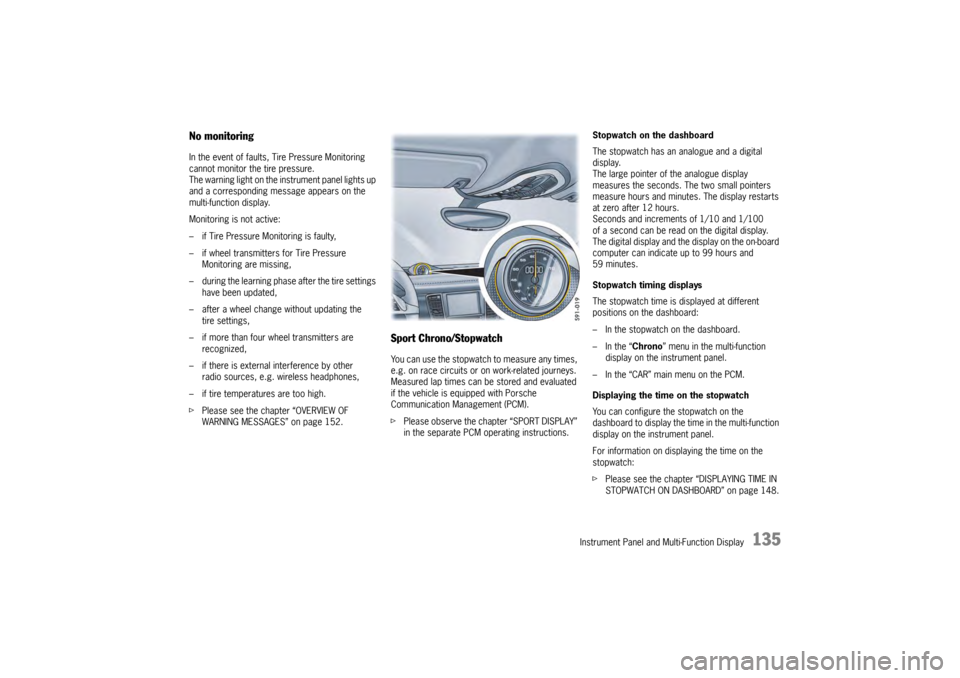
Sport Chrono/StopwatchYou can use the stopwatch to measure any times,
e.g. on race circuits or on work-related journeys.
Measured lap times can be stored and evaluated
if the vehicle is equipped with Porsche
Communication Management (PCM).
fPlease observe the chapter “SPORT DISPLAY”
in the separate PCM operating instructions. Stopwatch on the dashboard
The stopwatch has an analogue and a digital
display.
The large pointer of the analogue display
measures the seconds. The two small pointers
measure hours and minutes. The display restarts
at zero after 12 hours.
Seconds and increments of 1/10 and 1/100
of a second can be read on the digital display.
The digital display and the
display on the on-board
computer can indicate up to 99 hours and
59 minutes.
Stopwatch timing displays
The stopwatch time is displayed at different
positions on the dashboard:
– In the stopwatch on the dashboard.
– In the “ Chrono” menu in the multi-function
display on the instrument panel.
– In the “CAR” main menu on the PCM.
Displaying the time on the stopwatch
You can configure the stopwatch on the
dashboard to display the ti me in the multi-function
display on the instrument panel.
For information on displaying the time on the
stopwatch:
f Please see the chapter “DISPLAYING TIME IN
STOPWATCH ON DASHBOARD” on page 148.
Page 141 of 343
Instrument Panel and Multi-Function Display
139
Resetting to factory settingsAll settings made in the multi-function display
can be reset to the factory settings:
Note
All personal settings that have already been stored
will be lost as a result of resetting to factory
settings.
Adapting appearance of multi-function
displayThe contents and appearance of the multi-function
display can be adapted individually.
Selecting main menu display contents
Individual elements in the main menu can be
hidden and shown as required.
The main menu items “ Audio”, “Navigation”,
“ Map ”, “Phone ”, “Tr i p ”, “Tire pressure” and
“ Sport Chrono” can be hidden or shown.
The “ Settings ” menu item cannot be hidden. Adapting display contents of audio main
menu
In the audio main menu, you can display either
a list of all radio stations currently within range or
a list of all stored radio stations.
Available display contents:
–“
Station list ”
List of stations currently within range.
–“ Preset list ”
List of stored stations.
For information on the station and preset lists:
f Please observe the separate operating manual
for the Porsche communication Management
(PCM).
1.Select
> “Vehicle ”
> “ Settings ”
2. “Fact. settings ”
and confirm.
3. Select “ Ye s”
and confirm.
1. Select
> “Vehicle ”
> “Settings ”
> “ Display ”
and confirm.1. Select
> “Vehicle ”
> “Settings ”
> “ Display ”
2. “Menu scope ”
and confirm.
3. Select the desired main menu items.
4. Confirm selection.
Menu item is displayed.
Menu item is hidden.
1.Select
> “Vehicle ”
> “ Settings ”
> “Display ”
2. “Audio”
and confirm.
3. Select the desired display contents
and confirm.
Page 142 of 343
140
Instrument Panel and Multi-Function Display
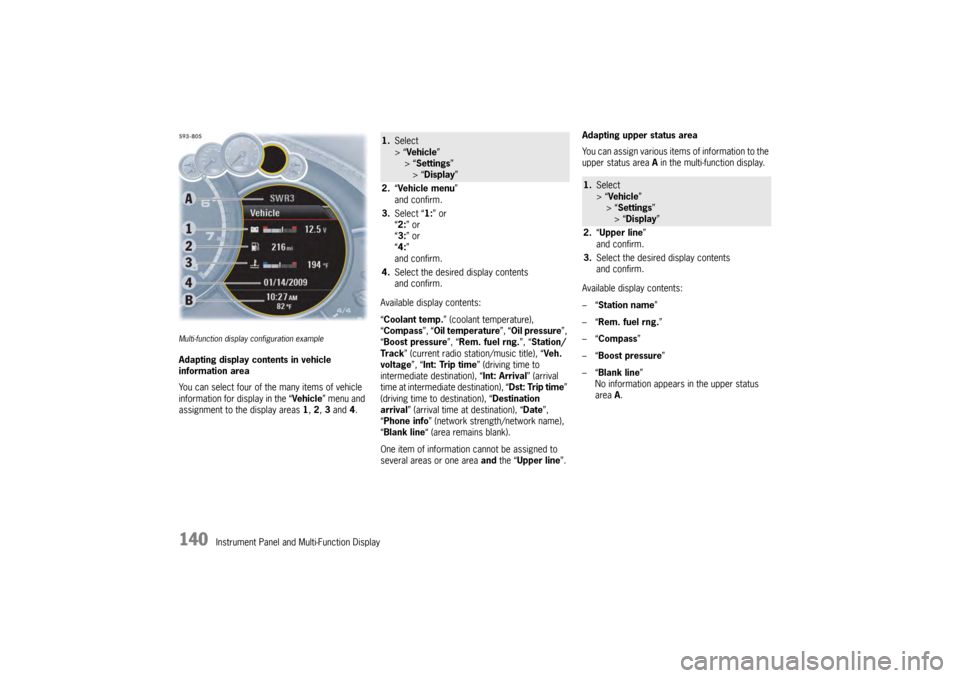
Multi-function display configuration exampleAdapting display contents in vehicle
information area
You can select four of the many items of vehicle
information for display in the “Vehicle” menu and
assignment to the display areas 1, 2 , 3 and 4. Available display contents:
“
Coolant temp. ” (coolant temperature),
“ Compass ”, “Oil temperature ”, “Oil pressure ”,
“ Boost pressure ”, “Rem. fuel rng. ”, “Station/
Track ” (current radio station/music title), “ Veh.
voltage ”, “Int: Trip time ” (driving time to
intermediate destination), “Int: Arrival ” (arrival
time at intermediate destination), “ Dst: Trip time”
(driving time to destination), “ Destination
arrival ” (arrival time at destination), “ Date”,
“ Phone info ” (network strength/network name),
“ Blank line “ (area remains blank).
One item of information cannot be assigned to
several areas or one area and the “ Upper line ”.Adapting upper status area
You can assign various items of information to the
upper status area
A in the multi-function display.
Available display contents:
–“ Station name”
–“ Rem. fuel rng. ”
–“ Compass”
–“ Boost pressure ”
–“ Blank line ”
No information appears in the upper status
area A.
1. Select
> “Vehicle ”
> “ Settings ”
> “Display ”
2. “Vehicle menu ”
and confirm.
3. Select “ 1:” or
“ 2: ” or
“ 3: ” or
“ 4: ”
and confirm.
4. Select the desired display contents
and confirm.
1.Select
> “Vehicle ”
> “Settings ”
> “Display ”
2. “Upper line ”
and confirm.
3. Select the desired display contents
and confirm.
Page 151 of 343
Instrument Panel and Multi-Function Display
149
Setting unitsYou can select the units of measurement for
vehicle displays such as the speed on the digital
speedometer in the instrument panel, the
temperature gauge in the air-conditioning displays
and the tire pressure display on the multi-function
display.
Setting speedometer units
The units of the speed and distance information on
the speedometer can be adjusted.
Available setting options:
–“ km/km/h ”
–“ Miles/mph” Setting unit for temperature gauges
The measurement unit for temperature gauges
can be changed.
Available setting options:
–“
°C”
–“ °F”
Setting unit for Tire Pressure Monitoring
display
The measurement unit for the Tire Pressure
Monitoring display can be changed.
Available setting options:
–“ bar”
–“ psi” Setting unit for boost-pressure gauge
The measurement unit for the boost-pressure
gauge can be changed.
Available setting options:
–“
bar”
–“ psi” 1. Select
> “Vehicle ”
> “ Settings ”
> “Units ”
and confirm.1. Select
> “Vehicle ”
> “ Settings ”
> “Units ”
2. Select “ Speedometer ”.
3. Select desired setting
and confirm.
1.Select
> “Vehicle ”
> “Settings ”
> “ Units ”
2. “Temperature ”.
3. Select desired setting
and confirm.1.Select
> “Vehicle ”
> “Settings ”
> “ Units ”
2. “Tire pressure ”.
3. Select desired setting
and confirm.
1.Select
> “Vehicle ”
> “ Settings ”
> “Units ”
2. “Boost pressure ”.
3. Select desired setting
and confirm.
Page 154 of 343
152
Instrument Panel and Multi-Function Display
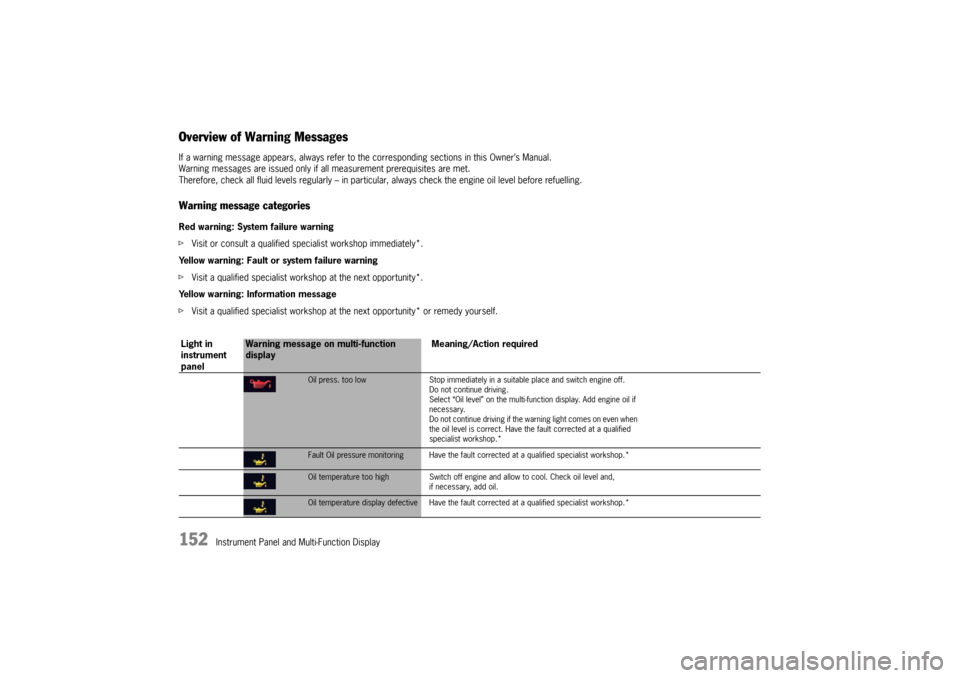
Overview of Warning MessagesIf a warning message appears, always refer to the corresponding sections in this Owner’s Manual.
Warning messages are issued only if all measurement prerequisites are met.
Therefore, check all fluid levels regu larly – in particular, always check the engine oil level before refuelling.Warning message categoriesRed warning: System failure warning
fVisit or consult a qualified spec ialist workshop immediately*.
Yellow warning: Fault or system failure warning
f Visit a qualified specialist worksh op at the next opportunity*.
Yellow warning: Information message
f Visit a qualified specialist workshop at the next opportunity* or remedy yourself.
Light in
instrument
panel
Warning message on multi-function
display Meaning/Action required
Oil press. too low
Stop immediately in a suitable place and switch engine off.
Do not continue driving.
Select “Oil level” on the multi-func tion display. Add engine oil if
necessary.
Do not continue driving if the wa rning light comes on even when
the oil level is correct. Have the fault corrected at a qualified
specialist workshop.*Fault Oil pressure monitoring Have the faul t corrected at a qualified specialist workshop.*Oil temperature too highSwitch off engine and allow to cool. Check oil level and,
if necessary, add oil.Oil temperature display defective Have the faul t corrected at a qualified specialist workshop.*
Page 155 of 343
Instrument Panel and Multi-Function Display
153
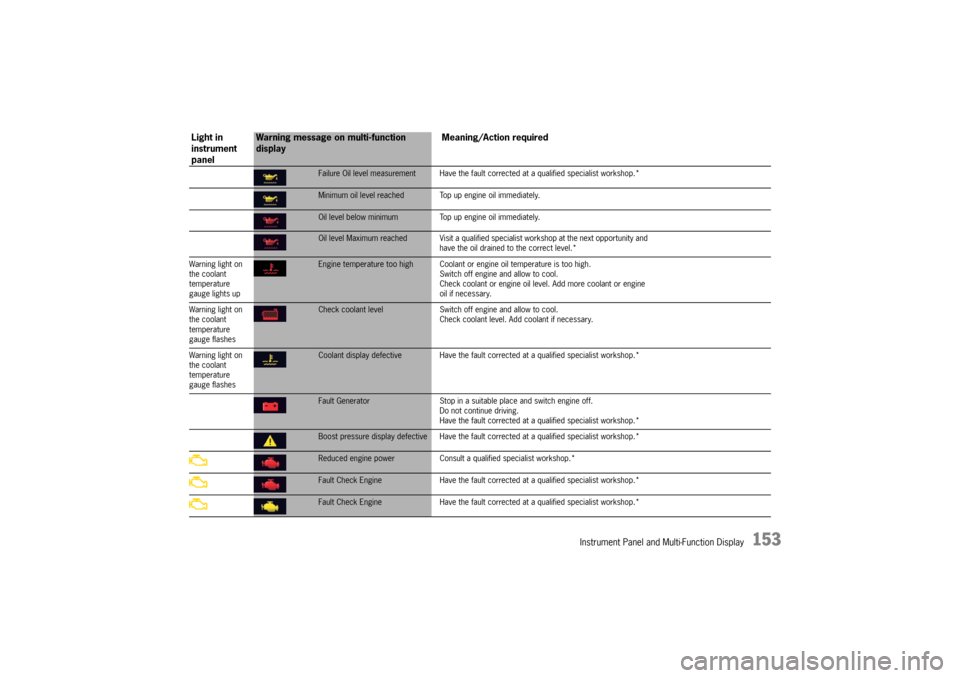
Failure Oil level measurement Have the fault corrected at a qualified specialist workshop.*Minimum oil level reached Top up engine oil immediately.Oil level below minimum Top up engine oil immediately.Oil level Maximum reached Visit a qualified spec ialist workshop at the next opportunity and
have the oil drained to the correct level.*
Warning light on
the coolant
temperature
gauge lights upEngine temperature too high Coolant or engine oil temperature is too high.
Switch off engine and allow to cool.
Check coolant or engine oil leve l. Add more coolant or engine
oil if necessary.
Warning light on
the coolant
temperature
gauge flashesCheck coolant level Switch off engine and allow to cool.
Check coolant level. Add coolant if necessary.
Warning light on
the coolant
temperature
gauge flashesCoolant display defective Have the fault corr ected at a qualified specialist workshop.*Fault Generator Stop in a suitable place and switch engine off.
Do not continue driving.
Have the fault corrected at a q ualified specialist workshop.*Boost pressure display defective Have the fault corrected at a qualified specialist workshop.*Reduced engine power Consult a qualified specialist workshop.*Fault Check Engine Have the fault corrected at a qualified specialist workshop.*Fault Check Engine Have the fault corrected at a qualified specialist workshop.*
Light in
instrument
panel
Warning message on multi-function
display Meaning/Action required
Page 161 of 343
Instrument Panel and Multi-Function Display
159
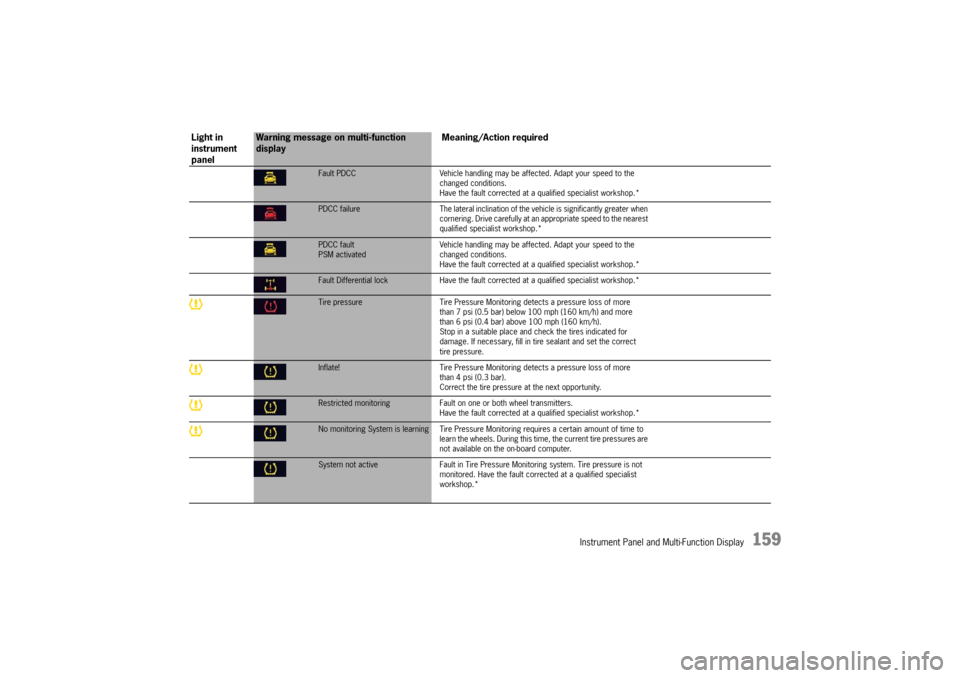
Fault PDCCVehicle handling may be affected. Adapt your speed to the
changed conditions.
Have the fault corrected at a q ualified specialist workshop.*PDCC failure The lateral inclination of the vehicle is significantly greater when
cornering. Drive carefully at an appropriate speed to the nearest
qualified specialist workshop.*PDCC fault
PSM activated Vehicle handling may be affect
ed. Adapt your speed to the
changed conditions.
Have the fault corrected at a q ualified specialist workshop.*Fault Differential lock Have the fault corrected at a qualified sp ecialist workshop.*Tire pressure Tire Pressure Monitoring detects a pressure loss of more
than 7 psi (0.5 bar) below 100 mph (160 km/h) and more
than 6 psi (0.4 bar) above 100 mph (160 km/h).
Stop in a suitable place and check the tires indicated for
damage. If necessary, fill in ti re sealant and set the correct
tire pressure.Inflate! Tire Pressure Monitoring detects a pressure loss of more
than 4 psi (0.3 bar).
Correct the tire pressure at the next opportunity.Restricted monitoring Fault on one or both wheel transmitters.
Have the fault corrected at a q ualified specialist workshop.*No monitoring System is learning Tire Pressure Mo nitoring requires a certain amount of time to
learn the wheels. During this time , the current tire pressures are
not available on the on-board computer.System not active Fault in Tire Pressure Monitoring system. Tire pressure is not
monitored. Have the fault corrected at a qualified specialist
workshop.*
Light in
instrument
panel
Warning message on multi-function
display Meaning/Action required
Page 162 of 343
160
Instrument Panel and Multi-Function Display
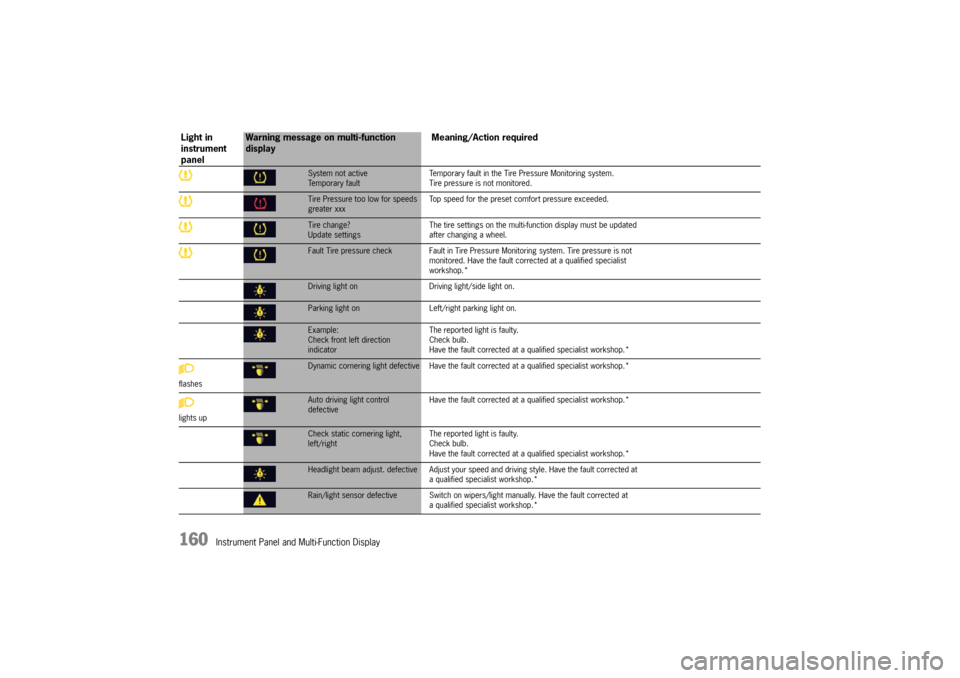
System not active
Temporary faultTemporary fault in the Tire Pressure Monitoring system.
Tire pressure is not monitored.Tire Pressure too low for speeds
greater xxx
Top speed for the preset co
mfort pressure exceeded.Tire change?
Update settings The tire settings on the multi-f
unction display must be updated
after changing a wheel.Fault Tire pressure check Fault in Tire Pressu re Monitoring system. Tire pressure is not
monitored. Have the fault corrected at a qualified specialist
workshop.*Driving light on Driving light/side light on.Parking light on Left/right parking light on.Example:
Check front left direction
indicator The reported light is faulty.
Check bulb.
Have the fault corrected at
a qualified specialist workshop.*
flashesDynamic cornering light defective Have the faul t corrected at a qualified specialist workshop.*
lights upAuto driving light control
defective Have the fault corrected at
a qualified specialist workshop.*Check static cornering light,
left/right The reported light is faulty.
Check bulb.
Have the fault corrected at
a qualified specialist workshop.*Headlight beam adjust. defective Adjust your speed and driving style. Have the fault corrected at
a qualified specialist workshop.*Rain/light sensor defective Switch on wipers/ light manually. Have the fault corrected at
a qualified specialist workshop.*
Light in
instrument
panel
Warning message on multi-function
display Meaning/Action required
Page 175 of 343
Driving and Driving Safety
173
Brake system warning light
You can check the functionality of the brake
system warning light by switching the ignition to
the “On” position (position 1) and verifying that the
warning light illuminates.
The warning light in the instrument panel lights up.
A message will be displayed on the multi-function
display of the instrument panel if the brake fluid
level is too low, or (if the brake pedal travel has
increased) one of the two brake circuits has failed.
A greater braking pressure will be required,
stopping distances will be longer and the braking
behavior will change, particularly in curves.
With correctly adjusted brakes and a correctly
working brake system, the pedal travel to the
point of brake application should be 1-3/16 in. to
1-9/16 in. (30 to 40 mm). Whenever the brake
pedal travel exceeds this value, have the brake
system checked.
Brake pedal
Warning!
Risk of an accident, resulting in serious
personal injury or death.
Any obstruction of the brake pedal could
increase the stopping distance.
f Always check the movement of the brake pedal
before driving and make sure that it is not
obstructed by a floor mat or any other object.
f Secure the floor mat to prevent it from sliding
into positions that could interfere with the safe
operation of your vehicle.
Your Porsche dealer will be glad to offer you
floor mats of the correct size including a securing possibility.
Note
In case one of the two brake circuits fails,
increased pedal travel is required to bring your
vehicle to a full stop.
Warning!
To avoid overheating and premature wear of
the brakes:
f Before descending a steep grade, reduce
speed and shift the tran smission into a lower
gear to control speed.
f Do not “ride the brakes” by resting your foot on
the pedal when not intending to apply brake
pressure.
f Do not hold the pedal down too long or too
often. This could cause the brakes to overheat and not function properly.
Brake warning light USA
Brake warning light Canada
Page 176 of 343

174
Driving and Driving Safety
Brake boosterThe brake booster assists braking only when
the engine is running.
When the car is moving while the engine is not
running, or if the brake booster is defective, more
pressure on the brake pedal is required to bring
the car to a stop.
Moisture, road salt or grit on brakes affects
braking.
Brakes will dry after a few cautious brake
applications.
Warning!
Risk of an accident, resulting in serious
personal injury or death.
Driving through water may reduce the
traction. Moisture on brakes from road
water, car wash, or a coating of road salt or
grit may affect braking efficiency.
f Cautiously apply brakes to test brakes after exposure to road water, etc.
Brake wearYour car has excellent brakes, but they are still
subject to wear. The rate at which they wear
depends on how the brakes are used.
f Have the brake system inspected at the
intervals recommended in your Maintenance
Booklet.
Brake system warning light
You can check the functionality of the brake
system warning light by switching the ignition to
the “On” position (position 1) and verifying that the
warning light illuminates.
A warning message will be displayed on the multi-
function display of the instrument panel if the
brake pads are worn, excessively.
f Do not continue to operate the vehicle.
Have your authorized Porsche dealer inspect
or replace the brake pads.
For information on warning messages on the
multi-function display:
f Please see the chapter “OVERVIEW OF
WARNING MESSAGES” on page 152.
Brake pads and brake discsWear on the brake pads and brake discs depends
to a great extent on the driving style and the
conditions of use and therefore cannot be
expressed in actual miles on the road.
The high-performance brake system is designed
for optimal braking effect at all speeds and
temperatures.
Certain speeds, braking forces and ambient
conditions (e.g. temperature and humidity) can
therefore cause the brakes to “squeal”.
New brake pads or linings
New brake pads have to be “broken in”, and
therefore only attain optimal friction when the car
has covered several hundred miles or km.
The slightly reduced braking ability must be
compensated for by pressing the brake pedal
harder. This applies whenever the brake pads
and/or brake discs are replaced.
Brake wear warning message