brake PORSCHE PANAMERA 2009 1.G Information Manual
[x] Cancel search | Manufacturer: PORSCHE, Model Year: 2009, Model line: PANAMERA, Model: PORSCHE PANAMERA 2009 1.GPages: 343, PDF Size: 7.96 MB
Page 174 of 343

172
Driving and Driving Safety
If the electric parking brake could not be applied
fully when the vehicle is stopped, the brake
warning light on the instrument panel starts to
flash.
For information on warning messages on the
multi-function display:
f
Please see the chapter “OVERVIEW OF
WARNING MESSAGES” on page 152.
BrakesfMake it a habit to chec k the operation of your
brakes before driving.
Keep in mind that the braking distance increases
very rapidly as the speed increases. At 60 mph
(100 km/h), for example, it is not twice but four
times longer than 30 mph (50 km/h). Tire traction
is also less effective when the roads are wet or
slippery.
f Therefore, always maintain a safe distance
from the car in front of you.Vehicles without Porsche Ceramic
Composite Brake (PCCB)Even though the brake discs consist of alloyed
grey cast iron, they will unavoidably start to
corrode if your car is parked for an extended
period. The brakes will tend to “rub” as a result.
The nature, extent and effects of corrosion
depend on the amount of time the vehicle was
parked, whether road salt or grit was spread and
whether grease-dissolving agents were used in
car washes.
If the braking comfort is noticeably impaired, we
recommend having the brake system checked by
experts at an authorized Porsche dealer.
Brake system functionYour Porsche is equipped with a power assisted
hydraulic dual circuit brake system with disc
brakes at the front and rear.
Both circuits function independently. One brake
circuit operates the front left and rear right wheel
and the other operates the front right and rear left
wheel.
If one brake circuit has failed, the other will still
operate. However, you will notice an increased
pedal travel when you apply the brakes. Failure of
one brake circuit will cause the stopping distance
to increase.
Warning!
Risk of an accident, resulting in serious
personal injury or death.
In the unlikely event of hydraulic failure of
one brake circuit:
f Push the brake pedal down firmly and hold it in
that position. A mechanical linkage activates
the second circuit, and you will be able to bring
the vehicle to a stop.
f After bringing your vehicle to a complete stop,
avoid driving the vehicle and instead have it
towed to the nearest authorized Porsche dealer for repair.
Brake warning light USA
Brake warning light Canada
Page 175 of 343

Driving and Driving Safety
173
Brake system warning light
You can check the functionality of the brake
system warning light by switching the ignition to
the “On” position (position 1) and verifying that the
warning light illuminates.
The warning light in the instrument panel lights up.
A message will be displayed on the multi-function
display of the instrument panel if the brake fluid
level is too low, or (if the brake pedal travel has
increased) one of the two brake circuits has failed.
A greater braking pressure will be required,
stopping distances will be longer and the braking
behavior will change, particularly in curves.
With correctly adjusted brakes and a correctly
working brake system, the pedal travel to the
point of brake application should be 1-3/16 in. to
1-9/16 in. (30 to 40 mm). Whenever the brake
pedal travel exceeds this value, have the brake
system checked.
Brake pedal
Warning!
Risk of an accident, resulting in serious
personal injury or death.
Any obstruction of the brake pedal could
increase the stopping distance.
f Always check the movement of the brake pedal
before driving and make sure that it is not
obstructed by a floor mat or any other object.
f Secure the floor mat to prevent it from sliding
into positions that could interfere with the safe
operation of your vehicle.
Your Porsche dealer will be glad to offer you
floor mats of the correct size including a securing possibility.
Note
In case one of the two brake circuits fails,
increased pedal travel is required to bring your
vehicle to a full stop.
Warning!
To avoid overheating and premature wear of
the brakes:
f Before descending a steep grade, reduce
speed and shift the tran smission into a lower
gear to control speed.
f Do not “ride the brakes” by resting your foot on
the pedal when not intending to apply brake
pressure.
f Do not hold the pedal down too long or too
often. This could cause the brakes to overheat and not function properly.
Brake warning light USA
Brake warning light Canada
Page 176 of 343

174
Driving and Driving Safety
Brake boosterThe brake booster assists braking only when
the engine is running.
When the car is moving while the engine is not
running, or if the brake booster is defective, more
pressure on the brake pedal is required to bring
the car to a stop.
Moisture, road salt or grit on brakes affects
braking.
Brakes will dry after a few cautious brake
applications.
Warning!
Risk of an accident, resulting in serious
personal injury or death.
Driving through water may reduce the
traction. Moisture on brakes from road
water, car wash, or a coating of road salt or
grit may affect braking efficiency.
f Cautiously apply brakes to test brakes after exposure to road water, etc.
Brake wearYour car has excellent brakes, but they are still
subject to wear. The rate at which they wear
depends on how the brakes are used.
f Have the brake system inspected at the
intervals recommended in your Maintenance
Booklet.
Brake system warning light
You can check the functionality of the brake
system warning light by switching the ignition to
the “On” position (position 1) and verifying that the
warning light illuminates.
A warning message will be displayed on the multi-
function display of the instrument panel if the
brake pads are worn, excessively.
f Do not continue to operate the vehicle.
Have your authorized Porsche dealer inspect
or replace the brake pads.
For information on warning messages on the
multi-function display:
f Please see the chapter “OVERVIEW OF
WARNING MESSAGES” on page 152.
Brake pads and brake discsWear on the brake pads and brake discs depends
to a great extent on the driving style and the
conditions of use and therefore cannot be
expressed in actual miles on the road.
The high-performance brake system is designed
for optimal braking effect at all speeds and
temperatures.
Certain speeds, braking forces and ambient
conditions (e.g. temperature and humidity) can
therefore cause the brakes to “squeal”.
New brake pads or linings
New brake pads have to be “broken in”, and
therefore only attain optimal friction when the car
has covered several hundred miles or km.
The slightly reduced braking ability must be
compensated for by pressing the brake pedal
harder. This applies whenever the brake pads
and/or brake discs are replaced.
Brake wear warning message
Page 177 of 343

Driving and Driving Safety
175
Warning!
f Do not obstruct the pedal travel with floor mats
or other objects.
The brake booster is ready for operation only
while the engine is running.
If the engine is switched off or there is a defect in
the brake booster, much greater force has to be
applied to the pedal when braking.
f Vehicles with defective brakes must not
be towed and must be transported on a flat
bed.
For information on towing and tow-starting:
f Please see the chapter “TOWING” on
page 316.
In heavy rain, while driving through water or after
leaving a car wash, the braking action may be
delayed and increased pressure may be required.
f For this reason, keep further back from the
vehicle in front and “dry” the brakes by
applying them at interval s. Make sure that the
traffic behind you is not affected. After a long drive over salted or gritted roads,
a coating may form on the brake discs and pads
that significantly reduces
friction and therefore
also braking effect.
f Even though the brake discs consist of alloyed
grey cast iron, they will unavoidably start to
corrode if your vehicle is parked for an
extended period. The brakes will tend to “rub”
as a result.
The nature, extent and effects of corrosion
depend on the amount of time the vehicle was
parked, whether road salt or grit was spread
and whether grease-dissolving agents were
used in car washes (not on vehicles with
Porsche Ceramic Composite Brake).
To prevent corrosion of the brake discs,
“brake them dry” before parking the vehicle
(not on vehicles with Porsche Ceramic
Composite Brake).
If braking comfort is no ticeably impaired, we
recommend that you have the brake system
checked by an authorized Porsche dealer. f
To relieve the brake system on downhill
stretches, change down to a lower gear in
good time (engine braking).
If engine braking is insufficient on steep
stretches, operate the footbrake at intervals.
Avoid continuous braking as it overheats the
brakes and reduces the braking effect.
For information on brake fluid and checking the
brake fluid level:
f Please see the chapter “BRAKE FLUID” on
page 258.
Page 179 of 343

Driving and Driving Safety
177
Accelerating (e.g. to overtake)Variant 1
fIncrease the speed as usual with the
accelerator pedal.
When you ease off the accelerator, the
previously stored value is set again.
Variant 2
f Push the control stalk on the steering wheel
forward (position 1).
The desired speed is increased in steps of
1mph (1km/h).
or
Press the control stalk on the steering wheel
forward and keep it pressed (position 1).
The desired speed is increased in steps of
5 mph (10 km/h).
The new desired speed is displayed on the
multi-function display in the instrument panel.
Deceleratingf Briefly pull the control stalk on the steering
wheel towards the steering wheel (position 2).
The desired speed is decreased in steps of
1 mph (1 km/h).
or
Pull the control stalk on the steering wheel
towards the steering whee l and keep it pulled
(position 2).
The desired speed is decreased in steps of
5 mph (10 km/h).
The new desired speed is displayed on the
multi-function display in the instrument panel.
Vehicles with PDK
Downshifts are carried out to help maintain the
pre-selected speed (especially when driving
downhill).
Interrupting cruise control
operation–OFFThe speed driven before the interruption remains
stored in the memory and can be reactivated by
pressing the control stalk.
f Please see the chapter “RESUMING THE
STORED SPEED – RESUME” on page 178.
f Press the control stalk down (position 3).
or
Press the brake or clutch pedal or move
the PDK selector lever to position N.
For more information on driving with Porsche
Doppelkupplung:
f Please see the chapter “PORSCHE
DOPPELKUPPLUNG (PDK)” on page 193.
Cruise control operation is interrupted
automatically:
– If the set vehicle speed is exceeded by more than approx. 16 mph (25 km/h) for longer
than 20 seconds.
– If the actual vehicle speed falls below the set vehicle speed by approx. 37 mph (60 km/h)
for longer than 60 seconds (e.g. gradients).
– If Porsche Stability Management (PSM) intervenes for longer than 0.5 seconds.
Page 182 of 343
180
Driving and Driving Safety
Override
The speed of the vehicle can be increased at any
time by pressing the accelerator.
If the set ACC speed is exceeded, the ACC is
deactivated.
The message “ACC passive” will appear on the
multi-function display in the instrument panel.
The desired speed that was stored is retained.
After releasing the accelerator pedal, the ACC
accelerates to the desired speed if there is no
vehicle in front and controls the distance if a
vehicle in front is present.
For information on the “ACC passive” status:
f
Please see the chapter “OPERATING STATES
WHEN ADAPTIVE CRUISE CONTROL IS
SWITCHED ON” on page 182.
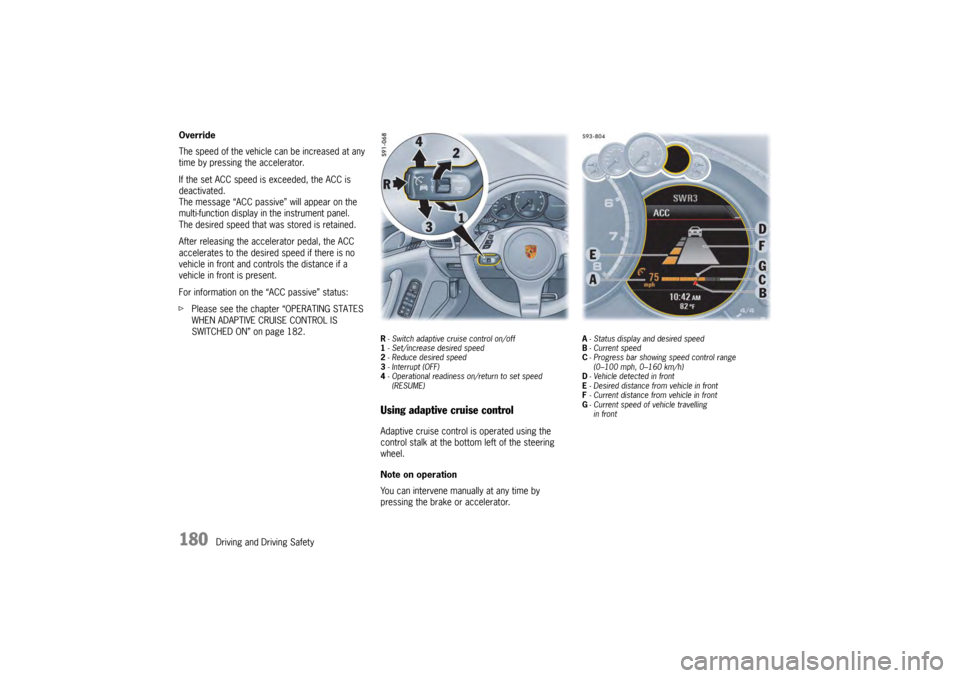
R- Switch adaptive cruise control on/off
1 - Set/increase desired speed
2 - Reduce desired speed
3 - Interrupt (OFF)
4 - Operational readiness on/return to set speed
(RESUME)Using adaptive cruise controlAdaptive cruise control is operated using the
control stalk at the bottom left of the steering
wheel.
Note on operation
You can intervene manually at any time by
pressing the brake or accelerator.
A - Status display and desired speed
B - Current speed
C - Progress bar showing speed control range
(0–100 mph, 0–160 km/h)
D - Vehicle detected in front
E - Desired distance from vehicle in front
F - Current distance from vehicle in front
G - Current speed of vehicle travelling
in front
Page 184 of 343

182
Driving and Driving Safety
Switching adaptive cruise control on
and offSwitching adaptive cruise control on
fPress button R on the control stalk.
The grey status display appears on the
multi-function display.
Adaptive cruise control is ready.
Switching adaptive cruise control off
f Press button R on the control stalk.
“ACC off” appears on the multi-function
display.
The desired speed that was stored is deleted.
The desired distance is set to the default value.Operating states when adaptive cruise
control is switched onThere are three possible operating states when
adaptive cruise control is switched on.
Adaptive cruise control active
Adaptive cruise control automatically regulates
the speed and distance fr om the vehicle in front.
The status display A turns orange. Adaptive cruise control is ready
Cruise control and distance control is inactive
after pressing the brakes or interrupting by
pressing the control stalk down (position
3, OFF ).
The desired speed that was stored and the
desired distance that was set are retained.
The status display A turns grey.
Adaptive cruise control is active again after
you release the accelerator.
For information on resuming cruise control and
distance control:
f Please see the chapter “RESUMING CRUISE
CONTROL AND DISTANCE CONTROL –
RESUME” on page 185.
Adaptive cruise control passive
Cruise control and distance control is inactive
after pressing the accelerator.
“ACC passive” appears on the multi-function
display.
The desired speed that was stored and the
desired distance that was set are retained.
The status display A turns grey.
Adaptive cruise control is active again after
you release the accelerator.
Setting and changing the desired speedPreconditions
– ACC is switched on.
– Vehicle is moving.
– No stationary objects are detected in front.
Setting the desired speed
1. Press the control stalk on the steering wheel forward (position 1).
The current driving speed is stored as the
desired speed, which will be maintained
automatically (within the control range from 20
to 100 mph, 30 to 210 km/h), and appears
orange in the status display A.
The red triangle B under the progress bar for
the speed control range shows the speed of
your vehicle.
2. Release the accelerator pedal. The desired speed is maintained automatically
unless a vehicle travelling in front is detected
as driving slower than the desired speed.
Note
If your vehicle is stopped, the message
“Impossible when parked” appears on the multi-
function display when you press the control stalk
forward (position 1).
If a stationary object wa s detected in front, the
message “Stationary ob ject” appears on the
multi-function display.
Page 186 of 343

184
Driving and Driving Safety
Possible distance settings
Automatic braking to a stopIf the vehicle in front stops, adaptive cruise control
will slow your vehicle down
to a stop provided this
is possible within the control limits of the system.
The display lights up on the instrument panel.
The vehicle is actively held at a stop.
For information on the HOLD function:
f Please see the chapter “HOLD FUNCTION:
DRIVE-OFF ASSISTANT AND STANDSTILL
MANAGEMENT” on page 206.
Note
Depending on the traffic flow, e.g. slow moving
traffic, stopping is initiated by a slow crawling
phase which ends in vehicle standstill.
Caution!
Brake pedal feels different. When adaptive
cruise control is operating normally or when
the HOLD function is active, the brake pedal
may feel different and you may hear
hydraulic noises.
This behavior is no rmal for the system.
It is not a fault.
Driving off againThe vehicle can be driven off again after being
stopped and speed and distance control will be
resumed, depending on the operating state of the
adaptive cruise control system.
For information on the operating states of the
adaptive cruise control system:
fPlease see the chapter “OPERATING STATES
WHEN ADAPTIVE CRUISE CONTROL IS
SWITCHED ON” on page 182.
Adaptive cruise control active
1. Press the control stalk on the steering wheel up (position 4, RESUME ).
2. Briefly press the accelerator pedal. Your vehicle drives on automatically.
Note
Your vehicle will not drive off if the vehicle
detected in front is stationary.
Adaptive cruise control is ready
Automatic speed and distance control can only
be resumed when your vehicle is moving.
1. Drive off normally.
2. Press the control stalk on the steering wheel up (position 4, RESUME ).
or
Set or change the desired speed.
Suitable for speedy driving in lines of
traffic. The time headway is 1 second.
This corresponds to 36 yd. (33 meters)
at a speed of 75 mph (120 km/h).
Suitable for driving comfortably in lines
of traffic. The time headway is
1.3 seconds. This corresponds to
47 yd. (43 meters) at a speed of
75 mph (120 km/h).
Preset distance
Corresponds to the general
recommendation of the road traffic
safety regulation (“two seconds time
headway”). The time headway is
1.8 seconds. This corresponds to
66 yd. (60 meters) at a speed of
75 mph (120 km/h).
Suitable for driving on country roads.
The time headway is 2.3 seconds.
This corresponds to 63 yd. (58 meters)
at a speed of 56 mph (90 km/h).
Page 187 of 343
Driving and Driving Safety
185
Interrupting and resuming cruise control
and distance controlInterrupting cruise control and distance
control – OFF
fPress the brake pedal.
or
Press the control stalk on the steering wheel
down (position 3, OFF ).
Adaptive cruise control is inactive.
The desired speed that was stored and the
desired distance are retained.
Resuming cruise control and distance
control – RESUME
f Push the control stalk on the steering wheel up
(position 4, RESUME).
The vehicle accelerates to the desired speed
that was stored unless a vehicle travelling in
front is detected as driving slower than the
desired speed and the distance from this
vehicle is less than the desired distance that
was set.
The status display A changes from grey to
orange.
or
Press the control stalk on the steering wheel
up and keep it pressed (position 4, RESUME).
The vehicle accelerates in a more sporty
driving style to the desired speed that was
stored. Note on operation
If speed and distance control was interrupted
using the control stalk
3 (OFF ), it can only be
resumed again when the vehicle is moving and no
stationary objects are detected in front.
Warning messagesIf adaptive cruise control is not active, the control
system still monitors the distance from the vehicle
in front.
If the distance from the ve hicle in front is less than
the desired distance that was set last, a yellow
warning triangle appears on the multi-function
display.
Warning!
Risk of accidents. Danger of collision with the
vehicle in front.
f Drive with extreme care.
fSlow down if necessary. Overtake request when adaptive cruise
control is active (ACC active)
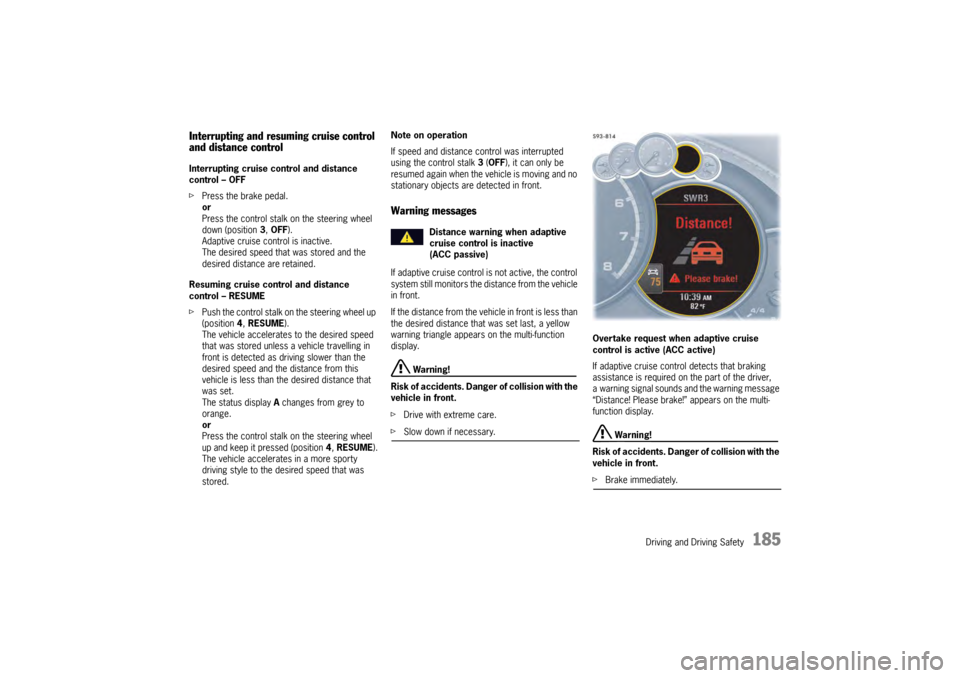
If adaptive cruise control detects that braking
assistance is required on the part of the driver,
a warning signal sounds and the warning message
“Distance! Please brake!” appears on the multi-
function display.
Warning!
Risk of accidents. Danger of collision with the
vehicle in front.
f Brake immediately.
Distance warning when adaptive
cruise control is inactive
(ACC passive)
Page 188 of 343

186
Driving and Driving Safety
Exceptions for adaptive cruise control
Adaptive cruise control is
not available in the
following situations:
– If the ignition is switched off.
– When PSM is off.
– If the driver’s door is opened and the driver’s seat belt is not fastened.
– When parking or maneuvering in very tight spaces.
– If the PDK selector lever is at position N, R or
P .
– On upward or downward slopes of more than 20 %.
– When the electric parking brake is activated.
If one of these exception situations occurs when
adaptive cruise control is switched on, adaptive
cruise control will be switched off.
A message to this effect will appear on the
multi-function display. Messages on the multi-function display
If adaptive cruise control was deactivated
automatically or if an action cannot be performed,
a message to this effect in blue appears on the
multi-function display.
–“
ACC not available! ”
Adaptive cruise control is not available,
e.g. when maneuvering.
–“ ABS/PSM intervention!”
Adaptive cruise control was deactivated
because ABS or PSM intervened as a control
mechanism.
–“ Electric parking brake! ”
Adaptive cruise control was deactivated
because the electric parking brake was
activated.
–“ Selector position!”
Adaptive cruise control was deactivated
because the PDK select or lever is not in
position D or manual position M.
–“ Impossible while parked ”
The required action is not possible because
your vehicle is stationary, e.g. when setting
a desired speed.
–“ Speed! ”
Adaptive cruise control was deactivated
because the rpm limit of the engine was
reached in manual position M of the PDK
selector lever. –“
Gradient too steep! ”
The desired distance or the desired speed
cannot be set because the gradient on the
road is too steep.
–“ Stationary object ”
The action is not possi ble because a stationary
object was detected ahead.
–“ PSM off! ”
Adaptive cruise control is not available
because PSM was switched off.
For information on Porsche Stability
Management (PSM):
f Please see the chapter “PORSCHE STABILITY
MANAGEMENT (PSM)” on page 202.
General information“Sport” and “Sport Plus” mode
Adaptive cruise control regulates your driving
more dynamically in “Sport” and “Sport Plus”
mode.