steering PORSCHE PANAMERA 2009 1.G Information Manual
[x] Cancel search | Manufacturer: PORSCHE, Model Year: 2009, Model line: PANAMERA, Model: PORSCHE PANAMERA 2009 1.GPages: 343, PDF Size: 7.96 MB
Page 153 of 343
Instrument Panel and Multi-Function Display
151
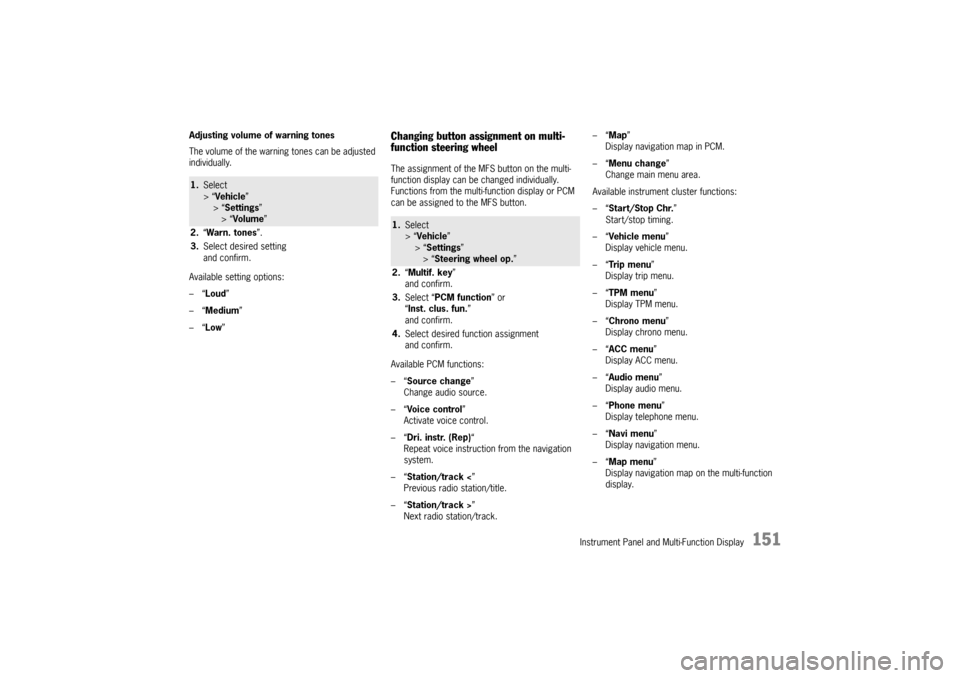
Adjusting volume of warning tones
The volume of the warning tones can be adjusted
individually.
Available setting options:
–“Loud ”
–“ Medium”
–“ Low ”
Changing button assignment on multi-
function steering wheelThe assignment of the MFS button on the multi-
function display can be changed individually.
Functions from the multi-function display or PCM
can be assigned to the MFS button.
Available PCM functions:
–“Source change ”
Change audio source.
–“ Voice control ”
Activate voice control.
–“ Dri. instr. (Rep) “
Repeat voice instruction from the navigation
system.
–“ Station/track < ”
Previous radio station/title.
–“ Station/track > ”
Next radio station/track. –“
Map ”
Display navigation map in PCM.
–“ Menu change ”
Change main menu area.
Available instrument cluster functions:
–“ Start/Stop Chr. ”
Start/stop timing.
–“ Vehicle menu ”
Display vehicle menu.
–“ Tr i p m e n u ”
Display trip menu.
–“ TPM menu ”
Display TPM menu.
–“ Chrono menu”
Display chrono menu.
–“ ACC menu ”
Display ACC menu.
–“ Audio menu ”
Display audio menu.
–“ Phone menu ”
Display telephone menu.
–“ Navi menu ”
Display navigation menu.
–“ Map menu ”
Display navigation map on the multi-function
display.
1. Select
> “Vehicle ”
> “ Settings ”
> “Volume ”
2. “Warn. tones ”.
3. Select desired setting
and confirm.
1.Select
> “Vehicle ”
> “Settings ”
> “ Steering wheel op. ”
2. “Multif. key ”
and confirm.
3. Select “PCM function” or
“ Inst. clus. fun. ”
and confirm.
4. Select desired function assignment
and confirm.
Page 159 of 343
Instrument Panel and Multi-Function Display
157
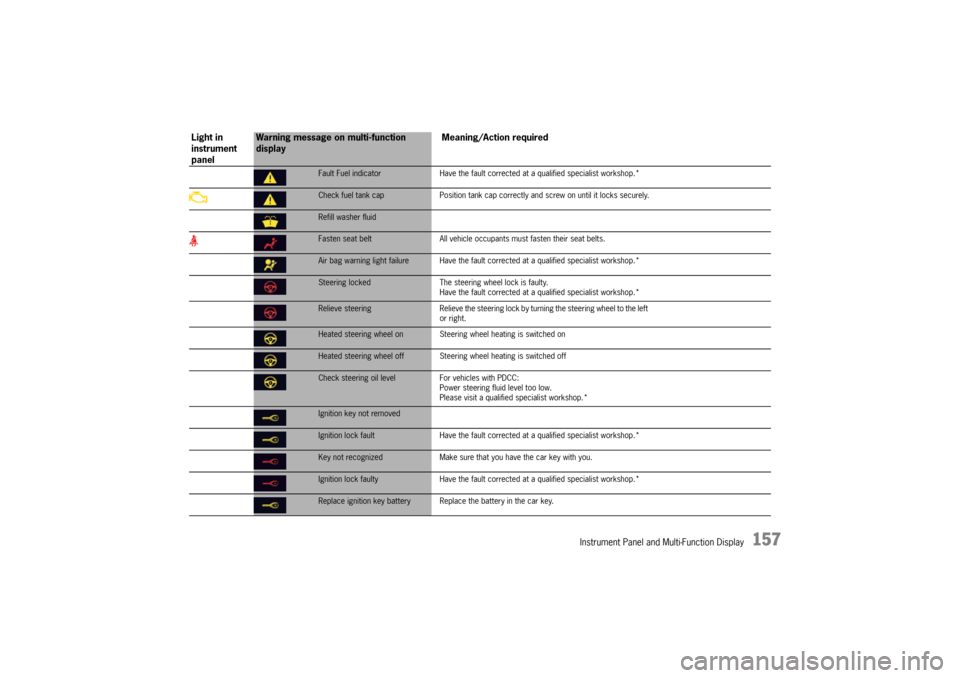
Fault Fuel indicatorHave the fault corrected at a qualified specialist workshop.*Check fuel tank cap Position tank cap correctly and screw on until it locks securely.Refill washer fluidFasten seat belt All vehicle occupants must fasten their seat belts.Air bag warning light failure Have the fault co rrected at a qualified specialist workshop.*Steering locked The steering wheel lock is faulty.
Have the fault corrected at a q ualified specialist workshop.*Relieve steering Relieve the steering lock by turning the steering wheel to the left
or right.Heated steering wheel on Steering wheel heating is switched onHeated steering wheel off Steering wheel heating is switched offCheck steering oil level For vehicles with PDCC:
Power steering fluid level too low.
Please visit a qualified specialist workshop.*Ignition key not removedIgnition lock fault Have the fault corrected at a qualified specialist workshop.*Key not recognized Make sure that you have the car key with you.Ignition lock faulty Have the fault corrected at a qua lified specialist workshop.*Replace ignition key battery Repla ce the battery in the car key.
Light in
instrument
panel
Warning message on multi-function
display Meaning/Action required
Page 165 of 343
Driving and Driving Safety
163
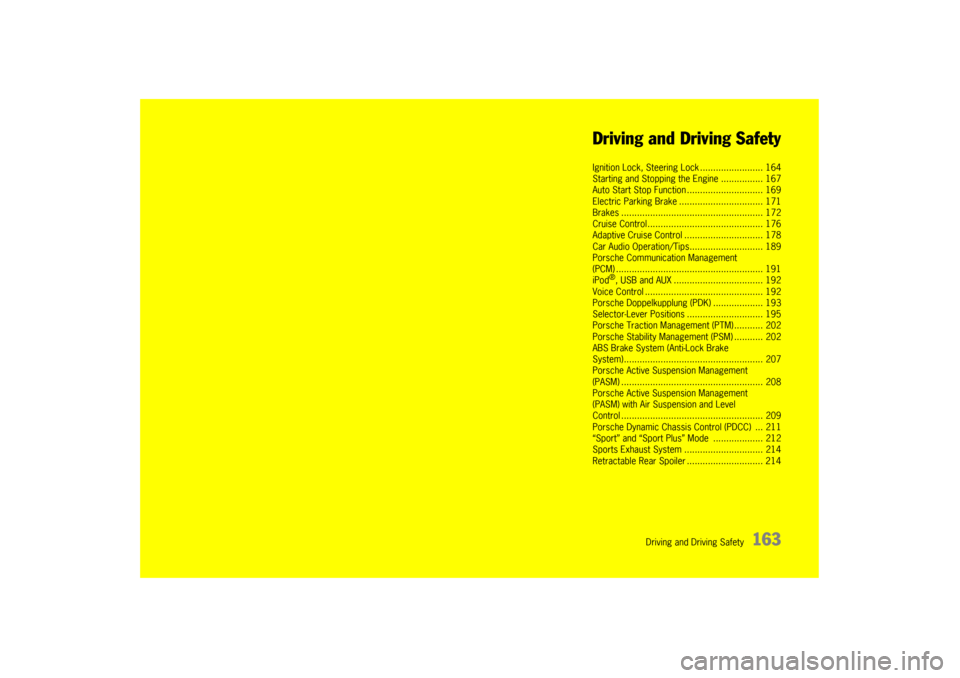
Driving and Driving Safety
Ignition Lock, Steering
Lock ........................ 164
Starting and Stopping the Engine ................ 167
Auto Start Stop Func tion ............................. 169
Electric Parking Brak e ................................ 171
Brakes ........................ .............................. 172
Cruise Control......... ................................... 176
Adaptive Cruise Contr ol .............................. 178
Car Audio Operation/Ti ps............................ 189
Porsche Communication Management
(PCM) .......................... .............................. 191
iPod
®, USB and AUX ........ .......................... 192
Voice Control ............... .............................. 192
Porsche Doppelkupplung (PDK) ................... 193
Selector-Lever Positi ons ............................. 195
Porsche Traction Management (PTM) ........... 202
Porsche Stability Management (PSM) ........... 202
ABS Brake System (Anti-Lock Brake
System)....................... .............................. 207
Porsche Active Suspension Management
(PASM) ............................................ .......... 208
Porsche Active Suspension Management
(PASM) with Air Suspension and Level
Control ............................................ .......... 209
Porsche Dynamic Chassis Control (PDCC) ... 211
“Sport” and “Sport Plus ” Mode ................... 212
Sports Exhaust Syst em .............................. 214
Retractable Rear Spoiler ............................. 214
Page 166 of 343
164
Driving and Driving Safety
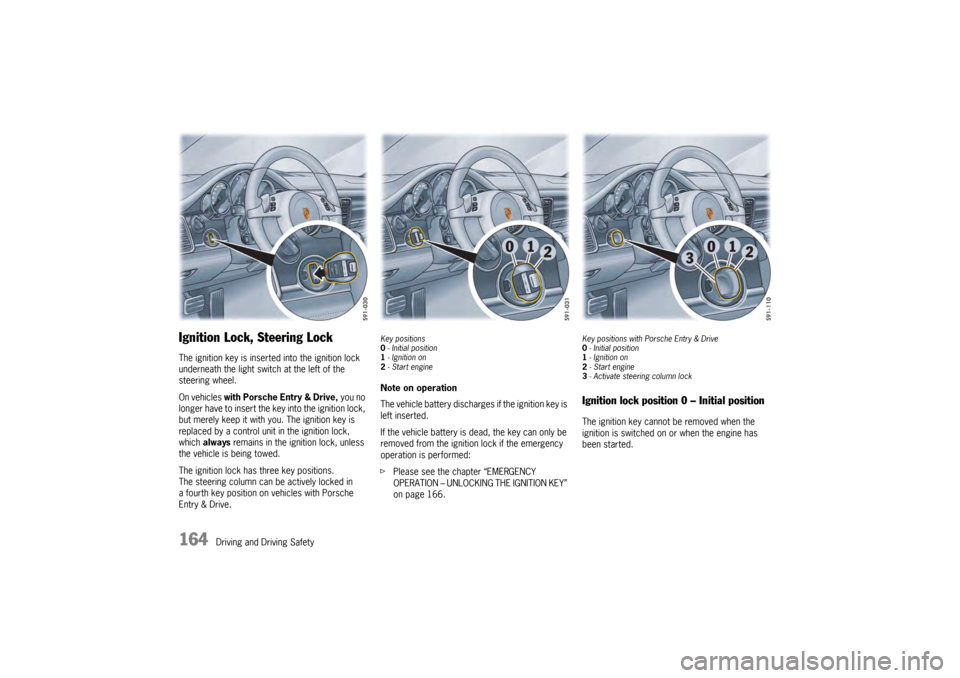
Ignition Lock, Steering LockThe ignition key is inserted into the ignition lock
underneath the light swit ch at the left of the
steering wheel.
On vehicles with Porsche Entry & Drive, you no
longer have to insert the key into the ignition lock,
but merely keep it with yo u. The ignition key is
replaced by a control unit in the ignition lock,
which always remains in the ignition lock, unless
the vehicle is being towed.
The ignition lock has three key positions.
The steering column can be actively locked in
a fourth key position on vehicles with Porsche
Entry & Drive.
Key positions
0 - Initial position
1 - Ignition on
2 -Start engineNote on operation
The vehicle battery discharges if the ignition key is
left inserted.
If the vehicle battery is dead, the key can only be
removed from the ignition lock if the emergency
operation is performed:
f Please see the chapter “EMERGENCY
OPERATION – UNLOCKING THE IGNITION KEY”
on page 166.
Key positions with Porsche Entry & Drive
0-Initial position
1 - Ignition on
2 -Start engine
3 -Activate steeri ng column lockIgnition lock position 0 – Initial positionThe ignition key cannot be removed when the
ignition is switched on or when the engine has
been started.
Page 167 of 343

Driving and Driving Safety
165
To remove the ignition key:
fStop the vehicle.
f Move PDK selector lever to position P.
f Switch ignition off.
f Remove the ignition key.Ignition lock position 1 – Ignition onfTurn ignition key to position 1.
All electrical equipment can be switched on. The
warning lights on the inst rument panel light up for
alamp check.
f Please see the chapter “INSTRUMENT PANEL
USA MODELS” on page 107.
If an electrical consumer is not switched on for
10 minutes after switching on the ignition, the
ignition must be switched off then on again.
Ignition lock position 2 – Start enginef Turn ignition key to ignition lock position 2.
The car key is reset automa tically from position 2
to position 1 when you start the engine.Ignition lock position 3 – Activate
steering column lock on vehicles with
Porsche Entry & Drivef Please see the chapter “Manually locking the
steering column on vehicles with Porsche
Entry & Drive” on page 165.Steering column lockVehicles without Porsche Entry & Drive
The steering column is locked automatically
when the ignition key is removed from the ignition
lock and unlocked automatically when the
ignition key is inserted into the ignition lock.
Vehicles with Porsche Entry & Drive
The steering column is locked automatically
when the driver’s door is opened when the ignition
is switched off. Manually locking the steering column on
vehicles with Porsche Entry & Drive
f
Once the ignition is switched off, turn the
control unit to ignition lock position 3 again
and hold it there for 2seconds.
The steering column is locked when you hear
a clicking noise.
The steering column can be unlocked
automatically by turning the control unit to
ignition lock position 1.
Emergency operation with Porsche
Entry & DriveInterference in radio tr ansmission between the
vehicle and ignition lock or a discharged ignition
lock battery can disable the Porsche Entry & Drive
comfort function.
If this happens, the control unit can be removed
from the ignition lock and the vehicle can be
started using the standard ignition key.
Removing the control unit from the
ignition lock
1. Turn the control unit to ignition lock position 3
and hold it there for about 10 seconds.
Once you hear the clicking sound, you can remove
the control unit in ignition lock position 0.
Page 170 of 343

168
Driving and Driving Safety
f
Do not warm up the engine when stationary.
Drive off immediately. Avoid high revs and full
throttle until the engine has reached operating
temperature.
f If the vehicle battery power is too weak, the
engine can be started with jump leads.
For information on jump-lead starting:
f Please see the chapter “EXTERNAL POWER
SUPPLY, JUMP-LEAD STARTING” on
page 306.
Note on operation
To ensure a good battery charge condition,
thereby ensuring that the battery will start the
engine, all electrical loads that are not required
should be switched off when the ignition is
switched on and when engine revs are low
(in traffic jams, in city traffic or in queues).
Stoppingf Only remove the ignition key when the vehicle
is stationary.
f Only switch the ignition off when the vehicle is
stationary, as there is no power steering and
brake booster assistance when the engine is
switched off.
f When leaving the vehicle, always remove the
ignition key, apply the electric parking brake
and engage selector-lever position P .
The control unit always remains in the ignition
lock on vehicles with Porsche Entry & Drive .
Warning!
Danger of injury. Hot engine compartment
components can burn skin on contact.
f Before working on any part in the engine
compartment, turn the engine off and let it cool
down sufficiently.
Risk of burn injury when standing near or
coming into contact with the exhaust pipe.
The exhaust pipe is hot wh en the vehicle is running
and remains hot for some time after the vehicle is
turned off. f
To prevent injury, make a point of noting where
your vehicle’s exhaust pipe is, avoid placing
your legs near the exhaust pipe when loading
and unloading cargo in the rear, and closely
supervise children around the vehicle during
time when the exhaust pipe could be hot.
A hot exhaust pipe can cause painful skin
burns.
Radiator fanFor information on radiator fans:
f Please see the chapter “RADIATOR FANS” on
page 258.
Warning!
Danger of injury. After the ignition is
switched off, the engine compartment and
coolant temperatures are monitored for
approx. 30 minutes. During this period, and
depending on temperature, the radiator fan
may continue to run or start to run.
f Carry out work in these areas only with the
engine off and exercise extreme caution,
always anticipating that the fan blade could suddenly start to run.
Page 178 of 343
176
Driving and Driving Safety
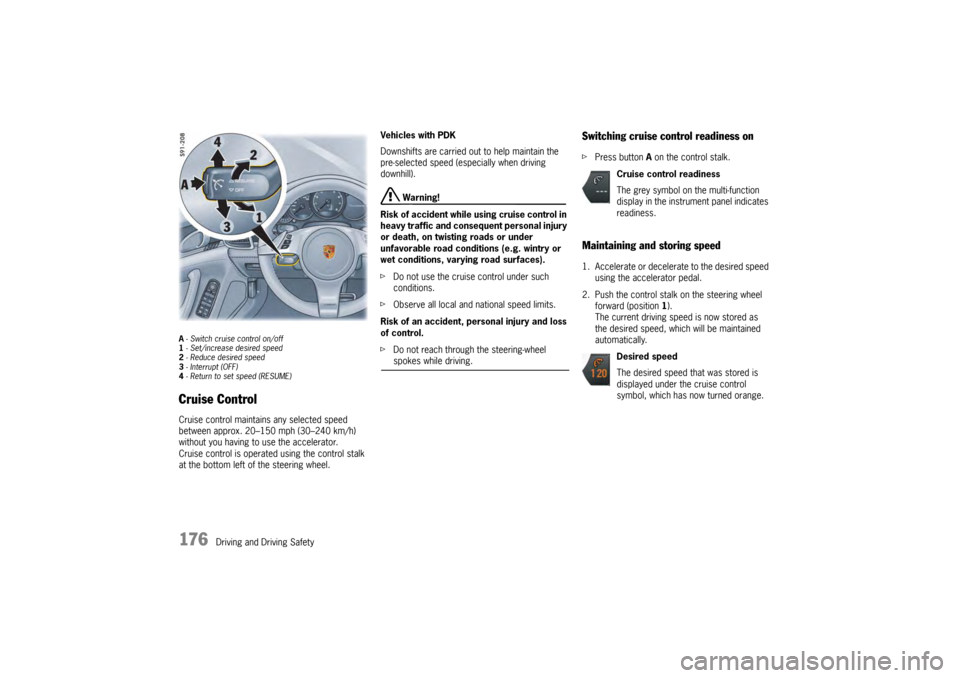
A- Switch cruise control on/off
1 - Set/increase desired speed
2 - Reduce desired speed
3 - Interrupt (OFF)
4 - Return to set speed (RESUME)Cruise ControlCruise control maintains any selected speed
between approx. 20–150 mph (30–240 km/h)
without you having to use the accelerator.
Cruise control is operated using the control stalk
at the bottom left of the steering wheel. Vehicles with PDK
Downshifts are carried out to help maintain the
pre-selected speed (especially when driving
downhill).
Warning!
Risk of accident while using cruise control in
heavy traffic and consequent personal injury
or death, on twisting roads or under
unfavorable road conditions (e.g. wintry or
wet conditions, varying road surfaces).
f Do not use the cruise control under such
conditions.
f Observe all local and national speed limits.
Risk of an accident, personal injury and loss
of control.
f Do not reach through the steering-wheel spokes while driving.
Switching cruise control readiness onfPress button A on the control stalk.Maintaining and storing speed1. Accelerate or decelera te to the desired speed
using the accelerator pedal.
2. Push the control stalk on the steering wheel forward (position 1).
The current driving speed is now stored as
the desired speed, which will be maintained
automatically.
Cruise control readiness
The grey symbol on the multi-function
display in the instrument panel indicates
readiness.
Desired speed
The desired speed that was stored is
displayed under the cruise control
symbol, which has now turned orange.
Page 179 of 343

Driving and Driving Safety
177
Accelerating (e.g. to overtake)Variant 1
fIncrease the speed as usual with the
accelerator pedal.
When you ease off the accelerator, the
previously stored value is set again.
Variant 2
f Push the control stalk on the steering wheel
forward (position 1).
The desired speed is increased in steps of
1mph (1km/h).
or
Press the control stalk on the steering wheel
forward and keep it pressed (position 1).
The desired speed is increased in steps of
5 mph (10 km/h).
The new desired speed is displayed on the
multi-function display in the instrument panel.
Deceleratingf Briefly pull the control stalk on the steering
wheel towards the steering wheel (position 2).
The desired speed is decreased in steps of
1 mph (1 km/h).
or
Pull the control stalk on the steering wheel
towards the steering whee l and keep it pulled
(position 2).
The desired speed is decreased in steps of
5 mph (10 km/h).
The new desired speed is displayed on the
multi-function display in the instrument panel.
Vehicles with PDK
Downshifts are carried out to help maintain the
pre-selected speed (especially when driving
downhill).
Interrupting cruise control
operation–OFFThe speed driven before the interruption remains
stored in the memory and can be reactivated by
pressing the control stalk.
f Please see the chapter “RESUMING THE
STORED SPEED – RESUME” on page 178.
f Press the control stalk down (position 3).
or
Press the brake or clutch pedal or move
the PDK selector lever to position N.
For more information on driving with Porsche
Doppelkupplung:
f Please see the chapter “PORSCHE
DOPPELKUPPLUNG (PDK)” on page 193.
Cruise control operation is interrupted
automatically:
– If the set vehicle speed is exceeded by more than approx. 16 mph (25 km/h) for longer
than 20 seconds.
– If the actual vehicle speed falls below the set vehicle speed by approx. 37 mph (60 km/h)
for longer than 60 seconds (e.g. gradients).
– If Porsche Stability Management (PSM) intervenes for longer than 0.5 seconds.
Page 182 of 343
180
Driving and Driving Safety
Override
The speed of the vehicle can be increased at any
time by pressing the accelerator.
If the set ACC speed is exceeded, the ACC is
deactivated.
The message “ACC passive” will appear on the
multi-function display in the instrument panel.
The desired speed that was stored is retained.
After releasing the accelerator pedal, the ACC
accelerates to the desired speed if there is no
vehicle in front and controls the distance if a
vehicle in front is present.
For information on the “ACC passive” status:
f
Please see the chapter “OPERATING STATES
WHEN ADAPTIVE CRUISE CONTROL IS
SWITCHED ON” on page 182.
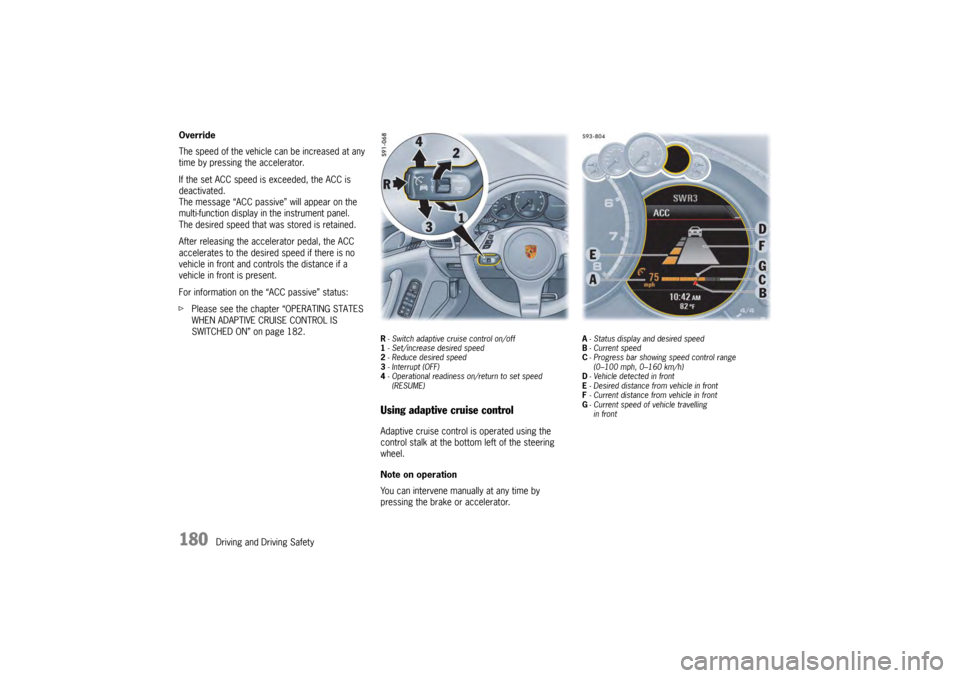
R- Switch adaptive cruise control on/off
1 - Set/increase desired speed
2 - Reduce desired speed
3 - Interrupt (OFF)
4 - Operational readiness on/return to set speed
(RESUME)Using adaptive cruise controlAdaptive cruise control is operated using the
control stalk at the bottom left of the steering
wheel.
Note on operation
You can intervene manually at any time by
pressing the brake or accelerator.
A - Status display and desired speed
B - Current speed
C - Progress bar showing speed control range
(0–100 mph, 0–160 km/h)
D - Vehicle detected in front
E - Desired distance from vehicle in front
F - Current distance from vehicle in front
G - Current speed of vehicle travelling
in front
Page 183 of 343
Driving and Driving Safety
181
Adaptive cruise control displayAll important information, messages and warnings
are displayed on the multi-function display in the
instrument panel.
“ACC” main menu
The adaptive cruise control display on the multi-
function display can be selected permanently
using the buttons on the multifunction steering
wheel or the control stalk at the bottom right of
the steering wheel.
For information on using the multi-function display:
f Please see the chapter “OPERATING THE
MULTI-FUNCTION DISPLAY IN THE
INSTRUMENT PANEL” on page 115. Status display
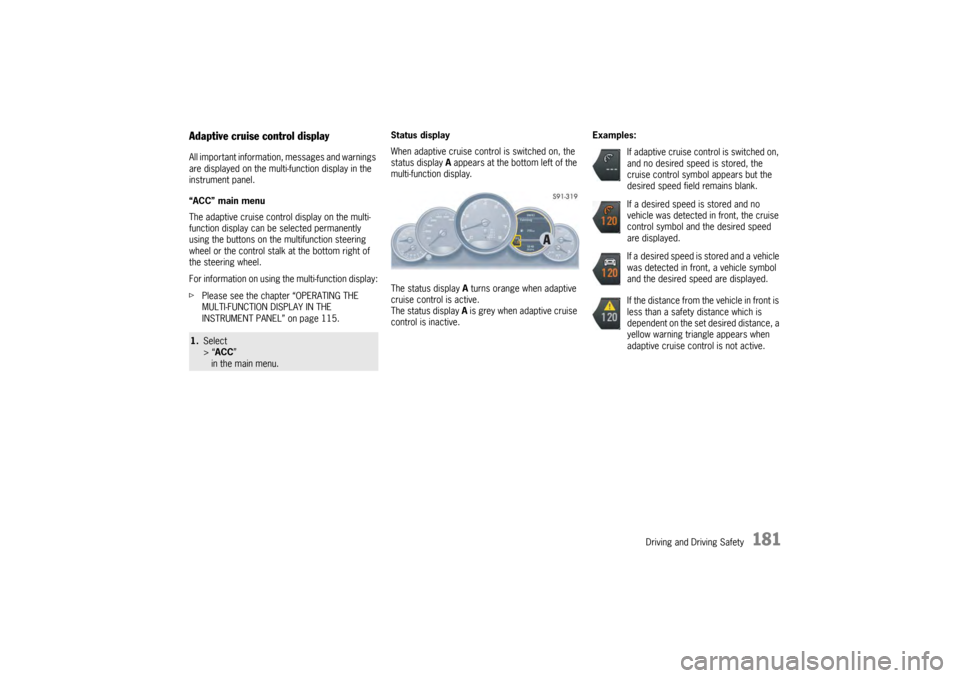
When adaptive cruise control is switched on, the
status display
A appears at the bottom left of the
multi-function display.
The status display A turns orange when adaptive
cruise control is active.
The status display A is grey when adaptive cruise
control is inactive. Examples:1.
Select
> “ACC ”
in the main menu.
If adaptive cruise control is switched on,
and no desired speed is stored, the
cruise control symbol appears but the
desired speed field remains blank.
If a desired speed is stored and no
vehicle was detected in front, the cruise
control symbol and the desired speed
are displayed.
If a desired speed is stored and a vehicle
was detected in front, a vehicle symbol
and the desired speed are displayed.
If the distance from the vehicle in front is
less than a safety distance which is
dependent on the set desired distance, a
yellow warning triangle appears when
adaptive cruise control is not active.