buttons PORSCHE PANAMERA 2010 1.G User Guide
[x] Cancel search | Manufacturer: PORSCHE, Model Year: 2010, Model line: PANAMERA, Model: PORSCHE PANAMERA 2010 1.GPages: 343, PDF Size: 7.96 MB
Page 65 of 343
Seats, Mirrors and Steering Wheel
63
Multi-Function Steering Wheel
Warning!
There is a risk of accident if you set or
operate the multi-funct ion display, radio,
navigation system, telephone or other
equipment while driving.
Operating these devices while driving could
distract you from traffic and cause you to
lose control of the vehicle.
f Operate the equipment while driving only if the
traffic situation allows you to do so safely.
f Carry out any complicated operating or setting procedures only when the vehicle is stationary.
Depending on the equipment in your vehicle, you
can use the function keys of the multi-function
steering wheel to operate the following Porsche
communication systems:
– Telephone
–PCM
– Multi-function display in the instrument panel
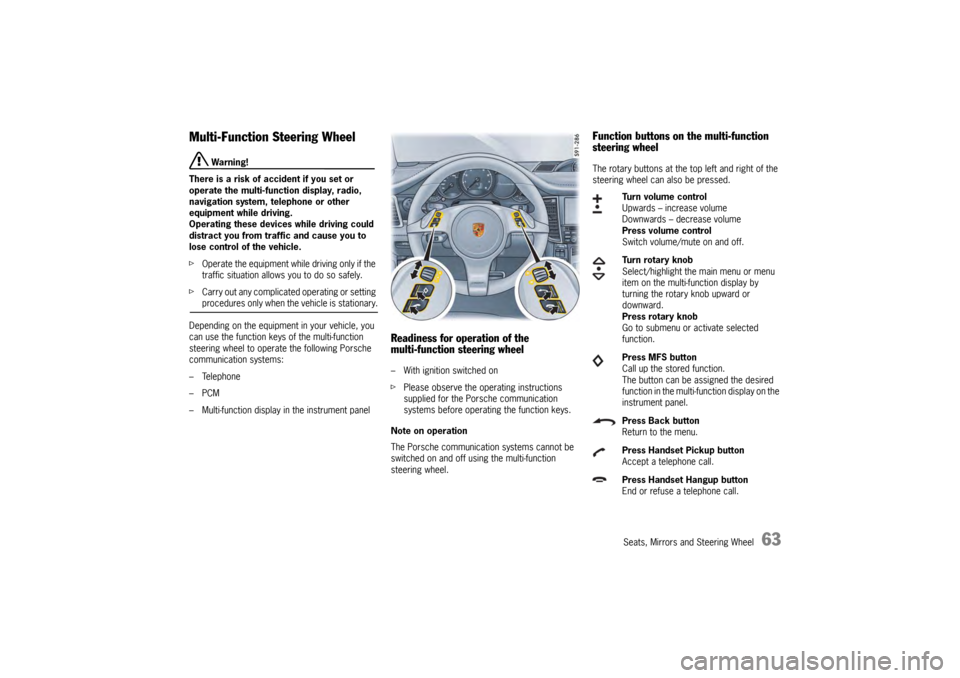
Readiness for operation of the
multi-function steering wheel– With ignition switched on
f Please observe the operating instructions
supplied for the Porsche communication
systems before operating the function keys.
Note on operation
The Porsche communication systems cannot be
switched on and off using the multi-function
steering wheel.
Function buttons on the multi-function
steering wheelThe rotary buttons at the top left and right of the
steering wheel can also be pressed.
Turn volume control
Upwards – increase volume
Downwards – decrease volume
Press volume control
Switch volume/mute on and off.
Turn rotary knob
Select/highlight the main menu or menu
item on the multi-function display by
turning the rotary knob upward or
downward.
Press rotary knob
Go to submenu or activate selected
function.
Press MFS button
Call up the stored function.
The button can be assigned the desired
function in the multi-fu nction display on the
instrument panel.
Press Back button
Return to the menu.
Press Handset Pickup button
Accept a telephone call.
Press Handset Hangup button
End or refuse a telephone call.
Page 67 of 343
Seats, Mirrors and Steering Wheel
65
Roll-Up Sunblinds, Rear Side
WindowsNote on operation
The roll-up sunblinds on the rear side windows can
be raised or lowered only when the rear side
windows are closed.
If child protection is activated, the roll-up sunblinds
on the rear side windows can only be operated
using the roll-up sunblind button in the front center
console or the power window buttons in the
driver’s door.
For information on child protection:
f Please see the chapter “DISABLING THE
CONTROLS IN THE REAR” on page 88.
For information on the roll-up sunblind button:
f Please see the chapter “RAISING/LOWERING
ROLL-UP SUNBLIND ON REAR WINDOW” on
page 66.
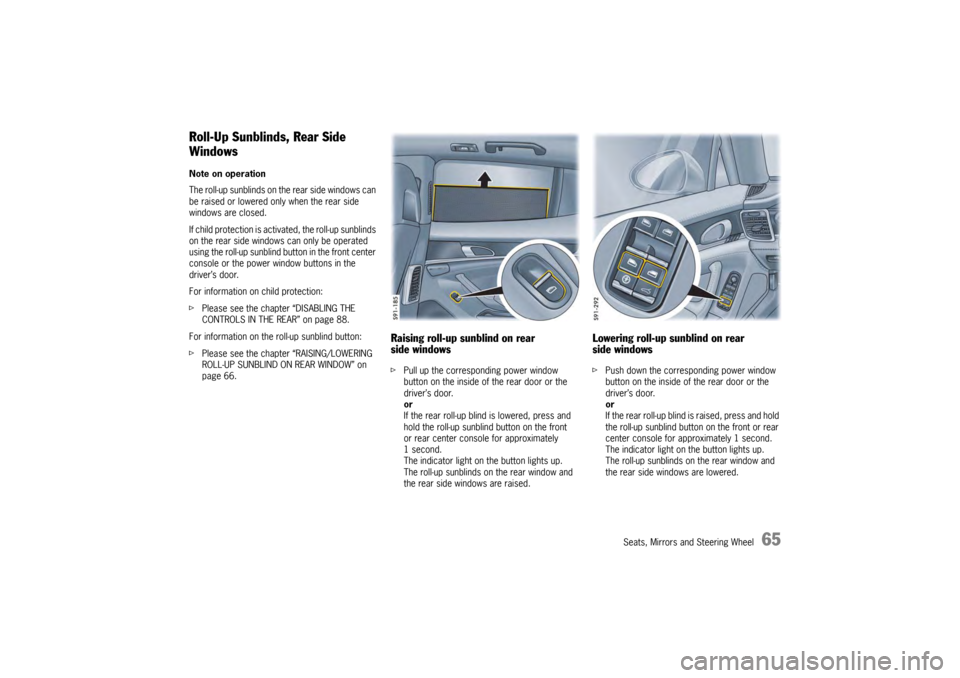
Raising roll-up sunblind on rear
side windowsfPull up the corresponding power window
button on the inside of the rear door or the
driver’s door.
or
If the rear roll-up blind is lowered, press and
hold the roll-up sunblind button on the front
or rear center console for approximately
1second.
The indicator light on the button lights up.
The roll-up sunblinds on the rear window and
the rear side windows are raised.
Lowering roll-up sunblind on rear
side windowsf Push down the corresponding power window
button on the inside of the rear door or the
driver’s door.
or
If the rear roll-up blind is raised, press and hold
the roll-up sunblind button on the front or rear
center console for approximately 1 second.
The indicator light on the button lights up.
The roll-up sunblinds on the rear window and
the rear side windows are lowered.
Page 82 of 343
80
Air Conditioning
Cancelling manual air distributionfPress the relevant air distribution button again.
The indicator light on the button goes out.
or
Press button for the relevant
air-conditioned area.
The indicator light on the button lights up.
Air quantity and distribution are controlled
automatically and variations are compensated.
Air distribution in the rear air-conditioned
areas when MONO or REAR mode is
activated (4-zone air conditioning)If the button or is pressed on the front
control panel, air flows from the central and side
vents in the rear of the vehicle.
If the button is pressed on the front control
panel, air flows into the footwells in the rear of
the vehicle.
For information on MONO mode:
fPlease see the chapter “ACCEPTING
SETTINGS FOR DRIVER’S SIDE FOR THE
ENTIRE VEHICLE” on page 74.
For information on REAR mode:
f Please see the chapter “ADJUSTING REAR AIR-
CONDITIONED AREAS WITH THE FRONT
CONTROL PANEL – REAR MODE (4-ZONE AIR
CONDITIONING)” on page 81.
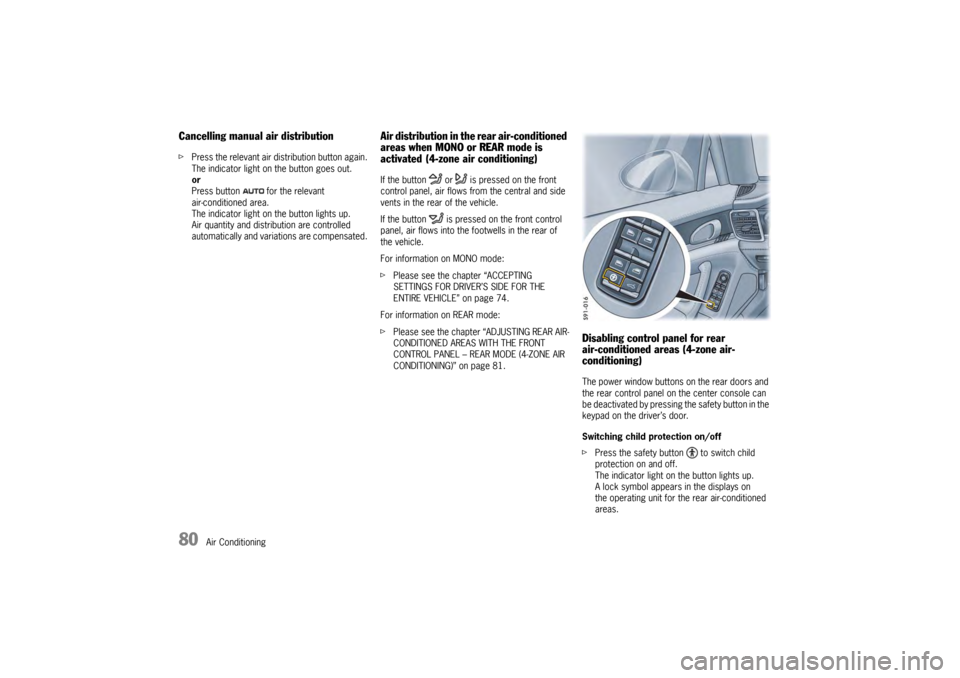
Disabling control panel for rear
air-conditioned areas (4-zone air-
conditioning)The power window buttons on the rear doors and
the rear control panel on the center console can
be deactivated by pressing the safety button in the
keypad on the driver’s door.
Switching child protection on/off
fPress the safety button to switch child
protection on and off.
The indicator light on the button lights up.
A lock symbol appears in the displays on
the operating unit for the rear air-conditioned
areas.
Page 90 of 343
88
Windows and Slide/Tilt Roof
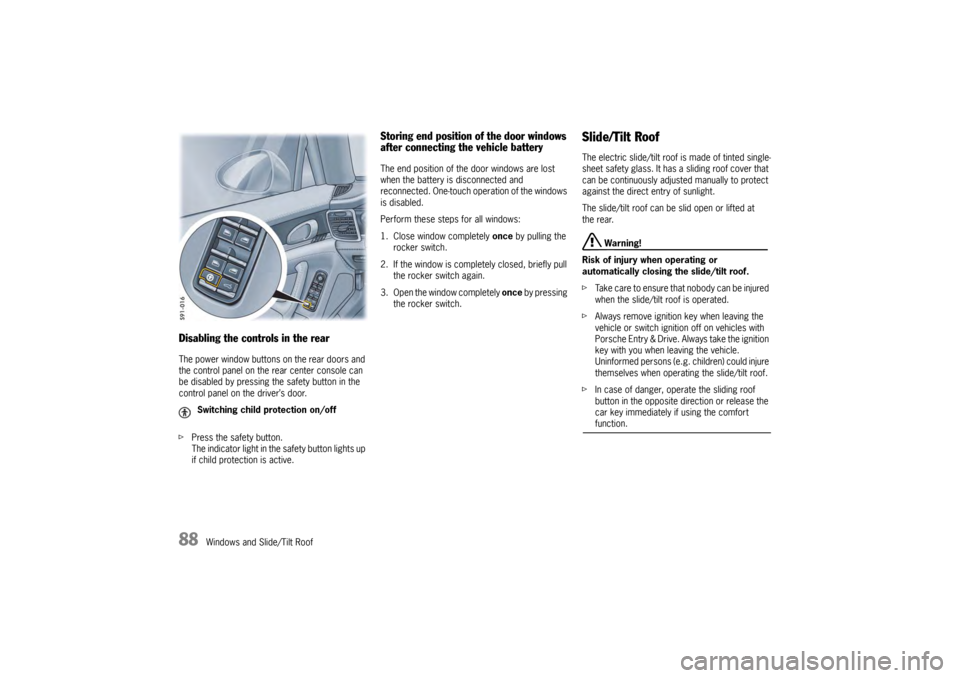
Disabling the controls in the rearThe power window buttons on the rear doors and
the control panel on the rear center console can
be disabled by pressing the safety button in the
control panel on the driver’s door.
fPress the safety button.
The indicator light in the safety button lights up
if child protection is active.
Storing end position of the door windows
after connecting the vehicle batteryThe end position of the door windows are lost
when the battery is disconnected and
reconnected. One-touch operation of the windows
is disabled.
Perform these steps for all windows:
1. Close window completely once by pulling the
rocker switch.
2. If the window is comple tely closed, briefly pull
the rocker switch again.
3. Open the window completely once by pressing
the rocker switch.
Slide/Tilt RoofThe electric slide/tilt roof is made of tinted single-
sheet safety glass. It has a sliding roof cover that
can be continuously adjusted manually to protect
against the direct entry of sunlight.
The slide/tilt roof can be slid open or lifted at
the rear.
Warning!
Risk of injury when operating or
automatically closing the slide/tilt roof.
f Take care to ensure that nobody can be injured
when the slide/tilt roof is operated.
f Always remove ignition key when leaving the
vehicle or switch ignition off on vehicles with
Porsche Entry & Drive. Always take the ignition
key with you when leaving the vehicle.
Uninformed persons (e.g. children) could injure
themselves when operating the slide/tilt roof.
f In case of danger, operate the sliding roof
button in the opposite di rection or release the
car key immediately if using the comfort function.
Switching child protection on/off
Page 140 of 343
138
Instrument Panel and Multi-Function Display
Vehicle Settings on the Multi-
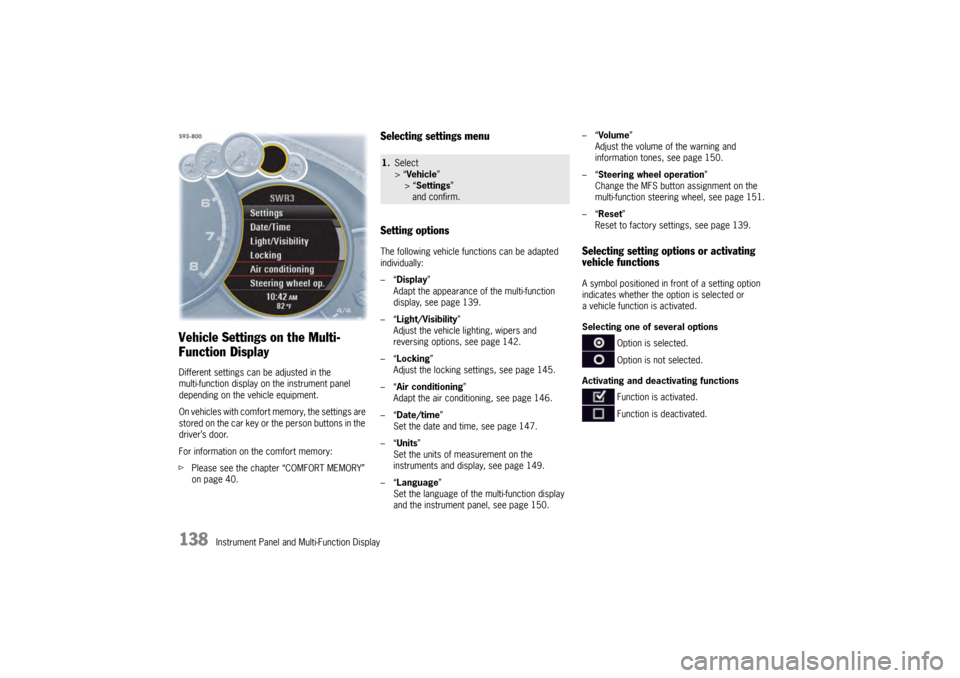
Function DisplayDifferent settings can be adjusted in the
multi-function display on the instrument panel
depending on the vehicle equipment.
On vehicles with comfort memory, the settings are
stored on the car key or the person buttons in the
driver’s door.
For information on the comfort memory:
fPlease see the chapter “COMFORT MEMORY”
on page 40.
Selecting settings menu
Setting optionsThe following vehicle functions can be adapted
individually:
–“ Display ”
Adapt the appearance of the multi-function
display, see page 139.
–“ Light/Visibility ”
Adjust the vehicle lighting, wipers and
reversing options, see page 142.
–“ Locking ”
Adjust the locking settings, see page 145.
–“ Air conditioning ”
Adapt the air conditioning, see page 146.
–“ Date/time ”
Set the date and time, see page 147.
–“ Units ”
Set the units of measurement on the
instruments and display, see page 149.
–“ Language”
Set the language of the multi-function display
and the instrument panel, see page 150. –“
Volume ”
Adjust the volume of the warning and
information tones, see page 150.
–“ Steering wheel operation”
Change the MFS button assignment on the
multi-function steering wheel, see page 151.
–“ Reset ”
Reset to factory settings, see page 139.
Selecting setting options or activating
vehicle functionsA symbol positioned in front of a setting option
indicates whether the option is selected or
a vehicle function is activated.
Selecting one of several options
Option is selected.
Option is not selected.
Activating and deactivating functions Function is activated.
Function is deactivated.
1.Select
> “Vehicle ”
> “ Settings ”
and confirm.
Page 183 of 343
Driving and Driving Safety
181
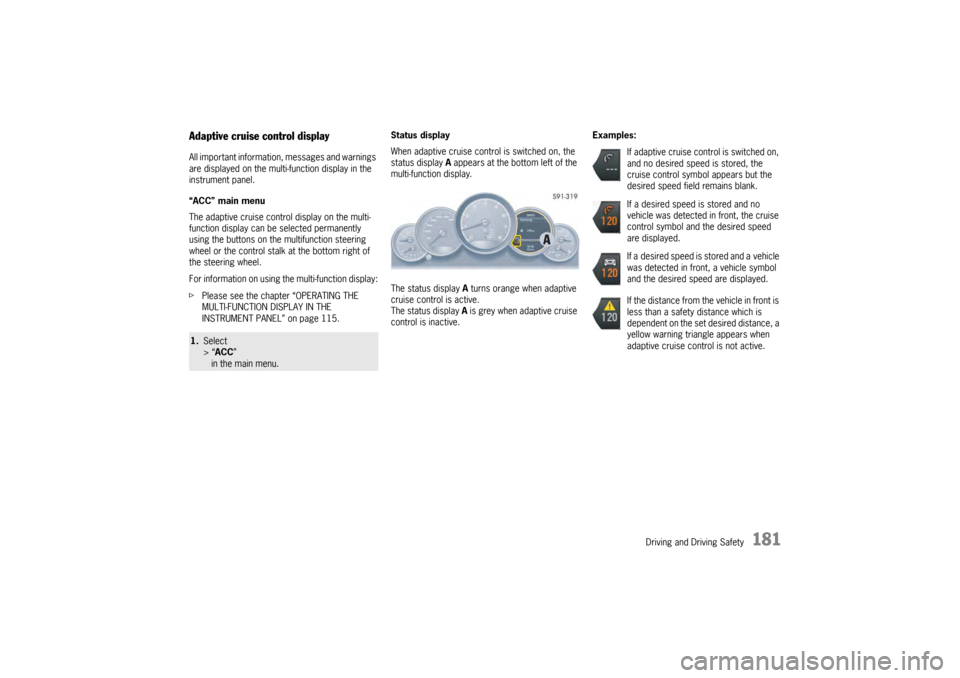
Adaptive cruise control displayAll important information, messages and warnings
are displayed on the multi-function display in the
instrument panel.
“ACC” main menu
The adaptive cruise control display on the multi-
function display can be selected permanently
using the buttons on the multifunction steering
wheel or the control stalk at the bottom right of
the steering wheel.
For information on using the multi-function display:
f Please see the chapter “OPERATING THE
MULTI-FUNCTION DISPLAY IN THE
INSTRUMENT PANEL” on page 115. Status display
When adaptive cruise control is switched on, the
status display
A appears at the bottom left of the
multi-function display.
The status display A turns orange when adaptive
cruise control is active.
The status display A is grey when adaptive cruise
control is inactive. Examples:1.
Select
> “ACC ”
in the main menu.
If adaptive cruise control is switched on,
and no desired speed is stored, the
cruise control symbol appears but the
desired speed field remains blank.
If a desired speed is stored and no
vehicle was detected in front, the cruise
control symbol and the desired speed
are displayed.
If a desired speed is stored and a vehicle
was detected in front, a vehicle symbol
and the desired speed are displayed.
If the distance from the vehicle in front is
less than a safety distance which is
dependent on the set desired distance, a
yellow warning triangle appears when
adaptive cruise control is not active.
Page 195 of 343
Driving and Driving Safety
193
Porsche Doppelkupplung (PDK)Porsche Doppelkupplung (PDK) is a seven-speed
transmission with an “automatic” and a “manual”
selection mode.
In automatic selection mode (selector-lever
position D), gear changing is automatic.
You can change temporarily from automatic to
manual mode using the shift buttons on the
steering wheel.
In manual selection mode (selector-lever
position M ), you change gear using the shift
buttons on the steering wheel or with the PDK
selector lever.
You can change between selector-lever
positions D and M as you wish while driving.
Note
f Take care not to operate the shift buttons on
the steering wheel in advertently in either
automatic or manual mode, thereby triggering
undesired gear changes.
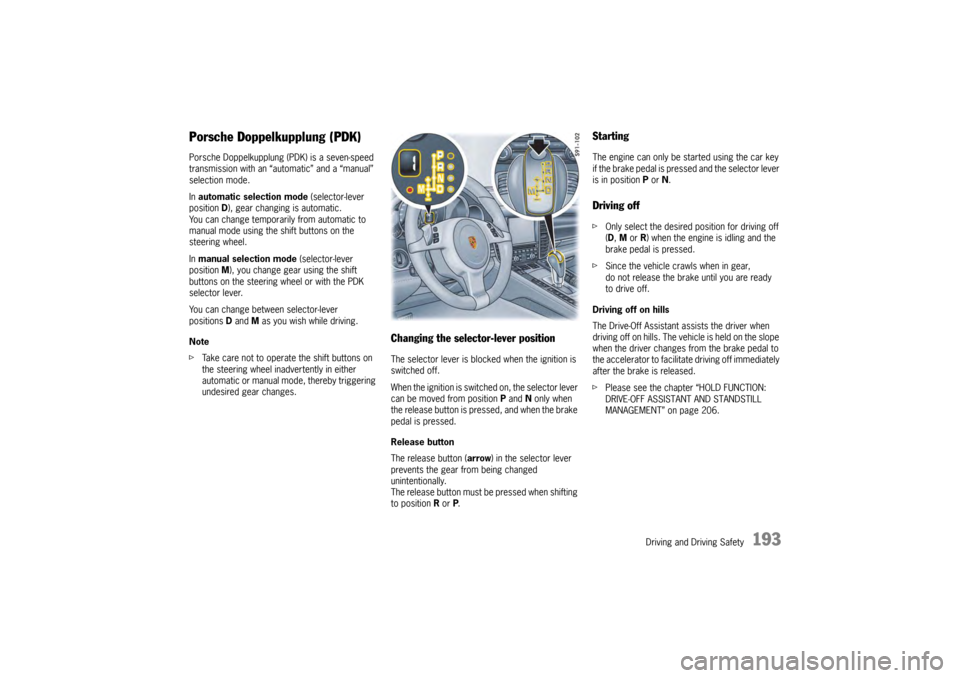
Changing the selector-lever positionThe selector lever is blocked when the ignition is
switched off.
When the ignition is switch ed on, the selector lever
can be moved from position P and N only when
the release button is pressed, and when the brake
pedal is pressed.
Release button
The release button ( arrow) in the selector lever
prevents the gear from being changed
unintentionally.
The release button must be pressed when shifting
to position R or P.
StartingThe engine can only be started using the car key
if the brake pedal is pressed and the selector lever
is in position P or N.Driving offf Only select the desired position for driving off
(D, M or R) when the engine is idling and the
brake pedal is pressed.
f Since the vehicle crawls when in gear,
do not release the brake until you are ready
to drive off.
Driving off on hills
The Drive-Off Assistant assists the driver when
driving off on hills. The vehicle is held on the slope
when the driver changes from the brake pedal to
the accelerator to facilitate driving off immediately
after the brake is released.
f Please see the chapter “HOLD FUNCTION:
DRIVE-OFF ASSISTANT AND STANDSTILL
MANAGEMENT” on page 206.
Page 198 of 343
196
Driving and Driving Safety
Driving off with Launch Control
Launch Control allows you to achieve maximum
acceleration from standstill.
Warning!
There is a risk of endangering other road
users if you use this Control in an improper
location or in a situation where other persons
might need to take evas ive action due to the
rapid acceleration that this technology
permits.
Launch Control is designed to be used in a
controlled environment on closed circuit driving
courses where no vehicle cross traffic or
pedestrian traffic is present.
f Use Launch Control only if conditions permit it
to be applied in a safe manner.
f Do not use Launch Control if there is a
possibility it could endanger other persons.
Such a possibility exists if you cannot see that
you have a clear road with no possibility of
cross traffic in your intended direction of driving.
Caution!
Stress on components increases
dramatically when starting with maximum
acceleration in comparison with “normal”
driving off. Use of Launch Control will
inevitably reduce the life of the engaged
engine and transmission components.
Preconditions:
– Launch Control should on ly be used when the
engine has reached operating temperature.
– “Sport Plus” mode must be switched on (indicator light on the button comes on and
“SPORT PLUS” appears on the multi-function
display).
1. Press the brake with your left foot.
2. Quickly press the accelerator down fully (kickdown activated) and hold it.
The engine speed will level off at
around 5,000 rpm on the Panamera S,
around 5,500 rpm on the Panamera 4S,
around 4,550 rpm on the Panamera Turbo.
“Launch Control active” appears on the
multi-function display.
3. Release the brake within a few seconds. Remaining stationary for a long time with
“Launch Control active” can lead to
overloading of the transmission.
To protect the transmi ssion, the engine power
is then reduced and the “Launch Control
active” process is cancelled. Shifting gears on the steering wheel
With the shift buttons on the steering wheel, you
can change temporarily from automatic selection
mode D to manual mode
M.
For example:
– Shifting down before bends and on entering built-up areas.
– Shifting down on downward slopes (engine braking).
– Shifting down for brief spurts of acceleration.
The manual selection mode remains engaged:
– For cornering (depending on the lateral acceleration) and overrunning.
– When the vehicle is stationary (e.g. at a junction).
The system leaves manual selection mode:
– automatically after around 8 seconds (unless cornering or overrunning),
– after driving off.
Page 199 of 343
Driving and Driving Safety
197
Kickdown
The kickdown function is active in selector-lever
positions D and M.
f For optimum acceleration, e.g. when
overtaking, press the accelerator pedal
beyond the full-throttle point (kickdown).
The transmission shifts down depending on
the speed of travel and engine speed.
Upshifts occur at the highest possible engine
speeds.
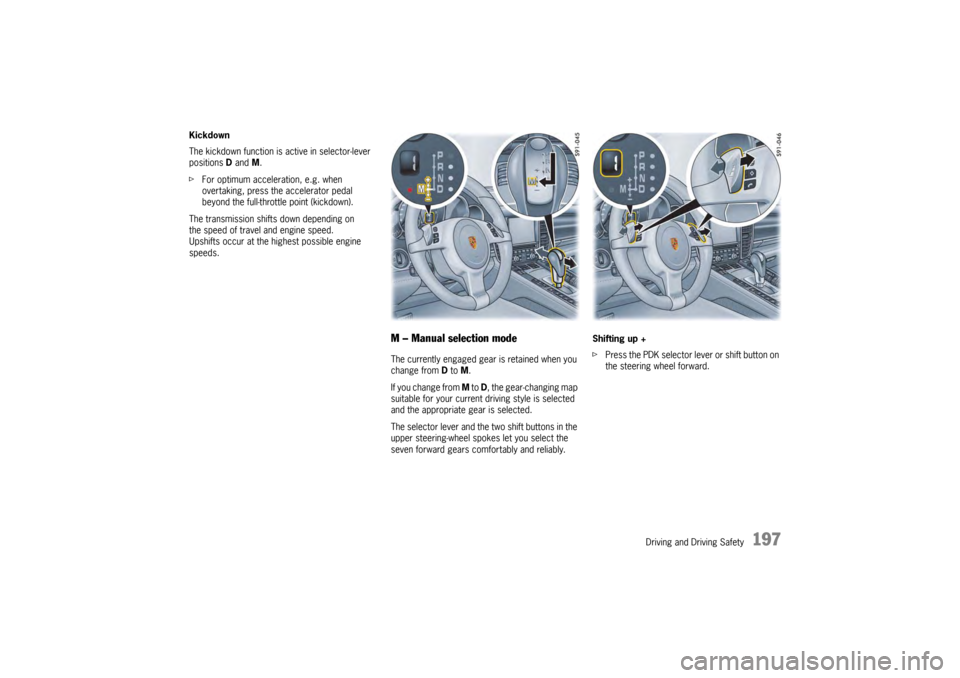
M – Manual selection modeThe currently engaged gear is retained when you
change from D to M.
If you change from M to D, the gear-changing map
suitable for your current driving style is selected
and the appropriate gear is selected.
The selector lever and the two shift buttons in the
upper steering-wheel spokes let you select the
seven forward gears comfortably and reliably. Shifting up +
f
Press the PDK selector lever or shift button on
the steering wheel forward.
Page 200 of 343
198
Driving and Driving Safety
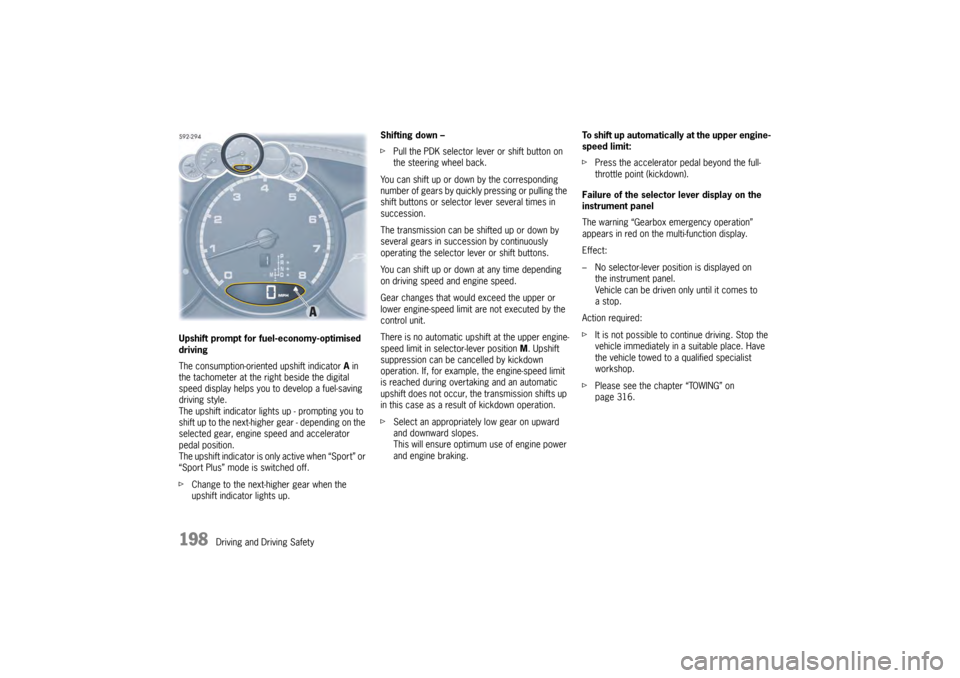
Upshift prompt for fuel-economy-optimised
driving
The consumption-oriente
d upshift indicator A in
the tachometer at the ri ght beside the digital
speed display helps you to develop a fuel-saving
driving style.
The upshift indicator lights up - prompting you to
shift up to the next-higher gear - depending on the
selected gear, engine speed and accelerator
pedal position.
The upshift indicator is only active when “Sport” or
“Sport Plus” mode is switched off.
f Change to the next-higher gear when the
upshift indicator lights up. Shifting down –
f
Pull the PDK selector lever or shift button on
the steering wheel back.
You can shift up or down by the corresponding
number of gears by quickly pressing or pulling the
shift buttons or selector lever several times in
succession.
The transmission can be shifted up or down by
several gears in succession by continuously
operating the selector lever or shift buttons.
You can shift up or down at any time depending
on driving speed and engine speed.
Gear changes that would exceed the upper or
lower engine-speed limit are not executed by the
control unit.
There is no automatic upshift at the upper engine-
speed limit in selector-lever position M. Upshift
suppression can be cancelled by kickdown
operation. If, for example, the engine-speed limit
is reached during overtaking and an automatic
upshift does not occur, the transmission shifts up
in this case as a result of kickdown operation.
f Select an appropriately low gear on upward
and downward slopes.
This will ensure optimum use of engine power
and engine braking. To shift up automatically
at the upper engine-
speed limit:
f Press the accelerator pedal beyond the full-
throttle point (kickdown).
Failure of the selector lever display on the
instrument panel
The warning “Gearbox emergency operation”
appears in red on the multi-function display.
Effect:
– No selector-lever position is displayed on the instrument panel.
Vehicle can be driven only until it comes to
astop.
Action required:
f It is not possible to continue driving. Stop the
vehicle immediately in a suitable place. Have
the vehicle towed to a qualified specialist
workshop.
f Please see the chapter “TOWING” on
page 316.