page 37 PORSCHE PANAMERA 2010 1.G User Guide
[x] Cancel search | Manufacturer: PORSCHE, Model Year: 2010, Model line: PANAMERA, Model: PORSCHE PANAMERA 2010 1.GPages: 343, PDF Size: 7.96 MB
Page 18 of 343
16
Overview Illustrations
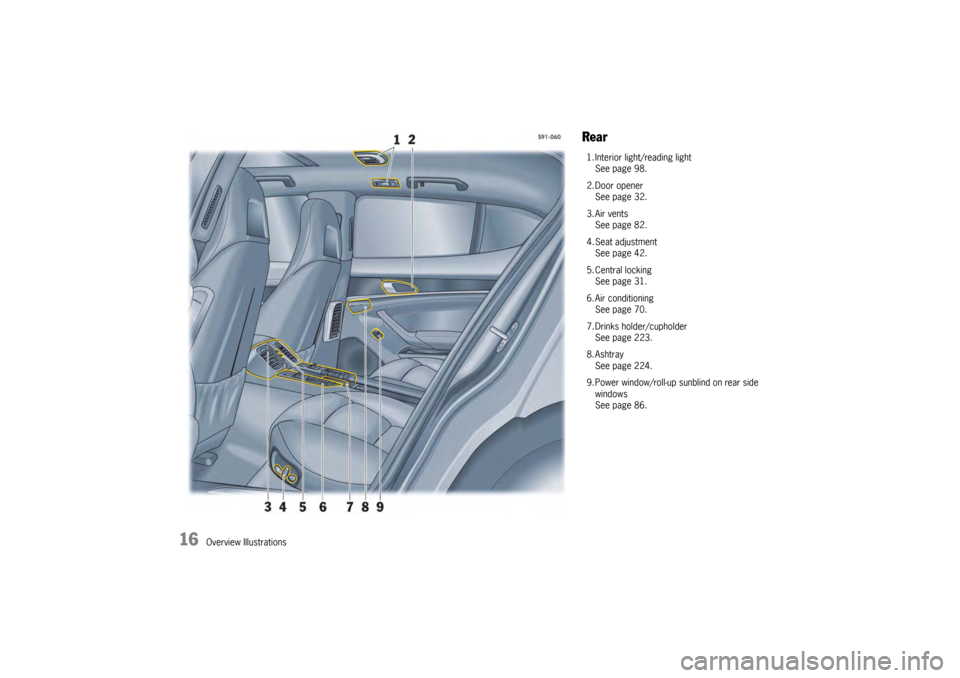
Rear1. Interior light/reading lightSee page 98.
2. Door opener See page 32.
3. Air vents See page 82.
4. Seat adjustment See page 42.
5. Central locking See page 31.
6. Air conditioning See page 70.
7. Drinks holder/cupholder See page 223.
8. Ashtray See page 224.
9. Power window/roll-up sunblind on rear side windows
See page 86.
Page 21 of 343
Opening and Locking
19
Notes on the Key and Central
Locking System KeyYou are provided with two vehicle keys with
integrated emergency key. These keys operate
all the locks on your vehicle.
fBe careful with your vehicle keys: do not
part with them except under exceptional
circumstances.
f Remove and take the ignition key with you,
even if leaving the vehicle only briefly.
Do not leave the ignition key in the vehicle.
f Inform your insurance company of any loss or
theft of car keys or if extra or replacement
keys have been cut.
f Third parties can still operate the mechanical
locks with a lost key.
Note on operation
Different vehicle settings are stored on the respec-
tive key when the vehicle is locked, provided the
vehicle is fitted with the relevant equipment.
For information on storing vehicle settings on
the key:
f Please see the chapter “STORING VEHICLE
SETTINGS” on Page 40.
Emergency operationfPlease see the chapter “EMERGENCY OPERA-
TION – UNLOCKING THE IGNITION KEY” on
Page 166.Replacement keysCar keys can only be ordered through an autho-
rized Porsche dealer. Sometimes, this may take a
long time.
You should therefore always keep a spare key on
your person. Keep it in a safe place, but under no
circumstances in or on the vehicle.
The key codes of new keys have to be “reported”
to the vehicle control mo dule by an authorized
Porsche dealer. All keys belonging to the vehicle
must also be reported again.
Note
Third parties can continue to operate the mecha-
nical locks using the lost key.
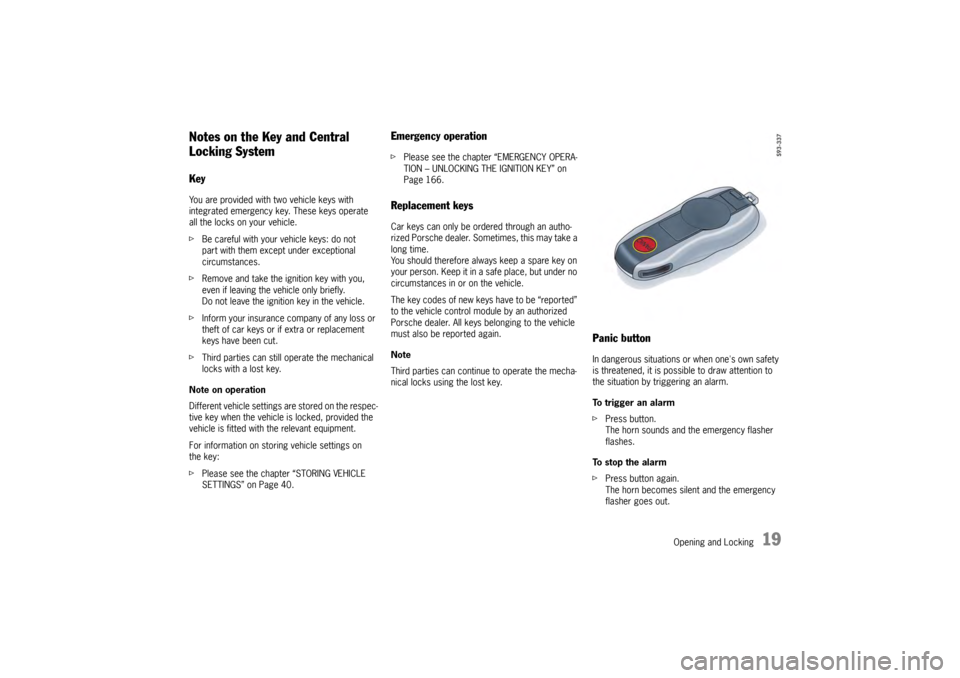
Panic buttonIn dangerous situations or when one's own safety
is threatened, it is possible to draw attention to
the situation by triggering an alarm.
To trigger an alarm
f Press button.
The horn sounds and the emergency flasher
flashes.
To stop the alarm
f Press button again.
The horn becomes silent and the emergency
flasher goes out.
Page 23 of 343
Opening and Locking
21
Brief Overview – Opening and
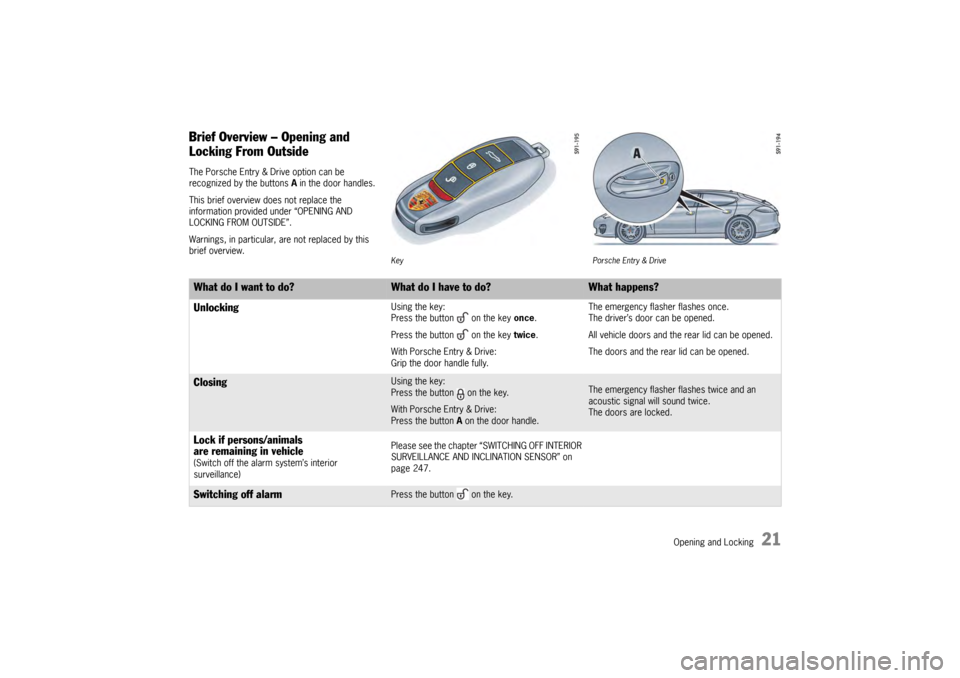
Locking From OutsideThe Porsche Entry & Drive option can be
recognized by the buttons A in the door handles.
This brief overview does not replace the
information provided under “OPENING AND
LOCKING FROM OUTSIDE”.
Warnings, in particular, are not replaced by this
brief overview.
Key Porsche Entry & Drive
What do I want to do?
What do I have to do?
What happens?
Unlocking
Using the key:
Press the button on the key once.
Press the button on the key twice.
With Porsche Entry & Drive:
Grip the door handle fully. The emergency flasher flashes once.
The driver’s door can be opened.
All vehicle doors and the rear lid can be opened.
The doors and the rear lid can be opened.
Closing
Using the key:
Press the button on the key.
With Porsche Entry & Drive:
Press the button A
on the door handle.
The emergency flasher flashes twice and an
acoustic signal will sound twice.
The doors are locked.
Lock if persons/animals
are remaining in vehicle (Switch off the alarm system’s interior
surveillance) Please see the chapter “SWITCHING OFF INTERIOR
SURVEILLANCE AND INCLINATION SENSOR” on
page 247.Switching off alarm
Press the button on the key.
Page 24 of 343
22
Opening and Locking
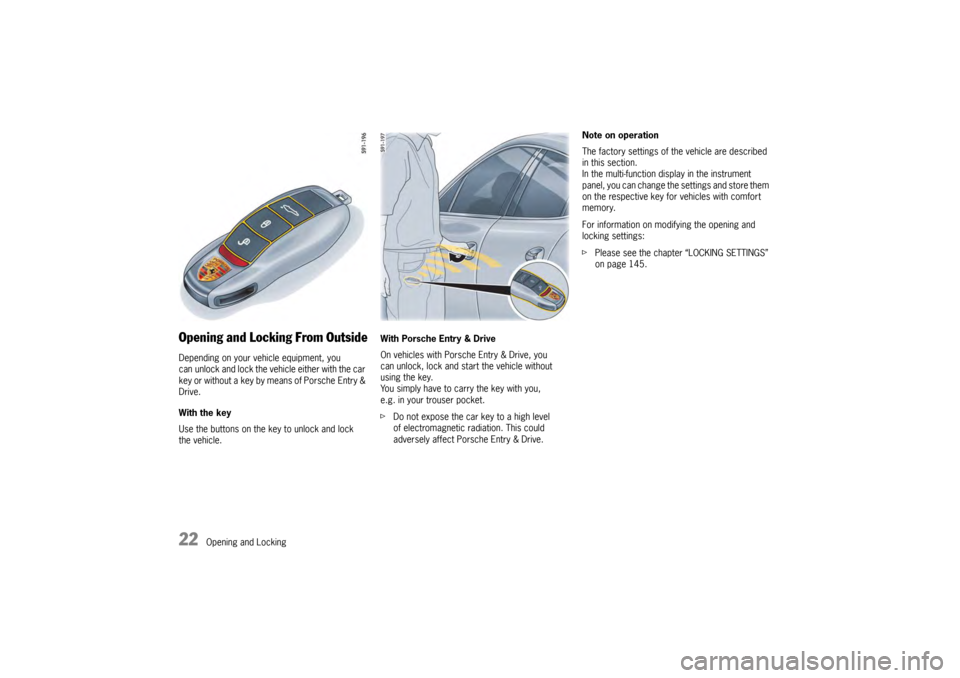
Opening and Locking From OutsideDepending on your vehicle equipment, you
can unlock and lock the vehicle either with the car
key or without a key by means of Porsche Entry &
Drive.
With the key
Use the buttons on the key to unlock and lock
the vehicle. With Porsche Entry & Drive
On vehicles with Porsche Entry & Drive, you
can unlock, lock and st
art the vehicle without
using the key.
You simply have to carry the key with you,
e.g. in your trouser pocket.
f Do not expose the car key to a high level
of electromagnetic radiation. This could
adversely affect Porsche Entry & Drive. Note on operation
The factory settings of the vehicle are described
in this section.
In the multi-function display in the instrument
panel, you can change the settings and store them
on the respective key fo
r vehicles with comfort
memory.
For information on modifying the opening and
locking settings:
f Please see the chapter “LOCKING SETTINGS”
on page 145.
Page 27 of 343
Opening and Locking
25
Automatic door locking and automatic
door unlocking
Warning!
In an emergency situation where you need to
exit the car through an automatically locked
door, remember the following procedure to
open the door.
f Unlock the doors by pressing the central
locking button or
f Pull the inside door handle on the front door
once or on the rear door twice to open the door.
In the multi-function display of the instrument
panel, you have the option of selecting diverse
variants of automatic door locking and automatic
door unlocking.
For information on modifying the opening and
locking settings:
f Please see the chapter “LOCKING SETTINGS”
on page 145.
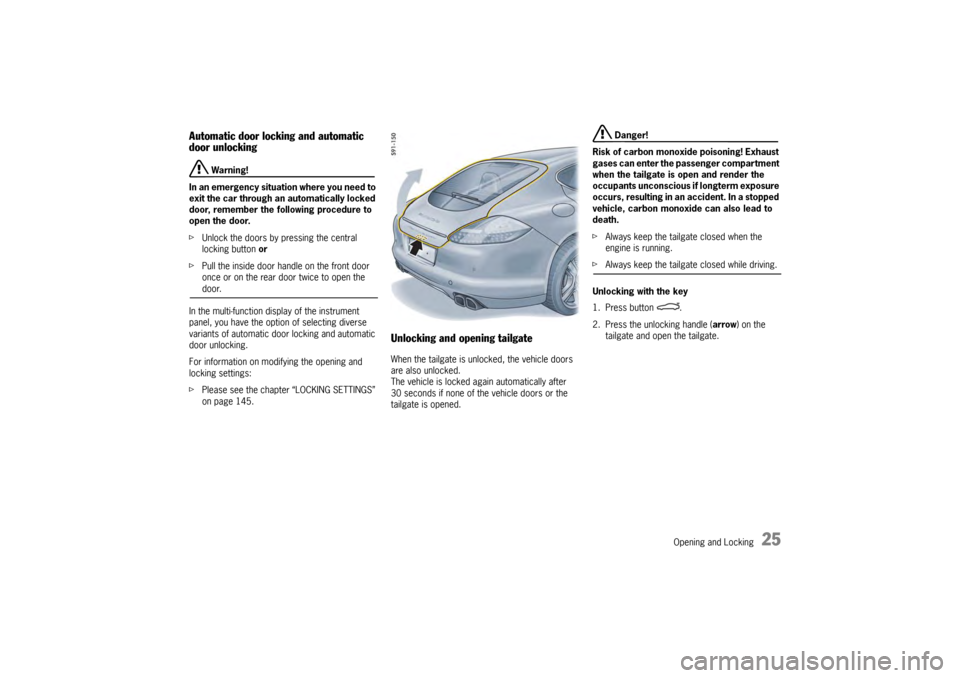
Unlocking and opening tailgateWhen the tailgate is unlocked, the vehicle doors
are also unlocked.
The vehicle is locked ag ain automatically after
30 seconds if none of the vehicle doors or the
tailgate is opened.
Danger!
Risk of carbon monoxide poisoning! Exhaust
gases can enter the passenger compartment
when the tailgate is open and render the
occupants unconscious if longterm exposure
occurs, resulting in an accident. In a stopped
vehicle, carbon monoxide can also lead to
death.
f Always keep the tailgate closed when the
engine is running.
fAlways keep the tailgate closed while driving.
Unlocking with the key
1. Press button .
2. Press the unlocking handle ( arrow) on the
tailgate and open the tailgate.
Page 30 of 343
28
Opening and Locking
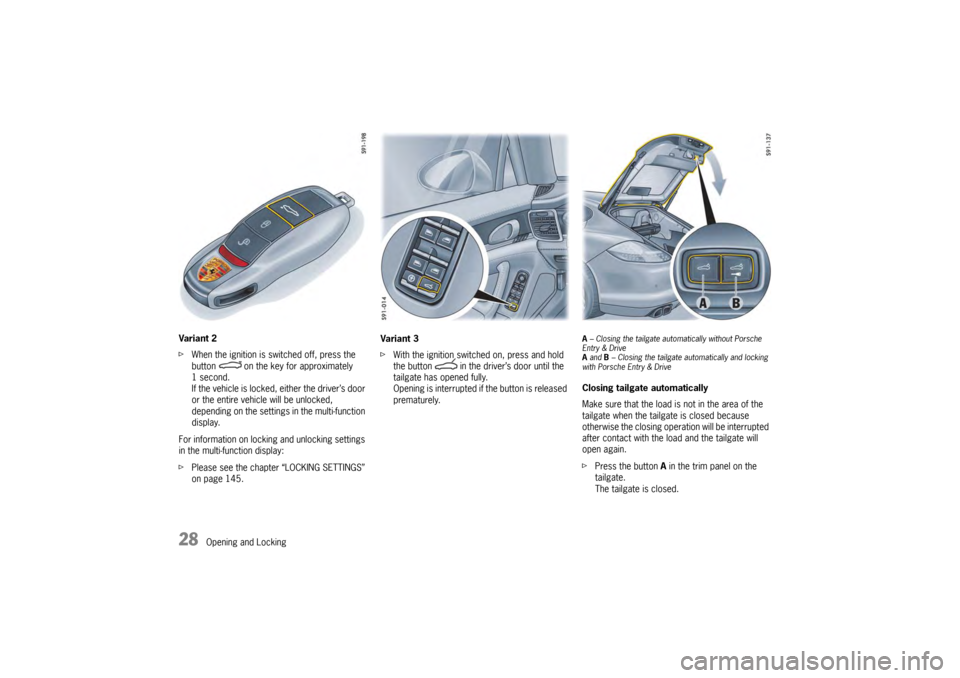
Variant 2
f
When the ignition is switched off, press the
button on the key for approximately
1second.
If the vehicle is locked, either the driver’s door
or the entire vehicle will be unlocked,
depending on the settings in the multi-function
display.
For information on locking and unlocking settings
in the multi-function display:
f Please see the chapter “LOCKING SETTINGS”
on page 145. Variant 3
f
With the ignition switched on, press and hold
the button in the driver’s door until the
tailgate has opened fully.
Opening is interrupted if the button is released
prematurely.
A – Closing the tailgate auto matically without Porsche
Entry & Drive
A and B – Closing the tailgate au tomatically and locking
with Porsche Entry & DriveClosing tailgate automatically
Make sure that the load is not in the area of the
tailgate when the tailgate is closed because
otherwise the closing operation will be interrupted
after contact with the load and the tailgate will
open again.
f Press the button A in the trim panel on the
tailgate.
The tailgate is closed.
Page 31 of 343
Opening and Locking
29
Close the tailgate automatically and lock
with Porsche Entry & Drive.
fPress the button B in the trim panel on the
tailgate.
The tailgate is closed and the vehicle is locked.
In order to close and then lock the tailgate on the
vehicle automatically, the key must be located:
– in the rear area and
– outside the vehicle.
A warning message appears on the multi-function
display in the instrument panel if these conditions
have not been met.
For information on warning messages on
the multi-function display:
f Please see the chapter “OVERVIEW OF
WARNING MESSAGES” on page 152.
Warning!
Risk of being locked out of vehicles with
Porsche Entry & Drive.
f Do not leave the key in the vehicle.
If locking button B is pressed after the tailgate
has closed, the vehicle is locked automatically.
If the key is left in th e vehicle, the emergency
flasher flashes once and a horn signal sounds.
Within approximately 30 seconds, the tailgate
can be opened again.
After 30 seconds have elapsed, the
vehicle can be unlocked again only with the second key. Interrupting the opening/closing operation in
the event of danger
The opening or closing op
eration is interrupted
immediately after:
f Pressing button on the key
or
Releasing button in the driver’s door
or
Briefly pressing button A or B in the trim panel
on the tailgate
or
Briefly pressing the release button on the
tailgate.
Automatic operation can be continued again at
any time. To do this, press the corresponding
button.
Caution!
Risk of damage to the tailgate caused by
striking garage roofs or roof transport
systems. If the luggage compartment cover
is not attached to the tailgate, the tailgate
continues to move slowly upwards beyond
the automatic stop.
f Only use the powerlift tailgate with the luggage compartment cover attached. Detection of obstacles during opening
The tailgate will stop movi
ng if opening is blocked
by an obstacle. A warning signal then sounds.
The opening operation can continue once the
obstacle is removed and after:
f Pressing button on the key
or
Pressing button in the driver’s door
or
Pressing the release button on the tailgate.
Page 33 of 343
Opening and Locking
31
Opening and Locking From InsideThe factory settings of the vehicle are described
in this section.
In the multi-function display in the instrument
panel, you can change the settings and store
them on the respective key for vehicles with
comfort memory.
For information on modifying the opening and
locking settings:
fPlease see the chapter “LOCKING SETTINGS”
on page 145.
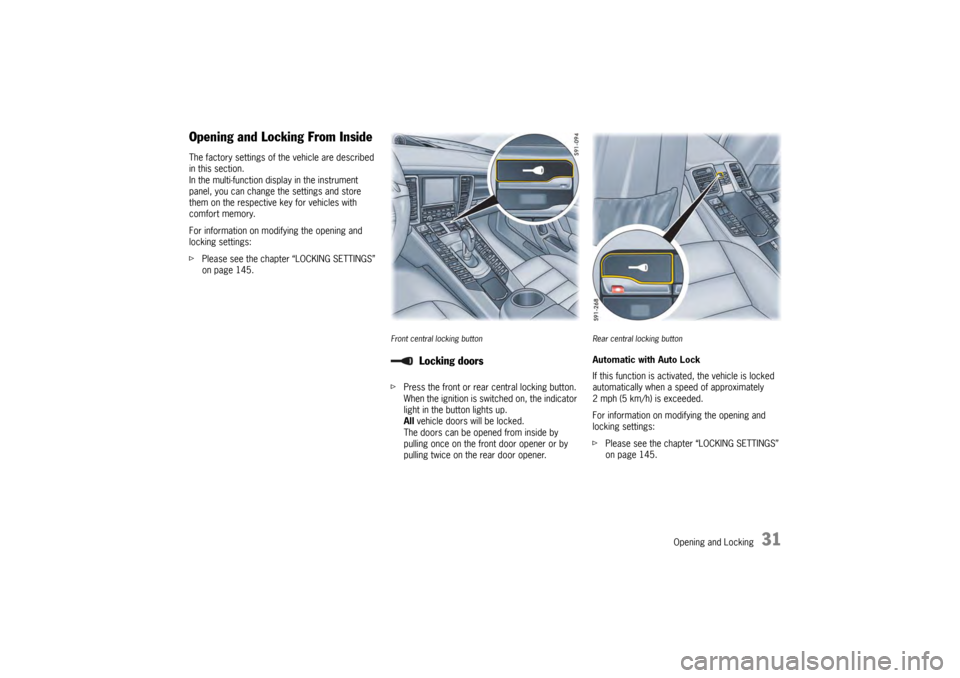
Front central locking buttonfPress the front or rear central locking button.
When the ignition is switched on, the indicator
light in the button lights up.
All vehicle doors will be locked.
The doors can be opened from inside by
pulling once on the front door opener or by
pulling twice on the rear door opener.
Rear central locking buttonAutomatic with Auto Lock
If this function is activate d, the vehicle is locked
automatically when a speed of approximately
2 mph (5 km/h) is exceeded.
For information on modifying the opening and
locking settings:
f Please see the chapter “LOCKING SETTINGS”
on page 145.
Locking doors
Page 35 of 343
Opening and Locking
33
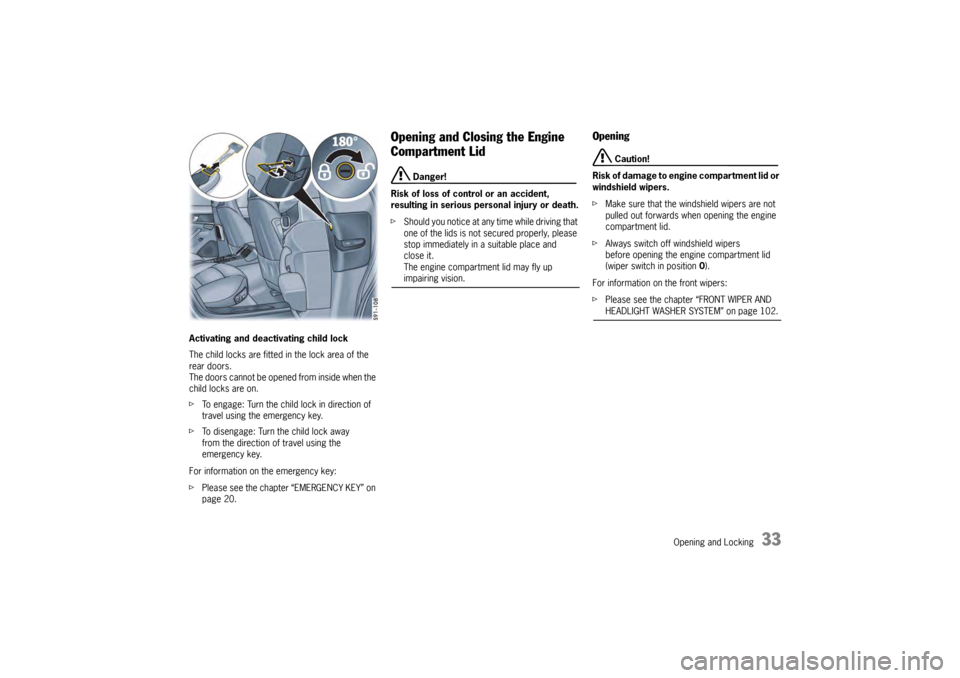
Activating and deactivating child lock
The child locks are fitted in the lock area of the
rear doors.
The doors cannot be opened from inside when the
child locks are on.
fTo engage: Turn the child lock in direction of
travel using the emergency key.
f To disengage: Turn the child lock away
from the direction of travel using the
emergency key.
For information on the emergency key:
f Please see the chapter “EMERGENCY KEY” on
page 20.
Opening and Closing the Engine
Compartment Lid
Danger!
Risk of loss of control or an accident,
resulting in serious personal injury or death.
f Should you notice at any time while driving that
one of the lids is not secured properly, please
stop immediately in a suitable place and
close it.
The engine compartment lid may fly up impairing vision.
Opening
Caution!
Risk of damage to engine compartment lid or
windshield wipers.
f Make sure that the windshield wipers are not
pulled out forwards when opening the engine
compartment lid.
f Always switch off windshield wipers
before opening the engine compartment lid
(wiper switch in position 0).
For information on the front wipers:
f Please see the chapter “FRONT WIPER AND HEADLIGHT WASHER SYSTEM” on page 102.
Page 37 of 343

Opening and Locking
35
Malfunctions When Opening and
ClosingEmergency operation of tailgateIf the tailgate cannot be opened with the radio
remote control (e.g. if th e battery of the remote
control is dead), the emergency operation must
be performed:
1. Unlock and open the driver’s door with the car key.
2. Switch on the ignition within 10 seconds to prevent the alarm system from
triggering.
3. Press the central locking button on the front or rear center console.
The tailgate is now unlocked and can be
opened with the unlocking handle.
Only one door is unlockedOn the multi-function di splay in the instrument
panel, you can set different variants for locking
and unlocking the doors and tailgate. You can
open all doors irrespective of the setting made.
f Press button on the key twice within
2seconds.The vehicle cannot be unlockedThe remote control of the key may
– not function correctly due to radio waves (also
radio contact between remote control and
vehicle in the case of Porsche Entry & Drive),
– fail due to a fault,
– fail due to a flat key battery.
f Unlock the vehicle using the emergency key
in the door lock.
If the vehicle was unlocked using the
emergency key in the door lock, only the
driver’s door can be opened.
In order to prevent the alarm system from
being triggered, switch the ignition on
within 10 seconds of opening the door .
The vehicle cannot be lockedThis is recognizable by the fact that the
emergency flasher does not flash and there is no
locking noise.
The remote control of the key may
– not function correctly due to radio waves (also radio contact between remote control
and vehicle in the case of Porsche Entry &
Drive),
– fail due to a fault,
– fail due to a flat key battery.
f Lock the vehicle usin g the emergency key
in the door lock.
If the central locking system is defective,
operating the lock cylinder in the driver’s door will
lock all functioning lockin g elements of the central
locking system.
For information on lockin g the doors by means of
the emergency operation:
f Please see the chapter “NOT ALL VEHICLE
DOORS ARE LOCKED” on page 36.
f Have faults in the central locking system
repaired.
Please contact a qualified specialist workshop.
We recommend that you have an authorized
Porsche dealer to do this work as they have
trained workshop personnel and the necessary
parts and tools.