Air PORSCHE PANAMERA 2010 1.G Service Manual
[x] Cancel search | Manufacturer: PORSCHE, Model Year: 2010, Model line: PANAMERA, Model: PORSCHE PANAMERA 2010 1.GPages: 343, PDF Size: 7.96 MB
Page 86 of 343
84
Air Conditioning
Extended ventilation panelFor information on the extended ventilation panel:
fPlease see the chapter “EXTENDED
VENTILATION PANEL” on page 81.
Automatic air-recirculation
For information on automatic air-recirculation
mode:
f Please see the chapter “AIR-RECIRCULATION
MODE” on page 74.
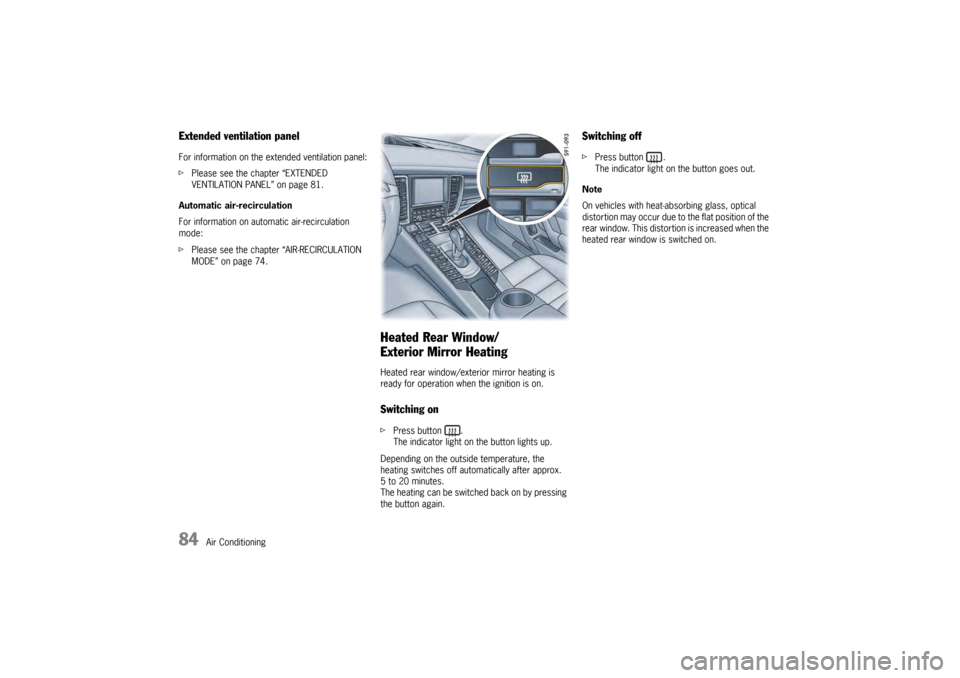
Heated Rear Window/
Exterior Mirror HeatingHeated rear window/exterior mirror heating is
ready for operation when the ignition is on.Switching onfPress button .
The indicator light on the button lights up.
Depending on the outside temperature, the
heating switches off automatically after approx.
5 to 20 minutes.
The heating can be switched back on by pressing
the button again.
Switching offf Press button .
The indicator light on the button goes out.
Note
On vehicles with heat-absorbing glass, optical
distortion may occur due to the flat position of the
rear window. This distortion is increased when the
heated rear window is switched on.
Page 99 of 343
Lights, Turn Signals and Windshield Wipers
97
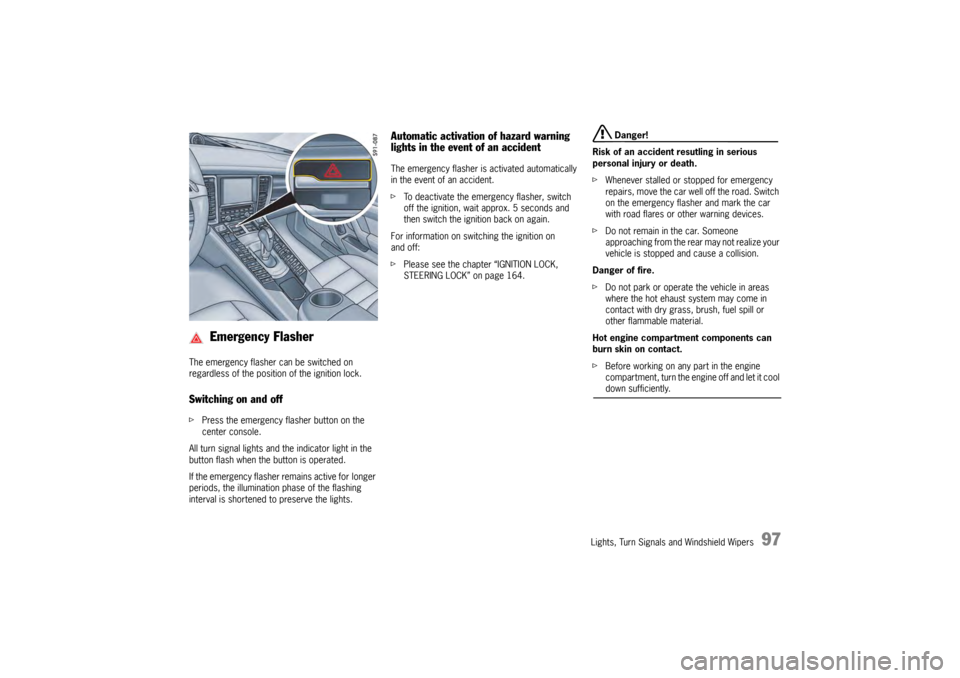
The emergency flasher can be switched on
regardless of the position of the ignition lock.Switching on and offfPress the emergency fl asher button on the
center console.
All turn signal lights and the indicator light in the
button flash when the button is operated.
If the emergency flasher remains active for longer
periods, the illumination phase of the flashing
interval is shortened to preserve the lights.
Automatic activation of hazard warning
lights in the event of an accidentThe emergency flasher is activated automatically
in the event of an accident.
f To deactivate the emergency flasher, switch
off the ignition, wait approx. 5 seconds and
then switch the ignition back on again.
For information on switching the ignition on
and off:
f Please see the chapter “IGNITION LOCK,
STEERING LOCK” on page 164.
Danger!
Risk of an accident resutling in serious
personal injury or death.
f Whenever stalled or stopped for emergency
repairs, move the car well off the road. Switch
on the emergency flasher and mark the car
with road flares or other warning devices.
f Do not remain in the car. Someone
approaching from the rear may not realize your
vehicle is stopped and cause a collision.
Danger of fire.
f Do not park or operate the vehicle in areas
where the hot ehaust system may come in
contact with dry grass, brush, fuel spill or
other flammable material.
Hot engine compartment components can
burn skin on contact.
f Before working on any part in the engine
compartment, turn the engine off and let it cool down sufficiently.
Emergency Flasher
Page 109 of 343
Instrument Panel and Multi-Function Display
107
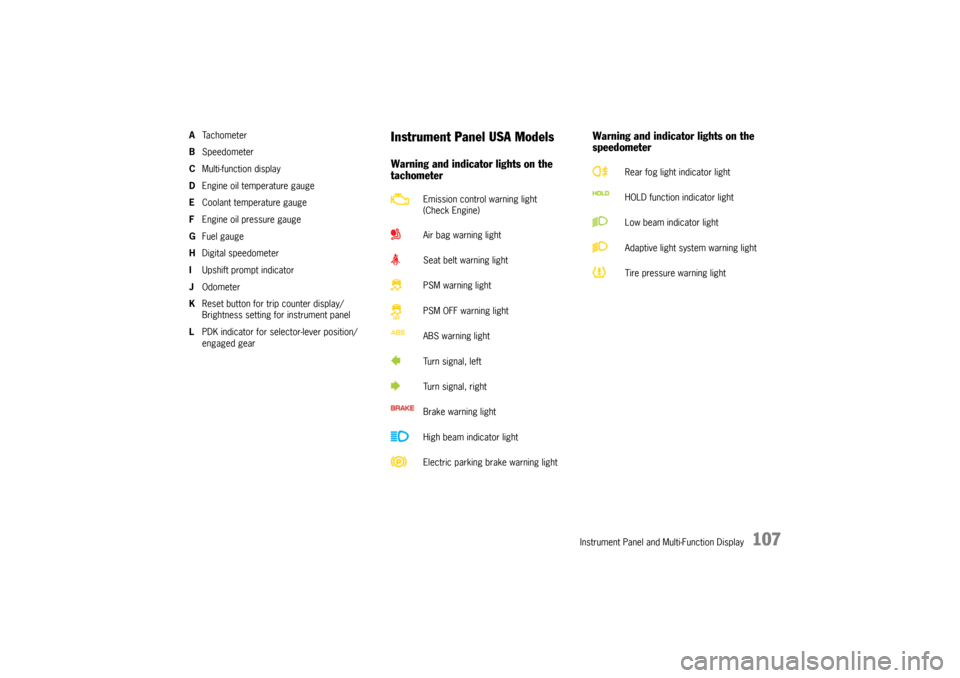
ATa c h o m e t e r
B Speedometer
C Multi-function display
D Engine oil temperature gauge
E Coolant temperature gauge
F Engine oil pressure gauge
G Fuel gauge
H Digital speedometer
I Upshift prompt indicator
J Odometer
K Reset button for trip counter display/
Brightness setting for instrument panel
L PDK indicator for selector-lever position/
engaged gear
Instrument Panel USA ModelsWarning and indicator lights on the
tachometer Warning and indicator lights on the
speedometer
Emission control warning light
(Check Engine)
Air bag warning light
Seat belt warning light
PSM warning light
PSM OFF warning light
ABS warning light
Turn signal, left
Turn signal, right
Brake warning light
High beam indicator light
Electric parking brake warning light
Rear fog light indicator light
HOLD function indicator light
Low beam indicator light
Adaptive light system warning light
Tire pressure warning light
Page 111 of 343
Instrument Panel and Multi-Function Display
109
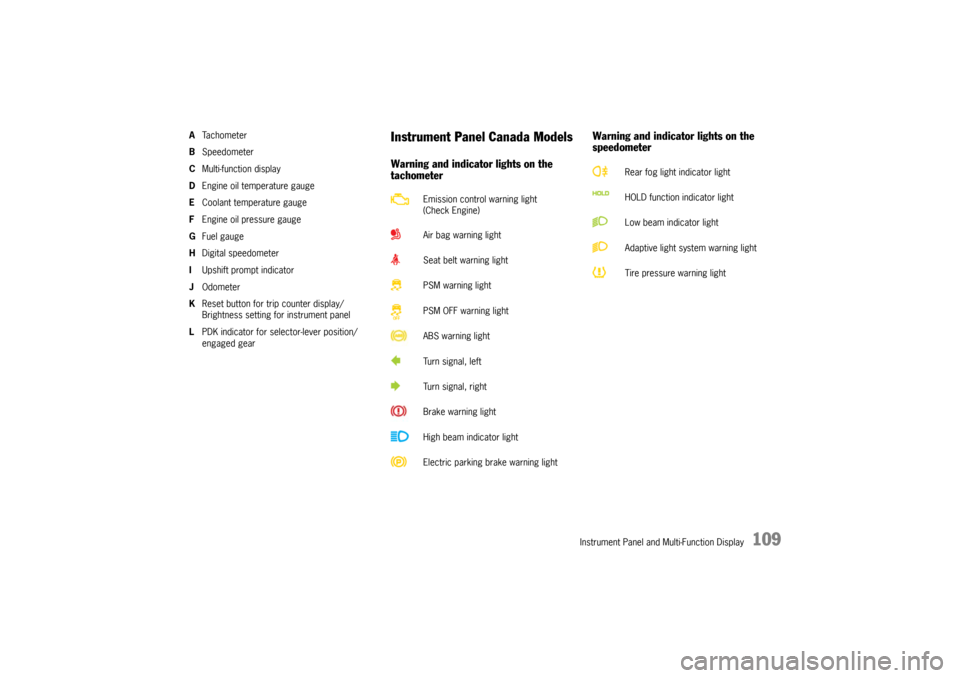
ATa c h o m e t e r
B Speedometer
C Multi-function display
D Engine oil temperature gauge
E Coolant temperature gauge
F Engine oil pressure gauge
G Fuel gauge
H Digital speedometer
I Upshift prompt indicator
J Odometer
K Reset button for trip counter display/
Brightness setting for instrument panel
L PDK indicator for selector-lever position/
engaged gear
Instrument Panel Canada ModelsWarning and indicator lights on the
tachometer Warning and indicator lights on the
speedometer
Emission control warning light
(Check Engine)
Air bag warning light
Seat belt warning light
PSM warning light
PSM OFF warning light
ABS warning light
Turn signal, left
Turn signal, right
Brake warning light
High beam indicator light
Electric parking brake warning light
Rear fog light indicator light
HOLD function indicator light
Low beam indicator light
Adaptive light system warning light
Tire pressure warning light
Page 112 of 343

110
Instrument Panel and Multi-Function Display
A – TachometerThe start of the red zone on the tachometer or
rev-counter scale is a visual warning of the
maximum permissible engine speed.
If the red zone is reached during acceleration, fuel
feed is interrupted in order to protect the engine.B – SpeedometerThe analogue display B is located on the left next
to the tachometer in the instrument panel.C – Multi-Function DisplayFor information on the multi-function display:
f Please see the chapter “OPERATING THE
MULTI-FUNCTION DISPLAY IN THE
INSTRUMENT PANEL” on page 115.
D – Engine Oil Temperature GaugeA warning message will appear on the multi-
function display in the instrument panel if the
engine oil temperature is too high.
f Reduce engine speed and engine load
immediately if the red zone is reached.
For information on warning messages on the
multi-function display:
f Please see the chapter “OVERVIEW OF
WARNING MESSAGES” on page 152.E – Coolant Temperature GaugeIf the cooling system is in any way faulty, consult
a qualified specialist workshop. We recommend
that you have an authorized Porsche dealer to do
this work, as they have the trained workshop
personnel and the necessa ry parts and tools for
this type of work.
Pointer in the lower area – engine cold
f Avoid high engine speeds and heavy
engine loading.
Pointer in the middle – normal operating
temperature
Pointer may move up to the red area when engine
is heavily loaded and outside temperature is high.
Coolant temperature warningThe temperature gauge warning light will
illuminate if the coolant temperature is too high.
The warning message “Engine temperature too
high” will also appear on the multi-function display
in the instrument panel.
f Switch off engine and allow to cool.
f Check radiators and air guides in front end of
vehicle for obstructions.
f Check the coolant level.
Top up with coolant if necessary.
f Have the fault corrected.
f Please see the chapte r “CHECKING COOLANT
LEVEL AND ADDING COOLANT” on page 257.
f Please see the chapter “OVERVIEW OF
WARNING MESSAGES” on page 152.
Note on operation
To prevent excessive temperatures, the cooling
air ducts must not be obstructed by covering
them (e.g. with film, “stone guards”, etc.).
Page 120 of 343
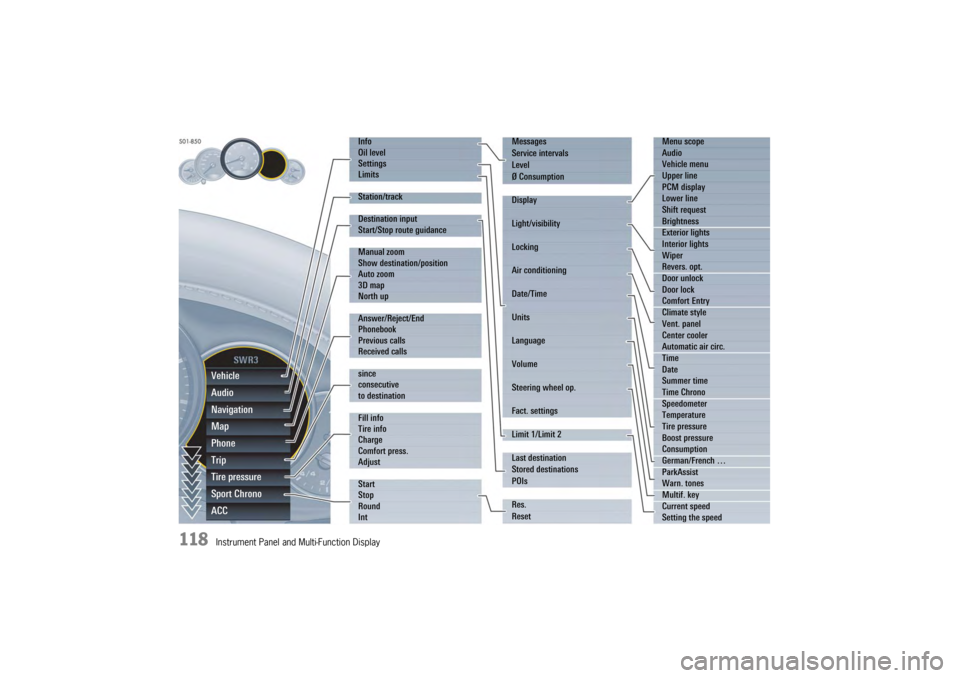
118
Instrument Panel and Multi-Function DisplayVehicle
Audio
Navigation
Map
Phone
Trip
Tire pressure
Sport Chrono
ACC
Info
Oil level
Settings
Limits
Station/track
Destination input
Start/Stop route guidance
Manual zoom
Show destination/position
Auto zoom
3D map
North up
Answer/Reject/End
Phonebook
Previous calls
Received calls
since
consecutive
to destination
Fill info
Tire info
Charge
Comfort press.
Adjust
Start
Stop
Round
IntMessages
Service intervals
Level
Ø Consumption
Display
Light/visibility
Locking
Air conditioning
Date/Time
Units
Language
Volume
Steering wheel op.
Fact. settings
Limit 1/Limit 2
Last destination
Stored destinations
POIs
Res.
Reset
Menu scope
Audio
Vehicle menu
Upper line
PCM display
Lower line
Shift request
Brightness
Exterior lights
Interior lights
Wiper
Revers. opt.
Door unlock
Door lock
Comfort Entry
Climate style
Vent. panel
Center cooler
Automatic air circ.
Time
Date
Summer time
Time Chrono
Speedometer
Temperature
Tire pressure
Boost pressure
Consumption
German/French …
ParkAssist
Warn. tones
Multif. key
Current speed
Setting the speed
Page 129 of 343

Instrument Panel and Multi-Function Display
127
Tire Pressure Monitoring (TPM)Each tire should be checked monthly when cold
and inflated to the inflation pressure
recommended by Porsche on the tire inflation
pressure label.
For information on the tire inflation pressure label:
fPlease see the chapter “TIRES AND WHEELS”
on page 280.
As an added safety feature, your vehicle has been
equipped with a tire pressure monitoring system
(TPM) that illuminates a low tire pressure telltale
(warning light) when one or more of your tires is
significantly under-inflated.
Accordingly, when the low tire pressure telltale
illuminates, you should stop and check your tires
as soon as possible, an d inflate them to the
proper pressure. Driving on a significantly under-
inflated tire causes the tire to overheat and can
lead to tire failure. Under-inflation also reduces
fuel efficiency and tire tread life, and may affect
the vehicle’s handling and stopping ability.
However, the tire pressure must still be set
manually on the wheel.
f Please see the chapter “TIRE PRESSURE FOR
COLD TIRES (68 °F/20 °C)” on page 326.
Danger!
Risk of serious personal injury or death.
Driving the vehicle with low tire pressure
increases the risk of a tire failure and
resulting loss of control. Furthermore, low
tire pressure increases rate of wear of the
affected tires.
Please note that the Tire Pressure Monitoring
is not a substitute for proper tire
maintenance, and it is the driver's
responsibility to maintain correct tire
pressure, even if under-inflation has not
reached the level to trigger illumination of
Tire Pressure Monitoring low tire pressure
telltale. Low tire pressure reduces the road
safety of the vehicle and destroys the tire and
wheel.
Tire Pressure Monitoring gives a warning
about tire damage caused by a natural loss
in pressure as well as about a gradual loss of
pressure caused by foreign objects.
Tire Pressure Monitoring cannot warn you
about tire damage that occurs suddenly (e.g.
flat tire due to abrupt external effects).
f When a red tire pressure warning appears,
stop immediately in a suitable place and check
the tires for damage. If necessary, remedy the
damage with a tire sealant.
f Do not by any means continue to drive with
defective tires. f
Sealing the tire with tire sealant is only an
emergency repair so you can drive to the
nearest specialist workshop.
The permitted top speed is 50 mph
(80 km/h) .
f Do not drive with tires in which the tire
pressure drops again very quickly. In case of
doubt, have tires checked by a specialist
workshop.
f Defective tires must be replaced immediately
at an authorized Porsche dealer.
Tires must never be repaired under any
circumstances.
f If Tire Pressure Monitoring is defective
(e.g. defective wheel transmitter), contact an
authorized Porsche dealer immediately and
have the damage repaired.
The tire pressure will not be monitored at all
or will be monitored only partially when Tire
Pressure Monitoring is defective.
For information on warning messages on the multi-
function display:
f Please see the chapter “OVERVIEW OF
WARNING MESSAGES” on page 152.
f Incomplete entries or selection of the wrong
tires on the multi-function display affect the
accuracy of warnings and messages.
The settings in the tire pressure menu must be
updated following a wheel change or changes
in vehicle loading.
Page 130 of 343

128
Instrument Panel and Multi-Function Display
f
Use only the pressure differences shown in the
“Fill info” display in the tire pressure menu or
from the corresponding tire pressure warning
when correcting the tire pressure.
f Tires can lose air over time without a tire
defect being present. A tire pressure warning
will then appear on the multi-function display.
Check the tire pressure at the next opportunity.
Warning!
Your vehicle has also been equipped with a TPM
malfunction indicator to in dicate when the system
is not operating properly.
The TPM malfunction indicator is combined with
the low tire pressure telltale.
When the system detects a malfunction, the
telltale will flash for approximately one minute and
then remain continuously illuminated. This
sequence will continue upon subsequent vehicle
start-ups as long as the malfunction exists.
When the malfunction indicator is illuminated, the
system may not be able to detect or signal low tire
pressure as intended.
TPM malfunctions may occur for a variety of
reasons, including the installation of replacement
or alternate tires or wheels on the vehicle that
prevent the TPM from functioning properly.
f Always check the TPM malfunction telltale after
replacing one or more tires or wheels on your
vehicle to ensure that the replacement or
alternate tires and wheels allow the TPM to continue to function properly. The warning light in the instrument panel lights up:
– When a loss in pressure has been detected.
– In the event of a defect in Tire Pressure
Monitoring or a temporary fault.
– When learning new fitted wheels/wheel transmitters, as long as the vehicle’s own
wheels have not ye t been recognized.
The tire pressure warning light on the instrument
panel goes out only when the cause of the fault
has been rectified.Warning light
Page 134 of 343
132
Instrument Panel and Multi-Function Display
Selecting settings in the Tire pressure menu
(type and size of fitted tire)
Warning!
Risk of accident due to excessive speed. This
could lead to serious personal injury or
death.
f Always observe the permissible maximum
speed of the respective tire.
f Exceeding maximum tire speed could result in
a tire burst, causing loss of control of the
vehicle. This could lead to serious personal
injury or death.
Moreover, Porsche recommends obeying all
traffic laws at all times to maintain the safety of yourself and all vehicle occupants. Warning!
Incomplete entries or selection of the wrong
tires on the multi-function display affect
correct indication of warnings and
messages.
f The settings must be updated in the “Tire
pressure ” menu after changing a wheel, filling
with tire sealant or adding air (after previous
warning “ Tire pressure!”).
f Please see the chapter “RED WARNING – TIRE PRESSURE!” on page 133. The new tire type and tire
size must be selected
even if the settings for the new set of wheels are
the same as for the old wheels.
Available setting options:
–“ 18 inch ”
–“ 19 inch ”
–“ 20 inch ”
Tire selection has only been successfully
completed when the following message appears
on the multi-function display (example).
“Summer tires 19-inch was set. No monitoring,
system is learning”.
f Please see the chapter “SYSTEM LEARNING”
on page 134. Notes
The message “Action cancelled” appears if the
setting process is interrupted. All entries made up
to this point are lost, and the original settings
remain in effect.
Before fitting tires with dimensions that are not
already stored in the mult
i-function display, the
missing information should be added to the
multi-function display.
f Please contact a qualified specialist workshop.
We recommend that you have an authorized
Porsche dealer to do this work as they have
trained workshop personnel and the necessary
parts and tools.
f Use only tires approved by Porsche.
The available items in the tire pressure menu
depend on the model type. For this reason it is
possible that some of the selection options shown
here are not available on your multi-function
display.
1. Select
> “Tire pressure ”
2. “Adjust ”
and confirm.
3. Select “ Summer tires ” or
“ Winter tires ” or
“ All-season ”
and confirm.
4. Select the tire size
and confirm.
Page 140 of 343
138
Instrument Panel and Multi-Function Display
Vehicle Settings on the Multi-
Function DisplayDifferent settings can be adjusted in the
multi-function display on the instrument panel
depending on the vehicle equipment.
On vehicles with comfort memory, the settings are
stored on the car key or the person buttons in the
driver’s door.
For information on the comfort memory:
fPlease see the chapter “COMFORT MEMORY”
on page 40.
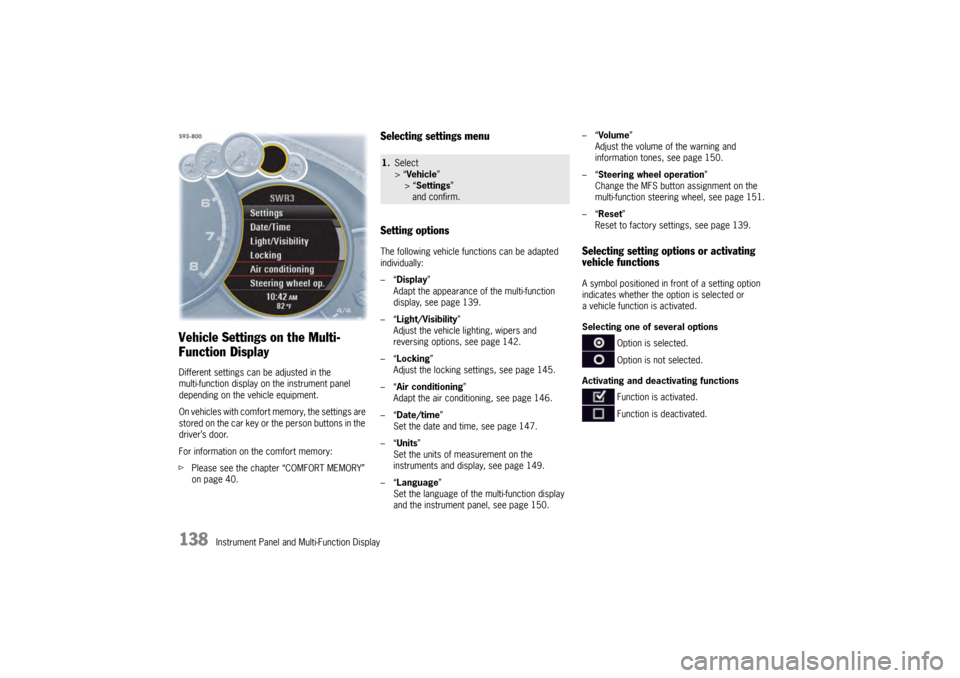
Selecting settings menu
Setting optionsThe following vehicle functions can be adapted
individually:
–“ Display ”
Adapt the appearance of the multi-function
display, see page 139.
–“ Light/Visibility ”
Adjust the vehicle lighting, wipers and
reversing options, see page 142.
–“ Locking ”
Adjust the locking settings, see page 145.
–“ Air conditioning ”
Adapt the air conditioning, see page 146.
–“ Date/time ”
Set the date and time, see page 147.
–“ Units ”
Set the units of measurement on the
instruments and display, see page 149.
–“ Language”
Set the language of the multi-function display
and the instrument panel, see page 150. –“
Volume ”
Adjust the volume of the warning and
information tones, see page 150.
–“ Steering wheel operation”
Change the MFS button assignment on the
multi-function steering wheel, see page 151.
–“ Reset ”
Reset to factory settings, see page 139.
Selecting setting options or activating
vehicle functionsA symbol positioned in front of a setting option
indicates whether the option is selected or
a vehicle function is activated.
Selecting one of several options
Option is selected.
Option is not selected.
Activating and deactivating functions Function is activated.
Function is deactivated.
1.Select
> “Vehicle ”
> “ Settings ”
and confirm.