instrument panel Ram 1500 2011 Owner's Manual
[x] Cancel search | Manufacturer: RAM, Model Year: 2011, Model line: 1500, Model: Ram 1500 2011Pages: 636, PDF Size: 4.88 MB
Page 331 of 636

method is with the vehicle rolling 2 to 3 mph (3 to
5 km/h). Avoid attempting to engage or disengage 4L
with the vehicle moving faster than 2 to 3 mph (3 to
5 km/h).
•Do not attempt to shift into or from 4L while the
transmission is in gear.
Transfer Case Position Indicator Light
The “Transfer Case Position Indicator Light” in the
instrument cluster is used to alert the driver that the front
axle is fully engaged and all four wheels are driving.
Electronically Shifted Transfer Case
(Four-Position Switch) – If Equipped
This is an electronic shift transfer case and is operated by
the 4WD Control Switch (Transfer Case Switch), which is
located on the instrument panel.
Transfer Case Switch (Four-Position)
5
STARTING AND OPERATING 329
Page 338 of 636

Electronically Shifted Transfer Case
(Five-Position Switch) – If Equipped
This is an electronic shift transfer case and is operated by
the 4WD Control Switch (Transfer Case Switch), which is
located on the instrument panel.This electronically shifted transfer case provides five
mode positions:•Two-wheel drive high range (2WD)
•Four-wheel drive automatic range (4WD AUTO)
•Four-wheel drive lock range (4WD LOCK)
•Four-wheel drive low range (4WD LOW)
•Neutral (NEUTRAL)
This electronically shifted transfer case is designed to be
driven in the two–wheel drive position (2WD) or four-
wheel drive position (4WD AUTO) for normal street and
highway conditions on dry hard surfaced roads). Driving
the vehicle in 2WD will have greater fuel economy
benefits as the front axle is not engaged in 2WD.
For variable driving conditions, the 4WD AUTO mode
can be used. In this mode, the front axle is engaged, but
the vehicle’s power is sent to the rear wheels. Four-wheel
Transfer Case Switch (Five–Position)
336 STARTING AND OPERATING
Page 347 of 636
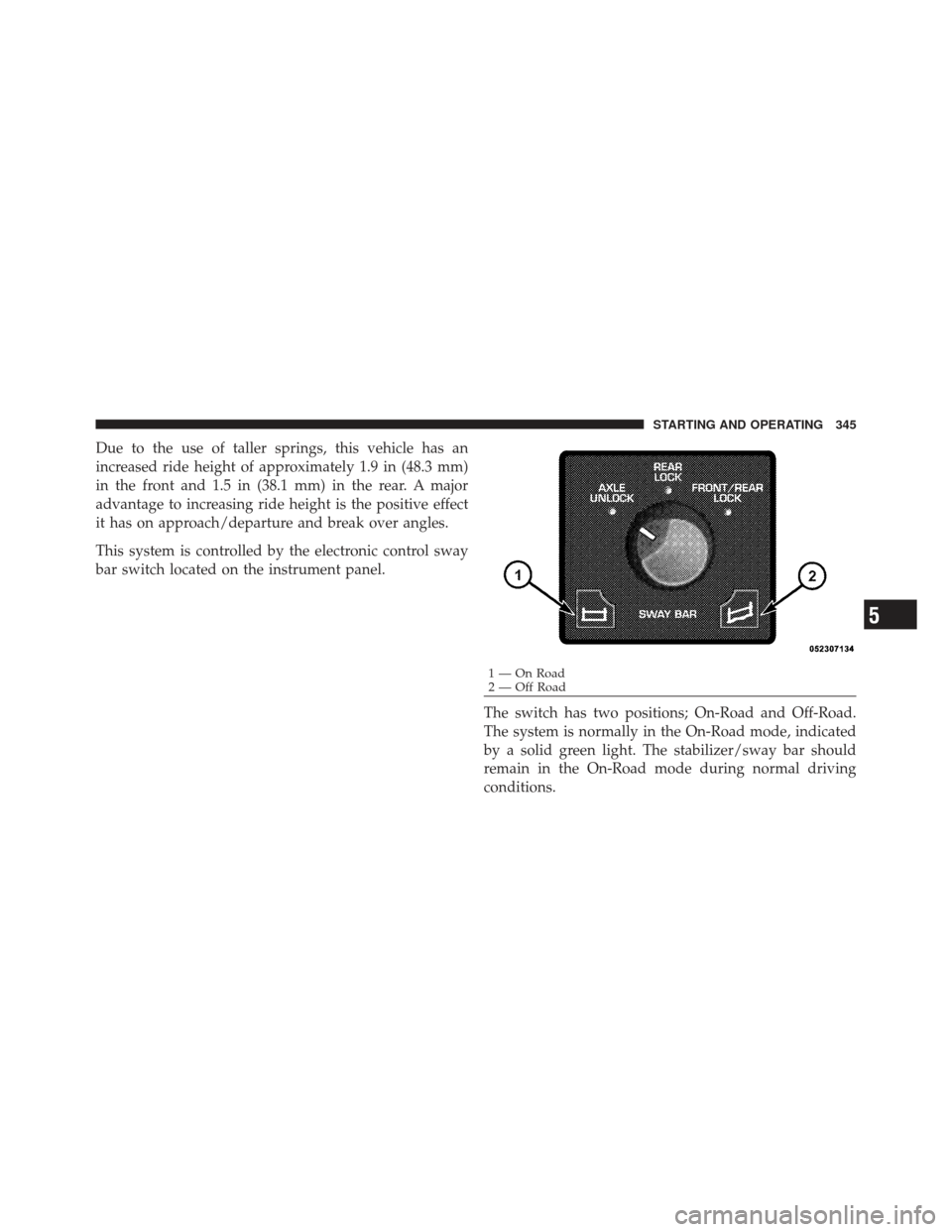
Due to the use of taller springs, this vehicle has an
increased ride height of approximately 1.9 in (48.3 mm)
in the front and 1.5 in (38.1 mm) in the rear. A major
advantage to increasing ride height is the positive effect
it has on approach/departure and break over angles.
This system is controlled by the electronic control sway
bar switch located on the instrument panel.The switch has two positions; On-Road and Off-Road.
The system is normally in the On-Road mode, indicated
by a solid green light. The stabilizer/sway bar should
remain in the On-Road mode during normal driving
conditions.
1 — On Road
2 — Off Road
5
STARTING AND OPERATING 345
Page 394 of 636
If necessary, add fluid to restore to the proper indicated
level. With a clean cloth, wipe any spilled fluid from all
surfaces. Refer to “Fluids, Lubricants, and Genuine
Parts” in “Maintaining Your Vehicle” for further
information.
MULTI-DISPLACEMENT SYSTEM (MDS) (IF
EQUIPPED) — 5.7L ENGINE ONLY
This feature offers improved fuel economy by shutting
off four of the engine’s eight cylinders during light load
and cruise conditions. The system is automatic with no
driver inputs or additional driving skills required.
NOTE:The MDS system may take some time to return
to full functionality after a battery disconnect.
PARKING BRAKE
Before leaving the vehicle, make sure that the parking
brake is fully applied. Also, be certain to leave the
transmission in PARK. The foot operated parking brake is located below the
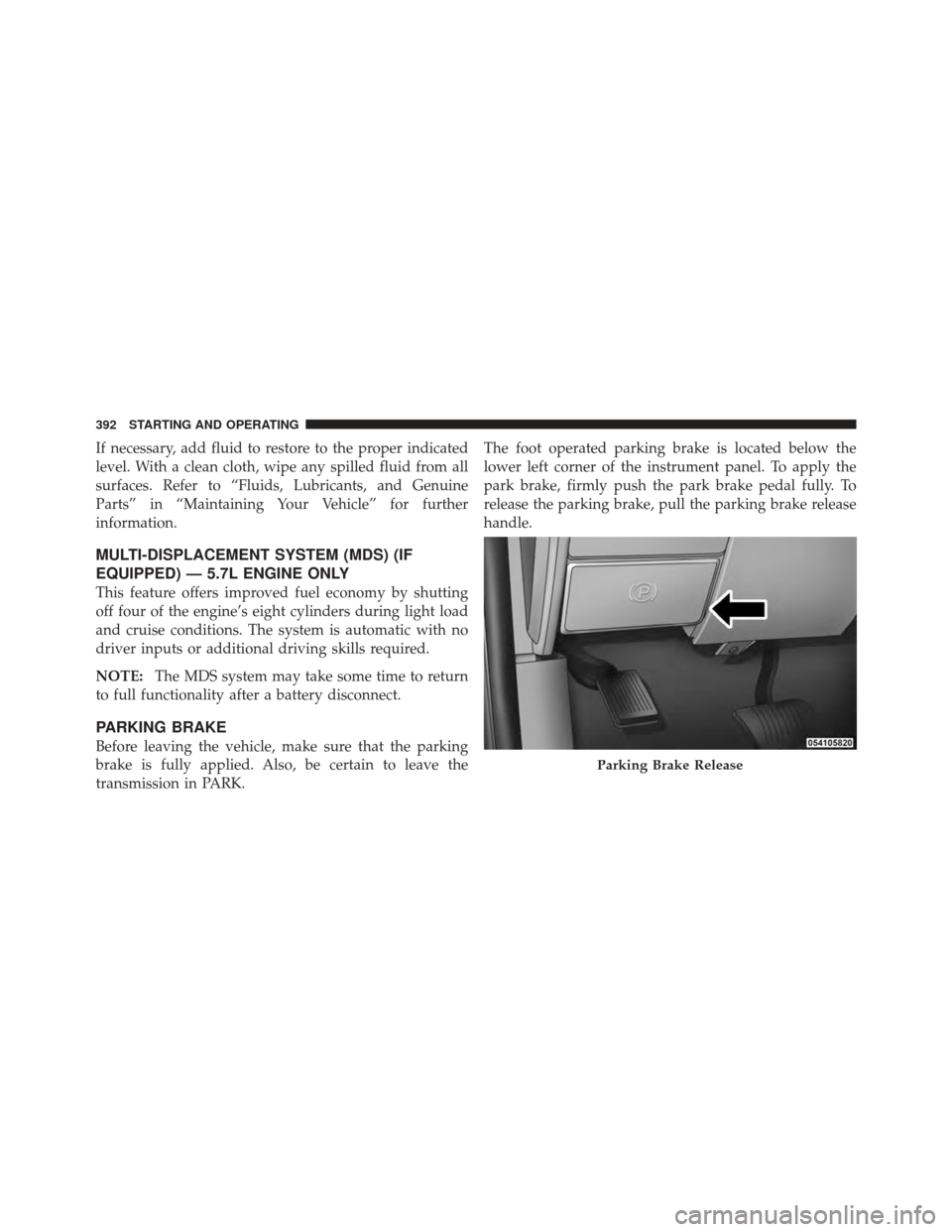
lower left corner of the instrument panel. To apply the
park brake, firmly push the park brake pedal fully. To
release the parking brake, pull the parking brake release
handle.
Parking Brake Release
392 STARTING AND OPERATING
Page 402 of 636
3. With the engine running and the brake applied, rotate
the steering wheel 180° counterclockwise from center.
4. Press the “ESC Off” switch four times within 20 sec-
onds. The “ESC Off Indicator Light” should appear and
disappear four times.
5. Rotate the steering wheel 360° clockwise (180° clock-
wise from center).
6. Cycle ignition switch OFF then ON.
7. If the sequence was completed properly, the “ESC Off
Indicator Light” will blink several times to confirm HSA
is off.
Steps 1 through 7 must be completed within 90 seconds
to turn off HSA. Repeat steps 1 through 7 to re-enable
HSA functionality.EVIC Equipped Vehicles
HSA is a Customer Programmable Feature on a EVIC
equipped vehicle. If you wish to turn off the HSA feature,
refer to “Electronic Vehicle Information Center (EVIC)/
Customer Programmable Features” in “Understanding
Your Instrument Panel” for further information.
Electronic Stability Control (ESC) – If Equipped
The ESC system enhances directional control and stabil-
ity of the vehicle under various driving conditions. ESC
corrects for oversteering or understeering of the vehicle
by applying the brake of the appropriate wheel to assist
in counteracting the oversteer or understeer condition.
Engine power may also be reduced to help the vehicle
maintain the desired path.
ESC uses sensors in the vehicle to determine the vehicle
path intended by the driver and compares it to the actual
path of the vehicle. When the actual path does not match
400 STARTING AND OPERATING
Page 455 of 636
WARNING!
•Never have any smoking materials lit in or near
the vehicle when the gas cap is removed or the
tank is being filled.
•Never add fuel to the vehicle when the engine is
running.
•A fire may result if gasoline is pumped into a
portable container that is inside of a vehicle. You
could be burned. Always place gas containers on
the ground while filling.
NOTE:
•Tighten the gas cap until you hear a “clicking” sound.
This is an indication that the gas cap is tightened
properly. The MIL in the instrument cluster may turn
on if the gas cap is not secured properly. Make sure
that the gas cap is tightened each time the vehicle is
refueled.
•When the fuel nozzle “clicks” or shuts off, the fuel
tank is full.
Loose Fuel Filler Cap Message
If the vehicle diagnostic system determines
that the fuel filler cap is loose, improperly
installed, or damaged, a loose gascap indicator
will display in the EVIC telltale display area.
Refer to “Electronic Vehicle Information Center (EVIC) in
“Understanding Your Instrument Panel” for further in-
formation. Tighten the fuel filler cap properly and press
the SELECT button to turn off the message. If the
problem continues, the message will appear the next time
the vehicle is started.
VEHICLE LOADING
Certification Label
As required by National Highway Traffic Safety Admin-
istration regulations, your vehicle has a certification label
affixed to the driver’s side door or pillar.
5
STARTING AND OPERATING 453
Page 471 of 636
1. Make sure the trailer brakes are in good working
condition, functioning normally, and properly adjusted.
See your trailer dealer if necessary.
2. Hook up the trailer and make the electrical connec-
tions according to the trailer manufacturer’s instructions.
3. When a trailer with electric brakes is plugged in, the
GAIN setting will illuminate.
4. Use the GAIN adjustment (+/-) buttons to increase or
decrease the GAIN setting to the desired starting point. A
GAIN setting of 6 is a good starting point for heavier
loads.
5. In a traffic-free environment, tow the trailer on a dry,
level surface at a speed of 20–25 mph (30–40 km/h) and
squeeze the manual brake control lever completely.
6. If the trailer wheels lockup (indicated by squealing
tires), reduce the GAIN setting; if the trailer wheels turn
freely, increase the GAIN setting.Repeat Steps 5 and 6 until the GAIN setting is at a point
just below trailer wheel lockup. If towing a heavier
trailer, trailer wheel lockup may not be attainable even
with the maximum GAIN setting of 10.
EVIC Display Messages
The trailer brake control interacts with the Electronic
Vehicle Information Center (EVIC). Display messages,
along with a single chime, will be displayed when a
malfunction is determined in the trailer connection,
trailer brake control, or on the trailer. Refer to “Electronic
Vehicle Information Center” in “Understanding Your
Instrument Panel” for further information.
5
STARTING AND OPERATING 469
Page 531 of 636

ONBOARD DIAGNOSTIC SYSTEM (OBD II)
Your vehicle is equipped with a sophisticated onboard
diagnostic system called OBD II. This system monitors
the performance of the emissions, engine, and automatic
transmission control systems. When these systems are
operating properly, your vehicle will provide excellent
performance and fuel economy, as well as engine emis-
sions well within current government regulations.
If any of these systems require service, the OBD II system
will turn on the “Malfunction Indicator Light (MIL).” It
will also store diagnostic codes and other information to
assist your service technician in making repairs. Al-
though your vehicle will usually be drivable and not
need towing, see your authorized dealer for service as
soon as possible.CAUTION!
•Prolonged driving with the MIL on could cause
further damage to the emission control system. It
could also affect fuel economy and drivability. The
vehicle must be serviced before any emissions
tests can be performed.
•If the MIL is flashing, while the engine is running,
severe catalytic converter damage and power loss
will soon occur. Immediate service is required.
Loose Fuel Filler Cap Message
If the vehicle diagnostic system determines
that the fuel filler cap is loose, improperly
installed, or damaged, a loose gascap indicator
will display in the EVIC telltale display area.
Refer to “Electronic Vehicle Information Center (EVIC) in
“Understanding Your Instrument Panel” for further in-
formation. Tighten the fuel filler cap properly and press
7
MAINTAINING YOUR VEHICLE 529
Page 589 of 636
Your authorized dealer will reset the oil change indicator
message after completing the scheduled oil change. If a
scheduled oil change is performed by someone other
than your authorized dealer, the message can be reset by
referring to the steps described under “Electronic Vehicle
Information Center (EVIC)/Oil Change Required” in
“Understanding Your Instrument Panel” or under “In-
strument Cluster Description/Odometer/Trip Odom-
eter” in “Understanding Your Instrument Panel” for
further information.
At Each Stop For Fuel
•Check the engine oil level about five minutes after a
fully warmed engine is shut off. Checking the oil level
while the vehicle is on level ground will improve the
accuracy of the oil level reading. Add oil only when
the level is at or below the ADD or MIN mark.
•Check the windshield washer solvent and add if
required.Once A Month
•Check tire pressure and look for unusual wear or
damage.
•Inspect the battery and clean and tighten the terminals
as required.
•Check the fluid levels of the coolant reservoir, brake
master cylinder, and transmission and add as needed.
•Check all lights and other electrical items for correct
operation.
At Each Oil Change
•Change the engine oil filter.
•Inspect the brake hoses and lines.8
M A I
N T
E
N A
N CE
S
C
H E
D
U L
E
SMAINTENANCE SCHEDULES 587
Page 624 of 636
Information Center, Vehicle................. 227
Inside Rearview Mirror .................... 93
Instrument Cluster ................. 206,208,210
Instrument Panel and Controls .............. 205
Instrument Panel Lens Cleaning ............. 562
Integrated Power Module (Fuses) ............ 564
Integrated Trailer Brake Controls ............. 466
Interior Appearance Care .................. 560
Interior Lights .......................... 125
Intermittent Wipers (Delay Wipers) ........... 130
Introduction ............................. 4
Inverter Outlet (115V) ..................... 167
Jack Location ........................... 491
Jump Starting .......................... 510
Key-In Reminder ......................... 15
Key, Programming ........................ 17
Key, Replacement ........................ 17 Key, Sentry (Immobilizer)
................... 16
Keyless Entry System ...................... 20
Keys ................................. 12
Lane Change and Turn Signals .............. 128
Lane Change Assist ...................... 128
Lap Belts .............................. 48
Lap/Shoulder Belts ....................... 39
LATCH (Lower Anchors and Tether for
CHildren) .............................. 72
Latches ................................ 85
Leaks, Fluid ............................ 86
Life of Tires ............................ 422
Light Bulbs ............................. 85
Lights .............................. 85,121
Airbag ...................... 61,65,83,224
Alarm ............................ 214
Anti-Lock .......................... 225
Automatic Headlights ................. 123
622 INDEX