instrument cluster Ram 1500 2011 Owner's Guide
[x] Cancel search | Manufacturer: RAM, Model Year: 2011, Model line: 1500, Model: Ram 1500 2011Pages: 636, PDF Size: 4.88 MB
Page 223 of 636
Operation of the Brake Warning Light can be checked by
turning the ignition switch from the OFF position to the
ON/RUN position. The light should illuminate for ap-
proximately two seconds. The light should then turn off
unless the parking brake is applied or a brake fault is
detected. If the light does not illuminate, have the light
inspected by an authorized dealer.
The light also will turn on when the parking brake is
applied with the ignition switch in the ON/RUN posi-
tion.
NOTE:This light shows only that the parking brake is
applied. It does not show the degree of brake application.
24. Oil Pressure Warning Light
This light indicates low engine oil pressure. The
light should turn on momentarily when the engine
is started. If the light turns on while driving, stop the
vehicle and shut off the engine as soon as possible. A chime
will sound for four minutes when this light turns on.
Do not operate the vehicle until the cause is corrected.
This light does not indicate how much oil is in the engine.
The engine oil level must be checked under the hood.
For vehicles equipped with a premium cluster this indi-
cator will display in the Electronic Vehicle Information
Center (EVIC). Refer to ”Electronic Vehicle Information
Center (EVIC) — If Equipped” for further information.
25. Tire Pressure Monitoring Telltale Light Each tire, including the spare (if provided),
should be checked monthly when cold and
inflated to the inflation pressure recommended
by the vehicle manufacturer on the vehicle
placard or tire inflation pressure label. (If your vehicle
has tires of a different size than the size indicated on the
vehicle placard or tire inflation pressure label, you should
determine the proper tire inflation pressure for those
tires.)
4
UNDERSTANDING YOUR INSTRUMENT PANEL 221
Page 225 of 636
CAUTION!
The TPMS has been optimized for the original
equipment tires and wheels. TPMS pressures and
warning have been established for the tire size
equipped on your vehicle. Undesirable system opera-
tion or sensor damage may result when using re-
placement equipment that is not of the same size,
type, and/or style. Aftermarket wheels can cause
sensor damage. Do not use tire sealant from a can or
balance beads if your vehicle is equipped with a
TPMS, as damage to the sensors may result.
NOTE: The TPMS telltale is also accompanied by a
“Low Tire” message in the odometer (Base Cluster), or in
the Electronic Vehicle Information Center (EVIC) screen
indicating “Low Tire” for EVIC enabled clusters. 26. Malfunction Indicator Light (MIL)
The Malfunction Indicator Light (MIL) is part of
an onboard diagnostic (OBDII) system which
monitors the emissions and engine control sys-
tem. If the vehicle is ready for emissions testing, the light
will come on when the ignition is first turned on and
remain on, as a bulb check, until the engine is started. If
the vehicle is not ready for emissions testing the light will
come on when the ignition is first turned on and remain
on for 15 seconds, then blink for 5 seconds, and remain
on until the vehicle is started. If the bulb does not come
on during starting, have the condition investigated
promptly.
If this light comes on and remains on while driving, it
suggests a potential engine control problem and the need
for system service.
4
UNDERSTANDING YOUR INSTRUMENT PANEL 223
Page 228 of 636
WARNING!
If the Transmission Temperature Warning Light is
illuminated and you continue operating the vehicle,
in some circumstances you could cause the fluid to
boil over, come in contact with hot engine or exhaust
components and cause a fire.
For vehicles equipped with a premium cluster this warn-
ing light will display in the Electronic Vehicle Informa-
tion Center (EVIC). Refer to ”Electronic Vehicle Informa-
tion Center (EVIC) — If Equipped” for further
information.
31. Seat Belt Reminder Light When the ignition switch is first turned to ON/
RUN, this light will turn on for four to eight
seconds as a bulb check. During the bulb check, if
the driver’s seat belt is unbuckled, a chime will sound.
After the bulb check or when driving, if the driver’s seat belt remains unbuckled, the seat belt reminder light will
flash or remain on continuously. Refer to “Occupant
Restraints” in “Things To Know Before Starting Your
Vehicle” for further information.
32. Charging System Light
This light shows the status of the electrical charg-
ing system. The light should come on when the
ignition switch is first turned to ON/RUN and remain on
briefly as a bulb check. If the light stays on or comes on
while driving, turn off some of the vehicle’s non-essential
electrical devices or increase engine speed (if at idle). If
the charging system light remains on, it means that the
vehicle is experiencing a problem with the charging
system. Obtain SERVICE IMMEDIATELY. See an autho-
rized dealer.
If jump starting is required, refer to “Jump Starting
Procedures” in “What To Do In Emergencies”.
226 UNDERSTANDING YOUR INSTRUMENT PANEL
Page 229 of 636
For vehicles equipped with a premium cluster this indi-
cator will display in the Electronic Vehicle Information
Center (EVIC). Refer to ”Electronic Vehicle Information
Center (EVIC) — If Equipped” for further information.
33. Electronic Stability Control (ESC) OFF Indicator
Light — If EquippedThis light indicates the Electronic Stability Con-
trol (ESC) is off.
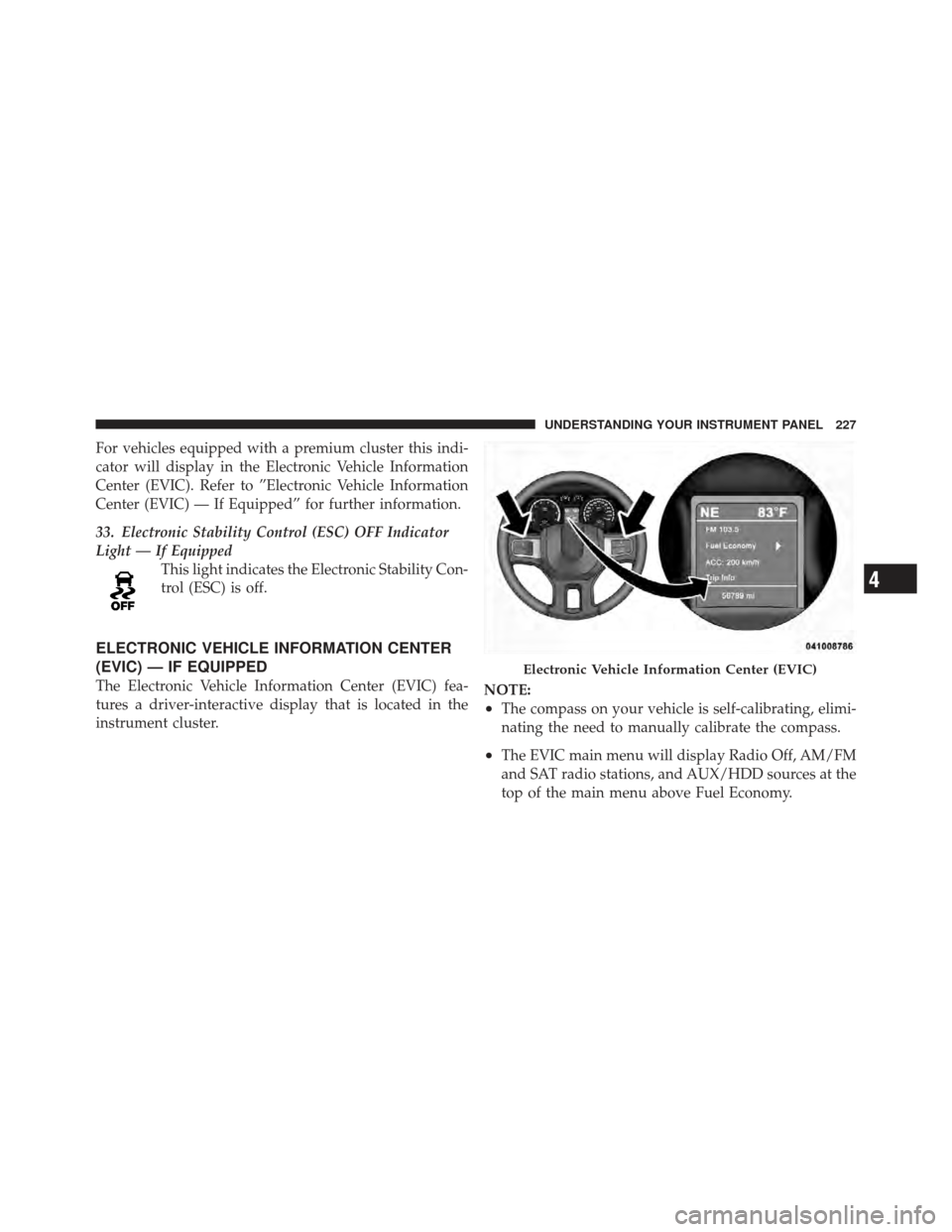
ELECTRONIC VEHICLE INFORMATION CENTER
(EVIC) — IF EQUIPPED
The Electronic Vehicle Information Center (EVIC) fea-
tures a driver-interactive display that is located in the
instrument cluster. NOTE:
•The compass on your vehicle is self-calibrating, elimi-
nating the need to manually calibrate the compass.
•The EVIC main menu will display Radio Off, AM/FM
and SAT radio stations, and AUX/HDD sources at the
top of the main menu above Fuel Economy.
Electronic Vehicle Information Center (EVIC)
4
UNDERSTANDING YOUR INSTRUMENT PANEL 227
Page 319 of 636

operating in TOW/HAUL mode, the transmission will
shift to third gear and fourth gear will be enabled under
steady cruise conditions.
The “TOW/HAUL Indicator Light” will illuminate in the
instrument cluster to indicate when the switch has been
activated. Pressing the switch a second time restoresnormal operation. If the TOW/HAUL mode is desired,
the switch must be pressed each time the engine is
started.
Transmission Limp Home Mode
Transmission function is monitored for abnormal condi-
tions. If a condition is detected that could result in
transmission damage, the Transmission Limp Home
Mode will be engaged. In this mode, the transmission
will operate (when in DRIVE) in second gear only.
To reset the transmission, use the following procedure:
1. Stop the vehicle.
2. Move the shift lever to the PARK position.
3. Turn OFF the engine and be sure to turn the key fob to
the LOCK position.
4. Wait approximately 10 seconds, then restart the en-
gine.
TOW/HAUL Switch
5
STARTING AND OPERATING 317
Page 320 of 636

5. Move the shift lever to the desired gear range.
If the problem is no longer detected, the transmission will
return to normal operation. If the problem persists,
PARK, REVERSE, and NEUTRAL will continue to oper-
ate. Only second gear will operate in the DRIVE position.
Have the transmission checked at your authorized dealer
as soon as possible.
Torque Converter Clutch
A feature designed to improve fuel economy has been
added to the automatic transmission of this vehicle. A
clutch within the torque converter engages automatically
at calibrated speeds. This may result in a slightly differ-
ent feeling or response during normal operation in high
gear. When the vehicle speed drops or during accelera-
tion, the clutch automatically and smoothly disengages.
Five–Speed Automatic Transmission – If
Equipped
The shift lever display located in the instrument panel
cluster indicates the transmission gear range. The shift
lever is mounted either on the right side of the steering
column (if equipped) or on the floor console (if
equipped). You must press the brake pedal to move the
shift lever out of the PARK position. To drive, move the
shift lever from PARK or NEUTRAL to the DRIVE
position. Pull the shift lever toward you when shifting
into REVERSE or PARK, or when shifting out of PARK
(Column Shift Only).
Electronic Range Select (ERS) Operation
The Electronic Range Select (ERS) shift control allows
you to limit the highest available gear when the shift
lever is in the DRIVE position. Move the console shift
lever left (-) or right (+), or toggle the switch on the
column shift lever down (-) or up (+) to select the desired
top gear. For example, if the driver shifts the transmission
318 STARTING AND OPERATING
Page 322 of 636
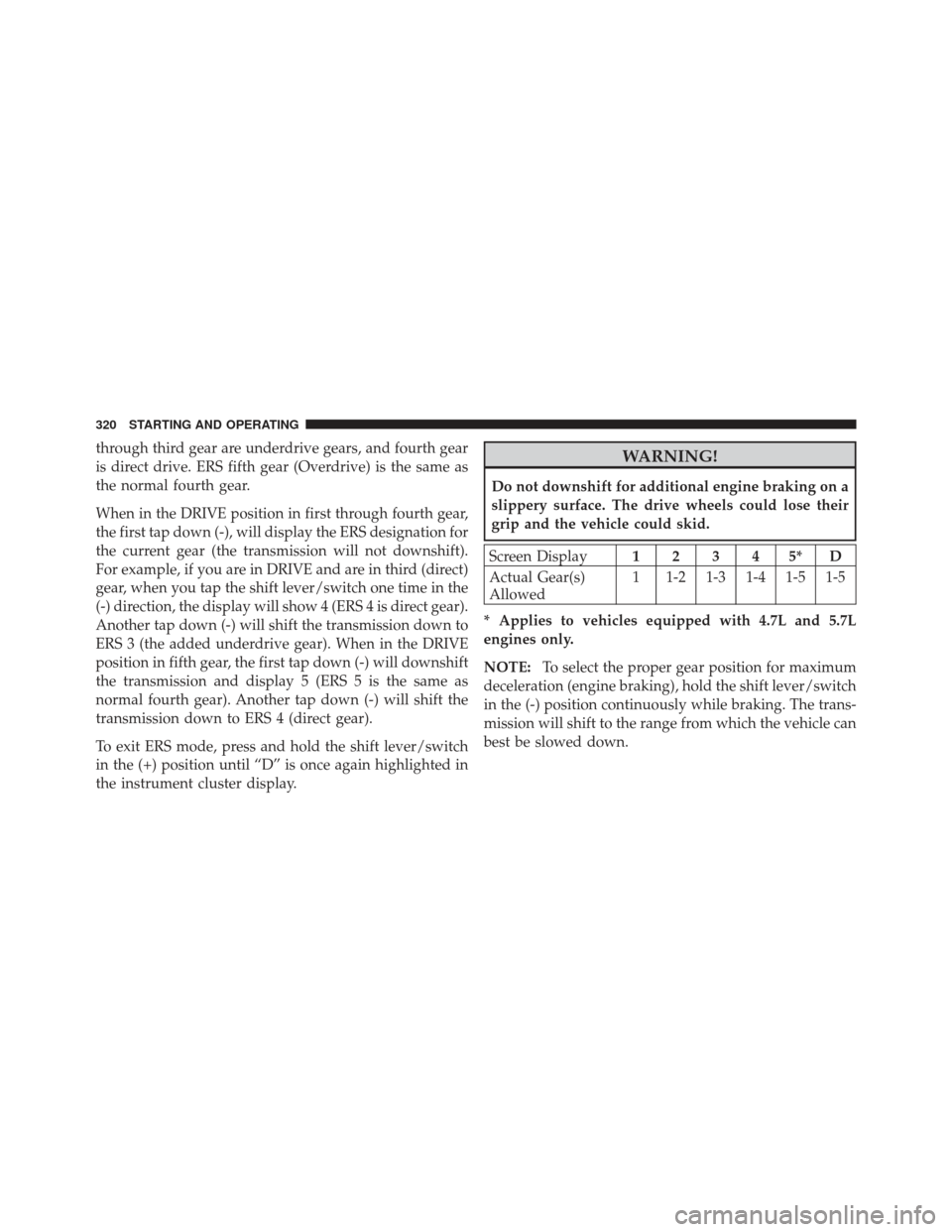
through third gear are underdrive gears, and fourth gear
is direct drive. ERS fifth gear (Overdrive) is the same as
the normal fourth gear.
When in the DRIVE position in first through fourth gear,
the first tap down (-), will display the ERS designation for
the current gear (the transmission will not downshift).
For example, if you are in DRIVE and are in third (direct)
gear, when you tap the shift lever/switch one time in the
(-) direction, the display will show 4 (ERS 4 is direct gear).
Another tap down (-) will shift the transmission down to
ERS 3 (the added underdrive gear). When in the DRIVE
position in fifth gear, the first tap down (-) will downshift
the transmission and display 5 (ERS 5 is the same as
normal fourth gear). Another tap down (-) will shift the
transmission down to ERS 4 (direct gear).
To exit ERS mode, press and hold the shift lever/switch
in the (+) position until “D” is once again highlighted in
the instrument cluster display.WARNING!
Do not downshift for additional engine braking on a
slippery surface. The drive wheels could lose their
grip and the vehicle could skid.
Screen Display12345*D
Actual Gear(s)
Allowed 1 1-2 1-3 1-4 1-5 1-5
* Applies to vehicles equipped with 4.7L and 5.7L
engines only.
NOTE: To select the proper gear position for maximum
deceleration (engine braking), hold the shift lever/switch
in the (-) position continuously while braking. The trans-
mission will shift to the range from which the vehicle can
best be slowed down.
320 STARTING AND OPERATING
Page 326 of 636
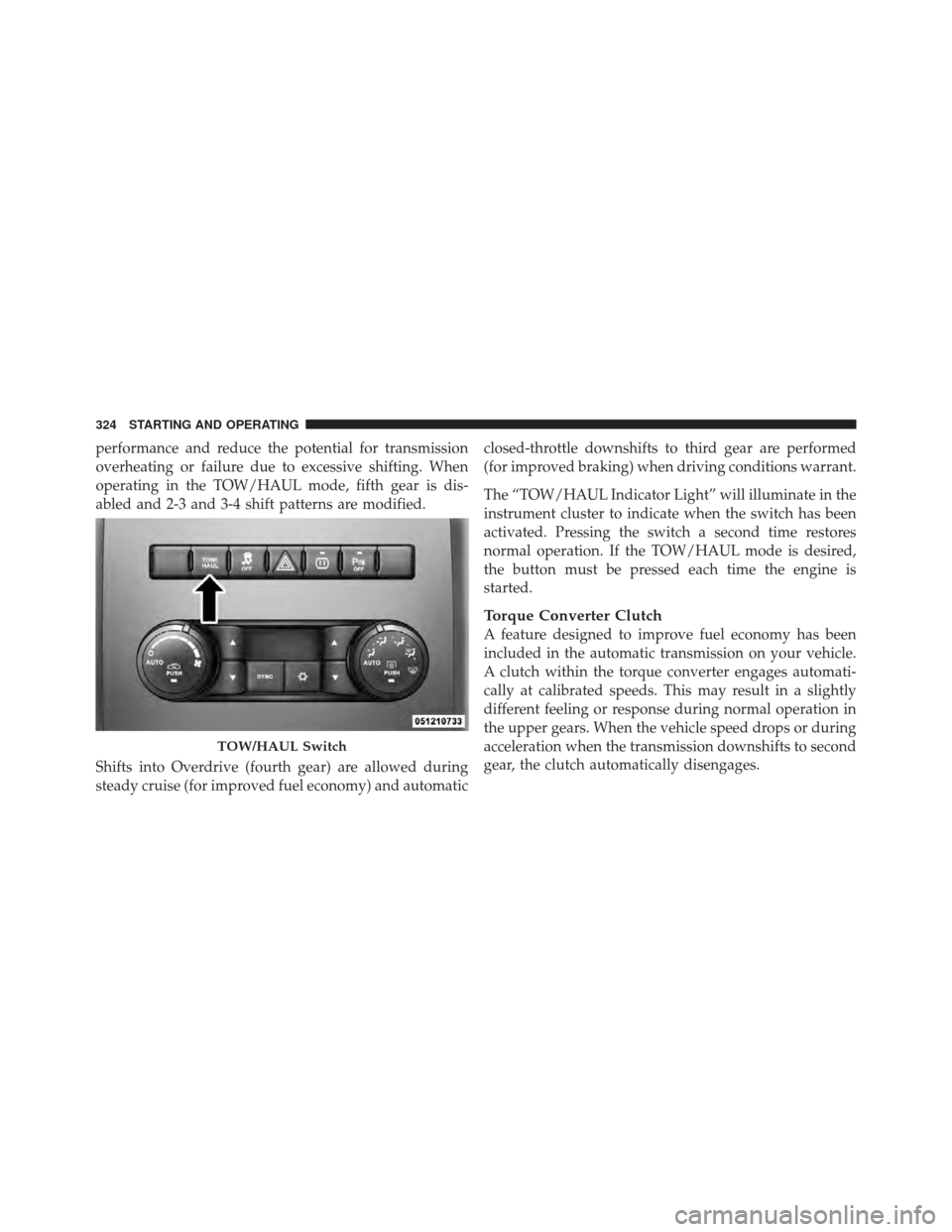
performance and reduce the potential for transmission
overheating or failure due to excessive shifting. When
operating in the TOW/HAUL mode, fifth gear is dis-
abled and 2-3 and 3-4 shift patterns are modified.
Shifts into Overdrive (fourth gear) are allowed during
steady cruise (for improved fuel economy) and automaticclosed-throttle downshifts to third gear are performed
(for improved braking) when driving conditions warrant.
The “TOW/HAUL Indicator Light” will illuminate in the
instrument cluster to indicate when the switch has been
activated. Pressing the switch a second time restores
normal operation. If the TOW/HAUL mode is desired,
the button must be pressed each time the engine is
started.
Torque Converter Clutch
A feature designed to improve fuel economy has been
included in the automatic transmission on your vehicle.
A clutch within the torque converter engages automati-
cally at calibrated speeds. This may result in a slightly
different feeling or response during normal operation in
the upper gears. When the vehicle speed drops or during
acceleration when the transmission downshifts to second
gear, the clutch automatically disengages.
TOW/HAUL Switch
324 STARTING AND OPERATING
Page 328 of 636
When additional traction is required, the 4H and 4L
positions can be used to lock the front and rear drive-
shafts together and force the front and rear wheels to
rotate at the same speed. This is accomplished by simply
moving the shift lever to the desired positions. The 4H
and 4L positions are intended for loose, slippery road
surfaces only. Driving in the 4H and 4L positions on dry,
hard surfaced roads may cause increased tire wear and
damage to the driveline components.
The “Transfer Case Position Indicator Light” in the
instrument cluster will alert the driver that the vehicle is
in four-wheel drive and that the front and rear drive-
shafts are locked together. This light will illuminate when
the transfer case is shifted into either the 4H or 4L
position. There is no light for the 2H or NEUTRAL
positions.
When operating your vehicle in 4L, the engine speed is
approximately three times that of the 2H or 4H positionsat a given road speed. Take care not to overspeed the
engine and do not exceed 25 mph (40 km/h).
Proper operation of four-wheel drive vehicles depends
on tires of equal size, type and circumference on each
wheel. Any difference will adversely affect shifting and
can cause damage to the drivetrain.
NOTE:
Do not attempt to make a shift while only the
front or rear wheels are spinning. The transfer case is not
equipped with a synchronizer and therefore the front and
rear driveshaft speeds must be equal for the shift to take
place. Shifting while only the front or rear wheels are
spinning can cause damage to the transfer case.
Because four-wheel drive provides improved traction,
there is a tendency to exceed safe turning and stopping
speeds. Do not go faster than road conditions permit.
326 STARTING AND OPERATING
Page 331 of 636

method is with the vehicle rolling 2 to 3 mph (3 to
5 km/h). Avoid attempting to engage or disengage 4L
with the vehicle moving faster than 2 to 3 mph (3 to
5 km/h).
•Do not attempt to shift into or from 4L while the
transmission is in gear.
Transfer Case Position Indicator Light
The “Transfer Case Position Indicator Light” in the
instrument cluster is used to alert the driver that the front
axle is fully engaged and all four wheels are driving.
Electronically Shifted Transfer Case
(Four-Position Switch) – If Equipped
This is an electronic shift transfer case and is operated by
the 4WD Control Switch (Transfer Case Switch), which is
located on the instrument panel.
Transfer Case Switch (Four-Position)
5
STARTING AND OPERATING 329