instrument panel Ram 1500 2014 Owner's Manual
[x] Cancel search | Manufacturer: RAM, Model Year: 2014, Model line: 1500, Model: Ram 1500 2014Pages: 806, PDF Size: 5.78 MB
Page 635 of 806
JACKING AND TIRE CHANGING
Jacking And Tire Changing 1500 Series Trucks
WARNING!
•Do not attempt to change a tire on the side of the
vehicle close to moving traffic. Pull far enough off
the road to avoid the danger of being hit when
operating the jack or changing the wheel.
• Being under a jacked-up vehicle is dangerous. The
vehicle could slip off the jack and fall on you. You
could be crushed. Never put any part of your body
under a vehicle that is on a jack. If you need to get
under a raised vehicle, take it to a service center
where it can be raised on a lift.
• Never start or run the engine while the vehicle is
on a jack.
(Continued)
WARNING! (Continued)
•The jack is designed to be used as a tool for
changing tires only. The jack should not be used to
lift the vehicle for service purposes. The vehicle
should be jacked on a firm level surface only.
Avoid ice or slippery areas.
NOTE: If your vehicle is equipped with an air suspen-
sion system, there is a feature which allows the automatic
leveling to be disabled to assist with changing a tire.
If your vehicle is equipped with a touchscreen, this
feature can be activated through the Uconnect® system.
Refer to “Uconnect® Settings” in “Understanding Your
Instrument Panel” for further information.
If your vehicle is not equipped with a touchscreen, this
feature can be activated through the Electronic Vehicle
Information Center (EVIC). Refer to “Electronic Vehicle
6
WHAT TO DO IN EMERGENCIES 633
Page 636 of 806
Information Center (EVIC)” in “Understanding Your
Instrument Panel” for further information.
Jack Location
The jack and jack tools are stored under the front
passenger seat.
Removal Of Jack And Tools (1500 Series)
To access the jack and jack tools you must remove the
plastic access cover, located on the side of the front
passengers seat. To remove the cover, pull the front part
of the cover (closest to the front of the seat) toward you
to release a locking tab. Once the front of the cover is
loose, slide the cover toward the front of the seat until it
is free from the seat frame.Remove the jack and tools by turning the wing bolt
counterclockwise, remove the wing bolt and then slide
the assembly out from under the seat.
Jack Access Cover
634 WHAT TO DO IN EMERGENCIES
Page 696 of 806
“Understanding Your Instrument Panel” for further in-
formation. Tighten the fuel filler cap properly and press
the SELECT button to turn off the message. If the
problem continues, the message will appear the next time
the vehicle is started.
A loose, improperly installed, or damaged fuel filler cap
may also turn on the Malfunction Indicator Light (MIL).
EMISSIONS INSPECTION AND MAINTENANCE
PROGRAMS
In some localities, it may be a legal requirement to pass
an inspection of your vehicle’s emissions control system.
Failure to pass could prevent vehicle registration.For states that require an Inspection and Mainte-
nance (I/M), this check verifies the “Malfunction
Indicator Light (MIL)” is functioning and is not
on when the engine is running, and that the OBD II
system is ready for testing. Normally, the OBD II system will be ready. The OBD II
system may
notbe ready if your vehicle was recently
serviced, recently had a dead battery or a battery replace-
ment. If the OBD II system should be determined not
ready for the I/M test, your vehicle may fail the test.
Your vehicle has a simple ignition actuated test, which
you can use prior to going to the test station. To check if
your vehicle’s OBD II system is ready, you must do the
following:
1. Cycle the ignition switch to the ON position, but do not crank or start the engine.
NOTE: If you crank or start the engine, you will have to
start this test over.
2. As soon as you cycle the ignition switch to the ON position, you will see the MIL symbol come on as part
of a normal bulb check.
694 MAINTAINING YOUR VEHICLE
Page 740 of 806
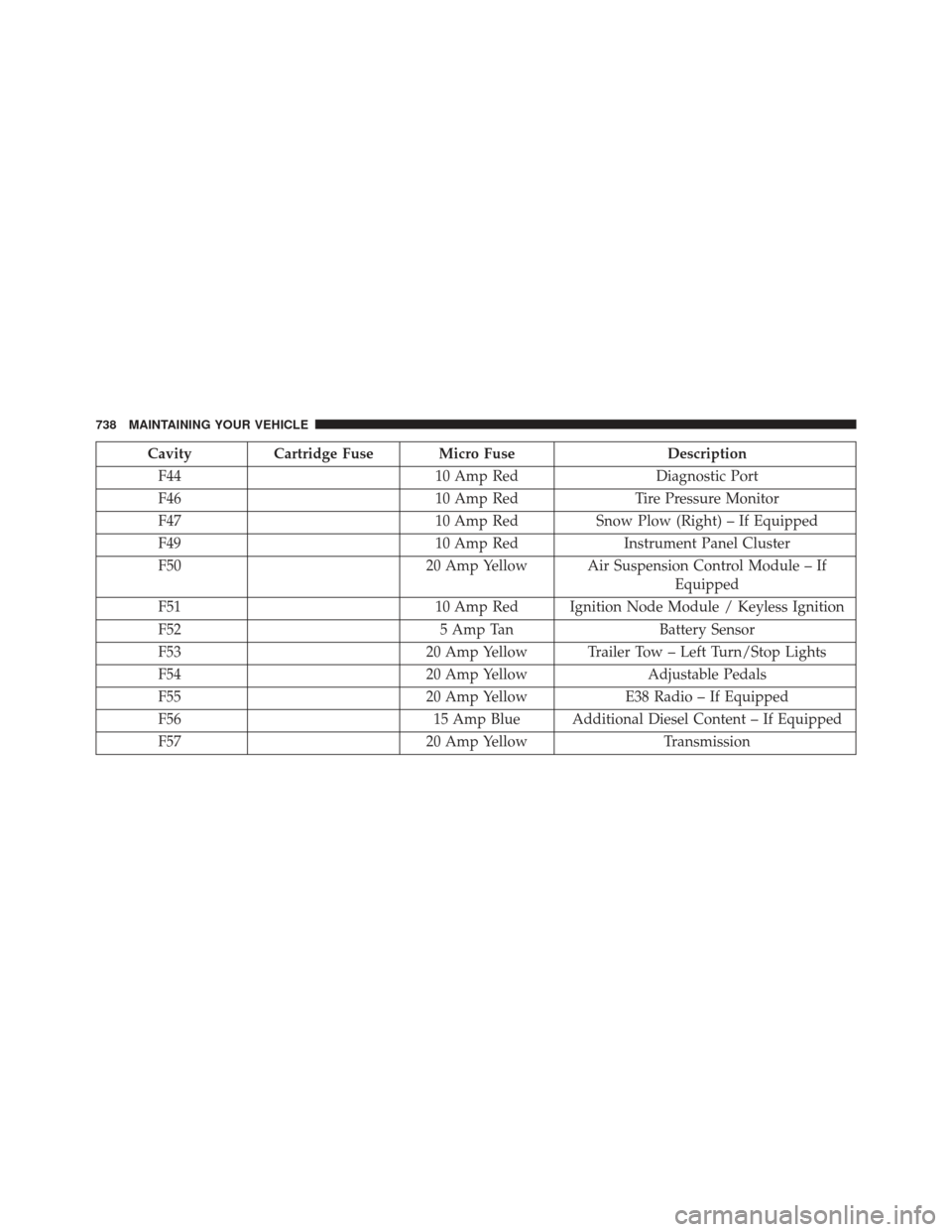
CavityCartridge Fuse Micro Fuse Description
F44 10 Amp RedDiagnostic Port
F46 10 Amp RedTire Pressure Monitor
F47 10 Amp RedSnow Plow (Right) – If Equipped
F49 10 Amp RedInstrument Panel Cluster
F50 20 Amp Yellow Air Suspension Control Module – If
Equipped
F51 10 Amp Red Ignition Node Module / Keyless Ignition
F52 5 Amp TanBattery Sensor
F53 20 Amp Yellow Trailer Tow – Left Turn/Stop Lights
F54 20 Amp YellowAdjustable Pedals
F55 20 Amp YellowE38 Radio – If Equipped
F56 15 Amp Blue Additional Diesel Content – If Equipped
F57 20 Amp YellowTransmission
738 MAINTAINING YOUR VEHICLE
Page 743 of 806
CavityCartridge Fuse Micro Fuse Description
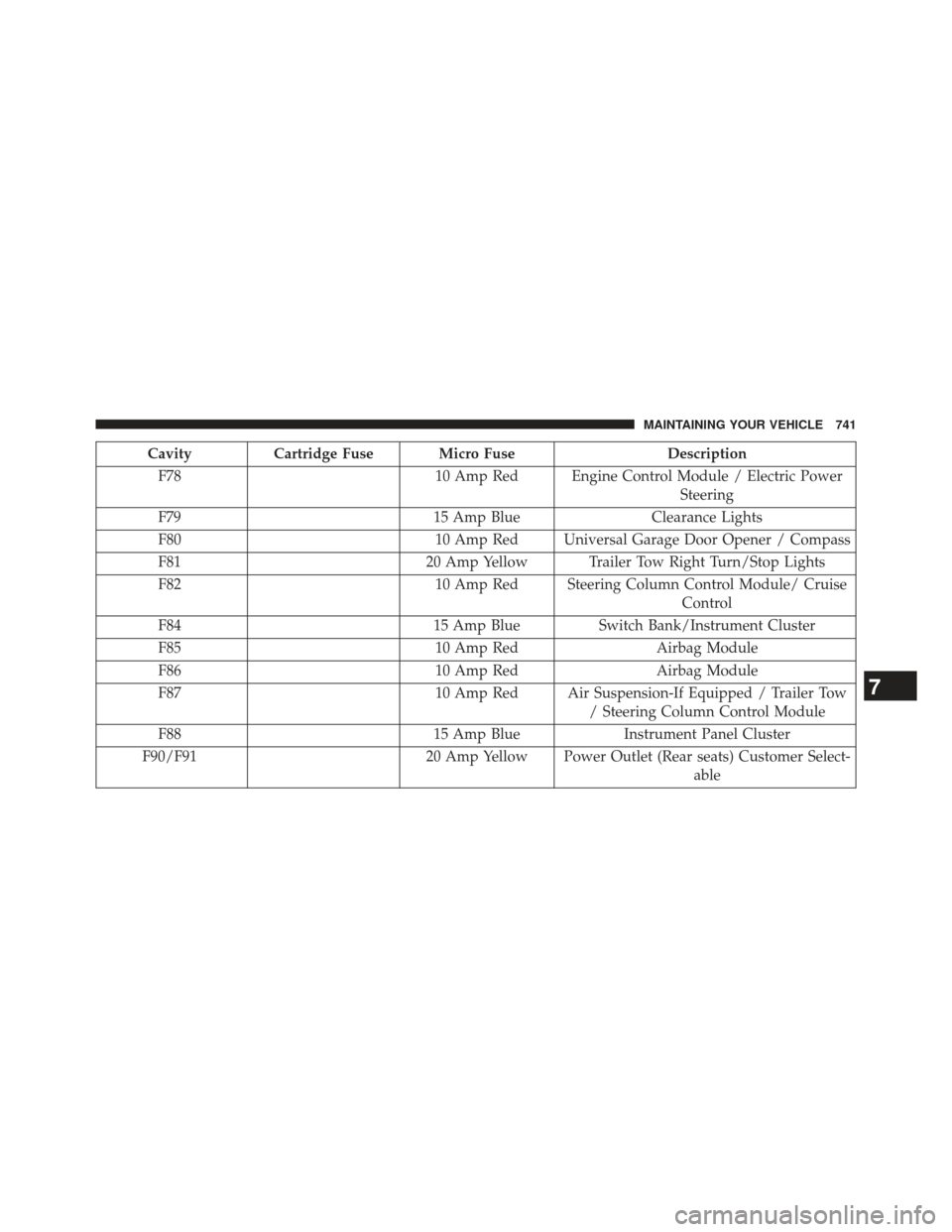
F78 10 Amp Red Engine Control Module / Electric Power
Steering
F79 15 Amp BlueClearance Lights
F80 10 Amp Red Universal Garage Door Opener / Compass
F81 20 Amp Yellow Trailer Tow Right Turn/Stop Lights
F82 10 Amp Red Steering Column Control Module/ Cruise
Control
F84 15 Amp BlueSwitch Bank/Instrument Cluster
F85 10 Amp RedAirbag Module
F86 10 Amp RedAirbag Module
F87 10 Amp Red Air Suspension-If Equipped / Trailer Tow
/ Steering Column Control Module
F88 15 Amp BlueInstrument Panel Cluster
F90/F91 20 Amp Yellow Power Outlet (Rear seats) Customer Select-
able
7
MAINTAINING YOUR VEHICLE 741
Page 744 of 806
CavityCartridge Fuse Micro Fuse Description
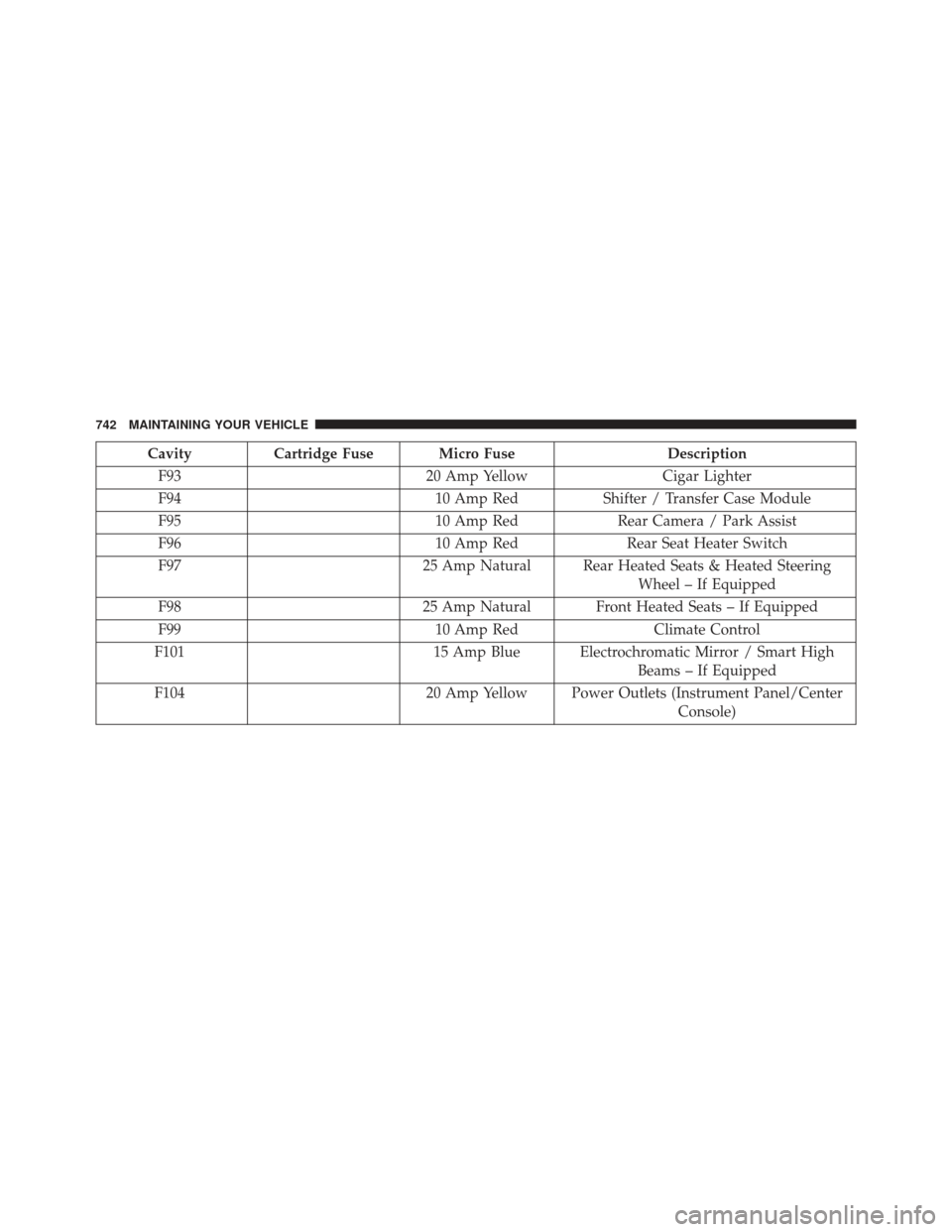
F93 20 Amp YellowCigar Lighter
F94 10 Amp RedShifter / Transfer Case Module
F95 10 Amp RedRear Camera / Park Assist
F96 10 Amp RedRear Seat Heater Switch
F97 25 Amp Natural Rear Heated Seats & Heated Steering
Wheel – If Equipped
F98 25 Amp Natural Front Heated Seats – If Equipped
F99 10 Amp RedClimate Control
F101 15 Amp Blue Electrochromatic Mirror / Smart High
Beams – If Equipped
F104 20 Amp Yellow Power Outlets (Instrument Panel/Center
Console)
742 MAINTAINING YOUR VEHICLE
Page 766 of 806
MAINTENANCE SCHEDULE
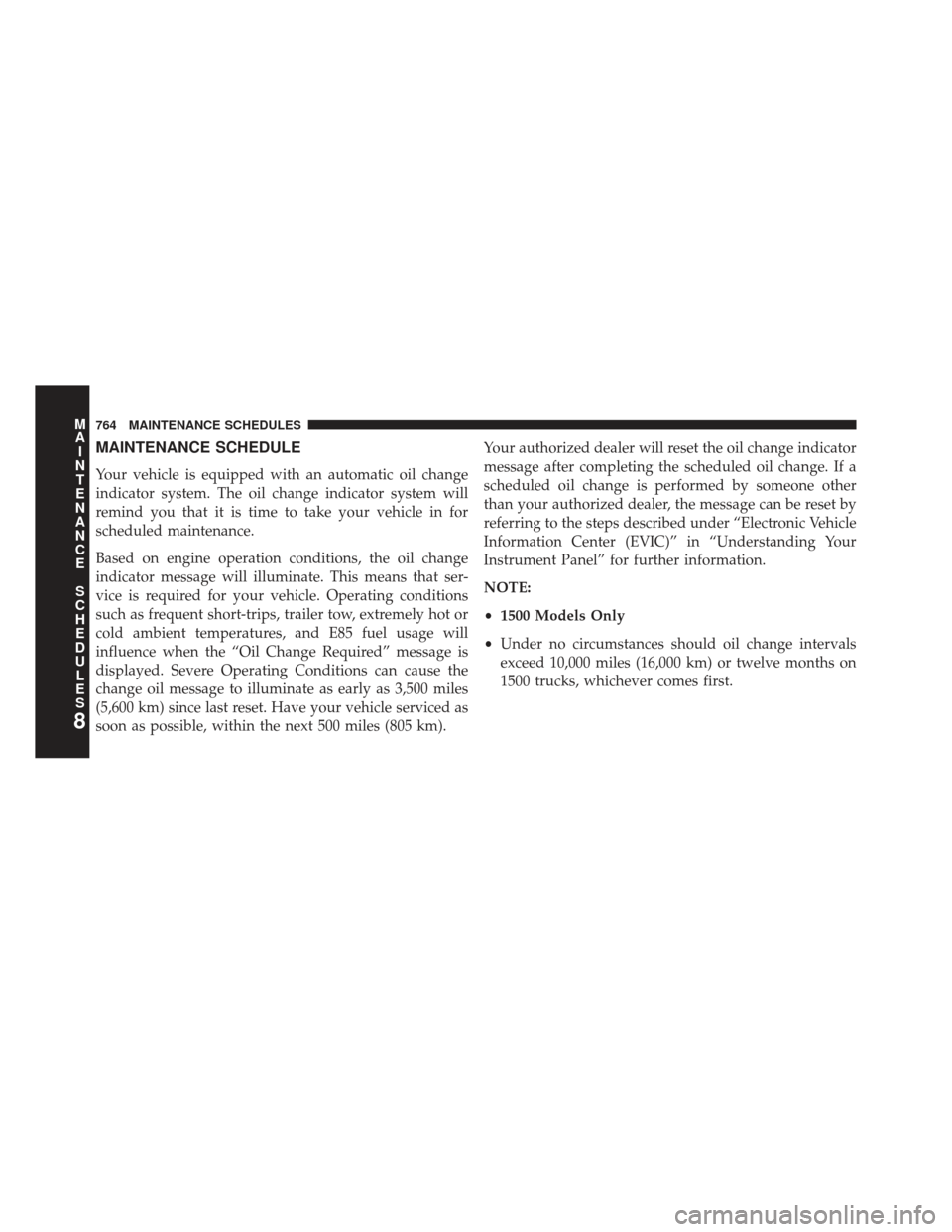
Your vehicle is equipped with an automatic oil change
indicator system. The oil change indicator system will
remind you that it is time to take your vehicle in for
scheduled maintenance.
Based on engine operation conditions, the oil change
indicator message will illuminate. This means that ser-
vice is required for your vehicle. Operating conditions
such as frequent short-trips, trailer tow, extremely hot or
cold ambient temperatures, and E85 fuel usage will
influence when the “Oil Change Required” message is
displayed. Severe Operating Conditions can cause the
change oil message to illuminate as early as 3,500 miles
(5,600 km) since last reset. Have your vehicle serviced as
soon as possible, within the next 500 miles (805 km).Your authorized dealer will reset the oil change indicator
message after completing the scheduled oil change. If a
scheduled oil change is performed by someone other
than your authorized dealer, the message can be reset by
referring to the steps described under “Electronic Vehicle
Information Center (EVIC)” in “Understanding Your
Instrument Panel” for further information.
NOTE:
•
1500 Models Only
• Under no circumstances should oil change intervals
exceed 10,000 miles (16,000 km) or twelve months on
1500 trucks, whichever comes first.
8
M A I
N T
E
N
A
N
C E
S
C
H E
D
U L
E
S764 MAINTENANCE SCHEDULES
Page 793 of 806

Switch.............................. .170
Head Restraints ......................... .160
Heated Mirrors .......................... .144
Heater ................................ .361
Heater, Engine Block ...................... .399
High Beam/Low Beam Select (Dimmer) Switch . . . .180
Hitches Trailer Towing ........................ .594
Hoisting ............................... .671
HomeLink® (Garage Door Opener) ............214
Hood Release ........................... .168
Hub Caps .............................. .669
Ignition .................................16
Key..................................12
Ignition Key Removal .......................16
Illuminated Entry ..........................23
Immobilizer (Sentry Key) ....................19
Infant Restraint ...........................83 Inflation Pressure Tires
.....................561
Information Center, Vehicle ..................297
Inside Rearview Mirror .....................132
Instrument Cluster ....................... .284
Instrument Panel and Controls ................281
Instrument Panel Lens Cleaning ...............730
Integrated Trailer Brake Controls ..............604
Interior Appearance Care ....................728
Interior Lights .......................... .175
Intermittent Wipers (Delay Wipers) .............181
Introduction ..............................4
Inverter Outlet (115V) ..................... .232
Jack Location ........................... .633
Jump Starting ........................... .671
Key Fob Programming Additional Key Fobs ...........21
Programming Additional Transmitters .........21
10
INDEX 791