horn Ram 1500 2014 User Guide
[x] Cancel search | Manufacturer: RAM, Model Year: 2014, Model line: 1500, Model: Ram 1500 2014Pages: 806, PDF Size: 5.78 MB
Page 333 of 806
SELECT button until a check-mark appears next to the
feature showing the system has been activated, or the
check-mark is removed showing the system has been
deactivated.
Auto Unlock Doors
When this feature is selected, all doors will unlock when
the vehicle is stopped and the transmission is in the
PARK or NEUTRAL position and the driver’s door is
opened. To make your selection, press and release the
SELECT button until a check-mark appears next to the
feature showing the system has been activated, or the
check-mark is removed showing the system has been
deactivated.
Horn With Remote Start
When this feature is selected, a short horn sound will
occur when the RKE transmitter REMOTE START button
is pressed. To make your selection, press and release the
SELECT button until a check-mark appears next to thefeature showing the system has been activated or the
check-mark is removed showing the system has been
deactivated.
Sound Horn With Remote Lock
When this feature is selected, a short horn sound will
occur when the RKE transmitter LOCK button is pressed.
This feature may be selected with or without the Flash
Lamps with Lock feature. To make your selection, press
and release the SELECT button until a check-mark ap-
pears next to the feature showing the system has been
activated or the check-mark is removed showing the
system has been deactivated.
Remote Unlock Sequence
When
Unlock Driver Door Only On 1st Press is selected,
only the driver’s door will unlock on the first press of the
RKE transmitter UNLOCK button. When Driver Door 1st
Press is selected, you must press the RKE transmitter
UNLOCK button twice to unlock the passenger’s doors.
4
UNDERSTANDING YOUR INSTRUMENT PANEL 331
Page 336 of 806
Transport Mode – If Equipped
When this feature is selected the air suspension system is
disabled to assist with flat bed towing. To make your
selection, press and release the SELECT button until a
check-mark appears next to the feature showing the
system has been activated or the check-mark is removed
showing the system has been deactivated.
Wheel Alignment Mode – If Equipped
Before performing a wheel alignment this mode must be
enabled. Refer to your authorized dealer for further
information.
Horn with Remote Lower – If Equipped
When this feature is selected, a short horn sound will
occur when the RKE transmitter REMOTE LOWER but-
ton is pressed. To make your selection, press and release
the SELECT button until a check-mark appears next tothe feature showing the system has been activated or the
check-mark is removed showing the system has been
deactivated.
Lights with Remote Lower – If Equipped
When this feature is selected, the front and rear turn
signals will flash when the RKE transmitter REMOTE
LOWER button is pressed. This feature may be selected
with or without the sound horn on lower feature selected.
To make your selection, press and release the SELECT
button until a check-mark appears next to the feature
showing the system has been activated or the check-mark
is removed showing the system has been deactivated.
Trailer Select
When this feature is selected, the Trailer Type can be
selected between “Trailer 1”, “Trailer 2”, “Trailer 3” and
“Trailer 4”. To make your selection, scroll up or down
until the preferred setting is highlighted, then press and
334 UNDERSTANDING YOUR INSTRUMENT PANEL
Page 349 of 806

turned off if they were turned on by this feature. To make
your selection, touch the Headlights With Wipers soft-
key, until a check-mark appears next to setting, showing
that setting has been selected. Touch the back arrow
soft-key to return to the previous menu.
•Auto Dim High Beam — If Equipped
When this feature is selected, the high beam headlights
will deactivate automatically under certain conditions. To
make your selection, touch the Auto High Beams soft-
key, until a check-mark appears next to setting, showing
that setting has been selected. Touch the back arrow
soft-key to return to the previous menu. Refer to “Lights/
Automatic High Beam — If Equipped” in “Understand-
ing The Features Of Your Vehicle” for further informa-
tion. •
Daytime Running Lights — If Equipped
When this feature is selected, the headlights will turn on
whenever the engine is running. To make your selection,
touch the Daytime Running Lights soft-key, until a
check-mark appears next to setting, showing that setting
has been selected. Touch the back arrow soft-key to
return to the previous menu.
• Flash Lamps With Lock
When this feature is selected, the exterior lamps will flash
when the doors are locked or unlocked with the Remote
Keyless Entry (RKE) transmitter. This feature may be
selected with or without the sound horn on lock feature
selected. To make your selection, touch the Flash Head-
lights with Lock soft-key, until a check-mark appears
next to setting, showing that setting has been selected.
Touch the back arrow soft-key to return to the previous
menu.
4
UNDERSTANDING YOUR INSTRUMENT PANEL 347
Page 350 of 806
Doors & Locks
After pressing the Doors & Locks soft-key the following
settings will be available:
•Auto Lock
When this feature is selected, all doors will lock auto-
matically when the vehicle reaches a speed of 15 mph
(24 km/h). To make your selection, touch the Auto Lock
soft-key, until a check-mark appears next to setting,
showing that setting has been selected. Touch the back
arrow soft-key to return to the previous menu.
• Auto Unlock On Exit
When this feature is selected, all doors will unlock when
the vehicle is stopped and the transmission is in the
PARK or NEUTRAL position and the driver’s door is
opened. To make your selection, touch the Auto Unlock
On Exit soft-key, until a check-mark appears next to setting, showing that setting has been selected. Touch the
back arrow soft-key to return to the previous menu.
•
Flash Lamps With Lock
When this feature is selected, the front and rear turn
signals will flash when the doors are locked or unlocked
with the RKE transmitter. This feature may be selected
with or without the sound horn on lock feature selected.
To make your selection, press and release the SELECT
button until a check-mark appears next to the feature
showing the system has been activated or the check-mark
is removed showing the system has been deactivated.
• Sound Horn With Lock
When this feature is selected, the horn will sound when
the door locks are activated. To make your selection,
touch the Sound Horn With Lock soft-key, until a check-
mark appears next to setting, showing that setting has
been selected. Touch the back arrow soft-key to return to
the previous menu.
348 UNDERSTANDING YOUR INSTRUMENT PANEL
Page 351 of 806
•Sound Horn With Remote Start
When this feature is selected, the horn will sound when
the remote start is activated. To make your selection,
touch the Sound Horn With Remote Start soft-key, until a
check-mark appears next to setting, showing that setting
has been selected. Touch the back arrow soft-key to
return to the previous menu.
• 1st Press Of Key Fob Unlocks
When 1st Press Of Key Fob Unlocks is selected, only the
driver’s door will unlock on the first press of the Remote
Keyless Entry (RKE) transmitter UNLOCK button. When
1st Press Of Key Fob Unlocks is selected, you must press
the RKE transmitter UNLOCK button twice to unlock the
passenger’s doors. When Unlock All Doors On 1st Press
is selected, all of the doors will unlock on the first press
of the RKE transmitter UNLOCK button. NOTE:
If the vehicle is programmed 1st Press Of Key Fob
Unlocks, all doors will unlock no matter which Passive
Entry equipped door handle is grasped. If 1st Press Of
Key Fob Unlocks is programmed, only the driver ’s door
will unlock when the driver ’s door is grasped. With
Passive Entry, if 1st Press Of Key Fob Unlocks is pro-
grammed touching the handle more than once will only
result in the driver ’s door opening. If driver door first is
selected, once the driver door is opened, the interior door
lock/unlock switch can be used to unlock all doors (or
use RKE transmitter).
• Passive Entry
This feature allows you to lock and unlock the vehicles
door(s) without having to press the Remote Keyless
Entry (RKE) transmitter lock or unlock buttons. To make
your selection, touch the Passive Entry soft-key, until a
check-mark appears next to setting, showing that setting
has been selected. Touch the back arrow soft-key to
4
UNDERSTANDING YOUR INSTRUMENT PANEL 349
Page 352 of 806
return to the previous menu. Refer to “Keyless Enter-N-
Go™” in “Things To Know Before Starting Your Vehicle”.
•Memory To FOB — If Equipped
This feature provides automatic driver seat positioning to
enhance driver mobility when entering and exiting the
vehicle. To make your selection, touch the Memory
Linked To FOB soft-key, until a check-mark appears next
to setting, showing that setting has been selected. Touch
the back arrow soft-key to return to the previous menu.
NOTE: The seat will return to the memorized seat
location (if Recall Memory with Remote Key Unlock is set
to ON) when the Remote Keyless Entry (RKE) transmitter
is used to unlock the door. Refer to “Driver Memory
Seat” in “Understanding The Features Of Your Vehicle”
for further information. Remote Start Comfort Systems — If Equipped
After pressing the “Auto-On Comfort & Remote Start”
button on the touchscreen the following settings will be
available:
•
Horn With Remote Start
When this feature is selected, the horn will sound when
the remote start is activated. To make your selection,
press the “Sound Horn With Remote Start” button on the
touchscreen, until a check-mark appears next to the
setting, showing that the setting has been selected. Press
the back arrow button on the touchscreen to return to the
previous menu.
• Auto-On Driver Heated/Ventilated Seat & Steering
Wheel With Vehicle Start — If Equipped
When this feature is selected the driver’s heated seat and
heated steering wheel will automatically turn on when
350 UNDERSTANDING YOUR INSTRUMENT PANEL
Page 357 of 806

press and release the SELECT button until a check-mark
appears next to the setting, showing that the setting has
been selected.
Phone/Bluetooth®
After touching the “Phone/Bluetooth®” soft-key the
following settings will be available:
•Paired Devices
This feature shows which phones are paired to the
Phone/Bluetooth® system. For further information, refer
to the Uconnect® Supplement Manual.
Air Suspension — If Equipped
After pressing the “Suspension” soft-key the following
settings will be available. •
Sound Horn With Remote Lower
When this feature is selected, a short horn sound will
occur when the RKE transmitter REMOTE LOWER but-
ton is pressed. Touch the box next to your selection and
a check-mark appears next to the feature showing the
system has been activated or the check-mark is removed
showing the system has been deactivated.
• Flash Lights With Remote Lower
When this feature is selected, the front and rear turn
signals will flash when the RKE transmitter REMOTE
LOWER button is pressed twice. This feature may be
selected with or without the Sound Horn on Lower
feature selected. Touch the box next to your selection and
a check-mark appears next to the feature showing the
system has been activated or the check-mark is removed
showing the system has been deactivated.
4
UNDERSTANDING YOUR INSTRUMENT PANEL 355
Page 739 of 806
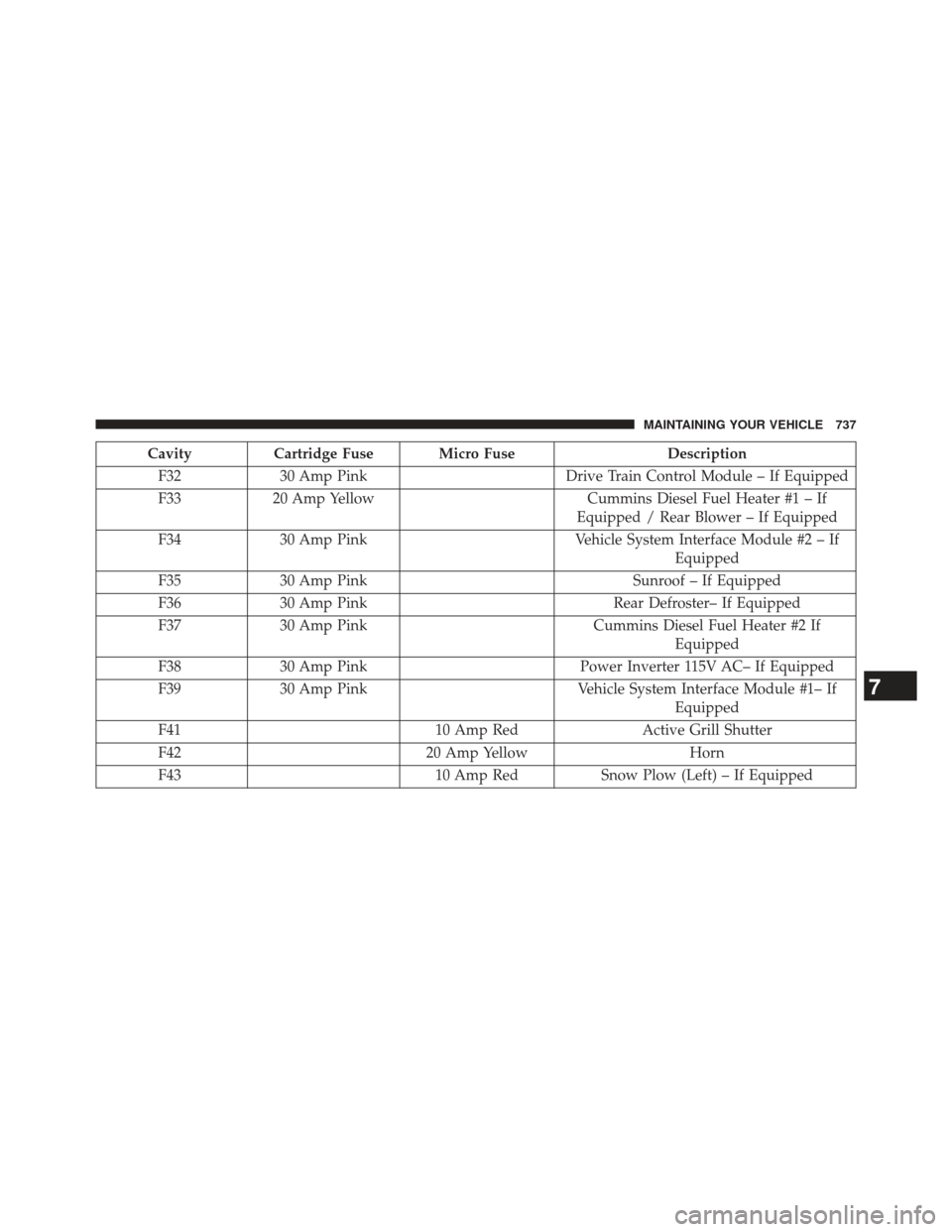
CavityCartridge Fuse Micro Fuse Description
F32 30 Amp Pink Drive Train Control Module – If Equipped
F33 20 Amp Yellow Cummins Diesel Fuel Heater #1 – If
Equipped / Rear Blower – If Equipped
F34 30 Amp Pink Vehicle System Interface Module #2 – If
Equipped
F35 30 Amp Pink Sunroof – If Equipped
F36 30 Amp Pink Rear Defroster– If Equipped
F37 30 Amp Pink Cummins Diesel Fuel Heater #2 If
Equipped
F38 30 Amp Pink Power Inverter 115V AC– If Equipped
F39 30 Amp Pink Vehicle System Interface Module #1– If
Equipped
F41 10 Amp RedActive Grill Shutter
F42 20 Amp YellowHorn
F43 10 Amp RedSnow Plow (Left) – If Equipped
7
MAINTAINING YOUR VEHICLE 737